最近线上的环境对敏感字段(手机号、银行卡号等)统一进行了加密处理,当我们查问题的时候,就犯了难,上游加密规则和项目加密规则还有区别,想着周末抽空做个上游系统RSA加解密的工具。
本来想做一个网页版本的,但还需要部署服务。有没有更加简单的方式。想到了一个Java的swing(一个古老的东西)。决定了那就开始动手吧!
- 新建项目,引入加解密Util
import sun.misc.BASE64Decoder;
import sun.misc.BASE64Encoder;

import javax.crypto.Cipher;
import java.io.IOException;
import java.security.KeyFactory;
import java.security.NoSuchAlgorithmException;
import java.security.PrivateKey;
import java.security.PublicKey;
import java.security.interfaces.RSAPrivateKey;
import java.security.interfaces.RSAPublicKey;
import java.security.spec.InvalidKeySpecException;
import java.security.spec.PKCS8EncodedKeySpec;
import java.security.spec.X509EncodedKeySpec;

/**
* RSA加解密工具类
*
* @author tao
*/
public class RsaUtils {
public static PublicKey getPublicKey(String pubKey) throws IOException, NoSuchAlgorithmException, InvalidKeySpecException {
byte[] keyBytes = new BASE64Decoder().decodeBuffer(pubKey);
X509EncodedKeySpec spec = new X509EncodedKeySpec(keyBytes);
KeyFactory kf = KeyFactory.getInstance("RSA");
return kf.generatePublic(spec);
}
public static PrivateKey getPrivateKey(String prikey) throws IOException, NoSuchAlgorithmException, InvalidKeySpecException {
byte[] keyBytes = new BASE64Decoder().decodeBuffer(prikey);
PKCS8EncodedKeySpec spec = new PKCS8EncodedKeySpec(keyBytes);
KeyFactory kf = KeyFactory.getInstance("RSA");
return kf.generatePrivate(spec);
}
/**
* 加密
*
* @param attr
* @return
*/
public static String RSAEncode(String attr, String pubilcKey) {
String result = "";
try {
Cipher cipher = Cipher.getInstance("RSA");
RSAPublicKey pubKey = (RSAPublicKey) getPublicKey(pubilcKey);
cipher.init(1, pubKey);
byte[] cipherText = cipher.doFinal(attr.getBytes());
result = new BASE64Encoder().encode(cipherText);
} catch (Exception e1) {
//失败返回原值
return attr;
}
return result;
}
/**
* 解密
*
* @param attr
* @return
*/
public static String RSADecode(String attr, String privateKey) {
String result = "";
try {
Cipher cipher = Cipher.getInstance("RSA");
RSAPrivateKey privKey = (RSAPrivateKey) getPrivateKey(privateKey);
cipher.init(2, privKey);
byte[] plainText = cipher.doFinal(new BASE64Decoder().decodeBuffer(attr));
result = new String(plainText);
} catch (Exception e1) {
//失败返回原值
return attr;
}
return result;
}}- 绘制swing解密,调试
```java
import javax.swing.*;
import java.awt.*;
import java.awt.datatransfer.Clipboard;
import java.awt.datatransfer.StringSelection;
import java.awt.event.ActionEvent;
import java.awt.event.ActionListener;
import java.awt.event.KeyAdapter;
import java.awt.event.KeyEvent;

/**
 * @author Tao
 * @Classname mySwing
 * @Description 我的Swing
 * @Date 2024/3/9
 */
public class MyFrame extends JFrame {


    public static void main(String[] args) {
        MyFrame myFrame = new MyFrame();
    }

    private static JTextArea publicKeyTextArea;
    private static JTextArea privateKeyTextArea;
    private static JTextArea plaintextTextArea;
    private static JTextArea ciphertextTextArea;

    public MyFrame() {
        JFrame frame = new JFrame("RSA Tool");
        frame.setSize(600, 400);
        frame.setDefaultCloseOperation(JFrame.EXIT_ON_CLOSE);

        // 获取屏幕尺寸
        Dimension screenSize = Toolkit.getDefaultToolkit().getScreenSize();
        int centerX = (int) ((screenSize.getWidth() - frame.getWidth()) / 2);
        int centerY = (int) ((screenSize.getHeight() - frame.getHeight()) / 2);

        // 设置窗口位置为屏幕中心
        frame.setLocation(centerX, centerY);

        JPanel panel = new JPanel();
        frame.add(panel);
        placeComponents(panel);

        frame.setVisible(true);
    }

    private static void placeComponents(JPanel panel) {
        panel.setLayout(null);

        JLabel publicKeyLabel = new JLabel("公钥:");
        publicKeyLabel.setBounds(10, 20, 80, 25);

        panel.add(publicKeyLabel);

        publicKeyTextArea = new JTextArea();
        publicKeyTextArea.setBounds(100, 20, 450, 50);
        publicKeyTextArea.setLineWrap(true);
        publicKeyTextArea.setWrapStyleWord(true);
        panel.add(publicKeyTextArea);

        JLabel privateKeyLabel = new JLabel("私钥:");
        privateKeyLabel.setBounds(10, 80, 80, 25);
        panel.add(privateKeyLabel);

        privateKeyTextArea = new JTextArea();
        privateKeyTextArea.setBounds(100, 80, 450, 50);
        privateKeyTextArea.setLineWrap(true);
        privateKeyTextArea.setWrapStyleWord(true);
        panel.add(privateKeyTextArea);

        JLabel plaintextLabel = new JLabel("加解密字段:");
        plaintextLabel.setBounds(10, 140, 80, 25);
        panel.add(plaintextLabel);

        plaintextTextArea = new JTextArea();
        plaintextTextArea.setBounds(100, 140, 450, 50);
        plaintextTextArea.setLineWrap(true);
        plaintextTextArea.setWrapStyleWord(true);
        panel.add(plaintextTextArea);

        JButton encryptButton = new JButton("加密");
        encryptButton.setBounds(10, 200, 80, 25);
        panel.add(encryptButton);

        JButton decryptButton = new JButton("解密");
        decryptButton.setBounds(100, 200, 80, 25);
        panel.add(decryptButton);

        ciphertextTextArea = new JTextArea();
        ciphertextTextArea.setBounds(10, 250, 360, 50);
        panel.add(ciphertextTextArea);

        JButton copyButton = new JButton("Copy");
        copyButton.setBounds(400, 250, 80, 25);
        panel.add(copyButton);

        publicKeyTextArea.addKeyListener(new KeyAdapter() {
            @Override
            public void keyPressed(KeyEvent e) {
                if (e.isControlDown() && e.getKeyCode() == KeyEvent.VK_C) {
                    String selectedText = publicKeyTextArea.getSelectedText();
                    if (selectedText != null && !selectedText.isEmpty()) {
                        Clipboard clipboard = Toolkit.getDefaultToolkit().getSystemClipboard();
                        StringSelection selection = new StringSelection(selectedText);
                        clipboard.setContents(selection, null);
                    }
                }
            }
        });

        plaintextTextArea.addKeyListener(new KeyAdapter() {
            @Override
            public void keyPressed(KeyEvent e) {
                if (e.isControlDown() && e.getKeyCode() == KeyEvent.VK_C) {
                    String selectedText = plaintextTextArea.getSelectedText();
                    if (selectedText != null && !selectedText.isEmpty()) {
                        Clipboard clipboard = Toolkit.getDefaultToolkit().getSystemClipboard();
                        StringSelection selection = new StringSelection(selectedText);
                        clipboard.setContents(selection, null);
                    }
                }
            }
        });


        privateKeyTextArea.addKeyListener(new KeyAdapter() {
            @Override
            public void keyPressed(KeyEvent e) {
                if (e.isControlDown() && e.getKeyCode() == KeyEvent.VK_C) {
                    String selectedText = privateKeyTextArea.getSelectedText();
                    if (selectedText != null && !selectedText.isEmpty()) {
                        Clipboard clipboard = Toolkit.getDefaultToolkit().getSystemClipboard();
                        StringSelection selection = new StringSelection(selectedText);
                        clipboard.setContents(selection, null);
                    }
                }
            }
        });

        // 绑定复制按钮点击事件
        copyButton.addActionListener(new ActionListener() {
            @Override
            public void actionPerformed(ActionEvent e) {
                String decryptedString = ciphertextTextArea.getText();
                StringSelection stringSelection = new StringSelection(decryptedString);
                Clipboard clipboard = Toolkit.getDefaultToolkit().getSystemClipboard();
                clipboard.setContents(stringSelection, null);
                JOptionPane.showMessageDialog(panel, "Text copied to clipboard.");
            }
        });

        encryptButton.addActionListener(e -> {
            try {
                String publicKeyStr = publicKeyTextArea.getText();
                String plaintext = plaintextTextArea.getText();
                String encryptedString = RsaUtils.RSAEncode(plaintext,publicKeyStr);
                ciphertextTextArea.setText(encryptedString);
            } catch (Exception ex) {
                ex.printStackTrace();
            }
        });

        decryptButton.addActionListener(new ActionListener() {
            @Override
            public void actionPerformed(ActionEvent e) {
                try {
                    String privateKeyStr = privateKeyTextArea.getText();
                    String ciphertext = plaintextTextArea.getText();
                    String decryptedString = RsaUtils.RSADecode(ciphertext,privateKeyStr);
                    ciphertextTextArea.setText(decryptedString);
                } catch (Exception ex) {
                    ex.printStackTrace();
                }
            }
        });
    }

}
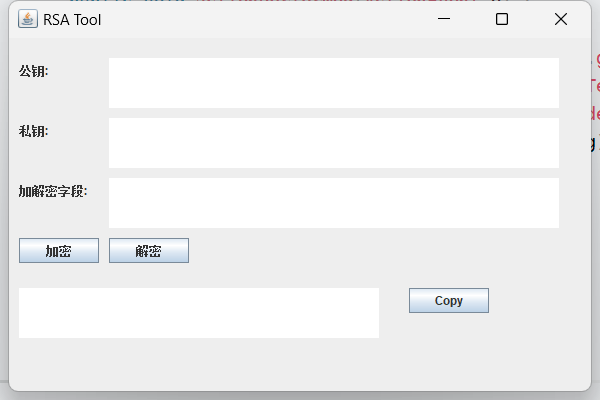
3 展示画面
4 打包
参考以下链接:https://blog.csdn.net/yuang12345/article/details/90293013/