前言
文档是知识库系统中,非常核心的功能之一。
本教程将手把手教你如何实现完整的文档管理功能,包括文档列表查询、创建新文档和删除文档。
功能概述
1.1 功能列表
本次教程将实现以下功能:
- 文档列表查询:支持分页查询、关键词搜索、分类筛选
- 创建文档:支持富文本编辑、Markdown格式、分类标签选择
- 删除文档:支持单个删除和批量删除
- 状态管理:草稿、发布、归档三种状态
1.2 技术栈
后端技术
- Spring Boot 3.x
- MyBatis-Plus 3.x
- MongoDB 4.x(存储大文本内容)
- MySQL 8.x(存储元数据)
前端技术
- React 18
- TypeScript 5
- Ant Design 5
- Axios
- Zustand(状态管理)
前置条件
2.1 环境要求
开发环境
- JDK 21+
- Node.js 18+
- MySQL 8.0+
- MongoDB 4.4+
- Maven 3.6+
开发工具
- IntelliJ IDEA(推荐)
后端开发
3.1 数据库表设计
步骤1:创建文档表
在 MySQL 中执行以下 SQL:
CREATE TABLE `document` (
  `id` BIGINT NOT NULL COMMENT '文档ID',
  `title` VARCHAR(255) NOT NULL COMMENT '文档标题',
  `summary` VARCHAR(1000) DEFAULT NULL COMMENT '文档摘要',
  `content_id` VARCHAR(64) DEFAULT NULL COMMENT 'MongoDB内容ID',
  `document_type` TINYINT DEFAULT 1 COMMENT '文档类型 1-文章 2-文件',
  `category_id` BIGINT DEFAULT NULL COMMENT '分类ID',
  `tags` VARCHAR(500) DEFAULT NULL COMMENT '标签,逗号分隔',
  `status` TINYINT DEFAULT 0 COMMENT '状态 0-草稿 1-发布 2-归档',
  `is_top` TINYINT DEFAULT 0 COMMENT '是否置顶',
  `is_recommend` TINYINT DEFAULT 0 COMMENT '是否推荐',
  `source` TINYINT DEFAULT 1 COMMENT '来源 1-原创 2-转载',
  `source_url` VARCHAR(500) DEFAULT NULL COMMENT '转载链接',
  `allow_comment` TINYINT DEFAULT 1 COMMENT '允许评论',
  `sort` INT DEFAULT 0 COMMENT '排序值',
  `view_count` BIGINT DEFAULT 0 COMMENT '浏览次数',
  `like_count` BIGINT DEFAULT 0 COMMENT '点赞次数',
  `favorite_count` BIGINT DEFAULT 0 COMMENT '收藏次数',
  `comment_count` BIGINT DEFAULT 0 COMMENT '评论次数',
  `author_id` BIGINT NOT NULL COMMENT '作者ID',
  `author_name` VARCHAR(64) NOT NULL COMMENT '作者名称',
  `publish_time` DATETIME DEFAULT NULL COMMENT '发布时间',
  `create_time` DATETIME DEFAULT CURRENT_TIMESTAMP COMMENT '创建时间',
  `update_time` DATETIME DEFAULT CURRENT_TIMESTAMP ON UPDATE CURRENT_TIMESTAMP COMMENT '更新时间',
  PRIMARY KEY (`id`),
  KEY `idx_category_id` (`category_id`),
  KEY `idx_status` (`status`),
  KEY `idx_author_id` (`author_id`),
  KEY `idx_create_time` (`create_time`)
) ENGINE=InnoDB DEFAULT CHARSET=utf8mb4 COMMENT='文档表';
3.2 公共基础类
在开始创建文档相关类之前,我们需要先准备一些公共基础类。
步骤2:创建响应码枚举类
package com.knowledge.base.common.result;

import lombok.AllArgsConstructor;
import lombok.Getter;

/**
 * 响应码枚举类
 *
 * <p>按照阿里巴巴Java开发规范设计,统一管理系统响应码</p>
 */
@Getter
@AllArgsConstructor
public enum ResultCode {

    /**
     * 成功
     */
    SUCCESS(200, "操作成功"),

    /**
     * 失败
     */
    ERROR(500, "操作失败"),

    /**
     * 参数错误
     */
    PARAM_ERROR(400, "参数错误"),

    /**
     * 参数缺失
     */
    PARAM_MISSING(400, "参数缺失"),

    /**
     * 参数无效
     */
    PARAM_INVALID(400, "参数无效"),

    /**
     * 未授权
     */
    UNAUTHORIZED(401, "未授权,请先登录"),

    /**
     * 禁止访问
     */
    FORBIDDEN(403, "禁止访问"),

    /**
     * 资源不存在
     */
    NOT_FOUND(404, "资源不存在"),

    /**
     * 请求方法不支持
     */
    METHOD_NOT_ALLOWED(405, "请求方法不支持"),

    /**
     * 请求超时
     */
    REQUEST_TIMEOUT(408, "请求超时"),

    /**
     * 系统内部错误
     */
    INTERNAL_SERVER_ERROR(500, "系统内部错误"),

    /**
     * 服务不可用
     */
    SERVICE_UNAVAILABLE(503, "服务不可用"),

    /**
     * 用户名或密码错误
     */
    USERNAME_OR_PASSWORD_ERROR(10001, "用户名或密码错误"),

    /**
     * 用户不存在
     */
    USER_NOT_EXIST(10002, "用户不存在"),

    /**
     * 用户已存在
     */
    USER_ALREADY_EXIST(10003, "用户已存在"),

    /**
     * 用户已被禁用
     */
    USER_DISABLED(10004, "用户已被禁用"),

    /**
     * Token无效
     */
    TOKEN_INVALID(10005, "Token无效"),

    /**
     * Token已过期
     */
    TOKEN_EXPIRED(10006, "Token已过期"),

    /**
     * 无权限访问
     */
    ACCESS_DENIED(10007, "无权限访问"),

    /**
     * 文档不存在
     */
    DOCUMENT_NOT_EXIST(20001, "文档不存在"),

    /**
     * 文档已存在
     */
    DOCUMENT_ALREADY_EXIST(20002, "文档已存在"),

    /**
     * 文档分类不存在
     */
    CATEGORY_NOT_EXIST(20003, "文档分类不存在"),

    /**
     * 文件上传失败
     */
    FILE_UPLOAD_FAILED(20004, "文件上传失败"),

    /**
     * 文件类型不支持
     */
    FILE_TYPE_NOT_SUPPORTED(20005, "文件类型不支持"),

    /**
     * 文件大小超限
     */
    FILE_SIZE_EXCEEDED(20006, "文件大小超限");

    /**
     * 响应码
     */
    private final Integer code;

    /**
     * 响应消息
     */
    private final String message;
}
步骤3:创建统一响应结果类
package com.knowledge.base.common.result;

import com.fasterxml.jackson.annotation.JsonInclude;
import lombok.Data;

import java.io.Serializable;

/**
 * 统一响应结果封装类
 *
 * <p>按照阿里巴巴Java开发规范设计,所有接口返回统一格式的响应结果</p>
 *
 * @param <T> 数据类型
 */
@Data
@JsonInclude(JsonInclude.Include.NON_NULL)
public class Result<T> implements Serializable {

    private static final long serialVersionUID = 1L;

    /**
     * 响应码
     */
    private Integer code;

    /**
     * 响应消息
     */
    private String message;

    /**
     * 响应数据
     */
    private T data;

    /**
     * 时间戳
     */
    private Long timestamp;

    /**
     * 私有构造方法
     */
    private Result() {
        this.timestamp = System.currentTimeMillis();
    }

    /**
     * 私有构造方法
     *
     * @param code    响应码
     * @param message 响应消息
     * @param data    响应数据
     */
    private Result(Integer code, String message, T data) {
        this.code = code;
        this.message = message;
        this.data = data;
        this.timestamp = System.currentTimeMillis();
    }

    /**
     * 成功返回(无数据)
     *
     * @param <T> 数据类型
     * @return 统一响应结果
     */
    public static <T> Result<T> success() {
        return new Result<>(ResultCode.SUCCESS.getCode(), ResultCode.SUCCESS.getMessage(), null);
    }

    /**
     * 成功返回(有数据)
     *
     * @param data 数据
     * @param <T>  数据类型
     * @return 统一响应结果
     */
    public static <T> Result<T> success(T data) {
        return new Result<>(ResultCode.SUCCESS.getCode(), ResultCode.SUCCESS.getMessage(), data);
    }

    /**
     * 成功返回(自定义消息)
     *
     * @param message 消息
     * @param <T>     数据类型
     * @return 统一响应结果
     */
    public static <T> Result<T> success(String message) {
        return new Result<>(ResultCode.SUCCESS.getCode(), message, null);
    }

    /**
     * 成功返回(自定义消息和数据)
     *
     * @param message 消息
     * @param data    数据
     * @param <T>     数据类型
     * @return 统一响应结果
     */
    public static <T> Result<T> success(String message, T data) {
        return new Result<>(ResultCode.SUCCESS.getCode(), message, data);
    }

    /**
     * 失败返回(默认错误)
     *
     * @param <T> 数据类型
     * @return 统一响应结果
     */
    public static <T> Result<T> error() {
        return new Result<>(ResultCode.ERROR.getCode(), ResultCode.ERROR.getMessage(), null);
    }

    /**
     * 失败返回(自定义消息)
     *
     * @param message 错误消息
     * @param <T>     数据类型
     * @return 统一响应结果
     */
    public static <T> Result<T> error(String message) {
        return new Result<>(ResultCode.ERROR.getCode(), message, null);
    }

    /**
     * 失败返回(自定义错误码和消息)
     *
     * @param code    错误码
     * @param message 错误消息
     * @param <T>     数据类型
     * @return 统一响应结果
     */
    public static <T> Result<T> error(Integer code, String message) {
        return new Result<>(code, message, null);
    }

    /**
     * 失败返回(使用结果码枚举)
     *
     * @param resultCode 结果码枚举
     * @param <T>        数据类型
     * @return 统一响应结果
     */
    public static <T> Result<T> error(ResultCode resultCode) {
        return new Result<>(resultCode.getCode(), resultCode.getMessage(), null);
    }

    /**
     * 根据条件返回成功或失败
     *
     * @param flag 条件标识
     * @param <T>  数据类型
     * @return 统一响应结果
     */
    public static <T> Result<T> status(boolean flag) {
        return flag ? success() : error();
    }
}
步骤4:创建业务异常类
package com.knowledge.base.common.exception;

import com.knowledge.base.common.result.ResultCode;
import lombok.Getter;

/**
 * 业务异常类
 *
 * <p>用于处理业务逻辑中的异常情况,按照阿里巴巴Java开发规范设计</p>
 */
@Getter
public class BusinessException extends RuntimeException {

    private static final long serialVersionUID = 1L;

    /**
     * 错误码
     */
    private final Integer code;

    /**
     * 错误消息
     */
    private final String message;

    /**
     * 构造方法
     *
     * @param message 错误消息
     */
    public BusinessException(String message) {
        super(message);
        this.code = ResultCode.ERROR.getCode();
        this.message = message;
    }

    /**
     * 构造方法
     *
     * @param code    错误码
     * @param message 错误消息
     */
    public BusinessException(Integer code, String message) {
        super(message);
        this.code = code;
        this.message = message;
    }

    /**
     * 构造方法
     *
     * @param resultCode 结果码枚举
     */
    public BusinessException(ResultCode resultCode) {
        super(resultCode.getMessage());
        this.code = resultCode.getCode();
        this.message = resultCode.getMessage();
    }

    /**
     * 构造方法
     *
     * @param message 错误消息
     * @param cause   原因
     */
    public BusinessException(String message, Throwable cause) {
        super(message, cause);
        this.code = ResultCode.ERROR.getCode();
        this.message = message;
    }

    /**
     * 构造方法
     *
     * @param resultCode 结果码枚举
     * @param cause      原因
     */
    public BusinessException(ResultCode resultCode, Throwable cause) {
        super(resultCode.getMessage(), cause);
        this.code = resultCode.getCode();
        this.message = resultCode.getMessage();
    }
}
3.3 实体类和DTO
步骤5:创建文档实体类
package com.knowledge.base.document.entity;

import com.baomidou.mybatisplus.annotation.*;
import lombok.Data;
import java.io.Serializable;
import java.time.LocalDateTime;

/**
 * 文档实体类
 */
@Data
@TableName("document")
public class Document implements Serializable {

    private static final long serialVersionUID = 1L;

    @TableId(value = "id", type = IdType.INPUT)
    private Long id;

    @TableField("title")
    private String title;

    @TableField("summary")
    private String summary;

    @TableField("content_id")
    private String contentId;

    @TableField("document_type")
    private Integer documentType;

    @TableField("category_id")
    private Long categoryId;

    @TableField("tags")
    private String tags;

    @TableField("status")
    private Integer status;

    @TableField("is_top")
    private Integer isTop;

    @TableField("is_recommend")
    private Integer isRecommend;

    @TableField("source")
    private Integer source;

    @TableField("source_url")
    private String sourceUrl;

    @TableField("allow_comment")
    private Integer allowComment;

    @TableField("sort")
    private Integer sort;

    @TableField("view_count")
    private Long viewCount;

    @TableField("like_count")
    private Long likeCount;

    @TableField("favorite_count")
    private Long favoriteCount;

    @TableField("comment_count")
    private Long commentCount;

    @TableField("author_id")
    private Long authorId;

    @TableField("author_name")
    private String authorName;

    @TableField("publish_time")
    private LocalDateTime publishTime;

    @TableField("create_time")
    private LocalDateTime createTime;

    @TableField("update_time")
    private LocalDateTime updateTime;
}
步骤6:创建文档DTO
package com.knowledge.base.document.dto;

import io.swagger.v3.oas.annotations.media.Schema;
import lombok.Data;

import java.io.Serializable;

/**
 * 文档DTO
 */
@Data
@Schema(description = "文档信息")
public class DocumentDTO implements Serializable {

    private static final long serialVersionUID = 1L;

    @Schema(description = "文档ID")
    private Long id;

    @Schema(description = "文档标题")
    private String title;

    @Schema(description = "文档摘要")
    private String summary;

    @Schema(description = "文档内容")
    private String content;

    @Schema(description = "文档类型 1-文章 2-文件")
    private Integer documentType;

    @Schema(description = "分类ID")
    private Long categoryId;

    @Schema(description = "标签,逗号分隔")
    private String tags;

    @Schema(description = "状态 0-草稿 1-发布 2-归档")
    private Integer status;

    @Schema(description = "是否置顶")
    private Integer isTop;

    @Schema(description = "是否推荐")
    private Integer isRecommend;

    @Schema(description = "来源 1-原创 2-转载")
    private Integer source;

    @Schema(description = "转载链接")
    private String sourceUrl;

    @Schema(description = "允许评论")
    private Integer allowComment;

    @Schema(description = "排序值")
    private Integer sort;
}
步骤7:创建作者VO
package com.knowledge.base.document.vo;

import io.swagger.v3.oas.annotations.media.Schema;
import lombok.Data;

import java.io.Serializable;

/**
 * 作者信息VO
 *
 * <p>用于返回文档作者详细信息</p>
 */
@Data
@Schema(description = "作者信息")
public class AuthorVO implements Serializable {

    private static final long serialVersionUID = 1L;

    /**
     * 作者ID
     */
    @Schema(description = "作者ID")
    private Long id;

    /**
     * 用户名
     */
    @Schema(description = "用户名")
    private String username;

    /**
     * 邮箱
     */
    @Schema(description = "邮箱")
    private String email;

    /**
     * 头像URL
     */
    @Schema(description = "头像URL")
    private String avatar;

    /**
     * 职位
     */
    @Schema(description = "职位")
    private String position;
}
步骤8:创建文档VO
package com.knowledge.base.document.vo;

import io.swagger.v3.oas.annotations.media.Schema;
import lombok.Data;

import java.io.Serializable;
import java.time.LocalDateTime;

/**
 * 文档响应VO
 */
@Data
@Schema(description = "文档信息响应")
public class DocumentVO implements Serializable {

    private static final long serialVersionUID = 1L;

    @Schema(description = "文档ID")
    private Long id;

    @Schema(description = "文档标题")
    private String title;

    @Schema(description = "文档摘要")
    private String summary;

    @Schema(description = "文档内容")
    private String content;

    @Schema(description = "文档类型")
    private Integer documentType;

    @Schema(description = "分类ID")
    private Long categoryId;

    @Schema(description = "分类名称")
    private String categoryName;

    @Schema(description = "标签列表")
    private String tags;

    @Schema(description = "状态")
    private Integer status;

    @Schema(description = "浏览次数")
    private Long viewCount;

    @Schema(description = "点赞次数")
    private Long likeCount;

    @Schema(description = "作者信息")
    private AuthorVO author;

    @Schema(description = "发布时间")
    private LocalDateTime publishTime;

    @Schema(description = "创建时间")
    private LocalDateTime createTime;

    @Schema(description = "更新时间")
    private LocalDateTime updateTime;
}
3.4 Mapper层
步骤9:创建文档Mapper
package com.knowledge.base.document.mapper;

import com.baomidou.mybatisplus.core.mapper.BaseMapper;
import com.knowledge.base.document.entity.Document;
import org.apache.ibatis.annotations.Mapper;
import org.apache.ibatis.annotations.Param;

/**
 * 文档Mapper接口
 */
@Mapper
public interface DocumentMapper extends BaseMapper<Document> {

    /**
     * 增加浏览次数
     */
    int incrementViewCount(@Param("documentId") Long documentId);

    /**
     * 增加点赞次数
     */
    int incrementLikeCount(@Param("documentId") Long documentId);

    /**
     * 增加收藏次数
     */
    int incrementFavoriteCount(@Param("documentId") Long documentId);
}
步骤10:创建Mapper XML文件
在 src/main/resources/mapper/ 目录下创建 DocumentMapper.xml:
<?xml version="1.0" encoding="UTF-8"?>
<!DOCTYPE mapper PUBLIC "-//mybatis.org//DTD Mapper 3.0//EN" "http://mybatis.org/dtd/mybatis-3-mapper.dtd">
<mapper namespace="com.knowledge.base.document.mapper.DocumentMapper">

    <!-- 增加浏览次数 -->
    <update id="incrementViewCount">
        UPDATE document
        SET view_count = view_count + 1
        WHERE id = #{documentId}
    </update>
    <!-- 增加点赞次数 -->
    <update id="incrementLikeCount">
        UPDATE document
        SET like_count = like_count + 1
        WHERE id = #{documentId}
    </update>
    <!-- 增加收藏次数 -->
    <update id="incrementFavoriteCount">
        UPDATE document
        SET favorite_count = favorite_count + 1
        WHERE id = #{documentId}
    </update>
</mapper>
3.5 MongoDB内容服务
步骤11:创建MongoDB内容实体
package com.knowledge.base.document.entity.mongodb;

import lombok.Data;
import org.springframework.data.annotation.Id;
import org.springframework.data.mongodb.core.mapping.Document;

/**
 * 文档内容实体(MongoDB)
 */
@Data
@Document(collection = "document_content")
public class DocumentContent {

    @Id
    private String id;

    private String content;

    private Long documentId;

    private java.time.LocalDateTime createTime;
}
步骤12:创建内容服务接口
package com.knowledge.base.document.service;

/**
 * 文档内容服务接口
 */
public interface DocumentContentService {

    /**
     * 保存文档内容
     */
    String saveContent(Long documentId, String content);

    /**
     * 根据ID获取内容
     */
    com.knowledge.base.document.entity.mongodb.DocumentContent getContentById(String contentId);

    /**
     * 更新内容
     */
    void updateContent(Long documentId, String content);

    /**
     * 删除内容
     */
    void deleteContent(String contentId);
}
步骤13:实现内容服务
package com.knowledge.base.document.service.impl;

import com.knowledge.base.document.entity.mongodb.DocumentContent;
import com.knowledge.base.document.service.DocumentContentService;
import org.springframework.data.mongodb.core.MongoTemplate;
import org.springframework.data.mongodb.core.query.Criteria;
import org.springframework.data.mongodb.core.query.Query;
import org.springframework.stereotype.Service;

import javax.annotation.Resource;
import java.time.LocalDateTime;

/**
 * 文档内容服务实现类
 */
@Service
public class DocumentContentServiceImpl implements DocumentContentService {

    @Resource
    private MongoTemplate mongoTemplate;

    @Override
    public String saveContent(Long documentId, String content) {
        DocumentContent documentContent = new DocumentContent();
        documentContent.setDocumentId(documentId);
        documentContent.setContent(content);
        documentContent.setCreateTime(LocalDateTime.now());

        DocumentContent saved = mongoTemplate.save(documentContent);
        return saved.getId();
    }

    @Override
    public DocumentContent getContentById(String contentId) {
        return mongoTemplate.findById(contentId, DocumentContent.class);
    }

    @Override
    public void updateContent(Long documentId, String content) {
        Query query = new Query(Criteria.where("documentId").is(documentId));
        DocumentContent documentContent = mongoTemplate.findOne(query, DocumentContent.class);

        if (documentContent != null) {
            documentContent.setContent(content);
            mongoTemplate.save(documentContent);
        }
    }

    @Override
    public void deleteContent(String contentId) {
        mongoTemplate.remove(contentId);
    }
}
3.6 Service层
步骤14:创建文档服务接口
package com.knowledge.base.document.service;

import com.baomidou.mybatisplus.core.metadata.IPage;
import com.knowledge.base.document.dto.DocumentDTO;
import com.knowledge.base.document.vo.DocumentVO;

/**
 * 文档服务接口
 */
public interface DocumentService {

    /**
     * 分页查询文档列表
     */
    IPage<DocumentVO> pageDocuments(Long current, Long size, Long categoryId, String keyword, Integer status);

    /**
     * 根据ID获取文档详情
     */
    DocumentVO getDocumentById(Long documentId);

    /**
     * 查看文档(增加浏览次数)
     */
    DocumentVO viewDocument(Long documentId);

    /**
     * 创建文档
     */
    Long createDocument(DocumentDTO documentDTO);

    /**
     * 更新文档
     */
    Boolean updateDocument(DocumentDTO documentDTO);

    /**
     * 删除文档
     */
    Boolean deleteDocument(Long documentId);

    /**
     * 点赞文档
     */
    Boolean likeDocument(Long documentId);

    /**
     * 收藏文档
     */
    Boolean favoriteDocument(Long documentId);

    /**
     * 发布文档
     */
    Boolean publishDocument(Long documentId);

    /**
     * 归档文档
     */
    Boolean archiveDocument(Long documentId);
}
步骤15:实现文档服务
package com.knowledge.base.document.service.impl;

import cn.hutool.core.bean.BeanUtil;
import cn.hutool.core.util.StrUtil;
import com.baomidou.mybatisplus.core.conditions.query.LambdaQueryWrapper;
import com.baomidou.mybatisplus.core.metadata.IPage;
import com.baomidou.mybatisplus.extension.plugins.pagination.Page;
import com.baomidou.mybatisplus.extension.service.impl.ServiceImpl;
import com.knowledge.base.common.exception.BusinessException;
import com.knowledge.base.common.result.ResultCode;
import com.knowledge.base.common.utils.SnowflakeIdGenerator;
import com.knowledge.base.document.dto.DocumentDTO;
import com.knowledge.base.document.entity.Document;
import com.knowledge.base.document.entity.mongodb.DocumentContent;
import com.knowledge.base.document.mapper.DocumentMapper;
import com.knowledge.base.document.service.DocumentContentService;
import com.knowledge.base.document.service.DocumentService;
import com.knowledge.base.document.utils.UserContext;
import com.knowledge.base.document.vo.AuthorVO;
import com.knowledge.base.document.vo.DocumentVO;
import jakarta.annotation.Resource;
import lombok.extern.slf4j.Slf4j;
import org.springframework.stereotype.Service;
import org.springframework.transaction.annotation.Transactional;
import org.springframework.util.StringUtils;

import java.time.LocalDateTime;
import java.util.Objects;

/**
 * 文档Service实现类
 */
@Slf4j
@Service
public class DocumentServiceImpl extends ServiceImpl<DocumentMapper, Document> implements DocumentService {

    @Resource
    private DocumentMapper documentMapper;

    @Resource
    private DocumentContentService documentContentService;

    @Override
    public IPage<DocumentVO> pageDocuments(Long current, Long size, Long categoryId, String keyword, Integer status) {
        // 构建查询条件
        LambdaQueryWrapper<Document> wrapper = new LambdaQueryWrapper<>();

        if (categoryId != null) {
            wrapper.eq(Document::getCategoryId, categoryId);
        }

        if (status != null) {
            wrapper.eq(Document::getStatus, status);
        }

        if (StringUtils.hasText(keyword)) {
            wrapper.and(w -> w.like(Document::getTitle, keyword)
                .or()
                .like(Document::getSummary, keyword)
                .or()
                .like(Document::getTags, keyword));
        }

        // 按置顶、排序、发布时间排序
        wrapper.orderByDesc(Document::getIsTop)
            .orderByDesc(Document::getSort)
            .orderByDesc(Document::getPublishTime);

        // 分页查询
        Page<Document> page = new Page<>(current, size);
        IPage<Document> documentPage = documentMapper.selectPage(page, wrapper);

        // 转换为VO
        return documentPage.convert(document -> {
            DocumentVO documentVO = BeanUtil.copyProperties(document, DocumentVO.class);
            // 设置作者信息
            documentVO.setAuthor(buildAuthorVO(document.getAuthorId(), document.getAuthorName()));
            return documentVO;
        });
    }

    @Override
    public DocumentVO getDocumentById(Long documentId) {
        Document document = documentMapper.selectById(documentId);
        if (document == null) {
            throw new BusinessException(ResultCode.DOCUMENT_NOT_EXIST);
        }

        DocumentVO documentVO = BeanUtil.copyProperties(document, DocumentVO.class);
        documentVO.setAuthor(buildAuthorVO(document.getAuthorId(), document.getAuthorName()));

        // 从MongoDB获取文档内容
        if (StrUtil.isNotBlank(document.getContentId())) {
            DocumentContent documentContent = documentContentService.getContentById(document.getContentId());
            if (documentContent != null) {
                documentVO.setContent(documentContent.getContent());
            }
        }

        return documentVO;
    }

    @Override
    @Transactional(rollbackFor = Exception.class)
    public DocumentVO viewDocument(Long documentId) {
        Document document = documentMapper.selectById(documentId);
        if (document == null) {
            throw new BusinessException(ResultCode.DOCUMENT_NOT_EXIST);
        }

        // 增加浏览次数
        documentMapper.incrementViewCount(documentId);

        DocumentVO documentVO = BeanUtil.copyProperties(document, DocumentVO.class);
        documentVO.setAuthor(buildAuthorVO(document.getAuthorId(), document.getAuthorName()));

        // 从MongoDB获取文档内容
        if (StrUtil.isNotBlank(document.getContentId())) {
            DocumentContent documentContent = documentContentService.getContentById(document.getContentId());
            if (documentContent != null) {
                documentVO.setContent(documentContent.getContent());
            }
        }

        return documentVO;
    }

    @Override
    @Transactional(rollbackFor = Exception.class)
    public Long createDocument(DocumentDTO documentDTO) {
        log.info("创建文档:title={}", documentDTO.getTitle());

        // 构建文档实体
        Document document = new Document();
        BeanUtil.copyProperties(documentDTO, document, "content");

        // 生成ID
        document.setId(SnowflakeIdGenerator.getInstance().nextId());

        // 设置默认值
        if (document.getDocumentType() == null) {
            document.setDocumentType(1);
        }
        if (document.getStatus() == null) {
            document.setStatus(0);
        }
        if (document.getIsTop() == null) {
            document.setIsTop(0);
        }
        if (document.getIsRecommend() == null) {
            document.setIsRecommend(0);
        }
        if (document.getSource() == null) {
            document.setSource(1);
        }
        if (document.getAllowComment() == null) {
            document.setAllowComment(1);
        }
        if (document.getSort() == null) {
            document.setSort(0);
        }
        if (document.getViewCount() == null) {
            document.setViewCount(0L);
        }
        if (document.getLikeCount() == null) {
            document.setLikeCount(0L);
        }
        if (document.getFavoriteCount() == null) {
            document.setFavoriteCount(0L);
        }
        if (document.getCommentCount() == null) {
            document.setCommentCount(0L);
        }

        // 从上下文中获取当前登录用户
        document.setAuthorId(UserContext.getCurrentUserId());
        document.setAuthorName(UserContext.getCurrentUserName());

        // 如果是发布状态,设置发布时间
        if (Objects.equals(document.getStatus(), 1)) {
            document.setPublishTime(LocalDateTime.now());
        }

        // 先保存MySQL文档记录
        int count = documentMapper.insert(document);
        if (count <= 0) {
            throw new BusinessException("创建文档失败");
        }

        // 保存内容到MongoDB
        if (StrUtil.isNotBlank(documentDTO.getContent())) {
            final Long documentId = document.getId();
            final String content = documentDTO.getContent();

            // 异步保存到MongoDB
            java.util.concurrent.CompletableFuture.runAsync(() -> {
                try {
                    String contentId = documentContentService.saveContent(documentId, content);
                    // 更MySQL记录的contentId
                    Document doc = new Document();
                    doc.setId(documentId);
                    doc.setContentId(contentId);
                    documentMapper.updateById(doc);
                } catch (Exception e) {
                    log.error("异步保存文档内容到MongoDB失败:documentId={}", documentId, e);
                }
            });
        }

        return document.getId();
    }

    @Override
    @Transactional(rollbackFor = Exception.class)
    public Boolean updateDocument(DocumentDTO documentDTO) {
        log.info("更新文档:documentId={}", documentDTO.getId());

        if (documentDTO.getId() == null) {
            throw new BusinessException("文档ID不能为空");
        }

        // 检查文档是否存在
        Document existDocument = documentMapper.selectById(documentDTO.getId());
        if (existDocument == null) {
            throw new BusinessException(ResultCode.DOCUMENT_NOT_EXIST);
        }

        // 更新MongoDB中的内容
        String contentId = existDocument.getContentId();
        if (StrUtil.isNotBlank(documentDTO.getContent())) {
            try {
                if (StrUtil.isNotBlank(existDocument.getContentId())) {
                    documentContentService.updateContent(documentDTO.getId(), documentDTO.getContent());
                } else {
                    contentId = documentContentService.saveContent(documentDTO.getId(), documentDTO.getContent());
                }
            } catch (Exception e) {
                log.warn("更新文档内容到MongoDB失败,文档元数据已更新到MySQL:documentId={}", documentDTO.getId(), e);
            }
        }

        // 构建更新实体
        Document document = new Document();
        BeanUtil.copyProperties(documentDTO, document, "content");
        document.setContentId(contentId);

        // 如果状态从草稿变为发布,设置发布时间
        if (Objects.equals(existDocument.getStatus(), 0)
            && Objects.equals(documentDTO.getStatus(), 1)) {
            document.setPublishTime(LocalDateTime.now());
        }

        int count = documentMapper.updateById(document);
        return count > 0;
    }

    @Override
    @Transactional(rollbackFor = Exception.class)
    public Boolean deleteDocument(Long documentId) {
        log.info("删除文档:documentId={}", documentId);

        if (documentId == null) {
            throw new BusinessException("文档ID不能为空");
        }

        // 删除MongoDB中的内容
        Document document = documentMapper.selectById(documentId);
        if (document != null && StrUtil.isNotBlank(document.getContentId())) {
            try {
                documentContentService.deleteContent(document.getContentId());
            } catch (Exception e) {
                log.warn("删除MongoDB内容失败:contentId={}", document.getContentId(), e);
            }
        }

        int count = documentMapper.deleteById(documentId);
        return count > 0;
    }

    @Override
    @Transactional(rollbackFor = Exception.class)
    public Boolean likeDocument(Long documentId) {
        log.info("点赞文档:documentId={}", documentId);

        if (documentId == null) {
            throw new BusinessException("文档ID不能为空");
        }

        // 检查文档是否存在
        Document document = documentMapper.selectById(documentId);
        if (document == null) {
            throw new BusinessException(ResultCode.DOCUMENT_NOT_EXIST);
        }

        // 增加点赞次数
        int count = documentMapper.incrementLikeCount(documentId);
        return count > 0;
    }

    @Override
    @Transactional(rollbackFor = Exception.class)
    public Boolean favoriteDocument(Long documentId) {
        log.info("收藏文档:documentId={}", documentId);

        if (documentId == null) {
            throw new BusinessException("文档ID不能为空");
        }

        // 检查文档是否存在
        Document document = documentMapper.selectById(documentId);
        if (document == null) {
            throw new BusinessException(ResultCode.DOCUMENT_NOT_EXIST);
        }

        // 增加收藏次数
        int count = documentMapper.incrementFavoriteCount(documentId);
        return count > 0;
    }

    @Override
    @Transactional(rollbackFor = Exception.class)
    public Boolean publishDocument(Long documentId) {
        log.info("发布文档:documentId={}", documentId);

        if (documentId == null) {
            throw new BusinessException("文档ID不能为空");
        }

        Document document = new Document();
        document.setId(documentId);
        document.setStatus(1);
        document.setPublishTime(LocalDateTime.now());

        int count = documentMapper.updateById(document);
        return count > 0;
    }

    @Override
    @Transactional(rollbackFor = Exception.class)
    public Boolean archiveDocument(Long documentId) {
        log.info("归档文档:documentId={}", documentId);

        if (documentId == null) {
            throw new BusinessException("文档ID不能为空");
        }

        Document document = new Document();
        document.setId(documentId);
        document.setStatus(2);

        int count = documentMapper.updateById(document);
        return count > 0;
    }

    /**
     * 构建作者信息VO
     */
    private AuthorVO buildAuthorVO(Long authorId, String authorName) {
        if (authorId == null) {
            return null;
        }
        AuthorVO authorVO = new AuthorVO();
        authorVO.setId(authorId);
        authorVO.setUsername(authorName);
        // 默认值,实际应该从用户服务获取完整信息
        authorVO.setEmail("");
        authorVO.setAvatar("");
        authorVO.setPosition("员工");
        return authorVO;
    }
}
3.7 Controller层
步骤16:创建文档Controller
package com.knowledge.base.document.controller;

import com.baomidou.mybatisplus.core.metadata.IPage;
import com.knowledge.base.common.result.Result;
import com.knowledge.base.document.dto.DocumentDTO;
import com.knowledge.base.document.service.DocumentService;
import com.knowledge.base.document.vo.DocumentVO;
import io.swagger.v3.oas.annotations.Operation;
import io.swagger.v3.oas.annotations.tags.Tag;
import jakarta.annotation.Resource;
import lombok.extern.slf4j.Slf4j;
import org.springframework.web.bind.annotation.*;

/**
 * 文档Controller
 */
@Slf4j
@RestController
@RequestMapping("/api/documents")
@Tag(name = "文档管理", description = "文档管理相关接口")
public class DocumentController {

    @Resource
    private DocumentService documentService;

    @Operation(summary = "分页查询文档列表")
    @GetMapping("/page")
    public Result<IPage<DocumentVO>> pageDocuments(
            @RequestParam(defaultValue = "1") Long current,
            @RequestParam(defaultValue = "12") Long size,
            @RequestParam(required = false) Long categoryId,
            @RequestParam(required = false) String keyword,
            @RequestParam(required = false) Integer status) {
        IPage<DocumentVO> page = documentService.pageDocuments(current, size, categoryId, keyword, status);
        return Result.success(page);
    }

    @Operation(summary = "获取文档详情")
    @GetMapping("/{id}")
    public Result<DocumentVO> getDocumentById(@PathVariable Long id) {
        DocumentVO documentVO = documentService.getDocumentById(id);
        return Result.success(documentVO);
    }

    @Operation(summary = "查看文档(增加浏览次数)")
    @GetMapping("/{id}/view")
    public Result<DocumentVO> viewDocument(@PathVariable Long id) {
        DocumentVO documentVO = documentService.viewDocument(id);
        return Result.success(documentVO);
    }

    @Operation(summary = "创建文档")
    @PostMapping
    public Result<Long> createDocument(@RequestBody DocumentDTO documentDTO) {
        Long documentId = documentService.createDocument(documentDTO);
        return Result.success(documentId);
    }

    @Operation(summary = "更新文档")
    @PutMapping("/{id}")
    public Result<Boolean> updateDocument(
            @PathVariable Long id,
            @RequestBody DocumentDTO documentDTO) {
        documentDTO.setId(id);
        Boolean result = documentService.updateDocument(documentDTO);
        return Result.success(result);
    }

    @Operation(summary = "删除文档")
    @DeleteMapping("/{id}")
    public Result<Boolean> deleteDocument(@PathVariable Long id) {
        Boolean result = documentService.deleteDocument(id);
        return Result.success(result);
    }

    @Operation(summary = "点赞文档")
    @PostMapping("/{id}/like")
    public Result<Boolean> likeDocument(@PathVariable Long id) {
        Boolean result = documentService.likeDocument(id);
        return Result.success(result);
    }

    @Operation(summary = "收藏文档")
    @PostMapping("/{id}/favorite")
    public Result<Boolean> favoriteDocument(@PathVariable Long id) {
        Boolean result = documentService.favoriteDocument(id);
        return Result.success(result);
    }

    @Operation(summary = "发布文档")
    @PutMapping("/{id}/publish")
    public Result<Boolean> publishDocument(@PathVariable Long id) {
        Boolean result = documentService.publishDocument(id);
        return Result.success(result);
    }

    @Operation(summary = "归档文档")
    @PutMapping("/{id}/archive")
    public Result<Boolean> archiveDocument(@PathVariable Long id) {
        Boolean result = documentService.archiveDocument(id);
        return Result.success(result);
    }
}
3.8 工具类
步骤17:创建雪花ID生成器
package com.knowledge.base.common.utils;

/**
 * 雪花算法ID生成器
 */
public class SnowflakeIdGenerator {

    private static final long START_TIME = 1609459200000L; // 2021-01-01 00:00:00

    private static final long DATA_CENTER_ID_BITS = 5L;
    private static final long WORKER_ID_BITS = 5L;
    private static final long SEQUENCE_BITS = 12L;

    private static final long MAX_DATA_CENTER_ID = ~(-1L << DATA_CENTER_ID_BITS);
    private static final long MAX_WORKER_ID = ~(-1L << WORKER_ID_BITS);
    private static final long MAX_SEQUENCE = ~(-1L << SEQUENCE_BITS);

    private static final long WORKER_ID_SHIFT = SEQUENCE_BITS;
    private static final long DATA_CENTER_ID_SHIFT = SEQUENCE_BITS + WORKER_ID_BITS;
    private static final long TIMESTAMP_SHIFT = SEQUENCE_BITS + WORKER_ID_BITS + DATA_CENTER_ID_BITS;

    private final long workerId;
    private final long dataCenterId;
    private long sequence = 0L;
    private long lastTime = -1L;

    private static SnowflakeIdGenerator instance;

    private SnowflakeIdGenerator(long workerId, long dataCenterId) {
        if (workerId > MAX_WORKER_ID || workerId < 0) {
            throw new IllegalArgumentException(
                String.format("worker Id can't be greater than %d or less than 0", MAX_WORKER_ID));
        }
        if (dataCenterId > MAX_DATA_CENTER_ID || dataCenterId < 0) {
            throw new IllegalArgumentException(
                String.format("datacenter Id can't be greater than %d or less than 0", MAX_DATA_CENTER_ID));
        }
        this.workerId = workerId;
        this.dataCenterId = dataCenterId;
    }

    public static synchronized SnowflakeIdGenerator getInstance() {
        if (instance == null) {
            instance = new SnowflakeIdGenerator(1L, 1L);
        }
        return instance;
    }

    public synchronized long nextId() {
        long currentTime = System.currentTimeMillis();

        if (currentTime < lastTime) {
            throw new RuntimeException(
                String.format("Clock moved backwards. Refusing to generate id for %d milliseconds",
                    lastTime - currentTime));
        }

        if (currentTime == lastTime) {
            sequence = (sequence + 1) & MAX_SEQUENCE;
            if (sequence == 0) {
                currentTime = tilNextMillis(lastTime);
            }
        } else {
            sequence = 0L;
        }

        lastTime = currentTime;

        return ((currentTime - START_TIME) << TIMESTAMP_SHIFT)
            | (dataCenterId << DATA_CENTER_ID_SHIFT)
            | (workerId << WORKER_ID_SHIFT)
            | sequence;
    }

    private long tilNextMillis(long lastTime) {
        long time = System.currentTimeMillis();
        while (time <= lastTime) {
            time = System.currentTimeMillis();
        }
        return time;
    }
}
步骤18:创建用户上下文工具类
package com.knowledge.base.document.utils;

/**
 * 用户上下文工具类
 */
public class UserContext {

    private static final ThreadLocal<Long> USER_ID = new ThreadLocal<>();
    private static final ThreadLocal<String> USER_NAME = new ThreadLocal<>();

    public static void setCurrentUserId(Long userId) {
        USER_ID.set(userId);
    }

    public static void setCurrentUserName(String userName) {
        USER_NAME.set(userName);
    }

    public static Long getCurrentUserId() {
        return USER_ID.get();
    }

    public static String getCurrentUserName() {
        return USER_NAME.get();
    }

    public static void clear() {
        USER_ID.remove();
        USER_NAME.remove();
    }
}
3.9 配置文件
步骤19:添加MongoDB配置
在 application.yml 中添加MongoDB配置:
spring:
  # MongoDB配置
  data:
    mongodb:
      host: 117.72.88.11
      port: 27017
      auto-index-creation: true
      database: knowledge_base
      username: mongodb
      password: susan123
前端开发
4.1 TypeScript类型定义
步骤20:创建文档类型定义
// src/types/document.ts

export interface Document {
  id: string;
  title: string;
  summary?: string;
  content?: string;
  documentType: number;
  categoryId?: string;
  tags: string[];
  status: 'draft' | 'published' | 'archived';
  isTop: number;
  isRecommend: number;
  source: number;
  allowComment: number;
  sort: number;
  viewCount: number;
  likeCount: number;
  favoriteCount: number;
  commentCount: number;
  authorId: string;
  authorName?: string;
  author?: {
    id: string;
    username: string;
    email?: string;
    avatar?: string;
    position?: string;
  };
  publishTime?: string;
  createTime: string;
  updateTime: string;
}

export interface DocumentFilter {
  page?: number;
  pageSize?: number;
  categoryId?: string;
  keyword?: string;
  status?: number;
}

export interface DocumentForm {
  title: string;
  summary?: string;
  content?: string;
  documentType?: number;
  categoryId?: string;
  tags?: string;
  status?: number;
  isTop?: number;
  isRecommend?: number;
  source?: number;
  allowComment?: number;
}
4.2 API服务层
步骤21:创建文档API服务
// src/services/document.service.ts

import request from './request';
import type { Document, DocumentFilter, DocumentForm } from '@/types/document';

export interface DocumentPageResponse {
  list: Document[];
  total: number;
  page: number;
  pageSize: number;
}

export const documentService = {
  // 分页查询文档列表
  getDocuments: (filter: DocumentFilter = {}): Promise<DocumentPageResponse> => {
    return request.get('/api/documents/page', { params: filter });
  },

  // 获取文档详情
  getDocument: (id: string): Promise<Document> => {
    return request.get(`/api/documents/${id}`);
  },

  // 查看文档(增加浏览次数)
  viewDocument: (id: string): Promise<Document> => {
    return request.get(`/api/documents/${id}/view`);
  },

  // 创建文档
  createDocument: (data: DocumentForm): Promise<string> => {
    return request.post('/api/documents', data);
  },

  // 更新文档
  updateDocument: (id: string, data: Partial<DocumentForm>): Promise<Document> => {
    return request.put(`/api/documents/${id}`, data);
  },

  // 删除文档
  deleteDocument: (id: string): Promise<void> => {
    return request.delete(`/api/documents/${id}`);
  },

  // 点赞文档
  likeDocument: (id: string): Promise<void> => {
    return request.post(`/api/documents/${id}/like`);
  },

  // 收藏文档
  favoriteDocument: (id: string): Promise<void> => {
    return request.post(`/api/documents/${id}/favorite`);
  },

  // 发布文档
  publishDocument: (id: string): Promise<void> => {
    return request.put(`/api/documents/${id}/publish`);
  },

  // 归档文档
  archiveDocument: (id: string): Promise<void> => {
    return request.put(`/api/documents/${id}/archive`);
  },
};
4.3 状态管理
步骤22:创建文档Store
// src/stores/document.store.ts

import { create } from 'zustand';
import { Document, DocumentFilter } from '@/types';
import { documentService } from '@/services';

interface DocumentState {
  documents: Document[];
  currentDocument: Document | null;
  isLoading: boolean;
  total: number;
  currentPage: number;
  pageSize: number;
  filter: DocumentFilter;

  // Actions
  fetchDocuments: (filter?: DocumentFilter) => Promise<void>;
  fetchDocument: (id: string) => Promise<void>;
  createDocument: (data: any) => Promise<Document>;
  updateDocument: (id: string, data: Partial<Document>) => Promise<void>;
  deleteDocument: (id: string) => Promise<void>;
  likeDocument: (id: string) => Promise<void>;
  setCurrentDocument: (document: Document | null) => void;
  setFilter: (filter: Partial<DocumentFilter>) => void;
  reset: () => void;
}

const defaultFilter: DocumentFilter = {
  page: 1,
  pageSize: 12,
};

export const useDocumentStore = create<DocumentState>((set, get) => ({
  documents: [],
  currentDocument: null,
  isLoading: false,
  total: 0,
  currentPage: 1,
  pageSize: 12,
  filter: defaultFilter,

  fetchDocuments: async (filter?: DocumentFilter) => {
    const currentState = get();
    if (currentState.isLoading) {
      return;
    }

    set({ isLoading: true });
    try {
      const currentFilter = get().filter;
      const finalFilter = { ...currentFilter, ...filter };
      const response = await documentService.getDocuments(finalFilter);

      set({
        documents: response.list,
        total: response.total,
        currentPage: response.page,
        pageSize: response.pageSize,
        isLoading: false,
      });

      if (filter && Object.keys(filter).length > 0) {
        set({ filter: finalFilter });
      }
    } catch (error) {
      set({ isLoading: false });
      throw error;
    }
  },

  fetchDocument: async (id: string) => {
    set({ isLoading: true });
    try {
      const document = await documentService.getDocument(id);
      set({
        currentDocument: document,
        isLoading: false,
      });
    } catch (error) {
      set({ isLoading: false });
      throw error;
    }
  },

  createDocument: async (data: any) => {
    const documentId = await documentService.createDocument(data);
    const document: Document = {
      id: String(documentId),
      title: data.title,
      content: data.content || '',
      summary: data.summary,
      categoryId: data.categoryId ? String(data.categoryId) : undefined,
      tags: data.tags ? data.tags.split(',').filter(Boolean) : [],
      status: data.status === 1 ? 'published' : data.status === 2 ? 'archived' : 'draft',
      documentType: data.documentType || 1,
      isTop: data.isTop || 0,
      isRecommend: data.isRecommend || 0,
      source: data.source || 1,
      allowComment: data.allowComment ?? 1,
      sort: data.sort || 0,
      viewCount: 0,
      likeCount: 0,
      favoriteCount: 0,
      commentCount: 0,
      authorId: '1',
      authorName: '当前用户',
      createTime: new Date().toISOString(),
      updateTime: new Date().toISOString(),
    };
    set((state) => ({
      documents: [document, ...state.documents],
      total: state.total + 1,
    }));
    return document;
  },

  updateDocument: async (id: string, data: Partial<Document>) => {
    const updatedDocument = await documentService.updateDocument(id, data);
    set((state) => ({
      documents: state.documents.map((doc) =>
        doc.id === id ? updatedDocument : doc
      ),
      currentDocument:
        state.currentDocument?.id === id ? updatedDocument : state.currentDocument,
    }));
  },

  deleteDocument: async (id: string) => {
    await documentService.deleteDocument(id);
    set((state) => ({
      documents: state.documents.filter((doc) => doc.id !== id),
      total: state.total - 1,
      currentDocument:
        state.currentDocument?.id === id ? null : state.currentDocument,
    }));
  },

  likeDocument: async (id: string) => {
    await documentService.likeDocument(id);
    set((state) => ({
      documents: state.documents.map((doc) =>
        doc.id === id ? { ...doc, likeCount: (doc.likeCount || 0) + 1 } : doc
      ),
      currentDocument:
        state.currentDocument?.id === id
          ? {
              ...state.currentDocument,
              likeCount: (state.currentDocument.likeCount || 0) + 1,
            }
          : state.currentDocument,
    }));
  },

  setCurrentDocument: (document: Document | null) => {
    set({ currentDocument: document });
  },

  setFilter: (filter: Partial<DocumentFilter>) => {
    set((state) => {
      const newFilter = { ...state.filter, ...filter };
      const hasChanged = Object.keys(filter).some(
        key => JSON.stringify(state.filter[key]) !== JSON.stringify(filter[key])
      );

      if (hasChanged) {
        return { filter: newFilter };
      }
      return {};
    });
  },

  reset: () => {
    set({
      documents: [],
      currentDocument: null,
      total: 0,
      currentPage: 1,
      filter: defaultFilter,
    });
  },
}));
4.4 页面组件
步骤23:创建文档列表页面
// src/pages/DocumentsPage.tsx

import React, { useEffect, useState } from 'react';
import { useNavigate } from 'react-router-dom';
import {
  Card,
  Table,
  Button,
  Input,
  Select,
  Tag,
  Space,
  Popconfirm,
  message,
  Tooltip,
  Dropdown,
} from 'antd';
import {
  PlusOutlined,
  SearchOutlined,
  EditOutlined,
  DeleteOutlined,
  EyeOutlined,
  StarOutlined,
  StarFilled,
  MoreOutlined,
  ReloadOutlined,
} from '@ant-design/icons';
import type { ColumnsType } from 'antd/es/table';
import { useDocumentStore } from '@/stores';
import type { Document } from '@/types';
import dayjs from 'dayjs';

export const DocumentsPage: React.FC = () => {
  const navigate = useNavigate();
  const {
    documents,
    isLoading,
    total,
    currentPage,
    pageSize,
    filter,
    fetchDocuments,
    deleteDocument,
    likeDocument,
    setFilter,
  } = useDocumentStore();

  const [searchKeyword, setSearchKeyword] = useState('');
  const [selectedRowKeys, setSelectedRowKeys] = useState<React.Key[]>([]);

  useEffect(() => {
    fetchDocuments();
  }, []);

  // 搜索处理
  const handleSearch = () => {
    setFilter({ keyword: searchKeyword, page: 1 });
    fetchDocuments({ keyword: searchKeyword, page: 1 });
  };

  // 重置搜索
  const handleReset = () => {
    setSearchKeyword('');
    setFilter({ keyword: undefined, page: 1 });
    fetchDocuments({ page: 1 });
  };

  // 表格列定义
  const columns: ColumnsType<Document> = [
    {
      title: '标题',
      dataIndex: 'title',
      key: 'title',
      width: 300,
      ellipsis: true,
      render: (text: string, record: Document) => (
        <a
          onClick={() => navigate(`/documents/${record.id}`)}
          style={{ fontWeight: 500 }}
        >
          {text}
        </a>
      ),
    },
    {
      title: '分类',
      dataIndex: 'categoryId',
      key: 'categoryId',
      width: 100,
      render: (categoryId: string) => categoryId || '-',
    },
    {
      title: '状态',
      dataIndex: 'status',
      key: 'status',
      width: 100,
      render: (status: string) => {
        const statusConfig = {
          draft: { color: 'default', text: '草稿' },
          published: { color: 'green', text: '已发布' },
          archived: { color: 'orange', text: '已归档' },
        };
        const config = statusConfig[status as keyof typeof statusConfig];
        return <Tag color={config?.color}>{config?.text}</Tag>;
      },
    },
    {
      title: '作者',
      dataIndex: 'authorName',
      key: 'authorName',
      width: 120,
    },
    {
      title: '浏览',
      dataIndex: 'viewCount',
      key: 'viewCount',
      width: 80,
      render: (count: number) => count?.toLocaleString() || 0,
    },
    {
      title: '点赞',
      dataIndex: 'likeCount',
      key: 'likeCount',
      width: 80,
      render: (count: number) => count?.toLocaleString() || 0,
    },
    {
      title: '创建时间',
      dataIndex: 'createTime',
      key: 'createTime',
      width: 180,
      render: (time: string) => dayjs(time).format('YYYY-MM-DD HH:mm'),
    },
    {
      title: '操作',
      key: 'action',
      width: 180,
      fixed: 'right',
      render: (_: unknown, record: Document) => (
        <Space size="small">
          <Tooltip title="查看">
            <Button
              type="text"
              icon={<EyeOutlined />}
              onClick={() => navigate(`/documents/${record.id}`)}
            />
          </Tooltip>
          <Tooltip title="编辑">
            <Button
              type="text"
              icon={<EditOutlined />}
              onClick={() => navigate(`/documents/${record.id}/edit`)}
            />
          </Tooltip>
          <Popconfirm
            title="确定要删除这个文档吗?"
            onConfirm={async () => {
              try {
                await deleteDocument(record.id);
                message.success('删除成功');
                fetchDocuments();
              } catch (error) {
                message.error('删除失败');
              }
            }}
          >
            <Button type="text" danger icon={<DeleteOutlined />} />
          </Popconfirm>
        </Space>
      ),
    },
  ];

  // 分页配置
  const paginationConfig = {
    current: currentPage,
    pageSize: pageSize,
    total: total,
    showSizeChanger: true,
    showQuickJumper: true,
    showTotal: (total: number) => `共 ${total} 条`,
    onChange: (page: number, size: number) => {
      setFilter({ page, pageSize: size });
      fetchDocuments({ page, pageSize: size });
    },
  };

  return (
    <div style={{ padding: '24px' }}>
      <Card>
        {/* 搜索栏 */}
        <Space style={{ marginBottom: 16 }} size="middle">
          <Input
            placeholder="搜索文档标题、摘要或标签"
            value={searchKeyword}
            onChange={(e) => setSearchKeyword(e.target.value)}
            onPressEnter={handleSearch}
            style={{ width: 300 }}
            allowClear
          />
          <Select
            placeholder="选择状态"
            style={{ width: 120 }}
            allowClear
            onChange={(value) => {
              setFilter({ status: value, page: 1 });
              fetchDocuments({ status: value, page: 1 });
            }}
          >
            <Select.Option value={0}>草稿</Select.Option>
            <Select.Option value={1}>已发布</Select.Option>
            <Select.Option value={2}>已归档</Select.Option>
          </Select>
          <Button type="primary" icon={<SearchOutlined />} onClick={handleSearch}>
            搜索
          </Button>
          <Button icon={<ReloadOutlined />} onClick={handleReset}>
            重置
          </Button>
          <Button
            type="primary"
            icon={<PlusOutlined />}
            onClick={() => navigate('/documents/create')}
          >
            新建文档
          </Button>
        </Space>
        {/* 文档表格 */}
        <Table
          columns={columns}
          dataSource={documents}
          rowKey="id"
          loading={isLoading}
          pagination={paginationConfig}
          rowSelection={{
            selectedRowKeys,
            onChange: (keys) => setSelectedRowKeys(keys),
          }}
        />
      </Card>
    </div>
  );
};

export default DocumentsPage;
步骤24:创建文档创建页面
// src/pages/CreateDocumentPage.tsx

import React, { useState } from 'react';
import { useNavigate } from 'react-router-dom';
import {
  Card,
  Form,
  Input,
  Select,
  Button,
  Space,
  message,
  Spin,
} from 'antd';
import { ArrowLeftOutlined, SaveOutlined } from '@ant-design/icons';
import ReactMarkdown from 'react-markdown';
import remarkGfm from 'remark-gfm';
import { useDocumentStore } from '@/stores';

const { TextArea } = Input;

export const CreateDocumentPage: React.FC = () => {
  const navigate = useNavigate();
  const { createDocument } = useDocumentStore();
  const [form] = Form.useForm();
  const [content, setContent] = useState('');
  const [isSaving, setIsSaving] = useState(false);

  const handleSave = async (status: number) => {
    try {
      setIsSaving(true);
      const values = await form.validateFields();
      const documentData = {
        ...values,
        content,
        status,
      };

      await createDocument(documentData);
      message.success('文档创建成功');
      navigate('/documents');
    } catch (error) {
      message.error('文档创建失败');
    } finally {
      setIsSaving(false);
    }
  };

  return (
    <div style={{ padding: '24px', maxWidth: 1200, margin: '0 auto' }}>
      <Card
        title={
          <Space>
            <Button
              type="text"
              icon={<ArrowLeftOutlined />}
              onClick={() => navigate('/documents')}
            >
              返回列表
            </Button>
            <span>创建新文档</span>
          </Space>
        }
      >
        <Spin spinning={isSaving}>
          <Form
            form={form}
            layout="vertical"
            initialValues={{
              documentType: 1,
              status: 0,
              source: 1,
              allowComment: 1,
            }}
          >
            <Form.Item
              label="文档标题"
              name="title"
              rules={[{ required: true, message: '请输入文档标题' }]}
            >
              <Input placeholder="请输入文档标题" size="large" />
            </Form.Item>
            <Form.Item label="文档摘要" name="summary">
              <TextArea
                rows={3}
                placeholder="请输入文档摘要"
                maxLength={500}
                showCount
              />
            </Form.Item>
            <Form.Item label="分类" name="categoryId">
              <Select placeholder="请选择分类" allowClear style={{ width: 200 }}>
                <Select.Option value="1">技术文档</Select.Option>
                <Select.Option value="2">产品文档</Select.Option>
                <Select.Option value="3">用户手册</Select.Option>
              </Select>
            </Form.Item>
            <Form.Item label="标签" name="tags">
              <Input placeholder="请输入标签,用逗号分隔" />
            </Form.Item>
            <Form.Item label="文档内容">
              <div style={{ border: '1px solid #d9d9d9', borderRadius: 4 }}>
                <div style={{ borderBottom: '1px solid #f0f0f0', padding: '8px 12px', background: '#fafafa' }}>
                  <span style={{ fontSize: 12, color: '#666' }}>
                    支持 Markdown 语法
                  </span>
                </div>
                <TextArea
                  value={content}
                  onChange={(e) => setContent(e.target.value)}
                  placeholder="请输入文档内容..."
                  rows={15}
                  style={{ border: 'none', resize: 'none' }}
                />
              </div>
            </Form.Item>
            <Form.Item>
              <Space>
                <Button
                  type="primary"
                  icon={<SaveOutlined />}
                  onClick={() => handleSave(0)}
                >
                  保存草稿
                </Button>
                <Button
                  type="primary"
                  danger
                  onClick={() => handleSave(1)}
                >
                  发布文档
                </Button>
                <Button onClick={() => navigate('/documents')}>
                  取消
                </Button>
              </Space>
            </Form.Item>
          </Form>
        </Spin>
      </Card>
    </div>
  );
};

export default CreateDocumentPage;
4.5 路由配置
步骤25:添加文档路由
// src/router/index.tsx

import { createBrowserRouter } from 'react-router-dom';
import { DocumentsPage } from '@/pages/DocumentsPage';
import { CreateDocumentPage } from '@/pages/CreateDocumentPage';
import { DocumentDetailPage } from '@/pages/DocumentDetailPage';

export const router = createBrowserRouter([
  {
    path: '/documents',
    element: <DocumentsPage />,
  },
  {
    path: '/documents/create',
    element: <CreateDocumentPage />,
  },
  {
    path: '/documents/:id',
    element: <DocumentDetailPage />,
  },
  // ... 其他路由
]);
功能测试
5.1 启动项目
步骤26:启动后端服务
# 进入后端项目目录
cd knowledge-base-backend

# 启动各个微服务
mvn clean install
cd kb-gateway && mvn spring-boot:run
cd kb-document && mvn spring-boot:run
cd kb-user-auth && mvn spring-boot:run
步骤27:启动前端服务
# 进入前端项目目录
cd knowledge-base-frontend

# 安装依赖
npm install

# 启动开发服务器
npm run dev
5.2 功能测试步骤
测试文档列表查询
- 访问 http://localhost:5173/documents
- 查看文档列表是否正常显示
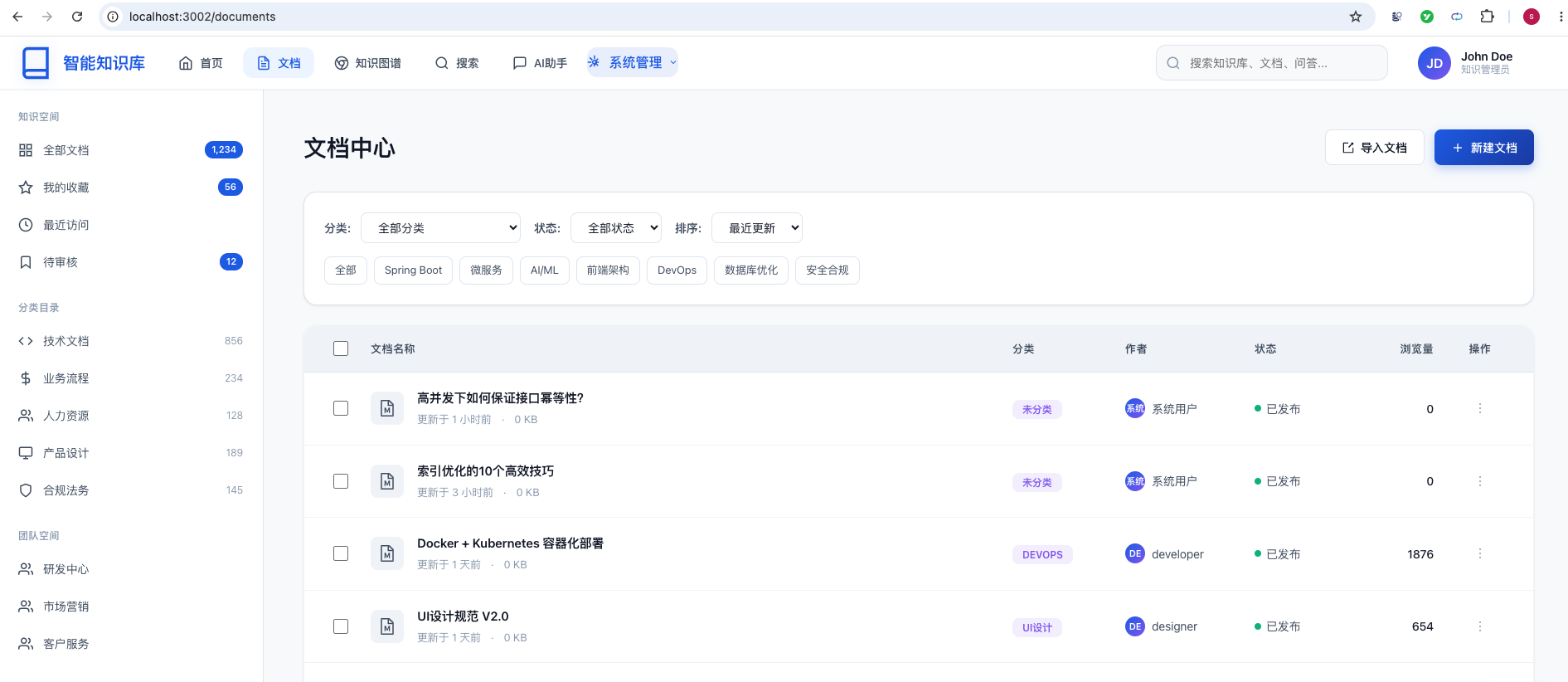
- 测试搜索功能 - 测试分页功能
2. 测试创建文档
- 点击"新建文档"按钮
- 填写文档信息
- 输入文档内容(支持Markdown)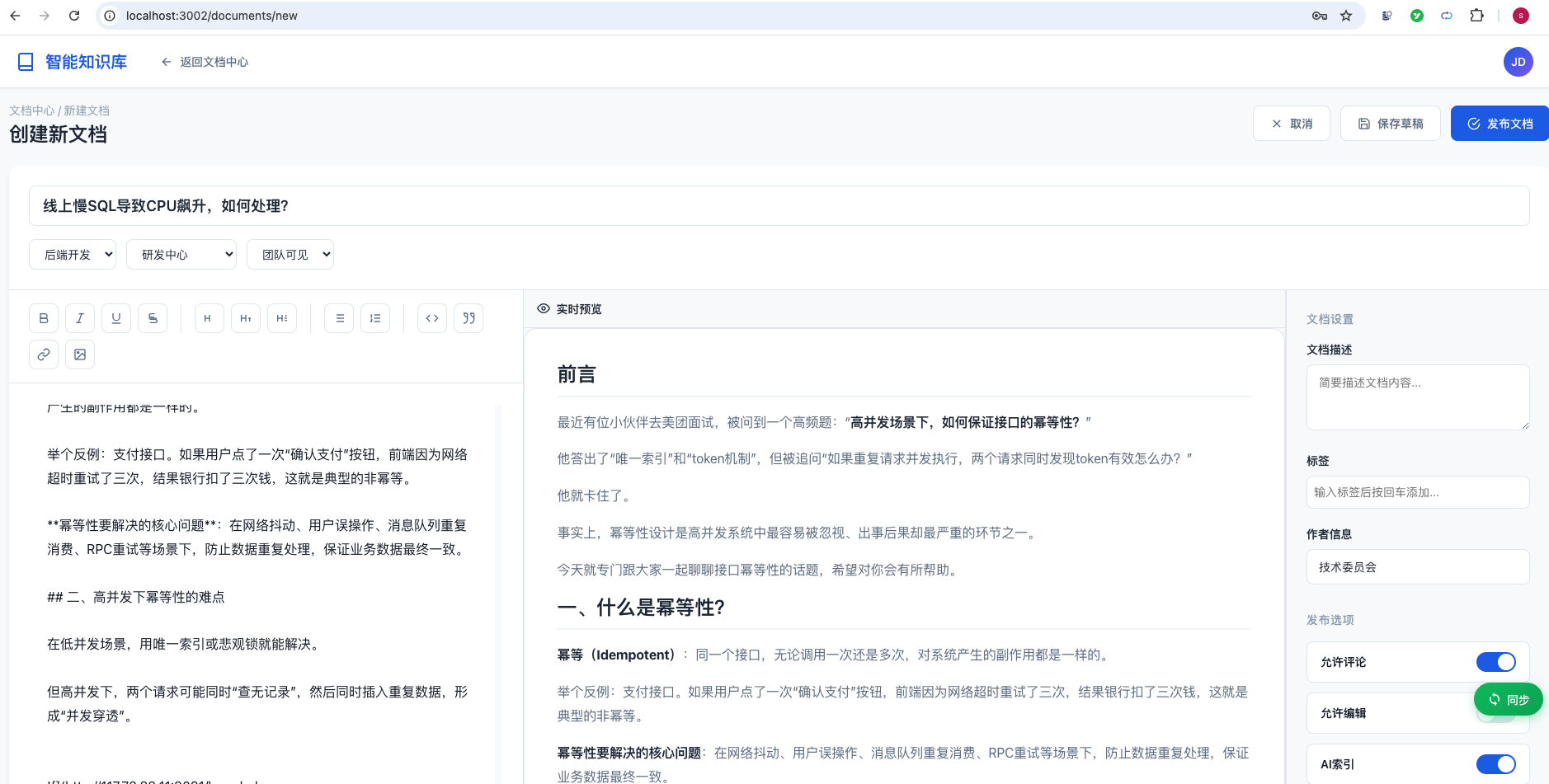
markdown内容中的图片,会自动上传到咱们上一篇文章中创建的文件服务中。 这个图片自动处理的功能是非常强大的。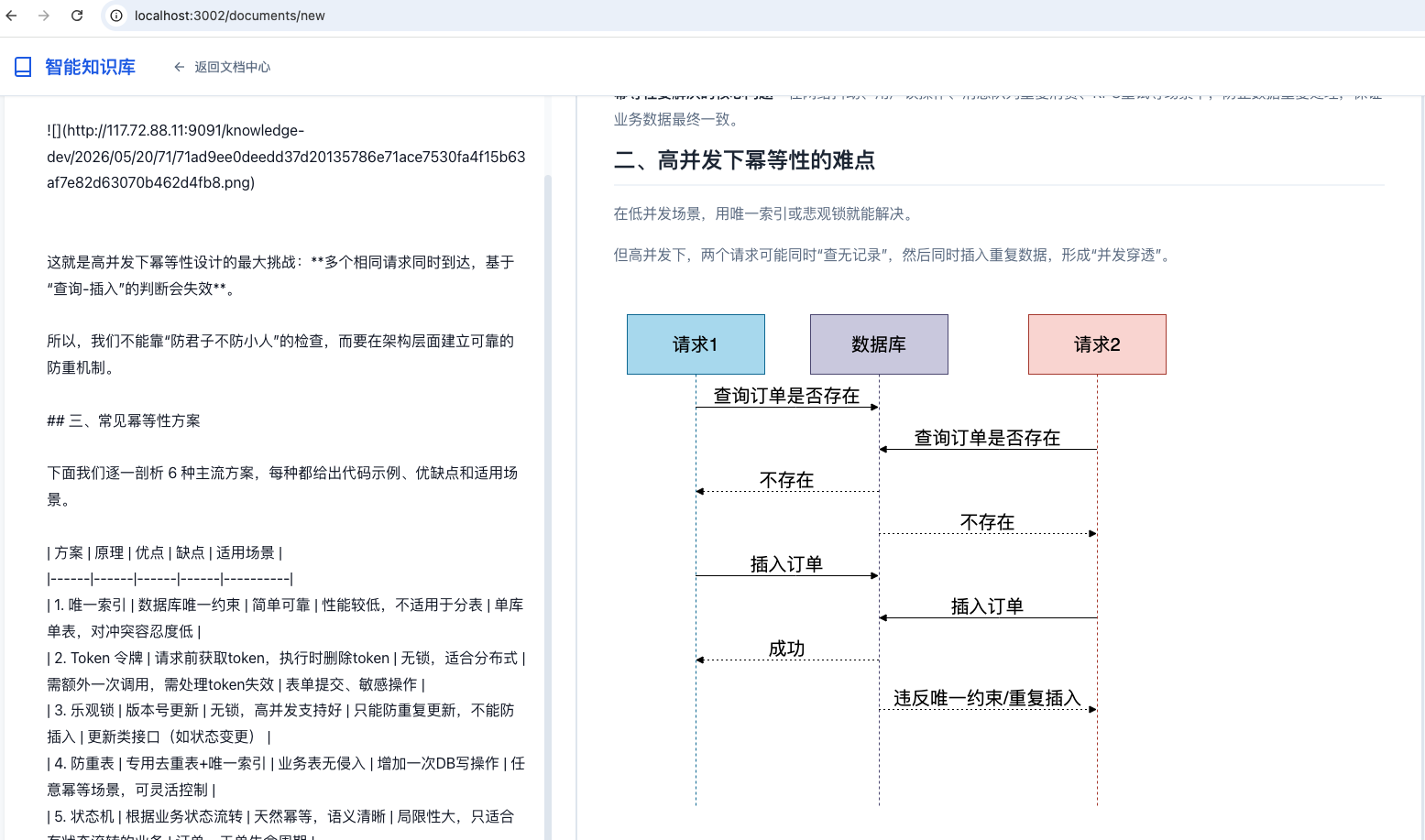
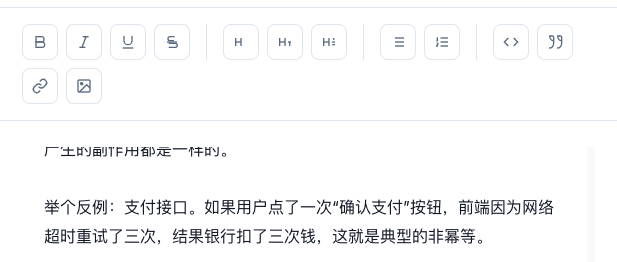
此外,编辑器中,还有很多其他的功能可以使用:
点击"保存草稿"或"发布文档"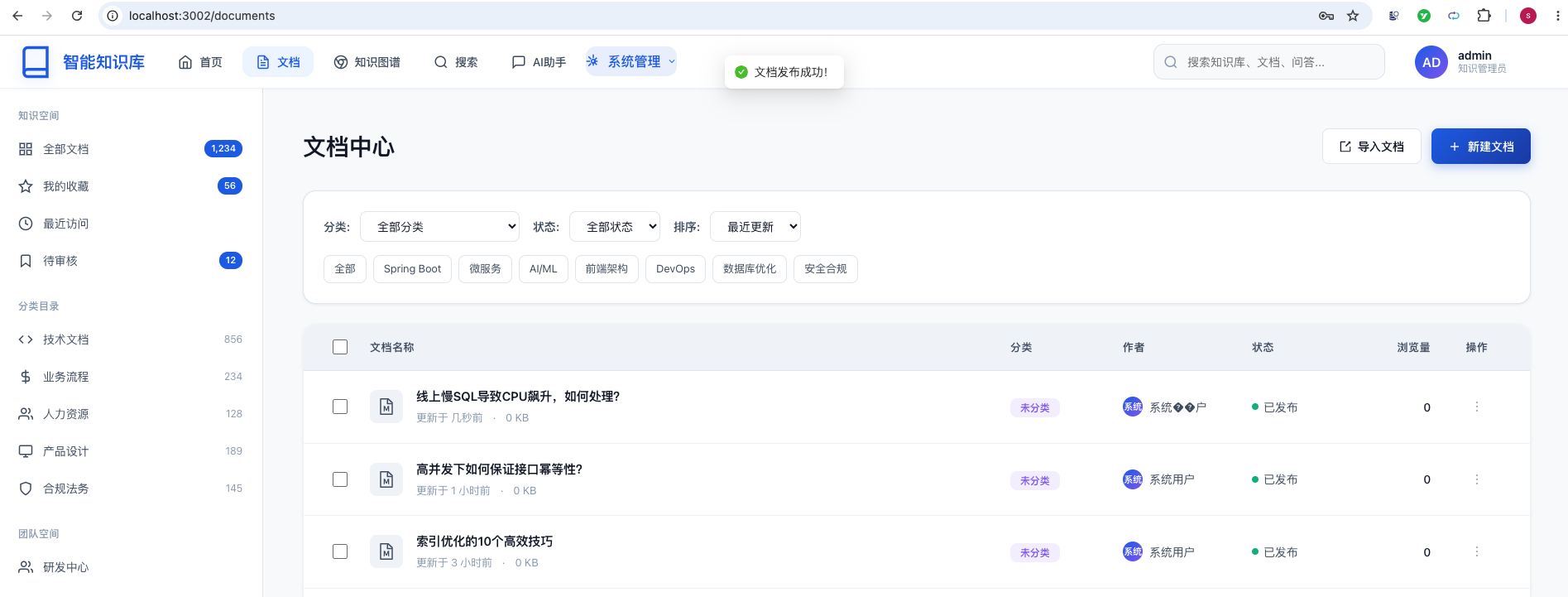
刚刚我们新建的文档,就能够在文档中心中看到了。
3.测试文档详情
- 点击任意文档标题
查看文档详情页面
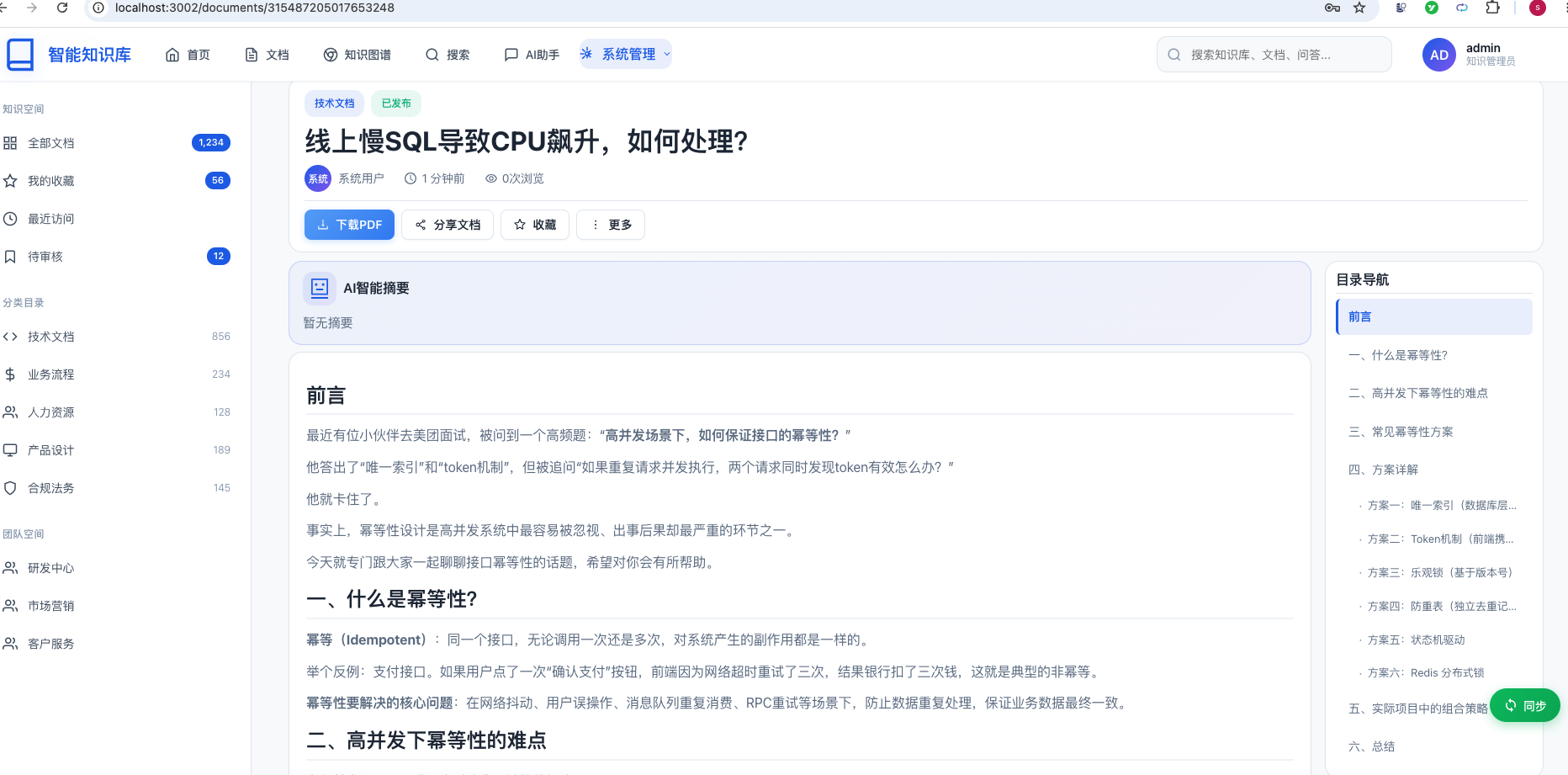
4.测试删除文档
- 在文档列表中找到要删除的文档
点击删除按钮
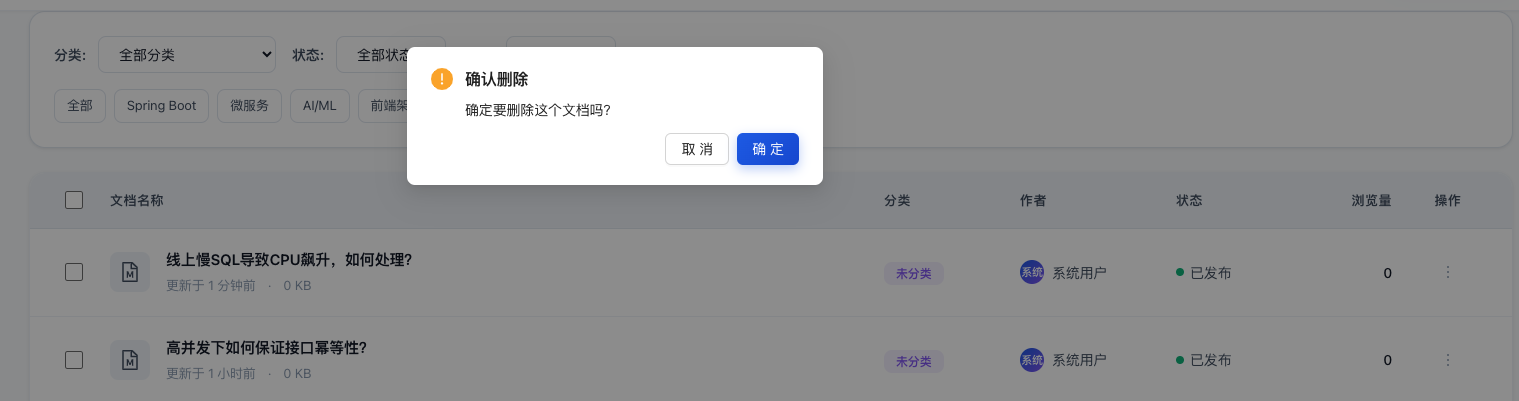
确认删除操作
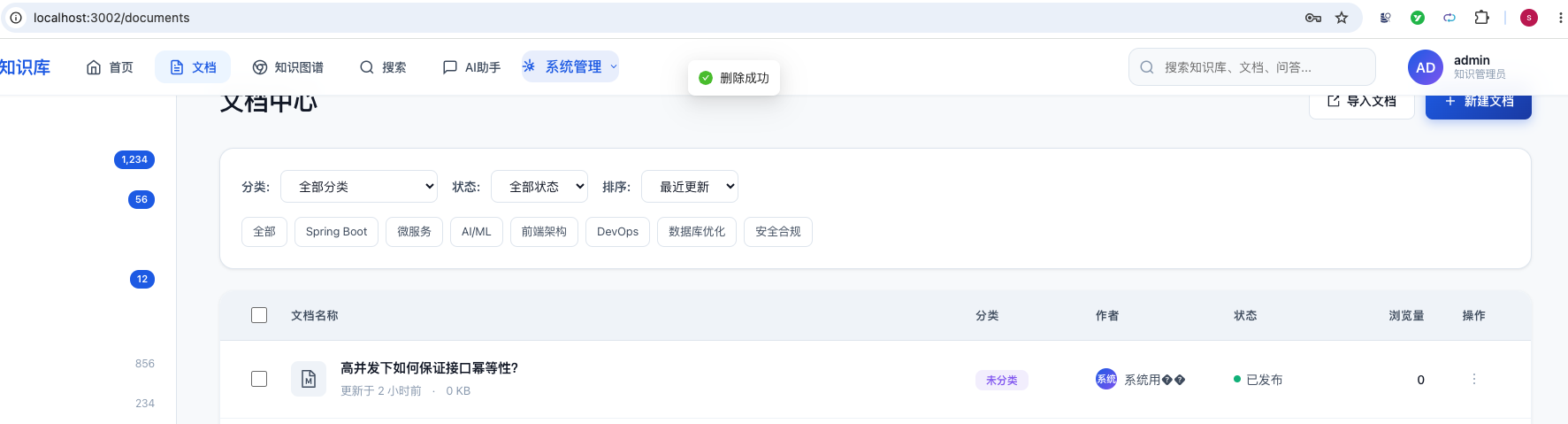
可以将刚刚创建的文档删除。
总结
恭喜你!🎉 你已经成功实现了完整的文档查询、创建和删除功能!
你学会了:
- Spring Boot + MyBatis-Plus + MongoDB 混合存储架构
- React + TypeScript + Ant Design 前端开发
- RESTful API 设计与实现
- 分页查询和搜索功能
- 状态管理和组件化开发
