一、功能概述
本教程将在企业知识库系统中实现完整的导入文档功能和草稿箱功能,支持导入Markdown文档、图片自动上传、文档编辑和草稿管理。
功能特性
- Markdown导入:支持导入Markdown文件,自动解析内容
- 图片处理:支持从外部URL下载图片并上传到系统文件服务
- 实时预览:支持Markdown实时预览和代码高亮
- 草稿管理:支持查看、编辑、删除草稿文档
- 文档状态:区分草稿(draft)和已发布(published)状态
二、技术栈
| 层级 | 技术 | 版本 |
|---|---|---|
| 前端 | React | 18+ |
| 前端框架 | Ant Design | 5.x |
| 状态管理 | Zustand | - |
| Markdown渲染 | react-markdown | 9.x |
| 代码高亮 | prism-react-renderer | - |
| 后端框架 | Spring Boot | 3.2.x |
| ORM框架 | MyBatis Plus | 3.5.x |
| 数据库 | MySQL | 8.0+ |
| 文档存储 | MongoDB | - |
| 文件存储 | RustFS分布式文件系统 | - |
| 服务调用 | Feign | - |
三、数据库设计
3.1 文档表(kb\_document)
CREATE TABLE `kb_document` (
  `id` BIGINT NOT NULL COMMENT '文档ID',
  `title` VARCHAR(200) NOT NULL COMMENT '文档标题',
  `content` LONGTEXT NOT NULL COMMENT '文档内容',
  `content_id` VARCHAR(64) DEFAULT NULL COMMENT '内容ID(MongoDB关联)',
  `content_length` INT DEFAULT NULL COMMENT '内容长度',
  `summary` TEXT DEFAULT NULL COMMENT '文档摘要',
  `category_id` BIGINT DEFAULT NULL COMMENT '分类ID',
  `author_id` BIGINT NOT NULL COMMENT '作者ID',
  `author_name` VARCHAR(50) DEFAULT NULL COMMENT '作者姓名',
  `cover_image` VARCHAR(500) DEFAULT NULL COMMENT '封面图片',
  `status` VARCHAR(20) NOT NULL DEFAULT 'draft' COMMENT '状态:draft/published',
  `is_public` TINYINT NOT NULL DEFAULT 1 COMMENT '是否公开:0-私有,1-团队可见,2-公开',
  `is_top` TINYINT NOT NULL DEFAULT 0 COMMENT '是否置顶',
  `allow_comment` TINYINT NOT NULL DEFAULT 1 COMMENT '允许评论',
  `view_count` INT NOT NULL DEFAULT 0 COMMENT '浏览次数',
  `like_count` INT NOT NULL DEFAULT 0 COMMENT '点赞次数',
  `comment_count` INT NOT NULL DEFAULT 0 COMMENT '评论次数',
  `collect_count` INT NOT NULL DEFAULT 0 COMMENT '收藏次数',
  `version` INT NOT NULL DEFAULT 1 COMMENT '版本号',
  `word_count` INT DEFAULT NULL COMMENT '字数',
  `publish_time` DATETIME DEFAULT NULL COMMENT '发布时间',
  `create_time` DATETIME NOT NULL DEFAULT CURRENT_TIMESTAMP COMMENT '创建时间',
  `update_time` DATETIME NOT NULL DEFAULT CURRENT_TIMESTAMP ON UPDATE CURRENT_TIMESTAMP COMMENT '更新时间',
  `create_by` VARCHAR(64) DEFAULT NULL COMMENT '创建人',
  `update_by` VARCHAR(64) DEFAULT NULL COMMENT '更新人',
  `deleted` TINYINT NOT NULL DEFAULT 0 COMMENT '删除标识',
  PRIMARY KEY (`id`),
  KEY `idx_category_id` (`category_id`),
  KEY `idx_author_id` (`author_id`),
  KEY `idx_status` (`status`)
) ENGINE=InnoDB DEFAULT CHARSET=utf8mb4 COMMENT='文档表';
3.2 文档内容表(MongoDB)
// MongoDB集合:kb_document_content
{
  "_id": "ObjectId",
  "content": "Markdown内容全文",
  "htmlContent": "转换后的HTML内容",
  "wordCount": 1234,
  "createdAt": ISODate(),
  "updatedAt": ISODate()
}
四、后端实现
4.1 文件上传响应DTO - FileUploadResponse.java
package com.knowledge.base.document.dto;

import lombok.Data;
import io.swagger.v3.oas.annotations.media.Schema;

@Data
@Schema(description = "文件上传响应")
public class FileUploadResponse {

    @Schema(description = "文件ID")
    private Long id;

    @Schema(description = "原始文件名")
    private String originalName;

    @Schema(description = "存储文件名")
    private String storedName;

    @Schema(description = "文件URL")
    private String fileUrl;

    @Schema(description = "预览URL")
    private String previewUrl;

    @Schema(description = "转换后的URL")
    private String convertedUrl;

    @Schema(description = "文件大小")
    private Long fileSize;

    @Schema(description = "MIME类型")
    private String mimeType;

    @Schema(description = "新URL(用于URL转换接口)")
    private String newUrl;
}
4.2 文件服务Feign客户端 - FileServiceFeignClient.java
package com.knowledge.base.document.feign;

import com.knowledge.base.common.result.Result;
import com.knowledge.base.document.dto.FileUploadResponse;
import org.springframework.cloud.openfeign.FeignClient;
import org.springframework.web.bind.annotation.*;
import org.springframework.web.multipart.MultipartFile;

@FeignClient(name = "kb-file", path = "/files")
public interface FileServiceFeignClient {

    @PostMapping(value = "/upload", consumes = "multipart/form-data")
    Result<FileUploadResponse> uploadFile(
            @RequestPart("file") MultipartFile file,
            @RequestParam("bucketName") String bucketName);

    @PostMapping("/upload-from-url")
    Result<FileUploadResponse> uploadFromUrl(@RequestParam("imageUrl") String imageUrl);
}
4.3 文档内容实体 - DocumentContent.java
package com.knowledge.base.document.entity.mongodb;

import lombok.Data;
import org.springframework.data.annotation.Id;
import org.springframework.data.mongodb.core.mapping.Document;
import java.time.LocalDateTime;

@Data
@Document(collection = "kb_document_content")
public class DocumentContent {

    @Id
    private String id;

    private String content;

    private String htmlContent;

    private Integer wordCount;

    private LocalDateTime createdAt;

    private LocalDateTime updatedAt;
}
4.4 文档服务接口 - DocumentService.java
package com.knowledge.base.document.service;

import com.knowledge.base.document.entity.Document;
import java.util.List;

public interface DocumentService {

    String uploadDocumentFile(MultipartFile file);

    Long createDocument(Document document);

    void updateDocument(Document document);

    Document getDocumentById(Long id);

    List<Document> getDocumentsByStatus(String status, int page, int pageSize);

    void deleteDocument(Long id);

    String uploadImageFromUrl(String imageUrl);

    void saveDocumentContent(Long documentId, String content);

    String getDocumentContent(Long documentId);
}
4.5 文件上传服务 - FileUploadService.java
package com.knowledge.base.document.service;

public interface FileUploadService {

    String uploadImageFromUrl(String imageUrl);
}
4.6 文件上传服务实现 - FileUploadServiceImpl.java
package com.knowledge.base.document.service.impl;

import cn.hutool.core.io.IoUtil;
import cn.hutool.http.HttpUtil;
import com.knowledge.base.common.exception.BusinessException;
import com.knowledge.base.common.result.ResultCode;
import com.knowledge.base.document.dto.FileUploadResponse;
import com.knowledge.base.document.feign.FileServiceFeignClient;
import com.knowledge.base.document.service.FileUploadService;
import lombok.RequiredArgsConstructor;
import lombok.extern.slf4j.Slf4j;
import org.springframework.stereotype.Service;
import org.springframework.web.multipart.MultipartFile;

import java.util.Arrays;
import java.util.HashSet;
import java.util.Set;

@Slf4j
@Service
@RequiredArgsConstructor
public class FileUploadServiceImpl implements FileUploadService {

    private final FileServiceFeignClient fileServiceFeignClient;

    private static final Set<String> INTERNAL_DOMAINS = new HashSet<>(
            Arrays.asList("rustfs", "localhost", "127.0.0.1", "117.72.88.11"));

    @Override
    public String uploadImageFromUrl(String imageUrl) {
        if (imageUrl == null || imageUrl.trim().isEmpty()) {
            throw new BusinessException(ResultCode.PARAM_INVALID, "图片URL不能为空");
        }

        String cleanUrl = imageUrl.trim();
        if (cleanUrl.startsWith("`") && cleanUrl.endsWith("`")) {
            cleanUrl = cleanUrl.substring(1, cleanUrl.length() - 1).trim();
        }

        boolean isInternalUrl = INTERNAL_DOMAINS.stream()
                .anyMatch(domain -> cleanUrl.contains(domain));

        if (isInternalUrl) {
            log.info("图片已是系统内部URL,直接返回:{}", cleanUrl);
            return cleanUrl;
        }

        try {
            log.info("开始从URL上传图片:{}", cleanUrl);
            var response = fileServiceFeignClient.uploadFromUrl(cleanUrl);

            if (response == null || response.getData() == null) {
                log.error("文件服务返回为空");
                throw new BusinessException(ResultCode.FILE_UPLOAD_FAILED);
            }

            FileUploadResponse uploadResponse = response.getData();
            String newUrl = uploadResponse.getNewUrl();

            if (newUrl != null && !newUrl.trim().isEmpty()) {
                log.info("URL转换成功,新URL:{}", newUrl);
                return newUrl.trim();
            }

            log.warn("文件服务返回的URL为空,尝试降级处理");
            return uploadImageFromUrlFallback(cleanUrl);

        } catch (BusinessException e) {
            throw e;
        } catch (Exception e) {
            log.error("从URL上传图片失败:{}", e.getMessage(), e);
            return uploadImageFromUrlFallback(cleanUrl);
        }
    }

    private String uploadImageFromUrlFallback(String imageUrl) {
        try {
            log.info("开始降级处理 - 直接下载图片并上传:{}", imageUrl);
            byte[] imageBytes = HttpUtil.downloadBytes(imageUrl);

            if (imageBytes == null || imageBytes.length == 0) {
                throw new BusinessException(ResultCode.FILE_UPLOAD_FAILED, "图片下载失败");
            }

            String fileName = imageUrl.substring(imageUrl.lastIndexOf('/') + 1);
            if (!fileName.contains(".")) {
                fileName = "image.png";
            }

            var tempFile = java.io.File.createTempFile("upload_", fileName);
            tempFile.deleteOnExit();
            java.nio.file.Files.write(tempFile.toPath(), imageBytes);

            var multipartFile = new org.springframework.web.multipart.commons.CommonsMultipartFile(
                    new org.apache.commons.fileupload.disk.DiskFileItem(
                            fileName,
                            "image/png",
                            false,
                            fileName,
                            (int) tempFile.length(),
                            tempFile.getParentFile()
                    )
            );

            var result = fileServiceFeignClient.uploadFile(multipartFile, "images");
            if (result != null && result.getData() != null) {
                String fileUrl = result.getData().getFileUrl();
                if (fileUrl != null && !fileUrl.isEmpty()) {
                    log.info("降级处理成功,新URL:{}", fileUrl);
                    return fileUrl;
                }
            }

            throw new BusinessException(ResultCode.FILE_UPLOAD_FAILED);
        } catch (BusinessException e) {
            throw e;
        } catch (Exception e) {
            log.error("降级处理失败:{}", e.getMessage(), e);
            throw new BusinessException(ResultCode.FILE_UPLOAD_FAILED, "图片上传失败");
        }
    }
}
4.7 文档控制器 - DocumentController.java
package com.knowledge.base.document.controller;

import com.knowledge.base.common.result.Result;
import com.knowledge.base.document.entity.Document;
import com.knowledge.base.document.service.DocumentService;
import io.swagger.v3.oas.annotations.Operation;
import io.swagger.v3.oas.annotations.tags.Tag;
import lombok.RequiredArgsConstructor;
import org.springframework.web.bind.annotation.*;
import org.springframework.web.multipart.MultipartFile;

import java.util.List;

@Tag(name = "文档管理")
@RestController
@RequestMapping("/documents")
@RequiredArgsConstructor
public class DocumentController {

    private final DocumentService documentService;

    @Operation(summary = "上传文档文件")
    @PostMapping("/upload")
    public Result<String> uploadDocumentFile(@RequestParam("file") MultipartFile file) {
        String filePath = documentService.uploadDocumentFile(file);
        return Result.success("上传文件成功", filePath);
    }

    @Operation(summary = "创建文档")
    @PostMapping
    public Result<Long> createDocument(@RequestBody Document document) {
        Long documentId = documentService.createDocument(document);
        return Result.success("创建文档成功", documentId);
    }

    @Operation(summary = "更新文档")
    @PutMapping("/{id}")
    public Result<Void> updateDocument(@PathVariable Long id, @RequestBody Document document) {
        document.setId(id);
        documentService.updateDocument(document);
        return Result.success("更新文档成功", null);
    }

    @Operation(summary = "获取文档详情")
    @GetMapping("/{id}")
    public Result<Document> getDocument(@PathVariable Long id) {
        Document document = documentService.getDocumentById(id);
        return Result.success("获取文档成功", document);
    }

    @Operation(summary = "查询文档列表")
    @GetMapping
    public Result<List<Document>> getDocuments(
            @RequestParam(required = false) String status,
            @RequestParam(defaultValue = "1") int page,
            @RequestParam(defaultValue = "20") int pageSize) {
        List<Document> documents = documentService.getDocumentsByStatus(status, page, pageSize);
        return Result.success("查询成功", documents);
    }

    @Operation(summary = "删除文档")
    @DeleteMapping("/{id}")
    public Result<Void> deleteDocument(@PathVariable Long id) {
        documentService.deleteDocument(id);
        return Result.success("删除文档成功", null);
    }

    @Operation(summary = "上传图片从URL")
    @PostMapping("/upload-image-from-url")
    public Result<String> uploadImageFromUrl(@RequestParam String imageUrl) {
        String fileUrl = documentService.uploadImageFromUrl(imageUrl);
        return Result.success("图片上传成功", fileUrl);
    }

    @Operation(summary = "保存文档内容")
    @PostMapping("/{id}/content")
    public Result<Void> saveDocumentContent(
            @PathVariable Long id,
            @RequestBody String content) {
        documentService.saveDocumentContent(id, content);
        return Result.success("保存文档内容成功", null);
    }

    @Operation(summary = "获取文档内容")
    @GetMapping("/{id}/content")
    public Result<String> getDocumentContent(@PathVariable Long id) {
        String content = documentService.getDocumentContent(id);
        return Result.success("获取文档内容成功", content);
    }
}
4.8 文档服务实现 - DocumentServiceImpl.java
package com.knowledge.base.document.service.impl;

import cn.hutool.core.util.StrUtil;
import com.knowledge.base.common.exception.BusinessException;
import com.knowledge.base.common.result.ResultCode;
import com.knowledge.base.document.dto.FileUploadResponse;
import com.knowledge.base.document.entity.Document;
import com.knowledge.base.document.entity.mongodb.DocumentContent;
import com.knowledge.base.document.feign.FileServiceFeignClient;
import com.knowledge.base.document.mapper.DocumentMapper;
import com.knowledge.base.document.repository.mongodb.DocumentContentRepository;
import com.knowledge.base.document.service.DocumentService;
import com.knowledge.base.document.utils.UserContext;
import lombok.RequiredArgsConstructor;
import lombok.extern.slf4j.Slf4j;
import org.springframework.stereotype.Service;
import org.springframework.transaction.annotation.Transactional;
import org.springframework.web.multipart.MultipartFile;

import java.time.LocalDateTime;
import java.util.List;

@Slf4j
@Service
@RequiredArgsConstructor
public class DocumentServiceImpl implements DocumentService {

    private final DocumentMapper documentMapper;
    private final DocumentContentRepository documentContentRepository;
    private final FileServiceFeignClient fileServiceFeignClient;

    @Override
    public String uploadDocumentFile(MultipartFile file) {
        try {
            var result = fileServiceFeignClient.uploadFile(file, "documents");
            if (result == null || result.getData() == null) {
                throw new BusinessException(ResultCode.FILE_UPLOAD_FAILED);
            }

            FileUploadResponse response = result.getData();
            String fileUrl = response.getFileUrl();
            if (StrUtil.isBlank(fileUrl)) {
                fileUrl = response.getPreviewUrl();
            }
            if (StrUtil.isBlank(fileUrl)) {
                fileUrl = response.getConvertedUrl();
            }
            if (StrUtil.isBlank(fileUrl) && response.getId() != null) {
                fileUrl = constructFileUrl(response.getId());
            }
            if (StrUtil.isBlank(fileUrl)) {
                throw new BusinessException(ResultCode.FILE_UPLOAD_FAILED);
            }

            return fileUrl;
        } catch (BusinessException e) {
            throw e;
        } catch (Exception e) {
            log.error("文件上传失败:{}", e.getMessage(), e);
            throw new BusinessException(ResultCode.FILE_UPLOAD_FAILED);
        }
    }

    @Override
    @Transactional
    public Long createDocument(Document document) {
        if (document.getAuthorId() == null) {
            Long userId = UserContext.getUserId();
            document.setAuthorId(userId);
        }

        documentMapper.insert(document);
        log.info("文档创建成功:documentId={}", document.getId());
        return document.getId();
    }

    @Override
    @Transactional
    public void updateDocument(Document document) {
        documentMapper.updateById(document);
        log.info("文档更新成功:documentId={}", document.getId());
    }

    @Override
    public Document getDocumentById(Long id) {
        return documentMapper.selectById(id);
    }

    @Override
    public List<Document> getDocumentsByStatus(String status, int page, int pageSize) {
        var queryWrapper = new com.baomidou.mybatisplus.core.conditions.query.QueryWrapper<Document>();
        queryWrapper.eq("deleted", 0);

        if (status != null && !status.isEmpty()) {
            queryWrapper.eq("status", status);
        }

        queryWrapper.orderByDesc("update_time");
        queryWrapper.limit(pageSize);
        queryWrapper.offset((long) (page - 1) * pageSize);

        return documentMapper.selectList(queryWrapper);
    }

    @Override
    @Transactional
    public void deleteDocument(Long id) {
        Document document = new Document();
        document.setId(id);
        document.setDeleted(1);
        documentMapper.updateById(document);
        log.info("文档删除成功:documentId={}", id);
    }

    @Override
    public String uploadImageFromUrl(String imageUrl) {
        var fileUploadService = new FileUploadServiceImpl(fileServiceFeignClient);
        return fileUploadService.uploadImageFromUrl(imageUrl);
    }

    @Override
    @Transactional
    public void saveDocumentContent(Long documentId, String content) {
        Document document = documentMapper.selectById(documentId);
        if (document == null) {
            throw new BusinessException(ResultCode.DOCUMENT_NOT_FOUND);
        }

        String contentId = document.getContentId();
        DocumentContent documentContent;

        if (contentId != null && !contentId.isEmpty()) {
            documentContent = documentContentRepository.findById(contentId).orElse(new DocumentContent());
            documentContent.setUpdatedAt(LocalDateTime.now());
        } else {
            documentContent = new DocumentContent();
            documentContent.setCreatedAt(LocalDateTime.now());
            documentContent.setUpdatedAt(LocalDateTime.now());
        }

        documentContent.setContent(content);
        documentContent.setWordCount(content != null ? content.length() : 0);

        documentContent = documentContentRepository.save(documentContent);

        document.setContentId(documentContent.getId());
        document.setContentLength(documentContent.getWordCount());
        documentMapper.updateById(document);

        log.info("文档内容保存成功:documentId={}, contentId={}, contentLength={}",
                documentId, documentContent.getId(), documentContent.getWordCount());
    }

    @Override
    public String getDocumentContent(Long documentId) {
        Document document = documentMapper.selectById(documentId);
        if (document == null) {
            throw new BusinessException(ResultCode.DOCUMENT_NOT_FOUND);
        }

        String contentId = document.getContentId();
        if (contentId == null || contentId.isEmpty()) {
            return document.getContent();
        }

        var contentOpt = documentContentRepository.findById(contentId);
        return contentOpt.map(DocumentContent::getContent).orElse(document.getContent());
    }

    private String constructFileUrl(Long fileId) {
        return "/files/download/" + fileId;
    }
}
4.9 MongoDB配置 - MongoConfig.java
package com.knowledge.base.document.config;

import org.springframework.context.annotation.Configuration;
import org.springframework.data.mongodb.config.EnableMongoAuditing;
import org.springframework.data.mongodb.repository.config.EnableMongoRepositories;

@Configuration
@EnableMongoRepositories(basePackages = "com.knowledge.base.document.repository")
@EnableMongoAuditing
public class MongoConfig {
}
4.10 MongoDB仓库 - DocumentContentRepository.java
package com.knowledge.base.document.repository.mongodb;

import com.knowledge.base.document.entity.mongodb.DocumentContent;
import org.springframework.data.mongodb.repository.MongoRepository;
import org.springframework.stereotype.Repository;

@Repository
public interface DocumentContentRepository extends MongoRepository<DocumentContent, String> {
}
五、前端实现
5.1 文档服务 - document.service.ts
import { http } from './request';

export const documentService = {
  uploadDocumentFile: (file: File) => {
    const formData = new FormData();
    formData.append('file', file);
    return http.postForm<string>('/document/documents/upload', formData);
  },

  createDocument: (data: any) => {
    return http.post<number>('/document/documents', data);
  },

  updateDocument: (id: number, data: any) => {
    return http.put<void>(`/document/documents/${id}`, data);
  },

  getDocument: (id: number) => {
    return http.get<any>(`/document/documents/${id}`);
  },

  getDocuments: (params: {
    status?: string;
    page?: number;
    pageSize?: number;
  }) => {
    return http.get<any[]>('/document/documents', { params });
  },

  deleteDocument: (id: number) => {
    return http.delete<void>(`/document/documents/${id}`);
  },

  saveDocumentContent: (id: number, content: string) => {
    return http.post<void>(`/document/documents/${id}/content`, content);
  },

  getDocumentContent: (id: number) => {
    return http.get<string>(`/document/documents/${id}/content`);
  },
};
5.2 文件服务 - file.service.ts
import { http } from './request';

export const fileService = {
  uploadFromUrl: (imageUrl: string) => {
    return http.post<{
      originalUrl: string;
      convertedUrl: string;
    }>('/document/files/upload-from-url', null, {
      params: { imageUrl },
      timeout: 60000,
    });
  },
};
5.3 请求配置 - request.ts
import axios, { AxiosInstance, AxiosRequestConfig, AxiosResponse } from 'axios';

const request: AxiosInstance = axios.create({
  baseURL: '/api',
  timeout: 120000,
  withCredentials: true,
});

request.interceptors.request.use(
  (config) => {
    const token = localStorage.getItem('token');
    if (token) {
      config.headers.Authorization = `Bearer ${token}`;
    }
    return config;
  },
  (error) => Promise.reject(error)
);

request.interceptors.response.use(
  (response: AxiosResponse) => {
    const { data } = response;
    if (data && typeof data === 'object' && 'code' in data) {
      if (data.code === 200) {
        return data.data;
      } else {
        return Promise.reject(new Error(data.message));
      }
    }
    return data;
  }
);

export const http = request;

export default request;
5.4 导入文档页面 - ImportDocumentPage.tsx
import React, { useState, useRef } from 'react';
import { Upload, Button, message, Card, Progress, Alert } from 'antd';
import { InboxOutlined, EyeOutlined, ClockCircleOutlined } from '@ant-design/icons';
import { useNavigate } from 'react-router-dom';
import { documentService, fileService } from '@/services';
import './ImportDocumentPage.css';
const { Dragger } = Upload;
export const ImportDocumentPage: React.FC = () => {
const navigate = useNavigate();
const [uploading, setUploading] = useState(false);
const [progress, setProgress] = useState(0);
const [currentFile, setCurrentFile] = useState<string | null>(null);
const [successCount, setSuccessCount] = useState(0);
const [failCount, setFailCount] = useState(0);
const [retryCount, setRetryCount] = useState(0);
const fileInputRef = useRef<HTMLInputElement>(null);
const processMarkdownContent = async (content: string): Promise<string> => {
const imageRegex = /!\[([^\]]*)\]\(([^)]+)\)/g;
let processedContent = content;
let match;
while ((match = imageRegex.exec(content)) !== null) {
const altText = match[1];
const imageUrl = match[2];
if (imageUrl.startsWith('http://') || imageUrl.startsWith('https://')) {
const cleanUrl = imageUrl.replace(/^`|`$/g, '').trim();
try {
const result = await fileService.uploadFromUrl(cleanUrl);
const uploadedUrl = result.convertedUrl || result.originalUrl;
if (uploadedUrl) {
processedContent = processedContent.replace(match[0], ``);
}
} catch (error) {
console.error('图片上传失败:', error);
}
}
}
processedContent = processedContent.replace(/<!--[^>]*-->/g, '');
return processedContent;
};
const handleFileUpload = async (file: File) => {
if (!file.name.endsWith('.md') && !file.name.endsWith('.markdown')) {
message.error('请上传Markdown文件');
return false;
}
setUploading(true);
setCurrentFile(file.name);
setProgress(0);
setRetryCount(0);
try {
const content = await file.text();
setProgress(30);
const processedContent = await processMarkdownContent(content);
setProgress(60);
const formData = {
title: file.name.replace(/\.(md|markdown)$/, ''),
content: processedContent,
summary: '',
status: 'draft',
categoryId: 1,
isPublic: 1,
};
setProgress(80);
const result = await documentService.createDocument(formData);
if (result) {
setProgress(100);
setSuccessCount(prev => prev + 1);
message.success(`${file.name} 导入成功`);
setTimeout(() => {
navigate('/drafts');
}, 1500);
}
} catch (error) {
console.error('导入失败:', error);
setFailCount(prev => prev + 1);
message.error(`${file.name} 导入失败`);
} finally {
setUploading(false);
setCurrentFile(null);
}
return false;
};
const handleRetry = () => {
setRetryCount(prev => prev + 1);
if (fileInputRef.current) {
fileInputRef.current.click();
}
};
const uploadProps = {
name: 'file',
multiple: false,
showUploadList: false,
accept: '.md,.markdown',
beforeUpload: handleFileUpload,
};
return (
<div className="import-document-page">
<div className="page-header">
<h1>导入文档</h1>
<p className="subtitle">支持导入 Markdown 格式的文档,自动处理文档中的图片</p>
</div>
<Card className="import-card">
<Dragger {...uploadProps} className="upload-dragger">
<p className="ant-upload-drag-icon">
<InboxOutlined />
</p>
<p className="ant-upload-text">点击或拖拽文件到此区域上传</p>
<p className="ant-upload-hint">
支持 .md 和 .markdown 格式的Markdown文件
</p>
</Dragger>
<input
ref={fileInputRef}
type="file"
accept=".md,.markdown"
style={{ display: 'none' }}
onChange={(e) => {
const file = e.target.files?.[0];
if (file) handleFileUpload(file);
}}
/>
</Card>
{uploading && (
<Card className="progress-card">
<div className="progress-header">
<span>正在导入: {currentFile}</span>
<span>{progress}%</span>
</div>
<Progress percent={progress} status="active" />
<Button
size="small"
icon={<ClockCircleOutlined />}
onClick={handleRetry}
style={{ marginTop: 8 }}
>
重试 ({retryCount})
</Button>
</Card>
)}
<div className="import-stats">
<div className="stat-item success">
<span className="stat-value">{successCount}</span>
<span className="stat-label">成功</span>
</div>
<div className="stat-item fail">
<span className="stat-value">{failCount}</span>
<span className="stat-label">失败</span>
</div>
</div>
<Alert
className="import-tips"
message="导入说明"
description={
<ul>
<li>支持导入 Markdown 格式的文档文件</li>
<li>文档中的图片会自动上传到文件服务器</li>
<li>导入的文档默认状态为"草稿",可在草稿箱中编辑和发布</li>
<li>支持批量导入多个文件</li>
</ul>
}
type="info"
showIcon
/>
</div>
);
};5.5 导入文档样式 - ImportDocumentPage.css
.import-document-page {
  padding: 32px;
  max-width: 900px;
  margin: 0 auto;
}

.page-header {
  margin-bottom: 32px;
}

.page-header h1 {
  font-size: 28px;
  font-weight: 600;
  color: var(--text-primary);
  margin-bottom: 8px;
}

.page-header .subtitle {
  color: var(--text-muted);
  font-size: 14px;
}

.import-card {
  margin-bottom: 24px;
}

.upload-dragger {
  padding: 40px 20px;
}

.upload-dragger .ant-upload-drag-icon {
  font-size: 64px;
  color: var(--primary-color);
  margin-bottom: 16px;
}

.upload-dragger .ant-upload-text {
  font-size: 16px;
  font-weight: 500;
  margin-bottom: 8px;
}

.upload-dragger .ant-upload-hint {
  color: var(--text-muted);
}

.progress-card {
  margin-bottom: 24px;
}

.progress-header {
  display: flex;
  justify-content: space-between;
  margin-bottom: 8px;
  font-size: 14px;
  color: var(--text-primary);
}

.import-stats {
  display: flex;
  gap: 24px;
  margin-bottom: 24px;
}

.stat-item {
  display: flex;
  align-items: center;
  gap: 8px;
}

.stat-value {
  font-size: 24px;
  font-weight: 600;
}

.stat-item.success .stat-value {
  color: #52c41a;
}

.stat-item.fail .stat-value {
  color: #ff4d4f;
}

.stat-label {
  font-size: 14px;
  color: var(--text-muted);
}

.import-tips {
  margin-top: 24px;
}

.import-tips ul {
  margin: 8px 0;
  padding-left: 20px;
}

.import-tips li {
  margin-bottom: 4px;
}
5.6 草稿箱页面 - DraftsPage.tsx
import React, { useEffect, useState } from 'react';
import { useNavigate } from 'react-router-dom';
import {
  Card,
  Table,
  Button,
  Input,
  Space,
  Tag,
  Tooltip,
  Modal,
  message,
  Popconfirm,
  Empty,
} from 'antd';
import type { ColumnsType } from 'antd/es/table';
import {
  SearchOutlined,
  ReloadOutlined,
  DeleteOutlined,
  EditOutlined,
  EyeOutlined,
  UploadOutlined,
} from '@ant-design/icons';
import { useDocumentStore } from '@/stores';
import { documentService, categoryService } from '@/services';
import dayjs from 'dayjs';
import relativeTime from 'dayjs/plugin/relativeTime';
import 'dayjs/locale/zh-cn';

dayjs.extend(relativeTime);
dayjs.locale('zh-cn');

const { Search } = Input;

export const DraftsPage: React.FC = () => {
  const navigate = useNavigate();
  const {
    documents,
    isLoading,
    total,
    currentPage,
    pageSize,
    filter,
    fetchDocuments,
    setFilter,
    reset,
  } = useDocumentStore();

  const [searchKeyword, setSearchKeyword] = useState<string>('');

  useEffect(() => {
    reset();
    setFilter({ status: 0, page: 1, pageSize: 20, sortBy: 'updateTime', sortOrder: 'desc' });
    fetchDocuments({ status: 0, page: 1, pageSize: 20, sortBy: 'updateTime', sortOrder: 'desc' });
  }, []);

  const handleSearch = (value: string) => {
    setSearchKeyword(value);
    fetchDocuments({ status: 0, keyword: value || undefined, page: 1, sortBy: 'updateTime', sortOrder: 'desc' });
  };

  const handleRefresh = () => {
    fetchDocuments({ status: 0, page: currentPage, pageSize, sortBy: 'updateTime', sortOrder: 'desc' });
  };

  const handleDelete = async (draftId: string) => {
    try {
      await documentService.deleteDocument(Number(draftId));
      message.success('草稿删除成功');
      handleRefresh();
    } catch (error) {
      message.error('草稿删除失败');
    }
  };

  const handleEdit = (draftId: string) => {
    navigate(`/documents/${draftId}/edit?from=drafts`);
  };

  const handleView = (draftId: string) => {
    navigate(`/documents/${draftId}`);
  };

  const columns: ColumnsType<any> = [
    {
      title: '标题',
      dataIndex: 'title',
      key: 'title',
      render: (text: string, record: any) => (
        <a onClick={() => handleView(record.id)}>{text}</a>
      ),
    },
    {
      title: '作者',
      dataIndex: 'authorName',
      key: 'authorName',
      width: 120,
    },
    {
      title: '分类',
      dataIndex: 'categoryId',
      key: 'categoryId',
      width: 120,
    },
    {
      title: '字数',
      dataIndex: 'wordCount',
      key: 'wordCount',
      width: 80,
      render: (count: number) => count || 0,
    },
    {
      title: '更新时间',
      dataIndex: 'updateTime',
      key: 'updateTime',
      width: 180,
      render: (time: string) => dayjs(time).fromNow(),
    },
    {
      title: '操作',
      key: 'action',
      width: 200,
      render: (_: any, record: any) => (
        <Space size="small">
          <Tooltip title="编辑">
            <Button
              type="text"
              size="small"
              icon={<EditOutlined />}
              onClick={() => handleEdit(String(record.id))}
            />
          </Tooltip>
          <Tooltip title="预览">
            <Button
              type="text"
              size="small"
              icon={<EyeOutlined />}
              onClick={() => handleView(String(record.id))}
            />
          </Tooltip>
          <Popconfirm
            title="确定删除此草稿?"
            onConfirm={() => handleDelete(String(record.id))}
            okText="确定"
            cancelText="取消"
          >
            <Tooltip title="删除">
              <Button
                type="text"
                size="small"
                danger
                icon={<DeleteOutlined />}
              />
            </Tooltip>
          </Popconfirm>
        </Space>
      ),
    },
  ];

  return (
    <div style={{ padding: 24 }}>
      <div style={{ marginBottom: 24, display: 'flex', justifyContent: 'space-between' }}>
        <h1>草稿箱</h1>
        <Button
          type="primary"
          icon={<UploadOutlined />}
          onClick={() => navigate('/documents/import')}
        >
          导入文档
        </Button>
      </div>
      <Card>
        <div style={{ marginBottom: 16, display: 'flex', gap: 12 }}>
          <Search
            placeholder="搜索草稿标题"
            onSearch={handleSearch}
            style={{ width: 300 }}
            allowClear
          />
          <Button icon={<ReloadOutlined />} onClick={handleRefresh}>
            刷新
          </Button>
        </div>
        <Table
          columns={columns}
          dataSource={documents}
          rowKey="id"
          loading={isLoading}
          locale={{
            emptyText: <Empty description="暂无草稿" />,
          }}
          pagination={{
            current: currentPage,
            pageSize: pageSize,
            total: total,
            showSizeChanger: false,
            showQuickJumper: false,
            onChange: (page, size) => {
              setFilter({ page, pageSize: size });
              fetchDocuments({ status: 0, page, pageSize: size, sortBy: 'updateTime', sortOrder: 'desc' });
            },
          }}
        />
      </Card>
    </div>
  );
};
5.7 编辑文档页面 - EditDocumentPage.tsx(核心部分)
import React, { useState, useEffect } from 'react';
import { useParams, useNavigate, useSearchParams } from 'react-router-dom';
import { Button, Input, Select, message, Breadcrumb } from 'antd';
import {
  SaveOutlined,
  SendOutlined,
  ArrowLeftOutlined,
} from '@ant-design/icons';
import { documentService } from '@/services';
import ReactMarkdown from 'react-markdown';
import { Prism as SyntaxHighlighter } from 'react-syntax-highlighter';
import { oneLight } from 'react-syntax-highlighter/dist/esm/styles/prism';

const { TextArea } = Input;
const { Option } = Select;

export const EditDocumentPage: React.FC = () => {
  const { id } = useParams<{ id: string }>();
  const navigate = useNavigate();
  const [searchParams] = useSearchParams();
  const from = searchParams.get('from') || 'documents';

  const [title, setTitle] = useState('');
  const [content, setContent] = useState('');
  const [summary, setSummary] = useState('');
  const [categoryId, setCategoryId] = useState<number>(1);
  const [accessLevel, setAccessLevel] = useState<string>('team');
  const [saving, setSaving] = useState(false);

  useEffect(() => {
    if (id && id !== 'new') {
      loadDocument();
    }
  }, [id]);

  const loadDocument = async () => {
    try {
      const doc = await documentService.getDocument(Number(id));
      setTitle(doc.title || '');
      setSummary(doc.summary || '');
      setCategoryId(doc.categoryId || 1);
      setAccessLevel(doc.isPublic === 0 ? 'private' : doc.isPublic === 1 ? 'team' : 'public');

      const docContent = await documentService.getDocumentContent(Number(id));
      setContent(docContent || doc.content || '');
    } catch (error) {
      message.error('加载文档失败');
    }
  };

  const handleSave = async () => {
    if (!title.trim()) {
      message.error('请输入文档标题');
      return;
    }

    setSaving(true);
    try {
      const docData = {
        title,
        summary,
        categoryId,
        status: 'draft',
        isPublic: accessLevel === 'private' ? 0 : accessLevel === 'team' ? 1 : 2,
      };

      if (id && id !== 'new') {
        await documentService.updateDocument(Number(id), docData);
        await documentService.saveDocumentContent(Number(id), content);
        message.success('保存成功');
      } else {
        const newId = await documentService.createDocument(docData);
        await documentService.saveDocumentContent(newId, content);
        message.success('创建成功');
        navigate(`/documents/${newId}/edit`, { replace: true });
      }
    } catch (error) {
      message.error('保存失败');
    } finally {
      setSaving(false);
    }
  };

  const handlePublish = async () => {
    if (!title.trim()) {
      message.error('请输入文档标题');
      return;
    }

    setSaving(true);
    try {
      const docData = {
        title,
        summary,
        categoryId,
        status: 'published',
        isPublic: accessLevel === 'private' ? 0 : accessLevel === 'team' ? 1 : 2,
      };

      if (id && id !== 'new') {
        await documentService.updateDocument(Number(id), docData);
        await documentService.saveDocumentContent(Number(id), content);
      } else {
        const newId = await documentService.createDocument(docData);
        await documentService.saveDocumentContent(newId, content);
        navigate(`/documents/${newId}/edit`, { replace: true });
      }

      message.success('发布成功');
      navigate('/documents');
    } catch (error) {
      message.error('发布失败');
    } finally {
      setSaving(false);
    }
  };

  return (
    <div style={{
      width: '100%',
      maxWidth: '100%',
      boxSizing: 'border-box',
      paddingTop: '0',
      marginTop: '-64px',
    }}>
      <div style={{
        paddingTop: '80px',
        paddingLeft: '16px',
        paddingRight: '16px',
        paddingBottom: '16px',
        backgroundColor: 'var(--bg-secondary)',
        minHeight: '100vh',
        width: '100%',
        maxWidth: '100%',
        boxSizing: 'border-box',
      }}>
        {/* 页面头部 */}
        <div style={{
          display: 'flex',
          justifyContent: 'space-between',
          alignItems: 'center',
          marginBottom: '24px',
        }}>
          <Breadcrumb
            items={[
              { title: <a onClick={() => navigate(from === 'drafts' ? '/drafts' : '/documents')}>
                {from === 'drafts' ? '草稿箱' : '文档中心'}
              </a> },
              { title: '编辑文档' },
            ]}
          />

          <Space>
            <Button
              icon={<ArrowLeftOutlined />}
              onClick={() => navigate(from === 'drafts' ? '/drafts' : '/documents')}
            >
              返回
            </Button>
            <Button
              type="primary"
              icon={<SaveOutlined />}
              loading={saving}
              onClick={handleSave}
            >
              保存草稿
            </Button>
            <Button
              type="primary"
              icon={<SendOutlined />}
              loading={saving}
              onClick={handlePublish}
            >
              发布
            </Button>
          </Space>
        </div>
        {/* 编辑器容器 */}
        <div style={{
          background: 'var(--bg-primary)',
          borderRadius: 'var(--radius-lg)',
          boxShadow: 'var(--shadow-md)',
          overflow: 'hidden',
          width: '100%',
          maxWidth: '100%',
          boxSizing: 'border-box',
        }}>
          {/* 编辑器主体 */}
          <div style={{
            display: 'flex',
            width: '100%',
            maxWidth: '100%',
            boxSizing: 'border-box',
          }}>
            {/* 主编辑区域 - 左右分栏 */}
            <div style={{
              flex: 1,
              display: 'flex',
              borderRight: '1px solid var(--border-color)',
              minWidth: 0,
              boxSizing: 'border-box',
            }}>
              {/* 左侧:Markdown输入区 */}
              <div style={{
                flex: '1 1 0%',
                display: 'flex',
                flexDirection: 'column',
                minWidth: 0,
                width: '100%',
                boxSizing: 'border-box',
              }}>
                {/* 工具栏 */}
                <div style={{
                  display: 'flex',
                  gap: '8px',
                  padding: '16px 24px',
                  borderBottom: '1px solid var(--border-color)',
                  background: 'var(--bg-primary)',
                  flexWrap: 'wrap',
                }}>
                  <Input
                    value={title}
                    onChange={(e) => setTitle(e.target.value)}
                    placeholder="输入文档标题..."
                    style={{ flex: 1, minWidth: '200px' }}
                  />
                </div>
                <TextArea
                  value={content}
                  onChange={(e) => setContent(e.target.value)}
                  placeholder="输入 Markdown 内容..."
                  style={{
                    flex: 1,
                    border: 'none',
                    borderRadius: 0,
                    resize: 'none',
                    fontFamily: 'Monaco, Consolas, monospace',
                    fontSize: '14px',
                    lineHeight: '1.6',
                    padding: '16px 24px',
                  }}
                />
              </div>
              {/* 右侧:实时预览区 */}
              <div style={{
                flex: '1 1 0%',
                display: 'flex',
                flexDirection: 'column',
                borderLeft: '1px solid var(--border-color)',
                background: 'var(--bg-secondary)',
                minWidth: 0,
                width: '100%',
                boxSizing: 'border-box',
              }}>
                <div style={{
                  display: 'flex',
                  alignItems: 'center',
                  padding: '12px 16px',
                  borderBottom: '1px solid var(--border-color)',
                  fontSize: '14px',
                  fontWeight: '600',
                  color: 'var(--text-primary)',
                }}>
                  实时预览
                </div>
                <div style={{
                  flex: 1,
                  overflow: 'auto',
                  padding: '16px 24px',
                }}>
                  <ReactMarkdown
                    components={{
                      code: ({ children, className, ...props }) => {
                        const match = /language-(\w+)/.exec(className || '');
                        const isInline = !match;
                        return isInline ? (
                          <code {...props}>{children}</code>
                        ) : (
                          <SyntaxHighlighter
                            style={oneLight}
                            language={match[1]}
                            PreTag="div"
                          >
                            {String(children).replace(/\n$/, '')}
                          </SyntaxHighlighter>
                        );
                      },
                    }}
                  >
                    {content}
                  </ReactMarkdown>
                </div>
              </div>
            </div>
            {/* 右侧边栏 */}
            <div style={{
              width: '320px',
              flexShrink: 0,
              borderLeft: '1px solid var(--border-color)',
              background: 'var(--bg-secondary)',
              padding: '24px',
              boxSizing: 'border-box',
            }}>
              <div style={{ marginBottom: '32px' }}>
                <div style={{
                  fontSize: '14px',
                  fontWeight: '700',
                  textTransform: 'uppercase',
                  color: 'var(--text-muted)',
                  marginBottom: '16px',
                }}>
                  文档设置
                </div>
                <div style={{ marginBottom: '20px' }}>
                  <label style={{
                    display: 'block',
                    fontSize: '14px',
                    fontWeight: '600',
                    color: 'var(--text-primary)',
                    marginBottom: '8px',
                  }}>
                    文档描述
                  </label>
                  <TextArea
                    value={summary}
                    onChange={(e) => setSummary(e.target.value)}
                    placeholder="简要描述文档内容..."
                    rows={3}
                  />
                </div>
                <div style={{ marginBottom: '20px' }}>
                  <label style={{
                    display: 'block',
                    fontSize: '14px',
                    fontWeight: '600',
                    color: 'var(--text-primary)',
                    marginBottom: '8px',
                  }}>
                    分类
                  </label>
                  <Select
                    value={categoryId}
                    onChange={setCategoryId}
                    style={{ width: '100%' }}
                  >
                    <Option value={1}>技术文档</Option>
                  </Select>
                </div>
                <div style={{ marginBottom: '20px' }}>
                  <label style={{
                    display: 'block',
                    fontSize: '14px',
                    fontWeight: '600',
                    color: 'var(--text-primary)',
                    marginBottom: '8px',
                  }}>
                    可见性
                  </label>
                  <Select
                    value={accessLevel}
                    onChange={setAccessLevel}
                    style={{ width: '100%' }}
                  >
                    <Option value="private">私有</Option>
                    <Option value="team">团队可见</Option>
                    <Option value="public">全员可见</Option>
                  </Select>
                </div>
              </div>
            </div>
          </div>
        </div>
      </div>
    </div>
  );
};
5.8 路由配置 - App.tsx
import { Routes, Route, Navigate } from 'react-router-dom';
import { MainLayout } from './layouts';
import { DocumentsPage } from './pages/DocumentsPage';
import { DraftsPage } from './pages/DraftsPage';
import { ImportDocumentPage } from './pages/ImportDocumentPage';
import { EditDocumentPage } from './pages/EditDocumentPage';
import { DocumentDetailPage } from './pages/DocumentDetailPage';

function App() {
  return (
    <Routes>
      <Route path="/" element={<MainLayout />}>
        <Route index element={<Navigate to="/documents" replace />} />
        <Route path="documents" element={<DocumentsPage />} />
        <Route path="documents/import" element={<ImportDocumentPage />} />
        <Route path="documents/:id" element={<DocumentDetailPage />} />
        <Route path="documents/:id/edit" element={<EditDocumentPage />} />
        <Route path="drafts" element={<DraftsPage />} />
        <Route path="drafts/:id/edit" element={<EditDocumentPage />} />
      </Route>
    </Routes>
  );
}

export default App;
六、测试运行
6.1 启动后端服务
# 启动 MySQL 和 MongoDB 数据库

# 启动文件服务
cd knowledge-base-backend/kb-file
mvn spring-boot:run

# 启动文档服务
cd knowledge-base-backend/kb-document
mvn spring-boot:run

# 启动网关服务
cd knowledge-base-backend/gateway
mvn spring-boot:run
6.2 启动前端服务
cd knowledge-base-frontend
npm install
npm run dev
6.3 功能测试
导入文档测试
- 访问
http://localhost:3002/documents/import 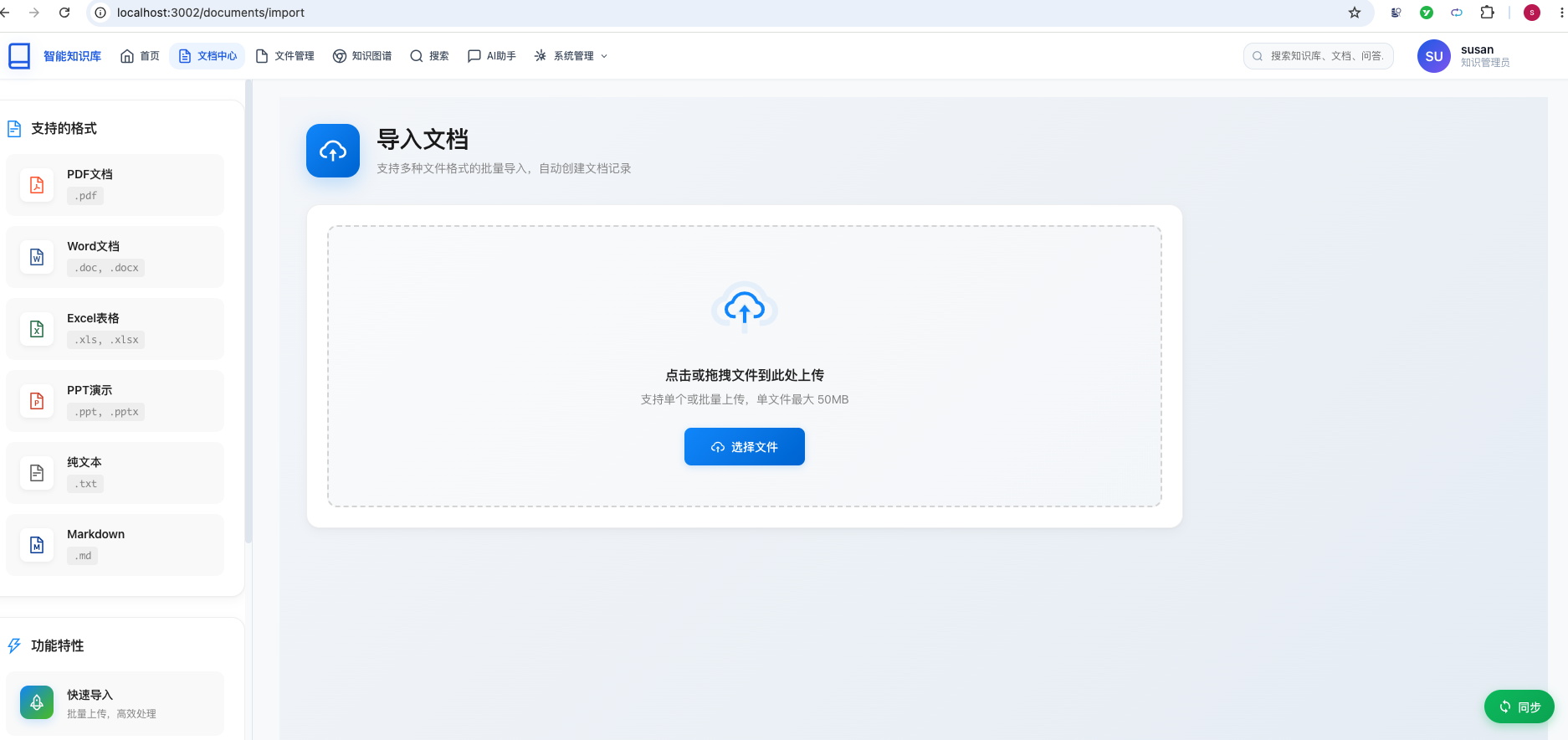
- 上传一个包含图片的 Markdown 文件
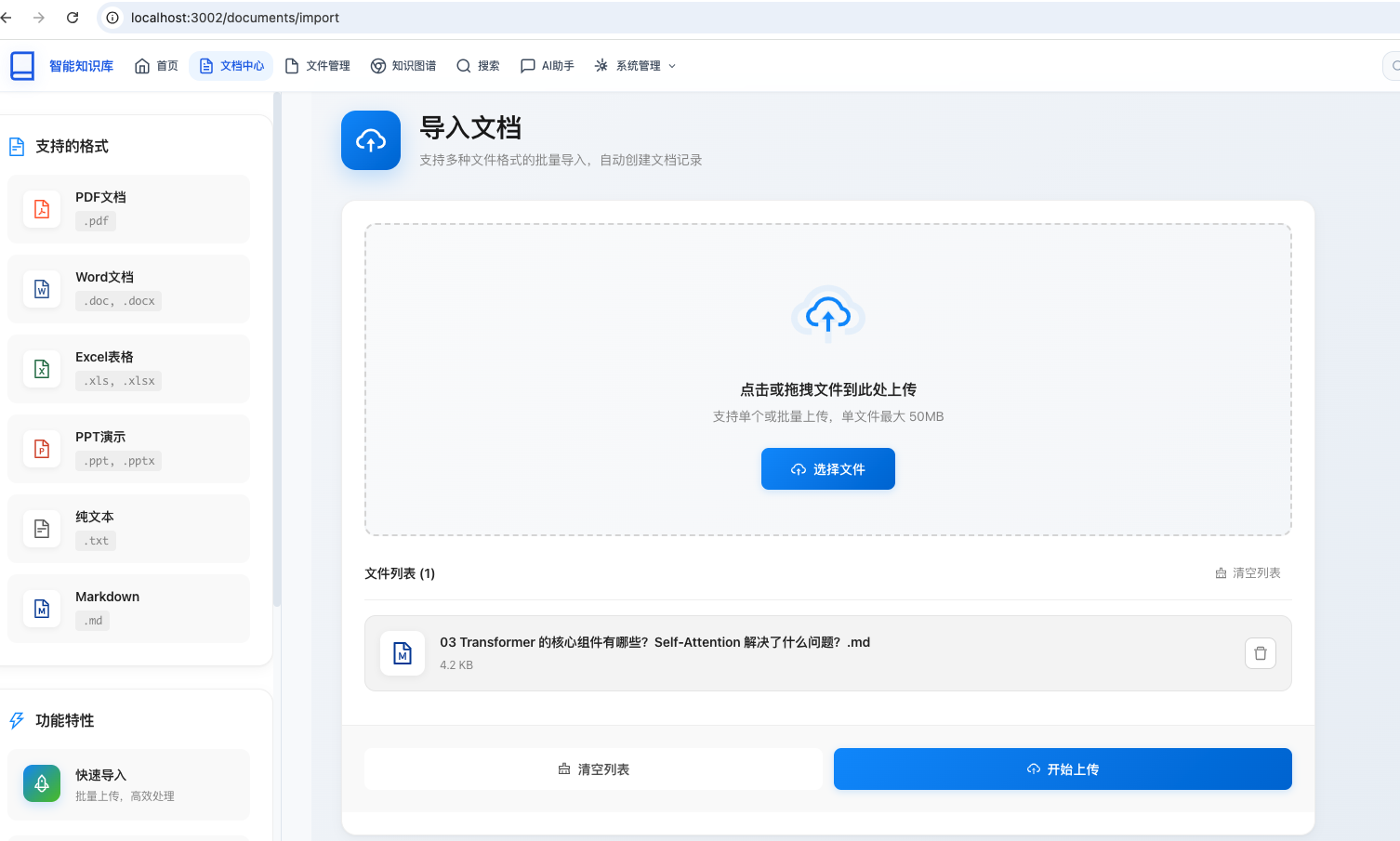
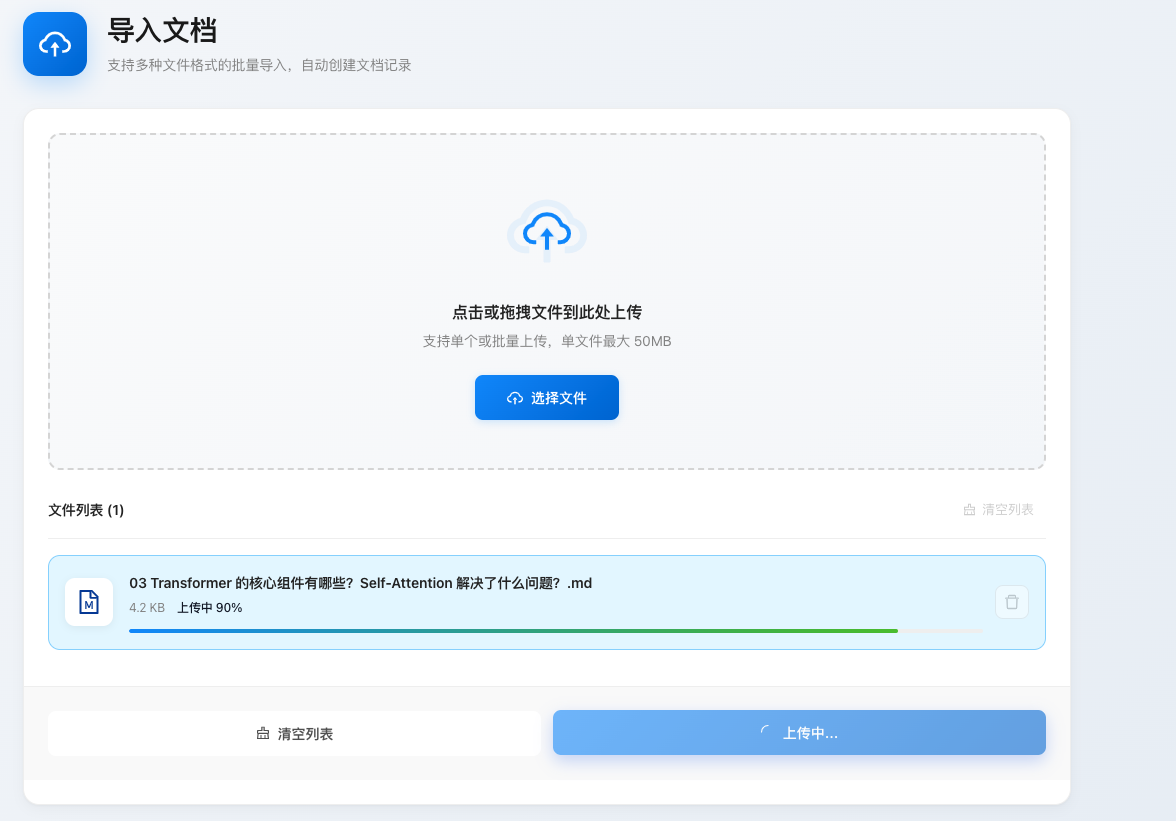
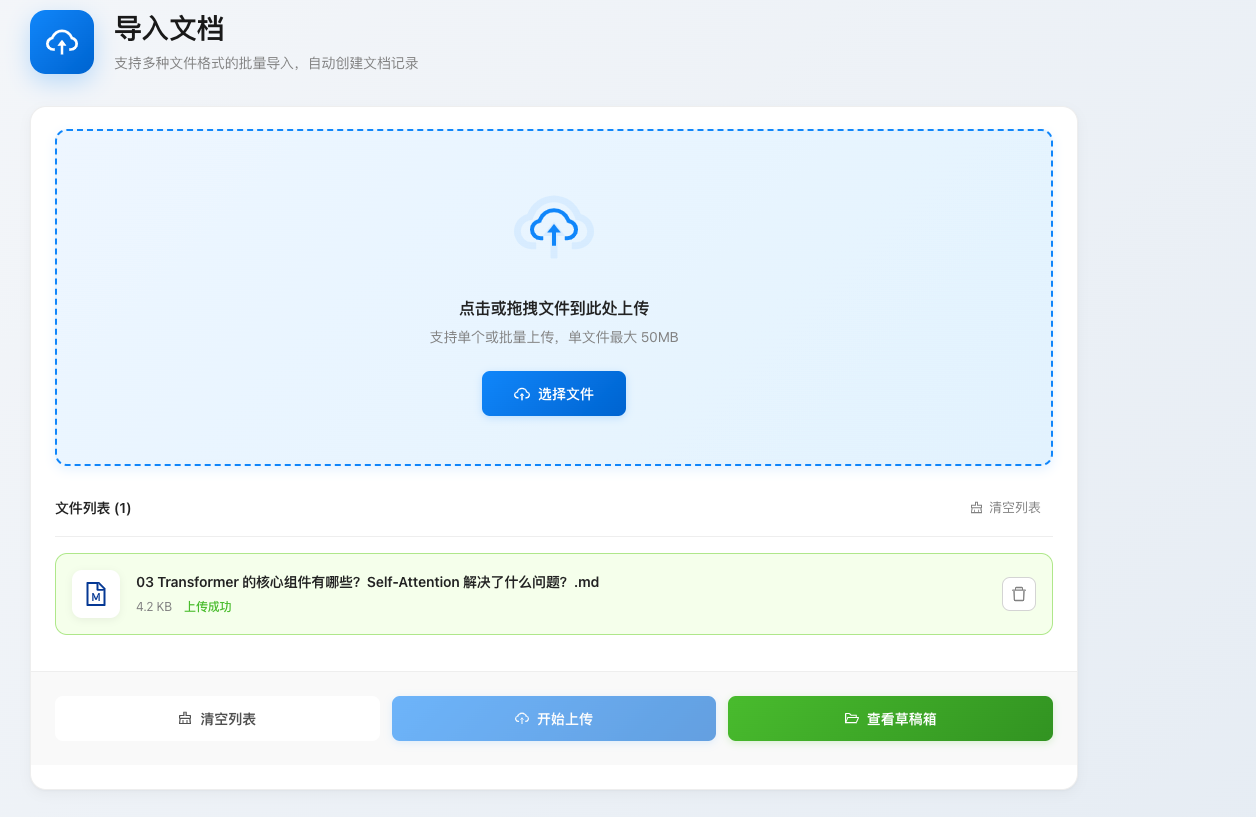
- 能够上传成功。
- 访问
草稿箱测试
- 访问
http://localhost:3002/drafts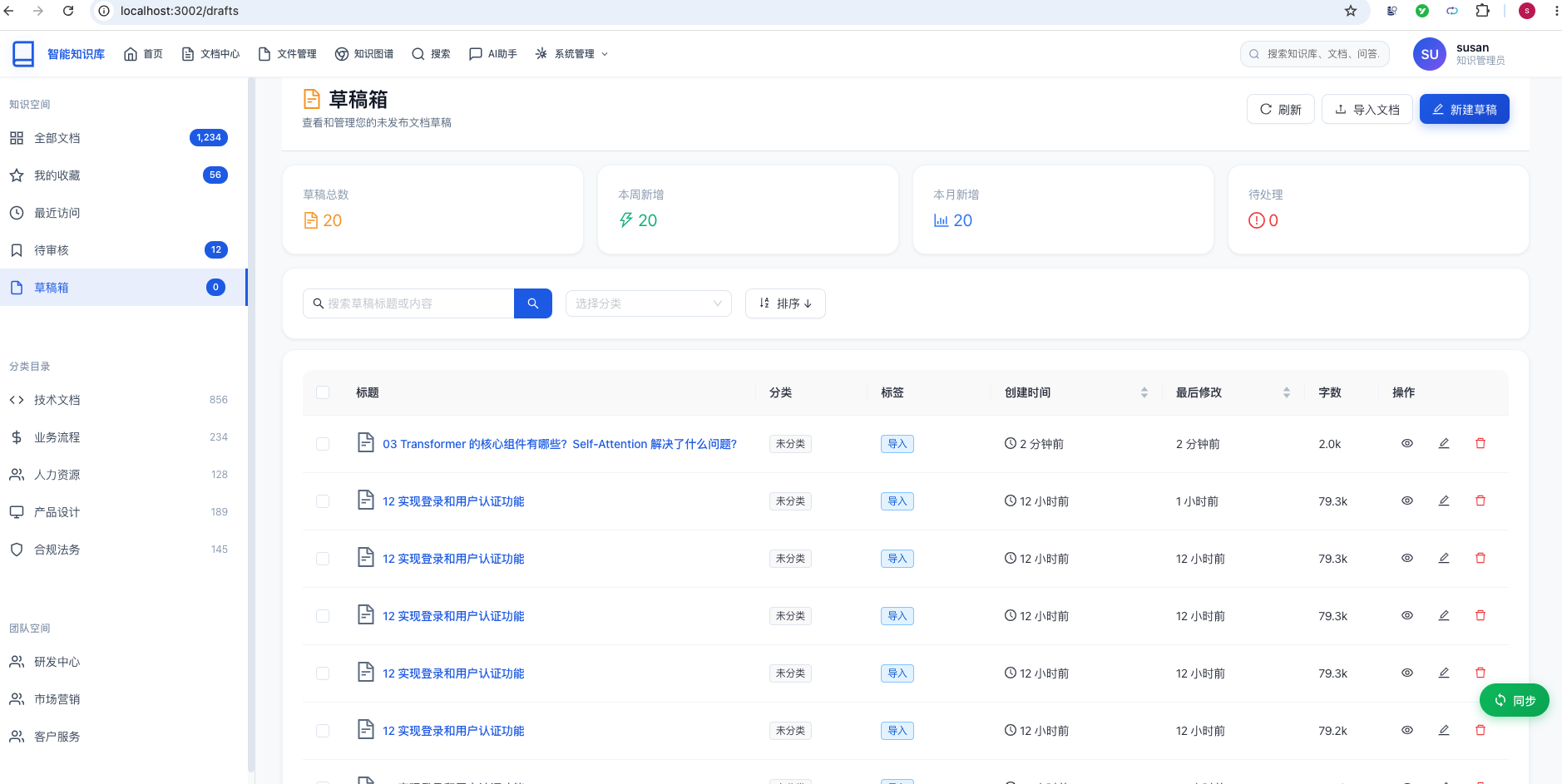
- 查看已导入的草稿文档
- 点击编辑按钮进入编辑页面
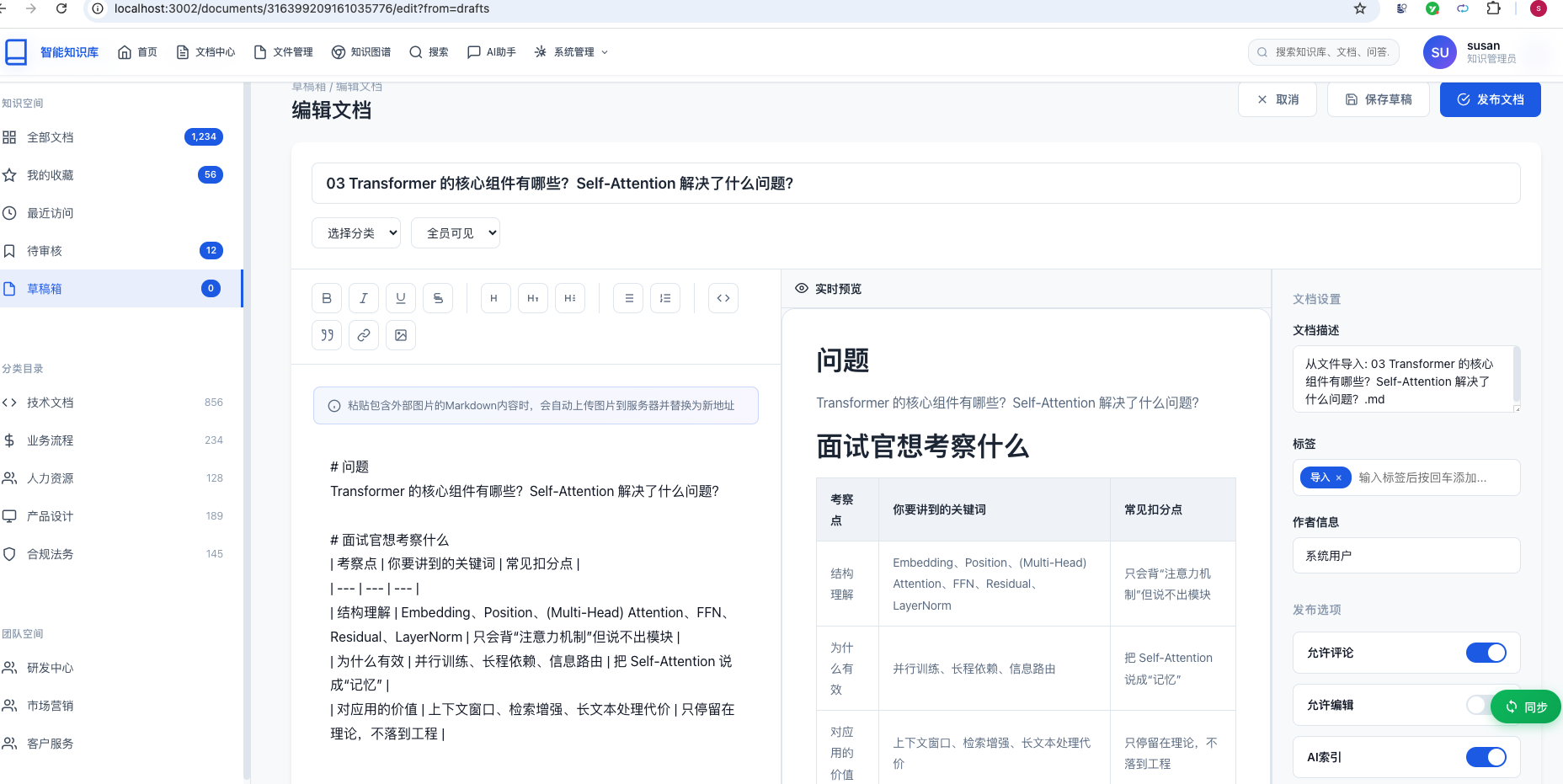
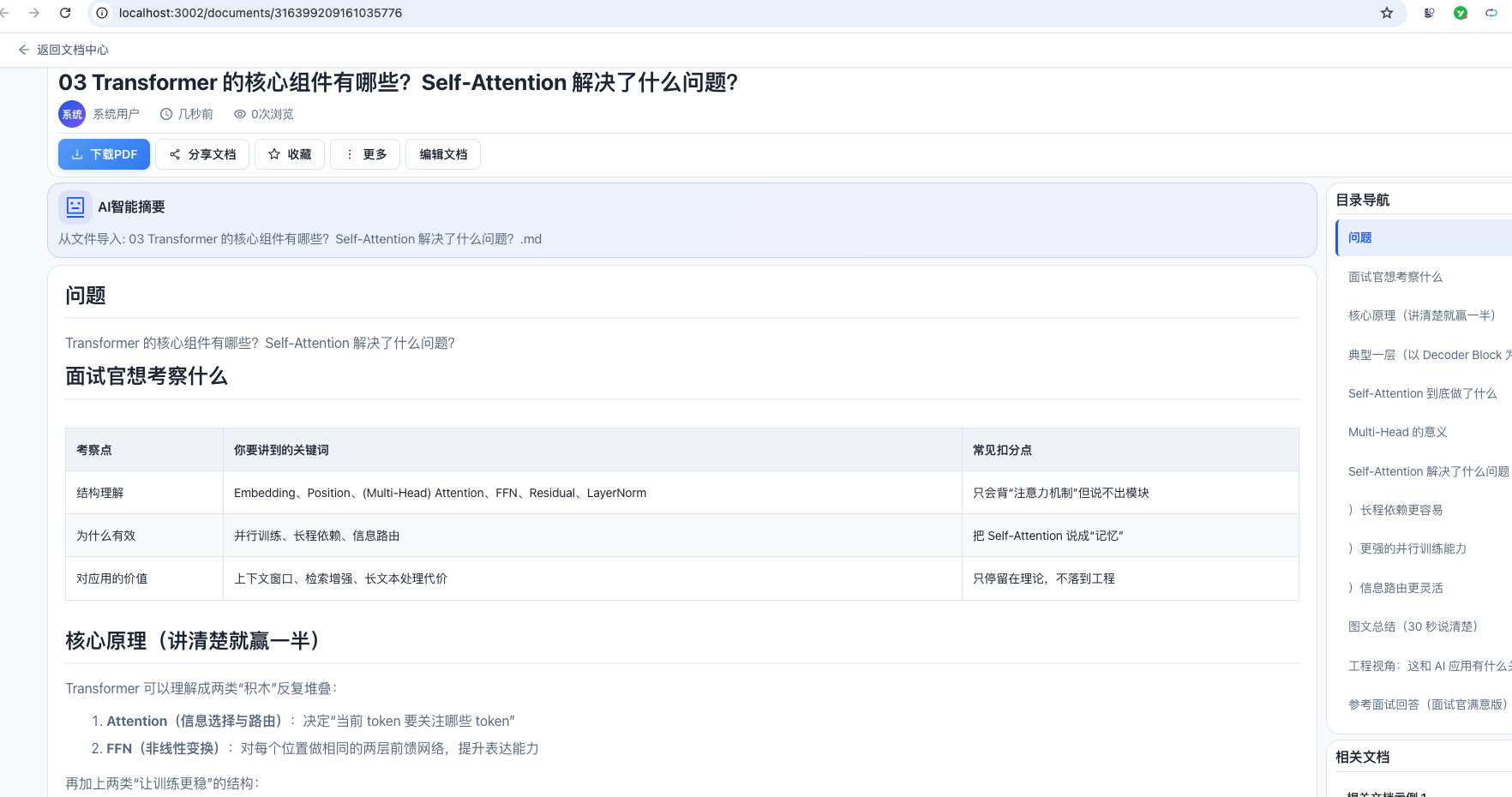
- 修改内容后保存或发布
- 访问
总结
本教程详细介绍了企业知识库系统中导入文档功能和草稿箱功能的完整实现方案,包括:
- 技术架构:采用前后端分离的微服务架构,前端基于 React + TypeScript + Ant Design,后端基于 Spring Boot + Feign,MySQL 存储元数据,MongoDB 存储文档内容
核心流程:
- 文档导入流程:上传 Markdown → 解析内容 → 下载并上传图片 → 保存元数据/内容 → 创建草稿
- 文档编辑流程:加载数据 → 编辑内容 → 实时预览 → 保存内容 → 更新状态
关键技术点:
- 文件上传:FormData + multipart/form-data,浏览器自动处理边界
- 图片处理:后端代理下载,避免跨域限制,支持降级处理
- 内容存储:MongoDB 存储文档内容,MySQL 存储元数据
- 实时预览:react-markdown 支持 Markdown 渲染和代码高亮
功能特性:
- 导入文档:支持 Markdown 文件上传、图片自动处理、导入进度显示
- 草稿箱:查看、编辑、删除草稿文档,支持搜索和筛选
- 编辑文档:左右分栏布局,实时预览,文档设置
按照本教程的代码实现,您将能够快速构建一个功能完整、界面美观的文档导入和草稿箱管理系统。
