一、概述
文档下载PDF和分享文档是知识库系统的核心用户功能。
PDF导出允许用户将Markdown格式的文档导出为排版精美的PDF文件,支持中文字体、代码块高亮、表格和图片渲染;
文档分享允许用户将文档通过链接分享给他人,支持密码保护、过期时间和访问次数限制。
本文将详细介绍如何从零开始开发这两个前后端完整的功能。
1.1 功能定位
| 功能模块 | 说明 | 使用场景 |
|---|---|---|
| PDF导出 | 将Markdown文档转换为PDF文件,支持代码块、表格、图片渲染 | 文档归档、离线阅读、打印输出 |
| 文档分享 | 创建文档分享链接,支持密码保护、过期时间、访问次数限制 | 团队协作、对外知识分享 |
1.2 功能流程
PDF导出流程:
  用户浏览文档 → 点击"下载PDF"按钮
    → 前端调用 /document/documents/{id}/download-pdf
    → 后端读取文档内容(MongoDB)
    → PDFBox渲染:标题、作者、摘要、代码块(One Dark Pro)、表格、图片
    → 返回PDF字节流 → 浏览器触发下载

文档分享流程:
  用户点击"分享文档" → 创建分享链接(设置密码/过期/次数限制)
    → 生成唯一shareId → 返回分享URL
    → 被分享者访问 /share/{shareId}
      ├── 无需密码 → 直接查看文档内容
      └── 需要密码 → 输入密码验证 → 查看文档内容
1.3 技术架构
PDF导出:
  前端:React + TypeScript + Ant Design(按钮触发下载)
  后端:Spring Boot 3.2 + Apache PDFBox 3.0 + 中文字体渲染
  技术点:Markdown解析(正则)、CJK字体宽度测量、动态分页、图片嵌入

文档分享:
  前端:React + TypeScript + Ant Design(分享弹窗 + 公开查看页)
  后端:Spring Boot 3.2 + MyBatis Plus + MySQL + MD5密码加密
  接口:认证接口 /document/documents/share/*,公开接口 /document/share/*

数据流向:
  PDF: Frontend → Gateway → kb-document → MongoDB(读取内容) + PDFBox(生成PDF) → 二进制流
  分享: Frontend → Gateway → kb-document → MySQL(kb_document_share表) → JSON响应
二、环境准备
2.1 添加PDFBox Maven依赖
在 kb-document/pom.xml 中添加Apache PDFBox依赖:
<!-- Apache PDFBox - PDF生成 -->
<dependency>
    <groupId>org.apache.pdfbox</groupId>
    <artifactId>pdfbox</artifactId>
    <version>3.0.1</version>
</dependency>
2.2 准备中文字体
PDFBox默认字体不支持中文,需要手动准备中文字体文件。将字体文件放在 kb-document/src/main/resources/fonts/ 目录下:
# 在 kb-document 模块下创建字体目录
mkdir -p kb-document/src/main/resources/fonts/

# macOS 系统字体路径(推荐使用 Arial Unicode.ttf,支持中日韩全部字符)
# 将字体文件复制到 resources/fonts/ 目录
cp "/System/Library/Fonts/Supplemental/Arial Unicode.ttf" \
kb-document/src/main/resources/fonts/注意:如果部署到Linux服务器,也可以使用文泉驿正黑(wqy-zenhei.ttc)或宋体(simsun.ttc)。PDF导出服务会自动从classpath和系统路径查找可用字体。
2.3 数据库准备
文档分享功能使用kb_document数据库,与文档核心服务共用同一数据库,无需创建新数据库。
三、数据库设计
3.1 文档分享表 (kb\_document\_share)
创建 sql/009_document_share.sql:
-- =====================================================
-- kb_document_share - 文档分享表
-- =====================================================

SET NAMES utf8mb4;
USE `kb_document`;
SET FOREIGN_KEY_CHECKS = 0;

DROP TABLE IF EXISTS `kb_document_share`;
CREATE TABLE `kb_document_share` (
  `id` BIGINT NOT NULL COMMENT '主键ID(雪花算法)',
  `share_id` VARCHAR(32) NOT NULL COMMENT '分享唯一标识',
  `document_id` BIGINT NOT NULL COMMENT '文档ID',
  `title` VARCHAR(255) DEFAULT NULL COMMENT '分享标题',
  `share_type` TINYINT DEFAULT 1 COMMENT '分享类型:1=公开链接,2=私信分享',
  `share_code` VARCHAR(32) DEFAULT NULL COMMENT '分享码(备用)',
  `expire_type` TINYINT DEFAULT 1 COMMENT '过期类型:1=永久有效,2=限时有效',
  `expire_time` DATETIME DEFAULT NULL COMMENT '过期时间',
  `access_limit` INT DEFAULT 0 COMMENT '访问次数限制:0=无限制',
  `access_count` INT DEFAULT 0 COMMENT '已访问次数',
  `require_password` TINYINT DEFAULT 0 COMMENT '是否需要密码:0=否,1=是',
  `password` VARCHAR(64) DEFAULT NULL COMMENT '访问密码(MD5加密)',
  `sharer_id` BIGINT NOT NULL COMMENT '分享人ID',
  `sharer_name` VARCHAR(64) DEFAULT NULL COMMENT '分享人名称',
  `description` VARCHAR(500) DEFAULT NULL COMMENT '分享描述',
  `status` TINYINT DEFAULT 0 COMMENT '状态:0=正常,1=已过期,2=已删除',
  `share_time` DATETIME DEFAULT NULL COMMENT '分享时间',
  `create_time` DATETIME NOT NULL DEFAULT CURRENT_TIMESTAMP COMMENT '创建时间',
  `update_time` DATETIME NOT NULL DEFAULT CURRENT_TIMESTAMP ON UPDATE CURRENT_TIMESTAMP COMMENT '更新时间',
  `create_by` BIGINT DEFAULT NULL COMMENT '创建人',
  `update_by` BIGINT DEFAULT NULL COMMENT '更新人',
  `deleted` TINYINT DEFAULT 0 COMMENT '逻辑删除标识',
  PRIMARY KEY (`id`),
  UNIQUE KEY `uk_share_id` (`share_id`),
  KEY `idx_document_id` (`document_id`),
  KEY `idx_sharer_id` (`sharer_id`),
  KEY `idx_status` (`status`),
  KEY `idx_share_time` (`share_time`)
) ENGINE=InnoDB DEFAULT CHARSET=utf8mb4 COLLATE=utf8mb4_unicode_ci COMMENT='文档分享表';

SELECT 'kb_document_share 表创建完成!' AS message;
设计要点:
share_id使用UUID生成12位唯一标识,作为分享链接的keypassword使用MD5加密存储,不保存明文密码access_limit和access_count配合实现访问次数控制status区分正常、已过期、已删除三种状态expire_type支持永久有效和限时有效两种模式- 索引覆盖常用查询字段:share\_id(精确查找)、document\_id(文档关联)、sharer\_id(用户分享列表)
四、PDF导出 - 后端实现
4.1 创建PDF导出服务接口
创建 PdfExportService.java:
package com.knowledge.base.document.service;

/**
 * PDF导出服务接口
 *
 * @author 苏三
 * @since 1.0.0
 */
public interface PdfExportService {

    /**
     * 导出文档为PDF并上传,返回下载URL
     *
     * @param documentId 文档ID
     * @return PDF下载URL
     */
    String exportDocumentToPdf(Long documentId);

    /**
     * 导出文档为PDF字节数组(用于直接下载)
     *
     * @param documentId 文档ID
     * @return PDF字节数组
     */
    byte[] exportDocumentToPdfBytes(Long documentId);

    /**
     * 生成PDF文件名
     *
     * @param documentId 文档ID
     * @param title 文档标题
     * @return 文件名
     */
    String generatePdfFileName(Long documentId, String title);
}
4.2 实现PDF导出服务
创建 PdfExportServiceImpl.java(核心实现类,约1000行,以下分模块讲解):
4.2.1 类声明和依赖注入
package com.knowledge.base.document.service.impl;

import cn.hutool.core.io.FileUtil;
import cn.hutool.http.HttpUtil;
import com.knowledge.base.common.exception.BusinessException;
import com.knowledge.base.document.entity.Category;
import com.knowledge.base.document.entity.Document;
import com.knowledge.base.document.mapper.CategoryMapper;
import com.knowledge.base.document.service.*;
import jakarta.annotation.Resource;
import lombok.extern.slf4j.Slf4j;
import org.apache.pdfbox.pdmodel.PDDocument;
import org.apache.pdfbox.pdmodel.PDPage;
import org.apache.pdfbox.pdmodel.PDPageContentStream;
import org.apache.pdfbox.pdmodel.common.PDRectangle;
import org.apache.pdfbox.pdmodel.font.PDType0Font;
import org.apache.pdfbox.pdmodel.font.PDType1Font;
import org.apache.pdfbox.pdmodel.graphics.image.PDImageXObject;
import org.springframework.beans.factory.annotation.Value;
import org.springframework.stereotype.Service;

import java.awt.Color;
import java.awt.image.BufferedImage;
import java.io.ByteArrayOutputStream;
import java.io.IOException;
import java.io.InputStream;
import java.net.URL;
import java.nio.file.Files;
import java.nio.file.Path;
import java.nio.file.Paths;
import java.time.LocalDateTime;
import java.time.format.DateTimeFormatter;
import java.util.ArrayList;
import java.util.List;
import java.util.regex.Matcher;
import java.util.regex.Pattern;

/**
 * PDF导出服务实现类
 *
 * <p>使用Apache PDFBox将文档内容转换为PDF格式</p>
 *
 * @author 苏三
 * @since 1.0.0
 */
@Slf4j
@Service
public class PdfExportServiceImpl implements PdfExportService {

    @Resource
    private DocumentService documentService;

    @Resource
    private DocumentContentService documentContentService;

    @Resource
    private FileUploadService fileUploadService;

    @Resource
    private CategoryMapper categoryMapper;

    @Value("${file.upload.path:/data/knowledge-base/uploads}")
    private String uploadPath;
4.2.2 常量和配置
    // ==================== 布局常量 ====================
    private static final float MARGIN = 50;          // 页面边距
    private static final float LINE_HEIGHT = 20;     // 行高
    private static final float FONT_SIZE = 12;       // 正文字号
    private static final float TITLE_FONT_SIZE = 18; // 标题字号
    private static final float SUBTITLE_FONT_SIZE = 10; // 副标题字号
    private static final float CODE_FONT_SIZE = 9;   // 代码字号
    private static final float CODE_LINE_HEIGHT = 14; // 代码行高

    // ==================== One Dark Pro 代码块配色 ====================
    private static final Color CODE_BG = new Color(40, 44, 52);       // 深色背景
    private static final Color CODE_BORDER = new Color(62, 68, 81);   // 边框颜色
    private static final Color CODE_HEADER_BG = new Color(33, 37, 43); // 顶部语言栏
    private static final Color CODE_TEXT = new Color(171, 178, 191);   // 代码文字颜色
    private static final Color TABLE_HEADER_BG = new Color(240, 242, 245); // 表头背景
    private static final Color TABLE_BORDER = new Color(200, 200, 200);    // 表格边框

    // ==================== Markdown解析正则 ====================
    private static final Pattern MARKDOWN_HEADING = Pattern.compile("^(#{1,6})\\s+(.+)$");
    private static final Pattern MARKDOWN_BOLD = Pattern.compile("\\*\\*(.+?)\\*\\*");
    private static final Pattern MARKDOWN_ITALIC = Pattern.compile("\\*(.+?)\\*");
    private static final Pattern MARKDOWN_LINK = Pattern.compile("\\[(.+?)\\]\\((.+?)\\)");
    private static final Pattern MARKDOWN_IMAGE = Pattern.compile("!\\[([^\\]]*)\\]\\(([^)]+)\\)");

    // ==================== 中文字体查找路径(按优先级排序)====================
    private static final String[] CHINESE_FONT_PATHS = {
            "/System/Library/Fonts/Supplemental/Arial Unicode.ttf",  // macOS
            "/Library/Fonts/Songti.ttc",                             // macOS 宋体
            "/usr/share/fonts/truetype/wqy/wqy-zenhei.ttc",         // Linux 文泉驿
            "C:\\Windows\\Fonts\\simsun.ttc",                        // Windows 宋体
            "C:\\Windows\\Fonts\\simhei.ttf"                         // Windows 黑体
    };
4.2.3 核心生成方法
    @Override
    public byte[] exportDocumentToPdfBytes(Long documentId) {
        Document document = documentService.getById(documentId);
        if (document == null) {
            throw new BusinessException("文档不存在");
        }

        // 从MongoDB读取文档Markdown内容
        var documentContent = documentContentService.getContentById(document.getContentId());
        String content = documentContent != null ? documentContent.getContent() : "";
        if (content == null || content.isEmpty()) {
            content = "";
        }

        String categoryName = resolveCategoryName(document.getCategoryId());
        return generatePdf(document.getTitle(), content, document.getAuthorName(),
                categoryName, document.getSummary(), document.getPublishTime());
    }

    @Override
    public String generatePdfFileName(Long documentId, String title) {
        String safeTitle = FileUtil.mainName(FileUtil.cleanInvalid(title));
        if (safeTitle == null || safeTitle.isEmpty()) {
            safeTitle = "document";
        }
        if (safeTitle.length() > 50) {
            safeTitle = safeTitle.substring(0, 50);
        }
        String timestamp = LocalDateTime.now()
                .format(DateTimeFormatter.ofPattern("yyyyMMddHHmmss"));
        return String.format("%s_%s.pdf", safeTitle, timestamp);
    }
4.2.4 PDF生成主流程
    private byte[] generatePdf(String title, String content, String author,
            String categoryName, String summary, LocalDateTime publishTime) {
        try (PDDocument document = new PDDocument();
             ByteArrayOutputStream outputStream = new ByteArrayOutputStream()) {

            PDPage page = new PDPage(PDRectangle.A4);
            document.addPage(page);

            float yPosition = page.getMediaBox().getHeight() - MARGIN;
            float pageWidth = page.getMediaBox().getWidth() - 2 * MARGIN;
            boolean isFirstPage = true;

            // 加载中文字体(优先classpath资源,回退系统路径)
            PDType0Font chineseFont = null;
            try {
                chineseFont = loadChineseFont(document);
            } catch (Exception e) {
                log.warn("无法加载中文字体,将使用默认字体:{}", e.getMessage());
            }

            PDPageContentStream contentStream = new PDPageContentStream(
                    document, page, PDPageContentStream.AppendMode.OVERWRITE, true, true);

            // ===== 文档头部:标题、作者、摘要 =====
            if (isFirstPage) {
                // 标题(支持自动换行)
                String displayTitle = title != null ? title : "无标题文档";
                List<String> wrappedTitle = wrapTextByWidth(displayTitle, pageWidth,
                        chineseFont, TITLE_FONT_SIZE);
                for (String titleLine : wrappedTitle) {
                    contentStream.beginText();
                    contentStream.setFont(chineseFont, TITLE_FONT_SIZE);
                    contentStream.newLineAtOffset(MARGIN, yPosition);
                    contentStream.showText(titleLine);
                    contentStream.endText();
                    yPosition -= LINE_HEIGHT * 1.5f;
                }
                yPosition -= LINE_HEIGHT * 0.5f;

                // 副标题:作者 | 分类 | 发布时间
                String subtitle = buildSubtitle(author, categoryName, publishTime);
                List<String> wrappedSubtitle = wrapTextByWidth(subtitle, pageWidth,
                        chineseFont, SUBTITLE_FONT_SIZE);
                for (String subLine : wrappedSubtitle) {
                    contentStream.beginText();
                    contentStream.setFont(chineseFont, SUBTITLE_FONT_SIZE);
                    contentStream.newLineAtOffset(MARGIN, yPosition);
                    contentStream.showText(subLine);
                    contentStream.endText();
                    yPosition -= LINE_HEIGHT;
                }
                yPosition -= LINE_HEIGHT;

                // 摘要
                if (summary != null && !summary.isEmpty()) {
                    String shortSummary = summary.length() > 200
                            ? summary.substring(0, 200) + "..." : summary;
                    List<String> wrappedSummary = wrapTextByWidth(shortSummary, pageWidth,
                            chineseFont, SUBTITLE_FONT_SIZE);
                    for (String summaryLine : wrappedSummary) {
                        contentStream.beginText();
                        contentStream.setFont(chineseFont, SUBTITLE_FONT_SIZE);
                        contentStream.newLineAtOffset(MARGIN, yPosition);
                        contentStream.showText(summaryLine);
                        contentStream.endText();
                        yPosition -= LINE_HEIGHT;
                    }
                }

                yPosition -= LINE_HEIGHT * 2;
                isFirstPage = false;
            }

            // ===== 逐行解析Markdown内容 =====
            String[] lines = content.split("\n");
            for (int i = 0; i < lines.length; i++) {
                String line = lines[i];

                // 代码块处理
                if (line.trim().startsWith("```")) {
                    String codeLang = line.trim().substring(3).trim();
                    List<String> codeLines = new ArrayList<>();
                    i++;
                    while (i < lines.length && !lines[i].trim().startsWith("```")) {
                        codeLines.add(lines[i]);
                        i++;
                    }
                    if (!codeLines.isEmpty()) {
                        RenderResult result = renderCodeBlock(
                                contentStream, document, page, codeLines, codeLang,
                                chineseFont, yPosition, pageWidth, MARGIN);
                        yPosition = result.yPosition;
                        contentStream = result.contentStream;
                        page = result.page;
                    }
                    continue;
                }

                // 表格处理
                if (i + 2 < lines.length && isTableRow(line.trim())
                        && isTableSeparator(lines[i + 1].trim())) {
                    List<String[]> tableData = new ArrayList<>();
                    tableData.add(parseTableRow(line.trim()));
                    i++; // 跳过分隔符行
                    i++;
                    while (i < lines.length && isTableRow(lines[i].trim())) {
                        tableData.add(parseTableRow(lines[i].trim()));
                        i++;
                    }
                    i--;
                    RenderResult result = renderTable(contentStream, document, page,
                            tableData, chineseFont, yPosition, pageWidth, MARGIN);
                    yPosition = result.yPosition;
                    contentStream = result.contentStream;
                    page = result.page;
                    continue;
                }

                // 翻页检测
                if (yPosition < MARGIN + LINE_HEIGHT * 2) {
                    contentStream.close();
                    page = new PDPage(PDRectangle.A4);
                    document.addPage(page);
                    contentStream = new PDPageContentStream(document, page,
                            PDPageContentStream.AppendMode.OVERWRITE, true, true);
                    yPosition = page.getMediaBox().getHeight() - MARGIN;
                }

                // 标题
                Matcher headingMatcher = MARKDOWN_HEADING.matcher(line.trim());
                if (headingMatcher.matches()) {
                    int level = headingMatcher.group(1).length();
                    float headingFontSize = TITLE_FONT_SIZE - (level - 1) * 2;
                    String headingText = headingMatcher.group(2);
                    List<String> wrappedHeading = wrapTextByWidth(headingText, pageWidth,
                            chineseFont, headingFontSize);
                    for (String headingLine : wrappedHeading) {
                        contentStream.beginText();
                        contentStream.setFont(chineseFont, headingFontSize);
                        contentStream.newLineAtOffset(MARGIN, yPosition);
                        contentStream.showText(headingLine);
                        contentStream.endText();
                        yPosition -= LINE_HEIGHT * 1.3f;
                    }
                    yPosition -= LINE_HEIGHT * 0.2f;
                    continue;
                }

                // 图片
                Matcher imageMatcher = MARKDOWN_IMAGE.matcher(line);
                if (imageMatcher.find()) {
                    String imageUrl = imageMatcher.group(2);
                    String imageAlt = imageMatcher.group(1);
                    RenderResult result = renderImage(contentStream, document, page,
                            imageUrl, imageAlt, yPosition, pageWidth, MARGIN);
                    yPosition = result.yPosition;
                    contentStream = result.contentStream;
                    page = result.page;
                    continue;
                }

                // 空行
                if (line.trim().isEmpty()) {
                    yPosition -= LINE_HEIGHT * 0.5f;
                    continue;
                }

                // 普通文本段落
                String plainText = extractPlainText(line);
                if (plainText.length() > 0) {
                    List<String> wrappedLines = wrapTextByWidth(plainText, pageWidth,
                            chineseFont, FONT_SIZE);
                    for (String wrappedLine : wrappedLines) {
                        if (yPosition < MARGIN + LINE_HEIGHT) {
                            contentStream.close();
                            page = new PDPage(PDRectangle.A4);
                            document.addPage(page);
                            contentStream = new PDPageContentStream(document, page,
                                    PDPageContentStream.AppendMode.OVERWRITE, true, true);
                            yPosition = page.getMediaBox().getHeight() - MARGIN;
                        }
                        contentStream.beginText();
                        contentStream.setFont(chineseFont, FONT_SIZE);
                        contentStream.newLineAtOffset(MARGIN, yPosition);
                        contentStream.showText(wrappedLine);
                        contentStream.endText();
                        yPosition -= LINE_HEIGHT;
                    }
                }
            }

            contentStream.close();
            document.save(outputStream);
            return outputStream.toByteArray();

        } catch (IOException e) {
            log.error("生成PDF失败", e);
            throw new BusinessException("生成PDF失败:" + e.getMessage());
        }
    }
4.2.5 中文字体加载
    /**
     * 加载中文字体(优先classpath资源,回退系统路径)
     */
    private PDType0Font loadChineseFont(PDDocument document) throws IOException {
        // 优先从classpath资源文件加载
        try (InputStream is = getClass().getResourceAsStream("/fonts/Arial Unicode.ttf")) {
            if (is != null) {
                log.info("从classpath资源加载中文字体:Arial Unicode.ttf");
                return PDType0Font.load(document, is);
            }
        }
        // 备用classpath资源
        try (InputStream is = getClass().getResourceAsStream("/fonts/simsun.ttc")) {
            if (is != null) {
                log.info("从classpath资源加载中文字体:simsun.ttc");
                return PDType0Font.load(document, is);
            }
        }
        // 回退:从系统字体路径加载
        for (String fontPath : CHINESE_FONT_PATHS) {
            Path path = Paths.get(fontPath);
            if (Files.exists(path)) {
                log.info("从系统路径加载中文字体:{}", fontPath);
                return PDType0Font.load(document, path.toFile());
            }
        }
        throw new IOException("未找到可用的中文字体");
    }
4.2.6 代码块渲染(One Dark Pro风格)
    /**
     * 渲染代码块:One Dark Pro 深色主题
     */
    private RenderResult renderCodeBlock(PDPageContentStream contentStream,
            PDDocument document, PDPage page, List<String> codeLines,
            String language, PDType0Font chineseFont,
            float yPosition, float pageWidth, float marginX) throws IOException {

        float headerHeight = 28;
        float paddingTop = 8;
        float paddingBottom = 12;
        float codeMaxWidth = pageWidth - 24;

        // 计算总行数(考虑代码行自动换行)
        int totalLines = 0;
        for (String codeLine : codeLines) {
            String replacedLine = codeLine.replace("\t", "    ");
            List<String> wrapped = wrapTextByWidth(replacedLine, codeMaxWidth,
                    chineseFont, CODE_FONT_SIZE);
            totalLines += wrapped.size();
        }

        float totalHeight = headerHeight + paddingTop
                + (totalLines * CODE_LINE_HEIGHT) + paddingBottom;

        // 代码块放不下则换页
        if (yPosition - totalHeight < marginX) {
            contentStream.close();
            page = new PDPage(PDRectangle.A4);
            document.addPage(page);
            contentStream = new PDPageContentStream(document, page,
                    PDPageContentStream.AppendMode.OVERWRITE, true, true);
            yPosition = page.getMediaBox().getHeight() - marginX;
        }

        float blockBottom = yPosition - totalHeight;

        // 深色背景
        contentStream.setNonStrokingColor(CODE_BG);
        contentStream.addRect(marginX, blockBottom, pageWidth, totalHeight);
        contentStream.fill();

        // 边框
        contentStream.setStrokingColor(CODE_BORDER);
        contentStream.setLineWidth(0.5f);
        contentStream.addRect(marginX, blockBottom, pageWidth, totalHeight);
        contentStream.stroke();

        // 顶部语言标签栏
        contentStream.setNonStrokingColor(CODE_HEADER_BG);
        contentStream.addRect(marginX, yPosition - headerHeight, pageWidth, headerHeight);
        contentStream.fill();

        String langLabel = (language != null && !language.isEmpty())
                ? language.toUpperCase() : "CODE";
        contentStream.beginText();
        contentStream.setNonStrokingColor(CODE_TEXT);
        contentStream.setFont(chineseFont, 8);
        contentStream.newLineAtOffset(marginX + 12, yPosition - 19);
        contentStream.showText(langLabel);
        contentStream.endText();

        // 代码文本行
        float textY = yPosition - headerHeight - paddingTop - CODE_LINE_HEIGHT;
        for (String codeLine : codeLines) {
            String replacedLine = codeLine.replace("\t", "    ");
            List<String> wrappedLines = wrapTextByWidth(replacedLine, codeMaxWidth,
                    chineseFont, CODE_FONT_SIZE);
            for (String wrappedLine : wrappedLines) {
                contentStream.beginText();
                contentStream.setNonStrokingColor(CODE_TEXT);
                contentStream.setFont(chineseFont, CODE_FONT_SIZE);
                contentStream.newLineAtOffset(marginX + 12, textY);
                contentStream.showText(wrappedLine);
                contentStream.endText();
                textY -= CODE_LINE_HEIGHT;
            }
        }

        contentStream.setStrokingColor(0, 0, 0);
        contentStream.setNonStrokingColor(0, 0, 0);

        return new RenderResult(contentStream, page, blockBottom - 8);
    }
4.2.7 表格渲染(动态行高)
    /**
     * 渲染表格:动态行高 + 单元格自动换行
     */
    private RenderResult renderTable(PDPageContentStream contentStream,
            PDDocument document, PDPage page, List<String[]> rows,
            PDType0Font chineseFont, float yPosition,
            float pageWidth, float marginX) throws IOException {

        if (rows.isEmpty()) {
            return new RenderResult(contentStream, page, yPosition);
        }

        int colCount = rows.get(0).length;
        float colWidth = pageWidth / colCount;
        float cellMaxWidth = colWidth - 10;
        float cellFontSize = FONT_SIZE - 1;
        float cellLineHeight = LINE_HEIGHT - 2;
        float cellPaddingTop = 5;
        float cellPaddingBottom = 5;

        // 第一遍:计算每行换行后的文本和实际高度
        List<List<List<String>>> allWrappedRows = new ArrayList<>();
        List<Float> rowHeights = new ArrayList<>();

        for (String[] row : rows) {
            List<List<String>> wrappedRow = new ArrayList<>();
            int maxLines = 1;
            for (int col = 0; col < Math.min(row.length, colCount); col++) {
                String cell = row[col] != null ? row[col].trim() : "";
                List<String> wrappedLines = wrapTextByWidth(cell, cellMaxWidth,
                        chineseFont, cellFontSize);
                if (wrappedLines.isEmpty()) {
                    wrappedLines = new ArrayList<>();
                    wrappedLines.add("");
                }
                wrappedRow.add(wrappedLines);
                maxLines = Math.max(maxLines, wrappedLines.size());
            }
            allWrappedRows.add(wrappedRow);
            rowHeights.add(maxLines * cellLineHeight + cellPaddingTop + cellPaddingBottom);
        }

        // 计算总高度
        float totalHeight = 0;
        for (float h : rowHeights) {
            totalHeight += h;
        }

        // 表格放不下则换页
        if (yPosition - totalHeight < marginX) {
            contentStream.close();
            page = new PDPage(PDRectangle.A4);
            document.addPage(page);
            contentStream = new PDPageContentStream(document, page,
                    PDPageContentStream.AppendMode.OVERWRITE, true, true);
            yPosition = page.getMediaBox().getHeight() - marginX;
        }

        float tableBottom = yPosition - totalHeight;
        float currentY = yPosition;

        // 第二遍:逐行绘制
        for (int r = 0; r < rows.size(); r++) {
            List<List<String>> wrappedRow = allWrappedRows.get(r);
            float rowHeight = rowHeights.get(r);
            boolean isHeader = (r == 0);

            // 表头背景
            if (isHeader) {
                contentStream.setNonStrokingColor(TABLE_HEADER_BG);
                contentStream.addRect(marginX, currentY - rowHeight,
                        pageWidth, rowHeight);
                contentStream.fill();
            }

            // 画单元格文字
            for (int col = 0; col < wrappedRow.size(); col++) {
                List<String> lines = wrappedRow.get(col);
                float textY = currentY - cellPaddingTop - cellLineHeight;
                for (String line : lines) {
                    contentStream.beginText();
                    contentStream.setNonStrokingColor(0, 0, 0);
                    contentStream.setFont(chineseFont, cellFontSize);
                    contentStream.newLineAtOffset(marginX + col * colWidth + 5, textY);
                    contentStream.showText(line);
                    contentStream.endText();
                    textY -= cellLineHeight;
                }
            }
            currentY -= rowHeight;
        }

        // 绘制网格线
        contentStream.setStrokingColor(TABLE_BORDER);
        contentStream.setLineWidth(0.5f);
        float lineY = yPosition;
        for (float h : rowHeights) {
            contentStream.moveTo(marginX, lineY);
            contentStream.lineTo(marginX + pageWidth, lineY);
            lineY -= h;
        }
        contentStream.moveTo(marginX, lineY);
        contentStream.lineTo(marginX + pageWidth, lineY);
        for (int col = 0; col <= colCount; col++) {
            contentStream.moveTo(marginX + col * colWidth, yPosition);
            contentStream.lineTo(marginX + col * colWidth, tableBottom);
        }
        contentStream.stroke();

        contentStream.setStrokingColor(0, 0, 0);
        contentStream.setNonStrokingColor(0, 0, 0);

        return new RenderResult(contentStream, page, tableBottom - 12);
    }
4.2.8 图片渲染
    /**
     * 从URL或本地路径下载图片并嵌入PDF
     */
    private RenderResult renderImage(PDPageContentStream contentStream,
            PDDocument document, PDPage page, String imageUrl, String imageAlt,
            float yPosition, float pageWidth, float marginX) throws IOException {

        float maxImageWidth = pageWidth - 20;
        float maxImageHeight = 400;

        try {
            byte[] imageBytes = downloadImage(imageUrl);
            if (imageBytes == null || imageBytes.length == 0) {
                return new RenderResult(contentStream, page, yPosition - LINE_HEIGHT);
            }

            BufferedImage bufferedImage = javax.imageio.ImageIO.read(
                    new java.io.ByteArrayInputStream(imageBytes));
            if (bufferedImage == null) {
                return new RenderResult(contentStream, page, yPosition - LINE_HEIGHT);
            }

            // 等比缩放
            float ratio = Math.min(
                    maxImageWidth / bufferedImage.getWidth(),
                    maxImageHeight / bufferedImage.getHeight());
            float drawWidth = bufferedImage.getWidth() * ratio;
            float drawHeight = bufferedImage.getHeight() * ratio;

            // 图片放不下则换页
            if (yPosition - drawHeight < marginX) {
                contentStream.close();
                page = new PDPage(PDRectangle.A4);
                document.addPage(page);
                contentStream = new PDPageContentStream(document, page,
                        PDPageContentStream.AppendMode.OVERWRITE, true, true);
                yPosition = page.getMediaBox().getHeight() - marginX;
            }

            // 居中绘制
            float imageX = marginX + (pageWidth - drawWidth) / 2;
            PDImageXObject pdImage = PDImageXObject.createFromByteArray(
                    document, imageBytes, imageAlt);
            contentStream.drawImage(pdImage, imageX,
                    yPosition - drawHeight, drawWidth, drawHeight);

            return new RenderResult(contentStream, page,
                    yPosition - drawHeight - LINE_HEIGHT);

        } catch (Exception e) {
            log.error("图片渲染失败:url={}", imageUrl, e);
            return new RenderResult(contentStream, page, yPosition - LINE_HEIGHT);
        }
    }

    /**
     * 下载图片(支持HTTP URL和本地路径)
     */
    private byte[] downloadImage(String imageUrl) {
        if (imageUrl == null || imageUrl.isEmpty()) {
            return null;
        }
        try {
            if (imageUrl.startsWith("http://") || imageUrl.startsWith("https://")) {
                return HttpUtil.downloadBytes(imageUrl);
            } else {
                Path localPath = Paths.get(imageUrl);
                if (Files.exists(localPath)) {
                    return Files.readAllBytes(localPath);
                }
            }
        } catch (Exception e) {
            log.error("下载图片失败:url={}", imageUrl, e);
        }
        return null;
    }
4.2.9 文本宽度测量和自动换行
这是PDF导出中最重要的工具方法,确保中文字符不会溢出页面边界:
    /**
     * 按实际字体宽度将文本分行,确保每行不超出页面宽度
     */
    private List<String> wrapTextByWidth(String text, float maxWidth,
            PDType0Font chineseFont, float fontSize) {
        List<String> result = new ArrayList<>();
        if (text == null || text.isEmpty()) {
            return result;
        }

        text = text.replace("\t", "    ");

        StringBuilder currentLine = new StringBuilder();
        for (int i = 0; i < text.length(); i++) {
            char c = text.charAt(i);
            String testLine = currentLine.toString() + c;
            float lineWidth = measureTextWidth(testLine, chineseFont, fontSize);

            if (lineWidth > maxWidth && currentLine.length() > 0) {
                result.add(currentLine.toString());
                currentLine = new StringBuilder();
                if (c == ' ') {
                    continue; // 跳过行首空格
                }
            }
            currentLine.append(c);
        }

        if (currentLine.length() > 0) {
            result.add(currentLine.toString());
        }
        return result;
    }

    /**
     * 使用字体实际测量文本宽度(单位:pt)
     * 当chineseFont为null时,自动估算CJK字符宽度
     */
    private float measureTextWidth(String text, PDType0Font chineseFont,
            float fontSize) {
        if (text == null || text.isEmpty()) {
            return 0;
        }
        try {
            if (chineseFont != null) {
                // PDFBox字体字符串宽度 = getStringWidth() / 1000 * fontSize
                return chineseFont.getStringWidth(text) / 1000f * fontSize;
            } else {
                // 回退字体不支持中文,手动估算CJK字符宽度
                float totalWidth = 0;
                for (int i = 0; i < text.length(); i++) {
                    char c = text.charAt(i);
                    if (isCJKCharacter(c)) {
                        totalWidth += fontSize; // CJK全角字符 ≈ 1em
                    } else {
                        totalWidth += PDType1Font.HELVETICA
                                .getStringWidth(String.valueOf(c)) / 1000f * fontSize;
                    }
                }
                return totalWidth;
            }
        } catch (IOException e) {
            // 测量失败时回退估算
            float width = 0;
            for (int i = 0; i < text.length(); i++) {
                width += isCJKCharacter(text.charAt(i)) ? fontSize : fontSize * 0.55f;
            }
            return width;
        }
    }

    /**
     * 判断字符是否为CJK(中日韩)全角字符
     */
    private boolean isCJKCharacter(char c) {
        if (c >= 0x2E80 && c <= 0x2EFF) return true; // CJK部首补充
        if (c >= 0x2F00 && c <= 0x2FDF) return true; // 康熙部首
        if (c >= 0x3000 && c <= 0x303F) return true; // CJK符号和标点
        if (c >= 0x3400 && c <= 0x4DBF) return true; // CJK扩展A
        if (c >= 0x4E00 && c <= 0x9FFF) return true; // CJK统一表意文字
        if (c >= 0xF900 && c <= 0xFAFF) return true; // CJK兼容表意文字
        if (c >= 0xFF00 && c <= 0xFFEF) return true; // 全角形式
        if (c == '\u2018' || c == '\u2019' || c == '\u201c' || c == '\u201d')
            return true; // 中文引号
        if (c == '\u2014' || c == '\u2015') return true; // 破折号
        return false;
    }
4.2.10 Markdown文本提取和辅助方法
    /**
     * 渲染结果封装:contentStream、page、yPosition
     */
    private static class RenderResult {
        final PDPageContentStream contentStream;
        final PDPage page;
        final float yPosition;

        RenderResult(PDPageContentStream contentStream, PDPage page, float yPosition) {
            this.contentStream = contentStream;
            this.page = page;
            this.yPosition = yPosition;
        }
    }

    /**
     * 构建副标题:作者 | 分类 | 发布时间
     */
    private String buildSubtitle(String author, String categoryName,
            LocalDateTime publishTime) {
        StringBuilder sb = new StringBuilder();
        if (author != null && !author.isEmpty()) {
            sb.append("作者:").append(author);
        }
        if (categoryName != null && !categoryName.isEmpty()) {
            if (sb.length() > 0) sb.append("  |  ");
            sb.append("分类:").append(categoryName);
        }
        if (sb.length() > 0) sb.append("  |  ");
        sb.append("发布时间:").append(publishTime != null
                ? publishTime.format(DateTimeFormatter.ofPattern("yyyy-MM-dd HH:mm:ss"))
                : "未知");
        return sb.toString();
    }

    /**
     * 提取Markdown纯文本(去除标记符号)
     */
    private String extractPlainText(String markdown) {
        if (markdown == null || markdown.isEmpty()) return "";

        String text = markdown;
        text = MARKDOWN_LINK.matcher(text).replaceAll("$1: $2"); // 链接→文本
        text = MARKDOWN_BOLD.matcher(text).replaceAll("$1");     // 粗体→文本
        text = MARKDOWN_ITALIC.matcher(text).replaceAll("$1");   // 斜体→文本
        text = text.replaceAll("`([^`]+)`", "$1");               // 行内代码→文本
        text = text.replaceAll("#+\\s*", "");                    // 标题标记
        text = text.replaceAll("!\\[.*?\\]\\(.*?\\)", "");       // 图片标记
        text = text.replaceAll("\\s*[-*_]{3,}\\s*", "\n");      // 分割线
        return text.trim();
    }

    // ==================== 表格检测辅助 ====================
    private boolean isTableRow(String line) {
        return line.startsWith("|") && line.endsWith("|") && line.length() > 2;
    }

    private boolean isTableSeparator(String line) {
        return line.matches("^\\|[\\s\\-:]+\\|([\\s\\-:]+\\|)+$");
    }

    private String[] parseTableRow(String line) {
        String inner = line.substring(1, line.length() - 1);
        return inner.split("\\|");
    }
}
五、PDF导出 - 后端Controller
5.1 在DocumentController中添加PDF端点
在 DocumentController.java 中添加以下两个端点:
@Resource
private PdfExportService pdfExportService;

/**
 * 导出文档为PDF(返回下载URL)
 */
@GetMapping("/{documentId}/export-pdf")
@Operation(summary = "导出文档为PDF", description = "将文档导出为PDF文件,返回下载URL")
public Result<String> exportPdf(
        @Parameter(description = "文档ID", required = true)
        @PathVariable Long documentId) {
    String pdfUrl = pdfExportService.exportDocumentToPdf(documentId);
    return Result.success(pdfUrl);
}

/**
 * 直接下载PDF文件
 */
@GetMapping("/{documentId}/download-pdf")
@Operation(summary = "下载文档PDF", description = "直接下载文档的PDF文件")
public void downloadPdf(
        @Parameter(description = "文档ID", required = true)
        @PathVariable Long documentId,
        HttpServletResponse response) throws IOException {

    byte[] pdfBytes = pdfExportService.exportDocumentToPdfBytes(documentId);

    // 获取文档标题用于文件名
    Document document = documentService.getDocumentById(documentId);
    String fileName = pdfExportService.generatePdfFileName(documentId, document.getTitle());

    // 设置响应头
    response.setContentType("application/pdf");
    response.setCharacterEncoding("UTF-8");
    response.setHeader("Content-Disposition",
            "attachment; filename*=UTF-8''" + java.net.URLEncoder.encode(fileName, "UTF-8"));

    // 写入响应
    response.getOutputStream().write(pdfBytes);
    response.getOutputStream().flush();
}
六、PDF导出 - 前端实现
6.1 添加PDF相关服务方法
在 document.service.ts 中添加PDF下载方法:
// 在 documentService 对象中添加以下方法:

/**
 * 导出文档为PDF(返回下载URL)
 * @param documentId 文档ID
 * @returns PDF下载URL
 */
exportDocumentToPdf: (documentId: string) => {
  return http.get<string>(`/document/documents/${documentId}/export-pdf`);
},

/**
 * 直接下载文档PDF文件
 * @param documentId 文档ID
 * @returns 下载结果
 */
downloadDocumentPdf: (documentId: string) => {
  return (http as any).download(`/document/documents/${documentId}/download-pdf`);
},
6.2 在文档详情页添加下载按钮
在 DocumentDetailPage.tsx 中添加PDF下载按钮和对应的处理函数:
import { DownloadOutlined } from '@ant-design/icons';
// ... 其他import

// PDF下载处理函数
const handleDownload = async () => {
  if (!id) return;
  try {
    message.loading({ content: '正在生成PDF...', key: 'pdf-download' });
    await documentService.downloadDocumentPdf(id);
    message.success({ content: 'PDF下载成功', key: 'pdf-download' });
  } catch (error) {
    console.error('PDF下载失败:', error);
    message.error({ content: 'PDF下载失败,请重试', key: 'pdf-download' });
  }
};

// 在文档操作按钮区域添加(仅已发布文档显示)
{currentDoc.status === 1 && (
  <Button
    type="primary"
    icon={<DownloadOutlined />}
    onClick={handleDownload}
  >
    下载PDF
  </Button>
)}
七、文档分享 - 后端实现
7.1 创建文档分享实体
创建 DocumentShare.java:
package com.knowledge.base.document.entity;

import com.baomidou.mybatisplus.annotation.TableName;
import com.knowledge.base.common.entity.BaseEntity;
import lombok.Data;
import lombok.EqualsAndHashCode;

import java.time.LocalDateTime;

/**
 * 文档分享实体
 *
 * @author 苏三
 * @since 1.0.0
 */
@Data
@EqualsAndHashCode(callSuper = true)
@TableName("kb_document_share")
public class DocumentShare extends BaseEntity {

    /** 分享唯一标识 */
    private String shareId;

    /** 关联文档ID */
    private Long documentId;

    /** 分享标题 */
    private String title;

    /** 分享类型:1=公开链接,2=私信分享 */
    private Integer shareType;

    /** 分享码(备用字段) */
    private String shareCode;

    /** 过期类型:1=永久有效,2=限时有效 */
    private Integer expireType;

    /** 过期时间 */
    private LocalDateTime expireTime;

    /** 访问次数限制:0=无限制 */
    private Integer accessLimit;

    /** 已访问次数 */
    private Integer accessCount;

    /** 是否需要密码:0=否,1=是 */
    private Integer requirePassword;

    /** 访问密码(MD5加密) */
    private String password;

    /** 分享人ID */
    private Long sharerId;

    /** 分享人名称 */
    private String sharerName;

    /** 分享描述 */
    private String description;

    /** 状态:0=正常,1=已过期,2=已删除 */
    private Integer status;

    /** 分享时间 */
    private LocalDateTime shareTime;
}
7.2 创建分享Mapper
创建 DocumentShareMapper.java:
package com.knowledge.base.document.mapper;

import com.baomidou.mybatisplus.core.mapper.BaseMapper;
import com.knowledge.base.document.entity.DocumentShare;
import org.apache.ibatis.annotations.Mapper;
import org.apache.ibatis.annotations.Param;
import org.apache.ibatis.annotations.Select;

import java.util.List;

/**
 * 文档分享Mapper
 *
 * @author 苏三
 * @since 1.0.0
 */
@Mapper
public interface DocumentShareMapper extends BaseMapper<DocumentShare> {

    /**
     * 通过分享ID查询有效的分享
     */
    @Select("SELECT * FROM kb_document_share WHERE share_id = #{shareId} " +
            "AND deleted = 0")
    DocumentShare selectByShareId(@Param("shareId") String shareId);

    /**
     * 查询文档的有效分享列表
     */
    @Select("SELECT * FROM kb_document_share WHERE document_id = #{documentId} " +
            "AND status = 0 AND deleted = 0 ORDER BY create_time DESC")
    List<DocumentShare> selectValidSharesByDocumentId(
            @Param("documentId") Long documentId);

    /**
     * 查询当前用户的所有分享
     */
    @Select("SELECT * FROM kb_document_share WHERE sharer_id = #{sharerId} " +
            "AND deleted = 0 ORDER BY create_time DESC")
    List<DocumentShare> selectBySharerId(@Param("sharerId") Long sharerId);
}
7.3 创建分享DTO和VO
创建 ShareDTO.java(请求参数):
package com.knowledge.base.document.dto;

import jakarta.validation.constraints.NotNull;
import lombok.AllArgsConstructor;
import lombok.Builder;
import lombok.Data;
import lombok.NoArgsConstructor;

/**
 * 文档分享请求DTO
 *
 * @author 苏三
 * @since 1.0.0
 */
@Data
@Builder
@NoArgsConstructor
@AllArgsConstructor
public class ShareDTO {

    /** 文档ID(必填) */
    @NotNull(message = "文档ID不能为空")
    private Long documentId;

    /** 分享类型:1=公开链接,2=私信分享 */
    private Integer shareType = 1;

    /** 过期类型:1=永久有效,2=限时有效 */
    private Integer expireType = 1;

    /** 过期时间(expireType=2时必填) */
    private String expireTime;

    /** 访问次数限制:0=无限制 */
    private Integer accessLimit = 0;

    /** 是否需要密码:0=否,1=是 */
    private Integer requirePassword = 0;

    /** 密码明文(requirePassword=1时必填,后端MD5加密存储) */
    private String password;

    /** 分享描述 */
    private String description;
}
创建 ShareVO.java(响应参数):
package com.knowledge.base.document.vo;

import lombok.AllArgsConstructor;
import lombok.Builder;
import lombok.Data;
import lombok.NoArgsConstructor;

import java.time.LocalDateTime;

/**
 * 文档分享响应VO
 *
 * @author 苏三
 * @since 1.0.0
 */
@Data
@Builder
@NoArgsConstructor
@AllArgsConstructor
public class ShareVO {

    /** 分享ID */
    private String shareId;

    /** 分享链接URL */
    private String shareUrl;

    /** 文档ID */
    private Long documentId;

    /** 文档标题 */
    private String title;

    /** 分享类型 */
    private Integer shareType;

    /** 分享类型描述 */
    private String shareTypeDesc;

    /** 过期类型 */
    private Integer expireType;

    /** 过期时间 */
    private LocalDateTime expireTime;

    /** 是否已过期 */
    private Boolean expired;

    /** 是否需要密码 */
    private Boolean requirePassword;

    /** 分享人名称 */
    private String sharerName;

    /** 分享时间 */
    private LocalDateTime shareTime;

    /** 访问次数 */
    private Integer accessCount;

    /** 分享描述 */
    private String description;
}
7.4 实现文档分享服务
创建 DocumentShareServiceImpl.java:
package com.knowledge.base.document.service.impl;

import cn.hutool.core.util.IdUtil;
import cn.hutool.crypto.digest.DigestUtil;
import com.knowledge.base.common.context.UserContext;
import com.knowledge.base.common.exception.BusinessException;
import com.knowledge.base.document.dto.ShareDTO;
import com.knowledge.base.document.entity.Document;
import com.knowledge.base.document.entity.DocumentShare;
import com.knowledge.base.document.mapper.DocumentShareMapper;
import com.knowledge.base.document.service.DocumentService;
import com.knowledge.base.document.service.DocumentShareService;
import com.knowledge.base.document.vo.ShareVO;
import jakarta.annotation.Resource;
import lombok.extern.slf4j.Slf4j;
import org.springframework.stereotype.Service;
import org.springframework.transaction.annotation.Transactional;

import java.time.LocalDateTime;
import java.util.List;
import java.util.stream.Collectors;

/**
 * 文档分享服务实现
 *
 * @author 苏三
 * @since 1.0.0
 */
@Slf4j
@Service
public class DocumentShareServiceImpl implements DocumentShareService {

    @Resource
    private DocumentShareMapper baseMapper;

    @Resource
    private DocumentService documentService;

    @Override
    @Transactional
    public ShareVO createShare(ShareDTO shareDTO) {
        // 验证文档存在
        Document document = documentService.getById(shareDTO.getDocumentId());
        if (document == null || document.getDeleted() == 1) {
            throw new BusinessException("文档不存在或已删除");
        }

        // 生成12位唯一shareId
        String shareId = generateShareId();

        // 构建分享实体
        DocumentShare share = new DocumentShare();
        share.setShareId(shareId);
        share.setDocumentId(shareDTO.getDocumentId());
        share.setTitle(document.getTitle());
        share.setShareType(shareDTO.getShareType() != null ? shareDTO.getShareType() : 1);
        share.setExpireType(shareDTO.getExpireType() != null ? shareDTO.getExpireType() : 1);

        // 处理过期时间(限时有效时必填)
        if (shareDTO.getExpireType() != null && shareDTO.getExpireType() == 2) {
            if (shareDTO.getExpireTime() == null) {
                throw new BusinessException("限时分享必须设置过期时间");
            }
            share.setExpireTime(LocalDateTime.parse(shareDTO.getExpireTime()));
        }

        // 访问限制
        share.setAccessLimit(shareDTO.getAccessLimit() != null
                ? shareDTO.getAccessLimit() : 0);
        share.setAccessCount(0);

        // 密码保护(MD5加密)
        if (shareDTO.getRequirePassword() != null && shareDTO.getRequirePassword() == 1) {
            if (shareDTO.getPassword() == null || shareDTO.getPassword().isEmpty()) {
                throw new BusinessException("密码保护分享必须设置密码");
            }
            share.setRequirePassword(1);
            share.setPassword(DigestUtil.md5Hex(shareDTO.getPassword()));
        } else {
            share.setRequirePassword(0);
        }

        // 设置分享人信息
        Long currentUserId = UserContext.getUserId();
        String currentUserName = UserContext.getUserName();
        share.setSharerId(currentUserId);
        share.setSharerName(currentUserName != null ? currentUserName : "未知用户");
        share.setDescription(shareDTO.getDescription());
        share.setStatus(0);
        share.setShareTime(LocalDateTime.now());

        baseMapper.insert(share);

        return convertToShareVO(share);
    }

    @Override
    public ShareVO getShareById(String shareId) {
        DocumentShare share = baseMapper.selectByShareId(shareId);
        if (share == null) {
            throw new BusinessException("分享不存在");
        }
        if (share.getStatus() != 0) {
            throw new BusinessException("分享已失效");
        }
        // 检查过期
        if (share.getExpireType() == 2 && share.getExpireTime() != null
                && share.getExpireTime().isBefore(LocalDateTime.now())) {
            throw new BusinessException("分享已过期");
        }
        return convertToShareVO(share);
    }

    @Override
    public boolean verifyShareAccess(String shareId, String password) {
        DocumentShare share = baseMapper.selectByShareId(shareId);
        if (share == null || share.getStatus() != 0) {
            return false;
        }
        if (share.getExpireType() == 2 && share.getExpireTime() != null
                && share.getExpireTime().isBefore(LocalDateTime.now())) {
            return false;
        }
        if (share.getAccessLimit() > 0
                && share.getAccessCount() >= share.getAccessLimit()) {
            return false;
        }
        if (share.getRequirePassword() == 1) {
            if (password == null || password.isEmpty()) {
                return false;
            }
            return DigestUtil.md5Hex(password).equals(share.getPassword());
        }
        return true;
    }

    @Override
    @Transactional
    public Long accessShare(String shareId, String password) {
        DocumentShare share = baseMapper.selectByShareId(shareId);
        if (share == null || share.getStatus() != 0) {
            throw new BusinessException("分享不存在或已失效");
        }

        // 验证过期
        if (share.getExpireType() == 2 && share.getExpireTime() != null
                && share.getExpireTime().isBefore(LocalDateTime.now())) {
            throw new BusinessException("分享已过期");
        }

        // 验证访问次数
        if (share.getAccessLimit() > 0
                && share.getAccessCount() >= share.getAccessLimit()) {
            throw new BusinessException("分享已达到访问次数上限");
        }

        // 验证密码
        if (share.getRequirePassword() == 1) {
            if (password == null || password.isEmpty()) {
                throw new BusinessException("此分享需要密码验证");
            }
            if (!DigestUtil.md5Hex(password).equals(share.getPassword())) {
                throw new BusinessException("密码错误");
            }
        }

        // 增加访问次数
        share.setAccessCount(share.getAccessCount() + 1);
        baseMapper.updateById(share);

        return share.getDocumentId();
    }

    @Override
    public List<ShareVO> getSharesByDocumentId(Long documentId) {
        List<DocumentShare> shares = baseMapper.selectValidSharesByDocumentId(documentId);
        return shares.stream().map(this::convertToShareVO).collect(Collectors.toList());
    }

    @Override
    public List<ShareVO> getMyShares() {
        Long userId = UserContext.getUserId();
        List<DocumentShare> shares = baseMapper.selectBySharerId(userId);
        return shares.stream().map(this::convertToShareVO).collect(Collectors.toList());
    }

    @Override
    @Transactional
    public boolean deleteShare(String shareId) {
        DocumentShare share = baseMapper.selectByShareId(shareId);
        if (share == null) {
            throw new BusinessException("分享不存在");
        }

        // 验证权限:只能删除自己的分享
        Long currentUserId = UserContext.getUserId();
        if (!currentUserId.equals(share.getSharerId())) {
            throw new BusinessException("无权操作此分享");
        }

        share.setStatus(2); // 设置为已删除状态
        return baseMapper.updateById(share) > 0;
    }

    @Override
    @Transactional
    public int batchDeleteShares(List<String> shareIds) {
        Long currentUserId = UserContext.getUserId();
        int count = 0;
        for (String shareId : shareIds) {
            DocumentShare share = baseMapper.selectByShareId(shareId);
            if (share != null && currentUserId.equals(share.getSharerId())) {
                share.setStatus(2);
                baseMapper.updateById(share);
                count++;
            }
        }
        return count;
    }

    @Override
    @Transactional
    public boolean updateShare(String shareId, ShareDTO shareDTO) {
        DocumentShare share = baseMapper.selectByShareId(shareId);
        if (share == null) {
            throw new BusinessException("分享不存在");
        }

        // 验证权限
        Long currentUserId = UserContext.getUserId();
        if (!currentUserId.equals(share.getSharerId())) {
            throw new BusinessException("无权操作此分享");
        }

        if (shareDTO.getExpireType() != null) {
            share.setExpireType(shareDTO.getExpireType());
        }
        if (shareDTO.getExpireTime() != null) {
            share.setExpireTime(LocalDateTime.parse(shareDTO.getExpireTime()));
        }
        if (shareDTO.getAccessLimit() != null) {
            share.setAccessLimit(shareDTO.getAccessLimit());
        }
        if (shareDTO.getRequirePassword() != null) {
            share.setRequirePassword(shareDTO.getRequirePassword());
            if (shareDTO.getRequirePassword() == 1 && shareDTO.getPassword() != null) {
                share.setPassword(DigestUtil.md5Hex(shareDTO.getPassword()));
            }
        }
        if (shareDTO.getDescription() != null) {
            share.setDescription(shareDTO.getDescription());
        }

        return baseMapper.updateById(share) > 0;
    }

    /**
     * 生成12位唯一分享ID
     */
    private String generateShareId() {
        return IdUtil.fastSimpleUUID().substring(0, 12);
    }

    /**
     * Entity → VO 转换
     */
    private ShareVO convertToShareVO(DocumentShare share) {
        String shareTypeDesc = share.getShareType() == 1 ? "公开链接" : "私信分享";

        boolean expired = false;
        if (share.getStatus() != 0) {
            expired = true;
        } else if (share.getExpireType() == 2 && share.getExpireTime() != null
                && share.getExpireTime().isBefore(LocalDateTime.now())) {
            expired = true;
        }

        return ShareVO.builder()
                .shareId(share.getShareId())
                .shareUrl("/share/" + share.getShareId())
                .documentId(share.getDocumentId())
                .title(share.getTitle())
                .shareType(share.getShareType())
                .shareTypeDesc(shareTypeDesc)
                .expireType(share.getExpireType())
                .expireTime(share.getExpireTime())
                .expired(expired)
                .requirePassword(share.getRequirePassword() == 1)
                .sharerName(share.getSharerName())
                .shareTime(share.getShareTime())
                .accessCount(share.getAccessCount())
                .description(share.getDescription())
                .build();
    }
}
八、文档分享 - 后端Controller
8.1 认证接口(DocumentController中添加)
在 DocumentController.java 中添加分享相关的认证接口:
@Resource
private DocumentShareService documentShareService;

// ==================== 分享管理(需登录) ====================

/**
 * 创建分享链接
 */
@PostMapping("/share")
@Operation(summary = "创建分享链接", description = "为文档创建分享链接")
public Result<ShareVO> createShare(@Valid @RequestBody ShareDTO shareDTO) {
    ShareVO shareVO = documentShareService.createShare(shareDTO);
    return Result.success(shareVO);
}

/**
 * 获取分享信息
 */
@GetMapping("/share/{shareId}")
@Operation(summary = "获取分享信息", description = "根据分享ID获取分享详情")
public Result<ShareVO> getShareInfo(
        @Parameter(description = "分享ID", required = true)
        @PathVariable String shareId) {
    ShareVO shareVO = documentShareService.getShareById(shareId);
    return Result.success(shareVO);
}

/**
 * 访问分享链接(带访问次数记录)
 */
@PostMapping("/share/{shareId}/access")
@Operation(summary = "访问分享链接", description = "访问分享链接并记录访问次数,返回文档ID")
public Result<Long> accessShare(
        @Parameter(description = "分享ID", required = true)
        @PathVariable String shareId,
        @Parameter(description = "访问密码(可选)")
        @RequestParam(required = false) String password) {
    Long documentId = documentShareService.accessShare(shareId, password);
    return Result.success(documentId);
}

/**
 * 获取文档的所有分享
 */
@GetMapping("/{documentId}/shares")
@Operation(summary = "获取文档分享列表", description = "获取指定文档的所有有效分享链接")
public Result<List<ShareVO>> getDocumentShares(
        @Parameter(description = "文档ID", required = true)
        @PathVariable Long documentId) {
    List<ShareVO> shares = documentShareService.getSharesByDocumentId(documentId);
    return Result.success(shares);
}

/**
 * 获取我的分享列表
 */
@GetMapping("/share/my")
@Operation(summary = "我的分享", description = "获取当前用户创建的所有分享链接")
public Result<List<ShareVO>> getMyShares() {
    List<ShareVO> shares = documentShareService.getMyShares();
    return Result.success(shares);
}

/**
 * 删除分享链接
 */
@DeleteMapping("/share/{shareId}")
@Operation(summary = "删除分享链接", description = "删除指定分享链接")
public Result<Boolean> deleteShare(
        @Parameter(description = "分享ID", required = true)
        @PathVariable String shareId) {
    boolean result = documentShareService.deleteShare(shareId);
    return Result.success(result);
}

/**
 * 更新分享设置
 */
@PutMapping("/share/{shareId}")
@Operation(summary = "更新分享设置", description = "更新分享链接的过期时间、密码等设置")
public Result<Boolean> updateShare(
        @Parameter(description = "分享ID", required = true)
        @PathVariable String shareId,
        @RequestBody ShareDTO shareDTO) {
    boolean result = documentShareService.updateShare(shareId, shareDTO);
    return Result.success(result);
}
8.2 创建公开接口控制器(无需登录)
创建 ShareController.java:
package com.knowledge.base.document.controller;

import com.knowledge.base.common.result.Result;
import com.knowledge.base.document.service.DocumentService;
import com.knowledge.base.document.service.DocumentShareService;
import com.knowledge.base.document.vo.DocumentVO;
import com.knowledge.base.document.vo.ShareVO;
import io.swagger.v3.oas.annotations.Operation;
import io.swagger.v3.oas.annotations.Parameter;
import io.swagger.v3.oas.annotations.tags.Tag;
import jakarta.annotation.Resource;
import lombok.extern.slf4j.Slf4j;
import org.springframework.web.bind.annotation.*;

/**
 * 公开分享访问控制器(无需登录)
 *
 * <p>所有 /share/** 接口已配置在网关白名单中,公众可直接访问</p>
 *
 * @author 苏三
 * @since 1.0.0
 */
@Slf4j
@RestController
@RequestMapping("/share")
@Tag(name = "公开分享", description = "公开分享访问接口(无需登录)")
public class ShareController {

    @Resource
    private DocumentShareService documentShareService;

    @Resource
    private DocumentService documentService;

    /**
     * 获取公开分享信息(不记录访问次数)
     */
    @GetMapping("/{shareId}")
    @Operation(summary = "获取分享信息", description = "通过分享链接获取分享基本信息")
    public Result<ShareVO> getShareInfo(
            @Parameter(description = "分享ID", required = true)
            @PathVariable String shareId) {
        ShareVO shareVO = documentShareService.getShareById(shareId);
        // 公开接口不暴露documentId
        shareVO.setDocumentId(null);
        return Result.success(shareVO);
    }

    /**
     * 验证分享密码(不记录访问次数)
     */
    @PostMapping("/{shareId}/verify")
    @Operation(summary = "验证分享密码", description = "验证分享链接的访问密码")
    public Result<Boolean> verifyPassword(
            @Parameter(description = "分享ID", required = true)
            @PathVariable String shareId,
            @Parameter(description = "访问密码(可选)")
            @RequestParam(required = false) String password) {
        boolean valid = documentShareService.verifyShareAccess(shareId, password);
        return Result.success(valid);
    }

    /**
     * 访问公开分享(记录访问次数并返回文档内容)
     */
    @PostMapping("/{shareId}/access")
    @Operation(summary = "访问分享文档", description = "访问分享链接,获取文档完整内容")
    public Result<DocumentVO> accessShare(
            @Parameter(description = "分享ID", required = true)
            @PathVariable String shareId,
            @Parameter(description = "访问密码(可选)")
            @RequestParam(required = false) String password) {
        // 验证并记录访问
        Long documentId = documentShareService.accessShare(shareId, password);
        // 返回完整文档内容(同时增加文档的浏览次数)
        DocumentVO documentVO = documentService.viewDocument(documentId);
        log.info("公开分享访问:shareId={}, documentId={}", shareId, documentId);
        return Result.success(documentVO);
    }
}
九、文档分享 - 前端服务层
9.1 添加分享相关服务方法
在 document.service.ts 中添加分享相关方法和类型定义:
// ==================== 分享相关接口 ====================

/**
 * ShareVO 响应类型
 */
export interface ShareVO {
  shareId: string;
  shareUrl: string;
  documentId: number;
  title: string;
  shareType: number;
  shareTypeDesc: string;
  expireType: number;
  expireTime: string;
  expired: boolean;
  requirePassword: boolean;
  sharerName: string;
  shareTime: string;
  accessCount: number;
  description: string;
}

// ==================== 认证接口(需登录) ====================

/**
 * 创建分享链接
 */
createShare: (data: {
  documentId: string;
  shareType?: number;
  expireType?: number;
  expireTime?: string;
  accessLimit?: number;
  requirePassword?: number;
  password?: string;
  description?: string;
}) => {
  return http.post<ShareVO>('/document/documents/share', data);
},

/**
 * 获取分享信息(需登录)
 */
getShareInfo: (shareId: string) => {
  return http.get<ShareVO>(`/document/documents/share/${shareId}`);
},

/**
 * 访问分享链接(需登录,记录访问次数)
 */
accessShare: (shareId: string, password?: string) => {
  const params = password ? { password } : {};
  return http.post<number>(`/document/documents/share/${shareId}/access`, null, { params });
},

/**
 * 获取文档的所有分享链接
 */
getDocumentShares: (documentId: string) => {
  return http.get<ShareVO[]>(`/document/documents/${documentId}/shares`);
},

/**
 * 获取我的分享列表
 */
getMyShares: () => {
  return http.get<ShareVO[]>('/document/documents/share/my');
},

/**
 * 删除分享链接
 */
deleteShare: (shareId: string) => {
  return http.delete<boolean>(`/document/documents/share/${shareId}`);
},

/**
 * 更新分享设置
 */
updateShare: (shareId: string, data: Record<string, any>) => {
  return http.put<boolean>(`/document/documents/share/${shareId}`, data);
},

// ==================== 公开接口(skipAuth: true,无需登录)====================

/**
 * 获取公开分享信息(无需登录)
 */
getPublicShareInfo: (shareId: string) => {
  return http.get<ShareVO>(`/document/share/${shareId}`, { skipAuth: true });
},

/**
 * 验证公开分享密码(无需登录)
 */
verifyPublicShare: (shareId: string, password?: string) => {
  const params = password ? { password } : {};
  return http.post<boolean>(`/document/share/${shareId}/verify`, null, { params, skipAuth: true });
},

/**
 * 访问公开分享文档(无需登录)
 */
accessPublicShare: (shareId: string, password?: string) => {
  const params = password ? { password } : {};
  return http.post<any>(`/document/share/${shareId}/access`, null, { params, skipAuth: true });
},
十、文档分享 - 前端分享弹窗
10.1 在文档详情页添加分享功能
在 DocumentDetailPage.tsx 中添加分享弹窗:
import {
  Modal, Form, Select, DatePicker, Input, InputNumber,
  Radio, Space, message, Tag, Tooltip, Button
} from 'antd';
import {
  ShareAltOutlined, CopyOutlined, DeleteOutlined
} from '@ant-design/icons';
// ... 其他import

// 分享相关状态
const [shareModalVisible, setShareModalVisible] = useState(false);
const [shares, setShares] = useState<ShareVO[]>([]);
const [creating, setCreating] = useState(false);
const [shareForm] = Form.useForm();

// 打开分享弹窗
const handleShare = async () => {
  if (!id) return;
  setShareModalVisible(true);
  try {
    const result = await documentService.getDocumentShares(id);
    // result 是 Result<List<ShareVO>> 格式,data 是数组
    const shareList = (result as any)?.data || result || [];
    setShares(Array.isArray(shareList) ? shareList : []);
  } catch (error) {
    console.error('获取分享列表失败:', error);
  }
};

// 创建分享
const handleCreateShare = async (values: any) => {
  if (!id) return;
  setCreating(true);
  try {
    const shareData: any = {
      documentId: id,
      shareType: values.shareType || 1,
      expireType: values.expireType || 1,
      accessLimit: values.accessLimit || 0,
      requirePassword: values.requirePassword || 0,
      description: values.description || '',
    };

    if (values.expireType === 2 && values.expireTime) {
      shareData.expireTime = values.expireTime.format('YYYY-MM-DD HH:mm:ss');
    }
    if (values.requirePassword === 1 && values.password) {
      shareData.password = values.password;
    }

    const result = await documentService.createShare(shareData);
    const newShare = (result as any)?.data || result;
    message.success('分享链接创建成功');

    // 刷新分享列表
    const updatedResult = await documentService.getDocumentShares(id);
    const updatedList = (updatedResult as any)?.data || updatedResult || [];
    setShares(Array.isArray(updatedList) ? updatedList : []);

    shareForm.resetFields();
  } catch (error: any) {
    message.error(error?.message || '创建分享失败');
  } finally {
    setCreating(false);
  }
};

// 复制分享链接
const handleCopyLink = (shareId: string) => {
  const shareUrl = `${window.location.origin}/share/${shareId}`;
  navigator.clipboard.writeText(shareUrl).then(() => {
    message.success('链接已复制到剪贴板');
  });
};

// 删除分享
const handleDeleteShare = async (shareId: string) => {
  try {
    await documentService.deleteShare(shareId);
    message.success('分享链接已删除');
    // 刷新列表
    setShares(shares.filter(s => s.shareId !== shareId));
  } catch (error) {
    message.error('删除分享失败');
  }
};
10.2 分享弹窗UI
{/* 在文档操作按钮区域添加分享按钮 */}
<Button
  icon={<ShareAltOutlined />}
  onClick={handleShare}
>
  分享文档
</Button>
{/* 分享弹窗 */}
<Modal
  title="分享文档"
  open={shareModalVisible}
  onCancel={() => setShareModalVisible(false)}
  footer={null}
  width={640}
  destroyOnClose
>
  {/* 创建分享表单 */}
  <div style={{ marginBottom: 24, padding: 16, background: '#f8f9fa', borderRadius: 8 }}>
    <h4 style={{ marginBottom: 16 }}>创建新的分享链接</h4>
    <Form
      form={shareForm}
      layout="vertical"
      onFinish={handleCreateShare}
    >
      <Form.Item name="shareType" label="分享方式" initialValue={1}>
        <Select
          options={[
            { label: '公开链接 - 任何拥有链接的人都可以访问', value: 1 },
            { label: '私信分享 - 仅指定人员可查看', value: 2 },
          ]}
        />
      </Form.Item>
      <Form.Item name="expireType" label="有效期" initialValue={1}>
        <Select
          options={[
            { label: '永久有效', value: 1 },
            { label: '自定义时间', value: 2 },
          ]}
        />
      </Form.Item>
      <Form.Item noStyle shouldUpdate={(prev, cur) =>
        prev.expireType !== cur.expireType
      }>
        {({ getFieldValue }) =>
          getFieldValue('expireType') === 2 ? (
            <Form.Item name="expireTime" label="过期时间">
              <DatePicker showTime style={{ width: '100%' }} />
            </Form.Item>
          ) : null
        }
      </Form.Item>
      <Form.Item name="accessLimit" label="访问次数限制" initialValue={0}>
        <Select
          options={[
            { label: '无限制', value: 0 },
            { label: '10次', value: 10 },
            { label: '50次', value: 50 },
            { label: '100次', value: 100 },
            { label: '500次', value: 500 },
          ]}
        />
      </Form.Item>
      <Form.Item name="requirePassword" label="密码保护" initialValue={0}>
        <Select
          options={[
            { label: '不需要密码', value: 0 },
            { label: '需要密码', value: 1 },
          ]}
        />
      </Form.Item>
      <Form.Item noStyle shouldUpdate={(prev, cur) =>
        prev.requirePassword !== cur.requirePassword
      }>
        {({ getFieldValue }) =>
          getFieldValue('requirePassword') === 1 ? (
            <Form.Item
              name="password"
              label="访问密码"
              rules={[
                { required: true, message: '请输入密码' },
                { min: 6, message: '密码至少6位' },
                { max: 20, message: '密码最长20位' },
              ]}
            >
              <Input.Password placeholder="请输入6-20位密码" />
            </Form.Item>
          ) : null
        }
      </Form.Item>
      <Form.Item name="description" label="分享描述">
        <Input.TextArea
          placeholder="可选,描述分享内容"
          maxLength={200}
          showCount
        />
      </Form.Item>
      <Form.Item>
        <Button type="primary" htmlType="submit" loading={creating}>
          创建分享链接
        </Button>
      </Form.Item>
    </Form>
  </div>
  {/* 已有分享列表 */}
  <div>
    <h4 style={{ marginBottom: 16 }}>已有分享链接</h4>
    {shares.length === 0 ? (
      <div style={{ color: '#94a3b8', textAlign: 'center', padding: 24 }}>
        暂无分享链接
      </div>
    ) : (
      <div style={{ maxHeight: 300, overflowY: 'auto' }}>
        {shares.map(share => (
          <div
            key={share.shareId}
            style={{
              padding: '12px 16px',
              marginBottom: 8,
              border: '1px solid #e2e8f0',
              borderRadius: 8,
              display: 'flex',
              justifyContent: 'space-between',
              alignItems: 'center',
            }}
          >
            <div>
              <div style={{ fontWeight: 500, marginBottom: 4 }}>
                <Tag color={share.shareType === 1 ? 'purple' : 'blue'}>
                  {share.shareTypeDesc}
                </Tag>
                {share.requirePassword && (
                  <Tag color="orange">需要密码</Tag>
                )}
                {share.expired && (
                  <Tag color="red">已过期</Tag>
                )}
              </div>
              <div style={{ fontSize: 12, color: '#64748b' }}>
                访问 {share.accessCount} 次 |
                分享于 {share.shareTime} |
                {share.expireTime && ` 过期: ${share.expireTime}`}
              </div>
            </div>
            <Space>
              <Tooltip title="复制链接">
                <Button
                  size="small"
                  icon={<CopyOutlined />}
                  onClick={() => handleCopyLink(share.shareId)}
                />
              </Tooltip>
              <Tooltip title="删除">
                <Button
                  size="small"
                  danger
                  icon={<DeleteOutlined />}
                  onClick={() => handleDeleteShare(share.shareId)}
                />
              </Tooltip>
            </Space>
          </div>
        ))}
      </div>
    )}
  </div>
</Modal>
十一、公开分享查看页面
11.1 创建ShareViewerPage.tsx
这是公开分享的落地页,无需登录即可访问。创建 src/pages/ShareViewerPage.tsx:
import React, { useEffect, useState } from 'react';
import { useParams, useNavigate } from 'react-router-dom';
import ReactMarkdown from 'react-markdown';
import remarkGfm from 'remark-gfm';
import { Button, Input, Card, Spin, message } from 'antd';
import {
  LockOutlined,
  ExclamationCircleOutlined,
  UserOutlined,
  ClockCircleOutlined,
  EyeOutlined,
} from '@ant-design/icons';
import { documentService, ShareVO } from '@/services/document.service';

type ViewState = 'loading' | 'verify' | 'expired' | 'error' | 'content';

export const ShareViewerPage: React.FC = () => {
  const { shareId } = useParams<{ shareId: string }>();
  const navigate = useNavigate();

  const [viewState, setViewState] = useState<ViewState>('loading');
  const [shareInfo, setShareInfo] = useState<ShareVO | null>(null);
  const [document, setDocument] = useState<any>(null);
  const [password, setPassword] = useState('');
  const [verifying, setVerifying] = useState(false);
  const [errorMessage, setErrorMessage] = useState('');

  useEffect(() => {
    if (shareId) {
      loadShareInfo();
    }
  }, [shareId]);

  const loadShareInfo = async () => {
    try {
      const result = await documentService.getPublicShareInfo(shareId!);
      const info = (result as any)?.data || result;
      setShareInfo(info);

      if (info.expired) {
        setViewState('expired');
        return;
      }

      if (info.requirePassword) {
        setViewState('verify');
      } else {
        loadDocument('');
      }
    } catch (error) {
      console.error('加载分享信息失败:', error);
      setViewState('error');
    }
  };

  const loadDocument = async (pwd: string) => {
    try {
      setVerifying(true);
      const result = await documentService.accessPublicShare(shareId!, pwd || undefined);
      const doc = (result as any)?.data || result;
      setDocument(doc);
      setViewState('content');
    } catch (error: any) {
      setErrorMessage(error?.message || '密码错误或分享已失效');
      setViewState(pwd ? 'verify' : 'error');
    } finally {
      setVerifying(false);
    }
  };

  const handleVerify = async () => {
    if (!password) {
      setErrorMessage('请输入访问密码');
      return;
    }
    await loadDocument(password);
  };

  // ===== 加载状态 =====
  if (viewState === 'loading') {
    return (
      <div style={{
        display: 'flex', justifyContent: 'center', alignItems: 'center',
        height: '100vh', background: '#f8fafc',
      }}>
        <Spin size="large" tip="加载中..." />
      </div>
    );
  }

  // ===== 过期状态 =====
  if (viewState === 'expired') {
    return (
      <div style={{
        display: 'flex', justifyContent: 'center', alignItems: 'center',
        height: '100vh', background: '#f8fafc',
      }}>
        <Card style={{ width: 400, textAlign: 'center' }}>
          <ExclamationCircleOutlined
            style={{ fontSize: 48, color: '#f59e0b', marginBottom: 16 }}
          />
          <h2>分享已失效</h2>
          <p style={{ color: '#64748b' }}>
            该分享链接已过期或被发布者删除
          </p>
          <Button type="primary" onClick={() => navigate('/')}>
            返回首页
          </Button>
        </Card>
      </div>
    );
  }

  // ===== 错误状态 =====
  if (viewState === 'error') {
    return (
      <div style={{
        display: 'flex', justifyContent: 'center', alignItems: 'center',
        height: '100vh', background: '#f8fafc',
      }}>
        <Card style={{ width: 400, textAlign: 'center' }}>
          <ExclamationCircleOutlined
            style={{ fontSize: 48, color: '#ef4444', marginBottom: 16 }}
          />
          <h2>无法访问</h2>
          <p style={{ color: '#64748b' }}>分享链接无效或不存在</p>
          <Button type="primary" danger onClick={() => navigate('/')}>
            返回首页
          </Button>
        </Card>
      </div>
    );
  }

  // ===== 密码验证 =====
  if (viewState === 'verify') {
    return (
      <div style={{
        display: 'flex', justifyContent: 'center', alignItems: 'center',
        minHeight: '100vh', background: '#f8fafc', padding: 24,
      }}>
        <Card style={{ width: 420 }} title={
          <div style={{ textAlign: 'center' }}>
            <LockOutlined style={{ fontSize: 32, color: '#8b5cf6' }} />
            <h2 style={{ margin: '12px 0 4px' }}>此分享需要密码</h2>
          </div>
        }>
          {shareInfo && (
            <div style={{
              background: '#f1f5f9', padding: 12,
              borderRadius: 8, marginBottom: 16,
            }}>
              <div><strong>文档:</strong>{shareInfo.title}</div>
              <div><UserOutlined /> {shareInfo.sharerName}</div>
              <div><ClockCircleOutlined /> {shareInfo.shareTime}</div>
              <div><EyeOutlined /> {shareInfo.accessCount} 次访问</div>
            </div>
          )}
          <Input.Password
            placeholder="请输入访问密码"
            value={password}
            onChange={(e) => {
              setPassword(e.target.value);
              setErrorMessage('');
            }}
            onPressEnter={handleVerify}
            style={{ marginBottom: 12 }}
          />
          {errorMessage && (
            <p style={{ color: '#ef4444', marginBottom: 12 }}>{errorMessage}</p>
          )}
          <Button
            type="primary"
            block
            loading={verifying}
            onClick={handleVerify}
          >
            验证并访问
          </Button>
        </Card>
      </div>
    );
  }

  // ===== 文档内容展示 =====
  return (
    <div style={{
      minHeight: '100vh', background: '#f8fafc',
    }}>
      {/* 顶部导航 */}
      <div style={{
        position: 'sticky', top: 0, zIndex: 100,
        background: '#fff', borderBottom: '1px solid #e2e8f0',
        padding: '12px 24px', display: 'flex',
        justifyContent: 'space-between', alignItems: 'center',
      }}>
        <div style={{ fontWeight: 600, fontSize: 16 }}>
          知识库 - 分享文档
        </div>
        <div style={{ color: '#64748b', fontSize: 13 }}>
          分享者:{shareInfo?.sharerName} |
          分享时间:{shareInfo?.shareTime}
        </div>
      </div>
      {/* 文档元信息 */}
      <div style={{
        maxWidth: 860, margin: '24px auto 0', padding: '0 24px',
      }}>
        <Card style={{ marginBottom: 24 }}>
          <h1 style={{ fontSize: 24, marginBottom: 12 }}>
            {document?.title || shareInfo?.title}
          </h1>
          <Space size="large">
            <span><UserOutlined /> {document?.authorName || '未知'}</span>
            <span><ClockCircleOutlined /> {document?.publishTime || '未知'}</span>
            <span><EyeOutlined /> {document?.viewCount || 0} 次阅读</span>
          </Space>
        </Card>
        {/* Markdown内容 */}
        <Card>
          <div className="markdown-body">
            <ReactMarkdown
              remarkPlugins={[remarkGfm]}
              components={{
                pre: ({ children }) => (
                  <pre style={{
                    background: '#282c34',
                    padding: 16,
                    borderRadius: 8,
                    overflow: 'auto',
                  }}>
                    {children}
                  </pre>
                ),
                code: ({ className, children, ...props }) => {
                  const match = /language-(\w+)/.exec(className || '');
                  if (match) {
                    return (
                      <div>
                        <div style={{
                          background: '#21252b',
                          color: '#abb2bf',
                          padding: '4px 16px',
                          borderRadius: '8px 8px 0 0',
                          fontSize: 12,
                        }}>
                          {match[1]}
                        </div>
                        <code className={className} {...props}>
                          {children}
                        </code>
                      </div>
                    );
                  }
                  return <code className={className} {...props}>{children}</code>;
                },
              }}
            >
              {document?.content || ''}
            </ReactMarkdown>
          </div>
        </Card>
      </div>
      {/* 页脚 */}
      <div style={{
        textAlign: 'center', padding: '32px 24px',
        color: '#94a3b8', fontSize: 13,
      }}>
        由知识库系统驱动 - 通过分享链接查看
      </div>
    </div>
  );
};

export default ShareViewerPage;
十二、路由配置
12.1 添加公开分享路由
在 src/router/index.tsx 中添加公开分享路由:
// 在文件顶部添加import(懒加载)
const ShareViewerPage = lazy(
  () => import('@/pages/ShareViewerPage')
);

// 在路由配置中添加(放在 ProtectedRoute 外部,作为公开路由)
{
  path: '/share/:shareId',
  element: (
    <Suspense fallback={<LoadingFallback />}>
      <ShareViewerPage />
    </Suspense>
  ),
},
重要说明: 分享路由必须放在 ProtectedRoute 外部,因为它是公开页面,未登录用户也需要访问。
十三、网关配置
13.1 添加公开分享接口到白名单
在 kb-gateway/src/main/resources/application.yml 中添加分享接口白名单:
# 白名单配置(无需认证的路径)
security:
  white-list:
    # ... 其他白名单路径
    - /api/document/share/**   # 公开分享接口(无需登录)
这样 /api/document/share/{shareId}、/api/document/share/{shareId}/verify、/api/document/share/{shareId}/access 三个接口都可以被未登录用户访问。
十四、测试验证
14.1 启动服务
# 1. 初始化数据库
cd sql/
mysql -u root -p < 009_document_share.sql

# 2. 启动网关
cd kb-gateway/
mvn spring-boot:run

# 3. 启动文档服务
cd kb-document/
mvn spring-boot:run

# 4. 启动前端
cd knowledge-base-frontend/
npm run dev
14.2 页面测试
PDF导出测试:
- 打开浏览器访问
http://localhost:3002 - 登录系统后进入任意一篇已发布的文档详情页
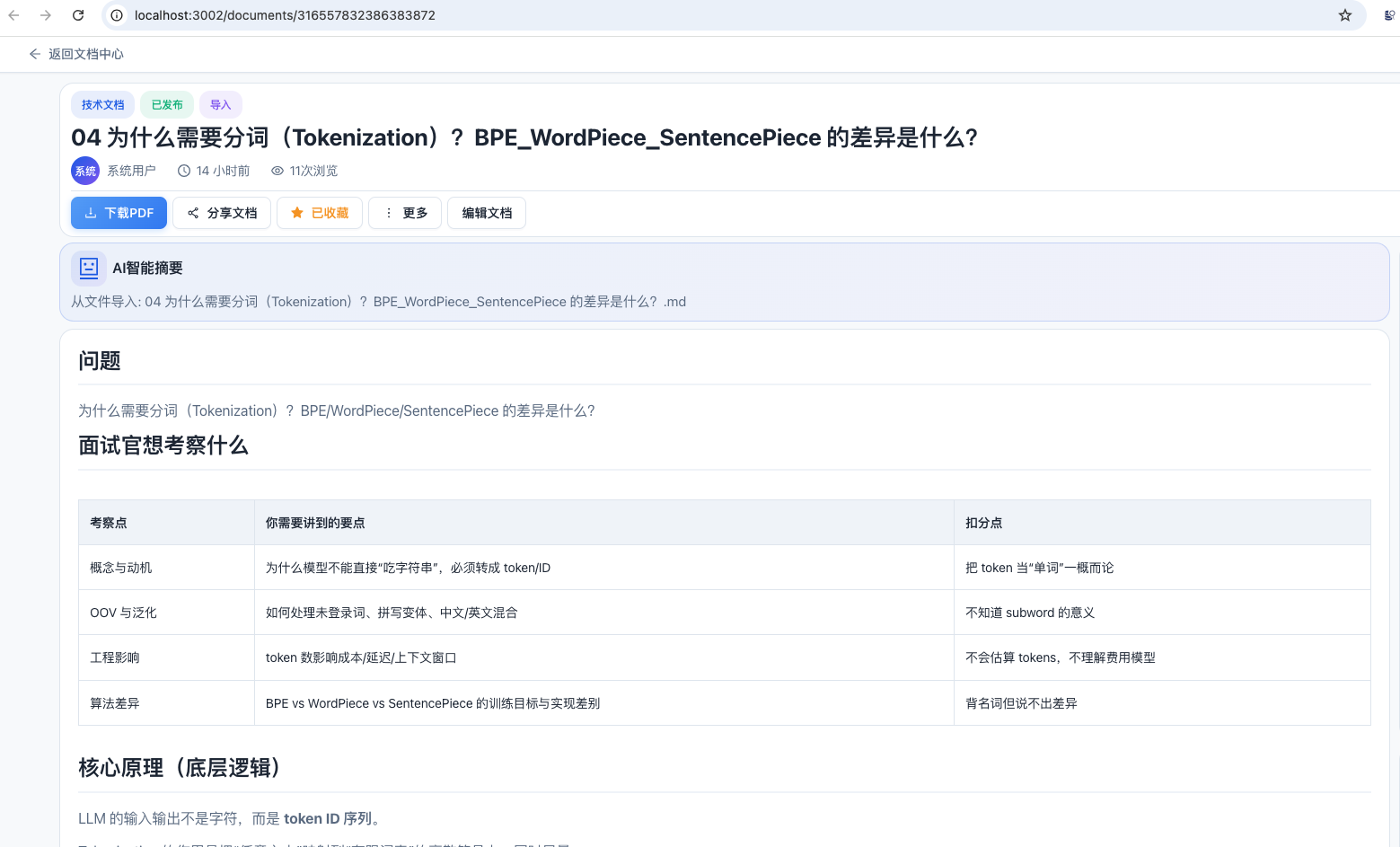
3.点击左上角"下载PDF"按钮
4.等待PDF生成完成,浏览器应自动下载PDF文件
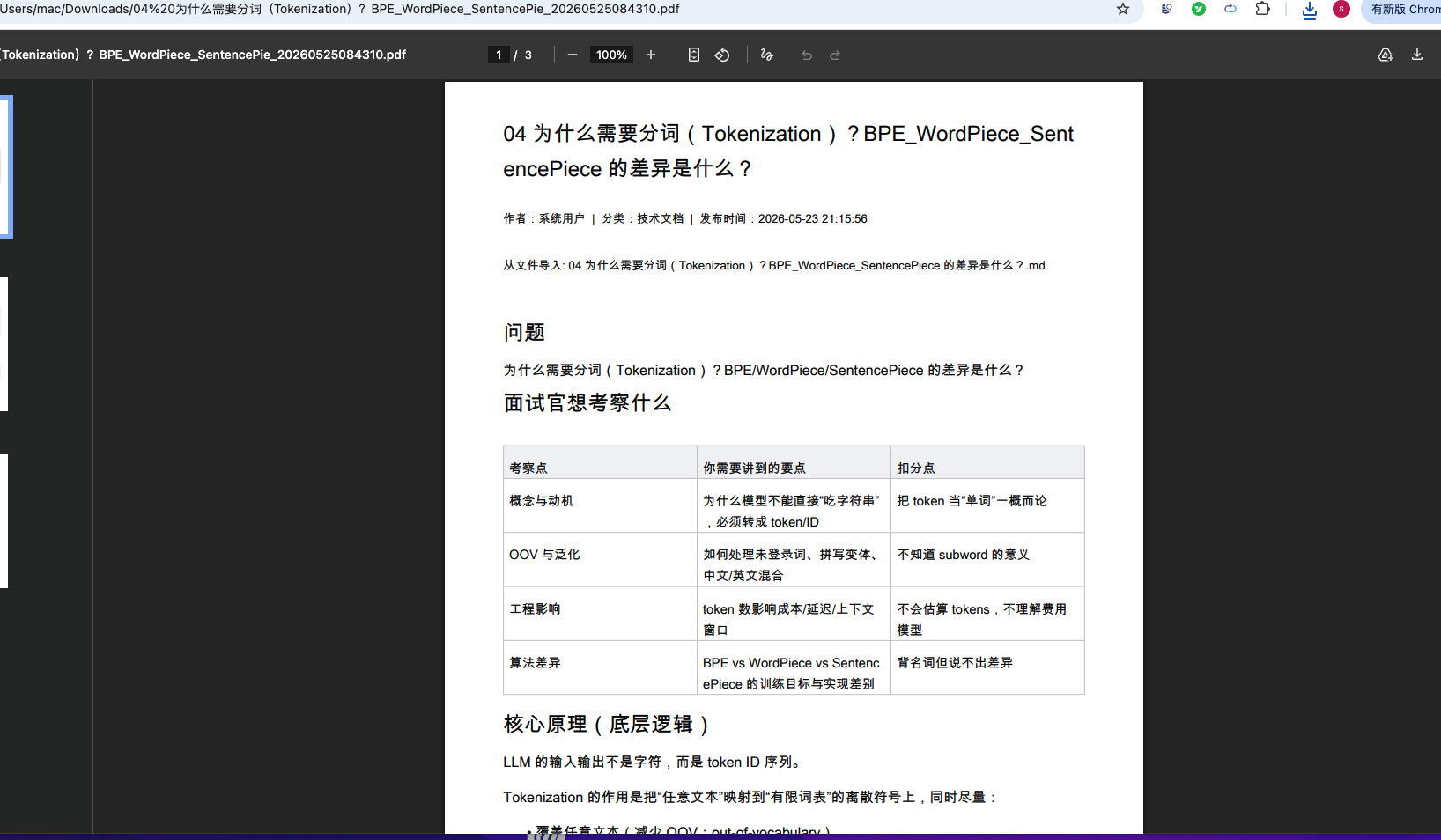
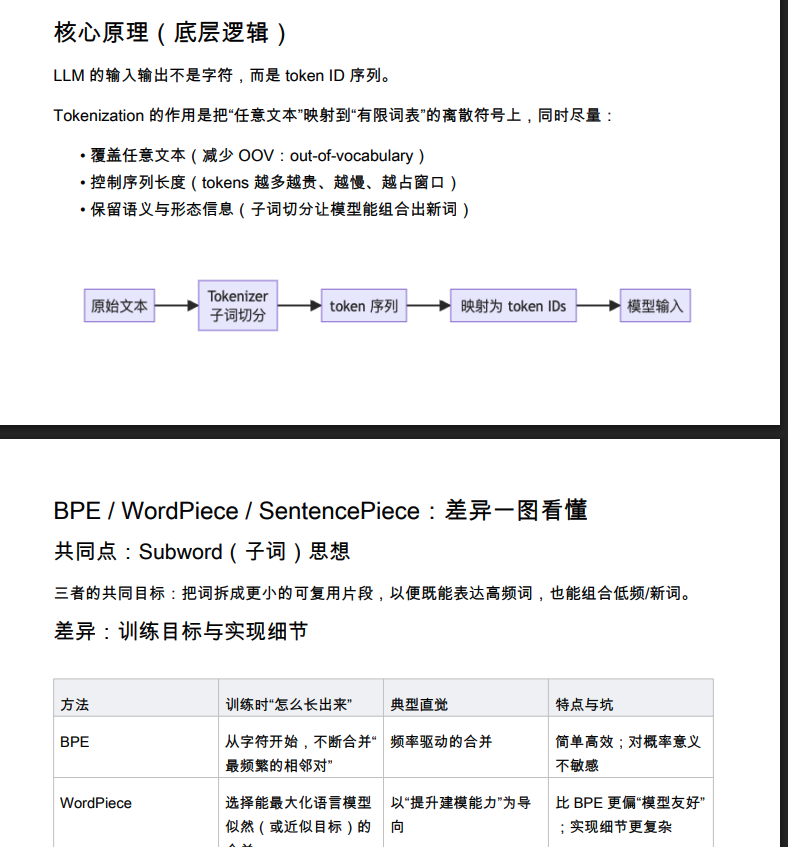
5.打开PDF文件验证内容排版:
- 标题、作者、摘要是否正确显示
- 代码块是否使用深色背景
- 表格是否完整渲染
- 图片是否正确嵌入
- 中文内容是否正确显示(无乱码)
文章内容、表格、图片等能正常显示,并且文章的文字全部都正常显示出来,没有被遮挡。
文档分享测试:
- 在文档详情页点击"分享文档"按钮
- 在弹出的分享窗口中:
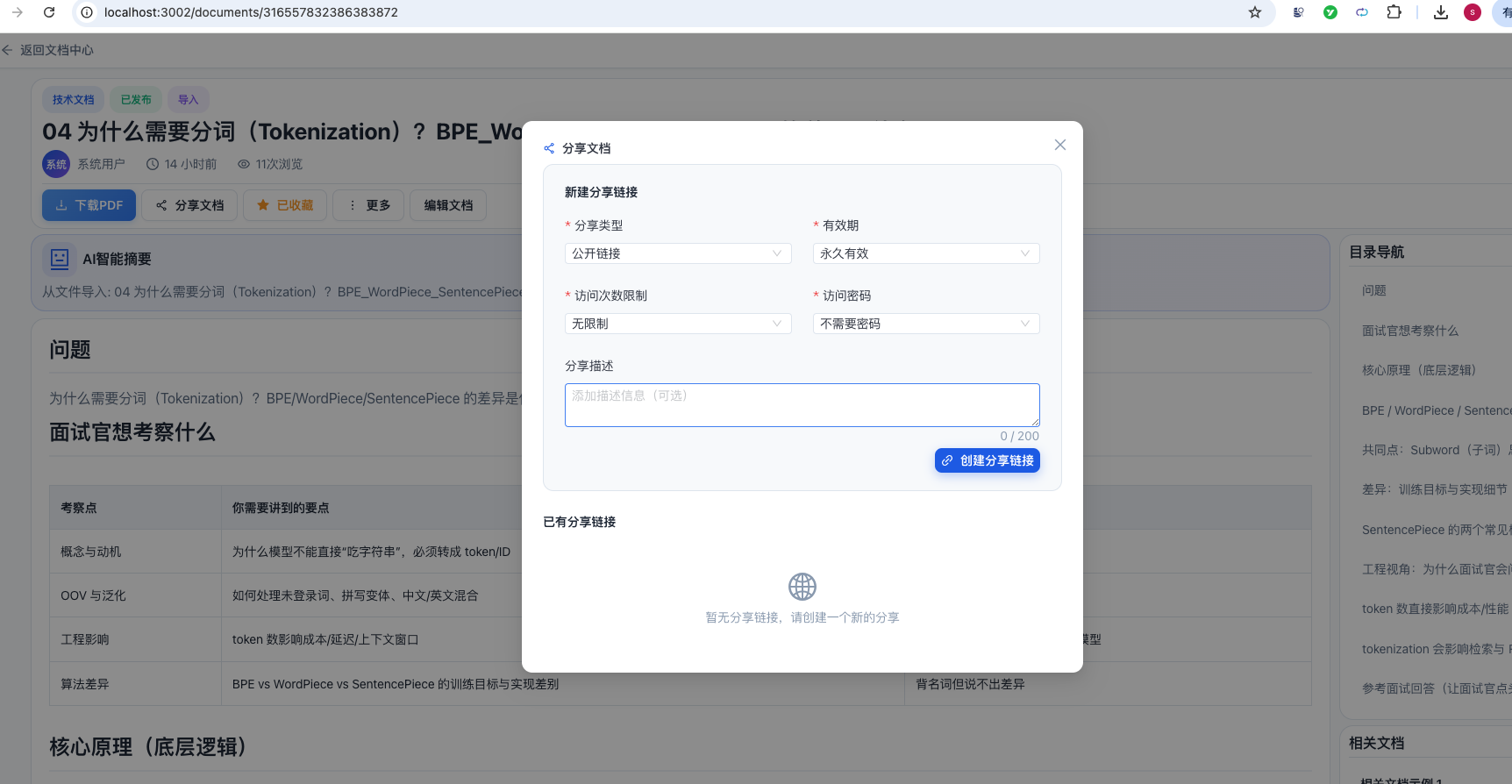
点击"创建分享链接"
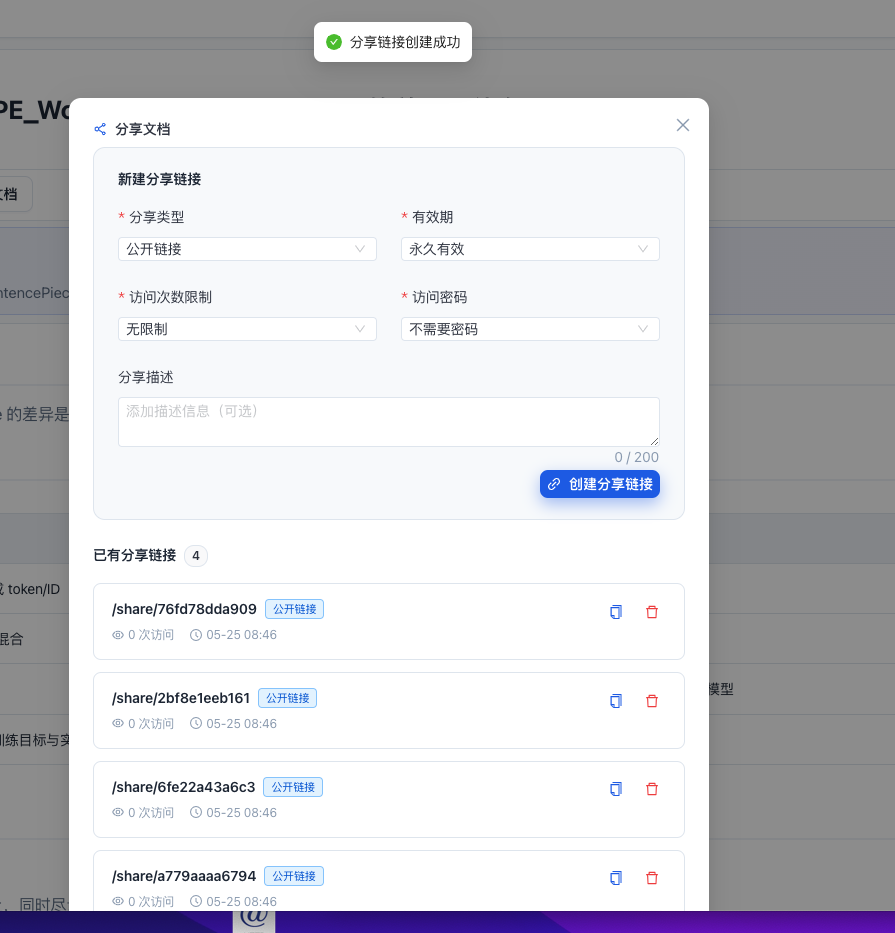
3.验证分享链接出现在列表中
4.点击"复制链接"按钮,获取分享URL(格式:http://localhost:3002/share/{shareId})
5.打开无痕浏览器窗口,访问该分享URL
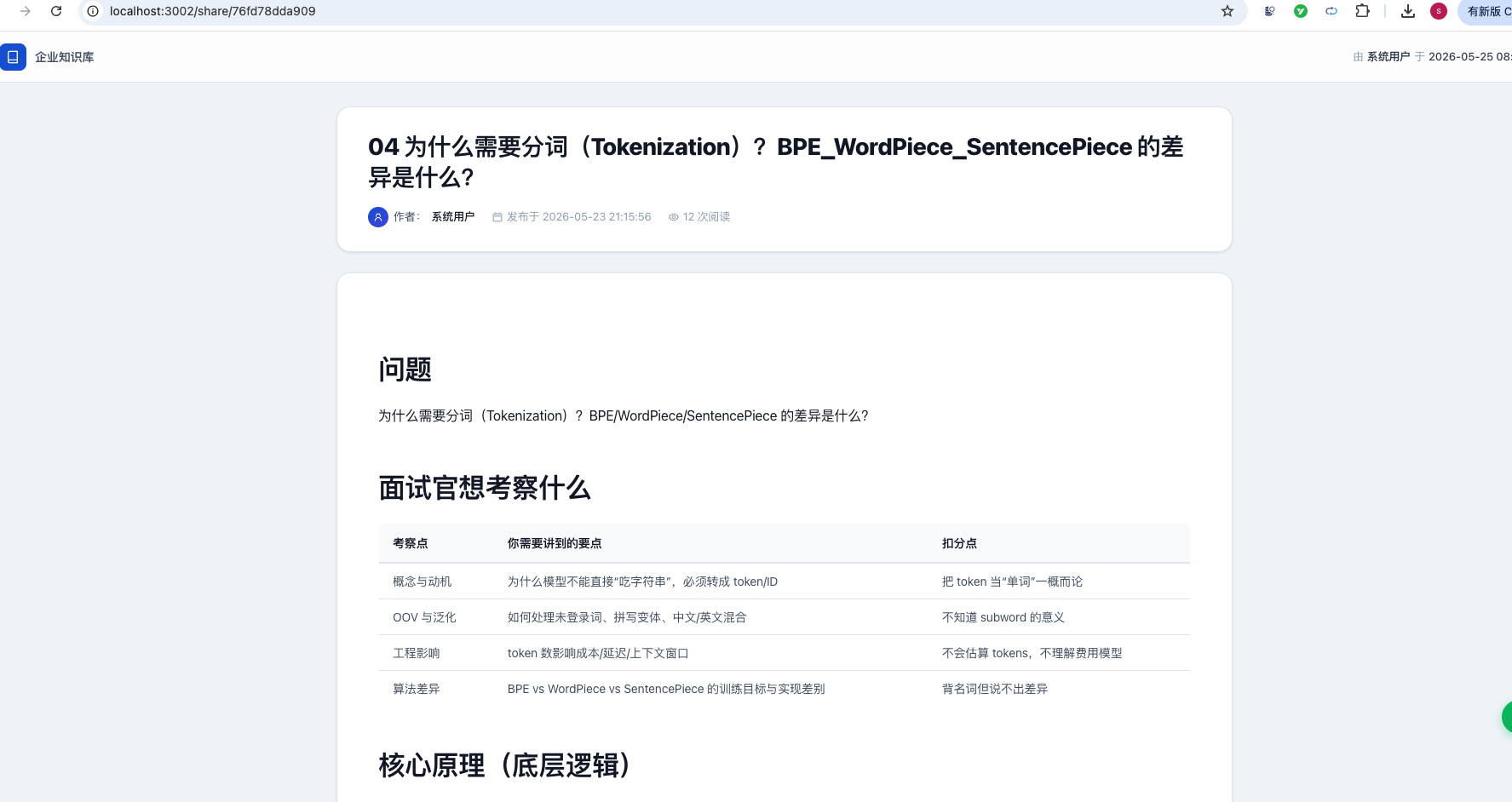
6.查看文档内容
7.验证文档内容正确渲染(Markdown格式、代码高亮等)
8.返回文档详情页,验证访问次数已增加
总结
本文详细介绍了如何从零开始为知识库系统添加文档PDF下载和文档分享功能。主要内容包括:
PDF导出功能:
- 后端使用Apache PDFBox实现Markdown到PDF的完整渲染管线
- 支持标题(H1-H6)、代码块(One Dark Pro深色主题)、表格(动态行高)、图片(URL/本地路径)、列表等Markdown元素
- 实现了中文字体加载和CJK字符宽度精确测量,确保中文排版不溢出
- 自动分页机制,代码块和表格等高度元素会智能换页
- 前端提供一键下载按钮,后端返回二进制PDF流
文档分享功能:
- 完整的分享链接创建、管理、访问权限控制体系
- 支持公开链接和私信分享两种类型
- 支持密码保护(MD5加密)、过期时间(永久/限时)、访问次数限制
- 独立的公开访问控制器(无需登录),通过网关白名单配置
- 前端实现分享弹窗(创建/管理)和公开分享查看页面(密码验证门禁 + Markdown渲染)
