一、概述
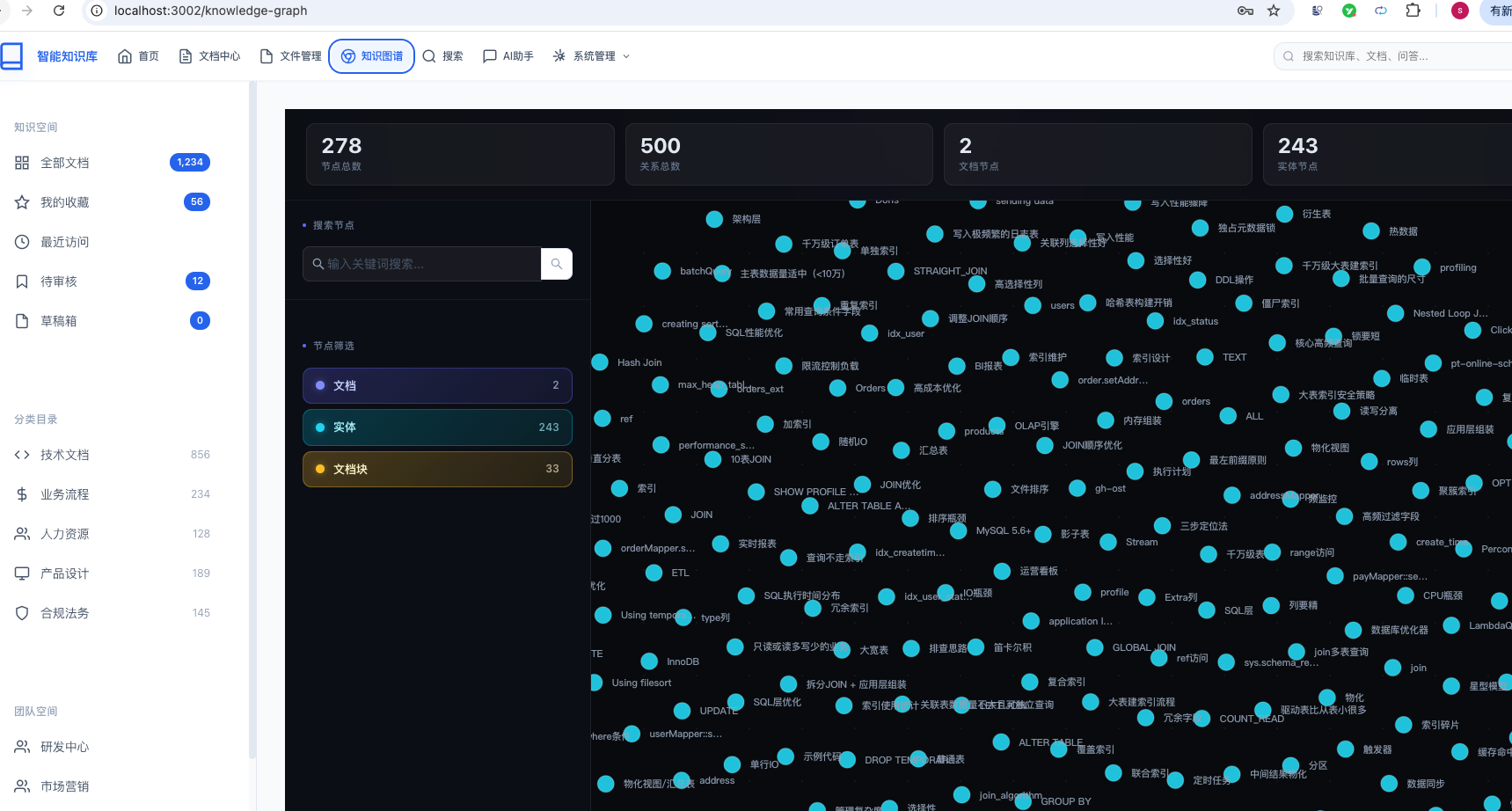
知识图谱是知识库系统的核心智能化功能,通过图数据库存储文档、文档块、知识实体及其关系,实现知识的可视化展示、关联分析和智能检索。
1.1 功能定位
| 功能模块 | 说明 | 使用场景 |
|---|---|---|
| 图谱展示 | 力导向图可视化展示所有节点和关系 | 浏览知识全貌 |
| 节点搜索 | 按名称/描述搜索节点,过滤不匹配的 | 快速定位知识点 |
| 类型筛选 | 按文档/实体/文档块类型过滤节点 | 聚焦特定维度 |
| 关系可视化 | 展示节点间的连接关系及关系类型 | 理解知识关联 |
| 节点详情 | 点击节点查看完整属性信息 | 深入了解知识点 |
| KAG构建 | LLM驱动的实体/关系自动提取与写图 | 文档入库自动建图 |
| 图谱检索 | 基于图谱的知识增强生成 | AI问答时提供图上下文 |
1.2 数据模型
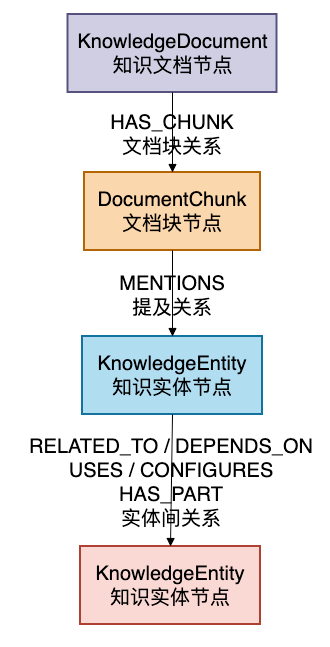
知识图谱采用 Neo4j 图数据库存储,包含三种节点类型和三种关系类型:
1.3 技术架构
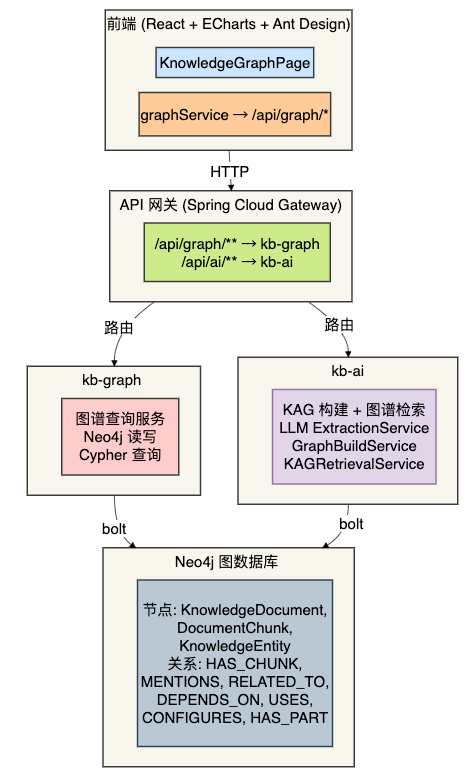
- Neo4j:图数据库存储,支持复杂的关系遍历和路径分析
- Spring Data Neo4j:ORM 框架,操作图数据
- ECharts:前端力导向图可视化
- LLM:提取文档中的实体和关系(KAG 构建流程)
- RabbitMQ:异步知识图谱构建,避免阻塞文档导入流程
二、基础设施部署
2.1 Neo4j 安装
首先需要安装 Neo4j 图数据库。推荐使用 Docker 部署:
docker run -d \
  --name neo4j-kb \
  -p 7474:7474 \
  -p 7687:7687 \
  -v neo4j-data:/data \
  -v neo4j-logs:/logs \
  -e NEO4J_AUTH=neo4j/susan123 \
  -e NEO4J_PLUGINS='["apoc"]' \
  neo4j:5-enterprise
启动后可以在浏览器访问 http://localhost:7474 打开 Neo4j Browser,输入用户名 neo4j 和密码 susan123 登录。
2.2 MySQL 备份表(可选)
图数据库主要使用 Neo4j,MySQL 表作为辅助备份:
CREATE DATABASE IF NOT EXISTS kb_graph DEFAULT CHARACTER SET utf8mb4 COLLATE utf8mb4_unicode_ci;

-- 图谱节点备份表
CREATE TABLE kb_graph.kb_graph_node (
  id          BIGINT       NOT NULL AUTO_INCREMENT,
  node_id     VARCHAR(255) NOT NULL COMMENT 'Neo4j节点标识',
  node_type   VARCHAR(50)  NOT NULL COMMENT '节点类型',
  node_name   VARCHAR(500) NOT NULL COMMENT '节点名称',
  properties  JSON         DEFAULT NULL COMMENT '属性JSON',
  labels      VARCHAR(500) DEFAULT NULL COMMENT '标签列表',
  weight      DOUBLE       DEFAULT 1.0 COMMENT '节点权重',
  PRIMARY KEY (id),
  UNIQUE KEY uk_node_id (node_id)
) ENGINE=InnoDB DEFAULT CHARSET=utf8mb4 COLLATE=utf8mb4_unicode_ci;

-- 图谱边备份表
CREATE TABLE kb_graph.kb_graph_edge (
  id                  BIGINT       NOT NULL AUTO_INCREMENT,
  edge_id             VARCHAR(255) NOT NULL COMMENT '边的唯一标识(Neo4j auto-id)',
  source_id           VARCHAR(255) NOT NULL COMMENT '源节点标识',
  target_id           VARCHAR(255) NOT NULL COMMENT '目标节点标识',
  relationship_type   VARCHAR(50)  NOT NULL COMMENT '关系类型:HAS_CHUNK, MENTIONS, RELATED_TO',
  relationship_name   VARCHAR(255) DEFAULT NULL COMMENT '关系详细类型',
  properties          JSON         DEFAULT NULL COMMENT '关系属性JSON',
  weight              DOUBLE       DEFAULT 1.0 COMMENT '边的权重',
  PRIMARY KEY (id),
  UNIQUE KEY uk_edge_id (edge_id),
  KEY idx_source_id (source_id),
  KEY idx_target_id (target_id)
) ENGINE=InnoDB DEFAULT CHARSET=utf8mb4 COLLATE=utf8mb4_unicode_ci;
三、Neo4j 图模型设计
3.1 KnowledgeDocumentNode(知识文档节点)
标签::KnowledgeDocument
package com.knowledge.base.graph.entity.node;

import org.springframework.data.neo4j.core.schema.Id;
import org.springframework.data.neo4j.core.schema.Node;

@Data
@Builder
@NoArgsConstructor
@AllArgsConstructor
@Node("KnowledgeDocument")
public class KnowledgeDocumentNode {

    @Id
    private Long docId;           // 文档ID(唯一标识)

    private String title;         // 文档标题
    private String summary;       // 文档摘要
    private Long categoryId;      // 分类ID
    private Long authorId;        // 作者ID
    private String authorName;    // 作者名称
    private Integer status;       // 状态
    private Integer documentType; // 文档类型
    private String tags;          // 标签
    private String publishTime;   // 发布时间
    private String createdAt;     // 创建时间
    private String updatedAt;     // 更新时间
}
3.2 DocumentChunkNode(文档块节点)
标签::DocumentChunk
package com.knowledge.base.graph.entity.node;

import org.springframework.data.neo4j.core.schema.Id;
import org.springframework.data.neo4j.core.schema.Node;

@Data
@Builder
@NoArgsConstructor
@AllArgsConstructor
@Node("DocumentChunk")
public class DocumentChunkNode {

    @Id
    private String chunkId;       // 文档块ID

    private Long docId;           // 所属文档ID
    private String content;       // 文档块内容
    private String heading;       // 标题
    private Integer chunkIndex;   // 块序号
    private Integer totalChunks;  // 总块数
    private Long categoryId;      // 分类ID
    private String createdAt;     // 创建时间
}
3.3 KnowledgeEntityNode(知识实体节点)
标签::KnowledgeEntity
package com.knowledge.base.graph.entity.node;

import org.springframework.data.neo4j.core.schema.Id;
import org.springframework.data.neo4j.core.schema.Node;

@Data
@Builder
@NoArgsConstructor
@AllArgsConstructor
@Node("KnowledgeEntity")
public class KnowledgeEntityNode {

    @Id
    private String name;          // 实体名称(唯一标识)

    private String type;          // 实体类型: TECH_STACK, API, CONFIG, CONCEPT, TOOL, PROCESS
    private String description;   // 实体描述
    private List<String> aliases; // 别名列表
    private String createdAt;     // 创建时间
    private String updatedAt;     // 更新时间
}
3.4 HasChunkRelation(文档-文档块关系)
关系类型::HAS_CHUNK,方向:(KnowledgeDocument)-[:HAS_CHUNK]->(DocumentChunk)
package com.knowledge.base.graph.entity.relationship;

import org.springframework.data.neo4j.core.schema.RelationshipProperties;
import org.springframework.data.neo4j.core.schema.RelationshipId;

@Data
@Builder
@NoArgsConstructor
@AllArgsConstructor
@RelationshipProperties
public class HasChunkRelation {

    @RelationshipId
    private Long id;

    private Integer chunkIndex;   // 文档块序号
}
3.5 MentionsRelation(文档块-实体关系)
关系类型::MENTIONS,方向:(DocumentChunk)-[:MENTIONS]->(KnowledgeEntity)
package com.knowledge.base.graph.entity.relationship;

import org.springframework.data.neo4j.core.schema.RelationshipProperties;

@Data
@Builder
@NoArgsConstructor
@AllArgsConstructor
@RelationshipProperties
public class MentionsRelation {

    @RelationshipId
    private Long id;

    private Double confidence;    // 置信度 0.0-1.0
    private String chunkId;       // 源文档块ID
}
3.6 实体间关系
实体之间存在四种类型的关系,方向和语义如下:
| 关系类型 | 方向 | 语义 | 示例 |
|---|---|---|---|
DEPENDS_ON | A → B | A 依赖 B | SpringBoot 依赖 Java |
USES | A → B | A 使用 B | 后端服务 使用 Redis |
CONFIGURES | A → B | A 配置 B | 应用 配置 Nginx |
HAS_PART | A → B | A 包含 B | 微服务 包含 API模块 |
这些关系通过 LLM 从文档内容中自动提取,写图时动态创建。
四、DTO 和 VO 设计
4.1 DTO(Data Transfer Object)
DTO 用于服务间传参和 Neo4j 写操作。所有 DTO 放在 com.knowledge.base.graph.dto 包下。
// 实体合并 DTO
@Data
@Builder
@NoArgsConstructor
@AllArgsConstructor
public class EntityMergeDTO {
    private String name;          // 实体名称
    private String type;          // 实体类型
    private String description;   // 描述
    private List<String> aliases; // 别名
}
// 关系合并 DTO
@Data
@Builder
@NoArgsConstructor
@AllArgsConstructor
public class RelationMergeDTO {
private String source; // 源实体名称
private String target; // 目标实体名称
private String relationType; // 关系类型
private Double weight; // 权重
}// 文档块-实体映射 DTO
@Data
@Builder
@NoArgsConstructor
@AllArgsConstructor
public class ChunkEntityMappingDTO {
private String chunkId; // 文档块ID
private String entityName; // 实体名称
private Double confidence; // 置信度
}// 文档节点属性 DTO
@Data
@Builder
@NoArgsConstructor
@AllArgsConstructor
public class DocumentPropsDTO {
private Long docId;
private String title;
private String summary;
private Long categoryId;
private Long authorId;
private String authorName;
private Integer status;
}// 文档块属性 DTO
@Data
@Builder
@NoArgsConstructor
@AllArgsConstructor
public class ChunkPropsDTO {
private String chunkId;
private Long docId;
private String content;
private String heading;
private Integer chunkIndex;
private Integer totalChunks;
}4.2 VO(View Object)
VO 用于返回给前端的数据结构。所有 VO 放在 com.knowledge.base.graph.vo 包下。
// 图谱节点 VO
@Data
@Builder
@NoArgsConstructor
@AllArgsConstructor
public class GraphNodeVO {
    private String id;                     // 节点ID
    private String name;                   // 节点名称
    private String type;                   // 节点类型
    private String label;                  // 显示标签
    private Integer size;                  // 可视化大小
    private String color;                  // 可视化颜色
    private Map<String, Object> properties; // 额外属性
}
// 图谱边 VO
@Data
@Builder
@NoArgsConstructor
@AllArgsConstructor
public class GraphEdgeVO {
private String id; // 边ID
private String source; // 源节点ID
private String target; // 目标节点ID
private String relation; // 关系名称
private String label; // 显示标签
private Double weight; // 权重
}// 图谱数据 VO(顶层返回)
@Data
@Builder
@NoArgsConstructor
@AllArgsConstructor
public class GraphDataVO {
private List<GraphNodeVO> nodes; // 节点列表
private List<GraphEdgeVO> edges; // 边列表
private Long nodeCount; // 节点总数
private Long edgeCount; // 边总数
}五、数据访问层(Repository)
5.1 Spring Data Neo4j 配置
创建 Neo4j 配置类,生成 Driver、Neo4jClient 和 TransactionManager:
package com.knowledge.base.graph.config;

import org.neo4j.driver.AuthTokens;
import org.neo4j.driver.Driver;
import org.neo4j.driver.GraphDatabase;
import org.springframework.beans.factory.annotation.Value;
import org.springframework.context.annotation.Bean;
import org.springframework.context.annotation.Configuration;
import org.springframework.data.neo4j.core.Neo4jClient;
import org.springframework.data.neo4j.core.Neo4jTemplate;
import org.springframework.transaction.PlatformTransactionManager;
import org.springframework.data.neo4j.core.transaction.Neo4jTransactionManager;

@Configuration
@EnableNeo4jRepositories(basePackages = "com.knowledge.base.graph.repository")
public class Neo4jConfig {

    @Value("${spring.neo4j.uri}")
    private String uri;

    @Value("${spring.neo4j.authentication.username}")
    private String username;

    @Value("${spring.neo4j.authentication.password}")
    private String password;

    @Bean
    public Driver driver() {
        return GraphDatabase.driver(uri, AuthTokens.basic(username, password));
    }

    @Bean
    public Neo4jClient neo4jClient(Driver driver) {
        return Neo4jClient.create(driver);
    }

    @Bean
    public PlatformTransactionManager transactionManager(Driver driver) {
        return new Neo4jTransactionManager(driver);
    }
}
在 application.yml 中配置连接信息:
spring:
  neo4j:
    uri: bolt://localhost:7687
    authentication:
      username: neo4j
      password: susan123
  autoconfigure:
    exclude:
      - org.springframework.boot.autoconfigure.jdbc.DataSourceAutoConfiguration
注意:kb-graph 模块不需要 MySQL 数据源,必须排除 DataSourceAutoConfiguration。
5.2 KnowledgeEntityRepository
package com.knowledge.base.graph.repository;

import com.knowledge.base.graph.entity.node.KnowledgeEntityNode;
import org.springframework.data.neo4j.repository.Neo4jRepository;
import org.springframework.data.neo4j.repository.query.Query;
import org.springframework.data.repository.query.Param;
import org.springframework.stereotype.Repository;

import java.util.List;

@Repository
public interface KnowledgeEntityRepository extends Neo4jRepository<KnowledgeEntityNode, String> {

    // 按关键词搜索实体(模糊匹配名称和别名)
    @Query("MATCH (e:KnowledgeEntity) "
         + "WHERE e.name CONTAINS $keyword "
         + "   OR any(alias IN coalesce(e.aliases, []) WHERE alias CONTAINS $keyword) "
         + "RETURN e LIMIT $limit")
    List<KnowledgeEntityNode> searchByName(@Param("keyword") String keyword,
                                           @Param("limit") int limit);

    // 按类型过滤实体
    @Query("MATCH (e:KnowledgeEntity {type: $type}) RETURN e LIMIT $limit")
    List<KnowledgeEntityNode> findByType(@Param("type") String type,
                                         @Param("limit") int limit);

    // 查询实体的邻居节点(1跳)
    @Query("MATCH (e:KnowledgeEntity {name: $name})-[r]-(neighbor) "
         + "RETURN neighbor LIMIT $limit")
    List<KnowledgeEntityNode> findNeighbors(@Param("name") String name,
                                             @Param("limit") int limit);

    // 查询实体类型分布统计
    @Query("MATCH (e:KnowledgeEntity) "
         + "RETURN e.type AS type, count(e) AS count ORDER BY count DESC")
    List<Map<String, Object>> countByType();

    // 反向查询提及某实体的文档块
    @Query("MATCH (c:DocumentChunk)-[:MENTIONS]->(e:KnowledgeEntity {name: $name}) "
         + "RETURN c LIMIT $limit")
    List<DocumentChunkNode> findMentioningChunks(@Param("name") String name,
                                                   @Param("limit") int limit);
}
5.3 KnowledgeDocumentRepository
package com.knowledge.base.graph.repository;

import com.knowledge.base.graph.entity.node.KnowledgeDocumentNode;
import org.springframework.data.neo4j.repository.Neo4jRepository;
import org.springframework.data.neo4j.repository.query.Query;
import org.springframework.stereotype.Repository;

import java.util.List;

@Repository
public interface KnowledgeDocumentRepository extends Neo4jRepository<KnowledgeDocumentNode, Long> {

    @Query("MATCH (d:KnowledgeDocument) WHERE d.status = 1 RETURN d ORDER BY d.publishTime DESC")
    List<KnowledgeDocumentNode> findAllPublished();

    @Query("MATCH (d:KnowledgeDocument {categoryId: $categoryId}) RETURN d")
    List<KnowledgeDocumentNode> findByCategoryId(@Param("categoryId") Long categoryId);

    @Query("MATCH (d:KnowledgeDocument) "
         + "WHERE d.title CONTAINS $keyword AND d.status = 1 "
         + "RETURN d LIMIT 20")
    List<KnowledgeDocumentNode> searchByTitle(@Param("keyword") String keyword);

    @Query("MATCH (d:KnowledgeDocument {docId: $docId}) DETACH DELETE d")
    void deleteByDocId(@Param("docId") Long docId);
}
5.4 CustomGraphRepository(自定义 Cypher 查询)
对于复杂查询场景,使用 Neo4jClient 直接执行 Cypher:
package com.knowledge.base.graph.repository;

import com.knowledge.base.graph.dto.*;
import java.util.List;
import java.util.Map;

public interface CustomGraphRepository {

    // 最短路径分析
    GraphPathResultDTO findShortestPaths(String source, String target, int maxDepth);

    // 实体多跳遍历
    List<TraverseResultDTO> traverseFromEntity(String entityName, int maxHops, int limit);

    // 图谱统计
    GraphStatsDTO getGraphStatistics();

    // 社区检测
    List<CommunityResultDTO> detectCommunities(int minCommunitySize);

    // 关键词子图搜索
    SubgraphResultDTO searchSubgraph(String keyword, int maxNodes);

    // 批量写入操作
    void mergeEntities(List<EntityMergeDTO> entities);
    void mergeRelations(List<RelationMergeDTO> relations);
    void connectChunksToEntities(List<ChunkEntityMappingDTO> mappings);
    void createDocumentNode(DocumentPropsDTO props);
    void createChunkNode(ChunkPropsDTO props);
    void createHasChunkRelation(Long docId, String chunkId, Integer chunkIndex);
}
CustomGraphRepositoryImpl 的实现核心逻辑:
@Override
public void mergeEntities(List<EntityMergeDTO> entities) {
    for (EntityMergeDTO dto : entities) {
        neo4jClient.query("MERGE (e:KnowledgeEntity {name: $name}) "
                + "ON CREATE SET e.type = $type, e.description = $description, "
                + "    e.aliases = $aliases, e.createdAt = datetime() "
                + "ON MATCH SET e.description = $description, "
                + "    e.aliases = $aliases, e.updatedAt = datetime()")
            .bind(dto.getName()).to("name")
            .bind(dto.getType()).to("type")
            .bind(dto.getDescription()).to("description")
            .bind(dto.getAliases()).to("aliases")
            .run();
    }
}
关键技术点:
- 使用
MERGE而非CREATE,避免重复创建同名节点 ON CREATE SET和ON MATCH SET分别处理新建和更新场景coalesce()函数处理可能为 null 的字段
六、业务逻辑层(Service)
6.1 GraphService(图谱查询服务)
位置:kb-graph 模块
package com.knowledge.base.graph.service;

import com.knowledge.base.graph.vo.*;
import java.util.List;

public interface GraphService {

    // 获取全量图谱数据
    GraphDataVO getGraphData(String type);

    // 获取节点列表
    List<GraphNodeVO> getNodes(String type);

    // 获取边列表
    List<GraphEdgeVO> getEdges(String sourceType, String targetType);

    // 获取节点关联关系
    List<GraphRelationVO> getNodeRelations(String nodeId);

    // 全图搜索
    GraphDataVO searchGraph(String keyword);

    // 路径分析
    GraphPathVO analyzePath(String sourceId, String targetId, Integer maxDepth);

    // 社区检测
    List<GraphCommunityVO> detectCommunity(String algorithm);
}
GraphServiceImpl 核心实现 —— **构建图谱数据**:
@Override
public GraphDataVO getGraphData(String type) {
    List<GraphNodeVO> nodes = getNodes(type);
    List<GraphEdgeVO> edges = getEdges(type, null);
    return GraphDataVO.builder()
        .nodes(nodes)
        .edges(edges)
        .nodeCount((long) nodes.size())
        .edgeCount((long) edges.size())
        .build();
}

@Override
public List<GraphNodeVO> getNodes(String type) {
    // 拼装 Cypher 查询
    String cypher = "MATCH (n) " +
        (type != null && !type.isEmpty() ? "WHERE $type IN labels(n) " : "") +
        "RETURN n, labels(n) AS labels, id(n) AS graphId " +
        "ORDER BY labels(n), n.name LIMIT 500";

    // 执行查询并映射为 GraphNodeVO
    return neo4jClient.query(cypher)
        .bind(type).to("type").optional()
        .fetchAs(GraphNodeVO.class)
        .mappedBy((typeSystem, record) -> {
            // 根据节点标签分配颜色、大小
            List<String> labels = record.get("labels").asList(...);
            String color = getNodeColor(labels);
            int size = resolveNodeSize(labels);
            return GraphNodeVO.builder()
                .id(...)
                .name(...)
                .type(labels.get(0))
                .color(color)
                .size(size)
                .build();
        }).all();
}节点可视化属性分配逻辑:
private String getNodeColor(List<String> labels) {
    String mainLabel = labels.get(0);
    return switch (mainLabel) {
        case "KnowledgeDocument", "Document" -> "#1890ff"; // 蓝色
        case "KnowledgeEntity", "Entity"     -> "#52c41a"; // 绿色
        case "DocumentChunk", "Chunk"        -> "#faad14"; // 黄色
        case "Category"                      -> "#722ed1"; // 紫色
        default                              -> "#8b5cf6"; // 默认紫色
    };
}

private int resolveNodeSize(List<String> labels) {
    String mainLabel = labels.get(0);
    return switch (mainLabel) {
        case "KnowledgeDocument", "Document" -> 30;
        case "KnowledgeEntity", "Entity"     -> 25;
        case "DocumentChunk", "Chunk"        -> 20;
        case "Category"                      -> 28;
        default                              -> 22;
    };
}
6.2 KAG 图谱构建流程(GraphBuildService)
位置:kb-ai 模块。这是知识图谱智能构建的核心流程。
package com.knowledge.base.ai.rag.kag.graph;

public interface GraphBuildService {

    // 为单个文档构建图谱
    void buildForDocument(Long docId);

    // 全量重建
    void buildAll();

    // 批量构建
    void buildBatch(List<Long> docIds);

    // 删除文档图谱
    void deleteForDocument(Long docId);
}
GraphBuildServiceImpl.buildForDocument() 的完整流程:
@Override
public void buildForDocument(Long docId) {
    log.info("开始为文档[{}]构建知识图谱", docId);

    // 1. 获取文档详情(通过Feign调用kb-document服务)
    DocumentVO doc = documentFeignClient.getDocument(docId);

    // 2. 清理旧图谱数据
    deleteForDocument(docId);

    // 3. 创建 KnowledgeDocument 节点
    graphRepository.createDocumentNode(DocumentPropsDTO.builder()
        .docId(doc.getId())
        .title(doc.getTitle())
        .summary(doc.getSummary())
        .categoryId(doc.getCategoryId())
        .authorId(doc.getAuthorId())
        .authorName(doc.getAuthorName())
        .status(doc.getStatus())
        .build());

    // 4. 文档分块
    List<DocumentChunk> chunks = chunkingService.chunk(
        doc.getContent(), doc.getTitle(), docId);

    // 5. 逐块处理
    for (int i = 0; i < chunks.size(); i++) {
        DocumentChunk chunk = chunks.get(i);

        // 5a. 创建 DocumentChunk 节点
        graphRepository.createChunkNode(ChunkPropsDTO.builder()
            .chunkId(chunk.getId())
            .docId(docId)
            .content(chunk.getContent())
            .heading(chunk.getHeading())
            .chunkIndex(i)
            .totalChunks(chunks.size())
            .build());

        // 5b. 建立 HAS_CHUNK 关系
        graphRepository.createHasChunkRelation(docId, chunk.getId(), i);

        // 5c. LLM 提取实体和关系
        ExtractionResult result = extractionService.extract(
            chunk.getContent(), chunk.getHeading(), docId, doc.getTitle());

        // 5d. 实体名称归一化(去重合并)
        List<EntityMergeDTO> normalized = entityNormalizer.normalize(result.getEntities());

        // 5e. 写入 Neo4j
        //     - MERGE 实体节点
        //     - MERGE RELATED_TO 关系
        //     - MERGE MENTIONS 关系
        graphRepository.mergeEntities(normalized);
        graphRepository.mergeRelations(result.getRelations());
        graphRepository.connectChunksToEntities(
            buildMappings(chunk.getId(), result.getEntities()));
    }

    log.info("文档[{}]知识图谱构建完成,共创建 {} 个块、{} 个实体",
        docId, chunks.size(), totalEntities);
}关键技术点:
- LLM 提取:通过
ExtractionService调用大语言模型,从文档块内容中提取结构化实体和关系 - 实体归一化:
EntityNormalizer.normalize()对 LLM 返回的实体进行去重合并,按名称相似度合并 - 异步执行:通过 RabbitMQ 异步消费,避免阻塞文档导入流程
- 幂等性:使用
MERGE语法,重复执行不会创建重复数据
6.3 KAG 图谱检索流程(KAGRetrievalService)
位置:kb-ai 模块。在 AI 问答时提供知识图谱上下文。
package com.knowledge.base.ai.rag.kag.retrieval;

public interface KAGRetrievalService {

    // 从图谱中检索与查询相关的上下文
    GraphContext retrieveGraphContext(String query);
}
检索流程:
用户问题
  │
  ▼
┌─────────────────────────────────────┐
│ 1. LLM实体提取                       │
│    从问题中提取实体关键词              │
│    "Spring Boot如何配置Redis"         │
│    → 实体: [Spring Boot, Redis]       │
└──────────────┬──────────────────────┘
               ▼
┌─────────────────────────────────────┐
│ 2. Neo4j实体匹配                     │
│    MATCH (e:KnowledgeEntity)         │
│    WHERE e.name CONTAINS $keyword    │
│    返回: 匹配的实体 + 连接数          │
└──────────────┬──────────────────────┘
               ▼
┌─────────────────────────────────────┐
│ 3. 多跳遍历(路径推理)               │
│    从匹配实体出发,最多2跳            │
│    查找 DEPENDS_ON|USES|CONFIGURES.. │
│    返回: 推理路径列表                 │
└──────────────┬──────────────────────┘
               ▼
┌─────────────────────────────────────┐
│ 4. 反向关联文档块                     │
│    MATCH (e)<-[:MENTIONS]-(c)        │
│    RETURN c.content, c.docId         │
│    返回: 相关文档块内容               │
└──────────────┬──────────────────────┘
               ▼
┌─────────────────────────────────────┐
│ 5. 组装 GraphContext                 │
│    包含: 实体列表、推理路径、文档块   │
└─────────────────────────────────────┘
GraphContext 数据结构:
@Data
public class GraphContext {
    private List<GraphEntity> entities;       // 匹配的实体
    private List<GraphPath> paths;            // 推理路径
    private List<GraphChunk> chunks;          // 关联文档块
    private boolean hasResults;               // 是否有结果

    @Data
    public static class GraphEntity {
        private String name;                  // 实体名称
        private String type;                  // 实体类型
        private String description;           // 描述
        private int connectionCount;          // 连接数
    }

    @Data
    public static class GraphPath {
        private List<String> nodes;           // 路径节点
        private List<String> relations;       // 路径关系
        private int hops;                     // 跳数
    }

    @Data
    public static class GraphChunk {
        private String chunkId;
        private Long docId;
        private String docTitle;
        private String content;
        private String heading;
    }
}
七、控制器层(Controller)
7.1 图谱查询控制器(kb-graph)
package com.knowledge.base.graph.controller;

import com.knowledge.base.common.result.R;
import com.knowledge.base.graph.service.GraphService;
import com.knowledge.base.graph.vo.*;
import io.swagger.v3.oas.annotations.Operation;
import io.swagger.v3.oas.annotations.tags.Tag;
import lombok.RequiredArgsConstructor;
import org.springframework.web.bind.annotation.*;

import java.util.List;

@Tag(name = "知识图谱", description = "知识图谱查询接口")
@RestController
@RequestMapping("/graph")
@RequiredArgsConstructor
public class GraphController {

    private final GraphService graphService;

    // ── GET /graph/data ── 获取全量图谱数据
    @Operation(summary = "获取全量图谱数据")
    @GetMapping("/data")
    public R<GraphDataVO> getGraphData(
        @RequestParam(required = false) String type) {
        return R.ok(graphService.getGraphData(type));
    }

    // ── GET /graph/nodes ── 获取节点列表
    @Operation(summary = "获取节点列表")
    @GetMapping("/nodes")
    public R<List<GraphNodeVO>> getNodes(
        @RequestParam(required = false) String type) {
        return R.ok(graphService.getNodes(type));
    }

    // ── GET /graph/edges ── 获取边列表
    @Operation(summary = "获取边列表")
    @GetMapping("/edges")
    public R<List<GraphEdgeVO>> getEdges(
        @RequestParam(required = false) String sourceType,
        @RequestParam(required = false) String targetType) {
        return R.ok(graphService.getEdges(sourceType, targetType));
    }

    // ── GET /graph/node/{nodeId}/relations ── 获取节点关联关系
    @Operation(summary = "获取节点关联关系")
    @GetMapping("/node/{nodeId}/relations")
    public R<List<GraphRelationVO>> getNodeRelations(
        @PathVariable String nodeId) {
        return R.ok(graphService.getNodeRelations(nodeId));
    }

    // ── GET /graph/search ── 全图搜索
    @Operation(summary = "全图搜索")
    @GetMapping("/search")
    public R<GraphDataVO> searchGraph(
        @RequestParam String keyword) {
        return R.ok(graphService.searchGraph(keyword));
    }

    // ── GET /graph/path ── 路径分析
    @Operation(summary = "路径分析")
    @GetMapping("/path")
    public R<GraphPathVO> analyzePath(
        @RequestParam String sourceId,
        @RequestParam String targetId,
        @RequestParam(defaultValue = "3") Integer maxDepth) {
        return R.ok(graphService.analyzePath(sourceId, targetId, maxDepth));
    }

    // ── GET /graph/community ── 社区检测
    @Operation(summary = "社区检测")
    @GetMapping("/community")
    public R<List<GraphCommunityVO>> detectCommunity(
        @RequestParam(defaultValue = "louvain") String algorithm) {
        return R.ok(graphService.detectCommunity(algorithm));
    }
}
7.2 KAG 构建控制器(kb-ai)
package com.knowledge.base.ai.controller;

import com.knowledge.base.ai.rag.kag.graph.GraphBuildService;
import com.knowledge.base.common.result.R;
import lombok.RequiredArgsConstructor;
import org.springframework.web.bind.annotation.*;

@RestController
@RequestMapping("/kag")
@RequiredArgsConstructor
public class KAGReindexController {

    private final GraphBuildService graphBuildService;

    // ── POST /kag/build/{docId} ── 为单个文档构建图谱
    @PostMapping("/build/{docId}")
    public R<Void> buildGraph(@PathVariable Long docId) {
        graphBuildService.buildForDocument(docId);
        return R.ok();
    }

    // ── POST /kag/build/batch ── 批量构建
    @PostMapping("/build/batch")
    public R<Void> buildBatch(@RequestBody List<Long> docIds) {
        graphBuildService.buildBatch(docIds);
        return R.ok();
    }

    // ── POST /kag/build/all ── 全量重建
    @PostMapping("/build/all")
    public R<Void> buildAll() {
        graphBuildService.buildAll();
        return R.ok();
    }

    // ── DELETE /kag/build/{docId} ── 删除文档图谱
    @DeleteMapping("/build/{docId}")
    public R<Void> deleteGraph(@PathVariable Long docId) {
        graphBuildService.deleteForDocument(docId);
        return R.ok();
    }
}
7.3 网关路由配置
在 kb-gateway 的 application.yml 中添加路由:
spring:
  cloud:
    gateway:
      routes:
        # 知识图谱查询路由
        - id: kb-graph
          uri: lb://kb-graph
          predicates:
            - Path=/api/graph/**
          filters:
            - StripPrefix=1

        # KAG/AI服务路由
        - id: kb-ai
          uri: lb://kb-ai
          predicates:
            - Path=/api/ai/**
          filters:
            - StripPrefix=1
7.4 安全配置(kb-graph)
kb-graph 模块的鉴权由网关统一处理,模块内部无需额外认证:
package com.knowledge.base.graph.config;

import org.springframework.context.annotation.Bean;
import org.springframework.context.annotation.Configuration;
import org.springframework.security.config.annotation.web.builders.HttpSecurity;
import org.springframework.security.web.SecurityFilterChain;

@Configuration
public class SecurityConfig {

    @Bean
    public SecurityFilterChain filterChain(HttpSecurity http) throws Exception {
        http.authorizeHttpRequests(auth -> auth
            .anyRequest().permitAll()           // 所有请求放行
        ).csrf(csrf -> csrf.disable());         // 禁用CSRF
        return http.build();
    }
}
八、KAG 异步构建(RabbitMQ)
8.1 消息生产者
在文档发布/更新时触发图谱构建。通过 kb-document 模块的 Feign 客户端调用 kb-ai:
// KAGFeignClient.java(kb-document模块)
@FeignClient(name = "kb-ai", path = "/")
public interface KAGFeignClient {

    @PostMapping("/kag/build/{docId}")
    R<Void> buildGraph(@PathVariable("docId") Long docId);

    @DeleteMapping("/kag/build/{docId}")
    R<Void> deleteGraph(@PathVariable("docId") Long docId);
}

// 在文档服务中调用
@Service
public class DocumentServiceImpl implements DocumentService {

    private final KAGFeignClient kagFeignClient;

    @Override
    public void publish(Long docId) {
        // ... 发布逻辑 ...

        // 异步构建知识图谱
        try {
            kagFeignClient.buildGraph(docId);
        } catch (Exception e) {
            log.error("触发图谱构建失败 docId={}", docId, e);
        }
    }
}
8.2 消息消费者
package com.knowledge.base.ai.mq;

import com.knowledge.base.ai.rag.kag.graph.GraphBuildService;
import lombok.RequiredArgsConstructor;
import lombok.extern.slf4j.Slf4j;
import org.springframework.amqp.rabbit.annotation.RabbitListener;
import org.springframework.stereotype.Component;

@Slf4j
@Component
@RequiredArgsConstructor
public class KAGReindexConsumer {

    private final GraphBuildService graphBuildService;

    @RabbitListener(queues = "kag.graph.build.queue")
    public void onMessage(KAGBuildMessage msg) {
        log.info("收到图谱构建消息: {}", msg);
        try {
            switch (msg.getType()) {
                case BUILD_BY_DOC_IDS:
                    graphBuildService.buildBatch(msg.getDocumentIds());
                    break;
                case BUILD_ALL:
                    graphBuildService.buildAll();
                    break;
                case DELETE_BY_DOC_IDS:
                    msg.getDocumentIds()
                        .forEach(graphBuildService::deleteForDocument);
                    break;
            }
        } catch (Exception e) {
            log.error("图谱构建失败", e);
        }
    }
}
九、前端实现
9.1 TypeScript 类型定义
在 src/types/index.ts 中添加知识图谱相关类型:
// ── 图谱 API 响应类型(与后端 GraphDataVO 对应)──
export interface GraphData {
  nodes: GraphNode[];
  edges: GraphEdge[];
  nodeCount?: number;
  edgeCount?: number;
}

export interface GraphNode {
  id: string;
  name: string;
  type: string;
  label?: string;
  labels?: string[];
  properties?: Record<string, any>;
  size?: number;
  color?: string;
  icon?: string;
  x?: number;
  y?: number;
  documentId?: string;
  userId?: string;
}

export interface GraphEdge {
  id: string;
  source: string;
  target: string;
  relationship: string;
  label?: string;
  weight?: number;
  properties?: Record<string, any>;
  color?: string;
  dashed?: boolean;
  createdAt?: string;
}

export interface GraphPathResult {
  nodes: GraphNode[];
  edges: GraphEdge[];
  pathLength: number;
  startNodeId: string;
  endNodeId: string;
}

// ── ECharts 渲染用类型 ──
export interface KnowledgeGraphNode {
  id: string;
  label: string;
  type: 'KnowledgeDocument' | 'KnowledgeEntity' | 'DocumentChunk';
  value?: number;
  description?: string;
  properties?: Record<string, any>;
}

export interface KnowledgeGraphLink {
  source: string;
  target: string;
  relation: string;
  label?: string;
  value?: number;
}

export interface KnowledgeGraphData {
  nodes: KnowledgeGraphNode[];
  links: KnowledgeGraphLink[];
}

// ── KAG 检索上下文类型(AI助手使用)──
export interface GraphContext {
  entities?: GraphEntity[];
  paths?: GraphPath[];
  chunks?: GraphChunk[];
  hasResults?: boolean;
}

export interface GraphEntity {
  name: string;
  type: string;
  description?: string;
  connectionCount?: number;
}

export interface GraphChunk {
  chunkId: string;
  docId: number;
  docTitle: string;
  content: string;
  heading?: string;
}

export interface GraphPath {
  nodes: string[];
  relations: string[];
  hops: number;
}
9.2 图谱 API 服务
在 src/services/graph.service.ts 中创建图谱服务:
import http from './request';
import type { GraphData, GraphNode, GraphEdge, GraphPathResult } from '@/types';

export const graphService = {
  // 获取全量图谱数据
  getGraphData(): Promise<GraphData> {
    return http.get('/graph/data');
  },

  // 搜索图谱节点
  searchNodes(keyword: string): Promise<GraphNode[]> {
    return http.get('/graph/search', { params: { keyword } });
  },

  // 获取节点关联关系
  getNodeRelationships(nodeId: string): Promise<GraphEdge[]> {
    return http.get(`/graph/node/${nodeId}/relations`);
  },

  // 路径分析
  findPath(startNodeId: string, endNodeId: string): Promise<GraphPathResult> {
    return http.get('/graph/path', {
      params: { sourceId: startNodeId, targetId: endNodeId }
    });
  },
};
9.3 路由配置
在 src/router/index.tsx 中添加知识图谱路由:
// 懒加载
const KnowledgeGraphPage = lazy(() => import('@/pages/KnowledgeGraphPage'));

// 路由定义(在 MainLayout 的 children 中)
{
  path: 'knowledge-graph',
  element: (
    <Suspense fallback={<LoadingFallback />}>
      <KnowledgeGraphPage />
    </Suspense>
  ),
},
9.4 导航入口
在 src/components/layout/MainLayout.tsx 的侧边菜单中添加图谱入口:
{
  key: '/knowledge-graph',
  icon: (
    <svg width="20" height="20" viewBox="0 0 24 24" fill="none" stroke="currentColor"
         strokeWidth="2" strokeLinecap="round" strokeLinejoin="round">
      <circle cx="12" cy="12" r="3" />
      <circle cx="4" cy="4" r="2" />
      <circle cx="20" cy="4" r="2" />
      <circle cx="4" cy="20" r="2" />
      <circle cx="20" cy="20" r="2" />
      <line x1="6" y1="6" x2="10.5" y2="10.5" />
      <line x1="18" y1="6" x2="13.5" y2="10.5" />
      <line x1="6" y1="18" x2="10.5" y2="13.5" />
      <line x1="18" y1="18" x2="13.5" y2="13.5" />
    </svg>
  ),
  label: '知识图谱',
},
9.5 知识图谱页面组件
src/pages/KnowledgeGraphPage.tsx 是整个图谱可视化的核心组件。以下是完整的实现步骤:
9.5.1 组件结构
KnowledgeGraphPage
├── 加载状态(骨架屏 + Spin)
├── 空数据状态(引导信息)
├── 图谱状态
│   ├── 顶部统计栏(节点总数/关系总数/文档数/实体数)
│   └── 主区域
│       ├── 左侧栏(348px)
│       │   ├── 搜索框(按名称/描述过滤节点)
│       │   ├── 类型筛选(文档/实体/文档块切换)
│       │   └── 节点详情面板(点击节点后显示)
│       └── 图谱画布(ECharts力导向图)
│           └── 浮动控制栏(缩放/适应/重置)
9.5.2 核心状态
const [loading, setLoading] = useState(true);
const [graphData, setGraphData] = useState<KnowledgeGraphData>({ nodes: [], links: [] });
const [selectedNode, setSelectedNode] = useState<KnowledgeGraphNode | null>(null);
const [zoom, setZoom] = useState(100);
const [searchTerm, setSearchTerm] = useState('');

// 统计信息
const [stats, setStats] = useState({
  totalNodes: 0, totalEdges: 0,
  docCount: 0, entityCount: 0, chunkCount: 0,
});

// 节点类型开关(全部默认开启)
const [nodeTypes, setNodeTypes] = useState<Record<NodeTypeKey, boolean>>({
  KnowledgeDocument: true,
  KnowledgeEntity: true,
  DocumentChunk: true,
});
9.5.3 数据加载
const fetchGraphData = async () => {
  setLoading(true);
  try {
    const data: GraphData = await graphService.getGraphData();

    // 统计各类型节点数量
    let docCount = 0, entityCount = 0, chunkCount = 0;
    data.nodes.forEach((node) => {
      const t = Array.isArray(node.type) ? node.type[0] : node.type;
      if (t === 'KnowledgeDocument') docCount++;
      else if (t === 'KnowledgeEntity') entityCount++;
      else if (t === 'DocumentChunk') chunkCount++;
    });

    setStats({
      totalNodes: data.nodes.length,
      totalEdges: data.edges.length,
      docCount, entityCount, chunkCount,
    });

    // 转换 GraphData → KnowledgeGraphData
    const knowledgeGraphData: KnowledgeGraphData = {
      nodes: data.nodes
        .filter(node => {
          const t = Array.isArray(node.type) ? node.type[0] : node.type;
          return ['KnowledgeDocument', 'KnowledgeEntity', 'DocumentChunk'].includes(t)
            && node.id !== 'unknown';
        })
        .map(node => ({
          id: String(node.id),
          label: String(node.name || 'Unknown'),
          type: (Array.isArray(node.type) ? node.type[0] : node.type) as NodeTypeKey,
          value: node.properties?.value,
          description: node.properties?.description
            || (Array.isArray(node.labels) ? node.labels.join(', ') : ''),
          properties: node.properties || {},
        })),
      links: data.edges
        .filter(edge => edge.source !== 'unknown' && edge.target !== 'unknown')
        .map(edge => ({
          source: String(edge.source),
          target: String(edge.target),
          relation: String((edge as any).relation || edge.relationship || 'related'),
        })),
    };

    setGraphData(knowledgeGraphData);
  } catch (error) {
    console.error('Failed to fetch graph data:', error);
  } finally {
    setLoading(false);
  }
};
9.5.4 ECharts 图谱初始化
const initChart = () => {
  if (!chartRef.current) return;

  // 过滤节点(类型筛选 + 搜索词)
  const term = searchTerm.trim().toLowerCase();
  const filteredNodes = graphData.nodes.filter((n) => {
    if (!nodeTypes[n.type as NodeTypeKey]) return false;
    if (term) {
      const label = String(n.label || '').toLowerCase();
      const desc = String(n.description || '').toLowerCase();
      if (!label.includes(term) && !desc.includes(term)) return false;
    }
    return true;
  });

  // 过滤边(两端节点都必须在过滤后的节点集中)
  const nodeIds = new Set(filteredNodes.map((n) => String(n.id)));
  const filteredLinks = graphData.links.filter(
    (link) => nodeIds.has(String(link.source)) && nodeIds.has(String(link.target)),
  );

  const chart = echarts.init(chartRef.current);
  chart.setOption({
    // 深色背景
    backgroundColor: 'transparent',

    // 力导向图配置
    series: [{
      type: 'graph',
      layout: 'force',
      roam: true,                        // 允许拖拽和缩放
      draggable: true,                   // 节点可拖拽
      scaleLimit: { min: 0.2, max: 3 },
      // 力导向参数
      force: {
        initIterations: 100,
        repulsion: 400,                  // 节点排斥力
        edgeLength: [120, 250],          // 边长度范围
        gravity: 0.08,                   // 重力
        layoutAnimation: true,           // 布局动画
      },
      // 交互:hover时高亮邻居节点
      emphasis: {
        focus: 'adjacency',
        blurScope: 'coordinateSystem',
      },
      // 节点数据
      data: filteredNodes.map(node => ({
        id: node.id,
        name: node.label,
        category: node.type,
        symbolSize: CATEGORY_CONFIG[node.type].size,
        itemStyle: {
          color: CATEGORY_CONFIG[node.type].color,
          borderColor: 'rgba(255,255,255,0.15)',
          borderWidth: 1.5,
        },
        emphasis: {
          scale: 1.4,
          itemStyle: {
            shadowBlur: 24,
            shadowColor: CATEGORY_CONFIG[node.type].glow,
            borderColor: 'rgba(255,255,255,0.4)',
          },
        },
      })),
      // 边数据(含关系标签)
      links: filteredLinks.map(link => ({
        source: link.source,
        target: link.target,
        label: {
          show: true,
          formatter: link.relation,
          color: '#94a3b8',
          fontSize: 10,
        },
        lineStyle: {
          color: 'rgba(148,163,184,0.35)',
          width: 1.2,
          curveness: 0.25,
        },
      })),
      // 节点分类
      categories: [
        { name: 'KnowledgeDocument' },
        { name: 'KnowledgeEntity' },
        { name: 'DocumentChunk' },
      ],
    }],
  });
};
9.5.5 节点点击事件
chart.on('click', (params: any) => {
  if (params.dataType === 'node') {
    const node = graphData.nodes.find(n => String(n.id) === String(params.data.id));
    if (node) setSelectedNode(node);
  }
});
9.5.6 搜索与过滤
// 搜索:设置 searchTerm 触发图表重新初始化
const handleSearch = (value: string) => {
  setSearchTerm(value.trim());
  setSelectedNode(null);
};

// 类型筛选:切换 nodeTypes 触发图表重新初始化
const toggleNodeType = (type: NodeTypeKey) => {
  setNodeTypes(prev => ({ ...prev, [type]: !prev[type] }));
  setSelectedNode(null);
};
图表在 searchTerm 或 nodeTypes 变化时通过 useEffect 自动重新初始化:
useEffect(() => {
  if (chartRef.current && (graphData.nodes.length > 0 || !loading)) {
    const timer = setTimeout(() => initChart(), 50);
    return () => clearTimeout(timer);
  }
}, [graphData, nodeTypes, searchTerm]);
9.6 知识图谱页样式
src/pages/KnowledgeGraphPage.css 采用深色专业主题设计:
/* 页面容器:深色渐变背景 */
.knowledge-graph-page {
  height: calc(100vh - 64px);
  background: radial-gradient(ellipse at 50% 0%, #0f111a 0%, #08090d 70%);
}

/* 统计栏:玻璃态效果 */
.graph-stats-bar {
  display: flex;
  gap: 12px;
  padding: 16px 24px;
  background: rgba(12, 14, 22, 0.6);
  backdrop-filter: blur(12px);
  border-bottom: 1px solid rgba(255, 255, 255, 0.04);
}

.stat-card {
  flex: 1;
  padding: 12px 16px;
  border-radius: 10px;
  background: rgba(255, 255, 255, 0.03);
  border: 1px solid rgba(255, 255, 255, 0.05);
}

.stat-card-value {
  font-size: 24px;
  font-weight: 700;
  color: #e2e8f0;
}

.stat-card-label {
  font-size: 11px;
  color: #64748b;
  text-transform: uppercase;
  letter-spacing: 0.05em;
}

/* 侧边栏:玻璃态效果 */
.graph-sidebar {
  width: 348px;
  background: rgba(12, 14, 22, 0.85);
  backdrop-filter: blur(24px);
  border-right: 1px solid rgba(255, 255, 255, 0.06);
}

/* 类型筛选 - 激活态带渐变色 */
.type-filter.active.type-doc {
  background: linear-gradient(135deg, rgba(99,102,241,0.2), rgba(99,102,241,0.08));
  border-color: rgba(99, 102, 241, 0.3);
  color: #c7d2fe;
}

/* 浮动控制栏 */
.graph-floating-controls {
  position: absolute;
  bottom: 24px;
  right: 24px;
  background: rgba(15, 17, 25, 0.8);
  backdrop-filter: blur(16px);
  border: 1px solid rgba(255, 255, 255, 0.08);
  border-radius: 12px;
}

/* 加载骨架屏闪烁动画 */
@keyframes shimmer {
  0% { background-position: -200% 0; }
  100% { background-position: 200% 0; }
}

/* 淡入上升动画 */
@keyframes fadeInUp {
  from { opacity: 0; transform: translateY(12px); }
  to { opacity: 1; transform: translateY(0); }
}
9.7 页面导出
重要:由于路由使用 React.lazy() 懒加载,组件必须有 default 导出:
export const KnowledgeGraphPage: React.FC = () => {
  // ... 组件实现 ...
};

export default KnowledgeGraphPage;  // ← 必须有这一行
十、测试
10.1 启动所有服务
按照以下顺序启动:
# 1. Neo4j
docker start neo4j-kb

# 2. 基础设施
# Nacos, RabbitMQ, MySQL, Redis

# 3. 微服务(按顺序)
# kb-gateway (8080)
# kb-graph (8088)
# kb-ai
# kb-document
# kb-auth
10.2 验证图数据库连接
# 访问 Neo4j Browser
open http://localhost:7474
# 用户名: neo4j, 密码: susan123

# 执行 Cypher 确认数据库为空
MATCH (n) RETURN n LIMIT 10;
10.3 构建知识图谱
# 先创建一个文档(通过前端或API)
# 假设文档ID为1,触发图谱构建:

curl -X POST http://localhost:8080/api/ai/kag/build/1

# 等待构建完成,检查 Neo4j:
# MATCH (n) RETURN labels(n), count(*)
# 应该看到 KnowledgeDocument, DocumentChunk, KnowledgeEntity 的统计
10.4 验证图谱查询 API
# 获取全量图谱数据
curl http://localhost:8080/api/graph/data | jq .

# 预期返回格式:
# {
#   "code": 200,
#   "data": {
#     "nodes": [
#       { "id": "1", "name": "Spring Boot入门", "type": "KnowledgeDocument", "color": "#1890ff", "size": 30 },
#       ...
#     ],
#     "edges": [
#       { "id": "...", "source": "1", "target": "chunk-1", "relation": "HAS_CHUNK" },
#       ...
#     ],
#     "nodeCount": 15,
#     "edgeCount": 20
#   }
# }

# 搜索节点
curl "http://localhost:8080/api/graph/search?keyword=Spring" | jq .

# 路径分析
curl "http://localhost:8080/api/graph/path?sourceId=Spring%20Boot&targetId=Redis" | jq .
10.5 验证前端图谱页面
# 启动前端
cd knowledge-base-frontend
npm run dev

# 浏览器访问
http://localhost:3002/knowledge-graph
验证以下功能是否正常:
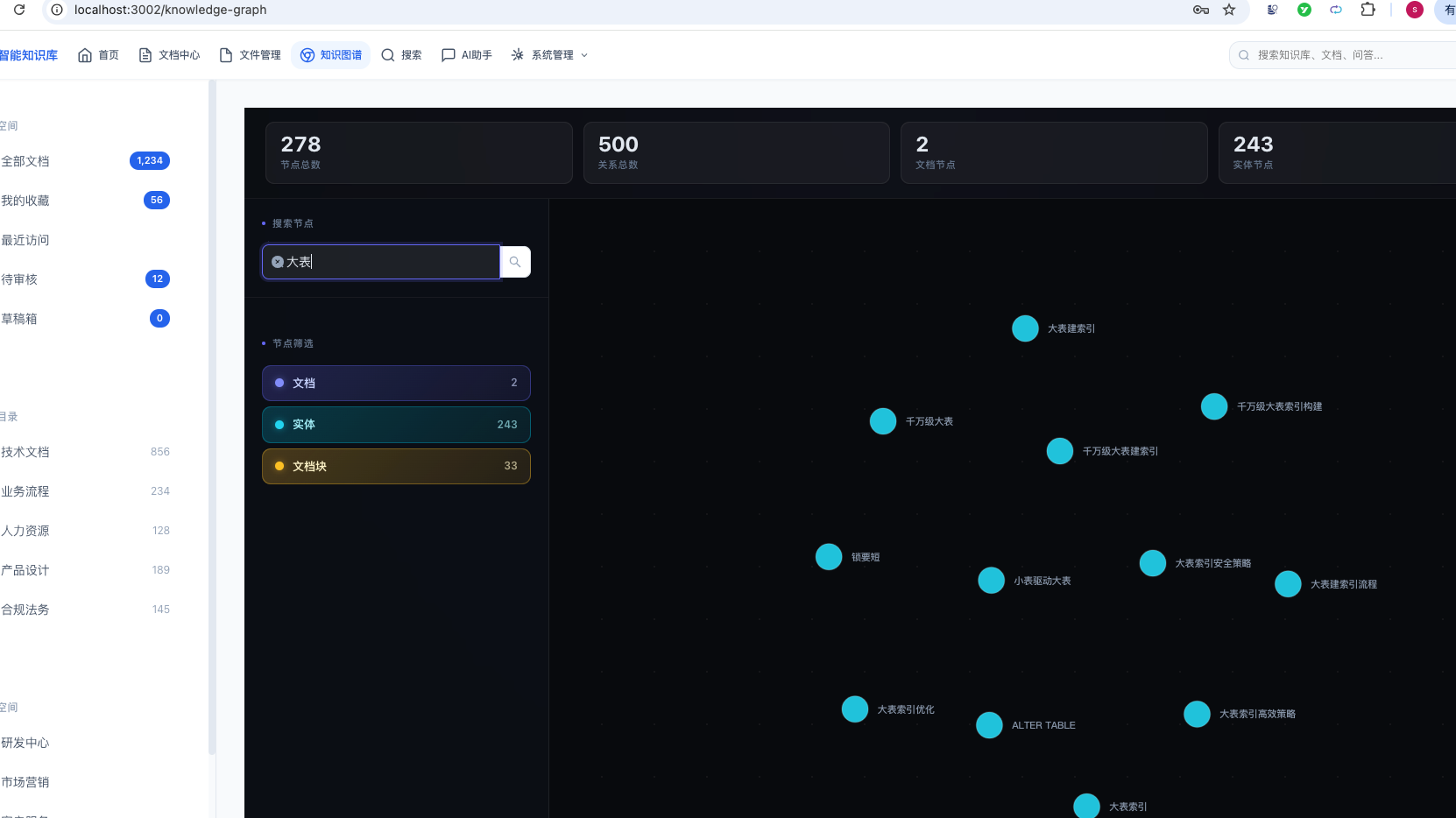
输入关键字:大表,可以在知识图谱中,过滤出大表相关的知识:
鼠标点击其中一个知识节点:
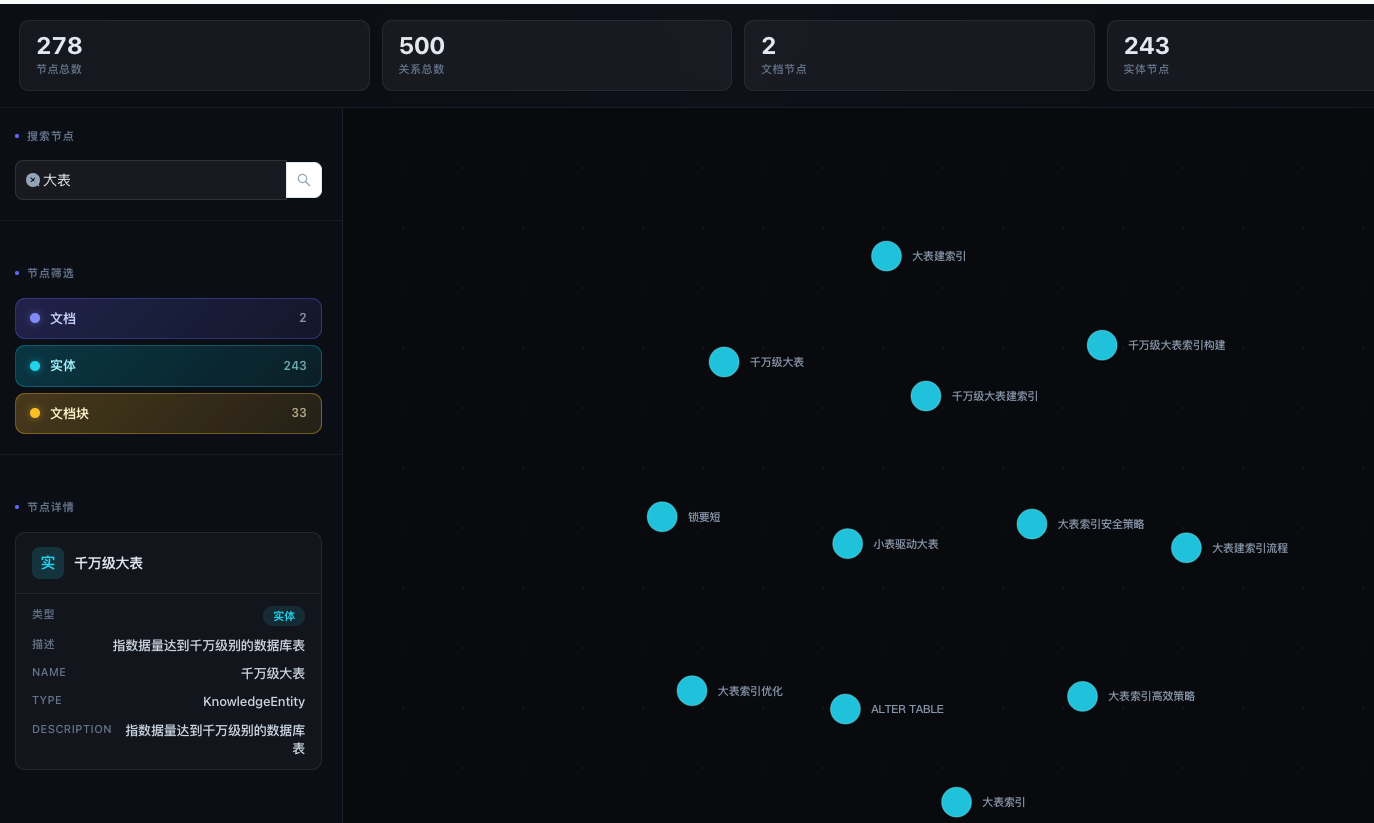
在左下角能够看到知识节点的详情信息。
总结
本章完整实现了知识图谱从后端到前端的全栈功能:
| 序号 | 功能 | 状态 |
|---|---|---|
| 1 | Neo4j 图模型设计(3种节点 + 5种关系) | 已完成 |
| 2 | Spring Data Neo4j 集成 | 已完成 |
| 3 | 图谱查询 API(数据/搜索/路径/社区) | 已完成 |
| 4 | KAG 智能构建(LLM 提取 + MERGE 写图) | 已完成 |
| 5 | KAG 图谱检索(多跳遍历 + 反向关联) | 已完成 |
| 6 | RabbitMQ 异步构建 | 已完成 |
| 7 | 网关路由配置 | 已完成 |
| 8 | 前端力导向图可视化(ECharts) | 已完成 |
| 9 | 节点搜索与类型筛选 | 已完成 |
| 10 | 关系标签展示与详情面板 | 已完成 |
技术亮点:
- LLM 驱动的自动构建:文档入库后自动通过大语言模型提取实体和关系,无需人工标注
- 图增强检索(KAG):AI 问答时自动检索知识图谱上下文,提供更准确的推理支持
- 力导向图谱可视化:基于 ECharts 的交互式图谱,支持缩放、拖拽、邻居高亮、搜索过滤
- 专业的 UI 设计:深色主题 + 玻璃态效果 + 骨架屏加载,提供流畅的用户体验
