一、概述
文件管理中心是知识库系统的基础设施,提供统一的上传、存储、预览和下载能力。
本文详细介绍如何在 kb-file 服务中扩展文件管理功能,实现对音频和视频文件的完整支持。
1.1 功能定位
音视频管理作为文件管理中心的核心扩展,提供以下功能:
| 功能模块 | 说明 | 使用场景 |
|---|---|---|
| 音视频上传 | 上传 mp4/avi/mov/mp3/wav 等媒体文件 | 知识库素材管理 |
| 元数据提取 | 自动提取时长、分辨率、码率等信息 | 文件详情展示 |
| HLS转码 | 将视频转码为多码率 HLS 流(360p + 720p) | 在线播放 |
| 缩略图生成 | 从视频中提取关键帧作为封面 | 文件列表预览 |
| 流媒体播放 | 支持 HLS 自适应码率播放 | 不同网络环境 |
| 转码状态追踪 | 异步转码进度管理 | 实时状态反馈 |
1.2 数据模型
音视频功能在原有 tb_file 表基础上扩展媒体相关字段:
tb_file(文件基础信息表)
├── id                        -- 文件ID(雪花算法)
├── original_name             -- 原始文件名
├── stored_name               -- 存储文件名
├── file_path                 -- 存储路径
├── file_size                 -- 文件大小(字节)
├── file_type                 -- 文件类型:VIDEO/AUDIO/IMAGE/DOCUMENT/ARCHIVE/OTHER
├── mime_type                 -- MIME类型
├── file_hash                 -- SHA-256哈希值
├── storage_type              -- 存储后端:RUSTFS
├── bucket_name               -- 存储桶名称
├── uploader_id               -- 上传者ID
├── access_level              -- 访问级别
├── download_count            -- 下载次数
├── status                    -- 状态
├── deleted                   -- 删除标识
│
├── ─── 以下为音视频扩展字段 ───
├── duration                  -- 时长(秒)
├── resolution                -- 分辨率,如 "1920x1080"
├── bitrate                   -- 码率(kbps)
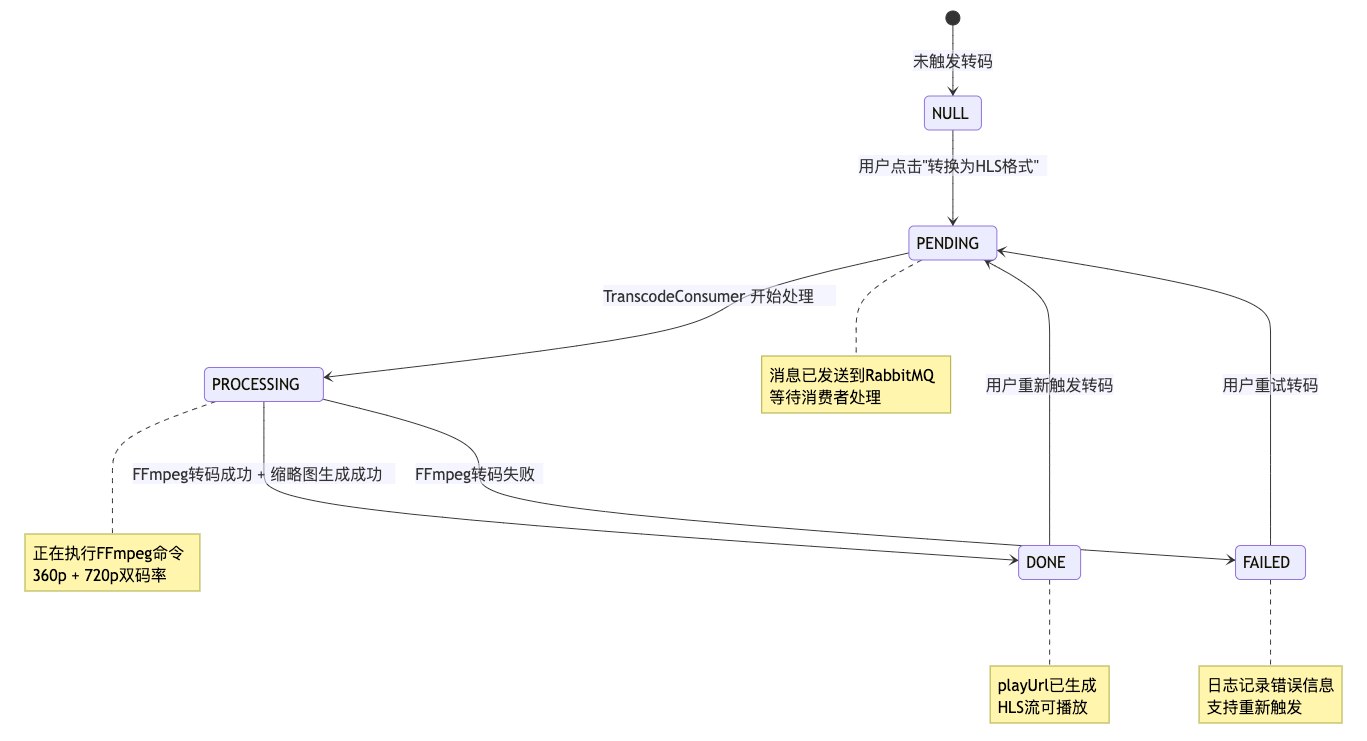
├── transcode_status          -- 转码状态:PENDING/PROCESSING/DONE/FAILED
├── hls_path                  -- HLS播放列表目录路径
└── thumbnail_path            -- 缩略图路径
1.3 技术实现
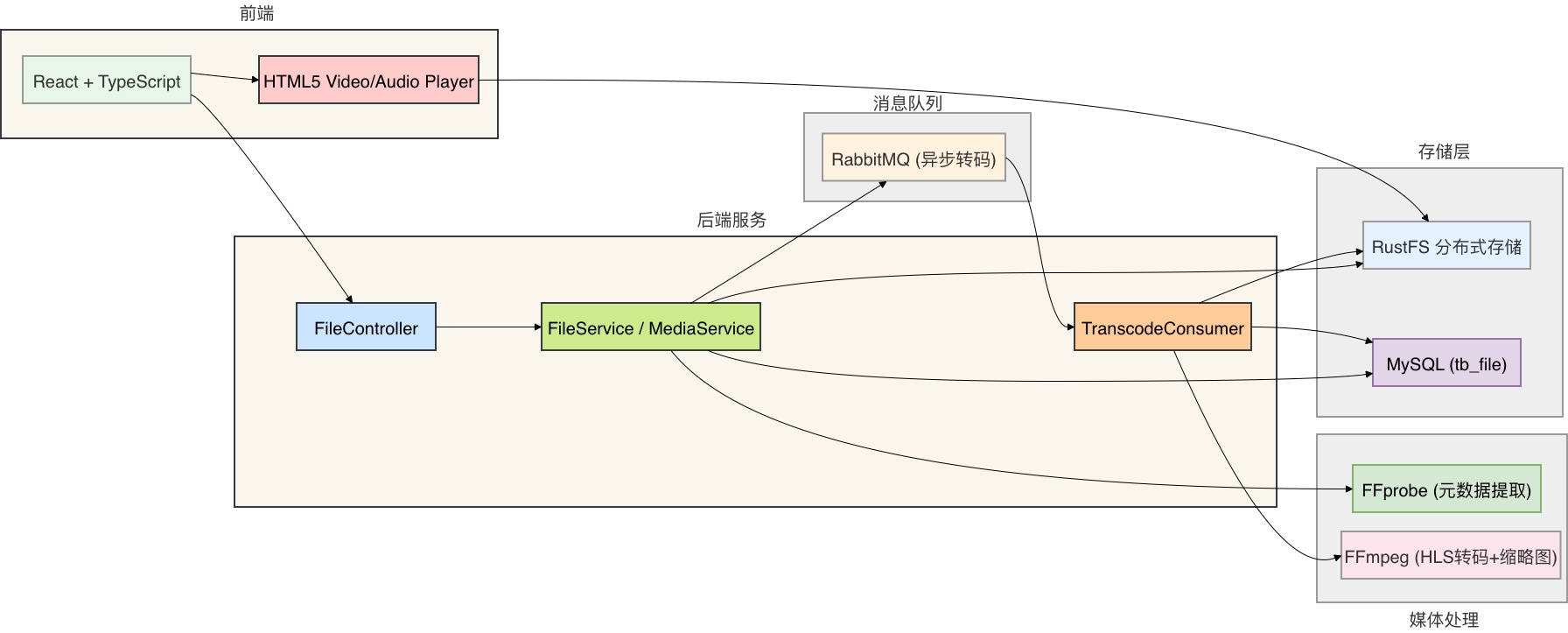
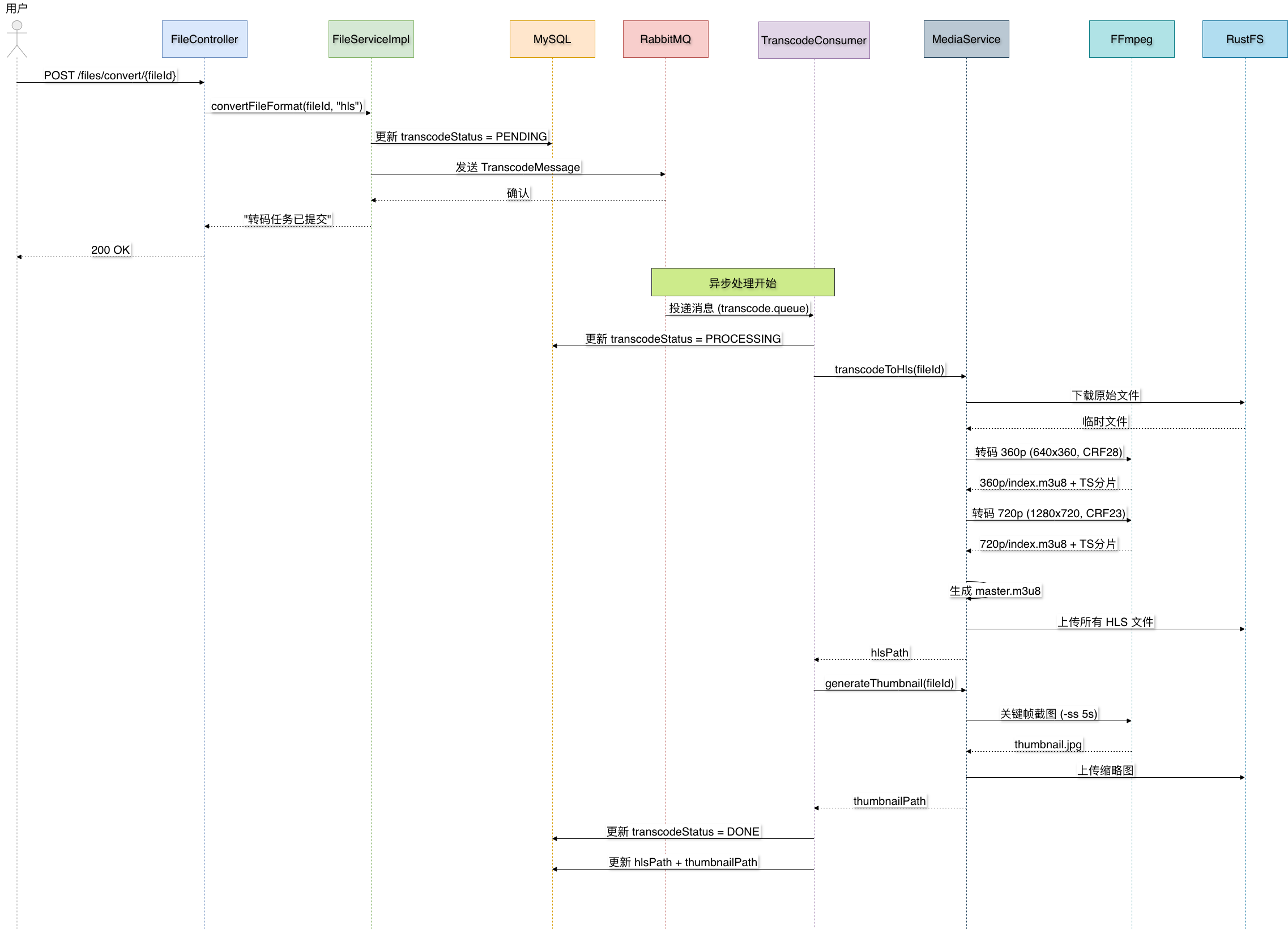
1.4 架构流程
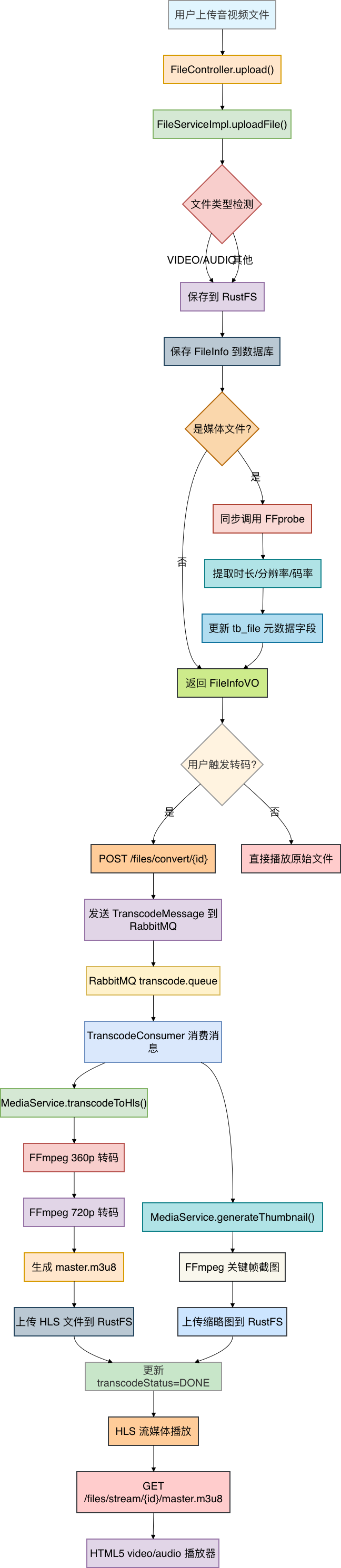
二、数据库设计
2.1 扩展 tb\_file 表
音视频功能不需要创建新表,只需在现有 tb_file 表中添加媒体相关字段。
创建 sql/alter_tb_file_media.sql:
-- =====================================================
-- kb-file 音视频功能扩展 — tb_file 表字段新增
-- 添加媒体元数据、转码状态、HLS路径、缩略图路径字段
-- =====================================================

ALTER TABLE tb_file
    ADD COLUMN duration         INT          COMMENT '时长(秒)',
    ADD COLUMN resolution       VARCHAR(20)  COMMENT '分辨率 如1920x1080',
    ADD COLUMN bitrate          INT          COMMENT '码率(kbps)',
    ADD COLUMN transcode_status VARCHAR(20)  DEFAULT NULL COMMENT '转码状态: PENDING/PROCESSING/DONE/FAILED',
    ADD COLUMN hls_path         VARCHAR(500) COMMENT 'HLS播放列表目录路径(相对于bucket)',
    ADD COLUMN thumbnail_path   VARCHAR(500) COMMENT '缩略图路径(相对于bucket)';

-- 为转码状态字段添加索引,加速前端轮询查询
CREATE INDEX idx_transcode_status ON tb_file(transcode_status);
2.2 字段说明
| 字段 | 类型 | 说明 | 必填 | 默认值 |
|---|---|---|---|---|
| duration | INT | 时长(秒) | 否 | NULL |
| resolution | VARCHAR(20) | 分辨率,如 "1920x1080" | 否 | NULL |
| bitrate | INT | 码率(kbps) | 否 | NULL |
| transcode\_status | VARCHAR(20) | 转码状态 | 否 | NULL |
| hls\_path | VARCHAR(500) | HLS播放列表目录路径 | 否 | NULL |
| thumbnail\_path | VARCHAR(500) | 缩略图路径 | 否 | NULL |
2.3 转码状态说明
| 状态 | 说明 | 前端展示 |
|---|---|---|
| NULL | 未触发转码 | 无特殊标记 |
| PENDING | 已发送转码请求,等待处理 | 转码中(排队) |
| PROCESSING | 正在执行 FFmpeg 转码 | 转码中(处理中) |
| DONE | 转码完成,可以播放 | 显示播放按钮 |
| FAILED | 转码失败 | 转码失败标记 |
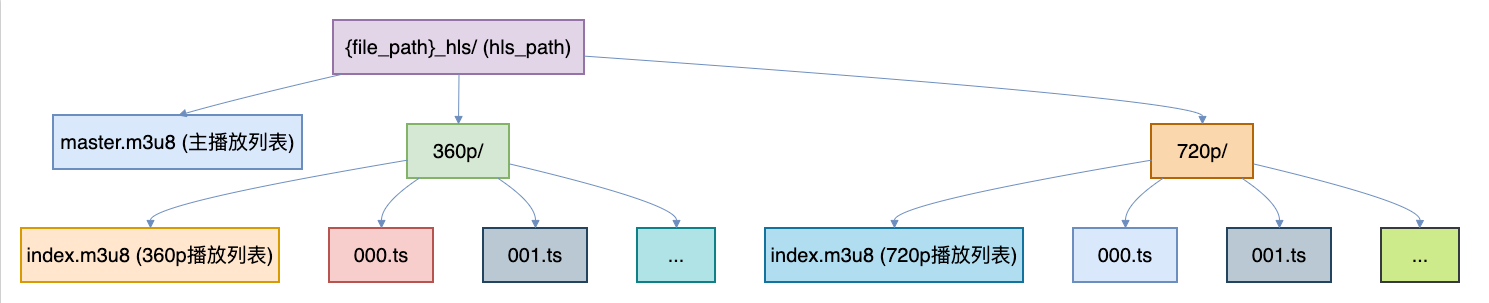
2.4 HLS 存储结构
转码完成后,RustFS 中的 HLS 文件存储结构如下:
三、实体类设计
3.1 扩展 FileInfo 实体类
在 kb-file/src/main/java/com/knowledge/base/file/entity/FileInfo.java 中添加音视频字段:
package com.knowledge.base.file.entity;

import com.baomidou.mybatisplus.annotation.IdType;
import com.baomidou.mybatisplus.annotation.TableId;
import com.baomidou.mybatisplus.annotation.TableName;
import io.swagger.v3.oas.annotations.media.Schema;
import lombok.Data;

import java.time.LocalDateTime;

/**
 * 文件信息实体类
 *
 * <p>存储文件的基础信息和音视频媒体元数据</p>
 *
 * @author 苏三
 * @since 1.0.0
 */
@Data
@TableName("tb_file")
public class FileInfo {

    @TableId(type = IdType.ASSIGN_ID)
    @Schema(description = "文件ID")
    private Long id;

    @Schema(description = "原始文件名")
    private String originalName;

    @Schema(description = "存储文件名")
    private String storedName;

    @Schema(description = "文件存储路径")
    private String filePath;

    @Schema(description = "文件大小(字节)")
    private Long fileSize;

    @Schema(description = "文件类型:VIDEO/AUDIO/IMAGE/DOCUMENT/ARCHIVE/OTHER")
    private String fileType;

    @Schema(description = "MIME类型")
    private String mimeType;

    @Schema(description = "文件扩展名")
    private String fileExtension;

    @Schema(description = "文件SHA-256哈希值")
    private String fileHash;

    @Schema(description = "存储类型:RUSTFS")
    private String storageType;

    @Schema(description = "存储桶名称")
    private String bucketName;

    @Schema(description = "上传者ID")
    private Long uploaderId;

    @Schema(description = "访问级别")
    private String accessLevel;

    @Schema(description = "下载次数")
    private Integer downloadCount;

    @Schema(description = "状态")
    private Integer status;

    @Schema(description = "删除标识")
    private Integer deleted;

    @Schema(description = "创建时间")
    private LocalDateTime createTime;

    @Schema(description = "更新时间")
    private LocalDateTime updateTime;

    @Schema(description = "创建人")
    private Long createBy;

    @Schema(description = "更新人")
    private Long updateBy;

    // ===================== 音视频扩展字段 =====================

    @Schema(description = "时长(秒),音视频文件专用")
    private Integer duration;

    @Schema(description = "分辨率,如 1920x1080")
    private String resolution;

    @Schema(description = "码率(kbps)")
    private Integer bitrate;

    @Schema(description = "转码状态:PENDING/PROCESSING/DONE/FAILED")
    private String transcodeStatus;

    @Schema(description = "HLS播放列表目录路径(相对于bucket)")
    private String hlsPath;

    @Schema(description = "缩略图路径(相对于bucket)")
    private String thumbnailPath;
}
3.2 设计思路
- 字段扩展到 tb\_file:避免创建新表,减少关联查询,保持简单
- mediaCodec 解耦:视频编解码器信息仅存在于
MediaMetadataVO 中,不持久化 - hlsPath 相对路径:存储相对于 bucket 的路径,方便跨环境迁移
- transcodeStatus 状态机:PENDING → PROCESSING → DONE/FAILED,状态可追踪
四、DTO和VO设计
4.1 扩展 FileInfoVO 响应对象
在 kb-file/src/main/java/com/knowledge/base/file/vo/FileInfoVO.java 中添加音视频响应字段:
package com.knowledge.base.file.vo;

import io.swagger.v3.oas.annotations.media.Schema;
import lombok.AllArgsConstructor;
import lombok.Builder;
import lombok.Data;
import lombok.NoArgsConstructor;

import java.time.LocalDateTime;

/**
 * 文件信息VO
 *
 * @author 苏三
 * @since 1.0.0
 */
@Data
@Builder
@NoArgsConstructor
@AllArgsConstructor
@Schema(description = "文件信息")
public class FileInfoVO {

    @Schema(description = "文件ID")
    private Long id;

    @Schema(description = "原始文件名")
    private String originalName;

    @Schema(description = "文件大小(字节)")
    private Long fileSize;

    @Schema(description = "文件大小(可读格式)")
    private String fileSizeReadable;

    @Schema(description = "文件类型:VIDEO/AUDIO/IMAGE/DOCUMENT/ARCHIVE/OTHER")
    private String fileType;

    @Schema(description = "MIME类型")
    private String mimeType;

    @Schema(description = "文件访问URL")
    private String fileUrl;

    @Schema(description = "预览URL")
    private String previewUrl;

    @Schema(description = "上传者ID")
    private Long uploaderId;

    @Schema(description = "上传者名称")
    private String uploaderName;

    @Schema(description = "访问级别")
    private String accessLevel;

    @Schema(description = "下载次数")
    private Integer downloadCount;

    @Schema(description = "存储类型")
    private String storageType;

    @Schema(description = "创建时间")
    private LocalDateTime createdAt;

    // ===================== 音视频扩展字段 =====================

    @Schema(description = "时长(秒),音视频文件专用")
    private Integer duration;

    @Schema(description = "分辨率,如 1920x1080")
    private String resolution;

    @Schema(description = "码率(kbps)")
    private Integer bitrate;

    @Schema(description = "转码状态:PENDING/PROCESSING/DONE/FAILED")
    private String transcodeStatus;

    @Schema(description = "HLS播放URL(转码完成后生成)")
    private String playUrl;

    @Schema(description = "缩略图URL(转码完成后生成)")
    private String thumbnailUrl;
}
4.2 创建 MediaMetadata VO
创建 kb-file/src/main/java/com/knowledge/base/file/vo/MediaMetadata.java,用于封装 FFprobe 提取的元数据:
package com.knowledge.base.file.vo;

import lombok.AllArgsConstructor;
import lombok.Builder;
import lombok.Data;
import lombok.NoArgsConstructor;

/**
 * 媒体元数据VO(FFprobe提取结果)
 *
 * @author 苏三
 * @since 1.0.0
 */
@Data
@Builder
@NoArgsConstructor
@AllArgsConstructor
public class MediaMetadata {

    /** 时长(秒) */
    private Integer duration;

    /** 分辨率,如 "1920x1080" */
    private String resolution;

    /** 码率(kbps) */
    private Integer bitrate;

    /** 视频编解码器,如 "h264" */
    private String videoCodec;

    /** 音频编解码器,如 "aac" */
    private String audioCodec;
}
4.3 创建 TranscodeMessage 消息体
创建 kb-file/src/main/java/com/knowledge/base/file/message/TranscodeMessage.java,用于 RabbitMQ 消息传递:
package com.knowledge.base.file.message;

import lombok.AllArgsConstructor;
import lombok.Data;
import lombok.NoArgsConstructor;

import java.io.Serializable;

/**
 * 转码消息体
 *
 * @author 苏三
 * @since 1.0.0
 */
@Data
@NoArgsConstructor
@AllArgsConstructor
public class TranscodeMessage implements Serializable {

    private static final long serialVersionUID = 1L;

    /** 文件ID */
    private Long fileId;

    /** 目标格式,固定为 "hls" */
    private String targetFormat;
}
4.4 设计说明
VO 转换逻辑:
| 字段 | 数据库来源 | 生成条件 |
|---|---|---|
| duration | tb\_file.duration | 上传时由 FFprobe 提取 |
| resolution | tb\_file.resolution | 上传时由 FFprobe 提取 |
| bitrate | tb\_file.bitrate | 上传时由 FFprobe 提取 |
| transcodeStatus | tb\_file.transcode\_status | 转码各阶段更新 |
| playUrl | 从 hlsPath 拼接 | transcodeStatus = "DONE" 且 hlsPath 不为空 |
| thumbnailUrl | 从 thumbnailPath 拼接 | thumbnailPath 不为空 |
五、数据访问层
5.1 FileMapper 接口
MyBatis-Plus 的 BaseMapper<FileInfo> 已提供完整 CRUD 能力,无需额外编写音视频专用 SQL。
kb-file/src/main/java/com/knowledge/base/file/mapper/FileMapper.java:
package com.knowledge.base.file.mapper;

import com.baomidou.mybatisplus.core.mapper.BaseMapper;
import com.knowledge.base.file.entity.FileInfo;
import org.apache.ibatis.annotations.Mapper;

/**
 * 文件Mapper接口
 *
 * @author 苏三
 * @since 1.0.0
 */
@Mapper
public interface FileMapper extends BaseMapper<FileInfo> {

    // 基础的CRUD操作由 MyBatis-Plus 自动生成
    // 音视频相关的查询通过 LambdaQueryWrapper 在 Service 层组装
}
5.2 FileMapper XML
在 kb-file/src/main/resources/mapper/FileMapper.xml 的 resultMap 中添加媒体字段映射:
<resultMap id="BaseResultMap" type="com.knowledge.base.file.entity.FileInfo">
    <!-- 基础字段 -->
    <id column="id" property="id" />
    <result column="original_name" property="originalName" />
    <result column="stored_name" property="storedName" />
    <result column="file_path" property="filePath" />
    <result column="file_size" property="fileSize" />
    <result column="file_type" property="fileType" />
    <result column="mime_type" property="mimeType" />
    <result column="file_extension" property="fileExtension" />
    <result column="file_hash" property="fileHash" />
    <result column="storage_type" property="storageType" />
    <result column="bucket_name" property="bucketName" />
    <result column="uploader_id" property="uploaderId" />
    <result column="access_level" property="accessLevel" />
    <result column="download_count" property="downloadCount" />
    <result column="status" property="status" />
    <result column="deleted" property="deleted" />
    <result column="create_time" property="createTime" />
    <result column="update_time" property="updateTime" />
    <result column="create_by" property="createBy" />
    <result column="update_by" property="updateBy" />

    <!-- 音视频扩展字段 -->
    <result column="duration" property="duration" />
    <result column="resolution" property="resolution" />
    <result column="bitrate" property="bitrate" />
    <result column="transcode_status" property="transcodeStatus" />
    <result column="hls_path" property="hlsPath" />
    <result column="thumbnail_path" property="thumbnailPath" />
</resultMap>
<!-- 通用查询结果列 -->
<sql id="Base_Column_List">
    id, original_name, stored_name, file_path, file_size, file_type, mime_type,
    file_extension, file_hash, storage_type, bucket_name, uploader_id,
    access_level, download_count, status, deleted,
    create_time, update_time, create_by, update_by,
    duration, resolution, bitrate, transcode_status, hls_path, thumbnail_path
</sql>
5.3 MyBatis-Plus 查询示例
音视频文件查询通过 LambdaQueryWrapper 实现,无需编写 XML SQL:
// 查询所有视频文件
LambdaQueryWrapper<FileInfo> wrapper = new LambdaQueryWrapper<>();
wrapper.eq(FileInfo::getFileType, "VIDEO");
List<FileInfo> videoFiles = fileMapper.selectList(wrapper);

// 查询正在转码的文件
wrapper.eq(FileInfo::getTranscodeStatus, "PROCESSING");

// 分页查询视频文件
Page<FileInfo> page = new Page<>(1, 20);
wrapper.eq(FileInfo::getFileType, "VIDEO")
       .orderByDesc(FileInfo::getCreateTime);
fileMapper.selectPage(page, wrapper);
六、业务逻辑层
6.1 MediaService 接口
创建 kb-file/src/main/java/com/knowledge/base/file/service/MediaService.java:
package com.knowledge.base.file.service;

import com.knowledge.base.file.vo.MediaMetadata;

/**
 * 媒体处理服务接口
 * 负责音视频文件的元数据提取、HLS转码、缩略图生成
 *
 * @author 苏三
 * @since 1.0.0
 */
public interface MediaService {

    /**
     * 提取媒体文件元数据(duration/resolution/bitrate/codec)
     *
     * @param fileId 文件ID
     * @return 媒体元数据
     */
    MediaMetadata probeMediaInfo(Long fileId);

    /**
     * 将视频文件转码为HLS多码率格式(360p + 720p)
     * 异步执行,由RabbitMQ消费者调用
     *
     * @param fileId 文件ID
     * @return HLS播放列表相对路径
     */
    String transcodeToHls(Long fileId);

    /**
     * 从视频文件生成缩略图(关键帧截图)
     *
     * @param fileId 文件ID
     * @return 缩略图相对路径
     */
    String generateThumbnail(Long fileId);

    /**
     * 更新文件的转码状态
     *
     * @param fileId 文件ID
     * @param status 转码状态:PENDING/PROCESSING/DONE/FAILED
     */
    void updateTranscodeStatus(Long fileId, String status);
}
6.2 MediaServiceImpl 实现类
创建 kb-file/src/main/java/com/knowledge/base/file/service/impl/MediaServiceImpl.java:
package com.knowledge.base.file.service.impl;

import cn.hutool.json.JSONArray;
import cn.hutool.json.JSONObject;
import cn.hutool.json.JSONUtil;
import com.baomidou.mybatisplus.core.conditions.update.LambdaUpdateWrapper;
import com.knowledge.base.file.config.FileStorageProperties;
import com.knowledge.base.file.entity.FileInfo;
import com.knowledge.base.file.mapper.FileMapper;
import com.knowledge.base.file.service.FileStorage;
import com.knowledge.base.file.service.MediaService;
import com.knowledge.base.file.vo.MediaMetadata;
import jakarta.annotation.Resource;
import lombok.extern.slf4j.Slf4j;
import org.springframework.stereotype.Service;

import java.io.*;
import java.nio.file.Files;
import java.nio.file.Path;

/**
 * 媒体处理服务实现类
 *
 * <p>使用 FFprobe 提取媒体元数据,使用 FFmpeg 完成 HLS 转码和缩略图生成</p>
 *
 * @author 苏三
 * @since 1.0.0
 */
@Slf4j
@Service
public class MediaServiceImpl implements MediaService {

    @Resource
    private FileMapper fileMapper;

    @Resource
    private FileStorage fileStorage;

    @Resource
    private FileStorageProperties fileStorageProperties;

    /** {@inheritDoc} */
    @Override
    public MediaMetadata probeMediaInfo(Long fileId) {
        log.info("提取媒体元数据:fileId={}", fileId);

        FileInfo fileInfo = fileMapper.selectById(fileId);
        if (fileInfo == null) {
            log.warn("文件不存在:fileId={}", fileId);
            return null;
        }

        Path tempFile = null;
        try {
            // 1. 从 RustFS 下载文件到临时目录
            String extension = fileInfo.getFileExtension();
            tempFile = downloadToTemp(fileInfo.getFilePath(), extension != null ? extension : "mp4");

            // 2. 执行 FFprobe
            String ffprobePath = fileStorageProperties.getFfmpeg().getFfprobePath();
            ProcessBuilder pb = new ProcessBuilder(
                    ffprobePath, "-v", "quiet", "-print_format", "json",
                    "-show_format", "-show_streams",
                    tempFile.toAbsolutePath().toString()
            );
            pb.redirectErrorStream(true);
            Process process = pb.start();

            String output = new String(process.getInputStream().readAllBytes());
            int exitCode = process.waitFor();

            if (exitCode != 0) {
                log.error("FFprobe 执行失败:exitCode={}, output={}", exitCode, output);
                return null;
            }

            // 3. 解析 FFprobe JSON 输出
            MediaMetadata metadata = parseFfprobeOutput(output);

            // 4. 更新数据库中的媒体元数据
            if (metadata != null) {
                FileInfo update = new FileInfo();
                update.setId(fileId);
                update.setDuration(metadata.getDuration());
                update.setResolution(metadata.getResolution());
                update.setBitrate(metadata.getBitrate());
                fileMapper.updateById(update);
            }

            log.info("元数据提取完成:fileId={}, metadata={}", fileId, metadata);
            return metadata;
        } catch (Exception e) {
            log.error("提取媒体元数据失败:fileId={}", fileId, e);
            return null;
        } finally {
            deleteTempFile(tempFile);
        }
    }

    /** {@inheritDoc} */
    @Override
    public String transcodeToHls(Long fileId) {
        log.info("开始HLS转码:fileId={}", fileId);

        FileInfo fileInfo = fileMapper.selectById(fileId);
        if (fileInfo == null) {
            log.error("文件不存在:fileId={}", fileId);
            return null;
        }

        Path tempFile = null;
        Path hlsDir = null;
        try {
            // 1. 下载原文件到临时目录
            String extension = fileInfo.getFileExtension();
            tempFile = downloadToTemp(fileInfo.getFilePath(), extension != null ? extension : "mp4");

            // 2. 创建 HLS 输出目录
            hlsDir = Files.createTempDirectory("hls_");

            String ffmpegPath = fileStorageProperties.getFfmpeg().getFfmpegPath();
            int segmentTime = fileStorageProperties.getFfmpeg().getHlsSegmentTime();

            // 3. 转码 360p 低码率
            transcodeResolution(ffmpegPath, tempFile, hlsDir, "360p",
                    640, 360, 28, 64, segmentTime);

            // 4. 转码 720p 高码率
            transcodeResolution(ffmpegPath, tempFile, hlsDir, "720p",
                    1280, 720, 23, 128, segmentTime);

            // 5. 生成 master.m3u8 主播放列表
            String masterPlaylist = generateMasterPlaylist();
            Files.writeString(hlsDir.resolve("master.m3u8"), masterPlaylist);

            // 6. 上传所有 HLS 文件到 RustFS
            String hlsBasePath = fileInfo.getFilePath() + "_hls";
            uploadHlsFiles(hlsDir, hlsBasePath);

            // 7. 更新数据库中的 hlsPath
            FileInfo update = new FileInfo();
            update.setId(fileId);
            update.setHlsPath(hlsBasePath);
            fileMapper.updateById(update);

            log.info("HLS转码完成:fileId={}, hlsPath={}", fileId, hlsBasePath);
            return hlsBasePath;
        } catch (Exception e) {
            log.error("HLS转码失败:fileId={}", fileId, e);
            return null;
        } finally {
            deleteTempFile(tempFile);
            deleteTempDir(hlsDir);
        }
    }

    /** {@inheritDoc} */
    @Override
    public String generateThumbnail(Long fileId) {
        log.info("生成缩略图:fileId={}", fileId);

        FileInfo fileInfo = fileMapper.selectById(fileId);
        if (fileInfo == null) {
            log.error("文件不存在:fileId={}", fileId);
            return null;
        }

        Path tempFile = null;
        Path thumbnailFile = null;
        try {
            // 1. 下载原文件
            String extension = fileInfo.getFileExtension();
            tempFile = downloadToTemp(fileInfo.getFilePath(), extension != null ? extension : "mp4");

            // 2. 生成缩略图
            thumbnailFile = Files.createTempFile("thumb_", ".jpg");
            String ffmpegPath = fileStorageProperties.getFfmpeg().getFfmpegPath();
            int thumbnailTime = fileStorageProperties.getFfmpeg().getThumbnailTime();

            ProcessBuilder pb = new ProcessBuilder(
                    ffmpegPath, "-i", tempFile.toAbsolutePath().toString(),
                    "-ss", formatTime(thumbnailTime),
                    "-vframes", "1",
                    "-q:v", "2",
                    "-y",
                    thumbnailFile.toAbsolutePath().toString()
            );
            pb.redirectErrorStream(true);
            Process process = pb.start();
            int exitCode = process.waitFor();

            if (exitCode != 0) {
                log.error("缩略图生成失败:exitCode={}", exitCode);
                return null;
            }

            // 3. 上传缩略图到 RustFS
            String thumbnailPath = fileInfo.getFilePath() + "_thumb.jpg";
            fileStorage.upload(thumbnailPath, thumbnailFile.toFile());

            // 4. 更新数据库
            FileInfo update = new FileInfo();
            update.setId(fileId);
            update.setThumbnailPath(thumbnailPath);
            fileMapper.updateById(update);

            log.info("缩略图生成完成:fileId={}, thumbnailPath={}", fileId, thumbnailPath);
            return thumbnailPath;
        } catch (Exception e) {
            log.error("缩略图生成失败:fileId={}", fileId, e);
            return null;
        } finally {
            deleteTempFile(tempFile);
            deleteTempFile(thumbnailFile);
        }
    }

    /** {@inheritDoc} */
    @Override
    public void updateTranscodeStatus(Long fileId, String status) {
        LambdaUpdateWrapper<FileInfo> wrapper = new LambdaUpdateWrapper<>();
        wrapper.eq(FileInfo::getId, fileId)
               .set(FileInfo::getTranscodeStatus, status);
        fileMapper.update(null, wrapper);
    }

    // ===================== 私有辅助方法 =====================

    /**
     * 下载文件到临时目录
     */
    private Path downloadToTemp(String filePath, String extension) throws IOException {
        Path tempFile = Files.createTempFile("media_", "." + extension);
        fileStorage.download(filePath, tempFile.toFile());
        return tempFile;
    }

    /**
     * 执行单码率转码
     *
     * @param ffmpegPath   FFmpeg 可执行文件路径
     * @param inputFile    输入视频文件
     * @param hlsDir       HLS 输出根目录
     * @param quality      质量标签(如 "360p")
     * @param width        目标宽度
     * @param height       目标高度
     * @param crf          CRF 值(越小质量越高)
     * @param audioBitrate 音频码率(kbps)
     * @param segmentTime  分片时长(秒)
     */
    private void transcodeResolution(String ffmpegPath, Path inputFile, Path hlsDir,
                                      String quality, int width, int height,
                                      int crf, int audioBitrate, int segmentTime)
            throws IOException, InterruptedException {

        Path outputDir = hlsDir.resolve(quality);
        Files.createDirectories(outputDir);

        ProcessBuilder pb = new ProcessBuilder(
                ffmpegPath,
                "-i", inputFile.toAbsolutePath().toString(),
                "-c:v", "libx264",
                "-preset", "fast",
                "-crf", String.valueOf(crf),
                "-vf", "scale=" + width + ":" + height,
                "-c:a", "aac",
                "-b:a", audioBitrate + "k",
                "-hls_time", String.valueOf(segmentTime),
                "-hls_list_size", "0",
                "-hls_segment_filename", outputDir.resolve("%03d.ts").toAbsolutePath().toString(),
                "-y",
                outputDir.resolve("index.m3u8").toAbsolutePath().toString()
        );
        pb.redirectErrorStream(true);
        Process process = pb.start();

        // 5分钟超时
        boolean finished = process.waitFor(5, java.util.concurrent.TimeUnit.MINUTES);
        if (!finished) {
            process.destroyForcibly();
            throw new RuntimeException("FFmpeg " + quality + " 转码超时");
        }

        int exitCode = process.exitValue();
        if (exitCode != 0) {
            String error = new String(process.getInputStream().readAllBytes());
            throw new RuntimeException("FFmpeg " + quality + " 转码失败: " + error);
        }

        log.info("{} 转码完成", quality);
    }

    /**
     * 生成 HLS 主播放列表
     */
    private String generateMasterPlaylist() {
        return "#EXTM3U\n"
                + "#EXT-X-VERSION:3\n"
                + "#EXT-X-STREAM-INF:BANDWIDTH=600000,RESOLUTION=640x360\n"
                + "360p/index.m3u8\n"
                + "#EXT-X-STREAM-INF:BANDWIDTH=1500000,RESOLUTION=1280x720\n"
                + "720p/index.m3u8\n";
    }

    /**
     * 上传 HLS 目录下所有文件到 RustFS
     */
    private void uploadHlsFiles(Path hlsDir, String hlsBasePath) throws IOException {
        // 上传 master.m3u8
        fileStorage.upload(hlsBasePath + "/master.m3u8", hlsDir.resolve("master.m3u8").toFile());

        // 上传各码率目录下的文件
        for (String quality : new String[]{"360p", "720p"}) {
            Path qualityDir = hlsDir.resolve(quality);
            File[] files = qualityDir.toFile().listFiles();
            if (files != null) {
                for (File file : files) {
                    String key = hlsBasePath + "/" + quality + "/" + file.getName();
                    fileStorage.upload(key, file);
                }
            }
        }
    }

    /**
     * 解析 FFprobe JSON 输出
     */
    private MediaMetadata parseFfprobeOutput(String jsonOutput) {
        try {
            JSONObject root = JSONUtil.parseObj(jsonOutput);
            JSONObject format = root.getJSONObject("format");
            JSONArray streams = root.getJSONArray("streams");

            // 提取时长
            Integer duration = null;
            if (format != null && format.containsKey("duration")) {
                duration = (int) Math.round(format.getDouble("duration"));
            }

            // 提取码率(bps -> kbps)
            Integer bitrate = null;
            if (format != null && format.containsKey("bit_rate")) {
                bitrate = format.getInt("bit_rate") / 1000;
            }

            // 提取分辨率
            String resolution = null;
            String videoCodec = null;
            String audioCodec = null;

            if (streams != null) {
                for (int i = 0; i < streams.size(); i++) {
                    JSONObject stream = streams.getJSONObject(i);
                    String codecType = stream.getStr("codec_type");

                    if ("video".equals(codecType)) {
                        int width = stream.getInt("width", 0);
                        int height = stream.getInt("height", 0);
                        if (width > 0 && height > 0) {
                            resolution = width + "x" + height;
                        }
                        videoCodec = stream.getStr("codec_name");
                    } else if ("audio".equals(codecType)) {
                        audioCodec = stream.getStr("codec_name");
                    }
                }
            }

            return MediaMetadata.builder()
                    .duration(duration)
                    .resolution(resolution)
                    .bitrate(bitrate)
                    .videoCodec(videoCodec)
                    .audioCodec(audioCodec)
                    .build();
        } catch (Exception e) {
            log.error("解析 FFprobe 输出失败", e);
            return null;
        }
    }

    /**
     * 格式化时间为 HH:MM:SS 格式
     */
    private String formatTime(int seconds) {
        int h = seconds / 3600;
        int m = (seconds % 3600) / 60;
        int s = seconds % 60;
        return String.format("%02d:%02d:%02d", h, m, s);
    }

    /**
     * 删除临时文件
     */
    private void deleteTempFile(Path file) {
        if (file != null) {
            try {
                Files.deleteIfExists(file);
            } catch (IOException e) {
                log.warn("删除临时文件失败:{}", file);
            }
        }
    }

    /**
     * 删除临时目录
     */
    private void deleteTempDir(Path dir) {
        if (dir != null) {
            try {
                File[] files = dir.toFile().listFiles();
                if (files != null) {
                    for (File file : files) {
                        file.delete();
                    }
                }
                Files.deleteIfExists(dir);
            } catch (IOException e) {
                log.warn("删除临时目录失败:{}", dir);
            }
        }
    }
}
6.3 在 FileServiceImpl 中集成媒体处理
在上传流程中添加元数据提取:
// FileServiceImpl.java 中的上传方法(关键步骤)
@Override
@Transactional(rollbackFor = Exception.class)
public FileInfoVO uploadFile(MultipartFile file, FileUploadDTO uploadDTO) {
    // 1. 校验文件
    // 2. 计算SHA-256哈希值
    // 3. 检查秒传
    // 4. 生成存储路径
    // 5. 上传到 RustFS
    // 6. 检测文件类型
    // 7. 保存 FileInfo 到数据库

    // 8. 如果是媒体文件,同步提取元数据
    if (isMediaFile(fileInfo.getFileType())) {
        try {
            MediaMetadata metadata = mediaService.probeMediaInfo(fileInfo.getId());
            if (metadata != null) {
                fileInfo.setDuration(metadata.getDuration());
                fileInfo.setResolution(metadata.getResolution());
                fileInfo.setBitrate(metadata.getBitrate());
                fileMapper.updateById(fileInfo);
            }
        } catch (Exception e) {
            log.warn("提取媒体元数据失败,不影响上传:fileId={}", fileInfo.getId(), e);
        }
    }

    // 9. 转换为 VO 返回
    return convertToVO(fileInfo);
}

/**
 * 判断是否是媒体文件
 */
private boolean isMediaFile(String fileType) {
    return "VIDEO".equals(fileType) || "AUDIO".equals(fileType);
}
在 VO 转换中拼接播放和缩略图 URL:
/**
 * 将 FileInfo 实体转换为 FileInfoVO
 */
private FileInfoVO convertToVO(FileInfo fileInfo) {
    FileInfoVO.FileInfoVOBuilder builder = FileInfoVO.builder()
            .id(fileInfo.getId())
            .originalName(fileInfo.getOriginalName())
            .fileSize(fileInfo.getFileSize())
            .fileType(fileInfo.getFileType())
            .duration(fileInfo.getDuration())
            .resolution(fileInfo.getResolution())
            .bitrate(fileInfo.getBitrate())
            .transcodeStatus(fileInfo.getTranscodeStatus())
            // ... 其他基础字段
            ;

    // 转码完成后拼接 HLS 播放 URL
    if ("DONE".equals(fileInfo.getTranscodeStatus())
            && fileInfo.getHlsPath() != null) {
        builder.playUrl("/files/stream/" + fileInfo.getId() + "/master.m3u8");
    }

    // 缩略图存在时拼接缩略图 URL
    if (fileInfo.getThumbnailPath() != null) {
        builder.thumbnailUrl("/files/thumbnail/" + fileInfo.getId());
    }

    return builder.build();
}
6.4 添加格式转换(触发转码)
/**
 * 将媒体文件转换为目标格式(触发HLS转码)
 */
@Override
public String convertFileFormat(Long fileId, String targetFormat) {
    log.info("文件格式转换:fileId={}, targetFormat={}", fileId, targetFormat);

    FileInfo fileInfo = fileMapper.selectById(fileId);
    if (fileInfo == null) {
        throw new BusinessException("文件不存在");
    }

    // 只允许媒体文件进行格式转换
    if (!isMediaFile(fileInfo.getFileType())) {
        throw new BusinessException("仅音视频文件支持格式转换");
    }

    // 设置转码状态为 PENDING
    FileInfo update = new FileInfo();
    update.setId(fileId);
    update.setTranscodeStatus("PENDING");
    fileMapper.updateById(update);

    // 发送转码消息到 RabbitMQ
    TranscodeMessage message = new TranscodeMessage(fileId, targetFormat);
    rabbitTemplate.convertAndSend(
            RabbitMQConfig.TRANSCODE_EXCHANGE,
            RabbitMQConfig.TRANSCODE_ROUTING_KEY,
            message
    );

    log.info("转码消息已发送:fileId={}, targetFormat={}", fileId, targetFormat);
    return fileId.toString();
}
6.5 核心算法说明
6.5.1 FFprobe 元数据提取
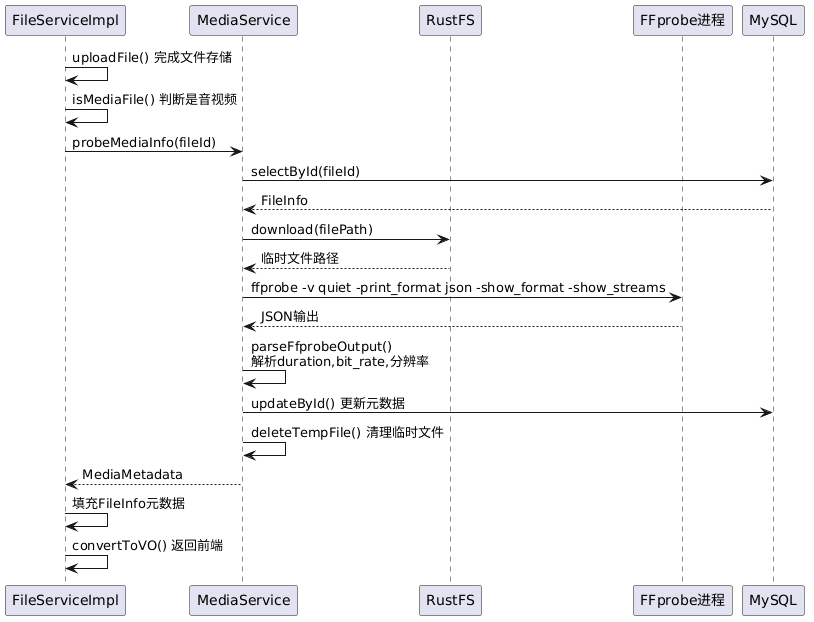
算法特点:
- 同步调用,上传时即时返回元数据
- 失败不影响上传流程,仅记录警告日志
- 临时文件使用后立即清理
- bps → kbps 单位转换(
bit_rate / 1000)
6.5.2 FFmpeg HLS 双码率转码
// 360p 低码率:适合慢速网络
ffmpeg -i input.mp4 \
  -c:v libx264 -preset fast -crf 28 \
  -vf scale=640:360 \
  -c:a aac -b:a 64k \
  -hls_time 10 -hls_list_size 0 \
  -hls_segment_filename 360p/%03d.ts \
  -y 360p/index.m3u8

// 720p 高码率:适合高速网络
ffmpeg -i input.mp4 \
  -c:v libx264 -preset fast -crf 23 \
  -vf scale=1280:720 \
  -c:a aac -b:a 128k \
  -hls_time 10 -hls_list_size 0 \
  -hls_segment_filename 720p/%03d.ts \
  -y 720p/index.m3u8

// 主播放列表 master.m3u8:
#EXTM3U
#EXT-X-VERSION:3
#EXT-X-STREAM-INF:BANDWIDTH=600000,RESOLUTION=640x360
360p/index.m3u8
#EXT-X-STREAM-INF:BANDWIDTH=1500000,RESOLUTION=1280x720
720p/index.m3u8
CRF 值选型参考:
| 码率 | 分辨率 | CRF | 音频码率 | 适合网络 |
|---|---|---|---|---|
| 600kbps | 640x360 | 28 | 64kbps | 4G/慢速WiFi |
| 1500kbps | 1280x720 | 23 | 128kbps | 宽带/WiFi |
6.5.3 异步转码状态机
七、消息队列配置
7.0 异步转码消息流
7.1 RabbitMQ 配置类
创建 kb-file/src/main/java/com/knowledge/base/file/config/RabbitMQConfig.java:
package com.knowledge.base.file.config;

import org.springframework.amqp.core.*;
import org.springframework.context.annotation.Bean;
import org.springframework.context.annotation.Configuration;

/**
 * RabbitMQ 配置 — 转码队列
 *
 * @author 苏三
 * @since 1.0.0
 */
@Configuration
public class RabbitMQConfig {

    /** 转码交换机 */
    public static final String TRANSCODE_EXCHANGE = "transcode.exchange";

    /** 转码队列 */
    public static final String TRANSCODE_QUEUE = "transcode.queue";

    /** 转码路由键 */
    public static final String TRANSCODE_ROUTING_KEY = "transcode";

    @Bean
    public DirectExchange transcodeExchange() {
        return new DirectExchange(TRANSCODE_EXCHANGE, true, false);
    }

    @Bean
    public Queue transcodeQueue() {
        return QueueBuilder.durable(TRANSCODE_QUEUE).build();
    }

    @Bean
    public Binding transcodeBinding() {
        return BindingBuilder
                .bind(transcodeQueue())
                .to(transcodeExchange())
                .with(TRANSCODE_ROUTING_KEY);
    }
}
7.2 转码消息消费者
创建 kb-file/src/main/java/com/knowledge/base/file/consumer/TranscodeConsumer.java:
package com.knowledge.base.file.consumer;

import com.knowledge.base.file.message.TranscodeMessage;
import com.knowledge.base.file.service.MediaService;
import jakarta.annotation.Resource;
import lombok.extern.slf4j.Slf4j;
import org.springframework.amqp.rabbit.annotation.RabbitListener;
import org.springframework.stereotype.Component;

/**
 * 转码消息消费者
 *
 * <p>监听 RabbitMQ 转码队列,异步执行 HLS 转码和缩略图生成</p>
 *
 * @author 苏三
 * @since 1.0.0
 */
@Slf4j
@Component
public class TranscodeConsumer {

    @Resource
    private MediaService mediaService;

    /**
     * 处理转码消息
     *
     * @param message 转码消息
     */
    @RabbitListener(queues = "transcode.queue")
    public void handleTranscodeMessage(TranscodeMessage message) {
        Long fileId = message.getFileId();
        log.info("收到转码消息:fileId={}, targetFormat={}", fileId, message.getTargetFormat());

        try {
            // 1. 更新状态为 PROCESSING
            mediaService.updateTranscodeStatus(fileId, "PROCESSING");

            // 2. 执行 HLS 转码
            String hlsPath = mediaService.transcodeToHls(fileId);
            if (hlsPath == null) {
                throw new RuntimeException("HLS转码失败");
            }

            // 3. 生成缩略图
            String thumbnailPath = mediaService.generateThumbnail(fileId);
            if (thumbnailPath == null) {
                log.warn("缩略图生成失败,但不影响转码结果:fileId={}", fileId);
            }

            // 4. 更新状态为 DONE
            mediaService.updateTranscodeStatus(fileId, "DONE");

            log.info("转码处理完成:fileId={}, hlsPath={}", fileId, hlsPath);
        } catch (Exception e) {
            log.error("转码处理失败:fileId={}", fileId, e);
            // 更新状态为 FAILED
            try {
                mediaService.updateTranscodeStatus(fileId, "FAILED");
            } catch (Exception ex) {
                log.error("更新转码状态失败", ex);
            }
        }
    }
}
7.3 YAML 配置
在 application.yml 中添加 RabbitMQ 和 FFmpeg 配置:
spring:
  rabbitmq:
    host: 117.72.88.11
    port: 5672
    username: admin
    password: ${RABBITMQ_PASSWORD:admin123}
    virtual-host: /
    listener:
      simple:
        concurrency: 1          # 消费者并发数(转码是CPU密集型,建议1个)
        prefetch: 1             # 每次预取1条消息

file:
  storage:
    ffmpeg:
      path: /usr/bin/ffmpeg     # FFmpeg 可执行文件路径
      ffprobe-path: /usr/bin/ffprobe
      hls-segment-time: 10      # HLS 分片时长(秒)
      thumbnail-time: 5         # 缩略图截取时间点(秒)
    upload:
      allowed-types:
        - mp4, avi, mov, wmv, mkv, webm, flv  # 视频格式
        - mp3, wav, flac, aac, ogg             # 音频格式
八、控制器层
8.1 FileController 音视频端点
在 kb-file/src/main/java/com/knowledge/base/file/controller/FileController.java 中添加音视频相关接口:
/**
 * 格式转换(触发HLS转码)
 *
 * @param fileId       文件ID
 * @param targetFormat 目标格式(hls)
 * @return 文件ID
 */
@PostMapping("/convert/{fileId}")
@Operation(summary = "格式转换", description = "将音视频文件转换为目标格式(触发HLS转码)")
public Result<String> convertFileFormat(
        @Parameter(description = "文件ID", required = true)
        @PathVariable Long fileId,
        @Parameter(description = "目标格式", required = true)
        @RequestParam(defaultValue = "hls") String targetFormat) {
    log.info("格式转换请求:fileId={}, targetFormat={}", fileId, targetFormat);

    String success = fileService.convertFileFormat(fileId, targetFormat);
    return Result.success("转码任务已提交", success);
}

/**
 * HLS 主播放列表流
 *
 * @param fileId 文件ID
 */
@GetMapping("/stream/{fileId}/master.m3u8")
@Operation(summary = "HLS主播放列表", description = "返回HLS主播放列表文件")
public void streamMasterPlaylist(
        @Parameter(description = "文件ID", required = true)
        @PathVariable Long fileId,
        HttpServletResponse response) {
    log.info("请求HLS主播放列表:fileId={}", fileId);
    fileService.streamMasterPlaylist(fileId, response);
}

/**
 * HLS 分片流
 *
 * @param fileId  文件ID
 * @param segment 分片文件名(如 "360p/000.ts")
 */
@GetMapping("/stream/{fileId}/{segment:.+\\.ts}")
@Operation(summary = "HLS分片", description = "返回HLS TS分片文件")
public void streamSegment(
        @Parameter(description = "文件ID", required = true)
        @PathVariable Long fileId,
        @Parameter(description = "分片文件名", required = true)
        @PathVariable String segment,
        HttpServletResponse response) {
    log.info("请求HLS分片:fileId={}, segment={}", fileId, segment);
    fileService.streamSegment(fileId, segment, response);
}

/**
 * 视频缩略图
 *
 * @param fileId 文件ID
 */
@GetMapping("/thumbnail/{fileId}")
@Operation(summary = "视频缩略图", description = "返回视频缩略图")
public void getThumbnail(
        @Parameter(description = "文件ID", required = true)
        @PathVariable Long fileId,
        HttpServletResponse response) {
    log.info("请求缩略图:fileId={}", fileId);
    fileService.getThumbnail(fileId, response);
}
8.2 HLS 流媒体服务实现
/**
 * 流式传输 HLS 主播放列表
 */
public void streamMasterPlaylist(Long fileId, HttpServletResponse response)
        throws IOException {
    FileInfo fileInfo = fileMapper.selectById(fileId);
    if (fileInfo == null || fileInfo.getHlsPath() == null) {
        response.setStatus(HttpServletResponse.SC_NOT_FOUND);
        return;
    }

    String key = fileInfo.getHlsPath() + "/master.m3u8";
    response.setContentType("application/vnd.apple.mpegurl");
    response.setHeader("Access-Control-Allow-Origin", "*");

    fileStorage.download(key, response.getOutputStream());
}

/**
 * 流式传输 HLS TS 分片
 */
public void streamSegment(Long fileId, String segment, HttpServletResponse response)
        throws IOException {
    FileInfo fileInfo = fileMapper.selectById(fileId);
    if (fileInfo == null || fileInfo.getHlsPath() == null) {
        response.setStatus(HttpServletResponse.SC_NOT_FOUND);
        return;
    }

    // segment 格式为 "360p/000.ts" 或 "720p/001.ts"
    String key = fileInfo.getHlsPath() + "/" + segment;
    response.setContentType("video/mp2t");
    response.setHeader("Access-Control-Allow-Origin", "*");

    fileStorage.download(key, response.getOutputStream());
}

/**
 * 流式传输缩略图
 */
public void getThumbnail(Long fileId, HttpServletResponse response)
        throws IOException {
    FileInfo fileInfo = fileMapper.selectById(fileId);
    if (fileInfo == null || fileInfo.getThumbnailPath() == null) {
        response.setStatus(HttpServletResponse.SC_NOT_FOUND);
        return;
    }

    response.setContentType("image/jpeg");
    response.setHeader("Access-Control-Allow-Origin", "*");

    fileStorage.download(fileInfo.getThumbnailPath(), response.getOutputStream());
}
8.3 RESTful API 设计
| 方法 | 路径 | 说明 | 参数 |
|---|---|---|---|
| POST | /files/upload | 上传音视频文件 | MultipartFile, FileUploadDTO |
| GET | /files/{fileId} | 获取文件详情(含元数据) | fileId |
| POST | /files/convert/{fileId} | 触发HLS转码 | fileId, targetFormat |
| GET | /files/stream/{fileId}/master.m3u8 | HLS主播放列表 | fileId |
| GET | /files/stream/{fileId}/{segment:.+ts} | HLS分片文件 | fileId, segment |
| GET | /files/thumbnail/{fileId} | 视频缩略图 | fileId |
| GET | /files/preview/{fileId} | 文件预览 | fileId |
| DELETE | /files/{fileId} | 删除文件 | fileId |
九、配置层
9.1 FileStorageProperties FFmpeg 配置
在 kb-file/src/main/java/com/knowledge/base/file/config/FileStorageProperties.java 中添加 FFmpeg 配置类:
/**
 * FFmpeg 相关配置
 */
@Data
public static class Ffmpeg {
    /** FFmpeg 可执行文件路径 */
    private String path = "/usr/bin/ffmpeg";

    /** FFprobe 可执行文件路径 */
    private String ffprobePath = "/usr/bin/ffprobe";

    /** HLS 分片时长(秒) */
    private int hlsSegmentTime = 10;

    /** 缩略图截取时间点(秒) */
    private int thumbnailTime = 5;
}
9.2 上传格式配置
/**
 * 上传配置
 */
@Data
public static class Upload {
    /** 最大上传文件大小(字节),默认 2GB */
    private long maxFileSize = 2L * 1024 * 1024 * 1024;

    /** 允许的视频文件格式 */
    private List<String> allowedVideoTypes = Arrays.asList(
            "mp4", "avi", "mov", "wmv", "mkv", "webm", "flv"
    );

    /** 允许的音频文件格式 */
    private List<String> allowedAudioTypes = Arrays.asList(
            "mp3", "wav", "flac", "aac", "ogg"
    );
}
十、前端开发
10.0 前端组件架构
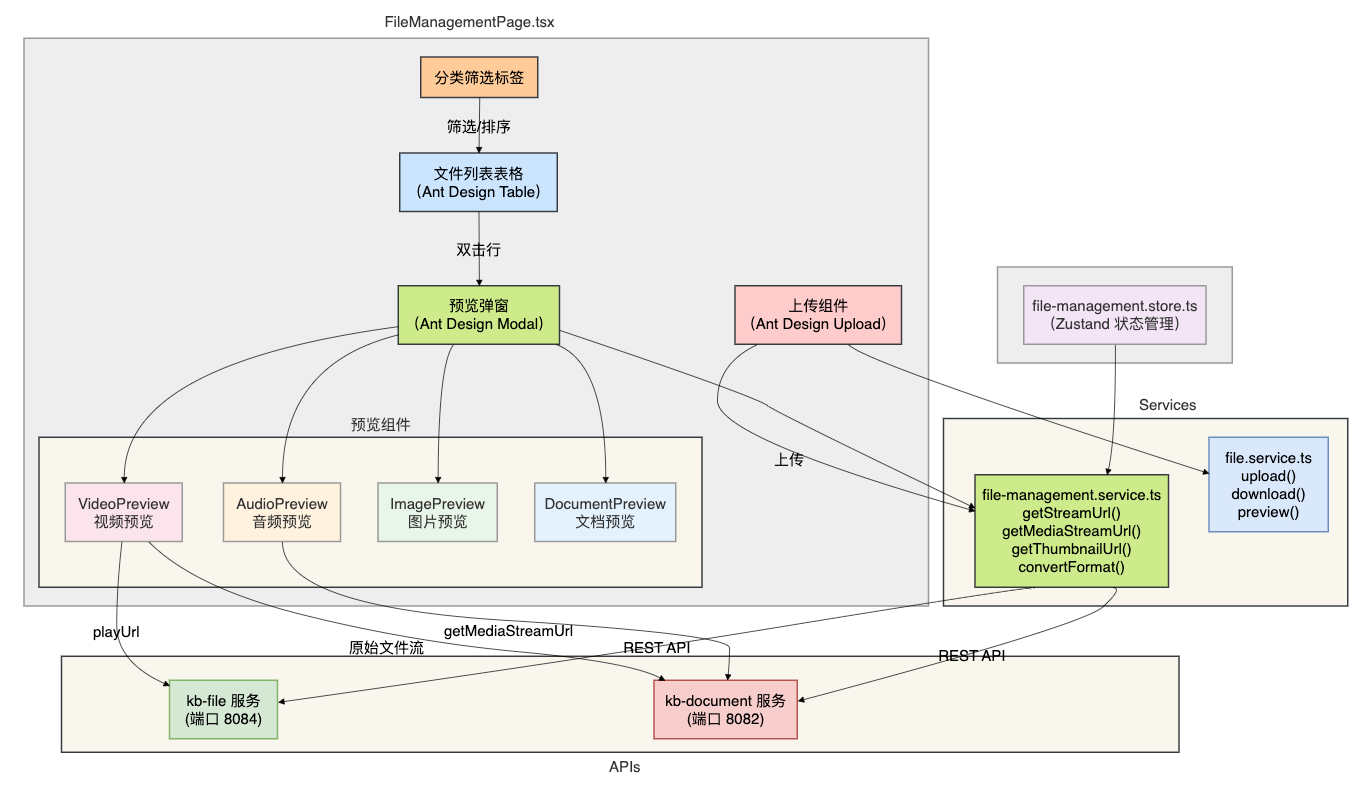
10.1 TypeScript 类型定义
在 file-management.service.ts 中定义 FileMetadata 接口,包含音视频字段:
// src/services/file-management.service.ts

export interface FileMetadata {
  id: number;
  originalName: string;
  fileSize: number;
  fileSizeReadable: string;
  fileType: string;  // 'VIDEO' | 'AUDIO' | 'IMAGE' | 'DOCUMENT' | 'ARCHIVE' | 'OTHER'
  mimeType: string;
  fileUrl: string;
  previewUrl: string;
  uploaderId: number;
  uploaderName: string;
  accessLevel: string;
  downloadCount: number;
  storageType: string;
  createdAt: string;

  // ===================== 音视频扩展字段 =====================

  /** 时长(秒) */
  duration?: number;

  /** 分辨率,如 "1920x1080" */
  resolution?: string;

  /** 码率(kbps) */
  bitrate?: number;

  /** 转码状态:PENDING/PROCESSING/DONE/FAILED */
  transcodeStatus?: string;

  /** HLS 播放 URL(转码完成后生成) */
  playUrl?: string;

  /** 缩略图 URL */
  thumbnailUrl?: string;
}

// API 服务方法
export const fileManagementService = {
  // ... 基础方法

  /** 获取 HLS 播放列表 URL */
  getStreamUrl(fileId: number): string {
    return `/api/files/stream/${fileId}/master.m3u8`;
  },

  /** 获取媒体流 URL(通过 kb-document 服务代理) */
  getMediaStreamUrl(fileId: number): string {
    return `/api/document/file-management/stream/${fileId}`;
  },

  /** 获取缩略图 URL */
  getThumbnailUrl(fileId: number): string {
    return `/api/files/thumbnail/${fileId}`;
  },

  /** 触发格式转换(HLS转码) */
  async convertFormat(fileId: number, targetFormat = 'hls'): Promise<any> {
    return request.post(`/api/files/convert/${fileId}`, null, {
      params: { targetFormat }
    });
  },
};
10.2 视频预览组件
在 FileManagementPage.tsx 中实现视频预览:
// 视频预览弹窗
const renderVideoPreview = () => {
  if (!previewFile || previewFile.fileType !== 'video') return null;

  const isTranscoded = previewFile.transcodeStatus === 'DONE';
  const streamUrl = previewFile.playUrl || fileManagementService.getMediaStreamUrl(previewFile.id);

  return (
    <div style={{ textAlign: 'center', padding: '16px' }}>
      {/* 视频播放器 */}
      <video
        controls
        controlsList="nodownload"
        style={{
          width: '100%',
          maxHeight: '60vh',
          borderRadius: '8px',
          backgroundColor: '#000',
        }}
        src={streamUrl}
        onCanPlay={() => setVideoLoading(false)}
        onError={(e) => {
          const video = e.currentTarget;
          console.error(`视频加载失败: ${video.error?.code} - ${video.error?.message}`);
          message.error('视频加载失败,请稍后重试');
        }}
      >
        您的浏览器不支持 HTML5 视频播放
      </video>
      {/* 加载状态 */}
      {videoLoading && (
        <div style={{ padding: '40px' }}>
          <Spin tip="视频加载中..." />
        </div>
      )}

      {/* 媒体信息 */}
      <div style={{ marginTop: '16px', display: 'flex', gap: '24px', justifyContent: 'center' }}>
        {previewFile.duration != null && (
          <Tag icon={<ClockCircleOutlined />} color="blue">
            {formatDuration(previewFile.duration)}
          </Tag>
        )}
        {previewFile.resolution && (
          <Tag icon={<ExpandOutlined />} color="green">
            {previewFile.resolution}
          </Tag>
        )}
        {previewFile.bitrate != null && (
          <Tag icon={<DashboardOutlined />} color="orange">
            {previewFile.bitrate} kbps
          </Tag>
        )}
      </div>
      {/* 转码状态提示 */}
      {!isTranscoded && previewFile.transcodeStatus && (
        <Alert
          type="info"
          message={`转码状态:${transcodeStatusMap[previewFile.transcodeStatus]}`}
          description={
            previewFile.transcodeStatus === 'PENDING' || previewFile.transcodeStatus === 'PROCESSING'
              ? '当前直接播放原始文件,转码完成后将自动切换到 HLS 流。转码可能需要几分钟。'
              : previewFile.transcodeStatus === 'FAILED'
              ? '转码失败,当前直接播放原始文件。如原文件无法播放,请联系管理员。'
              : '当前直接播放原始文件,您可以点击"转换格式"开始转码。'
          }
          style={{ marginTop: '12px' }}
        />
      )}

      {/* 转码按钮 */}
      {(!previewFile.transcodeStatus || previewFile.transcodeStatus === 'FAILED') && (
        <Button
          type="primary"
          icon={<SwapOutlined />}
          style={{ marginTop: '12px' }}
          onClick={() => handleConvertFormat(previewFile.id)}
        >
          转换为 HLS 格式
        </Button>
      )}
    </div>
  );
};

// 时长格式化辅助函数
const formatDuration = (seconds: number): string => {
  const h = Math.floor(seconds / 3600);
  const m = Math.floor((seconds % 3600) / 60);
  const s = seconds % 60;

  if (h > 0) {
    return `${h}时${m}分${s}秒`;
  } else if (m > 0) {
    return `${m}分${s}秒`;
  }
  return `${s}秒`;
};

// 转码状态映射
const transcodeStatusMap: Record<string, string> = {
  PENDING: '排队中',
  PROCESSING: '转码中',
  DONE: '已完成',
  FAILED: '失败',
};

// 触发转码处理函数
const handleConvertFormat = async (fileId: number) => {
  try {
    await fileManagementService.convertFormat(fileId, 'hls');
    message.success('转码任务已提交,预计需要几分钟');
    // 开始轮询状态
    startTranscodePolling(fileId);
  } catch (error) {
    message.error('转码提交失败');
  }
};
10.3 音频预览组件
// 音频预览弹窗
const renderAudioPreview = () => {
  if (!previewFile || previewFile.fileType !== 'audio') return null;

  const streamUrl = fileManagementService.getMediaStreamUrl(previewFile.id);

  return (
    <div style={{ textAlign: 'center', padding: '32px 16px' }}>
      {/* 音频封面占位 */}
      <div
        style={{
          width: '200px',
          height: '200px',
          margin: '0 auto 24px',
          borderRadius: '12px',
          background: 'linear-gradient(135deg, #fa8c16, #ffc069)',
          display: 'flex',
          alignItems: 'center',
          justifyContent: 'center',
          fontSize: '64px',
          color: '#fff',
        }}
      >
        🎵
      </div>
      {/* 文件名 */}
      <h3 style={{ marginBottom: '16px', color: '#1e293b' }}>
        {previewFile.originalName}
      </h3>
      {/* 音频播放器 */}
      <audio
        controls
        controlsList="nodownload"
        style={{ width: '100%', margin: '0 auto' }}
        src={streamUrl}
        onCanPlay={() => setAudioLoading(false)}
      >
        您的浏览器不支持 HTML5 音频播放
      </audio>
      {/* 加载状态 */}
      {audioLoading && (
        <div style={{ padding: '20px' }}>
          <Spin tip="音频加载中..." />
        </div>
      )}

      {/* 媒体信息 */}
      <div style={{ marginTop: '20px', display: 'flex', gap: '16px', justifyContent: 'center' }}>
        {previewFile.duration != null && (
          <Tag icon={<ClockCircleOutlined />} color="blue">
            {formatDuration(previewFile.duration)}
          </Tag>
        )}
        {previewFile.bitrate != null && (
          <Tag icon={<DashboardOutlined />} color="orange">
            {previewFile.bitrate} kbps
          </Tag>
        )}
      </div>
    </div>
  );
};
10.4 文件类型识别与图标
// 根据文件类型返回对应图标和颜色
const getFileTypeConfig = (fileType: string) => {
  const configs: Record<string, { icon: React.ReactNode; color: string; label: string }> = {
    video: {
      icon: <VideoCameraOutlined />,
      color: '#722ed1',  // 紫色
      label: '视频',
    },
    audio: {
      icon: <AudioOutlined />,
      color: '#fa8c16',  // 橙色
      label: '音频',
    },
    image: {
      icon: <FileImageOutlined />,
      color: '#52c41a',  // 绿色
      label: '图片',
    },
    document: {
      icon: <FileTextOutlined />,
      color: '#1890ff',  // 蓝色
      label: '文档',
    },
    archive: {
      icon: <FileZipOutlined />,
      color: '#595959',  // 灰色
      label: '压缩包',
    },
    other: {
      icon: <FileOutlined />,
      color: '#8c8c8c',
      label: '其他',
    },
  };
  return configs[fileType] || configs.other;
};
10.5 预览弹窗容器
{/* 预览弹窗 */}
<Modal
  title={
    <span>
      {previewFile?.fileType === 'video' && <VideoCameraOutlined style={{ marginRight: 8, color: '#722ed1' }} />}
      {previewFile?.fileType === 'audio' && <AudioOutlined style={{ marginRight: 8, color: '#fa8c16' }} />}
      {previewFile?.originalName}
    </span>
  }
  open={previewVisible}
  onCancel={closePreview}
  width={previewFile?.fileType === 'image' ? 800 : 900}
  footer={[
    <Button key="close" onClick={closePreview}>
      关闭
    </Button>,
    <Button
      key="download"
      type="primary"
      icon={<DownloadOutlined />}
      onClick={() => previewFile && handleDownload(previewFile.id)}
    >
      下载
    </Button>,
  ]}
  destroyOnClose
>
  {previewFile?.fileType === 'video' && renderVideoPreview()}
  {previewFile?.fileType === 'audio' && renderAudioPreview()}
  {previewFile?.fileType === 'image' && renderImagePreview()}
  {previewFile?.fileType === 'document' && renderDocumentPreview()}
</Modal>
十一、测试
1 环境准备
安装 FFmpeg 和 FFprobe:
# macOS
brew install ffmpeg

# Ubuntu/Debian
sudo apt-get install ffmpeg

# CentOS/RHEL
sudo yum install ffmpeg ffmpeg-devel

# 验证安装
ffmpeg -version
ffprobe -version
执行数据库变更:
mysql -h 127.0.0.1 -u root -p kb_file < sql/alter_tb_file_media.sql按顺序启动下面这些微服务:
kb-gateway
kb-auth
kb-file
启动前端
cd knowledge-base-frontend
npm run dev
浏览器访问
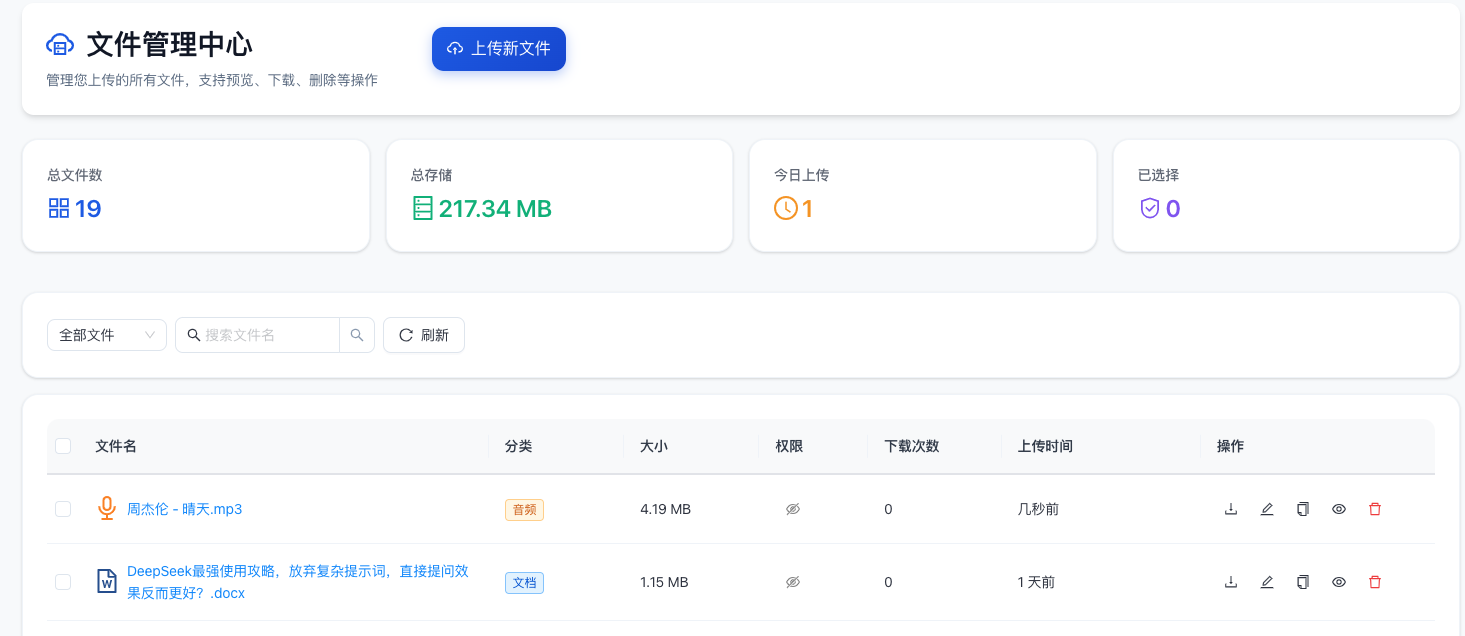
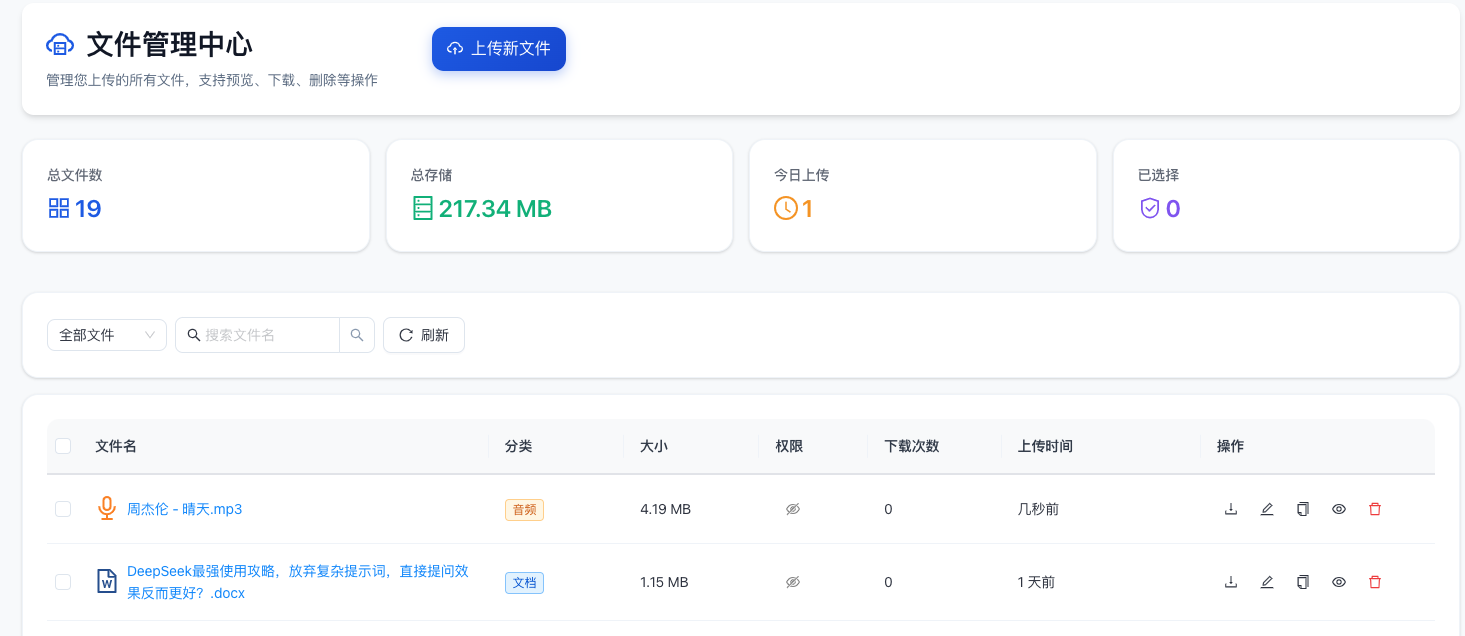
上传周杰伦的一首歌:《晴天》
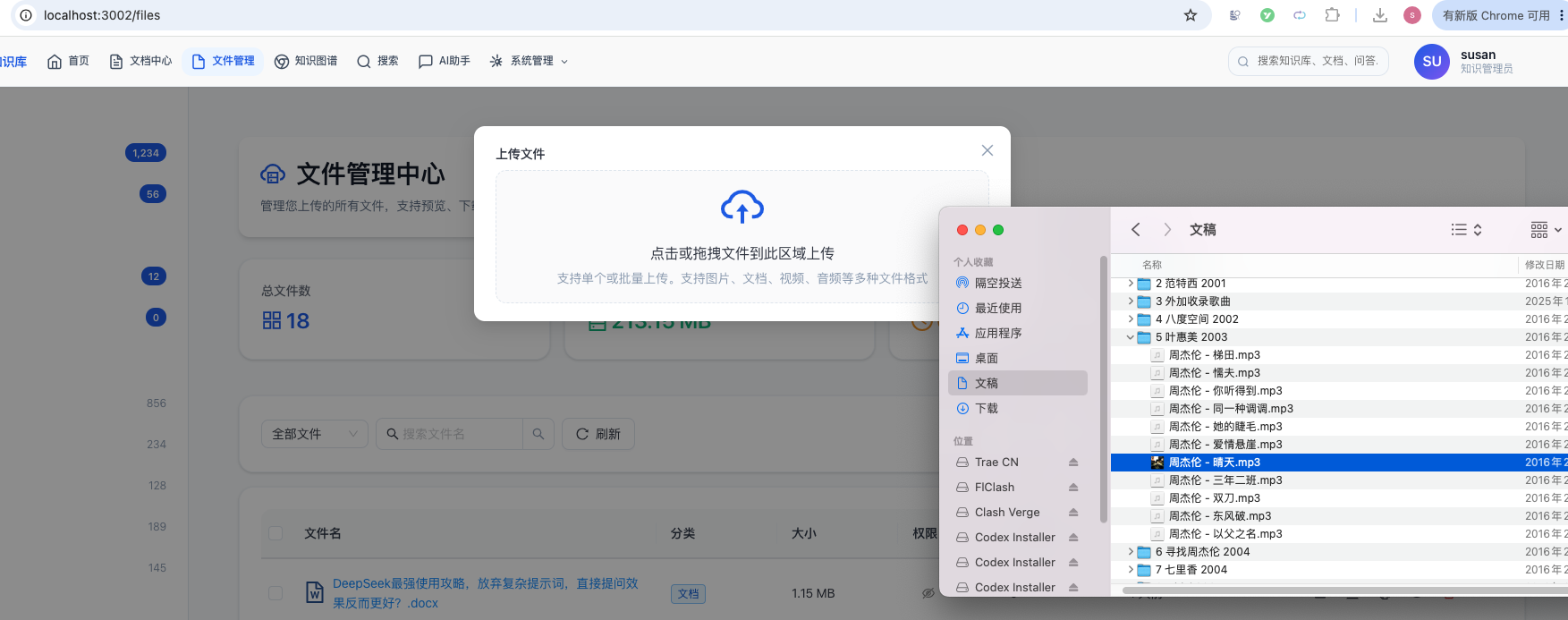
上传成功了:
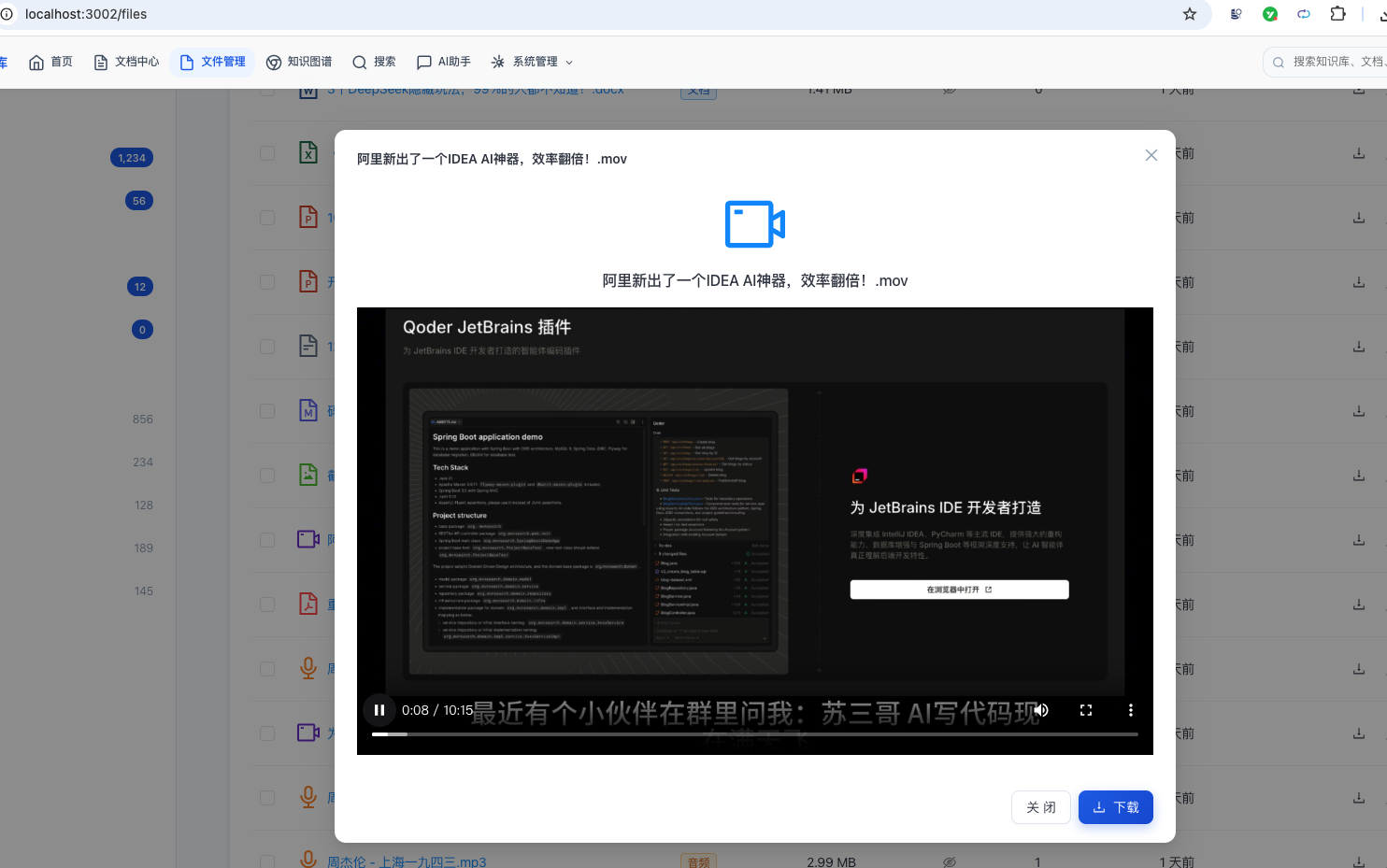
点击歌曲名称,能够直接播放:
也可以点击播放视频:
幻灯片可以预览:

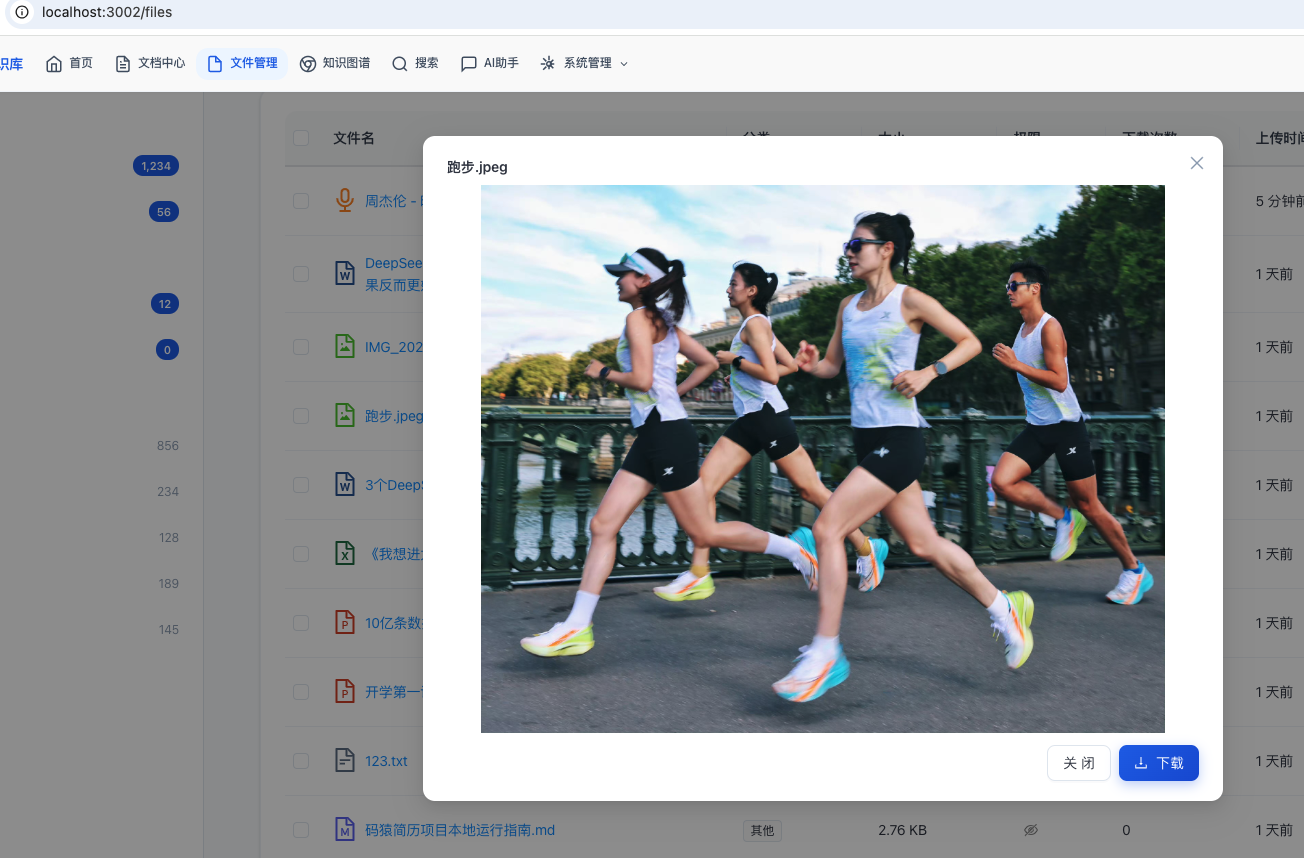
图片可以查看:
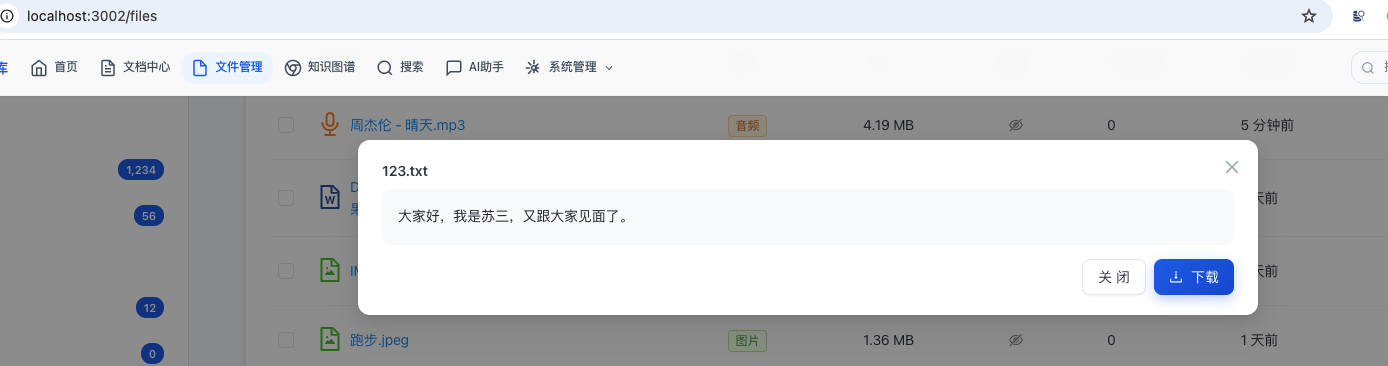
文本可以查看:
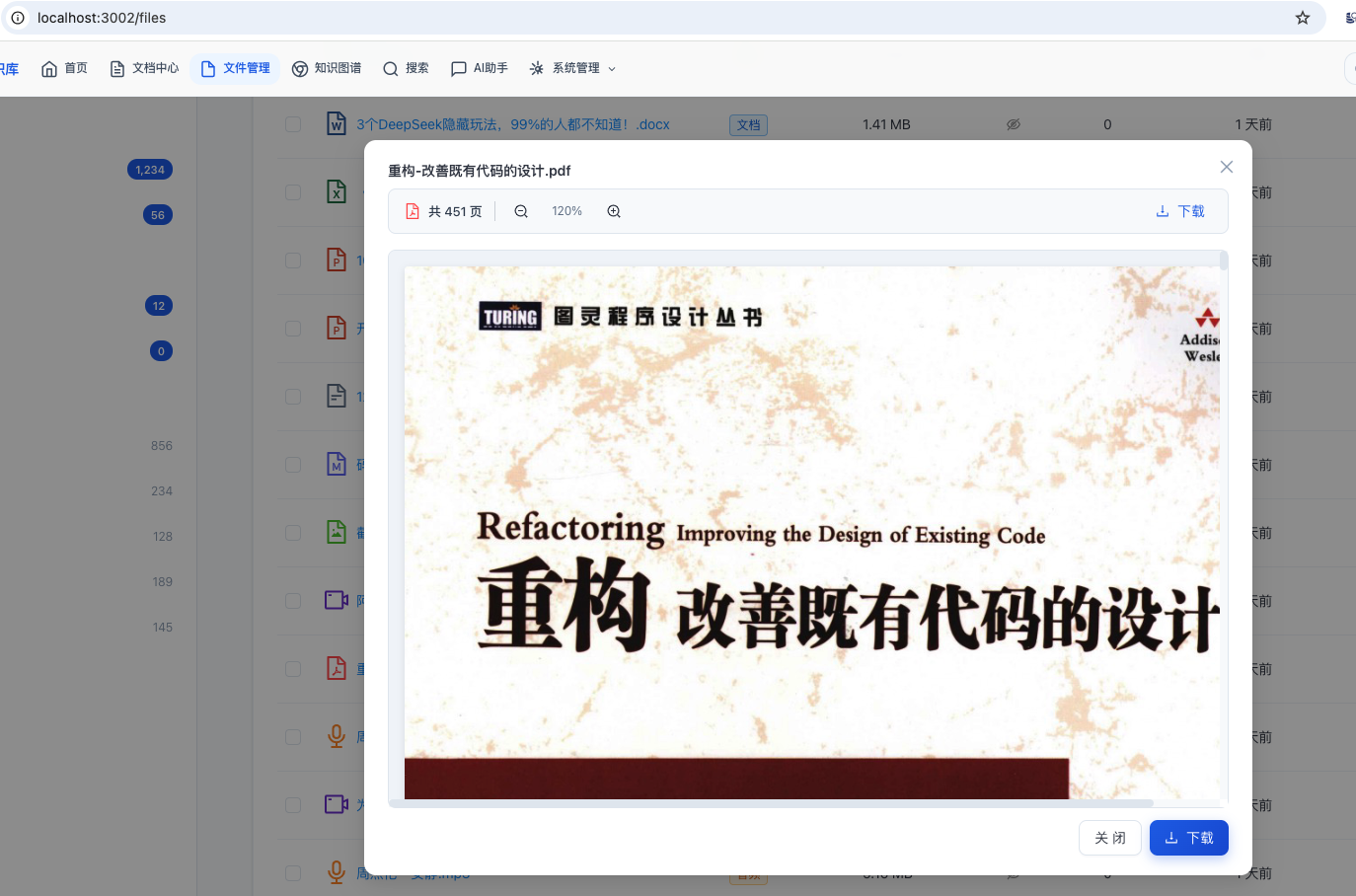
PDF可以查看:
还正常md文件、word、excel等多种格式的文件。
总结
本文详细介绍了在知识库系统中扩展文件管理功能,实现对音频和视频文件的完整支持。
涵盖了以下核心内容:
已完成功能
| 功能 | 实现方式 | 说明 |
|---|---|---|
| 音视频上传 | MultipartFile + RustFS | 支持 mp4/avi/mov/mp3/wav 等格式 |
| 元数据提取 | FFprobe | 同步提取时长/分辨率/码率/编解码器 |
| HLS转码 | FFmpeg + RabbitMQ 异步 | 360p + 720p 多码率自适应 |
| 缩略图生成 | FFmpeg 关键帧截图 | 视频封面预览 |
| 流媒体播放 | HLS TS 分片流 | 自适应码率切换 |
| 转码状态追踪 | 数据库状态机 + 前端轮询 | 实时进度反馈 |
| 前端播放器 | HTML5 video/audio 原生 | 支持 HLS 流播放 |
技术要点
- FFprobe 元数据提取:上传后同步提取,失败不影响上传流程
- RabbitMQ 异步转码:将耗时转码操作解耦到消息队列
- FFmpeg HLS 转码:生成 360p 和 720p 双码率,支持自适应切换
- RustFS 文件存储:HLS 分片文件上传到分布式文件系统
- 状态机管理:PENDING → PROCESSING → DONE/FAILED,状态可追踪
- 前端播放器:原生 HTML5 元素 + 可选 HLS.js 增强
架构优势
- 异步非阻塞:转码通过消息队列异步处理,不阻塞用户请求
- 自适应码率:根据网络状况自动选择 360p 或 720p
- 失败重试:转码失败时支持重新触发
- 元数据独立:元数据提取和转码分离,上传即时返回基础信息
- 存储统一:HLS 分片和原始文件统一存储在 RustFS
通过本文的学习,你应该能够掌握:
- FFmpeg/FFprobe 的 Java 集成方法
- HLS 自适应码率流的生成和分发
- RabbitMQ 异步任务处理的实现模式
- 音视频元数据的提取和存储
- 前端音视频播放器的开发方法
- 转码状态机的设计和管理
祝你开发顺利!
