一、概述
通知中心是知识库系统的消息中枢,通过"持久化存储 + WebSocket 实时推送"的双通道架构,确保用户在任何场景下都能收到系统通知。
本文详细介绍如何在 kb-foundation 服务中实现完整的通知中心功能,涵盖后端核心逻辑、消息队列集成、WebSocket 实时推送以及前端页面开发。
1.1 功能定位
通知中心作为系统的消息基础设施,提供以下核心功能:
| 功能模块 | 说明 | 使用场景 |
|---|---|---|
| 通知CRUD | 发送、查询、标记已读、删除通知 | 通知基础管理 |
| 分页查询 | 支持按类型、已读状态、时间范围筛选 | 通知列表展示 |
| 实时推送 | 基于 WebSocket STOMP 的实时消息推送 | 即时通知触达 |
| 消息队列 | 基于 RabbitMQ 的异步事件驱动 | 跨模块解耦(审核→通知) |
| 模板管理 | 通知模板的创建、编辑和测试发送 | 通知内容标准化 |
| 未读统计 | 实时统计用户未读通知数量 | 红点/角标提示 |
1.2 架构设计
通知中心采用"事件驱动 + 双通道"架构:
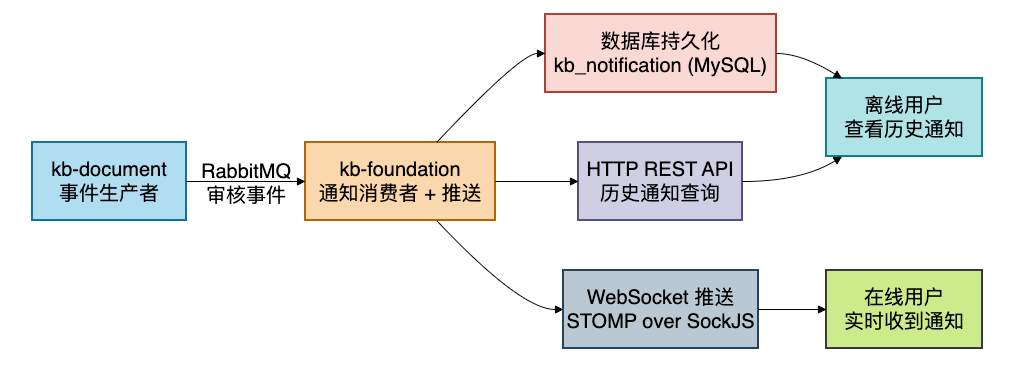
双通道说明:
| 通道 | 实现方式 | 适用场景 |
|---|---|---|
| 数据库持久化 | MySQL kb_notification 表 | 离线用户也能看到通知,支持历史查询 |
| WebSocket 实时推送 | STOMP over SockJS | 在线用户即时收到通知,无需轮询 |
1.3 技术栈
- 后端框架:Spring Boot 3.x + MyBatis Plus
- 消息队列:RabbitMQ(主题模式 TopicExchange)
- 实时推送:Spring WebSocket STOMP + SockJS
- 消息序列化:Jackson2Json(支持 JavaTimeModule)
- ID生成:SnowflakeIdGenerator(雪花算法)
- 前端框架:React 18 + TypeScript + Ant Design
- 状态管理:Zustand
- WebSocket客户端:@stomp/stompjs + sockjs-client
1.4 模块分工
| 模块 | 职责 | 关键文件 |
|---|---|---|
| kb-common | 定义共享事件DTO | ReviewEventDTO.java |
| kb-document | 审核事件生产者 | DocumentReviewServiceImpl.java |
| kb-foundation | 通知核心服务 + 消费者 + WebSocket | NotificationServiceImpl.java、ReviewNotificationListener.java、WebSocketConfig.java |
| kb-gateway | API 路由 + WebSocket 路由 | application.yml |
| 前端 | 通知中心页面 + WebSocket 客户端 | NotificationCenterPage.tsx、websocket.service.ts |
二、数据库设计
2.1 通知表结构
CREATE TABLE `kb_notification` (
  `id` BIGINT NOT NULL COMMENT '通知ID',
  `user_id` BIGINT NOT NULL COMMENT '接收用户ID',
  `user_name` VARCHAR(50) DEFAULT NULL COMMENT '用户姓名(冗余字段)',
  `notification_type` VARCHAR(20) NOT NULL COMMENT '通知类型:system/comment/mention/review/like',
  `title` VARCHAR(200) NOT NULL COMMENT '通知标题',
  `content` TEXT NOT NULL COMMENT '通知内容',
  `link` VARCHAR(500) DEFAULT NULL COMMENT '跳转链接',
  `related_type` VARCHAR(50) DEFAULT NULL COMMENT '关联类型',
  `related_id` BIGINT DEFAULT NULL COMMENT '关联ID',
  `is_read` TINYINT NOT NULL DEFAULT 0 COMMENT '是否已读:0-未读,1-已读',
  `read_time` DATETIME DEFAULT NULL COMMENT '阅读时间',
  `created_at` DATETIME NOT NULL DEFAULT CURRENT_TIMESTAMP COMMENT '创建时间',
  `updated_at` DATETIME NOT NULL DEFAULT CURRENT_TIMESTAMP ON UPDATE CURRENT_TIMESTAMP COMMENT '更新时间',
  `create_by` BIGINT DEFAULT NULL COMMENT '创建人ID',
  `update_by` BIGINT DEFAULT NULL COMMENT '更新人ID',
  `deleted` TINYINT NOT NULL DEFAULT 0 COMMENT '逻辑删除标记:0-未删除,1-已删除',
  PRIMARY KEY (`id`),
  KEY `idx_user_id` (`user_id`),
  KEY `idx_is_read` (`is_read`),
  KEY `idx_notification_type` (`notification_type`),
  KEY `idx_create_time` (`created_at`)
) ENGINE=InnoDB DEFAULT CHARSET=utf8mb4 COLLATE=utf8mb4_unicode_ci COMMENT='系统通知表';
2.2 字段说明
| 字段 | 类型 | 说明 | 必填 | 默认值 |
|---|---|---|---|---|
| id | BIGINT | 通知ID(雪花算法生成) | 是 | - |
| user\_id | BIGINT | 接收用户ID | 是 | - |
| user\_name | VARCHAR(50) | 用户姓名(冗余字段,避免关联查询) | 否 | NULL |
| notification\_type | VARCHAR(20) | 通知类型枚举 | 是 | - |
| title | VARCHAR(200) | 通知标题 | 是 | - |
| content | TEXT | 通知内容 | 是 | - |
| link | VARCHAR(500) | 跳转链接(如 /documents/123) | 否 | NULL |
| related\_type | VARCHAR(50) | 关联业务类型(如 document) | 否 | NULL |
| related\_id | BIGINT | 关联业务ID | 否 | NULL |
| is\_read | TINYINT | 是否已读 | 是 | 0 |
| read\_time | DATETIME | 阅读时间 | 否 | NULL |
2.3 通知类型枚举
| 类型值 | 说明 | 触发场景 |
|---|---|---|
| system | 系统通知 | 系统公告、维护通知等 |
| comment | 评论通知 | 有人评论了你的文档 |
| mention | 提及通知 | 有人在评论中 @ 了你 |
| review | 审核通知 | 文档审核状态变更 |
| like | 点赞通知 | 有人点赞了你的文档 |
2.4 索引设计
- 主键索引:
id- 主键唯一标识 - 用户索引:
idx_user_id- 加速按用户查询通知列表 - 已读索引:
idx_is_read- 加速按已读状态筛选 - 类型索引:
idx_notification_type- 加速按通知类型筛选 - 时间索引:
idx_create_time- 加速按时间范围查询和排序
三、实体类设计
3.1 创建Notification实体类
在 kb-foundation 模块中创建 Notification.java:
package com.knowledge.base.foundation.entity;

import com.baomidou.mybatisplus.annotation.TableField;
import com.baomidou.mybatisplus.annotation.TableName;
import com.knowledge.base.common.config.BaseEntity;
import io.swagger.v3.oas.annotations.media.Schema;
import lombok.Data;
import lombok.EqualsAndHashCode;

import java.time.LocalDateTime;

@Data
@EqualsAndHashCode(callSuper = true)
@TableName("kb_notification")
@Schema(description = "系统通知实体")
public class Notification extends BaseEntity {

    @Schema(description = "接收用户ID")
    @TableField("user_id")
    private Long userId;

    @Schema(description = "用户姓名(冗余字段)")
    @TableField("user_name")
    private String userName;

    @Schema(description = "通知类型:system/comment/mention/review/like")
    @TableField("notification_type")
    private String notificationType;

    @Schema(description = "通知标题")
    @TableField("title")
    private String title;

    @Schema(description = "通知内容")
    @TableField("content")
    private String content;

    @Schema(description = "跳转链接")
    @TableField("link")
    private String link;

    @Schema(description = "关联类型")
    @TableField("related_type")
    private String relatedType;

    @Schema(description = "关联ID")
    @TableField("related_id")
    private Long relatedId;

    @Schema(description = "是否已读:0-未读,1-已读")
    @TableField("is_read")
    private Integer isRead;

    @Schema(description = "阅读时间")
    @TableField("read_time")
    private LocalDateTime readTime;
}
3.2 设计思路
- 继承BaseEntity:复用基础字段(id、createdAt、updatedAt、createBy、updateBy、deleted)
- userName冗余:避免每次展示通知时都需要 JOIN 用户表查询姓名
- link字段:存储前端跳转路径,点击通知可直接跳转到目标页面
- relatedType + relatedId:通用关联设计,可以关联任何业务实体
- isRead + readTime:支持已读/未读状态跟踪,readTime 记录阅读时间
四、DTO和VO设计
4.1 创建NotificationDTO
在 kb-foundation 模块中创建 NotificationDTO.java(用于接收创建通知的请求):
package com.knowledge.base.foundation.dto;

import io.swagger.v3.oas.annotations.media.Schema;
import jakarta.validation.constraints.NotBlank;
import jakarta.validation.constraints.NotNull;
import lombok.Data;

import java.io.Serializable;

@Data
@Schema(description = "通知DTO")
public class NotificationDTO implements Serializable {

    private static final long serialVersionUID = 1L;

    @Schema(description = "通知ID")
    private Long id;

    @NotNull(message = "接收用户ID不能为空")
    @Schema(description = "接收用户ID")
    private Long userId;

    @Schema(description = "用户姓名(冗余字段)")
    private String userName;

    @NotBlank(message = "通知类型不能为空")
    @Schema(description = "通知类型:system/comment/mention/review/like")
    private String notificationType;

    @NotBlank(message = "通知标题不能为空")
    @Schema(description = "通知标题")
    private String title;

    @NotBlank(message = "通知内容不能为空")
    @Schema(description = "通知内容")
    private String content;

    @Schema(description = "跳转链接")
    private String link;

    @Schema(description = "关联类型")
    private String relatedType;

    @Schema(description = "关联ID")
    private Long relatedId;

    @Schema(description = "是否已读:0-未读,1-已读")
    private Integer isRead;
}
4.2 创建NotificationQueryDTO
创建 NotificationQueryDTO.java(用于分页查询的条件封装):
package com.knowledge.base.foundation.dto;

import com.knowledge.base.common.result.PageParam;
import io.swagger.v3.oas.annotations.media.Schema;
import lombok.Data;
import lombok.EqualsAndHashCode;

@Data
@EqualsAndHashCode(callSuper = true)
@Schema(description = "通知查询DTO")
public class NotificationQueryDTO extends PageParam {

    @Schema(description = "用户ID")
    private Long userId;

    @Schema(description = "通知类型")
    private String notificationType;

    @Schema(description = "是否已读")
    private Integer isRead;

    @Schema(description = "开始时间")
    private String startTime;

    @Schema(description = "结束时间")
    private String endTime;
}
4.3 创建NotificationVO
创建 NotificationVO.java(用于返回给前端的通知视图对象):
package com.knowledge.base.foundation.vo;

import io.swagger.v3.oas.annotations.media.Schema;
import lombok.AllArgsConstructor;
import lombok.Builder;
import lombok.Data;
import lombok.NoArgsConstructor;

import java.io.Serializable;
import java.time.LocalDateTime;

@Data
@Builder
@NoArgsConstructor
@AllArgsConstructor
@Schema(description = "通知VO")
public class NotificationVO implements Serializable {

    private static final long serialVersionUID = 1L;

    @Schema(description = "通知ID")
    private Long id;

    @Schema(description = "接收用户ID")
    private Long userId;

    @Schema(description = "用户姓名")
    private String userName;

    @Schema(description = "通知类型")
    private String notificationType;

    @Schema(description = "通知标题")
    private String title;

    @Schema(description = "通知内容")
    private String content;

    @Schema(description = "跳转链接")
    private String link;

    @Schema(description = "关联类型")
    private String relatedType;

    @Schema(description = "关联ID")
    private Long relatedId;

    @Schema(description = "是否已读")
    private Integer isRead;

    @Schema(description = "阅读时间")
    private LocalDateTime readTime;

    @Schema(description = "创建时间")
    private LocalDateTime createdAt;
}
4.4 设计说明
DTO vs QueryDTO vs VO的区别:
| 类型 | 用途 | 特点 |
|---|---|---|
| NotificationDTO | 创建通知时的请求参数 | 带有 @NotNull/@NotBlank 校验注解 |
| NotificationQueryDTO | 分页查询时的筛选条件 | 继承 PageParam,包含可选的筛选字段 |
| NotificationVO | 返回给客户端的响应 | 使用 Builder 模式,包含 createdAt 展示字段 |
转换逻辑:
- 创建通知时,DTO → Entity(使用 Hutool BeanUtil.copyProperties)
- 查询返回时,Entity → VO(使用 MyBatis Plus 的 IPage.convert() + BeanUtil)
五、数据访问层
5.1 创建NotificationMapper接口
在 kb-foundation 模块中创建 NotificationMapper.java:
package com.knowledge.base.foundation.mapper;

import com.baomidou.mybatisplus.core.mapper.BaseMapper;
import com.knowledge.base.foundation.entity.Notification;
import org.apache.ibatis.annotations.Mapper;
import org.apache.ibatis.annotations.Param;
import org.apache.ibatis.annotations.Select;

import java.util.List;

@Mapper
public interface NotificationMapper extends BaseMapper<Notification> {

    @Select("SELECT COUNT(*) FROM kb_notification WHERE user_id = #{userId} AND is_read = 0")
    Long countUnreadByUserId(@Param("userId") Long userId);

    @Select("SELECT * FROM kb_notification WHERE user_id = #{userId} ORDER BY created_at DESC")
    List<Notification> selectByUserId(@Param("userId") Long userId);
}
5.2 MyBatis Plus集成
使用 MyBatis Plus 后,简单的 CRUD 操作无需编写 SQL:
// 自动生成SQL - 无需编写XML
notificationMapper.selectById(id);           // 按ID查询
notificationMapper.selectPage(page, wrapper); // 分页查询
notificationMapper.selectCount(wrapper);      // 计数查询
notificationMapper.insert(notification);      // 插入
notificationMapper.updateById(notification);  // 更新
notificationMapper.update(null, updateWrapper); // 条件更新
notificationMapper.deleteById(id);            // 删除
5.3 设计说明
- 继承BaseMapper:MyBatis Plus 自动提供基础 CRUD 方法
- @Select注解:两个自定义查询直接使用注解 SQL,无需 XML 文件
- countUnreadByUserId:统计用户未读通知数量,用于前端红点/角标展示
- selectByUserId:按用户ID查询全部通知,按创建时间倒序
六、业务逻辑层
6.1 创建NotificationService接口
在 kb-foundation 模块中创建 NotificationService.java:
package com.knowledge.base.foundation.service;

import com.baomidou.mybatisplus.core.metadata.IPage;
import com.knowledge.base.common.result.Result;
import com.knowledge.base.foundation.dto.NotificationDTO;
import com.knowledge.base.foundation.dto.NotificationQueryDTO;
import com.knowledge.base.foundation.entity.Notification;
import com.knowledge.base.foundation.vo.NotificationVO;

public interface NotificationService {

    /**
     * 发送通知(基于DTO,用于 API 调用)
     */
    Result<Long> sendNotification(NotificationDTO notificationDTO);

    /**
     * 分页查询通知
     */
    IPage<Notification> pageNotifications(Long current, Long size, Long userId, Integer isRead);

    /**
     * 查询通知列表(基于查询DTO,支持多条件筛选)
     */
    Result<IPage<NotificationVO>> getNotifications(NotificationQueryDTO queryDTO);

    /**
     * 根据ID获取通知
     */
    Notification getNotificationById(Long id);

    /**
     * 发送通知(基于实体对象,用于内部调用)
     */
    Boolean sendNotification(Notification notification);

    /**
     * 标记通知为已读
     */
    Result<Boolean> markAsRead(Long id);

    /**
     * 标记所有通知为已读
     */
    Result<Boolean> markAllAsRead(Long userId);

    /**
     * 删除通知
     */
    Result<Boolean> deleteNotification(Long id);

    /**
     * 获取未读通知数量
     */
    Result<Long> getUnreadCount(Long userId);
}
6.2 创建NotificationServiceImpl实现类
在 kb-foundation 模块中创建 NotificationServiceImpl.java:
package com.knowledge.base.foundation.service.impl;

import cn.hutool.core.bean.BeanUtil;
import com.baomidou.mybatisplus.core.conditions.query.LambdaQueryWrapper;
import com.baomidou.mybatisplus.core.conditions.update.LambdaUpdateWrapper;
import com.baomidou.mybatisplus.core.metadata.IPage;
import com.baomidou.mybatisplus.extension.plugins.pagination.Page;
import com.baomidou.mybatisplus.extension.service.impl.ServiceImpl;
import com.knowledge.base.common.exception.BusinessException;
import com.knowledge.base.common.result.PageParam;
import com.knowledge.base.common.result.Result;
import com.knowledge.base.common.utils.SnowflakeIdGenerator;
import com.knowledge.base.foundation.dto.NotificationDTO;
import com.knowledge.base.foundation.dto.NotificationQueryDTO;
import com.knowledge.base.foundation.entity.Notification;
import com.knowledge.base.foundation.mapper.NotificationMapper;
import com.knowledge.base.foundation.service.NotificationService;
import com.knowledge.base.foundation.vo.NotificationVO;
import jakarta.annotation.Resource;
import lombok.extern.slf4j.Slf4j;
import org.springframework.stereotype.Service;
import org.springframework.transaction.annotation.Transactional;
import org.springframework.util.StringUtils;

import java.time.LocalDateTime;

@Slf4j
@Service
public class NotificationServiceImpl extends ServiceImpl<NotificationMapper, Notification>
        implements NotificationService {

    @Resource
    private NotificationMapper notificationMapper;

    /** 发送通知(基于DTO) */
    @Override
    @Transactional(rollbackFor = Exception.class)
    public Result<Long> sendNotification(NotificationDTO notificationDTO) {
        log.info("发送通知:userId={}, type={}", notificationDTO.getUserId(),
                notificationDTO.getNotificationType());

        // 参数校验
        if (notificationDTO.getUserId() == null) {
            throw new BusinessException("接收用户ID不能为空");
        }
        if (!StringUtils.hasText(notificationDTO.getNotificationType())) {
            throw new BusinessException("通知类型不能为空");
        }
        if (!StringUtils.hasText(notificationDTO.getTitle())) {
            throw new BusinessException("通知标题不能为空");
        }
        if (!StringUtils.hasText(notificationDTO.getContent())) {
            throw new BusinessException("通知内容不能为空");
        }

        // 构建通知实体
        Notification notification = new Notification();
        BeanUtil.copyProperties(notificationDTO, notification);
        notification.setId(SnowflakeIdGenerator.getInstance().nextId());

        if (notification.getIsRead() == null) {
            notification.setIsRead(0);
        }
        notification.setCreatedAt(LocalDateTime.now());

        // 保存到数据库
        int count = notificationMapper.insert(notification);
        if (count <= 0) {
            throw new BusinessException("发送通知失败");
        }

        log.info("通知发送成功:notificationId={}", notification.getId());
        return Result.success(notification.getId());
    }

    /** 分页查询通知 */
    @Override
    public IPage<Notification> pageNotifications(Long current, Long size,
                                                   Long userId, Integer isRead) {
        log.info("分页查询通知:current={}, size={}, userId={}, isRead={}",
                current, size, userId, isRead);

        LambdaQueryWrapper<Notification> wrapper = new LambdaQueryWrapper<>();

        if (userId != null) {
            wrapper.eq(Notification::getUserId, userId);
        }
        if (isRead != null) {
            wrapper.eq(Notification::getIsRead, isRead);
        }

        wrapper.orderByDesc(Notification::getCreatedAt);

        Page<Notification> page = new Page<>(current, size);
        return notificationMapper.selectPage(page, wrapper);
    }

    /** 查询通知列表(多条件筛选) */
    @Override
    public Result<IPage<NotificationVO>> getNotifications(NotificationQueryDTO queryDTO) {
        log.info("查询通知列表:userId={}", queryDTO.getUserId());

        LambdaQueryWrapper<Notification> wrapper = new LambdaQueryWrapper<>();

        if (queryDTO.getUserId() == null) {
            throw new BusinessException("用户ID不能为空");
        }
        wrapper.eq(Notification::getUserId, queryDTO.getUserId());

        if (StringUtils.hasText(queryDTO.getNotificationType())) {
            wrapper.eq(Notification::getNotificationType,
                    queryDTO.getNotificationType());
        }

        if (queryDTO.getIsRead() != null) {
            wrapper.eq(Notification::getIsRead, queryDTO.getIsRead());
        }

        // 支持时间范围筛选
        if (StringUtils.hasText(queryDTO.getStartTime())) {
            wrapper.ge(Notification::getCreatedAt, queryDTO.getStartTime());
        }
        if (StringUtils.hasText(queryDTO.getEndTime())) {
            wrapper.le(Notification::getCreatedAt, queryDTO.getEndTime());
        }

        wrapper.orderByDesc(Notification::getCreatedAt);

        PageParam pageParam = queryDTO;
        Page<Notification> page = new Page<>(pageParam.getCurrent(), pageParam.getSize());
        IPage<Notification> notificationPage = notificationMapper.selectPage(page, wrapper);

        // Entity → VO 转换
        IPage<NotificationVO> voPage = notificationPage.convert(
                notification -> BeanUtil.copyProperties(notification, NotificationVO.class));

        return Result.success(voPage);
    }

    /** 根据ID获取通知 */
    @Override
    public Notification getNotificationById(Long id) {
        log.info("查询通知详情:id={}", id);
        return notificationMapper.selectById(id);
    }

    /** 发送通知(基于实体,内部调用) */
    @Override
    @Transactional(rollbackFor = Exception.class)
    public Boolean sendNotification(Notification notification) {
        log.info("发送通知:userId={}, title={}",
                notification.getUserId(), notification.getTitle());

        if (notification.getUserId() == null) {
            throw new BusinessException("接收用户ID不能为空");
        }

        notification.setId(SnowflakeIdGenerator.getInstance().nextId());

        if (notification.getIsRead() == null) {
            notification.setIsRead(0);
        }
        notification.setCreatedAt(LocalDateTime.now());

        int count = notificationMapper.insert(notification);
        return count > 0;
    }

    /** 标记通知为已读 */
    @Override
    @Transactional(rollbackFor = Exception.class)
    public Result<Boolean> markAsRead(Long id) {
        log.info("标记通知已读:notificationId={}", id);

        if (id == null) {
            throw new BusinessException("通知ID不能为空");
        }

        Notification notification = notificationMapper.selectById(id);
        if (notification == null) {
            throw new BusinessException("通知不存在");
        }

        LambdaUpdateWrapper<Notification> updateWrapper = new LambdaUpdateWrapper<>();
        updateWrapper.eq(Notification::getId, id)
                .set(Notification::getIsRead, 1)
                .set(Notification::getReadTime, LocalDateTime.now());

        int count = notificationMapper.update(null, updateWrapper);
        return Result.success(count > 0);
    }

    /** 标记所有通知为已读 */
    @Override
    @Transactional(rollbackFor = Exception.class)
    public Result<Boolean> markAllAsRead(Long userId) {
        log.info("标记所有通知已读:userId={}", userId);

        if (userId == null) {
            throw new BusinessException("用户ID不能为空");
        }

        LambdaUpdateWrapper<Notification> updateWrapper = new LambdaUpdateWrapper<>();
        updateWrapper.eq(Notification::getUserId, userId)
                .eq(Notification::getIsRead, 0)
                .set(Notification::getIsRead, 1)
                .set(Notification::getReadTime, LocalDateTime.now());

        int count = notificationMapper.update(null, updateWrapper);
        log.info("已标记{}条通知为已读", count);
        return Result.success(true);
    }

    /** 删除通知 */
    @Override
    @Transactional(rollbackFor = Exception.class)
    public Result<Boolean> deleteNotification(Long id) {
        log.info("删除通知:notificationId={}", id);

        if (id == null) {
            throw new BusinessException("通知ID不能为空");
        }

        int count = notificationMapper.deleteById(id);
        return Result.success(count > 0);
    }

    /** 获取未读通知数量 */
    @Override
    public Result<Long> getUnreadCount(Long userId) {
        log.info("获取未读通知数量:userId={}", userId);

        if (userId == null) {
            throw new BusinessException("用户ID不能为空");
        }

        Long count = notificationMapper.countUnreadByUserId(userId);
        return Result.success(count);
    }
}
6.3 核心设计说明
6.3.1 两个发送方法的设计
| 方法 | 参数类型 | 使用场景 | 返回 |
|---|---|---|---|
| sendNotification(NotificationDTO) | DTO(带校验) | 外部 API 调用 | Result<Long> |
| sendNotification(Notification) | Entity | 内部代码调用(MQ监听器) | Boolean |
设计原因:
- DTO 版本带有
@Valid校验注解,适合 Controller 层调用 - Entity 版本更简洁,适合 Service 间调用和 MQ 监听器调用
- 两个方法都使用雪花算法生成 ID,都设置默认
isRead = 0
6.3.2 标记全部已读的批量更新
LambdaUpdateWrapper<Notification> updateWrapper = new LambdaUpdateWrapper<>();
updateWrapper.eq(Notification::getUserId, userId)
        .eq(Notification::getIsRead, 0)    // 只更新未读的
        .set(Notification::getIsRead, 1)
        .set(Notification::getReadTime, LocalDateTime.now());
关键点:
- 只更新
is_read = 0的记录,避免重复更新已读通知 - 同时设置
read_time,记录阅读时间 - 使用
LambdaUpdateWrapper避免硬编码字段名
七、控制器层
7.1 创建NotificationController
在 kb-foundation 模块中创建 NotificationController.java:
package com.knowledge.base.foundation.controller;

import com.baomidou.mybatisplus.core.metadata.IPage;
import com.knowledge.base.common.result.Result;
import com.knowledge.base.common.utils.UserContextUtil;
import com.knowledge.base.foundation.entity.Notification;
import com.knowledge.base.foundation.service.NotificationService;
import io.swagger.v3.oas.annotations.Operation;
import io.swagger.v3.oas.annotations.Parameter;
import io.swagger.v3.oas.annotations.tags.Tag;
import jakarta.annotation.Resource;
import jakarta.validation.Valid;
import lombok.extern.slf4j.Slf4j;
import org.springframework.web.bind.annotation.*;

@Slf4j
@RestController
@RequestMapping("/notifications")
@Tag(name = "通知管理", description = "系统通知管理接口")
public class NotificationController {

    @Resource
    private NotificationService notificationService;

    @GetMapping
    @Operation(summary = "分页查询通知", description = "分页查询通知列表")
    public Result<IPage<Notification>> pageNotifications(
        @Parameter(description = "当前页") @RequestParam(defaultValue = "1") Long current,
        @Parameter(description = "每页大小") @RequestParam(defaultValue = "10") Long size,
        @Parameter(description = "是否已读") @RequestParam(required = false) Integer isRead) {
        Long userId = UserContextUtil.getUserId();
        log.info("分页查询通知请求:current={}, size={}, userId={}, isRead={}",
                current, size, userId, isRead);

        IPage<Notification> page = notificationService.pageNotifications(
                current, size, userId, isRead);
        return Result.success(page);
    }

    @GetMapping("/{id}")
    @Operation(summary = "查询通知详情", description = "根据通知ID查询通知详情")
    public Result<Notification> getNotificationById(
        @Parameter(description = "通知ID", required = true) @PathVariable Long id) {
        log.info("查询通知详情请求:id={}", id);

        Notification notification = notificationService.getNotificationById(id);
        return Result.success(notification);
    }

    @PostMapping
    @Operation(summary = "发送通知", description = "创建新通知")
    public Result<Boolean> sendNotification(@Valid @RequestBody Notification notification) {
        log.info("发送通知请求:userId={}, title={}",
                notification.getUserId(), notification.getTitle());

        Boolean success = notificationService.sendNotification(notification);
        return Result.success("发送通知成功", success);
    }

    @PutMapping("/{id}/read")
    @Operation(summary = "标记已读", description = "标记通知为已读")
    public Result<Boolean> markAsRead(
        @Parameter(description = "通知ID", required = true) @PathVariable Long id) {
        log.info("标记通知已读请求:id={}", id);

        return notificationService.markAsRead(id);
    }

    @PutMapping("/read-all")
    @Operation(summary = "全部标记已读", description = "将用户所有未读通知标记为已读")
    public Result<Boolean> markAllAsRead() {
        Long userId = UserContextUtil.getUserId();
        log.info("全部标记已读请求:userId={}", userId);

        return notificationService.markAllAsRead(userId);
    }

    @DeleteMapping("/{id}")
    @Operation(summary = "删除通知", description = "根据通知ID删除通知")
    public Result<Boolean> deleteNotification(
        @Parameter(description = "通知ID", required = true) @PathVariable Long id) {
        log.info("删除通知请求:id={}", id);

        return notificationService.deleteNotification(id);
    }

    @GetMapping("/unread-count")
    @Operation(summary = "获取未读数量", description = "获取用户未读通知数量")
    public Result<Long> getUnreadCount() {
        Long userId = UserContextUtil.getUserId();
        log.info("获取未读数量请求:userId={}", userId);

        return notificationService.getUnreadCount(userId);
    }
}
7.2 RESTful API设计
| 方法 | 路径 | 说明 | 参数 |
|---|---|---|---|
| GET | /notifications | 分页查询通知列表 | current, size, isRead |
| GET | /notifications/{id} | 查询通知详情 | id(路径参数) |
| POST | /notifications | 发送通知 | Notification实体 |
| PUT | /notifications/{id}/read | 标记单个已读 | id(路径参数) |
| PUT | /notifications/read-all | 全部标记已读 | -(从JWT获取userId) |
| DELETE | /notifications/{id} | 删除通知 | id(路径参数) |
| GET | /notifications/unread-count | 获取未读数量 | -(从JWT获取userId) |
7.3 用户身份获取
Controller 中使用 UserContextUtil.getUserId() 从 JWT 上下文中获取当前登录用户ID,避免客户端传入伪造的用户ID。
// UserContextUtil 通过 ThreadLocal 存储当前请求的用户信息
Long userId = UserContextUtil.getUserId();
八、WebSocket 实时推送
8.1 架构概述
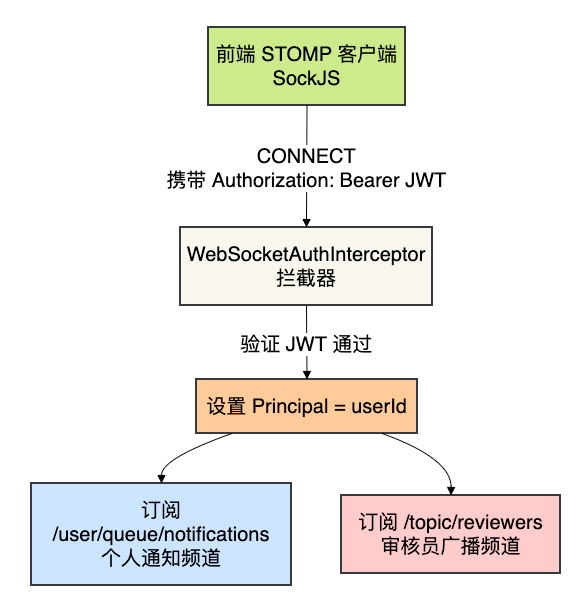
WebSocket 实时推送是本功能的亮点,确保在线用户无需刷新页面即可即时收到通知。
8.2 创建WebSocket配置
在 kb-foundation 模块中创建 WebSocketConfig.java:
package com.knowledge.base.foundation.websocket;

import jakarta.annotation.Resource;
import org.springframework.context.annotation.Configuration;
import org.springframework.messaging.simp.config.ChannelRegistration;
import org.springframework.messaging.simp.config.MessageBrokerRegistry;
import org.springframework.web.socket.config.annotation.EnableWebSocketMessageBroker;
import org.springframework.web.socket.config.annotation.StompEndpointRegistry;
import org.springframework.web.socket.config.annotation.WebSocketMessageBrokerConfigurer;

@Configuration
@EnableWebSocketMessageBroker
public class WebSocketConfig implements WebSocketMessageBrokerConfigurer {

    @Resource
    private WebSocketAuthInterceptor webSocketAuthInterceptor;

    @Override
    public void configureMessageBroker(MessageBrokerRegistry registry) {
        // 启用简单消息代理,用于向客户端推送消息
        registry.enableSimpleBroker("/topic", "/queue");
        // 客户端发送消息的目标前缀
        registry.setApplicationDestinationPrefixes("/app");
        // 用户消息前缀(用于 convertAndSendToUser)
        registry.setUserDestinationPrefix("/user/");
    }

    @Override
    public void registerStompEndpoints(StompEndpointRegistry registry) {
        // 注册WebSocket端点,允许跨域
        registry.addEndpoint("/ws/notification")
                .setAllowedOriginPatterns("*")
                .withSockJS(); // 启用SockJS支持
    }

    @Override
    public void configureClientInboundChannel(ChannelRegistration registration) {
        // 注册认证拦截器,在 STOMP CONNECT 时从 JWT 提取用户身份
        registration.interceptors(webSocketAuthInterceptor);
    }
}
配置说明:
| 配置项 | 值 | 说明 |
|---|---|---|
| enableSimpleBroker | /topic, /queue | 服务端向客户端推送消息的目标前缀 |
| setApplicationDestinationPrefixes | /app | 客户端向服务端发送消息的目标前缀 |
| setUserDestinationPrefix | /user/ | 用户个人消息前缀,/user/{userId}/queue/notifications |
| SockJS端点 | /ws/notification | 前端连接的 STOMP 端点 |
| 跨域 | setAllowedOriginPatterns("*") | 允许所有来源连接 |
8.3 创建WebSocket认证拦截器
创建 WebSocketAuthInterceptor.java:
package com.knowledge.base.foundation.websocket;

import com.knowledge.base.common.utils.JwtUtil;
import jakarta.annotation.Resource;
import lombok.extern.slf4j.Slf4j;
import org.springframework.messaging.Message;
import org.springframework.messaging.MessageChannel;
import org.springframework.messaging.simp.stomp.StompCommand;
import org.springframework.messaging.simp.stomp.StompHeaderAccessor;
import org.springframework.messaging.support.ChannelInterceptor;
import org.springframework.stereotype.Component;

import java.security.Principal;

@Slf4j
@Component
public class WebSocketAuthInterceptor implements ChannelInterceptor {

    @Resource
    private JwtUtil jwtUtil;

    @Override
    public Message<?> preSend(Message<?> message, MessageChannel channel) {
        StompHeaderAccessor accessor = StompHeaderAccessor.wrap(message);

        if (StompCommand.CONNECT.equals(accessor.getCommand())) {
            String authHeader = accessor.getFirstNativeHeader("Authorization");
            if (authHeader != null && authHeader.startsWith("Bearer ")) {
                String token = authHeader.substring(7);
                try {
                    if (jwtUtil.validateToken(token)) {
                        Long userId = jwtUtil.getUserId(token);
                        if (userId != null) {
                            accessor.setUser(new Principal() {
                                @Override
                                public String getName() {
                                    return String.valueOf(userId);
                                }
                            });
                            log.debug("WebSocket 认证成功:userId={}", userId);
                        }
                    } else {
                        log.warn("WebSocket 认证失败:Token 无效或已过期");
                    }
                } catch (Exception e) {
                    log.warn("WebSocket 认证异常:{}", e.getMessage());
                }
            } else {
                log.debug("WebSocket CONNECT 未携带 Authorization 头,以匿名身份连接");
            }
        }

        return message;
    }
}
拦截器逻辑:
- 在 STOMP CONNECT 阶段拦截消息
- 从
Authorization头提取 Bearer Token - 验证 JWT 有效性,提取
userId - 将
userId设置为连接的Principal - 认证成功后,
convertAndSendToUser(userId, ...)才能正确路由消息
九、RabbitMQ 消息队列集成
9.1 事件驱动架构
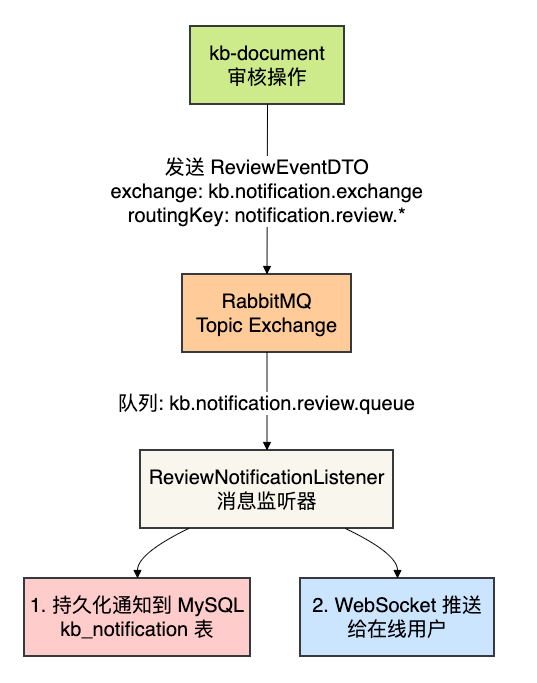
通知中心通过 RabbitMQ 实现以下事件流:
9.2 创建ReviewEventDTO(事件载体)
在 kb-common 模块中创建 ReviewEventDTO.java(共享事件定义):
package com.knowledge.base.common.event;

import lombok.AllArgsConstructor;
import lombok.Builder;
import lombok.Data;
import lombok.NoArgsConstructor;

import java.io.Serializable;
import java.time.LocalDateTime;

@Data
@Builder
@NoArgsConstructor
@AllArgsConstructor
public class ReviewEventDTO implements Serializable {

    private static final long serialVersionUID = 1L;

    /** 事件类型:SUBMITTED / APPROVED / REJECTED */
    private String eventType;

    /** 文档ID */
    private Long documentId;

    /** 文档标题 */
    private String documentTitle;

    /** 文档作者ID */
    private Long authorId;

    /** 文档作者名称(冗余字段,避免查询) */
    private String authorName;

    /** 审核员ID */
    private Long reviewerId;

    /** 审核员名称 */
    private String reviewerName;

    /** 审核轮次 */
    private Integer reviewRound;

    /** 审核级别(预留多级扩展,默认1) */
    private Integer reviewLevel;

    /** 审核意见(驳回时必填) */
    private String reviewComment;

    /** 事件时间 */
    private LocalDateTime timestamp;
}
9.3 创建ReviewNotificationListener(消息消费者)
在 kb-foundation 模块中创建 ReviewNotificationListener.java:
package com.knowledge.base.foundation.mq;

import com.knowledge.base.common.event.ReviewEventDTO;
import com.knowledge.base.foundation.dto.NotificationDTO;
import com.knowledge.base.foundation.service.NotificationService;
import jakarta.annotation.Resource;
import lombok.extern.slf4j.Slf4j;
import org.springframework.amqp.rabbit.annotation.RabbitListener;
import org.springframework.jdbc.core.JdbcTemplate;
import org.springframework.messaging.simp.SimpMessagingTemplate;
import org.springframework.stereotype.Component;

import java.util.LinkedHashMap;
import java.util.List;
import java.util.Map;

@Slf4j
@Component
public class ReviewNotificationListener {

    @Resource
    private NotificationService notificationService;

    @Resource
    private SimpMessagingTemplate messagingTemplate;

    @Resource
    private JdbcTemplate jdbcTemplate;

    @RabbitListener(queues = "kb.notification.review.queue")
    public void handleReviewEvent(ReviewEventDTO event) {
        if (event == null || event.getEventType() == null) {
            log.warn("收到空的审核事件,忽略");
            return;
        }

        String notificationType = "review";
        String link = "/documents/" + event.getDocumentId();

        try {
            switch (event.getEventType()) {
                case "SUBMITTED" -> handleSubmitted(event, notificationType, link);
                case "APPROVED"  -> handleApproved(event, notificationType, link);
                case "REJECTED"  -> handleRejected(event, notificationType, link);
                default -> log.warn("未知的审核事件类型:{}", event.getEventType());
            }
        } catch (Exception e) {
            // 捕获所有异常,避免死循环重试
            log.error("处理审核事件失败:eventType={}, documentId={}, error={}",
                    event.getEventType(), event.getDocumentId(), e.getMessage(), e);
        }
    }

    /**
     * 处理文档提交审核事件 → 通知所有审核员
     */
    private void handleSubmitted(ReviewEventDTO event, String type, String link) {
        String title = "新文档待审核";
        String content = String.format("用户「%s」提交了文档《%s》,请及时审核。",
                event.getAuthorName(), event.getDocumentTitle());

        // 1. 查询所有审核员用户ID
        List<Long> reviewerIds = findReviewerUserIds();
        if (reviewerIds.isEmpty()) {
            log.warn("未找到审核员,跳过通知推送:documentId={}", event.getDocumentId());
        }

        // 2. 持久化通知 + WebSocket点对点推送给每个审核员
        for (Long reviewerId : reviewerIds) {
            persistAndPush(reviewerId, type, title, content, link, event.getDocumentId());
        }

        // 3. 广播到审核员公共频道(在线审核员实时收到)
        Map<String, Object> payload = buildPushPayload(event, type, title, content, link);
        messagingTemplate.convertAndSend("/topic/reviewers", payload);
        log.info("已广播审核提交事件到 /topic/reviewers:documentId={}", event.getDocumentId());
    }

    /**
     * 处理审核通过事件 → 通知文档作者
     */
    private void handleApproved(ReviewEventDTO event, String type, String link) {
        String title = "文档审核通过";
        String content = String.format("您的文档《%s》已通过审核,正式发布。",
                event.getDocumentTitle());

        if (event.getAuthorId() != null) {
            persistAndPush(event.getAuthorId(), type, title, content, link,
                    event.getDocumentId());
        }
    }

    /**
     * 处理审核驳回事件 → 通知文档作者
     */
    private void handleRejected(ReviewEventDTO event, String type, String link) {
        String title = "文档审核驳回";
        String reason = event.getReviewComment() != null
                && !event.getReviewComment().isBlank()
                ? event.getReviewComment() : "未填写原因";
        String content = String.format("您的文档《%s》未通过审核,驳回原因:%s",
                event.getDocumentTitle(), reason);

        if (event.getAuthorId() != null) {
            persistAndPush(event.getAuthorId(), type, title, content, link,
                    event.getDocumentId());
        }
    }

    /**
     * 持久化通知到数据库 + WebSocket 点对点推送
     */
    private void persistAndPush(Long userId, String type, String title,
                                 String content, String link, Long documentId) {
        // 1. 持久化到数据库
        NotificationDTO dto = new NotificationDTO();
        dto.setUserId(userId);
        dto.setNotificationType(type);
        dto.setTitle(title);
        dto.setContent(content);
        dto.setLink(link);
        dto.setRelatedType("document");
        dto.setRelatedId(documentId);
        dto.setIsRead(0);
        notificationService.sendNotification(dto);

        // 2. WebSocket 点对点推送给目标用户
        Map<String, Object> payload = new LinkedHashMap<>();
        payload.put("notificationType", type);
        payload.put("title", title);
        payload.put("content", content);
        payload.put("link", link);
        payload.put("documentId", documentId);
        messagingTemplate.convertAndSendToUser(
                String.valueOf(userId), "/queue/notifications", payload);
    }

    /**
     * 查询所有具有 ROLE_REVIEWER 角色的用户ID
     */
    private List<Long> findReviewerUserIds() {
        try {
            return jdbcTemplate.queryForList(
                    "SELECT ur.user_id FROM kb_user_role ur " +
                    "JOIN kb_role r ON ur.role_id = r.id " +
                    "WHERE r.role_code = 'ROLE_REVIEWER'", Long.class);
        } catch (Exception e) {
            log.warn("查询审核员列表失败:{}", e.getMessage());
            return List.of();
        }
    }

    /**
     * 构建 WebSocket 广播推送数据
     */
    private Map<String, Object> buildPushPayload(ReviewEventDTO event,
            String type, String title, String content, String link) {
        Map<String, Object> payload = new LinkedHashMap<>();
        payload.put("eventType", event.getEventType());
        payload.put("notificationType", type);
        payload.put("title", title);
        payload.put("content", content);
        payload.put("link", link);
        payload.put("documentId", event.getDocumentId());
        payload.put("documentTitle", event.getDocumentTitle());
        payload.put("timestamp", event.getTimestamp() != null
                ? event.getTimestamp().toString() : "");
        return payload;
    }
}
9.4 三种事件的处理逻辑
| 事件类型 | 通知对象 | 通知方式 | 关键逻辑 |
|---|---|---|---|
| SUBMITTED | 所有审核员 | 点对点 + 广播 | 查询 kb_user_role 表获取所有审核员ID,逐一点对点推送;同时广播到 /topic/reviewers |
| APPROVED | 文档作者 | 点对点 | 通知作者文档已通过审核 |
| REJECTED | 文档作者 | 点对点 | 通知作者审核被驳回,包含驳回原因 |
9.5 消息生产者(kb-document模块)
此部分在 kb-document 服务的 DocumentReviewServiceImpl 中实现,本教程不展开。关键代码为:// 发送审核事件到 RabbitMQ
rabbitTemplate.convertAndSend(
"kb.notification.exchange", // 交换机
"notification.review." + eventType, // 路由键
ReviewEventDTO.builder() // 事件数据
.eventType(eventType)
.documentId(document.getId())
.documentTitle(document.getTitle())
.authorId(document.getCreateBy())
.build()
);9.6 RabbitMQ配置
在 kb-foundation 模块的 RabbitMQConfig.java 中注册通知相关的队列和交换机:
// 通知交换机(主题模式)
public static final String NOTIFICATION_EXCHANGE = "kb.notification.exchange";

// 审核通知队列
public static final String REVIEW_NOTIFICATION_QUEUE = "kb.notification.review.queue";
public static final String REVIEW_NOTIFICATION_ROUTING_KEY = "notification.review.*";

@Bean
public TopicExchange notificationExchange() {
    return new TopicExchange(NOTIFICATION_EXCHANGE, true, false);
}

@Bean
public Queue reviewNotificationQueue() {
    return QueueBuilder.durable(REVIEW_NOTIFICATION_QUEUE).build();
}

@Bean
public Binding reviewNotificationBinding() {
    return BindingBuilder.bind(reviewNotificationQueue())
            .to(notificationExchange())
            .with(REVIEW_NOTIFICATION_ROUTING_KEY);
}
关键配置:
- 交换机类型:TopicExchange(主题模式),支持通配符路由
notification.review.* - 队列持久化:
durable,确保 RabbitMQ 重启后消息不丢失 - 路由键模式:
notification.review.*可匹配submitted、approved、rejected等事件类型 - 消息序列化:
Jackson2JsonMessageConverter+JavaTimeModule(支持LocalDateTime)
十、前端页面开发
10.1 TypeScript 类型定义
在 src/types/index.ts 中定义 SystemNotification 类型:
export interface SystemNotification {
  id: string;
  type: 'system' | 'comment' | 'mention' | 'review' | 'like';
  title: string;
  content: string;
  link?: string;
  read: boolean;
  createdAt: string;
}
10.2 API 服务层
创建 src/services/notification.service.ts:
import { http } from './request';
import { SystemNotification } from '@/types';

export const notificationService = {
  // 获取通知列表
  getNotifications: (params?: {
    page?: number;
    pageSize?: number;
    type?: string;
  }) => {
    return http.get<{ records: SystemNotification[]; total: number }>(
      '/notifications',
      { params }
    );
  },

  // 获取未读通知数量
  getUnreadCount: () => {
    return http.get<number>('/notifications/unread-count');
  },

  // 标记为已读
  markAsRead: (id: string) => {
    return http.put(`/notifications/${id}/read`);
  },

  // 全部标记为已读
  markAllAsRead: () => {
    return http.put('/notifications/read-all');
  },

  // 删除通知
  deleteNotification: (id: string) => {
    return http.delete(`/notifications/${id}`);
  },
};

export default notificationService;
10.3 WebSocket 客户端服务
创建 src/services/websocket.service.ts:
import { Client, IFrame, IMessage } from '@stomp/stompjs';
import SockJS from 'sockjs-client';
import { WS_BASE_URL, WS_CONFIG } from '@/config';

export interface WsNotificationPayload {
  eventType?: string;
  notificationType: string;
  title: string;
  content: string;
  link?: string;
  documentId?: number | string;
  documentTitle?: string;
  timestamp?: string;
}

type NotificationCallback = (payload: WsNotificationPayload) => void;

class WebSocketService {
  private client: Client | null = null;
  private notificationCallbacks: Set<NotificationCallback> = new Set();
  private reviewerCallbacks: Set<NotificationCallback> = new Set();
  private reconnectAttempts = 0;
  private maxReconnect = WS_CONFIG.maxReconnectTimes;
  private connected = false;

  onNotification(callback: NotificationCallback): () => void {
    this.notificationCallbacks.add(callback);
    return () => { this.notificationCallbacks.delete(callback); };
  }

  onReviewerNotification(callback: NotificationCallback): () => void {
    this.reviewerCallbacks.add(callback);
    return () => { this.reviewerCallbacks.delete(callback); };
  }

  connect(authToken: string, isReviewer: boolean): void {
    if (this.client?.active) return;

    const socketUrl = `${WS_BASE_URL}/notification`;

    this.client = new Client({
      webSocketFactory: () => new SockJS(socketUrl),
      connectHeaders: { Authorization: authToken },
      heartbeatIncoming: WS_CONFIG.heartbeatInterval,
      heartbeatOutgoing: WS_CONFIG.heartbeatInterval,
      reconnectDelay: 0, // 手动控制重连

      onConnect: (_frame: IFrame) => {
        this.connected = true;
        this.reconnectAttempts = 0;
        console.info('[WS] 已连接到通知服务');

        // 订阅个人通知频道
        this.client?.subscribe('/user/queue/notifications', (message: IMessage) => {
          try {
            const payload: WsNotificationPayload = JSON.parse(message.body);
            this.notificationCallbacks.forEach((cb) => cb(payload));
          } catch (e) {
            console.error('[WS] 解析通知消息失败:', e);
          }
        });

        // 审核员订阅公共广播频道
        if (isReviewer) {
          this.client?.subscribe('/topic/reviewers', (message: IMessage) => {
            try {
              const payload: WsNotificationPayload = JSON.parse(message.body);
              this.reviewerCallbacks.forEach((cb) => cb(payload));
            } catch (e) {
              console.error('[WS] 解析审核消息失败:', e);
            }
          });
          console.info('[WS] 已订阅审核员广播频道');
        }
      },

      onDisconnect: () => {
        this.connected = false;
        console.warn('[WS] 连接已断开');
        this.attemptReconnect(authToken, isReviewer);
      },

      onStompError: (frame: IFrame) => {
        console.error('[WS] STOMP 错误:', frame.headers['message']);
        this.attemptReconnect(authToken, isReviewer);
      },
    });

    this.client.activate();
  }

  disconnect(): void {
    this.maxReconnect = 0;
    try { this.client?.deactivate(); } catch { /* ignore */ }
    this.connected = false;
    this.reconnectAttempts = 0;
  }

  isConnected(): boolean {
    return this.connected;
  }

  private attemptReconnect(authToken: string, isReviewer: boolean): void {
    if (this.reconnectAttempts >= this.maxReconnect) {
      console.warn(`[WS] 已达最大重连次数 (${this.maxReconnect}),停止重连`);
      return;
    }
    this.reconnectAttempts++;
    const delay = WS_CONFIG.reconnectInterval;
    console.info(`[WS] 将在 ${delay / 1000}s 后尝试第 ${this.reconnectAttempts} 次重连...`);
    setTimeout(() => {
      if (!this.connected) this.connect(authToken, isReviewer);
    }, delay);
  }
}

export const webSocketService = new WebSocketService();
export default webSocketService;
WebSocket 连接流程:
- 使用 SockJS 建立到
/ws/notification的连接 - STOMP CONNECT 时通过
Authorization头传递 JWT Token - 连接成功后订阅
/user/queue/notifications(个人通知) - 审核员额外订阅
/topic/reviewers(广播频道) - 断开连接后自动重连(有限次数)
10.4 Zustand 状态管理
创建 src/stores/notification.store.ts:
import { create } from 'zustand';
import { SystemNotification } from '@/types';
import { notificationService } from '@/services';

/** 后端通知原始字段映射为前端 SystemNotification 类型 */
function mapNotification(raw: any): SystemNotification {
  return {
    id: String(raw?.id ?? ''),
    type: (raw?.notificationType as SystemNotification['type']) || 'system',
    title: (raw?.title as string) || '',
    content: (raw?.content as string) || '',
    link: raw?.link as string | undefined,
    read: Boolean(raw?.isRead ?? raw?.read ?? false),
    createdAt: (raw?.createdAt as string) || '',
  };
}

interface NotificationState {
  notifications: SystemNotification[];
  unreadCount: number;
  isLoading: boolean;

  // REST API actions
  fetchNotifications: (params?: {
    page?: number;
    pageSize?: number;
    type?: string;
  }) => Promise<void>;
  fetchUnreadCount: () => Promise<void>;
  markAsRead: (id: string) => Promise<void>;
  markAllAsRead: () => Promise<void>;
  deleteNotification: (id: string) => Promise<void>;
  clearAll: () => Promise<void>;
  reset: () => void;

  // WebSocket 实时推送 actions
  addNotification: (notification: SystemNotification) => void;
  incrementUnreadCount: (delta?: number) => void;
}

export const useNotificationStore = create<NotificationState>((set) => ({
  notifications: [],
  unreadCount: 0,
  isLoading: false,

  fetchNotifications: async (params) => {
    set({ isLoading: true });
    try {
      const response = await notificationService.getNotifications(params);
      const records: any[] = (response as any).records ?? [];
      const mapped = records.map(mapNotification);
      set({
        notifications: mapped,
        unreadCount: mapped.filter((n) => !n.read).length,
        isLoading: false,
      });
    } catch {
      set({ isLoading: false });
    }
  },

  fetchUnreadCount: async () => {
    try {
      const count = await notificationService.getUnreadCount();
      set({ unreadCount: count });
    } catch { /* handled by interceptor */ }
  },

  markAsRead: async (id: string) => {
    await notificationService.markAsRead(id);
    set((state) => ({
      notifications: state.notifications.map((n) =>
        n.id === id ? { ...n, read: true } : n
      ),
      unreadCount: Math.max(0, state.unreadCount - 1),
    }));
  },

  markAllAsRead: async () => {
    await notificationService.markAllAsRead();
    set((state) => ({
      notifications: state.notifications.map((n) => ({ ...n, read: true })),
      unreadCount: 0,
    }));
  },

  deleteNotification: async (id: string) => {
    await notificationService.deleteNotification(id);
    set((state) => ({
      notifications: state.notifications.filter((n) => n.id !== id),
      unreadCount: state.notifications.find((n) => n.id === id)?.read
        ? state.unreadCount
        : Math.max(0, state.unreadCount - 1),
    }));
  },

  clearAll: async () => {
    await notificationService.clearAll();
    set({ notifications: [], unreadCount: 0 });
  },

  reset: () => set({ notifications: [], unreadCount: 0 }),

  // WebSocket 实时推送:在列表头部插入新通知
  addNotification: (notification) => {
    set((state) => ({
      notifications: [notification, ...state.notifications],
      unreadCount: notification.read
        ? state.unreadCount
        : state.unreadCount + 1,
    }));
  },

  incrementUnreadCount: (delta = 1) => {
    set((state) => ({
      unreadCount: Math.max(0, state.unreadCount + delta),
    }));
  },
}));
Store 设计说明:
| 操作 | 数据来源 | 触发时机 |
|---|---|---|
| fetchNotifications | REST API | 页面首次加载、手动刷新 |
| fetchUnreadCount | REST API | 页面加载、WebSocket 重连后 |
| addNotification | WebSocket 推送 | 后端实时推送新通知 |
| markAsRead | REST API + 本地更新 | 用户点击"标为已读" |
| markAllAsRead | REST API + 本地更新 | 用户点击"全部已读" |
| deleteNotification | REST API + 本地更新 | 用户删除通知 |
10.5 通知中心页面
创建 src/pages/NotificationCenterPage.tsx,核心结构:
页面关键功能:
- 统计卡片:全部/未读/已读/类型数量
- 侧边栏筛选:按消息状态(全部/未读/已读)和通知类型(系统/评论/审核/点赞)筛选
- 通知列表:显示图标(颜色区分类型)、标题、内容预览(2行)、相对时间、类型标签
- 悬停操作:未读通知显示"标为已读"按钮,所有通知显示"删除"按钮
- 详情抽屉:点击通知打开右侧 Drawer,显示完整内容、时间和查看详情按钮
- 批量操作:全部标记已读、清空所有通知
- 空状态:不同类型下显示不同的空状态提示
- 骨架屏:加载中显示 5 行骨架卡片
完整代码请参考项目源码文件 NotificationCenterPage.tsx(约 635 行)。
10.6 在MainLayout中集成WebSocket
在应用的主布局中初始化 WebSocket 连接,监听通知推送并更新 Store:
// 在 MainLayout.tsx 或 App.tsx 中
useEffect(() => {
  const token = authStore.token;
  const isReviewer = userStore.user?.roles?.includes('REVIEWER');

  // 建立 WebSocket 连接
  webSocketService.connect(token, isReviewer);

  // 注册通知回调:收到推送时更新 Store
  const unsub = webSocketService.onNotification((payload) => {
    const notification: SystemNotification = {
      id: String(Date.now()),
      type: (payload.notificationType as SystemNotification['type']) || 'system',
      title: payload.title,
      content: payload.content,
      link: payload.link,
      read: false,
      createdAt: new Date().toISOString(),
    };
    useNotificationStore.getState().addNotification(notification);
  });

  return () => {
    unsub(); // 清理回调
    webSocketService.disconnect(); // 断开连接
  };
}, []);
10.7 路由配置
在 src/router/index.tsx 中注册路由:
{
  path: 'notifications',
  element: (
    <Suspense fallback={<PageLoading />}>
      <NotificationCenterPage />
    </Suspense>
  ),
},
10.8 网关路由配置
在 kb-gateway 的 application.yml 中配置通知相关的路由:
# REST API 路由(通知管理接口)
- id: kb-foundation
  uri: lb://kb-foundation
  predicates:
    - Path=/api/notifications/**
  filters:
    - StripPrefix=1

# WebSocket 路由(STOMP 端点)
- id: kb-foundation-ws
  uri: lb:ws://kb-foundation
  predicates:
    - Path=/ws/**
说明:
/api/notifications/**路由到kb-foundation服务的通知 REST API/ws/**使用lb:ws://协议路由到kb-foundation的 WebSocket 端点- 网关层不做 WebSocket 认证,由 STOMP 层的
WebSocketAuthInterceptor处理
测试
按顺序启动下面这些微服务:
kb-auth-user
kb-foundation
kb-document
kb-gateway
启动前端
cd knowledge-base-frontend
npm run dev
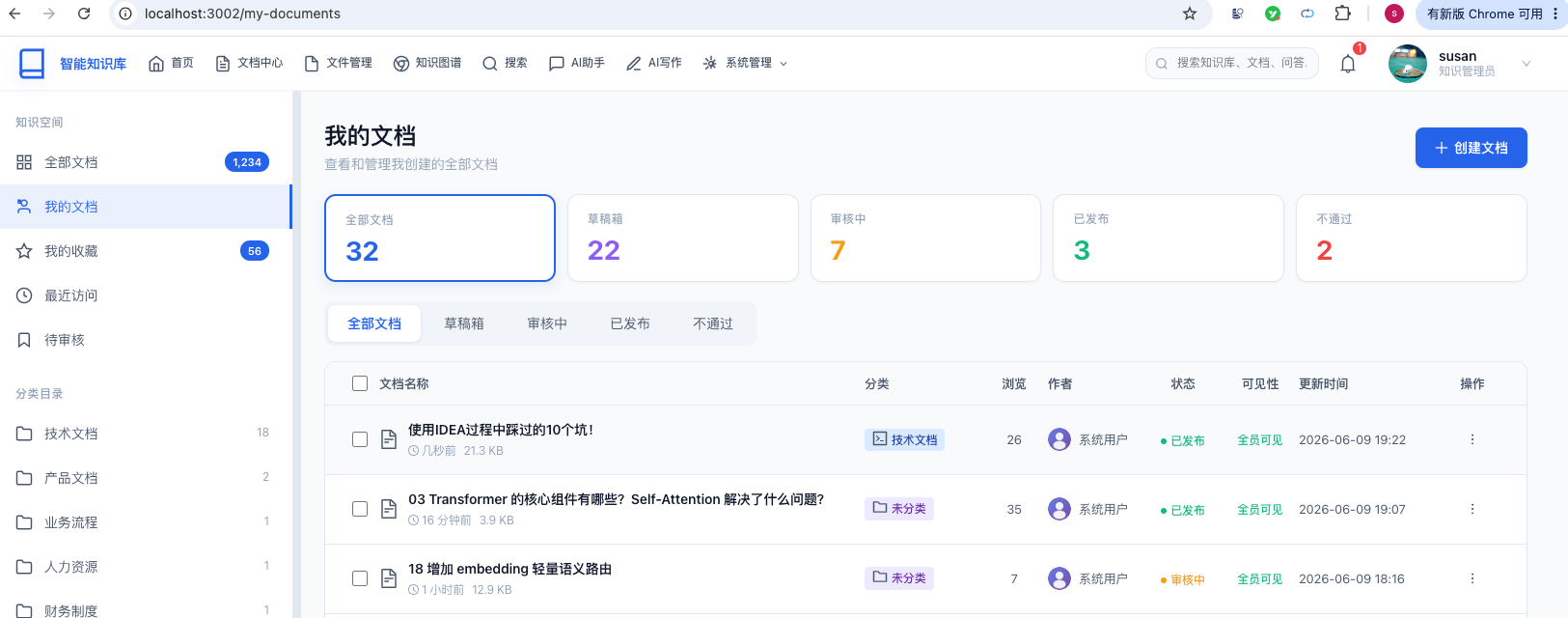
浏览器访问我的文档页面:
http://localhost:3002/my-documents
修改一个文档:
点击提交文档按钮:
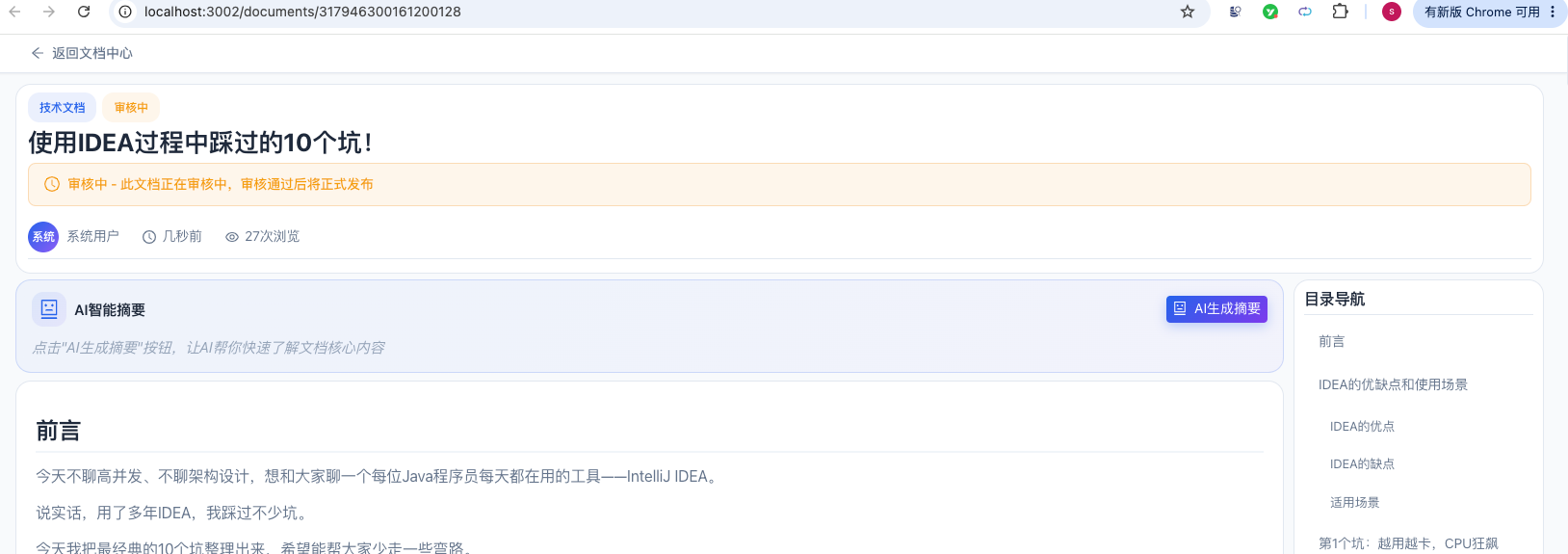
此时,看到该文档的状态已经变成了审核中。
然后去审核一下:
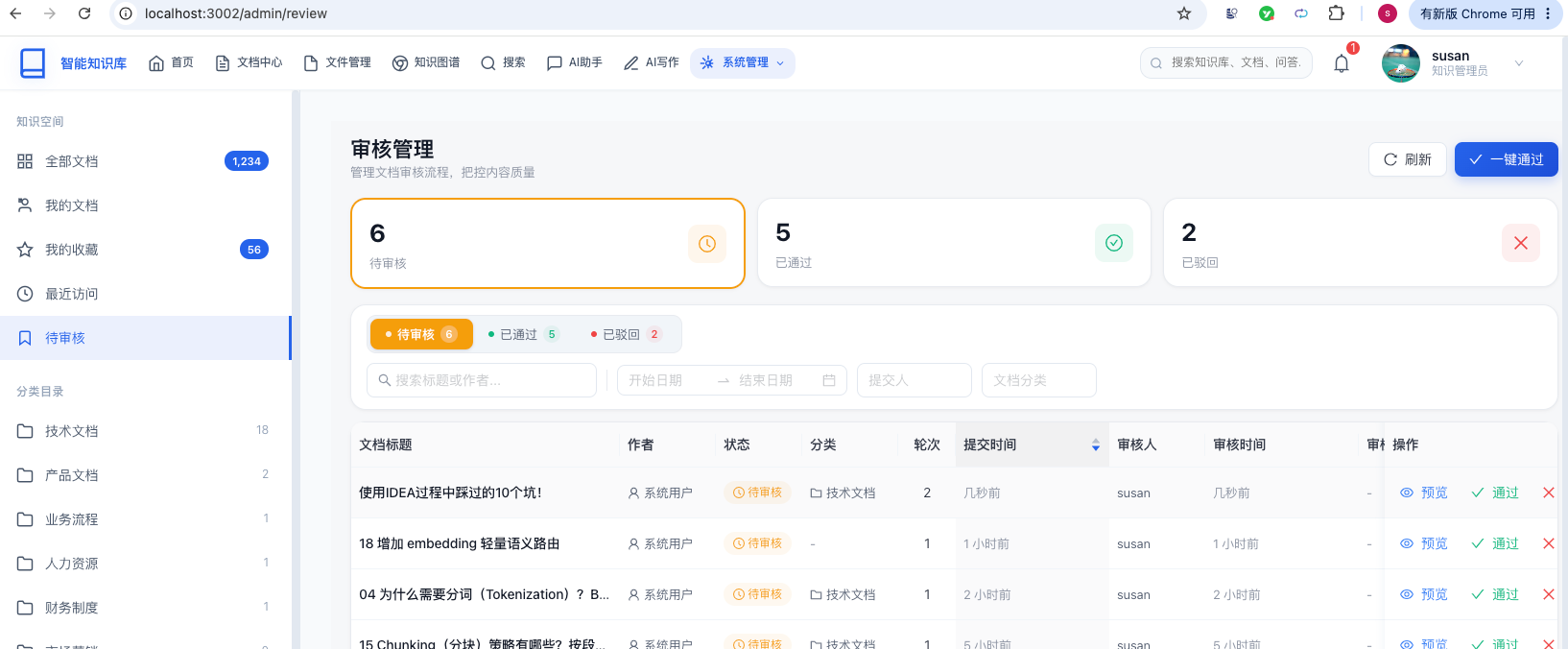
直接审核通过该文档,点击右上角的消息中心图标:
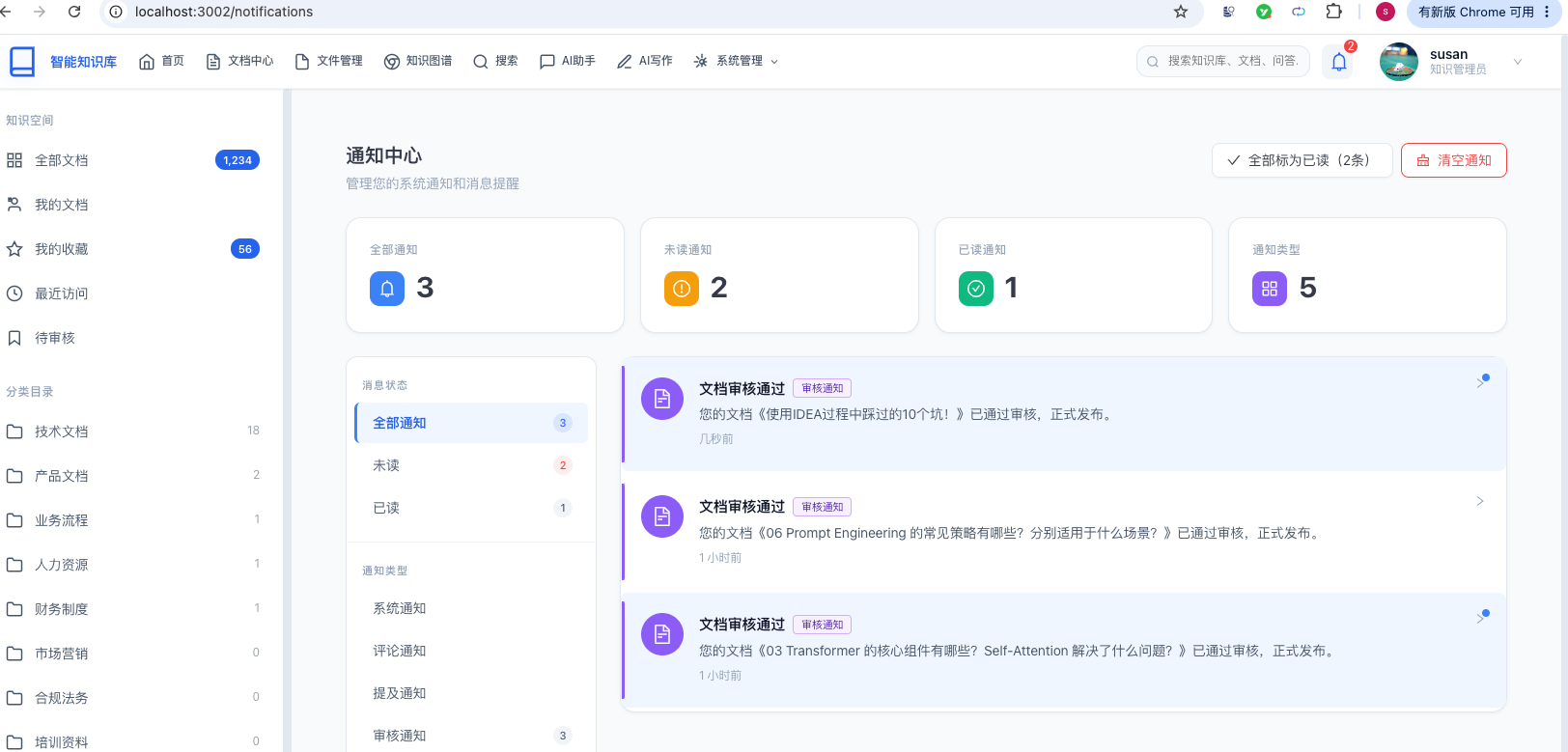
可以看到文档审核通过的消息提醒:
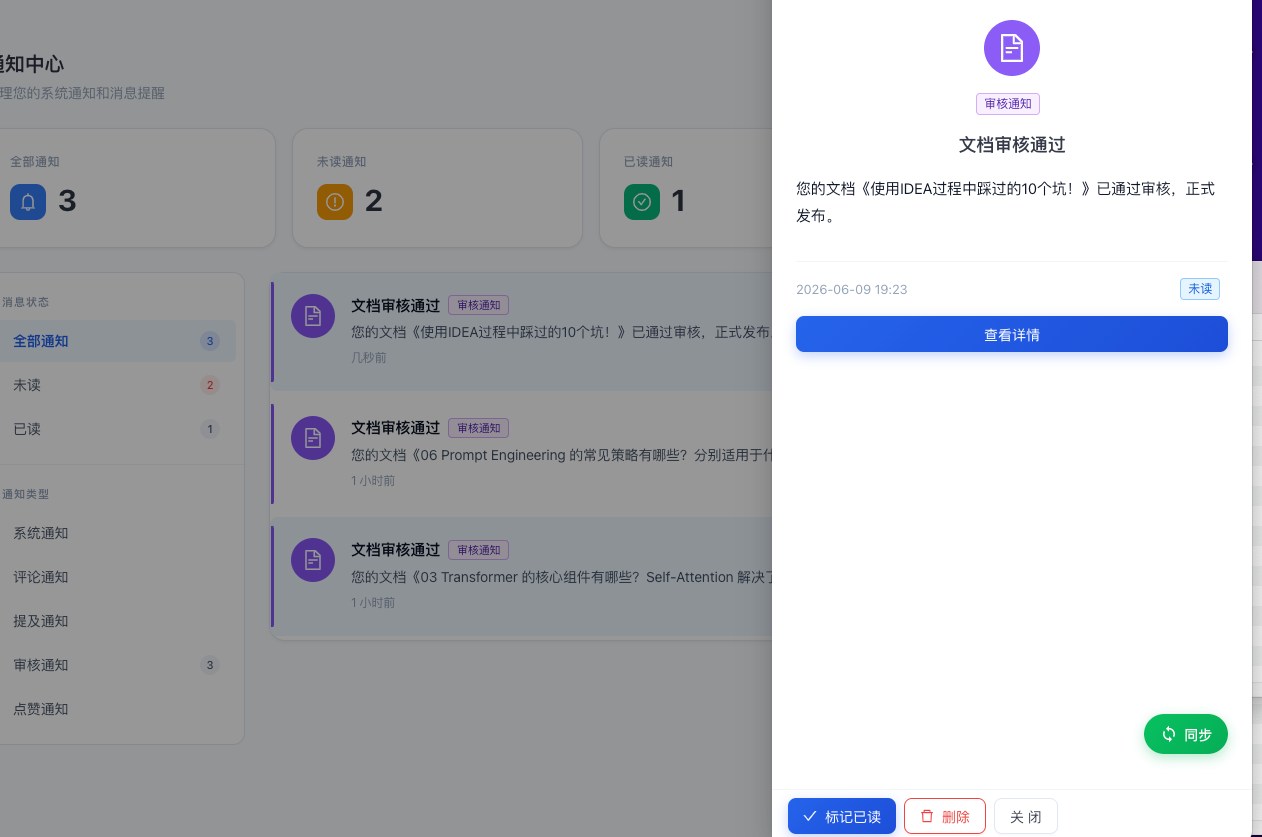
点击消息之后,在右边会显示消息的详情。
点击查看详情按钮,可以新窗口打开文档详情页面。
总结
已完成功能
| 功能 | 实现方式 | 说明 |
|---|---|---|
| 通知CRUD | Service + Controller | 发送、查询、标记已读、删除 |
| 分页查询 | MyBatis Plus Page | 支持多条件筛选(类型、已读状态、时间范围) |
| 未读统计 | Mapper自定义SQL | 实时统计用户未读数量 |
| 实时推送 | WebSocket STOMP + SockJS | 点对点个人推送 + 广播频道 |
| 消息队列 | RabbitMQ TopicExchange | 审核事件驱动的异步通知 |
| 前端页面 | React + Zustand + Ant Design | 完整的通知中心UI(列表、筛选、详情抽屉) |
| WebSocket客户端 | @stomp/stompjs + sockjs-client | 自动重连、心跳保活、双频道订阅 |
| 模板管理 | 通知模板CRUD | 通知内容标准化管理 |
技术要点
- 双通道架构:数据库持久化 + WebSocket 实时推送,确保在线/离线用户都能收到通知
- 事件驱动解耦:通过 RabbitMQ 实现 kb-document 和 kb-foundation 之间的异步解耦
- STOMP认证:通过
ChannelInterceptor在 CONNECT 阶段验证 JWT 并设置 Principal - 消息序列化:
Jackson2JsonMessageConverter+JavaTimeModule支持 LocalDateTime - 前端状态管理:Zustand Store 同时支持 REST API 拉取和 WebSocket 推送更新
- 自动重连:WebSocket 断开后自动重连,有限次数防止无限重试
- 异常容错:MQ 监听器捕获所有异常,避免消息死循环重试
通过本文的学习,你应该能够掌握:
- WebSocket STOMP 协议在 Spring Boot 中的集成和认证
- RabbitMQ 主题交换机的事件驱动架构设计
- 前端 STOMP 客户端的连接管理、自动重连和心跳保活
- Zustand 状态管理中 REST API 和 WebSocket 双数据源的协调
- 跨模块事件解耦的 DTO 设计和消息序列化
- 完整的通知中心前后端全栈开发流程
祝你开发顺利!
