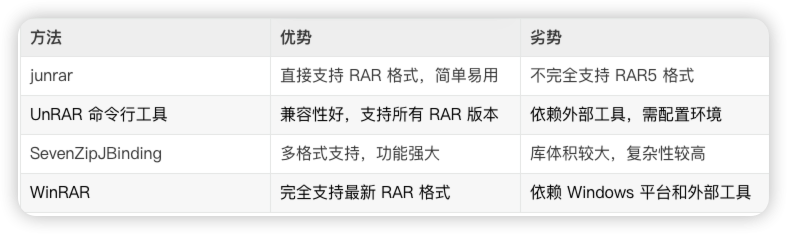
以下是 Java 代码中解压 RAR 文件的四种方法,每种方法都提供了详细的示例代码。我
方法 1:使用junrar 库
junrar 是一个专门用于处理 RAR 文件的 Java 库,支持 RAR 4 和部分 RAR 5 格式。
配置依赖
在使用之前,确保你已将 junrar 添加到你的项目中。如果使用 Maven,则需要添加以下依赖:
<dependency>
    <groupId>com.github.junrar</groupId>
    <artifactId>junrar</artifactId>
    <version>7.5.0</version>
</dependency>
示例代码
以下是解压 RAR 文件的代码示例:
import com.github.junrar.Archive;
import com.github.junrar.rarfile.FileHeader;

import java.io.File;
import java.io.FileOutputStream;

public class RarExtractorUsingJunrar {
    public static void extractRar(String sourceRar, String destDir) {
        File rarFile = new File(sourceRar);
        File outputDir = new File(destDir);

        if (!outputDir.exists()) {
            outputDir.mkdirs();
        }

        try (Archive archive = new Archive(rarFile)) {
            if (archive == null) {
                System.out.println("无法打开 RAR 文件!");
                return;
            }

            FileHeader fileHeader;
            while ((fileHeader = archive.nextFileHeader()) != null) {
                String outputFilePath = destDir + File.separator + fileHeader.getFileNameString().trim();
                File outputFile = new File(outputFilePath);

                if (fileHeader.isDirectory()) {
                    outputFile.mkdirs();
                } else {
                    try (FileOutputStream fos = new FileOutputStream(outputFile)) {
                        archive.extractFile(fileHeader, fos);
                    }
                }
            }
            System.out.println("解压完成!");
        } catch (Exception e) {
            e.printStackTrace();
        }
    }

    public static void main(String[] args) {
        String sourceRar = "example.rar";  // 输入的 RAR 文件路径
        String destDir = "output";        // 解压的目标路径
        extractRar(sourceRar, destDir);
    }
}
方法 2:使用 Apache Commons Compress 配合外部工具
Apache Commons Compress 本身不支持 RAR 文件,但你可以结合外部工具(如 UnRAR 命令行工具)来处理 RAR 文件。
配置 Apache Commons Compress
在 Maven 中添加依赖:
<dependency>
    <groupId>org.apache.commons</groupId>
    <artifactId>commons-compress</artifactId>
    <version>1.24.0</version>
</dependency>
示例代码
以下代码通过调用 unrar 命令来解压 RAR 文件:
import java.io.BufferedReader;
import java.io.InputStreamReader;

public class RarExtractorUsingUnrar {
    public static void extractRar(String rarPath, String destPath) {
        try {
            // 调用 UnRAR 命令行工具
            ProcessBuilder processBuilder = new ProcessBuilder("unrar", "x", rarPath, destPath);
            Process process = processBuilder.start();

            BufferedReader reader = new BufferedReader(new InputStreamReader(process.getInputStream()));
            String line;
            while ((line = reader.readLine()) != null) {
                System.out.println(line);
            }

            process.waitFor();
            System.out.println("解压完成!");
        } catch (Exception e) {
            e.printStackTrace();
        }
    }

    public static void main(String[] args) {
        String rarPath = "example.rar";  // 输入的 RAR 文件路径
        String destPath = "output";     // 解压的目标路径
        extractRar(rarPath, destPath);
    }
}注意:确保你的操作系统中已经安装了 unrar 命令行工具,并且配置在 PATH 环境变量中。
方法 3:使用 SevenZipJBinding 库
SevenZipJBinding 是一个强大的压缩和解压库,可以处理多种格式,包括 RAR。
配置依赖
SevenZipJBinding 需要以下 Maven 依赖:
<dependency>
    <groupId>net.sf.sevenzipjbinding</groupId>
    <artifactId>sevenzipjbinding-all-platforms</artifactId>
    <version>16.02-2.01</version>
</dependency>
示例代码
以下是使用 SevenZipJBinding 解压 RAR 文件的示例:
import net.sf.sevenzipjbinding.*;
import net.sf.sevenzipjbinding.simple.ISimpleInArchive;
import net.sf.sevenzipjbinding.simple.ISimpleInArchiveItem;

import java.io.File;
import java.io.FileOutputStream;

public class RarExtractorUsingSevenZip {
    public static void extractRar(String sourceRar, String destDir) {
        File rarFile = new File(sourceRar);
        File outputDir = new File(destDir);

        if (!outputDir.exists()) {
            outputDir.mkdirs();
        }

        try (RandomAccessFileInStream stream = new RandomAccessFileInStream(new RandomAccessFile(rarFile, "r"));
             ISevenZipInArchive archive = SevenZip.openInArchive(SevenZipArchiveFormat.RAR, stream)) {

            ISimpleInArchive simpleArchive = archive.getSimpleInterface();
            for (ISimpleInArchiveItem item : simpleArchive.getArchiveItems()) {
                if (!item.isFolder()) {
                    File outputFile = new File(outputDir, item.getPath());
                    outputFile.getParentFile().mkdirs();

                    try (FileOutputStream fos = new FileOutputStream(outputFile)) {
                        ExtractOperationResult result = item.extractSlow(data -> {
                            fos.write(data);
                            return data.length;
                        });

                        if (result != ExtractOperationResult.OK) {
                            System.err.println("解压失败:" + item.getPath());
                        }
                    }
                }
            }

            System.out.println("解压完成!");
        } catch (Exception e) {
            e.printStackTrace();
        }
    }

    public static void main(String[] args) {
        String sourceRar = "example.rar";  // 输入的 RAR 文件路径
        String destDir = "output";        // 解压的目标路径
        extractRar(sourceRar, destDir);
    }
}
方法 4:使用 JNI 调用外部库(如 WinRAR)
如果你需要完全依赖系统的 RAR 解压程序(如 WinRAR),可以通过 JNI 调用 Windows 的系统工具。
示例代码
以下是使用 Runtime.exec 调用 WinRAR 的解压命令:
import java.io.BufferedReader;
import java.io.InputStreamReader;

public class RarExtractorUsingWinRAR {
    public static void extractRar(String rarPath, String destPath) {
        try {
            // 调用 WinRAR 命令
            String command = String.format("winrar x -o+ %s %s", rarPath, destPath);
            Process process = Runtime.getRuntime().exec(command);

            BufferedReader reader = new BufferedReader(new InputStreamReader(process.getInputStream()));
            String line;
            while ((line = reader.readLine()) != null) {
                System.out.println(line);
            }

            process.waitFor();
            System.out.println("解压完成!");
        } catch (Exception e) {
            e.printStackTrace();
        }
    }

    public static void main(String[] args) {
        String rarPath = "example.rar";  // 输入的 RAR 文件路径
        String destPath = "output";     // 解压的目标路径
        extractRar(rarPath, destPath);
    }
}
注意:
- 确保系统已安装 WinRAR,并且配置到 PATH 环境变量中。
- 命令行格式可能因平台不同而有所变化。
总结
根据你的具体需求选择适合的方法!