一、概述
我的收藏和最近访问是知识库系统的核心用户功能模块。
我的收藏允许用户将感兴趣的文档标记为收藏,方便随时查阅;
最近访问自动记录用户浏览文档的历史,帮助用户快速回溯之前看过的内容。
本文将详细介绍如何从零开始开发这两个前后端完整的功能。
1.1 功能定位
| 功能模块 | 说明 | 使用场景 |
|---|---|---|
| 我的收藏 | 用户收藏感兴趣的文档,支持收藏/取消收藏切换 | 标记重要文档、建立个人知识库 |
| 最近访问 | 自动记录用户浏览的文档历史 | 快速回溯之前阅读的文档 |
1.2 功能流程
收藏功能流程:
  用户浏览文档 → 点击收藏按钮 → 调用toggle接口
    ├── 未收藏 → 创建收藏记录 → 文档收藏数+1 → 按钮变为实心星
    └── 已收藏 → 物理删除记录 → 文档收藏数-1 → 按钮变为空心星

最近访问流程:
  用户打开文档详情页 → 后端异步记录访问
    → 删除该用户该文档的旧记录 → 插入新记录(更新访问时间)
    → 用户点击"最近访问"查看历史列表
1.3 技术架构
收藏功能:
  前端:React + TypeScript + Zustand状态管理 + Ant Design组件
  后端:Spring Boot 3.2 + MyBatis Plus + MySQL
  接口:RESTful API(/api/document/favorite/*)

最近访问:
  前端:React + TypeScript + Ant Design列表组件
  后端:Spring Boot 3.2 + MyBatis Plus + MySQL + 异步记录
  接口:RESTful API(/api/document/access/*)

数据流向:
  Frontend → Gateway(/api/document/**) → kb-document服务
    → Controller → Service → Mapper → MySQL(kb_document数据库)
二、数据库设计
这两个功能使用kb_document数据库,与文档核心服务部署在同一数据库中。
2.1 用户收藏表 (kb\_user\_favorite)
创建 sql/11_kb_favorite.sql:
-- =====================================================
-- kb_favorite 数据库 - 收藏功能
-- =====================================================

SET NAMES utf8mb4;
USE `kb_document`;
SET FOREIGN_KEY_CHECKS = 0;

-- 用户收藏表
DROP TABLE IF EXISTS `kb_user_favorite`;
CREATE TABLE `kb_user_favorite` (
  `id` BIGINT NOT NULL COMMENT '收藏ID',
  `user_id` BIGINT NOT NULL COMMENT '用户ID',
  `document_id` BIGINT NOT NULL COMMENT '文档ID',
  `document_title` VARCHAR(200) DEFAULT NULL COMMENT '文档标题(冗余字段)',
  `document_category_id` BIGINT DEFAULT NULL COMMENT '文档分类ID(冗余字段)',
  `favorite_time` DATETIME NOT NULL DEFAULT CURRENT_TIMESTAMP COMMENT '收藏时间',
  `create_time` DATETIME NOT NULL DEFAULT CURRENT_TIMESTAMP COMMENT '创建时间',
  `update_time` DATETIME NOT NULL DEFAULT CURRENT_TIMESTAMP ON UPDATE CURRENT_TIMESTAMP COMMENT '更新时间',
  `deleted` TINYINT NOT NULL DEFAULT 0 COMMENT '删除标识',
  PRIMARY KEY (`id`),
  UNIQUE KEY `uk_user_document` (`user_id`, `document_id`, `deleted`),
  KEY `idx_user_id` (`user_id`),
  KEY `idx_document_id` (`document_id`),
  KEY `idx_favorite_time` (`favorite_time`)
) ENGINE=InnoDB DEFAULT CHARSET=utf8mb4 COLLATE=utf8mb4_unicode_ci COMMENT='用户收藏表';

SELECT 'kb_favorite 表创建完成!' AS message;
设计要点:
user_id和document_id组合唯一索引(含deleted字段),防止重复收藏document_title和document_category_id为冗余字段,减少关联查询favorite_time记录收藏时间,支持按时间排序- 使用雪花算法生成ID,支持分布式环境
2.2 文档访问记录表 (kb\_document\_access)
创建 sql/008_document_access.sql:
-- =====================================================
-- kb_document_access - 文档访问记录表
-- =====================================================

SET NAMES utf8mb4;
USE `kb_document`;
SET FOREIGN_KEY_CHECKS = 0;

DROP TABLE IF EXISTS `kb_document_access`;
CREATE TABLE `kb_document_access` (
  `id` BIGINT NOT NULL AUTO_INCREMENT COMMENT '访问记录ID',
  `user_id` BIGINT NOT NULL COMMENT '用户ID',
  `document_id` BIGINT NOT NULL COMMENT '文档ID',
  `document_title` VARCHAR(200) NOT NULL COMMENT '文档标题',
  `access_time` DATETIME NOT NULL DEFAULT CURRENT_TIMESTAMP COMMENT '访问时间',
  `created_at` DATETIME NOT NULL DEFAULT CURRENT_TIMESTAMP COMMENT '创建时间',
  `updated_at` DATETIME NOT NULL DEFAULT CURRENT_TIMESTAMP ON UPDATE CURRENT_TIMESTAMP COMMENT '更新时间',
  `created_by` BIGINT DEFAULT NULL COMMENT '创建人ID',
  `updated_by` BIGINT DEFAULT NULL COMMENT '更新人ID',
  `deleted` TINYINT NOT NULL DEFAULT 0 COMMENT '删除标识',
  PRIMARY KEY (`id`),
  UNIQUE KEY `idx_user_document` (`user_id`, `document_id`),
  KEY `idx_user_id` (`user_id`),
  KEY `idx_access_time` (`access_time`),
  KEY `idx_document_id` (`document_id`)
) ENGINE=InnoDB DEFAULT CHARSET=utf8mb4 COMMENT='文档访问记录表';

SELECT 'kb_document_access 表创建完成!' AS message;
设计要点:
user_id和document_id组合唯一索引,确保每个用户对同一文档只有一条记录- 使用自增ID(
AUTO_INCREMENT),与收藏表使用雪花ID不同 - 记录新访问时,先删除旧记录再插入新记录,保持访问时间最新
access_time索引支持按访问时间排序查询
2.3 执行SQL脚本
# 连接MySQL并执行SQL脚本
mysql -u root -p < sql/11_kb_favorite.sql
mysql -u root -p < sql/008_document_access.sql

# 验证表是否创建成功
mysql -u root -p kb_document -e "SHOW TABLES LIKE '%favorite%';"
mysql -u root -p kb_document -e "SHOW TABLES LIKE '%access%';"
三、后端实现 - 实体类设计
实体类按照阿里巴巴Java开发规范设计,使用Lombok简化代码,MyBatis Plus注解映射数据库表。
3.1 用户收藏实体
创建 kb-document/src/main/java/com/knowledge/base/document/entity/UserFavorite.java:
package com.knowledge.base.document.entity;

import com.baomidou.mybatisplus.annotation.*;
import com.knowledge.base.common.config.BaseEntity;
import lombok.Data;
import lombok.EqualsAndHashCode;

import java.time.LocalDateTime;

/**
 * 用户收藏实体类
 *
 * <p>按照阿里巴巴Java开发规范设计,记录用户收藏文档的信息</p>
 *
 * @author 苏三
 * @since 1.0.0
 */
@Data
@EqualsAndHashCode(callSuper = true)
@TableName("kb_user_favorite")
public class UserFavorite extends BaseEntity {

    /**
     * 用户ID
     */
    @TableField("user_id")
    private Long userId;

    /**
     * 文档ID
     */
    @TableField("document_id")
    private Long documentId;

    /**
     * 文档标题(冗余字段)
     */
    @TableField("document_title")
    private String documentTitle;

    /**
     * 文档分类ID(冗余字段)
     */
    @TableField("document_category_id")
    private Long documentCategoryId;

    /**
     * 收藏时间
     */
    @TableField("favorite_time")
    private LocalDateTime favoriteTime;

    /**
     * 创建时间
     */
    @TableField("create_time")
    private LocalDateTime createTime;

    /**
     * 更新时间
     */
    @TableField("update_time")
    private LocalDateTime updateTime;

    // ==================== 非数据库字段(关联查询使用) ====================

    /**
     * 文档摘要(查询时关联获取)
     */
    @TableField(exist = false)
    private String documentSummary;

    /**
     * 文档作者名称(查询时关联获取)
     */
    @TableField(exist = false)
    private String documentAuthorName;

    /**
     * 文档作者ID(查询时关联获取)
     */
    @TableField(exist = false)
    private Long documentAuthorId;

    /**
     * 文档状态(查询时关联获取)
     */
    @TableField(exist = false)
    private Integer documentStatus;

    /**
     * 文档浏览次数(查询时关联获取)
     */
    @TableField(exist = false)
    private Long documentViewCount;

    /**
     * 文档创建时间(查询时关联获取)
     */
    @TableField(exist = false)
    private LocalDateTime documentCreateTime;

    /**
     * 文档更新时间(查询时关联获取)
     */
    @TableField(exist = false)
    private LocalDateTime documentUpdateTime;
}
设计要点:
- 继承
BaseEntity获取通用字段(id、createTime、updateTime、createBy、updateBy、deleted、version) - 使用
@TableField(exist = false)标记非数据库字段,这些字段通过JOIN查询时填充 - 冗余存储
documentTitle和documentCategoryId,减少常用信息的关联查询
3.2 文档访问记录实体
创建 kb-document/src/main/java/com/knowledge/base/document/entity/DocumentAccess.java:
package com.knowledge.base.document.entity;

import com.baomidou.mybatisplus.annotation.*;
import lombok.Data;

import java.time.LocalDateTime;

/**
 * 文档访问记录实体类
 *
 * <p>按照阿里巴巴Java开发规范设计,记录用户访问文档的历史记录</p>
 *
 * @author 苏三
 * @since 1.0.0
 */
@Data
@TableName("kb_document_access")
public class DocumentAccess {

    /**
     * 访问记录ID(自增)
     */
    @TableId(value = "id", type = IdType.AUTO)
    private Long id;

    /**
     * 用户ID
     */
    private Long userId;

    /**
     * 文档ID
     */
    private Long documentId;

    /**
     * 文档标题
     */
    private String documentTitle;

    /**
     * 访问时间
     */
    private LocalDateTime accessTime;

    /**
     * 创建时间
     */
    @TableField(value = "created_at", fill = FieldFill.INSERT)
    private LocalDateTime createdAt;

    /**
     * 更新时间
     */
    @TableField(value = "updated_at", fill = FieldFill.INSERT_UPDATE)
    private LocalDateTime updatedAt;

    /**
     * 创建人ID
     */
    @TableField(value = "created_by", fill = FieldFill.INSERT)
    private Long createdBy;

    /**
     * 更新人ID
     */
    @TableField(value = "updated_by", fill = FieldFill.INSERT_UPDATE)
    private Long updatedBy;

    /**
     * 逻辑删除标记(0-未删除,1-已删除)
     */
    @TableLogic
    private Integer deleted;

    // ==================== 非数据库字段(关联查询使用) ====================

    /**
     * 文档摘要(查询时关联获取)
     */
    @TableField(exist = false)
    private String summary;

    /**
     * 分类名称(查询时关联获取)
     */
    @TableField(exist = false)
    private String categoryName;

    /**
     * 作者名称(查询时关联获取)
     */
    @TableField(exist = false)
    private String authorName;

    /**
     * 文档状态(查询时关联获取)
     */
    @TableField(exist = false)
    private Integer status;
}
设计要点:
- 使用
@TableId(type = IdType.AUTO)自增ID,因为访问记录的ID不需要分布式唯一性 - 实体不继承
BaseEntity,因为该表字段命名风格不同(created_at而非create_time) - 使用
@TableLogic配置逻辑删除
四、后端实现 - VO类设计
VO(View Object)用于接口返回数据给前端,只包含前端需要的字段。
4.1 用户收藏VO
创建 kb-document/src/main/java/com/knowledge/base/document/vo/UserFavoriteVO.java:
package com.knowledge.base.document.vo;

import io.swagger.v3.oas.annotations.media.Schema;
import lombok.Data;

import java.io.Serializable;
import java.time.LocalDateTime;

/**
 * 用户收藏VO
 *
 * <p>按照阿里巴巴Java开发规范设计,用于返回用户收藏信息给前端</p>
 *
 * @author 苏三
 * @since 1.0.0
 */
@Data
@Schema(description = "用户收藏信息")
public class UserFavoriteVO implements Serializable {

    private static final long serialVersionUID = 1L;

    @Schema(description = "收藏ID")
    private Long id;

    @Schema(description = "用户ID")
    private Long userId;

    @Schema(description = "文档ID")
    private Long documentId;

    @Schema(description = "文档标题")
    private String documentTitle;

    @Schema(description = "文档摘要")
    private String documentSummary;

    @Schema(description = "文档分类ID")
    private Long documentCategoryId;

    @Schema(description = "文档分类名称")
    private String documentCategoryName;

    @Schema(description = "文档作者ID")
    private Long documentAuthorId;

    @Schema(description = "文档作者名称")
    private String documentAuthorName;

    @Schema(description = "文档状态")
    private Integer documentStatus;

    @Schema(description = "浏览次数")
    private Long documentViewCount;

    @Schema(description = "收藏时间")
    private LocalDateTime favoriteTime;

    @Schema(description = "是否已收藏")
    private Boolean isFavorited;
}
4.2 文档访问记录VO
创建 kb-document/src/main/java/com/knowledge/base/document/vo/DocumentAccessVO.java:
package com.knowledge.base.document.vo;

import io.swagger.v3.oas.annotations.media.Schema;
import lombok.Data;

import java.io.Serializable;
import java.time.LocalDateTime;

/**
 * 文档访问记录响应VO
 *
 * <p>按照阿里巴巴Java开发规范设计,用于返回文档访问记录信息</p>
 *
 * @author 苏三
 * @since 1.0.0
 */
@Data
@Schema(description = "文档访问记录响应")
public class DocumentAccessVO implements Serializable {

    private static final long serialVersionUID = 1L;

    @Schema(description = "访问记录ID")
    private Long id;

    @Schema(description = "用户ID")
    private Long userId;

    @Schema(description = "文档ID")
    private Long documentId;

    @Schema(description = "文档标题")
    private String documentTitle;

    @Schema(description = "文档摘要")
    private String summary;

    @Schema(description = "分类名称")
    private String categoryName;

    @Schema(description = "作者名称")
    private String authorName;

    @Schema(description = "访问时间")
    private LocalDateTime accessTime;

    @Schema(description = "文档状态")
    private Integer status;
}
五、后端实现 - 数据访问层 (Mapper)
Mapper层使用MyBatis Plus的BaseMapper作为基础,自定义SQL使用注解方式。
5.1 用户收藏Mapper
创建 kb-document/src/main/java/com/knowledge/base/document/mapper/UserFavoriteMapper.java:
package com.knowledge.base.document.mapper;

import com.baomidou.mybatisplus.core.mapper.BaseMapper;
import com.knowledge.base.document.entity.UserFavorite;
import org.apache.ibatis.annotations.*;

import java.util.List;

/**
 * 用户收藏Mapper接口
 *
 * <p>按照阿里巴巴Java开发规范设计,提供收藏相关的数据库操作</p>
 *
 * @author 苏三
 * @since 1.0.0
 */
@Mapper
public interface UserFavoriteMapper extends BaseMapper<UserFavorite> {

    /**
     * 获取用户收藏列表(LEFT JOIN文档表获取详细信息)
     *
     * @param userId 用户ID
     * @return 收藏列表(含文档摘要、作者等信息)
     */
    @Select("SELECT uf.*, d.summary AS documentSummary, " +
            "d.author_name AS documentAuthorName, d.author_id AS documentAuthorId, " +
            "d.status AS documentStatus, d.view_count AS documentViewCount, " +
            "d.create_time AS documentCreateTime, d.update_time AS documentUpdateTime " +
            "FROM kb_user_favorite uf " +
            "LEFT JOIN kb_document d ON uf.document_id = d.id AND d.deleted = 0 " +
            "WHERE uf.user_id = #{userId} AND uf.deleted = 0 " +
            "ORDER BY uf.favorite_time DESC")
    @Results({
            @Result(column = "documentSummary", property = "documentSummary"),
            @Result(column = "documentAuthorName", property = "documentAuthorName"),
            @Result(column = "documentAuthorId", property = "documentAuthorId"),
            @Result(column = "documentStatus", property = "documentStatus"),
            @Result(column = "documentViewCount", property = "documentViewCount"),
            @Result(column = "documentCreateTime", property = "documentCreateTime"),
            @Result(column = "documentUpdateTime", property = "documentUpdateTime")
    })
    List<UserFavorite> getUserFavorites(@Param("userId") Long userId);

    /**
     * 查询用户对指定文档的收藏记录(用于判断是否已收藏)
     *
     * @param userId     用户ID
     * @param documentId 文档ID
     * @return 收藏记录(null表示未收藏)
     */
    @Select("SELECT * FROM kb_user_favorite " +
            "WHERE user_id = #{userId} AND document_id = #{documentId} AND deleted = 0")
    UserFavorite findByUserAndDocument(@Param("userId") Long userId,
                                        @Param("documentId") Long documentId);

    /**
     * 统计文档的收藏数量
     *
     * @param documentId 文档ID
     * @return 收藏数量
     */
    @Select("SELECT COUNT(*) FROM kb_user_favorite " +
            "WHERE document_id = #{documentId} AND deleted = 0")
    Integer countByDocumentId(@Param("documentId") Long documentId);

    /**
     * 物理删除收藏记录
     *
     * <p>使用物理删除而非逻辑删除,避免唯一索引冲突</p>
     * <p>因为唯一索引包含了deleted字段,逻辑删除后留存的记录会影响用户再次收藏</p>
     *
     * @param userId     用户ID
     * @param documentId 文档ID
     * @return 删除数量
     */
    @Delete("DELETE FROM kb_user_favorite " +
            "WHERE user_id = #{userId} AND document_id = #{documentId}")
    int physicalDelete(@Param("userId") Long userId,
                       @Param("documentId") Long documentId);
}
设计要点:
getUserFavorites通过LEFT JOIN获取文档详细信息,减少N+1查询findByUserAndDocument用于快速判断收藏状态physicalDelete使用物理删除(@Delete注解),因为收藏表使用物理删除而非逻辑删除,避免唯一约束冲突(当用户收藏→取消收藏→再次收藏时,逻辑删除记录的deleted=1与新记录的deleted=0不会冲突,但会有残留数据)- 使用
@Param注解明确参数名,提高可读性
5.2 文档访问记录Mapper
创建 kb-document/src/main/java/com/knowledge/base/document/mapper/DocumentAccessMapper.java:
package com.knowledge.base.document.mapper;

import com.baomidou.mybatisplus.core.mapper.BaseMapper;
import com.knowledge.base.document.entity.DocumentAccess;
import org.apache.ibatis.annotations.Mapper;
import org.apache.ibatis.annotations.Param;
import org.apache.ibatis.annotations.Select;

import java.util.List;

/**
 * 文档访问记录Mapper接口
 *
 * <p>按照阿里巴巴Java开发规范设计,提供文档访问记录相关的数据库操作</p>
 *
 * @author 苏三
 * @since 1.0.0
 */
@Mapper
public interface DocumentAccessMapper extends BaseMapper<DocumentAccess> {

    /**
     * 根据用户ID查询最近访问记录,按访问时间倒序排列
     *
     * <p>LEFT JOIN文档表和分类表获取详细信息</p>
     *
     * @param userId 用户ID
     * @param limit  查询数量限制
     * @return 访问记录列表
     */
    @Select("SELECT da.*, d.summary, d.category_id, c.category_name, d.author_name, d.status " +
            "FROM kb_document_access da " +
            "LEFT JOIN kb_document d ON da.document_id = d.id " +
            "LEFT JOIN kb_category c ON d.category_id = c.id " +
            "WHERE da.user_id = #{userId} AND d.deleted = 0 " +
            "ORDER BY da.access_time DESC " +
            "LIMIT #{limit}")
    List<DocumentAccess> selectRecentAccessByUserId(@Param("userId") Long userId,
                                                      @Param("limit") Integer limit);

    /**
     * 删除用户对指定文档的访问记录
     *
     * @param userId     用户ID
     * @param documentId 文档ID
     * @return 删除数量
     */
    @org.apache.ibatis.annotations.Delete(
        "DELETE FROM kb_document_access WHERE user_id = #{userId} AND document_id = #{documentId}")
    int deleteByUserIdAndDocumentId(@Param("userId") Long userId,
                                      @Param("documentId") Long documentId);

    /**
     * 清空用户的所有访问记录
     *
     * @param userId 用户ID
     * @return 删除数量
     */
    @org.apache.ibatis.annotations.Delete(
        "DELETE FROM kb_document_access WHERE user_id = #{userId}")
    int deleteAllByUserId(@Param("userId") Long userId);
}
设计要点:
selectRecentAccessByUserId双LEFT JOIN获取文档摘要和分类名称- 使用
LIMIT #{limit}控制返回数量
5.3 在DocumentMapper中增加收藏计数方法
在DocumentMapper.java中添加两个方法:
/**
 * 增加文档收藏数量
 *
 * @param documentId 文档ID
 * @return 影响行数
 */
@Update("UPDATE kb_document SET favorite_count = favorite_count + 1 WHERE id = #{documentId}")
int incrementFavoriteCount(@Param("documentId") Long documentId);

/**
 * 减少文档收藏数量
 *
 * @param documentId 文档ID
 * @return 影响行数
 */
@Update("UPDATE kb_document SET favorite_count = favorite_count - 1 " +
        "WHERE id = #{documentId} AND favorite_count > 0")
int decrementFavoriteCount(@Param("documentId") Long documentId);
六、后端实现 - 业务逻辑层 (Service)
6.1 用户收藏Service接口
创建 kb-document/src/main/java/com/knowledge/base/document/service/UserFavoriteService.java:
package com.knowledge.base.document.service;

import com.knowledge.base.document.vo.UserFavoriteVO;

import java.util.List;

/**
 * 用户收藏Service接口
 *
 * <p>按照阿里巴巴Java开发规范设计,提供收藏相关的业务操作</p>
 *
 * @author 苏三
 * @since 1.0.0
 */
public interface UserFavoriteService {

    /**
     * 添加收藏
     *
     * @param userId     用户ID
     * @param documentId 文档ID
     * @return 是否成功
     */
    Boolean addFavorite(Long userId, Long documentId);

    /**
     * 取消收藏
     *
     * @param userId     用户ID
     * @param documentId 文档ID
     * @return 是否成功
     */
    Boolean removeFavorite(Long userId, Long documentId);

    /**
     * 判断是否已收藏
     *
     * @param userId     用户ID
     * @param documentId 文档ID
     * @return 是否已收藏
     */
    Boolean isFavorited(Long userId, Long documentId);

    /**
     * 获取用户收藏列表
     *
     * @param userId 用户ID
     * @return 收藏列表
     */
    List<UserFavoriteVO> getUserFavorites(Long userId);

    /**
     * 获取文档收藏数量
     *
     * @param documentId 文档ID
     * @return 收藏数量
     */
    Long getFavoriteCount(Long documentId);

    /**
     * 切换收藏状态(收藏 ↔ 取消收藏)
     *
     * @param userId     用户ID
     * @param documentId 文档ID
     * @return 新状态(true-已收藏,false-未收藏)
     */
    Boolean toggleFavorite(Long userId, Long documentId);
}
6.2 用户收藏Service实现
创建 kb-document/src/main/java/com/knowledge/base/document/service/impl/UserFavoriteServiceImpl.java:
package com.knowledge.base.document.service.impl;

import com.baomidou.mybatisplus.extension.service.impl.ServiceImpl;
import com.knowledge.base.common.exception.BusinessException;
import com.knowledge.base.common.utils.SnowflakeIdGenerator;
import com.knowledge.base.document.entity.Document;
import com.knowledge.base.document.entity.UserFavorite;
import com.knowledge.base.document.mapper.DocumentMapper;
import com.knowledge.base.document.mapper.UserFavoriteMapper;
import com.knowledge.base.document.service.UserFavoriteService;
import com.knowledge.base.document.vo.UserFavoriteVO;
import jakarta.annotation.Resource;
import lombok.extern.slf4j.Slf4j;
import org.springframework.stereotype.Service;
import org.springframework.transaction.annotation.Transactional;

import java.util.ArrayList;
import java.util.List;

/**
 * 用户收藏Service实现类
 *
 * <p>按照阿里巴巴Java开发规范设计,实现收藏相关的业务逻辑</p>
 *
 * @author 苏三
 * @since 1.0.0
 */
@Slf4j
@Service
public class UserFavoriteServiceImpl
        extends ServiceImpl<UserFavoriteMapper, UserFavorite>
        implements UserFavoriteService {

    @Resource
    private UserFavoriteMapper userFavoriteMapper;

    @Resource
    private DocumentMapper documentMapper;

    @Override
    @Transactional(rollbackFor = Exception.class)
    public Boolean addFavorite(Long userId, Long documentId) {
        // 1. 验证文档是否存在
        Document document = documentMapper.selectById(documentId);
        if (document == null) {
            throw new BusinessException("文档不存在");
        }

        // 2. 检查是否已收藏(幂等处理)
        UserFavorite existing = userFavoriteMapper.findByUserAndDocument(userId, documentId);
        if (existing != null) {
            log.info("用户已收藏该文档,直接返回成功");
            return true;
        }

        // 3. 创建收藏记录
        UserFavorite favorite = new UserFavorite();
        favorite.setId(SnowflakeIdGenerator.getInstance().nextId());
        favorite.setUserId(userId);
        favorite.setDocumentId(documentId);
        favorite.setDocumentTitle(document.getTitle());
        favorite.setDocumentCategoryId(document.getCategoryId());

        int count = userFavoriteMapper.insert(favorite);
        if (count > 0) {
            // 4. 更新文档收藏数量
            documentMapper.incrementFavoriteCount(documentId);
            return true;
        }
        return false;
    }

    @Override
    @Transactional(rollbackFor = Exception.class)
    public Boolean removeFavorite(Long userId, Long documentId) {
        // 使用物理删除,避免逻辑删除的唯一约束冲突
        int count = userFavoriteMapper.physicalDelete(userId, documentId);
        if (count > 0) {
            // 减少文档收藏数量
            documentMapper.decrementFavoriteCount(documentId);
            return true;
        }
        return false;
    }

    @Override
    public Boolean isFavorited(Long userId, Long documentId) {
        UserFavorite favorite = userFavoriteMapper.findByUserAndDocument(userId, documentId);
        return favorite != null;
    }

    @Override
    public List<UserFavoriteVO> getUserFavorites(Long userId) {
        List<UserFavorite> favorites = userFavoriteMapper.getUserFavorites(userId);
        List<UserFavoriteVO> result = new ArrayList<>();

        for (UserFavorite favorite : favorites) {
            UserFavoriteVO vo = new UserFavoriteVO();
            vo.setId(favorite.getId());
            vo.setUserId(favorite.getUserId());
            vo.setDocumentId(favorite.getDocumentId());
            vo.setDocumentTitle(favorite.getDocumentTitle());
            vo.setDocumentSummary(favorite.getDocumentSummary());
            vo.setDocumentCategoryId(favorite.getDocumentCategoryId());
            vo.setDocumentAuthorName(favorite.getDocumentAuthorName());
            vo.setDocumentAuthorId(favorite.getDocumentAuthorId());
            vo.setDocumentStatus(favorite.getDocumentStatus());
            vo.setDocumentViewCount(favorite.getDocumentViewCount());
            vo.setFavoriteTime(favorite.getFavoriteTime());
            vo.setIsFavorited(true); // 收藏列表中的都是已收藏的
            result.add(vo);
        }

        return result;
    }

    @Override
    public Long getFavoriteCount(Long documentId) {
        Integer count = userFavoriteMapper.countByDocumentId(documentId);
        return count != null ? count.longValue() : 0L;
    }

    @Override
    @Transactional(rollbackFor = Exception.class)
    public Boolean toggleFavorite(Long userId, Long documentId) {
        boolean isFavorited = isFavorited(userId, documentId);

        if (isFavorited) {
            // 如果已收藏,则取消收藏
            removeFavorite(userId, documentId);
            return false; // 返回未收藏状态
        } else {
            // 如果未收藏,则添加收藏
            addFavorite(userId, documentId);
            return true; // 返回已收藏状态
        }
    }
}
设计要点:
addFavorite中先验证文档是否存在,防止收藏不存在的文档addFavorite具有幂等性 - 如果已收藏则直接返回成功removeFavorite使用物理删除,避免逻辑删除导致的唯一索引冲突toggleFavorite一个方法实现收藏/取消收藏的切换,返回操作后的新状态- 使用
@Transactional确保收藏记录的创建/删除与文档收藏计数更新的一致性
6.3 文档访问记录Service接口
创建 kb-document/src/main/java/com/knowledge/base/document/service/DocumentAccessService.java:
package com.knowledge.base.document.service;

import com.knowledge.base.document.vo.DocumentAccessVO;

import java.util.List;

/**
 * 文档访问记录服务接口
 *
 * <p>按照阿里巴巴Java开发规范设计,提供文档访问记录相关的业务操作</p>
 *
 * @author 苏三
 * @since 1.0.0
 */
public interface DocumentAccessService {

    /**
     * 记录文档访问
     *
     * @param userId        用户ID
     * @param documentId    文档ID
     * @param documentTitle 文档标题
     */
    void recordAccess(Long userId, Long documentId, String documentTitle);

    /**
     * 获取用户最近访问记录
     *
     * @param limit 查询数量限制
     * @return 访问记录列表
     */
    List<DocumentAccessVO> getRecentAccess(Integer limit);

    /**
     * 删除单条访问记录
     *
     * @param documentId 文档ID
     */
    void deleteAccess(Long documentId);

    /**
     * 清空用户所有访问记录
     */
    void clearAllAccess();
}
6.4 文档访问记录Service实现
创建 kb-document/src/main/java/com/knowledge/base/document/service/impl/DocumentAccessServiceImpl.java:
package com.knowledge.base.document.service.impl;

import com.knowledge.base.document.entity.DocumentAccess;
import com.knowledge.base.document.mapper.DocumentAccessMapper;
import com.knowledge.base.document.service.DocumentAccessService;
import com.knowledge.base.document.utils.UserContext;
import com.knowledge.base.document.vo.DocumentAccessVO;
import lombok.RequiredArgsConstructor;
import lombok.extern.slf4j.Slf4j;
import org.springframework.stereotype.Service;
import org.springframework.transaction.annotation.Transactional;

import java.time.LocalDateTime;
import java.util.List;
import java.util.stream.Collectors;

/**
 * 文档访问记录服务实现类
 *
 * <p>按照阿里巴巴Java开发规范设计</p>
 *
 * @author 苏三
 * @since 1.0.0
 */
@Slf4j
@Service
@RequiredArgsConstructor
public class DocumentAccessServiceImpl implements DocumentAccessService {

    private final DocumentAccessMapper documentAccessMapper;

    /**
     * 默认查询数量限制
     */
    private static final int DEFAULT_LIMIT = 20;

    @Override
    @Transactional(rollbackFor = Exception.class)
    public void recordAccess(Long userId, Long documentId, String documentTitle) {
        if (userId == null) {
            log.warn("用户未登录,跳过访问记录");
            return;
        }

        // 先删除旧记录,再插入新记录(确保访问时间是最新的)
        documentAccessMapper.deleteByUserIdAndDocumentId(userId, documentId);

        // 创建新记录
        DocumentAccess access = new DocumentAccess();
        access.setUserId(userId);
        access.setDocumentId(documentId);
        access.setDocumentTitle(documentTitle);
        access.setAccessTime(LocalDateTime.now());
        documentAccessMapper.insert(access);

        log.debug("记录用户访问:userId={}, documentId={}", userId, documentId);
    }

    @Override
    public List<DocumentAccessVO> getRecentAccess(Integer limit) {
        Long userId = UserContext.getCurrentUserId();
        if (userId == null) {
            return List.of();
        }

        int queryLimit = limit != null && limit > 0 ? limit : DEFAULT_LIMIT;
        List<DocumentAccess> accessList =
                documentAccessMapper.selectRecentAccessByUserId(userId, queryLimit);

        return accessList.stream()
                .map(this::convertToVO)
                .collect(Collectors.toList());
    }

    @Override
    @Transactional(rollbackFor = Exception.class)
    public void deleteAccess(Long documentId) {
        Long userId = UserContext.getCurrentUserId();
        if (userId == null) {
            return;
        }
        documentAccessMapper.deleteByUserIdAndDocumentId(userId, documentId);
    }

    @Override
    @Transactional(rollbackFor = Exception.class)
    public void clearAllAccess() {
        Long userId = UserContext.getCurrentUserId();
        if (userId == null) {
            return;
        }
        documentAccessMapper.deleteAllByUserId(userId);
    }

    /**
     * 将实体转换为VO
     */
    private DocumentAccessVO convertToVO(DocumentAccess access) {
        DocumentAccessVO vo = new DocumentAccessVO();
        vo.setId(access.getId());
        vo.setUserId(access.getUserId());
        vo.setDocumentId(access.getDocumentId());
        vo.setDocumentTitle(access.getDocumentTitle());
        vo.setAccessTime(access.getAccessTime());
        vo.setSummary(access.getSummary());
        vo.setCategoryName(access.getCategoryName());
        vo.setAuthorName(access.getAuthorName());
        vo.setStatus(access.getStatus());
        return vo;
    }
}
设计要点:
recordAccess先删除旧记录再插入新记录,确保每个用户每个文档只有一条最新记录- 用户未登录时跳过记录(不抛异常)
- 使用
@RequiredArgsConstructor简化依赖注入 - 使用Stream API进行Entity到VO的转换
6.5 在文档浏览时集成访问记录
在DocumentServiceImpl.java的viewDocument方法中,加入异步访问记录:
// 在 viewDocument 方法中,获取文档后添加:

// 异步记录访问记录(不阻塞主流程)
final Long currentUserId = UserContext.getCurrentUserId();
final String documentTitle = document.getTitle();
CompletableFuture.runAsync(() -> {
    try {
        documentAccessService.recordAccess(currentUserId, documentId, documentTitle);
    } catch (Exception e) {
        log.error("异步记录访问记录失败", e);
    }
});
设计要点:
- 使用
CompletableFuture.runAsync异步执行,不阻塞文档浏览的主流程 - 即使访问记录失败,也不影响用户正常浏览文档
- 在finally块中捕获异常,防止异步线程的异常影响主线程
七、后端实现 - 控制器层
7.1 用户收藏Controller
创建 kb-document/src/main/java/com/knowledge/base/document/controller/UserFavoriteController.java:
package com.knowledge.base.document.controller;

import com.knowledge.base.common.result.Result;
import com.knowledge.base.document.service.UserFavoriteService;
import com.knowledge.base.document.utils.UserContext;
import com.knowledge.base.document.vo.UserFavoriteVO;
import io.swagger.v3.oas.annotations.Operation;
import io.swagger.v3.oas.annotations.Parameter;
import io.swagger.v3.oas.annotations.tags.Tag;
import jakarta.annotation.Resource;
import lombok.extern.slf4j.Slf4j;
import org.springframework.web.bind.annotation.*;

import java.util.List;

/**
 * 用户收藏Controller
 *
 * @author 苏三
 * @since 1.0.0
 */
@Slf4j
@RestController
@RequestMapping("/favorite")
@Tag(name = "用户收藏", description = "用户收藏管理接口")
public class UserFavoriteController {

    @Resource
    private UserFavoriteService userFavoriteService;

    /**
     * 切换收藏状态
     */
    @PostMapping("/toggle/{documentId}")
    @Operation(summary = "切换收藏状态", description = "切换文档的收藏状态")
    public Result<Boolean> toggleFavorite(
            @Parameter(description = "文档ID", required = true)
            @PathVariable Long documentId) {
        Long userId = UserContext.getCurrentUserId();
        Boolean isFavorited = userFavoriteService.toggleFavorite(userId, documentId);
        return Result.success(isFavorited);
    }

    /**
     * 添加收藏
     */
    @PostMapping("/add/{documentId}")
    @Operation(summary = "添加收藏", description = "添加文档到收藏")
    public Result<Boolean> addFavorite(
            @Parameter(description = "文档ID", required = true)
            @PathVariable Long documentId) {
        Long userId = UserContext.getCurrentUserId();
        Boolean result = userFavoriteService.addFavorite(userId, documentId);
        return Result.success(result);
    }

    /**
     * 取消收藏
     */
    @DeleteMapping("/remove/{documentId}")
    @Operation(summary = "取消收藏", description = "取消文档收藏")
    public Result<Boolean> removeFavorite(
            @Parameter(description = "文档ID", required = true)
            @PathVariable Long documentId) {
        Long userId = UserContext.getCurrentUserId();
        Boolean result = userFavoriteService.removeFavorite(userId, documentId);
        return Result.success(result);
    }

    /**
     * 检查是否已收藏
     */
    @GetMapping("/check/{documentId}")
    @Operation(summary = "检查收藏状态", description = "检查文档是否已被收藏")
    public Result<Boolean> checkFavorite(
            @Parameter(description = "文档ID", required = true)
            @PathVariable Long documentId) {
        Long userId = UserContext.getCurrentUserId();
        Boolean isFavorited = userFavoriteService.isFavorited(userId, documentId);
        return Result.success(isFavorited);
    }

    /**
     * 获取用户收藏列表
     */
    @GetMapping("/list")
    @Operation(summary = "获取收藏列表", description = "获取当前用户的收藏列表")
    public Result<List<UserFavoriteVO>> getUserFavorites() {
        Long userId = UserContext.getCurrentUserId();
        List<UserFavoriteVO> favorites = userFavoriteService.getUserFavorites(userId);
        return Result.success(favorites);
    }

    /**
     * 获取文档收藏数量
     */
    @GetMapping("/count/{documentId}")
    @Operation(summary = "获取收藏数量", description = "获取文档的收藏数量")
    public Result<Long> getFavoriteCount(
            @Parameter(description = "文档ID", required = true)
            @PathVariable Long documentId) {
        Long count = userFavoriteService.getFavoriteCount(documentId);
        return Result.success(count);
    }
}
7.2 文档访问记录Controller
创建 kb-document/src/main/java/com/knowledge/base/document/controller/DocumentAccessController.java:
package com.knowledge.base.document.controller;

import com.knowledge.base.common.result.Result;
import com.knowledge.base.document.service.DocumentAccessService;
import com.knowledge.base.document.utils.UserContext;
import com.knowledge.base.document.vo.DocumentAccessVO;
import io.swagger.v3.oas.annotations.Operation;
import io.swagger.v3.oas.annotations.Parameter;
import io.swagger.v3.oas.annotations.tags.Tag;
import lombok.RequiredArgsConstructor;
import lombok.extern.slf4j.Slf4j;
import org.springframework.web.bind.annotation.*;

import java.util.List;

/**
 * 文档访问记录Controller
 *
 * @author 苏三
 * @since 1.0.0
 */
@Slf4j
@RestController
@RequestMapping("/access")
@Tag(name = "文档访问记录", description = "文档访问记录管理接口")
@RequiredArgsConstructor
public class DocumentAccessController {

    private final DocumentAccessService documentAccessService;

    /**
     * 记录文档访问
     */
    @PostMapping("/record")
    @Operation(summary = "记录文档访问", description = "记录用户访问文档的行为")
    public Result<Boolean> recordAccess(
            @Parameter(description = "文档ID", required = true)
            @RequestParam Long documentId,
            @Parameter(description = "文档标题", required = true)
            @RequestParam String documentTitle) {
        Long userId = UserContext.getCurrentUserId();
        documentAccessService.recordAccess(userId, documentId, documentTitle);
        return Result.success(true);
    }

    /**
     * 获取用户最近访问记录
     */
    @GetMapping("/recent")
    @Operation(summary = "获取最近访问记录", description = "获取当前用户最近访问的文档列表")
    public Result<List<DocumentAccessVO>> getRecentAccess(
            @Parameter(description = "查询数量限制")
            @RequestParam(required = false) Integer limit) {
        List<DocumentAccessVO> accessList = documentAccessService.getRecentAccess(limit);
        return Result.success(accessList);
    }

    /**
     * 删除单条访问记录
     */
    @DeleteMapping("/remove/{documentId}")
    @Operation(summary = "删除访问记录", description = "删除单条访问记录")
    public Result<Boolean> deleteAccess(
            @Parameter(description = "文档ID", required = true)
            @PathVariable Long documentId) {
        documentAccessService.deleteAccess(documentId);
        return Result.success(true);
    }

    /**
     * 清空用户所有访问记录
     */
    @DeleteMapping("/clear")
    @Operation(summary = "清空访问记录", description = "清空当前用户的所有访问记录")
    public Result<Boolean> clearAllAccess() {
        documentAccessService.clearAllAccess();
        return Result.success(true);
    }
}
7.3 API接口汇总
收藏接口(/api/document/favorite):
| 方法 | 路径 | 说明 |
|---|---|---|
| POST | /favorite/toggle/{documentId} | 切换收藏状态 |
| POST | /favorite/add/{documentId} | 添加收藏 |
| DELETE | /favorite/remove/{documentId} | 取消收藏 |
| GET | /favorite/check/{documentId} | 检查收藏状态 |
| GET | /favorite/list | 获取收藏列表 |
| GET | /favorite/count/{documentId} | 获取收藏数量 |
访问记录接口(/api/document/access):
| 方法 | 路径 | 说明 |
|---|---|---|
| POST | /access/record | 记录文档访问 |
| GET | /access/recent | 获取最近访问 |
| DELETE | /access/remove/{documentId} | 删除单条记录 |
| DELETE | /access/clear | 清空所有记录 |
八、网关路由配置
收藏和访问记录接口部署在kb-document服务上,无需额外路由配置。网关已配置/api/document/**路径转发到kb-document服务:
# kb-gateway/application.yml 中已有的路由配置
- id: kb-document
  uri: lb://kb-document
  predicates:
    - Path=/api/document/**
  filters:
    - StripPrefix=2
路由说明:
- 前端调用
/api/document/favorite/list - Gateway匹配
/api/document/**路由规则 StripPrefix=2去掉/api/document前缀- 转发到
kb-document服务的/favorite/list接口
九、前端实现 - API服务层
使用Axios封装的http实例,baseURL为/api,请求时会自动拼接完整路径。
9.1 收藏API服务
创建 knowledge-base-frontend/src/services/favorite.service.ts:
import { http } from './request';

/**
 * 用户收藏服务
 *
 * @author 一线大厂标准
 * @since 1.0.0
 */
export const favoriteService = {
  /**
   * 切换收藏状态(收藏 ↔ 取消收藏)
   * @param documentId 文档ID(字符串,避免Snowflake ID精度丢失)
   * @returns 新状态:true-已收藏,false-未收藏
   */
  toggleFavorite: (documentId: string) => {
    return http.post<boolean>(`/document/favorite/toggle/${documentId}`);
  },

  /**
   * 添加收藏
   * @param documentId 文档ID
   */
  addFavorite: (documentId: string) => {
    return http.post<boolean>(`/document/favorite/add/${documentId}`);
  },

  /**
   * 取消收藏
   * @param documentId 文档ID
   */
  removeFavorite: (documentId: string) => {
    return http.delete<boolean>(`/document/favorite/remove/${documentId}`);
  },

  /**
   * 检查文档是否已收藏
   * @param documentId 文档ID
   */
  checkFavorite: (documentId: string) => {
    return http.get<boolean>(`/document/favorite/check/${documentId}`);
  },

  /**
   * 获取当前用户的收藏列表
   */
  getFavorites: () => {
    return http.get<any[]>('/document/favorite/list');
  },

  /**
   * 获取文档的收藏数量
   * @param documentId 文档ID
   */
  getFavoriteCount: (documentId: string) => {
    return http.get<number>(`/document/favorite/count/${documentId}`);
  },
};

export default favoriteService;
设计要点:
documentId使用string类型,避免JavaScript Number对大整数(Snowflake ID 17-19位)精度丢失- HTTP请求路径使用
/document/favorite/...,被代理到后端/api/document/favorite/...
9.2 访问记录API服务
创建 knowledge-base-frontend/src/services/access.service.ts:
import { http } from './request';

/**
 * 文档访问记录服务
 *
 * @author 一线大厂标准
 * @since 1.0.0
 */
export const accessService = {
  /**
   * 记录文档访问
   * @param documentId 文档ID
   * @param documentTitle 文档标题
   */
  recordAccess: (documentId: string, documentTitle: string) => {
    return http.post<boolean>('/document/access/record', {
      documentId,
      documentTitle,
    });
  },

  /**
   * 获取用户最近访问记录
   * @param limit 查询数量限制(默认20)
   */
  getRecentAccess: (limit?: number) => {
    const params = limit ? { limit } : {};
    return http.get<any[]>('/document/access/recent', { params });
  },

  /**
   * 删除单条访问记录
   * @param documentId 文档ID
   */
  deleteAccess: (documentId: string) => {
    return http.delete<boolean>(`/document/access/remove/${documentId}`);
  },

  /**
   * 清空用户所有访问记录
   */
  clearAllAccess: () => {
    return http.delete<boolean>('/document/access/clear');
  },
};

export default accessService;
9.3 注册服务到index.ts
在 knowledge-base-frontend/src/services/index.ts 中导出新服务:
export { favoriteService } from './favorite.service';
export { accessService } from './access.service';
十、前端实现 - 状态管理 (Zustand Store)
使用Zustand进行收藏状态管理,以Map<string, boolean>缓存收藏状态,支持快速判断。
创建 knowledge-base-frontend/src/stores/favorite.store.ts:
import { create } from 'zustand';
import { favoriteService } from '@/services/favorite.service';

/**
 * 收藏状态管理
 *
 * @author 一线大厂标准
 * @since 1.0.0
 */
interface FavoriteState {
  /** 收藏状态缓存:文档ID -> 是否收藏 */
  favorites: Map<string, boolean>;
  /** 是否正在加载 */
  isLoading: boolean;
  /** 收藏的文档列表 */
  favoriteDocuments: any[];

  /** 切换收藏状态 */
  toggleFavorite: (documentId: string) => Promise<boolean>;
  /** 检查文档是否已收藏 */
  checkFavorite: (documentId: string) => Promise<void>;
  /** 加载收藏列表 */
  loadFavorites: () => Promise<void>;
  /** 判断文档是否已收藏(从缓存读取) */
  isFavorited: (documentId: string) => boolean;
}

export const useFavoriteStore = create<FavoriteState>((set, get) => ({
  favorites: new Map<string, boolean>(),
  isLoading: false,
  favoriteDocuments: [],

  // 切换收藏状态
  toggleFavorite: async (documentId: string) => {
    try {
      const isFavorited = await favoriteService.toggleFavorite(documentId);

      // 更新缓存
      set((state) => ({
        favorites: new Map(state.favorites).set(documentId, isFavorited),
      }));

      return isFavorited;
    } catch (error) {
      console.error('切换收藏状态失败:', error);
      throw error;
    }
  },

  // 检查文档是否已收藏
  checkFavorite: async (documentId: string) => {
    try {
      const isFavorited = await favoriteService.checkFavorite(documentId);

      set((state) => ({
        favorites: new Map(state.favorites).set(documentId, isFavorited),
      }));
    } catch (error) {
      console.error('检查收藏状态失败:', error);
    }
  },

  // 加载用户的收藏列表
  loadFavorites: async () => {
    set({ isLoading: true });
    try {
      const data = await favoriteService.getFavorites();

      // 构建收藏状态Map
      const favoriteMap = new Map<string, boolean>();
      data.forEach((item: any) => {
        if (item.documentId) {
          const docId = String(item.documentId);
          favoriteMap.set(docId, true);
        }
      });

      set({
        favoriteDocuments: data,
        favorites: favoriteMap,
        isLoading: false,
      });
    } catch (error) {
      console.error('加载收藏列表失败:', error);
      set({ isLoading: false });
    }
  },

  // 从缓存判断是否已收藏(同步方法)
  isFavorited: (documentId: string) => {
    return get().favorites.get(documentId) === true;
  },
}));

export default useFavoriteStore;
设计要点:
- 使用
Map<string, boolean>作为收藏状态缓存,O(1)时间复杂度判断收藏状态 toggleFavorite直接更新本地缓存,无需重新请求列表isFavorited为同步方法,适合在渲染时使用- documentId统一转为字符串,避免类型不一致
在 knowledge-base-frontend/src/stores/index.ts 中导出:
export { useFavoriteStore } from './favorite.store';十一、前端实现 - 我的收藏页面
创建 knowledge-base-frontend/src/pages/FavoritesPage.tsx:
import React, { useEffect, useState } from 'react';
import { useNavigate } from 'react-router-dom';
import {
  Card,
  Table,
  Button,
  Input,
  Space,
  Tag,
  Tooltip,
  Empty,
  message,
  Popconfirm,
  Row,
  Col,
  Statistic,
} from 'antd';
import type { ColumnsType } from 'antd/es/table';
import {
  SearchOutlined,
  ReloadOutlined,
  DeleteOutlined,
  EyeOutlined,
  StarFilled,
  ClockCircleOutlined,
  FolderOutlined,
  UserOutlined,
  FileTextOutlined,
  HeartOutlined,
  ThunderboltOutlined,
  BarChartOutlined,
} from '@ant-design/icons';
import { useFavoriteStore } from '@/stores';
import { favoriteService } from '@/services';
import dayjs from 'dayjs';
import relativeTime from 'dayjs/plugin/relativeTime';
import 'dayjs/locale/zh-cn';

dayjs.extend(relativeTime);
dayjs.locale('zh-cn');

const { Search } = Input;

export const FavoritesPage: React.FC = () => {
  const navigate = useNavigate();
  const {
    favoriteDocuments,
    isLoading,
    loadFavorites,
  } = useFavoriteStore();

  const [selectedFavorites, setSelectedFavorites] = useState<string[]>([]);
  const [searchKeyword, setSearchKeyword] = useState<string>('');

  // 初始加载收藏列表
  useEffect(() => {
    loadFavorites();
  }, []);

  // 取消收藏
  const handleRemoveFavorite = async (documentId: string) => {
    try {
      await favoriteService.removeFavorite(documentId);
      message.success('取消收藏成功');
      loadFavorites(); // 刷新列表
    } catch (error) {
      console.error('取消收藏失败:', error);
      message.error('取消收藏失败');
    }
  };

  // 批量取消收藏
  const handleBatchRemove = async () => {
    if (selectedFavorites.length === 0) {
      message.warning('请先选择要取消收藏的文档');
      return;
    }
    try {
      await Promise.all(selectedFavorites.map(
        id => favoriteService.removeFavorite(id)
      ));
      message.success(`成功取消收藏 ${selectedFavorites.length} 个文档`);
      setSelectedFavorites([]);
      loadFavorites();
    } catch (error) {
      message.error('批量取消收藏失败');
    }
  };

  // 查看文档
  const handleView = (documentId: string) => {
    navigate(`/documents/${documentId}`);
  };

  // 搜索过滤
  const filteredDocuments = favoriteDocuments.filter((doc: any) => {
    if (searchKeyword) {
      const keyword = searchKeyword.toLowerCase();
      return (
        doc.documentTitle?.toLowerCase().includes(keyword) ||
        doc.documentSummary?.toLowerCase().includes(keyword)
      );
    }
    return true;
  });

  // 获取分类标签样式
  const getCategoryStyle = (name: string) => {
    const lowerName = (name || '').toLowerCase();
    if (lowerName.includes('技术')) {
      return { bg: 'rgba(37, 99, 235, 0.1)', color: '#2563eb' };
    }
    if (lowerName.includes('业务')) {
      return { bg: 'rgba(16, 185, 129, 0.1)', color: '#10b981' };
    }
    return { bg: 'rgba(139, 92, 246, 0.1)', color: '#8b5cf6' };
  };

  // 表格列定义
  const columns: ColumnsType<any> = [
    {
      title: '标题',
      dataIndex: 'documentTitle',
      key: 'title',
      width: '35%',
      render: (title: string, record: any) => (
        <a onClick={() => handleView(record.documentId)}
           style={{ fontWeight: 500 }}>
          {title || '未命名文档'}
        </a>
      ),
    },
    {
      title: '分类',
      dataIndex: 'documentCategoryName',
      key: 'category',
      width: '12%',
      render: (categoryName: string) => {
        if (!categoryName) return <Tag>未分类</Tag>;
        const style = getCategoryStyle(categoryName);
        return (
          <Tag icon={<FolderOutlined />}
               style={{ backgroundColor: style.bg, color: style.color }}>
            {categoryName}
          </Tag>
        );
      },
    },
    {
      title: '作者',
      dataIndex: 'documentAuthorName',
      key: 'author',
      width: '10%',
      render: (authorName: string) => (
        <Space>
          <UserOutlined style={{ color: '#64748b' }} />
          <span>{authorName || '未知'}</span>
        </Space>
      ),
    },
    {
      title: '收藏时间',
      dataIndex: 'favoriteTime',
      key: 'favoriteTime',
      width: '18%',
      render: (time: string) => (
        <Tooltip title={time}>
          <span>
            <ClockCircleOutlined style={{ marginRight: 4 }} />
            {time ? dayjs(time).format('YYYY-MM-DD HH:mm:ss') : '-'}
          </span>
        </Tooltip>
      ),
    },
    {
      title: '操作',
      key: 'actions',
      width: '15%',
      render: (_, record: any) => (
        <Space size="small">
          <Tooltip title="查看">
            <Button type="text" icon={<EyeOutlined />}
                    onClick={() => handleView(record.documentId)} />
          </Tooltip>
          <Tooltip title="取消收藏">
            <Popconfirm
              title="确认取消收藏?"
              onConfirm={() => handleRemoveFavorite(record.documentId)}
            >
              <Button type="text" danger icon={<DeleteOutlined />} />
            </Popconfirm>
          </Tooltip>
        </Space>
      ),
    },
  ];

  return (
    <div style={{ padding: '16px' }}>
      {/* 页面头部 */}
      <div style={{
        display: 'flex', justifyContent: 'space-between',
        alignItems: 'center', marginBottom: 16
      }}>
        <div>
          <h1 style={{ fontSize: 24, fontWeight: 600, margin: 0 }}>
            <StarFilled style={{ marginRight: 8, color: '#f59e0b' }} />
            我的收藏
          </h1>
          <p style={{ color: '#64748b', marginTop: 4, fontSize: 13 }}>
            查看和管理您收藏的文档
          </p>
        </div>
        <Button icon={<ReloadOutlined />} onClick={() => loadFavorites()}>
          刷新
        </Button>
      </div>
      {/* 统计卡片 */}
      <Row gutter={16} style={{ marginBottom: 16 }}>
        <Col span={6}>
          <Card>
            <Statistic title="收藏总数" value={filteredDocuments.length}
                       prefix={<HeartOutlined />}
                       valueStyle={{ color: '#f59e0b' }} />
          </Card>
        </Col>
        <Col span={6}>
          <Card>
            <Statistic title="本周新增"
              value={filteredDocuments.filter((d: any) =>
                d.favoriteTime && dayjs(d.favoriteTime).isAfter(dayjs().subtract(7, 'day'))
              ).length}
              prefix={<ThunderboltOutlined />}
              valueStyle={{ color: '#10b981' }} />
          </Card>
        </Col>
        <Col span={6}>
          <Card>
            <Statistic title="本月新增"
              value={filteredDocuments.filter((d: any) =>
                d.favoriteTime && dayjs(d.favoriteTime).isAfter(dayjs().subtract(30, 'day'))
              ).length}
              prefix={<BarChartOutlined />}
              valueStyle={{ color: '#3b82f6' }} />
          </Card>
        </Col>
        <Col span={6}>
          <Card>
            <Statistic title="未分类"
              value={filteredDocuments.filter((d: any) =>
                !d.documentCategoryName).length}
              prefix={<FolderOutlined />}
              valueStyle={{ color: '#8b5cf6' }} />
          </Card>
        </Col>
      </Row>
      {/* 搜索和操作栏 */}
      <Card style={{ marginBottom: 12 }}
        extra={selectedFavorites.length > 0 && (
          <Popconfirm title="确认取消收藏选中的文档?"
                      onConfirm={handleBatchRemove}>
            <Button danger icon={<DeleteOutlined />}>
              批量取消收藏 ({selectedFavorites.length})
            </Button>
          </Popconfirm>
        )}>
        <Search placeholder="搜索收藏文档标题或内容" allowClear
                onSearch={setSearchKeyword}
                style={{ width: 300 }}
                prefix={<SearchOutlined />} enterButton />
      </Card>
      {/* 收藏列表 */}
      <Card>
        {filteredDocuments.length === 0 && !isLoading ? (
          <Empty description={
            <div>
              <p style={{ color: '#64748b', fontSize: 16 }}>暂无收藏文档</p>
              <p style={{ color: '#94a3b8', fontSize: 14 }}>
                去文档中心发现感兴趣的文档并收藏吧
              </p>
              <Button type="primary" icon={<FolderOutlined />}
                      onClick={() => navigate('/documents')}>
                前往文档中心
              </Button>
            </div>
          } />
        ) : (
          <Table
            columns={columns}
            dataSource={filteredDocuments}
            loading={isLoading}
            rowSelection={{
              selectedRowKeys: selectedFavorites,
              onChange: (keys) => setSelectedFavorites(keys as string[]),
            }}
            scroll={{ x: 'max-content' }}
            pagination={{
              showSizeChanger: true,
              showTotal: (total) => `共 ${total} 个收藏`,
            }}
            onRow={(record) => ({
              onDoubleClick: () => handleView(record.documentId),
            })}
          />
        )}
      </Card>
    </div>
  );
};

export default FavoritesPage;
设计要点:
- 页面包含四个统计卡片:收藏总数、本周新增、本月新增、未分类数量
- 支持关键字搜索过滤
- 支持行选择和批量取消收藏
- 双击行快速打开文档
- 空状态引导用户前往文档中心
十二、前端实现 - 最近访问页面
创建 knowledge-base-frontend/src/pages/RecentAccessPage.tsx:
import React, { useState, useEffect } from 'react';
import { useNavigate } from 'react-router-dom';
import {
  List,
  Card,
  Button,
  Empty,
  Popconfirm,
  Tag,
  Tooltip,
} from 'antd';
import {
  ClockCircleOutlined,
  DeleteOutlined,
  ClearOutlined,
  FileTextOutlined,
  CalendarOutlined,
  FolderOutlined,
  UserOutlined,
} from '@ant-design/icons';
import { accessService } from '@/services/access.service';

const COLORS = {
  primary: '#2563eb',
  textPrimary: '#0f172a',
  textSecondary: '#475569',
  textTertiary: '#94a3b8',
};

/**
 * 文档访问记录类型
 */
interface DocumentAccess {
  id: string;
  userId: string;
  documentId: string;
  documentTitle: string;
  summary: string;
  categoryName: string;
  authorName: string;
  accessTime: string;
  status: number;
}

const RecentAccessPage: React.FC = () => {
  const [accessList, setAccessList] = useState<DocumentAccess[]>([]);
  const [loading, setLoading] = useState(false);
  const navigate = useNavigate();

  /** 获取最近访问记录 */
  const fetchRecentAccess = async () => {
    setLoading(true);
    try {
      const data = await accessService.getRecentAccess(20);
      setAccessList(data);
    } catch (error) {
      console.error('获取最近访问记录失败:', error);
    } finally {
      setLoading(false);
    }
  };

  /** 删除单条访问记录 */
  const handleDelete = async (documentId: string) => {
    try {
      await accessService.deleteAccess(documentId);
      setAccessList(prev =>
        prev.filter(item => item.documentId !== documentId)
      );
    } catch (error) {
      console.error('删除访问记录失败:', error);
    }
  };

  /** 清空所有访问记录 */
  const handleClearAll = async () => {
    try {
      await accessService.clearAllAccess();
      setAccessList([]);
    } catch (error) {
      console.error('清空访问记录失败:', error);
    }
  };

  /** 格式化相对时间 */
  const formatTime = (timeStr: string): string => {
    const date = new Date(timeStr);
    const now = new Date();
    const diff = now.getTime() - date.getTime();

    if (diff < 60000) return '刚刚';
    if (diff < 3600000) return `${Math.floor(diff / 60000)}分钟前`;
    if (diff < 86400000) return `${Math.floor(diff / 3600000)}小时前`;
    if (diff < 604800000) return `${Math.floor(diff / 86400000)}天前`;

    return date.toLocaleDateString('zh-CN', {
      year: 'numeric', month: '2-digit', day: '2-digit',
      hour: '2-digit', minute: '2-digit',
    });
  };

  /** 获取文档状态标签 */
  const getStatusTag = (status: number) => {
    const statusMap: Record<number, { color: string; text: string }> = {
      0: { color: 'default', text: '草稿' },
      1: { color: 'success', text: '已发布' },
      2: { color: 'warning', text: '已归档' },
    };
    const item = statusMap[status] || { color: 'default', text: '未知' };
    return <Tag color={item.color}>{item.text}</Tag>;
  };

  useEffect(() => {
    fetchRecentAccess();
  }, []);

  return (
    <div style={{ padding: '8px 12px' }}>
      {/* 页面头部 */}
      <div style={{
        display: 'flex', justifyContent: 'space-between',
        alignItems: 'center', marginBottom: 16,
      }}>
        <h1 style={{ fontSize: 24, fontWeight: 700, margin: 0 }}>
          最近访问
        </h1>
        {accessList.length > 0 && (
          <Popconfirm title="确定清空所有访问记录吗?"
                      onConfirm={handleClearAll}>
            <Button type="text" danger icon={<ClearOutlined />}>
              清空记录
            </Button>
          </Popconfirm>
        )}
      </div>
      {loading ? (
        <Card loading style={{ width: '100%' }} />
      ) : accessList.length === 0 ? (
        <Card>
          <Empty description="暂无访问记录">
            <Button type="primary" onClick={() => navigate('/documents')}>
              去浏览文档
            </Button>
          </Empty>
        </Card>
      ) : (
        <div>
          <div style={{
            padding: '8px 0', color: COLORS.textSecondary,
            fontSize: 13, marginBottom: 8,
          }}>
            <ClockCircleOutlined />
            <span style={{ marginLeft: 4 }}>
              共 {accessList.length} 条记录
            </span>
          </div>
          <List
            grid={{ gutter: 16, column: 1 }}
            dataSource={accessList}
            renderItem={(item) => (
              <List.Item key={item.id}>
                <Card hoverable
                  onClick={() => navigate(`/documents/${item.documentId}`)}
                >
                  <div>
                    {/* 标题行 */}
                    <div style={{
                      display: 'flex', justifyContent: 'space-between',
                      alignItems: 'center', marginBottom: 8,
                    }}>
                      <div style={{
                        display: 'flex', alignItems: 'center', gap: 8,
                      }}>
                        <FileTextOutlined style={{ color: COLORS.primary }} />
                        <span style={{
                          fontSize: 15, fontWeight: 600,
                          color: COLORS.textPrimary,
                        }}>
                          {item.documentTitle}
                        </span>
                        {getStatusTag(item.status)}
                      </div>
                      <Tooltip title="删除记录">
                        <Popconfirm title="确定删除这条访问记录吗?"
                                    onConfirm={() => handleDelete(item.documentId)}>
                          <Button type="text" danger
                                  icon={<DeleteOutlined />}
                                  onClick={(e) => e.stopPropagation()} />
                        </Popconfirm>
                      </Tooltip>
                    </div>
                    {/* 摘要 */}
                    {item.summary && (
                      <p style={{
                        color: COLORS.textSecondary, fontSize: 13,
                        margin: '0 0 8px 0',
                        overflow: 'hidden', textOverflow: 'ellipsis',
                        whiteSpace: 'nowrap',
                      }}>
                        {item.summary}
                      </p>
                    )}

                    {/* 元信息 */}
                    <div style={{
                      display: 'flex', gap: 16,
                      color: COLORS.textTertiary, fontSize: 12,
                    }}>
                      {item.categoryName && (
                        <span>
                          <FolderOutlined style={{ marginRight: 4 }} />
                          {item.categoryName}
                        </span>
                      )}
                      {item.authorName && (
                        <span>
                          <UserOutlined style={{ marginRight: 4 }} />
                          {item.authorName}
                        </span>
                      )}
                      <span>
                        <CalendarOutlined style={{ marginRight: 4 }} />
                        {formatTime(item.accessTime)}
                      </span>
                    </div>
                  </div>
                </Card>
              </List.Item>
            )}
          />
        </div>
      )}
    </div>
  );
};

export default RecentAccessPage;
设计要点:
- 使用卡片列表展示,每条记录包含标题、摘要、分类、作者、访问时间
- 相对时间显示:刚刚 → N分钟前 → N小时前 → N天前 → 完整日期
- 支持删除单条记录和清空全部记录
- 点击卡片跳转到文档详情页
- 空状态引导用户浏览文档
十三、前端实现 - 路由和侧边栏导航
13.1 路由配置
在 router/index.tsx 中添加路由:
// 懒加载页面组件
const FavoritesPage = lazy(() => import('@/pages/FavoritesPage'));
const RecentAccessPage = lazy(() => import('@/pages/RecentAccessPage'));

// 在 MainLayout 的 children 中添加路由
{
  path: 'favorites',
  element: (
    <Suspense fallback={<LoadingFallback />}>
      <FavoritesPage />
    </Suspense>
  ),
},
{
  path: 'recent-access',
  element: (
    <Suspense fallback={<LoadingFallback />}>
      <RecentAccessPage />
    </Suspense>
  ),
},
13.2 侧边栏导航
在 components/layout/MainLayout.tsx 的侧边栏中添加导航项:
{/* 我的收藏 */}
<li className={`sidebar-item ${location.pathname === '/favorites' ? 'active' : ''}`}>
  <a href="/favorites" className="sidebar-link"
     onClick={(e) => handleSidebarClick(e, '/favorites')}>
    <svg width="18" height="18" viewBox="0 0 24 24" fill="none"
         stroke="currentColor" strokeWidth="2">
      <polygon points="12 2 15.09 8.26 22 9.27 17 14.14
                       18.18 21.02 12 17.77 5.82 21.02
                       7 14.14 2 9.27 8.91 8.26 12 2" />
    </svg>
    我的收藏
  </a>
</li>
{/* 最近访问 */}
<li className={`sidebar-item ${location.pathname === '/recent-access' ? 'active' : ''}`}>
  <a href="/recent-access" className="sidebar-link"
     onClick={(e) => handleSidebarClick(e, '/recent-access')}>
    <svg width="18" height="18" viewBox="0 0 24 24" fill="none"
         stroke="currentColor" strokeWidth="2">
      <circle cx="12" cy="12" r="10" />
      <polyline points="12 6 12 12 16 14" />
    </svg>
    最近访问
  </a>
</li>
测试
1 启动后端服务
# 启动 MySQL 和 MongoDB 数据库

# 启动用户服务
cd knowledge-base-backend/kb-auth-user
mvn spring-boot:run

# 启动文档服务
cd knowledge-base-backend/kb-document
mvn spring-boot:run

# 启动网关服务
cd knowledge-base-backend/gateway
mvn spring-boot:run
2 启动前端服务
cd knowledge-base-frontend
npm install
npm run dev
3 功能测试
访问地址:http://localhost:3002/favorites
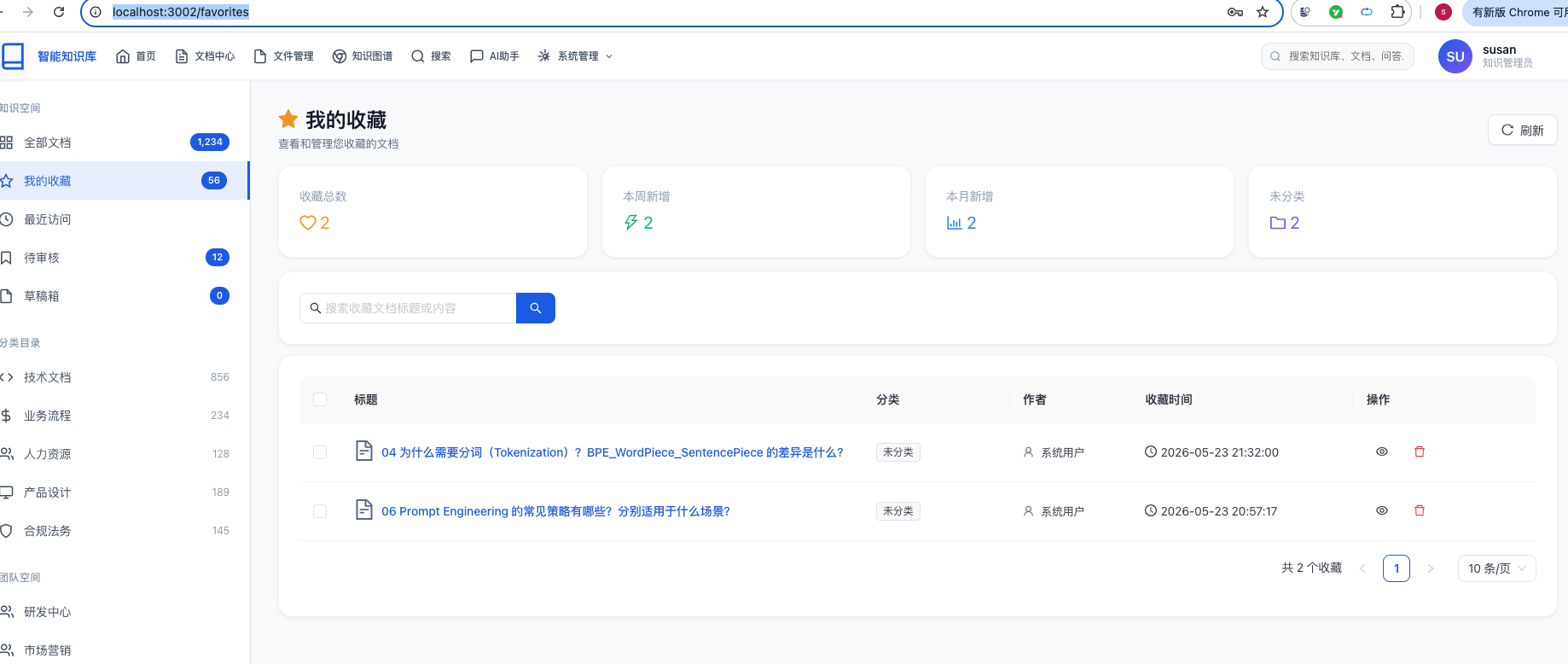
能够看到我的收藏记录。
返回访问文档中:
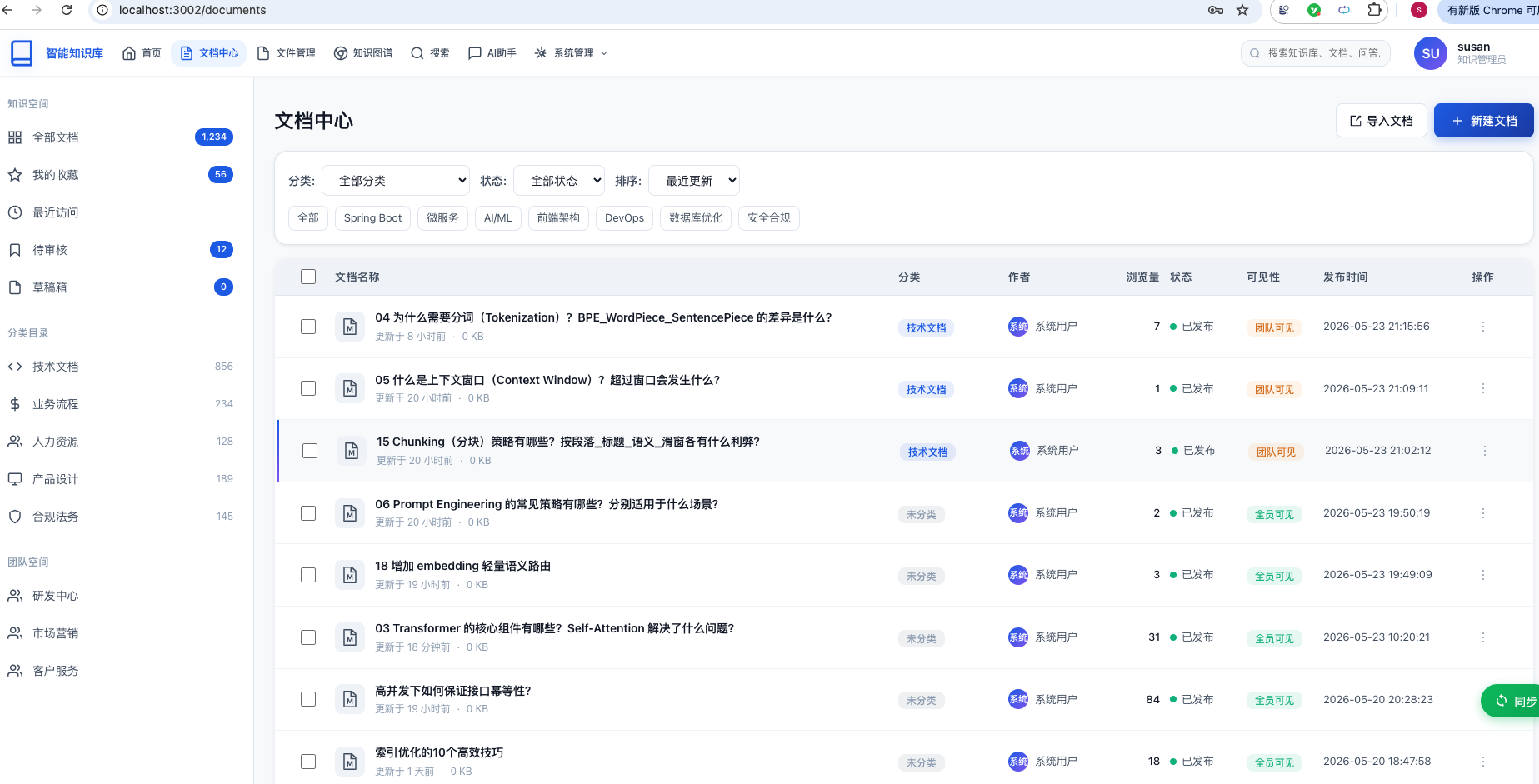
访问其中一个文档详情,点击收藏按钮: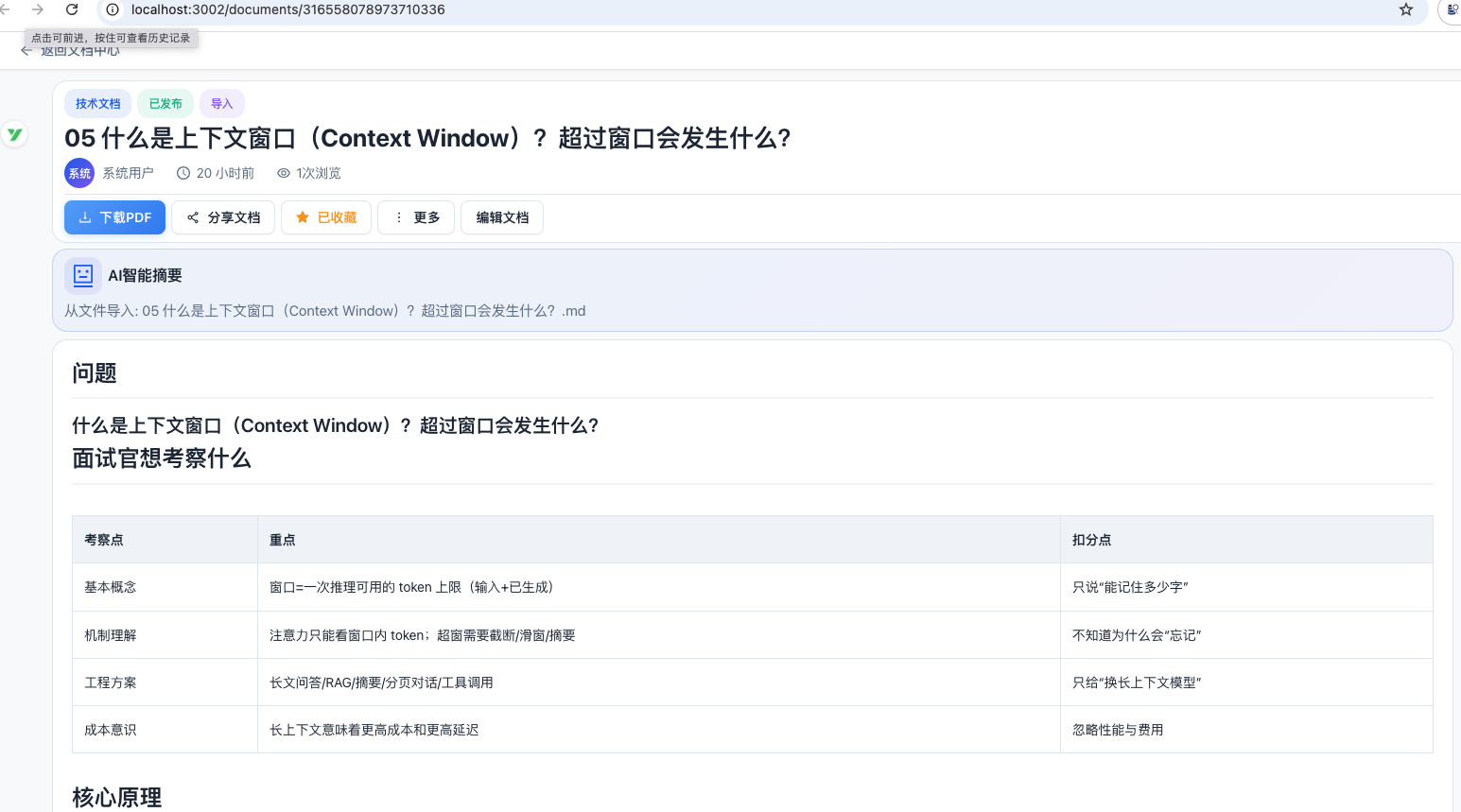
再回到我的收藏页面,此时会多一条数据: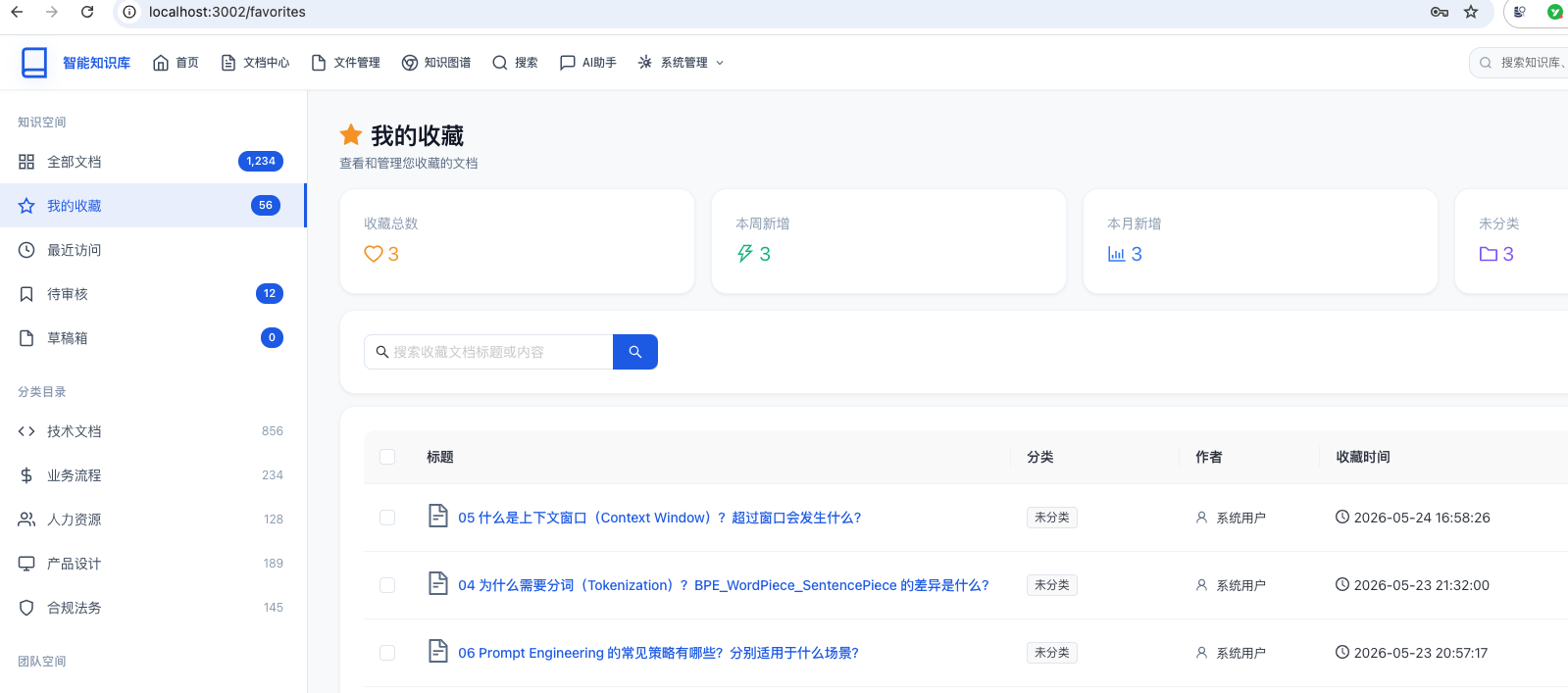
访问最近访问地址:http://localhost:3002/recent-access
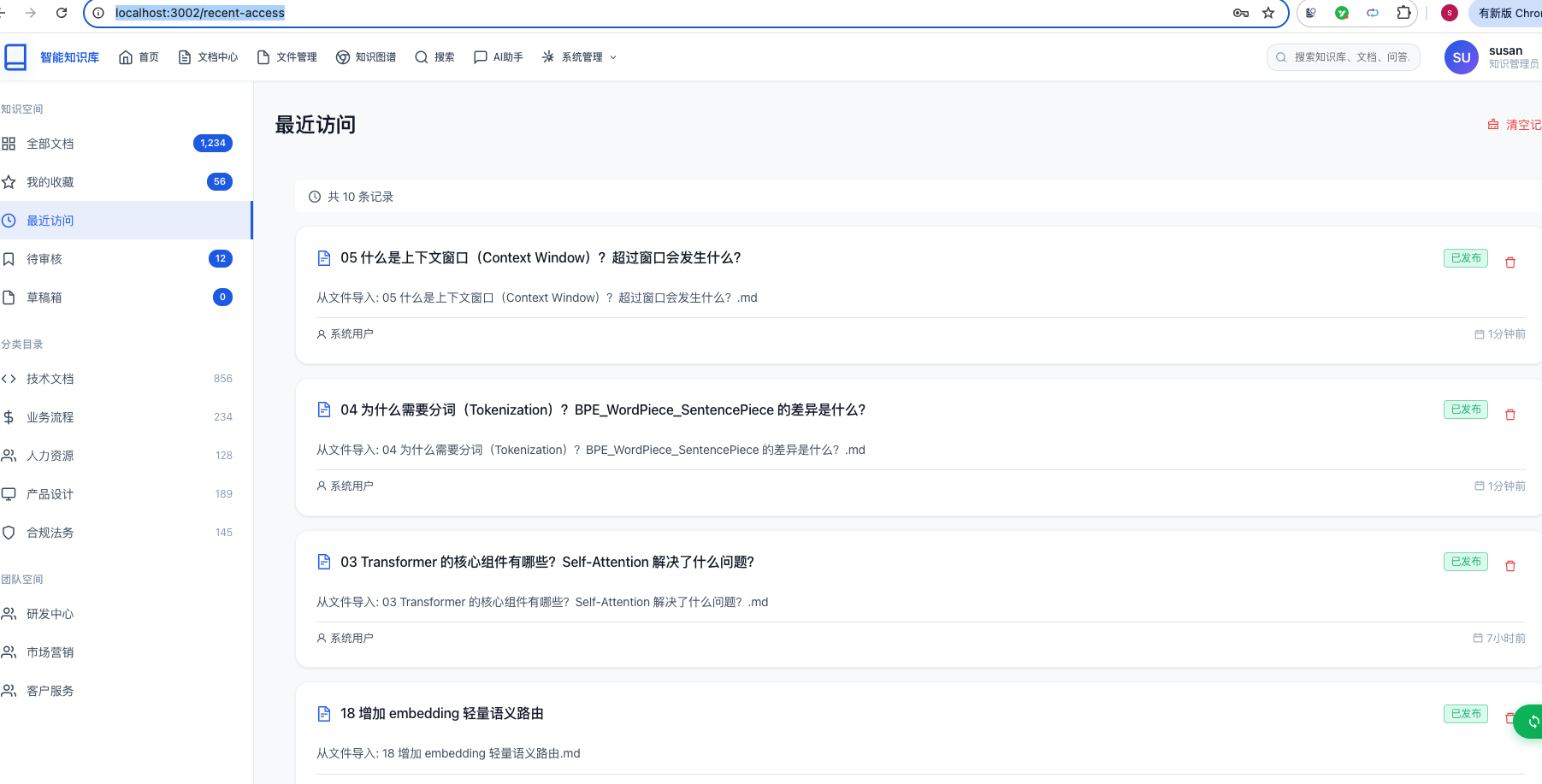
在里面也能看到我们刚刚访问的文档。
总结
本文详细介绍了如何从零开始为知识库系统增加「我的收藏」和「最近访问」两个功能,涵盖完整的前后端实现。
