一、概述
智能搜索是知识库系统的核心功能之一,不仅要支持传统的关键词匹配,还需要结合语义理解,让用户能够快速准确地找到所需知识。
本文将详细介绍如何从零构建一套完整的智能搜索系统,支持关键词搜索和混合智能搜索两种模式。
1.1 功能定位
智能搜索作为知识检索的入口,提供以下核心功能:
| 功能模块 | 说明 | 使用场景 |
|---|---|---|
| 关键词搜索 | 基于ES multi\_match的BM25全文检索 | 精确关键词匹配,快速返回 |
| 混合智能搜索 | BM25 + kNN向量 + RRF融合 + LLM重排序 | 语义搜索,理解意图 |
| 搜索建议 | 输入时自动补全文档标题 | 提升搜索体验 |
| 搜索历史 | 记录和展示用户搜索历史 | 快速重复搜索 |
| 热门搜索 | 统计并展示热门搜索关键词 | 发现热门内容 |
| 高亮显示 | 搜索结果中关键字高亮 | 快速定位匹配内容 |
| 索引管理 | 文档自动同步到ES索引 | 保证搜索数据实时性 |
1.2 搜索模式对比
关键词搜索(BM25全文检索)
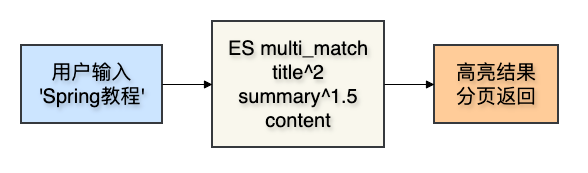
混合智能搜索(BM25 + kNN + RRF + LLM Rerank)

1.3 技术架构
整个智能搜索功能横跨多个微服务:
| 服务模块 | 端口 | 核心职责 | 数据存储 |
|---|---|---|---|
| kb-search | 8083 | 搜索入口、关键词搜索、搜索历史 | ES(kb\_document索引)、MySQL |
| kb-ai | 8086 | RAG混合搜索、向量检索、LLM重排序 | ES(kb\_chunk索引) |
| kb-document | 8082 | 文档管理、提供文档元数据 | MySQL |
调用链路:

二、数据库设计
2.1 搜索历史表
搜索历史记录存储在MySQL的kb_search_history表中:
CREATE TABLE `kb_search_history` (
  `id` BIGINT NOT NULL COMMENT '历史ID',
  `user_id` BIGINT NOT NULL COMMENT '用户ID',
  `keyword` VARCHAR(200) NOT NULL COMMENT '搜索关键词',
  `search_count` INT NOT NULL DEFAULT 1 COMMENT '搜索次数',
  `create_time` DATETIME NOT NULL DEFAULT CURRENT_TIMESTAMP COMMENT '搜索时间',
  PRIMARY KEY (`id`),
  KEY `idx_user_id` (`user_id`),
  KEY `idx_keyword` (`keyword`),
  KEY `idx_create_time` (`create_time`)
) ENGINE=InnoDB DEFAULT CHARSET=utf8mb4 COLLATE=utf8mb4_unicode_ci COMMENT='搜索历史表';
2.2 字段说明
| 字段 | 类型 | 说明 | 必填 | 默认值 |
|---|---|---|---|---|
| id | BIGINT | 历史记录ID(雪花算法生成) | 是 | - |
| user\_id | BIGINT | 用户ID | 是 | - |
| keyword | VARCHAR(200) | 搜索关键词 | 是 | - |
| search\_count | INT | 搜索次数(同一用户同一关键词累加) | 是 | 1 |
| create\_time | DATETIME | 最近搜索时间 | 是 | CURRENT\_TIMESTAMP |
2.3 搜索历史UPSERT逻辑
同一用户搜索同一关键词时,不新增记录,而是更新search_count和create_time:
// 先查是否存在
SearchHistory existHistory = searchHistoryMapper.selectOne(
    new LambdaQueryWrapper<SearchHistory>()
        .eq(SearchHistory::getUserId, userId)
        .eq(SearchHistory::getKeyword, keyword)
);

if (existHistory != null) {
    // 存在:搜索次数+1,更新时间
    existHistory.setSearchCount(existHistory.getSearchCount() + 1);
    existHistory.setCreateTime(LocalDateTime.now());
    searchHistoryMapper.updateById(existHistory);
} else {
    // 不存在:新增记录
    SearchHistory history = new SearchHistory();
    history.setUserId(userId);
    history.setKeyword(keyword);
    history.setSearchCount(1);
    history.preInsert(); // 生成雪花ID
    searchHistoryMapper.insert(history);
}
三、Elasticsearch索引设计
3.1 kb\_document索引
关键词搜索使用的文档索引,存储文档的全文信息和元数据:
{
  "settings": {
    "number_of_shards": 1,
    "number_of_replicas": 0,
    "refresh_interval": "5s"
  },
  "mappings": {
    "properties": {
      "title":        { "type": "text", "analyzer": "ik_max_word", "fields": { "keyword": { "type": "keyword" } } },
      "summary":      { "type": "text", "analyzer": "ik_max_word" },
      "content":      { "type": "text", "analyzer": "ik_max_word" },
      "categoryId":   { "type": "long" },
      "categoryName": { "type": "keyword" },
      "tagIds":       { "type": "long" },
      "tagNames":     { "type": "keyword" },
      "creatorId":    { "type": "long" },
      "creatorName":  { "type": "keyword" },
      "teamId":       { "type": "long" },
      "teamName":     { "type": "keyword" },
      "docStatus":    { "type": "integer" },
      "viewCount":    { "type": "integer" },
      "likeCount":    { "type": "integer" },
      "commentCount": { "type": "integer" },
      "isPublic":     { "type": "boolean" },
      "publishAt":    { "type": "keyword" },
      "createdAt":    { "type": "keyword" },
      "updatedAt":    { "type": "keyword" }
    }
  }
}
设计要点:
- title/summary/content 使用
ik_max_word分词器,支持中文分词搜索 - title.keyword 子字段用于前缀匹配(搜索建议)
- keyword类型用于精确匹配字段(如分类名、作者名、时间)
- 时间字段使用
keyword类型而非date类型,避免LocalDateTime反序列化问题
3.2 kb\_chunk索引(kb-ai模块)
混合智能搜索使用的块级索引,存储文档分块和向量嵌入:
{
  "settings": {
    "number_of_shards": 3,
    "number_of_replicas": 1
  },
  "mappings": {
    "properties": {
      "chunkId":          { "type": "keyword" },
      "documentId":       { "type": "long" },
      "documentTitle":    { "type": "text", "analyzer": "ik_max_word" },
      "content":          { "type": "text", "analyzer": "ik_max_word" },
      "heading":          { "type": "keyword" },
      "embedding":        { "type": "dense_vector", "dims": 1024, "index": true, "similarity": "cosine" },
      "publishTime":      { "type": "keyword" },
      "documentStatus":   { "type": "integer" },
      "categoryId":       { "type": "long" }
    }
  }
}
设计要点:
- embedding 字段使用
dense_vector类型,维度1024,支持cosineSimilarity向量检索 - content/documentTitle 使用
ik_max_word分词器,支持BM25关键词检索 - 文档被分割为多个chunk(512字符/块,64字符重叠),每个chunk独立索引
四、实体类设计
4.1 创建DocumentIndex实体类(ES文档)
创建 kb-search/src/main/java/com/knowledge/base/search/entity/DocumentIndex.java:
package com.knowledge.base.search.entity;

import lombok.AllArgsConstructor;
import lombok.Builder;
import lombok.Data;
import lombok.NoArgsConstructor;
import org.springframework.data.annotation.Id;
import org.springframework.data.elasticsearch.annotations.Document;
import org.springframework.data.elasticsearch.annotations.Field;
import org.springframework.data.elasticsearch.annotations.FieldType;

import java.util.List;

/**
 * ES文档索引实体
 *
 * <p>映射 kb_document 索引,存储文档的全文信息和元数据,
 * 供关键词搜索和高亮查询使用</p>
 *
 * @author 苏三
 * @since 1.0.0
 */
@Data
@Builder
@NoArgsConstructor
@AllArgsConstructor
@Document(indexName = "kb_document", createIndex = false)
public class DocumentIndex {

    /** 文档ID(ES文档_id) */
    @Id
    private String id;

    /** 文档标题(IK分词,支持中文搜索) */
    @Field(type = FieldType.Text, analyzer = "ik_max_word")
    private String title;

    /** 文档摘要 */
    @Field(type = FieldType.Text, analyzer = "ik_max_word")
    private String summary;

    /** 文档正文内容 */
    @Field(type = FieldType.Text, analyzer = "ik_max_word")
    private String content;

    /** 分类ID */
    @Field(type = FieldType.Long)
    private Long categoryId;

    /** 分类名称 */
    @Field(type = FieldType.Keyword)
    private String categoryName;

    /** 标签ID列表 */
    @Field(type = FieldType.Long)
    private List<Long> tagIds;

    /** 标签名称列表 */
    @Field(type = FieldType.Keyword)
    private List<String> tagNames;

    /** 创建者ID */
    @Field(type = FieldType.Long)
    private Long creatorId;

    /** 创建者名称 */
    @Field(type = FieldType.Keyword)
    private String creatorName;

    /** 团队ID */
    @Field(type = FieldType.Long)
    private Long teamId;

    /** 团队名称 */
    @Field(type = FieldType.Keyword)
    private String teamName;

    /** 文档状态(1=已发布) */
    @Field(type = FieldType.Integer)
    private Integer docStatus;

    /** 浏览次数 */
    @Field(type = FieldType.Integer)
    private Integer viewCount;

    /** 点赞次数 */
    @Field(type = FieldType.Integer)
    private Integer likeCount;

    /** 评论次数 */
    @Field(type = FieldType.Integer)
    private Integer commentCount;

    /** 是否公开 */
    @Field(type = FieldType.Boolean)
    private Boolean isPublic;

    /** 发布时间(keyword类型,避免日期解析问题) */
    @Field(type = FieldType.Keyword)
    private String publishAt;

    /** 创建时间 */
    @Field(type = FieldType.Keyword)
    private String createdAt;

    /** 更新时间 */
    @Field(type = FieldType.Keyword)
    private String updatedAt;
}
设计要点:
createIndex = false:不让Spring Data ES自动建索引,索引结构由代码手动控制- IK分词器:对中文文本字段使用
ik_max_word分词,标题额外保留keyword子字段 - 时间字段用Keyword:避免ES自动推断为
date类型导致LocalDateTime反序列化失败
4.2 创建SearchHistory实体类(MySQL)
创建 kb-search/src/main/java/com/knowledge/base/search/entity/SearchHistory.java:
package com.knowledge.base.search.entity;

import com.baomidou.mybatisplus.annotation.IdType;
import com.baomidou.mybatisplus.annotation.TableId;
import com.baomidou.mybatisplus.annotation.TableName;
import com.knowledge.base.common.utils.SnowflakeIdGenerator;
import lombok.Data;

import java.time.LocalDateTime;

/**
 * 搜索历史实体类
 *
 * @author 苏三
 * @since 1.0.0
 */
@Data
@TableName("kb_search_history")
public class SearchHistory {

    /** 历史记录ID(雪花算法生成) */
    @TableId(type = IdType.INPUT)
    private Long id;

    /** 用户ID */
    private Long userId;

    /** 搜索关键词 */
    private String keyword;

    /** 搜索次数 */
    private Integer searchCount;

    /** 搜索时间 */
    private LocalDateTime createTime;

    /**
     * 插入前自动生成雪花ID
     */
    public void preInsert() {
        if (this.id == null) {
            this.id = SnowflakeIdGenerator.getInstance().nextId();
        }
    }
}
五、DTO和VO设计
5.1 创建SearchRequestDTO
创建 kb-search/src/main/java/com/knowledge/base/search/dto/SearchRequestDTO.java:
package com.knowledge.base.search.dto;

import io.swagger.v3.oas.annotations.media.Schema;
import jakarta.validation.constraints.NotBlank;
import lombok.Data;

import java.io.Serializable;
import java.util.List;

/**
 * 搜索请求DTO
 *
 * @author 苏三
 * @since 1.0.0
 */
@Data
@Schema(description = "搜索请求")
public class SearchRequestDTO implements Serializable {

    private static final long serialVersionUID = 1L;

    /** 搜索关键词 */
    @Schema(description = "搜索关键词")
    @NotBlank(message = "搜索关键词不能为空")
    private String keyword;

    /** 分类ID列表(高级搜索) */
    @Schema(description = "分类ID列表")
    private List<Long> categoryIds;

    /** 标签ID列表(高级搜索) */
    @Schema(description = "标签ID列表")
    private List<Long> tagIds;

    /** 团队ID列表(高级搜索) */
    @Schema(description = "团队ID列表")
    private List<Long> teamIds;

    /** 创建者ID */
    @Schema(description = "创建者ID")
    private Long creatorId;

    /** 文档状态 */
    @Schema(description = "文档状态")
    private Integer docStatus;

    /** 开始时间 */
    @Schema(description = "开始时间")
    private String startTime;

    /** 结束时间 */
    @Schema(description = "结束时间")
    private String endTime;

    /** 排序字段 */
    @Schema(description = "排序字段")
    private String sortField;

    /** 排序方式 */
    @Schema(description = "排序方式")
    private String sortOrder;

    /** 页码 */
    @Schema(description = "页码")
    private Integer current = 1;

    /** 每页大小 */
    @Schema(description = "每页大小")
    private Integer size = 10;

    /**
     * 搜索模式:keyword(关键词搜索) / hybrid(混合智能搜索)
     */
    @Schema(description = "搜索模式:keyword / hybrid", example = "hybrid")
    private String searchMode = "keyword";

    /**
     * 混合搜索返回Top-K结果数(searchMode=hybrid时生效)
     */
    @Schema(description = "混合搜索Top-K")
    private int topK = 10;

    /**
     * 是否启用LLM重排序(searchMode=hybrid时生效)
     */
    @Schema(description = "是否启用LLM重排序")
    private boolean enableRerank = true;
}
5.2 创建SearchResultVO(含ChunkResult内部类)
创建 kb-search/src/main/java/com/knowledge/base/search/vo/SearchResultVO.java:
package com.knowledge.base.search.vo;

import io.swagger.v3.oas.annotations.media.Schema;
import lombok.AllArgsConstructor;
import lombok.Builder;
import lombok.Data;
import lombok.NoArgsConstructor;

import java.io.Serializable;
import java.util.List;

/**
 * 搜索结果VO
 *
 * @author 苏三
 * @since 1.0.0
 */
@Data
@Builder
@NoArgsConstructor
@AllArgsConstructor
@Schema(description = "搜索结果")
public class SearchResultVO implements Serializable {

    private static final long serialVersionUID = 1L;

    @Schema(description = "文档ID")
    private Long id;

    /** 文档标题(含高亮标签) */
    @Schema(description = "文档标题")
    private String title;

    /** 文档摘要(含高亮标签) */
    @Schema(description = "文档摘要")
    private String summary;

    /** 高亮片段列表(关键词搜索模式) */
    @Schema(description = "高亮片段")
    private List<String> highlights;

    @Schema(description = "分类名称")
    private String categoryName;

    @Schema(description = "标签名称列表")
    private List<String> tagNames;

    @Schema(description = "创建者名称")
    private String creatorName;

    @Schema(description = "团队名称")
    private String teamName;

    @Schema(description = "浏览次数")
    private Integer viewCount;

    @Schema(description = "点赞次数")
    private Integer likeCount;

    @Schema(description = "评论次数")
    private Integer commentCount;

    @Schema(description = "发布时间")
    private String publishAt;

    /** 相关度得分(0~1) */
    @Schema(description = "相关度得分")
    private Float score;

    /** BM25得分(混合搜索模式) */
    @Schema(description = "BM25得分")
    private Double bm25Score;

    /** 向量相似度得分(混合搜索模式) */
    @Schema(description = "向量相似度得分")
    private Double vectorScore;

    /** LLM重排序得分(混合搜索模式) */
    @Schema(description = "LLM重排序得分")
    private Double rerankScore;

    /** 文档块结果列表(混合搜索模式,含高亮) */
    @Schema(description = "文档块结果列表")
    private List<ChunkResult> chunks;

    // ==================== 内部类:文档块检索结果 ====================

    /**
     * 文档块检索结果
     *
     * <p>混合搜索返回的是块级结果,一个文档可能有多个块命中。
     * 每个块包含匹配的内容片段、所属章节标题和各项得分。</p>
     */
    @Data
    @Builder
    @NoArgsConstructor
    @AllArgsConstructor
    @Schema(description = "文档块检索结果")
    public static class ChunkResult implements Serializable {

        private static final long serialVersionUID = 1L;

        @Schema(description = "块ID")
        private String chunkId;

        @Schema(description = "块文本内容")
        private String content;

        @Schema(description = "所属章节标题")
        private String heading;

        @Schema(description = "融合/重排序得分")
        private double score;

        @Schema(description = "BM25得分")
        private double bm25Score;

        @Schema(description = "向量相似度得分")
        private double vectorScore;
    }
}
5.3 创建SearchSuggestVO
创建 kb-search/src/main/java/com/knowledge/base/search/vo/SearchSuggestVO.java:
package com.knowledge.base.search.vo;

import lombok.AllArgsConstructor;
import lombok.Builder;
import lombok.Data;
import lombok.NoArgsConstructor;

import java.io.Serializable;

/**
 * 搜索建议VO
 *
 * @author 苏三
 * @since 1.0.0
 */
@Data
@Builder
@NoArgsConstructor
@AllArgsConstructor
public class SearchSuggestVO implements Serializable {

    private static final long serialVersionUID = 1L;

    /** 建议文本 */
    private String text;

    /** 建议类型(title/author/category) */
    private String type;

    /** 关联文档ID */
    private Long documentId;

    /** 匹配得分 */
    private Float score;
}
5.4 创建SearchHistoryVO
创建 kb-search/src/main/java/com/knowledge/base/search/vo/SearchHistoryVO.java:
package com.knowledge.base.search.vo;

import lombok.AllArgsConstructor;
import lombok.Builder;
import lombok.Data;
import lombok.NoArgsConstructor;

import java.time.LocalDateTime;

/**
 * 搜索历史VO
 *
 * @author 苏三
 * @since 1.0.0
 */
@Data
@Builder
@NoArgsConstructor
@AllArgsConstructor
public class SearchHistoryVO {

    /** 历史ID */
    private Long id;

    /** 搜索关键词 */
    private String keyword;

    /** 搜索次数 */
    private Integer searchCount;

    /** 最近搜索时间 */
    private LocalDateTime createTime;
}
5.5 DTO/VO设计说明
| 类型 | 用途 | 特点 |
|---|---|---|
| SearchRequestDTO | 接收搜索请求 | 包含关键词、搜索模式、分页、筛选条件 |
| SearchResultVO | 返回搜索结果 | 包含高亮文本、得分详情、chunk列表 |
| SearchSuggestVO | 返回搜索建议 | 建议文本、类型、关联文档ID |
| SearchHistoryVO | 返回搜索历史 | 关键词、搜索次数、时间 |
六、数据访问层
6.1 创建SearchHistoryMapper
创建 kb-search/src/main/java/com/knowledge/base/search/mapper/SearchHistoryMapper.java:
package com.knowledge.base.search.mapper;

import com.baomidou.mybatisplus.core.mapper.BaseMapper;
import com.knowledge.base.search.entity.SearchHistory;
import org.apache.ibatis.annotations.Mapper;

/**
 * 搜索历史Mapper接口
 *
 * @author 苏三
 * @since 1.0.0
 */
@Mapper
public interface SearchHistoryMapper extends BaseMapper<SearchHistory> {

}
使用MyBatis Plus后,基础CRUD操作无需编写SQL:
// 自动生成以下SQL操作
searchHistoryMapper.selectById(id);
searchHistoryMapper.selectList(wrapper);
searchHistoryMapper.insert(history);
searchHistoryMapper.updateById(history);
searchHistoryMapper.deleteById(id);
6.2 Elasticsearch操作
搜索功能的数据操作主要面向ES,通过以下两个Bean进行操作:
// Spring Data ES高级操作(保存、删除、分页查询)
private final ElasticsearchOperations elasticsearchOperations;

// ES低级客户端(原生查询、高亮、索引管理)
private final ElasticsearchClient esClient;
两种客户端的适用场景:
| 场景 | 使用客户端 | 原因 |
|---|---|---|
| 保存/删除文档 | elasticsearchOperations | save()/delete() API简洁 |
| 关键词搜索 + 高亮 | esClient(原生) | 需要对query和高亮做精细控制 |
| 前缀建议查询 | elasticsearchOperations | StringQuery足够简单 |
| 创建/删除索引 | esClient(原生) | Spring Data ES不支持索引管理 |
七、业务逻辑层
7.1 创建SearchService接口
创建 kb-search/src/main/java/com/knowledge/base/search/service/SearchService.java:
package com.knowledge.base.search.service;

import com.knowledge.base.common.result.PageResult;
import com.knowledge.base.search.dto.SearchRequestDTO;
import com.knowledge.base.search.vo.SearchResultVO;
import com.knowledge.base.search.vo.SearchSuggestVO;

import java.util.List;
import java.util.Map;

/**
 * 搜索Service接口
 *
 * @author 苏三
 * @since 1.0.0
 */
public interface SearchService {

    /**
     * 统一搜索入口(根据searchMode路由到关键词或混合搜索)
     */
    PageResult<SearchResultVO> search(SearchRequestDTO dto);

    /**
     * 高级搜索
     */
    PageResult<SearchResultVO> advancedSearch(SearchRequestDTO dto);

    /**
     * 搜索建议(输入自动补全)
     */
    List<SearchSuggestVO> suggest(String keyword, Integer size);

    /**
     * 索引单个文档(通过kb-document API拉取数据)
     */
    void indexDocument(Long documentId);

    /**
     * 直接从Map数据索引文档(kb-document内部调用)
     */
    void indexDocumentData(Map<String, Object> docData);

    /**
     * 批量索引文档
     */
    void batchIndexDocuments(List<Long> documentIds);

    /**
     * 删除文档索引
     */
    void deleteDocument(Long documentId);

    /**
     * 批量删除文档索引
     */
    void batchDeleteDocuments(List<Long> documentIds);

    /**
     * 重建索引(清空+全量同步kb-document已发布文档)
     */
    void rebuildIndex();
}
7.2 创建SearchServiceImpl实现类
创建 kb-search/src/main/java/com/knowledge/base/search/service/impl/SearchServiceImpl.java:
package com.knowledge.base.search.service.impl;

import co.elastic.clients.elasticsearch.ElasticsearchClient;
import co.elastic.clients.elasticsearch.core.SearchResponse;
import co.elastic.clients.elasticsearch.core.search.Hit;
import co.elastic.clients.elasticsearch.indices.CreateIndexRequest;
import co.elastic.clients.elasticsearch.indices.DeleteIndexRequest;
import co.elastic.clients.elasticsearch.indices.ExistsRequest;
import com.fasterxml.jackson.core.type.TypeReference;
import com.fasterxml.jackson.databind.ObjectMapper;
import com.knowledge.base.common.exception.BusinessException;
import com.knowledge.base.common.result.PageResult;
import com.knowledge.base.common.result.Result;
import com.knowledge.base.search.dto.SearchRequestDTO;
import com.knowledge.base.search.entity.DocumentIndex;
import com.knowledge.base.search.feign.RagSearchFeignClient;
import com.knowledge.base.search.feign.RagSearchItemVO;
import com.knowledge.base.search.feign.RagSearchRequest;
import com.knowledge.base.search.service.SearchService;
import com.knowledge.base.search.vo.SearchResultVO;
import com.knowledge.base.search.vo.SearchSuggestVO;
import lombok.RequiredArgsConstructor;
import lombok.extern.slf4j.Slf4j;
import org.springframework.beans.factory.annotation.Value;
import org.springframework.data.domain.PageRequest;
import org.springframework.data.elasticsearch.core.ElasticsearchOperations;
import org.springframework.data.elasticsearch.core.SearchHit;
import org.springframework.data.elasticsearch.core.SearchHits;
import org.springframework.data.elasticsearch.core.query.Query;
import org.springframework.data.elasticsearch.core.query.StringQuery;
import org.springframework.http.HttpEntity;
import org.springframework.http.HttpHeaders;
import org.springframework.http.HttpMethod;
import org.springframework.http.ResponseEntity;
import org.springframework.stereotype.Service;
import org.springframework.util.StringUtils;
import org.springframework.web.client.RestTemplate;

import java.util.ArrayList;
import java.util.LinkedHashMap;
import java.util.List;
import java.util.Map;
import java.util.stream.Collectors;

/**
 * 搜索服务实现
 *
 * <p>提供两种搜索模式:</p>
 * <ol>
 *   <li><b>关键词搜索</b>:基于 ES multi_match 的 BM25 全文检索,支持高亮</li>
 *   <li><b>混合智能搜索</b>:通过 Feign 调用 kb-ai 的 BM25 + kNN + RRF 融合检索</li>
 * </ol>
 *
 * @author 苏三
 * @since 1.0.0
 */
@Slf4j
@Service
@RequiredArgsConstructor
public class SearchServiceImpl implements SearchService {

    /** ES 索引名称 */
    private static final String INDEX_NAME = "kb_document";

    // ==================== 依赖注入 ====================

    private final ElasticsearchOperations elasticsearchOperations;
    private final ElasticsearchClient esClient;
    private final RagSearchFeignClient ragSearchFeignClient;
    private final ObjectMapper objectMapper = new ObjectMapper();

    @Value("${kb-document.base-url:http://localhost:8082}")
    private String kbDocumentBaseUrl;

    // ==================== 搜索入口 ====================

    @Override
    public PageResult<SearchResultVO> search(SearchRequestDTO dto) {
        if ("hybrid".equals(dto.getSearchMode())) {
            return searchHybrid(dto);
        }
        return searchKeyword(dto);
    }

    @Override
    public PageResult<SearchResultVO> advancedSearch(SearchRequestDTO dto) {
        log.info("高级搜索:keyword={}", dto.getKeyword());
        return search(dto);
    }
}
7.3 核心方法:关键词搜索
// ==================== 关键词搜索 ====================

/**
 * 关键词搜索(BM25 全文检索 + ES 高亮)
 *
 * <p>通过 ES 原生客户端构建 multi_match 查询,对 title、summary、content
 * 三个字段做加权匹配,title 权重最高。同时配置 ES highlight 返回高亮片段。</p>
 */
private PageResult<SearchResultVO> searchKeyword(SearchRequestDTO dto) {
    log.info("关键词搜索:keyword={}", dto.getKeyword());

    try {
        String keyword = dto.getKeyword();

        // 构建 ES 查询:multi_match 加权 + docStatus 过滤 + highlight
        SearchResponse<Map> response = esClient.search(s -> {
            s.index(INDEX_NAME)
             .from((dto.getCurrent() - 1) * dto.getSize())
             .size(dto.getSize());

            // 有关键词时:多字段加权匹配 + 已发布过滤
            if (StringUtils.hasText(keyword)) {
                s.query(q -> q.bool(b -> b
                        .must(m -> m.multiMatch(mm -> mm
                                .query(keyword)
                                .fields("title^2", "summary^1.5", "content")))
                        .filter(f -> f.term(t -> t.field("docStatus").value(1)))));
            } else {
                // 无关键词时:只过滤已发布
                s.query(q -> q.bool(b -> b
                        .filter(f -> f.term(t -> t.field("docStatus").value(1)))));
            }

            // 高亮配置:标题和摘要返回完整字段,内容返回 3 个片段
            s.highlight(h -> h
                    .preTags("<em>").postTags("</em>")
                    .fields("title", hf -> hf.numberOfFragments(0))
                    .fields("summary", hf -> hf.numberOfFragments(0))
                    .fields("content", hf -> hf.fragmentSize(150).numberOfFragments(3)));

            return s;
        }, Map.class);

        // 解析搜索结果,提取高亮字段
        List<SearchResultVO> results = new ArrayList<>();
        for (Hit<Map> hit : response.hits().hits()) {
            Map<String, Object> source = hit.source();

            // 从 ES hit 中提取高亮字段
            List<String> titleHighlights = hit.highlight() != null
                    ? hit.highlight().get("title") : null;
            List<String> summaryHighlights = hit.highlight() != null
                    ? hit.highlight().get("summary") : null;
            List<String> contentHighlights = hit.highlight() != null
                    ? hit.highlight().get("content") : null;

            // 标题:优先取高亮版本,合并相邻 em 标签
            String title = (titleHighlights != null && !titleHighlights.isEmpty())
                    ? mergeAdjacentEmTags(titleHighlights.get(0))
                    : getString(source, "title");
            String summary = (summaryHighlights != null && !summaryHighlights.isEmpty())
                    ? mergeAdjacentEmTags(summaryHighlights.get(0))
                    : getString(source, "summary");

            // ES 未返回高亮时,用简单正则高亮兜底
            if (titleHighlights == null && summaryHighlights == null
                    && StringUtils.hasText(keyword)) {
                title = highlightSimple(title, keyword);
                summary = highlightSimple(summary, keyword);
            }

            // 内容高亮片段
            List<String> highlights;
            if (contentHighlights != null && !contentHighlights.isEmpty()) {
                highlights = contentHighlights.stream()
                        .map(this::mergeAdjacentEmTags)
                        .collect(Collectors.toList());
            } else {
                highlights = new ArrayList<>();
            }

            results.add(SearchResultVO.builder()
                    .id(hit.id() != null ? Long.parseLong(hit.id()) : null)
                    .title(title)
                    .summary(summary)
                    .highlights(highlights)
                    .categoryName(getString(source, "categoryName"))
                    .tagNames(getStringList(source, "tagNames"))
                    .creatorName(getString(source, "creatorName"))
                    .teamName(getString(source, "teamName"))
                    .viewCount(toInt(source.get("viewCount")))
                    .likeCount(toInt(source.get("likeCount")))
                    .commentCount(toInt(source.get("commentCount")))
                    .publishAt(getString(source, "publishAt"))
                    .score(hit.score() != null ? hit.score().floatValue() : 0f)
                    .build());
        }

        return PageResult.<SearchResultVO>builder()
                .records(results)
                .total(response.hits().total() != null
                        ? response.hits().total().value() : 0L)
                .current((long) dto.getCurrent())
                .size((long) dto.getSize())
                .build();

    } catch (Exception e) {
        log.error("关键词搜索失败:{}", e.getMessage(), e);
        throw new BusinessException("搜索失败: " + e.getMessage());
    }
}
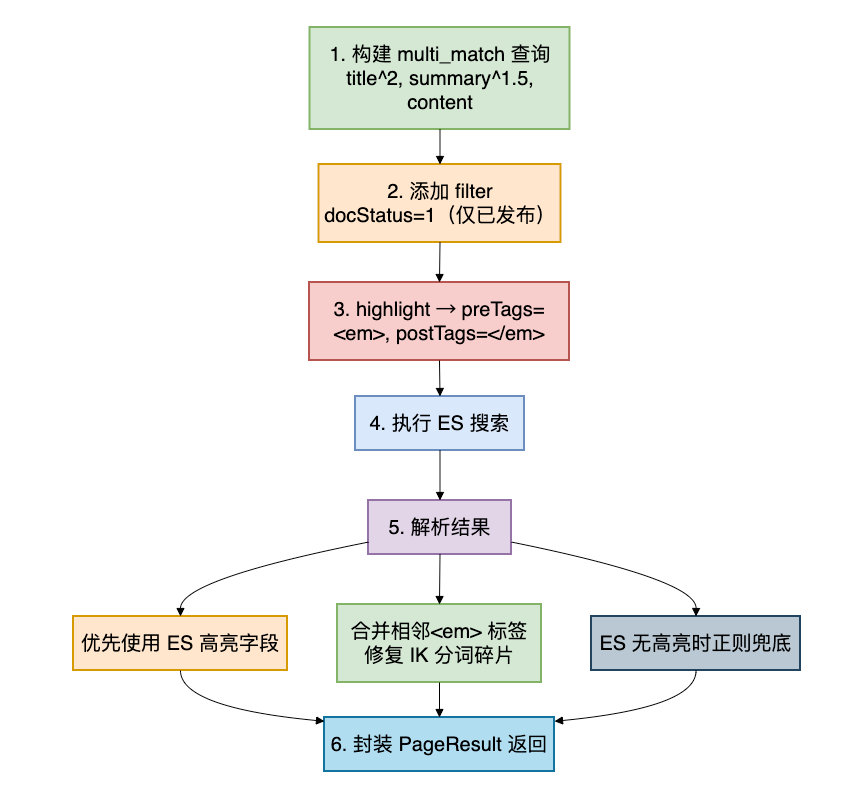
关键词搜索流程:
7.4 核心方法:混合智能搜索
// ==================== 混合智能搜索 ====================

/**
 * 混合智能搜索(BM25 + kNN 向量 + RRF 融合 + LLM 重排序)
 *
 * <p>通过 Feign 调用 kb-ai 的 /rag/search 接口,获取 chunk 级检索结果后
 * 按 documentId 聚合为文档级结果,并从 kb_document 索引补充元数据。</p>
 *
 * <p>失败时自动回退到关键词搜索。</p>
 */
private PageResult<SearchResultVO> searchHybrid(SearchRequestDTO dto) {
    log.info("混合智能搜索:keyword={}, topK={}, enableRerank={}",
            dto.getKeyword(), dto.getTopK(), dto.isEnableRerank());

    try {
        // 1. 构建请求 → Feign 调用 kb-ai
        RagSearchRequest request = RagSearchRequest.builder()
                .query(dto.getKeyword())
                .topK(dto.getTopK() > 0 ? dto.getTopK() : 10)
                .enableRerank(dto.isEnableRerank())
                .build();

        Result<List<RagSearchItemVO>> result = ragSearchFeignClient.search(request);

        List<RagSearchItemVO> dataList = result.getData();
        if (dataList == null || dataList.isEmpty()) {
            return PageResult.<SearchResultVO>builder()
                    .records(new ArrayList<>())
                    .total(0L)
                    .current((long) dto.getCurrent())
                    .size((long) dto.getSize())
                    .build();
        }

        // 2. 按 documentId 聚合 chunk 为文档级结果
        Map<String, SearchResultVO> docMap = new LinkedHashMap<>();
        List<SearchResultVO> standaloneResults = new ArrayList<>();

        for (RagSearchItemVO item : dataList) {
            Long docId = item.getDocumentId();

            // 构建 chunk 结果对象
            SearchResultVO.ChunkResult chunk = SearchResultVO.ChunkResult.builder()
                    .chunkId(item.getChunkId())
                    .content(item.getContent())
                    .heading(item.getHeading())
                    .score(item.getScore())
                    .bm25Score(item.getBm25Score())
                    .vectorScore(item.getVectorScore())
                    .build();

            if (docId == null) {
                // 无 documentId:每个 chunk 独立展示
                String title = item.getDocumentTitle();
                if (title == null || title.isEmpty()) {
                    title = item.getHeading();
                }
                SearchResultVO vo = SearchResultVO.builder()
                        .title(title != null ? title : "未命名文档")
                        .summary(chunk.getContent().length() > 200
                                ? chunk.getContent().substring(0, 200) + "..."
                                : chunk.getContent())
                        .score((float) chunk.getScore())
                        .bm25Score(chunk.getBm25Score())
                        .vectorScore(chunk.getVectorScore())
                        .chunks(new ArrayList<>(List.of(chunk)))
                        .build();
                standaloneResults.add(vo);
                continue;
            }

            // 有 documentId:按 docId 聚合 chunk
            String docIdStr = String.valueOf(docId);
            if (docMap.containsKey(docIdStr)) {
                docMap.get(docIdStr).getChunks().add(chunk);
            } else {
                String publishTime = formatPublishTime(item.getPublishTime());
                SearchResultVO vo = SearchResultVO.builder()
                        .id(docId.longValue())
                        .title(item.getDocumentTitle())
                        .summary(chunk.getContent().length() > 200
                                ? chunk.getContent().substring(0, 200) + "..."
                                : chunk.getContent())
                        .publishAt(publishTime)
                        .score((float) chunk.getScore())
                        .bm25Score(chunk.getBm25Score())
                        .vectorScore(chunk.getVectorScore())
                        .chunks(new ArrayList<>(List.of(chunk)))
                        .build();
                docMap.put(docIdStr, vo);
            }
        }

        List<SearchResultVO> records = new ArrayList<>(docMap.values());
        records.addAll(standaloneResults);

        // 3. 对混合搜索结果做关键字高亮
        if (StringUtils.hasText(dto.getKeyword())) {
            for (SearchResultVO vo : records) {
                vo.setTitle(highlightSimple(vo.getTitle(), dto.getKeyword()));
                vo.setSummary(highlightSimple(vo.getSummary(), dto.getKeyword()));
                if (vo.getChunks() != null) {
                    for (SearchResultVO.ChunkResult chunk : vo.getChunks()) {
                        chunk.setContent(
                                highlightSimple(chunk.getContent(), dto.getKeyword()));
                    }
                }
            }
        }

        // 4. 从 kb_document ES 索引补充文档元数据(分类、作者、浏览数等)
        enrichDocumentMetadata(records);

        return PageResult.<SearchResultVO>builder()
                .records(records)
                .total((long) records.size())
                .current((long) dto.getCurrent())
                .size((long) dto.getSize())
                .build();

    } catch (Exception e) {
        log.error("混合智能搜索失败,回退到关键词搜索:{}", e.getMessage(), e);
        return searchKeyword(dto);
    }
}
混合搜索流程:
7.5 文档元数据补充
混合搜索的结果来自kb_chunk索引,只有块级信息(标题、内容、得分),缺少分类、作者等元数据。需要通过kb_document索引补充:
/**
 * 从 kb_document ES 索引批量补充文档元数据
 */
private void enrichDocumentMetadata(List<SearchResultVO> records) {
    if (records == null || records.isEmpty()) {
        return;
    }

    // 收集所有有 ID 的文档
    List<String> ids = records.stream()
            .filter(r -> r.getId() != null)
            .map(r -> String.valueOf(r.getId()))
            .distinct()
            .collect(Collectors.toList());

    if (ids.isEmpty()) {
        return;
    }

    try {
        // 用 terms 查询批量获取文档元数据
        String idsJson = ids.stream()
                .map(id -> "\"" + id + "\"")
                .collect(Collectors.joining(","));
        String queryJson = "{\"query\":{\"terms\":{\"_id\":["
                + idsJson + "]}},\"size\":" + ids.size() + "}";

        Query searchQuery = new StringQuery(queryJson);
        SearchHits<DocumentIndex> searchHits =
                elasticsearchOperations.search(searchQuery, DocumentIndex.class);

        Map<String, DocumentIndex> docIndexMap = searchHits.getSearchHits().stream()
                .collect(Collectors.toMap(
                        SearchHit::getId,
                        SearchHit::getContent,
                        (a, b) -> a));

        // 逐个填充缺失字段
        for (SearchResultVO vo : records) {
            if (vo.getId() == null) continue;
            DocumentIndex doc = docIndexMap.get(String.valueOf(vo.getId()));
            if (doc == null) continue;

            if (vo.getSummary() == null || vo.getSummary().isEmpty()) {
                vo.setSummary(doc.getSummary());
            }
            if (vo.getPublishAt() == null && doc.getPublishAt() != null) {
                vo.setPublishAt(doc.getPublishAt());
            }
            if (vo.getCategoryName() == null) {
                vo.setCategoryName(doc.getCategoryName());
            }
            if (vo.getCreatorName() == null) {
                vo.setCreatorName(doc.getCreatorName());
            }
            if (vo.getViewCount() == null) {
                vo.setViewCount(doc.getViewCount());
            }
            if (vo.getTagNames() == null) {
                vo.setTagNames(doc.getTagNames());
            }
            // 其他字段同理...
        }
    } catch (Exception e) {
        log.warn("补充文档元数据失败:{}", e.getMessage());
    }
}
7.6 搜索建议实现
通过ES的prefix查询匹配标题前缀:
@Override
public List<SearchSuggestVO> suggest(String keyword, Integer size) {
    if (!StringUtils.hasText(keyword)) {
        return new ArrayList<>();
    }

    if (size == null || size <= 0) {
        size = 10;
    }

    try {
        // 用 prefix 查询匹配标题前缀
        String queryJson = objectMapper.writeValueAsString(
                Map.of("prefix", Map.of("title.keyword", keyword)));
        Query searchQuery = new StringQuery(queryJson);
        searchQuery.setPageable(PageRequest.of(0, size));

        SearchHits<DocumentIndex> searchHits =
                elasticsearchOperations.search(searchQuery, DocumentIndex.class);

        return searchHits.getSearchHits().stream()
                .map(hit -> SearchSuggestVO.builder()
                        .text(hit.getContent().getTitle())
                        .type("title")
                        .documentId(Long.parseLong(hit.getId()))
                        .build())
                .collect(Collectors.toList());

    } catch (Exception e) {
        log.error("搜索建议失败:{}", e.getMessage(), e);
        return new ArrayList<>();
    }
}
7.7 高亮处理工具方法
// ==================== 高亮处理 ====================

/**
 * 简单关键字高亮:用 <em> 标签包裹匹配文本(大小写不敏感)
 */
private String highlightSimple(String text, String keyword) {
    if (text == null || keyword == null || keyword.isEmpty()) {
        return text;
    }
    String escaped = java.util.regex.Pattern.quote(keyword);
    return text.replaceAll("(?i)" + escaped, "<em>$0</em>");
}

/**
 * 合并相邻的 em 标签,解决 IK 分词器 token 碎片问题
 *
 * <p>例如:<em>索</em><em>引</em> → <em>索引</em></p>
 */
private String mergeAdjacentEmTags(String text) {
    if (text == null) return null;
    return text.replace("</em><em>", "");
}IK分词器碎片问题:中文分词器IK可能将"索引"切分为"索"+"引"两个子token,导致ES返回 <em>索</em><em>引</em>。mergeAdjacentEmTags()方法将相邻的</em><em>标签合并为空,得到<em>索引</em>。
7.8 索引管理
// ==================== 索引管理 ====================

/**
 * 索引单个文档(通过 REST 调用 kb-document 获取文档详情)
 */
@Override
public void indexDocument(Long documentId) {
    if (documentId == null) {
        return;
    }
    log.info("索引文档:documentId={}", documentId);

    try {
        RestTemplate restTemplate = new RestTemplate();
        HttpHeaders headers = new HttpHeaders();
        headers.set("X-User-Id", "1");
        HttpEntity<Void> entity = new HttpEntity<>(headers);

        String url = kbDocumentBaseUrl + "/documents/" + documentId;
        ResponseEntity<String> response =
                restTemplate.exchange(url, HttpMethod.GET, entity, String.class);

        String body = response.getBody();
        if (body == null) {
            log.warn("kb-document 返回空响应:documentId={}", documentId);
            return;
        }

        Map<String, Object> respMap = objectMapper.readValue(body,
                new TypeReference<Map<String, Object>>() {});
        @SuppressWarnings("unchecked")
        Map<String, Object> docData = (Map<String, Object>) respMap.get("data");
        if (docData == null) {
            log.warn("文档数据为空:documentId={}", documentId);
            return;
        }

        // 构建索引对象并写入 ES
        DocumentIndex docIndex = buildDocumentIndexFromMap(docData);
        elasticsearchOperations.save(docIndex);
        log.info("文档索引成功:documentId={}, title={}",
                documentId, docIndex.getTitle());

    } catch (Exception e) {
        log.error("索引文档失败:documentId={}, error={}",
                documentId, e.getMessage(), e);
    }
}

/**
 * 从 kb-document API 响应数据构建 ES 文档索引对象
 */
private DocumentIndex buildDocumentIndexFromMap(Map<String, Object> docData) {
    Long docId = toLong(docData.get("id"));

    return DocumentIndex.builder()
            .id(docId != null ? String.valueOf(docId) : null)
            .title((String) docData.get("title"))
            .summary((String) docData.get("summary"))
            .content((String) docData.get("content"))
            .categoryId(toLong(docData.get("categoryId")))
            .categoryName((String) docData.get("categoryName"))
            .creatorName(toCreatorName(docData))
            .docStatus(toInt(docData.get("status")))
            .viewCount(toInt(docData.get("viewCount")))
            .likeCount(toInt(docData.get("likeCount")))
            .commentCount(toInt(docData.get("commentCount")))
            .isPublic(toInt(docData.get("isPublic")) == 1)
            .publishAt(formatPublishTime(getString(docData, "publishTime")))
            .createdAt(formatPublishTime(getString(docData, "createTime")))
            .updatedAt(formatPublishTime(getString(docData, "updateTime")))
            .build();
}

@Override
public void rebuildIndex() {
    log.info("重建索引开始:从 kb-document 同步所有已发布文档");

    try {
        // 1. 删除旧索引
        if (esClient.indices().exists(
                ExistsRequest.of(e -> e.index(INDEX_NAME))).value()) {
            esClient.indices().delete(
                    DeleteIndexRequest.of(d -> d.index(INDEX_NAME)));
            log.info("旧索引删除成功");
        }

        // 2. 创建新索引(带显式 mapping)
        CreateIndexRequest createRequest = CreateIndexRequest.of(c -> c
                .index(INDEX_NAME)
                .settings(s -> s
                        .numberOfShards("1")
                        .numberOfReplicas("0")
                        .refreshInterval(ri -> ri.time("5s")))
                .mappings(m -> m
                        .properties("title", p -> p.text(t ->
                                t.fields("keyword", f -> f.keyword(k -> k))))
                        .properties("summary", p -> p.text(t -> t))
                        .properties("content", p -> p.text(t -> t))
                        .properties("categoryName", p -> p.keyword(k -> k))
                        .properties("tagNames", p -> p.keyword(k -> k))
                        .properties("creatorName", p -> p.keyword(k -> k))
                        .properties("viewCount", p -> p.integer(i -> i))
                        .properties("likeCount", p -> p.integer(i -> i))
                        .properties("commentCount", p -> p.integer(i -> i))
                        .properties("publishAt", p -> p.keyword(k -> k))
                        .properties("createdAt", p -> p.keyword(k -> k))
                        .properties("updatedAt", p -> p.keyword(k -> k))));
        esClient.indices().create(createRequest);

        // 3. 分页从 kb-document 拉取已发布文档并索引
        RestTemplate restTemplate = new RestTemplate();
        // ... 分页调用 /documents/page?current=X&size=50&status=1
        // ... 逐个 buildDocumentIndexFromMap + elasticsearchOperations.save

        log.info("索引重建完成");

    } catch (Exception e) {
        log.error("重建索引失败:{}", e.getMessage(), e);
        throw new BusinessException("重建索引失败: " + e.getMessage());
    }
}
7.9 创建SearchHistoryService
创建 kb-search/src/main/java/com/knowledge/base/search/service/impl/SearchHistoryServiceImpl.java:
package com.knowledge.base.search.service.impl;

import com.baomidou.mybatisplus.core.conditions.query.LambdaQueryWrapper;
import com.knowledge.base.search.entity.SearchHistory;
import com.knowledge.base.search.mapper.SearchHistoryMapper;
import com.knowledge.base.search.service.SearchHistoryService;
import com.knowledge.base.search.vo.SearchHistoryVO;
import lombok.RequiredArgsConstructor;
import lombok.extern.slf4j.Slf4j;
import org.springframework.stereotype.Service;
import org.springframework.util.StringUtils;

import java.time.LocalDateTime;
import java.util.ArrayList;
import java.util.List;
import java.util.Map;
import java.util.stream.Collectors;

/**
 * 搜索历史Service实现
 *
 * @author 苏三
 * @since 1.0.0
 */
@Slf4j
@Service
@RequiredArgsConstructor
public class SearchHistoryServiceImpl implements SearchHistoryService {

    private final SearchHistoryMapper searchHistoryMapper;

    @Override
    public List<SearchHistoryVO> getSearchHistory(Long userId) {
        // 按 keyword 分组,取每组最新的记录,返回前20条
        List<SearchHistory> histories = searchHistoryMapper.selectList(
                new LambdaQueryWrapper<SearchHistory>()
                        .eq(SearchHistory::getUserId, userId)
                        .orderByDesc(SearchHistory::getCreateTime));

        // 按 keyword 去重,每个关键词取搜索次数最多的
        Map<String, SearchHistory> grouped = histories.stream()
                .collect(Collectors.toMap(
                        SearchHistory::getKeyword,
                        h -> h,
                        (a, b) -> a.getSearchCount() >= b.getSearchCount() ? a : b));

        return grouped.values().stream()
                .sorted((a, b) -> b.getCreateTime().compareTo(a.getCreateTime()))
                .limit(20)
                .map(h -> SearchHistoryVO.builder()
                        .id(h.getId())
                        .keyword(h.getKeyword())
                        .searchCount(h.getSearchCount())
                        .createTime(h.getCreateTime())
                        .build())
                .collect(Collectors.toList());
    }

    @Override
    public void saveSearchHistory(Long userId, String keyword) {
        if (userId == null || !StringUtils.hasText(keyword)) {
            return;
        }

        // UPSERT: 同一用户同一关键词,更新搜索次数和时间
        SearchHistory existHistory = searchHistoryMapper.selectOne(
                new LambdaQueryWrapper<SearchHistory>()
                        .eq(SearchHistory::getUserId, userId)
                        .eq(SearchHistory::getKeyword, keyword));

        if (existHistory != null) {
            existHistory.setSearchCount(existHistory.getSearchCount() + 1);
            existHistory.setCreateTime(LocalDateTime.now());
            searchHistoryMapper.updateById(existHistory);
        } else {
            SearchHistory history = new SearchHistory();
            history.setUserId(userId);
            history.setKeyword(keyword);
            history.setSearchCount(1);
            history.preInsert();
            searchHistoryMapper.insert(history);
        }
    }

    @Override
    public List<String> getHotSearch() {
        // 最近7天,按搜索次数降序,取前10
        LocalDateTime sevenDaysAgo = LocalDateTime.now().minusDays(7);

        List<SearchHistory> histories = searchHistoryMapper.selectList(
                new LambdaQueryWrapper<SearchHistory>()
                        .ge(SearchHistory::getCreateTime, sevenDaysAgo)
                        .orderByDesc(SearchHistory::getSearchCount)
                        .last("LIMIT 10"));

        return histories.stream()
                .map(SearchHistory::getKeyword)
                .distinct()
                .collect(Collectors.toList());
    }

    @Override
    public Boolean clearSearchHistory(Long userId) {
        return searchHistoryMapper.delete(
                new LambdaQueryWrapper<SearchHistory>()
                        .eq(SearchHistory::getUserId, userId)) > 0;
    }

    @Override
    public Boolean deleteSearchHistory(Long historyId, Long userId) {
        return searchHistoryMapper.delete(
                new LambdaQueryWrapper<SearchHistory>()
                        .eq(SearchHistory::getId, historyId)
                        .eq(SearchHistory::getUserId, userId)) > 0;
    }
}
八、Feign客户端设计
8.1 为什么用Feign
kb-search和kb-ai是两个独立的微服务,kb-search需要通过内部REST调用kb-ai的混合搜索接口。使用OpenFeign替代RestTemplate有以下优势:
| 对比项 | RestTemplate | Feign |
|---|---|---|
| 调用方式 | 手动构造URL和请求 | 声明式接口,像本地方法调用 |
| 类型安全 | 返回String,手动JSON解析 | 强类型DTO,自动序列化/反序列化 |
| 服务发现 | 手动拼接IP:端口 | 集成Nacos,自动负载均衡 |
| 代码量 | 大量样板代码 | 只需接口+注解 |
8.2 创建Feign接口
创建 kb-search/src/main/java/com/knowledge/base/search/feign/RagSearchFeignClient.java:
package com.knowledge.base.search.feign;

import com.knowledge.base.common.result.Result;
import org.springframework.cloud.openfeign.FeignClient;
import org.springframework.web.bind.annotation.PostMapping;
import org.springframework.web.bind.annotation.RequestBody;

import java.util.List;

/**
 * kb-ai RAG混合搜索Feign客户端
 *
 * @author 苏三
 * @since 1.0.0
 */
@FeignClient(
        name = "kb-ai",           // 服务名,对应Nacos注册名
        path = "/rag",            // 基础路径
        contextId = "ragSearchFeignClient"
)
public interface RagSearchFeignClient {

    /**
     * 混合搜索 (BM25 + kNN + RRF融合)
     *
     * @param request 搜索请求
     * @return 搜索结果列表
     */
    @PostMapping("/search")
    Result<List<RagSearchItemVO>> search(@RequestBody RagSearchRequest request);
}
8.3 创建请求和响应DTO
创建 kb-search/src/main/java/com/knowledge/base/search/feign/RagSearchRequest.java:
package com.knowledge.base.search.feign;

import lombok.AllArgsConstructor;
import lombok.Builder;
import lombok.Data;
import lombok.NoArgsConstructor;

/**
 * RAG混合搜索请求
 */
@Data
@Builder
@NoArgsConstructor
@AllArgsConstructor
public class RagSearchRequest {

    /** 查询文本 */
    private String query;

    /** 返回Top-K结果数 */
    @Builder.Default
    private int topK = 10;

    /** 是否启用LLM重排序 */
    @Builder.Default
    private boolean enableRerank = true;
}
创建 kb-search/src/main/java/com/knowledge/base/search/feign/RagSearchItemVO.java:
package com.knowledge.base.search.feign;

import lombok.AllArgsConstructor;
import lombok.Builder;
import lombok.Data;
import lombok.NoArgsConstructor;

/**
 * RAG混合搜索结果项(匹配 kb-ai 的 RagSearchResultVO)
 */
@Data
@Builder
@NoArgsConstructor
@AllArgsConstructor
public class RagSearchItemVO {

    /** 块ID */
    private String chunkId;

    /** 来源文档ID */
    private Long documentId;

    /** 来源文档标题 */
    private String documentTitle;

    /** 块文本内容 */
    private String content;

    /** 所属章节标题 */
    private String heading;

    /** 融合/重排序得分 */
    private double score;

    /** BM25得分 */
    private double bm25Score;

    /** 向量相似度得分 */
    private double vectorScore;

    /** 文档发布时间 */
    private String publishTime;
}
8.4 启用Feign
在启动类上添加@EnableFeignClients注解:
package com.knowledge.base.search;

import org.springframework.boot.SpringApplication;
import org.springframework.boot.autoconfigure.SpringBootApplication;
import org.springframework.cloud.openfeign.EnableFeignClients;

/**
 * 搜索服务启动类
 */
@EnableFeignClients(basePackages = "com.knowledge.base.search.feign")
@SpringBootApplication(scanBasePackages = "com.knowledge.base")
public class SearchApplication {

    public static void main(String[] args) {
        SpringApplication.run(SearchApplication.class, args);
    }
}
8.5 添加Feign依赖
在kb-search/pom.xml中添加:
<!-- OpenFeign + LoadBalancer(调用 kb-ai 混合搜索) -->
<dependency>
    <groupId>org.springframework.cloud</groupId>
    <artifactId>spring-cloud-starter-openfeign</artifactId>
</dependency>
<dependency>
    <groupId>org.springframework.cloud</groupId>
    <artifactId>spring-cloud-starter-loadbalancer</artifactId>
</dependency>
九、控制器层
9.1 创建SearchController
创建 kb-search/src/main/java/com/knowledge/base/search/controller/SearchController.java:
package com.knowledge.base.search.controller;

import com.knowledge.base.common.result.PageResult;
import com.knowledge.base.common.result.Result;
import com.knowledge.base.search.dto.SearchRequestDTO;
import com.knowledge.base.search.service.SearchHistoryService;
import com.knowledge.base.search.service.SearchService;
import com.knowledge.base.search.vo.SearchHistoryVO;
import com.knowledge.base.search.vo.SearchResultVO;
import com.knowledge.base.search.vo.SearchSuggestVO;
import io.swagger.v3.oas.annotations.Operation;
import io.swagger.v3.oas.annotations.tags.Tag;
import jakarta.servlet.http.HttpServletRequest;
import jakarta.validation.Valid;
import lombok.RequiredArgsConstructor;
import lombok.extern.slf4j.Slf4j;
import org.springframework.web.bind.annotation.*;

import java.util.List;
import java.util.Map;
import java.util.concurrent.CompletableFuture;

/**
 * 搜索Controller
 *
 * @author 苏三
 * @since 1.0.0
 */
@Slf4j
@RestController
@RequestMapping("")
@RequiredArgsConstructor
@Tag(name = "搜索服务", description = "搜索相关接口")
public class SearchController {

    private final SearchService searchService;
    private final SearchHistoryService searchHistoryService;

    /**
     * 全文搜索
     */
    @PostMapping
    @Operation(summary = "全文搜索", description = "执行全文搜索")
    public Result<PageResult<SearchResultVO>> search(
            @Valid @RequestBody SearchRequestDTO dto,
            HttpServletRequest request) {
        PageResult<SearchResultVO> result = searchService.search(dto);

        // 异步保存搜索历史(不影响搜索响应速度)
        Long userId = getUserId(request);
        String keyword = dto.getKeyword();
        CompletableFuture.runAsync(() -> {
            try {
                searchHistoryService.saveSearchHistory(userId, keyword);
            } catch (Exception e) {
                log.warn("保存搜索历史失败:keyword={}, error={}",
                        keyword, e.getMessage());
            }
        });
        return Result.success(result);
    }

    /**
     * 搜索建议
     */
    @GetMapping("/suggest")
    @Operation(summary = "搜索建议", description = "获取搜索建议")
    public Result<List<SearchSuggestVO>> suggest(
            @RequestParam String keyword,
            @RequestParam(defaultValue = "10") Integer size) {
        List<SearchSuggestVO> suggestions = searchService.suggest(keyword, size);
        return Result.success(suggestions);
    }

    /**
     * 热门搜索
     */
    @GetMapping("/hot")
    @Operation(summary = "热门搜索", description = "获取系统热门搜索关键词")
    public Result<List<String>> hotSearch() {
        List<String> hotSearches = searchHistoryService.getHotSearch();
        return Result.success(hotSearches);
    }

    /**
     * 搜索历史
     */
    @GetMapping("/history")
    @Operation(summary = "搜索历史", description = "获取当前用户搜索历史")
    public Result<List<SearchHistoryVO>> searchHistory(HttpServletRequest request) {
        Long userId = getUserId(request);
        List<SearchHistoryVO> history = searchHistoryService.getSearchHistory(userId);
        return Result.success(history);
    }

    /**
     * 清空搜索历史
     */
    @DeleteMapping("/history")
    @Operation(summary = "清空搜索历史", description = "清空当前用户搜索历史")
    public Result<Boolean> clearSearchHistory(HttpServletRequest request) {
        Long userId = getUserId(request);
        Boolean success = searchHistoryService.clearSearchHistory(userId);
        return Result.success(success);
    }

    /**
     * 重建索引
     */
    @PostMapping("/index/rebuild")
    @Operation(summary = "重建索引", description = "重建搜索索引")
    public Result<String> rebuildIndex() {
        searchService.rebuildIndex();
        return Result.success("索引重建任务已提交");
    }

    /**
     * 索引文档(供kb-document内部调用)
     */
    @PostMapping("/index/document")
    @Operation(summary = "索引文档", description = "从文档数据直接索引到ES")
    public Result<Boolean> indexDocument(@RequestBody Map<String, Object> docData) {
        searchService.indexDocumentData(docData);
        return Result.success(true);
    }

    /**
     * 删除文档索引(供kb-document内部调用)
     */
    @DeleteMapping("/index/document/{documentId}")
    @Operation(summary = "删除文档索引", description = "从ES删除文档索引")
    public Result<Boolean> deleteDocumentIndex(@PathVariable Long documentId) {
        searchService.deleteDocument(documentId);
        return Result.success(true);
    }

    /**
     * 获取用户ID(从请求头解析)
     */
    private Long getUserId(HttpServletRequest request) {
        String userId = request.getHeader("X-User-Id");
        if (userId != null) {
            return Long.parseLong(userId);
        }
        return 1L; // 默认用户
    }
}
9.2 RESTful API设计
| 方法 | 路径 | 说明 | 关键参数 |
|---|---|---|---|
| POST | / | 全文搜索(关键词/混合) | keyword, searchMode, topK, enableRerank |
| POST | /advanced | 高级搜索 | keyword + 分类/标签/时间筛选 |
| GET | /suggest | 搜索自动补全 | keyword, size |
| GET | /hot | 热门搜索词 | - |
| GET | /history | 用户搜索历史 | - (X-User-Id头部) |
| DELETE | /history | 清空搜索历史 | - (X-User-Id头部) |
| POST | /index/rebuild | 重建ES索引 | - |
| POST | /index/document | 索引文档(内部调用) | docData(Map) |
| DELETE | /index/document/{id} | 删除文档索引(内部调用) | documentId |
9.3 异步保存搜索历史
搜索响应的速度直接影响用户体验,因此搜索历史的保存采用异步方式:
// 关键:在进入异步方法之前,从 request 中提取 userId 和 keyword
Long userId = getUserId(request);
String keyword = dto.getKeyword();

// 使用 CompletableFuture 异步执行,不阻塞搜索响应
CompletableFuture.runAsync(() -> {
    try {
        searchHistoryService.saveSearchHistory(userId, keyword);
    } catch (Exception e) {
        log.warn("保存搜索历史失败:keyword={}, error={}", keyword, e.getMessage());
    }
});
注意事项: 必须先提取userId和keyword再传入lambda,因为Tomcat可能在方法返回后回收HttpServletRequest对象。
十、kb-ai混合搜索集成
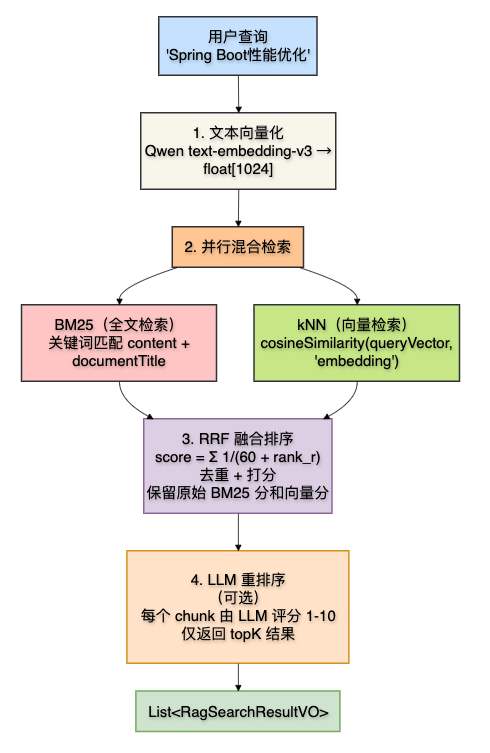
10.1 kb-ai的RAG检索架构
kb-ai模块实现了完整的RAG(Retrieval-Augmented Generation)混合检索管线:
10.2 向量检索的实现
kb-ai中向量检索使用ES的script_score查询:
// 使用 cosineSimilarity 计算查询向量与文档向量的相似度
esClient.search(s -> s
    .index(KB_CHUNK_INDEX)
    .query(q -> q.scriptScore(ss -> ss
        .query(qq -> qq.matchAll(m -> m))
        .script(sc -> sc
            .source("cosineSimilarity(params.query_vector, 'embedding') + 1.0")
            .params("query_vector", JsonData.of(queryEmbedding)))))
    .size(hybridTopK), Map.class);
10.3 RRF融合算法
// RRF (Reciprocal Rank Fusion)
// score(d) = Σ( 1 / (C + rank_r(d)) )
// 其中 C=60 为平滑常数

Map<String, RRFScore> rrfScores = new LinkedHashMap<>();

// 合并BM25排序结果
for (int i = 0; i < bm25Results.size(); i++) {
    String id = bm25Results.get(i).getId();
    double bm25Score = 1.0 / (RRF_C + i + 1);
    rrfScores.put(id, new RRFScore(bm25Score, 0.0));
}

// 合并kNN排序结果
for (int i = 0; i < knnResults.size(); i++) {
    String id = knnResults.get(i).getId();
    double knnScore = 1.0 / (RRF_C + i + 1);
    rrfScores.compute(id, (k, v) -> {
        if (v == null) return new RRFScore(0.0, knnScore);
        v.rrfScore += knnScore;
        v.knnScore = knnScore;
        return v;
    });
}
10.4 kb-ai的RagSearchController
创建 kb-ai/src/main/java/com/knowledge/base/ai/controller/RagSearchController.java:
@Slf4j
@RestController
@RequestMapping("/rag/search")
@RequiredArgsConstructor
@Tag(name = "RAG检索", description = "知识库RAG检索接口")
public class RagSearchController {

    private final RagRetrievalService ragRetrievalService;

    @PostMapping
    @Operation(summary = "RAG检索", description = "基于RAG的知识库检索,不生成回答")
    public Result<List<RagSearchResultVO>> search(
            @Valid @RequestBody RagSearchRequestDTO requestDTO) {
        List<RagSearchResultVO> results = ragRetrievalService.retrieve(
                requestDTO.getQuery(),
                requestDTO.getTopK(),
                requestDTO.isEnableRerank());
        return Result.success(results);
    }
}
十一、前端实现
11.1 TypeScript类型定义
在 src/types/index.ts 中添加搜索相关类型:
// 文档块结果
export interface ChunkResult {
  chunkId: string;
  content: string;
  heading?: string;
  score: number;
  bm25Score: number;
  vectorScore: number;
}

// 搜索结果
export interface SearchResult {
  id: string;
  title: string;
  summary?: string;
  highlights?: string[];
  categoryName?: string;
  tagNames?: string[];
  creatorName?: string;
  teamName?: string;
  viewCount?: number;
  likeCount?: number;
  commentCount?: number;
  publishAt?: string;
  score: number;
  bm25Score?: number;
  vectorScore?: number;
  rerankScore?: number;
  chunks?: ChunkResult[];  // 混合搜索模式的块级结果
}

// 分页搜索结果
export interface SearchResponse {
  records: SearchResult[];
  total: number;
  current: number;
  size: number;
}
11.2 API服务层
创建 src/services/search.service.ts:
import { http } from './request';
import { SearchResponse } from '@/types';

export interface SearchParams {
  keyword: string;
  searchMode?: 'keyword' | 'hybrid';
  topK?: number;
  enableRerank?: boolean;
  page?: number;
  pageSize?: number;
  sortBy?: 'relevance' | 'time' | 'views';
}

export const searchService = {
  // 智能搜索(keyword / hybrid)
  search: (params: SearchParams) => {
    return http.post<SearchResponse>('/search', {
      keyword: params.keyword,
      searchMode: params.searchMode || 'keyword',
      topK: params.topK || 10,
      enableRerank: params.enableRerank ?? true,
      current: params.page || 1,
      size: params.pageSize || 10,
      sortField: params.sortBy,
    });
  },

  // 搜索建议(自动补全)
  suggestions: (keyword: string) => {
    return http.get<SearchSuggestVO[]>('/search/suggest', {
      params: { keyword, size: 8 },
    });
  },

  // 热门搜索
  hotSearch: () => {
    return http.get<string[]>('/search/hot');
  },

  // 搜索历史
  history: () => {
    return http.get<SearchHistoryVO[]>('/search/history');
  },

  // 清除搜索历史
  clearHistory: () => {
    return http.delete('/search/history');
  },
};

export default searchService;
11.3 页面组件核心逻辑
创建 src/pages/SearchPage.tsx,核心功能包括:
1. 搜索模式切换
// 状态:keyword 或 hybrid
const [searchMode, setSearchMode] = useState<'keyword' | 'hybrid'>('hybrid');

// 切换模式后自动重新搜索
const isFirstRender = useRef(true);
useEffect(() => {
  if (isFirstRender.current) {
    isFirstRender.current = false;
    return;
  }
  if (query.trim()) {
    performSearch(query);
  }
}, [searchMode]);
2. 防抖搜索建议(300ms)
const fetchSuggestions = useCallback(async (keyword: string) => {
  if (keyword.trim().length < 1) {
    setSuggestions([]);
    setShowSuggestions(false);
    return;
  }
  const data = await searchService.suggestions(keyword);
  setSuggestions(data.map((s: any) => ({ text: s.text || s })));
  setShowSuggestions(true);
}, []);

const handleInputChange = (e: React.ChangeEvent<HTMLInputElement>) => {
  const value = e.target.value;
  setQuery(value);
  if (suggestTimer.current) clearTimeout(suggestTimer.current);
  suggestTimer.current = setTimeout(() => fetchSuggestions(value), 300);
};
3. 搜索方法
const performSearch = async (keyword: string, currentPage = 1) => {
  const q = keyword || query;
  if (!q.trim()) return;

  setLoading(true);
  setSearched(true);
  setShowSuggestions(false);

  const response = await searchService.search({
    keyword: q,
    searchMode,
    topK: 10,
    enableRerank: true,
    page: currentPage,
    pageSize,
  });
  setResults(response.records || []);
  setTotal(response.total || 0);
  // 刷新搜索历史
  loadHistory();
  loadHotSearches();
};
4. 关键字高亮渲染
// 后端返回的高亮文本包含 <em> 标签,用 dangerouslySetInnerHTML 渲染
<h3
  className="result-title"
  dangerouslySetInnerHTML={{ __html: result.title || '未命名文档' }}
/>

// 摘要:优先检测后端已高亮的 <em> 标签,否则用客户端高亮
<div
  className="result-excerpt"
  dangerouslySetInnerHTML={{
    __html: result.summary.includes('<em>')
      ? result.summary
      : highlightKeyword(result.summary)
  }}
/>

// 客户端高亮辅助函数
const highlightKeyword = (text: string): string => {
  if (!text || !query) return text;
  const regex = new RegExp(`(${query.replace(/[.*+?^${}()|[\]\\]/g, '\\$&')})`, 'gi');
  return text.replace(regex, '<mark>$1</mark>');
};
5. 混合搜索得分展示
{searchMode === 'hybrid' && (
  <div className="score-breakdown">
    {result.bm25Score !== undefined && (
      <span className="score-chip bm25">
        BM25 {(result.bm25Score * 100).toFixed(0)}
      </span>
    )}
    {result.vectorScore !== undefined && (
      <span className="score-chip vector">
        向量 {(result.vectorScore * 100).toFixed(0)}
      </span>
    )}
    {result.rerankScore !== undefined && (
      <span className="score-chip rerank">
        重排 {(result.rerankScore * 100).toFixed(0)}
      </span>
    )}
  </div>
)}
6. Chunk展开/折叠
{searchMode === 'hybrid' && result.chunks && result.chunks.length > 0 && (
<div className="result-chunks" onClick={(e) => { e.stopPropagation(); toggleChunks(result.id); }}>
<div className="chunks-toggle">
相关片段 ({result.chunks.length})
<span className={`toggle-arrow ${expandedChunks.has(result.id) ? 'expanded' : ''}`}>
▶
</span>
</div>
{expandedChunks.has(result.id) && result.chunks.map((chunk, idx) => (
<div key={chunk.chunkId || idx} className="chunk-item">
{chunk.heading && <div className="chunk-heading">{chunk.heading}</div>}
<div
className="chunk-content"
dangerouslySetInnerHTML={{
__html: (() => {
const text = chunk.content.length > 300
? chunk.content.slice(0, 300) + '...' : chunk.content;
return text.includes('<em>') ? text : highlightKeyword(text);
})()
}}
/>
</div>
))}
</div>
)}11.4 CSS样式设计
创建 src/pages/SearchPage.css,核心样式要点:
搜索框聚焦效果
.search-box-wrapper {
  background: #ffffff;
  border-radius: 16px;
  padding: 8px;
  display: flex;
  box-shadow: 0 20px 25px -5px rgba(0, 0, 0, 0.1);
  border: 2px solid #e2e8f0;
  transition: all 0.3s;
}

.search-box-wrapper:focus-within {
  border-color: #2563eb;
  box-shadow: 0 0 0 4px rgba(37, 99, 235, 0.1);
}
搜索模式切换按钮
.mode-btn {
  padding: 8px 18px;
  border-radius: 20px;
  border: 1px solid #e2e8f0;
  background: #ffffff;
  color: #64748b;
  cursor: pointer;
  transition: all 0.2s;
}

.mode-btn.active {
  background: #2563eb;
  color: #ffffff;
}

.mode-btn.hybrid.active {
  background: linear-gradient(135deg, #6366f1, #4f46e5);
}
高亮样式(em和mark统一处理)
.result-excerpt mark,
.result-excerpt em,
.result-title em {
  background: #fef3c7;
  color: #0f172a;
  padding: 0 2px;
  border-radius: 2px;
  font-style: normal;
}
得分徽章
.score-chip.bm25  { background: #eff6ff; color: #2563eb; }
.score-chip.vector { background: #ecfeff; color: #0891b2; }
.score-chip.rerank { background: #fef9c3; color: #a16207; }
十二、配置文件
12.1 kb-search的application.yml
server:
  port: 8083

spring:
  application:
    name: kb-search
  datasource:
    url: jdbc:mysql://localhost:3306/kb_search?useUnicode=true&characterEncoding=utf-8&serverTimezone=Asia/Shanghai
    username: root
    password: root
    driver-class-name: com.mysql.cj.jdbc.Driver
  data:
    redis:
      host: localhost
      port: 6379
      database: 2
  elasticsearch:
    uris: http://117.72.88.11:9200
    username: elastic
    password: susan123
  cloud:
    nacos:
      discovery:
        server-addr: 117.72.88.11:8848
        namespace: KNOWLEDGE_BASE
      config:
        server-addr: 117.72.88.11:8848
        namespace: KNOWLEDGE_BASE

mybatis-plus:
  mapper-locations: classpath*:/mapper/**/*.xml
  configuration:
    map-underscore-to-camel-case: true

# kb-document服务地址(用于索引同步)
kb-document:
  base-url: http://localhost:8082
测试
按顺序启动下面这些微服务:
kb-gateway
kb-auth
kb-ai
kb-document
kb-search
启动前端
cd knowledge-base-frontend
npm run dev
浏览器访问
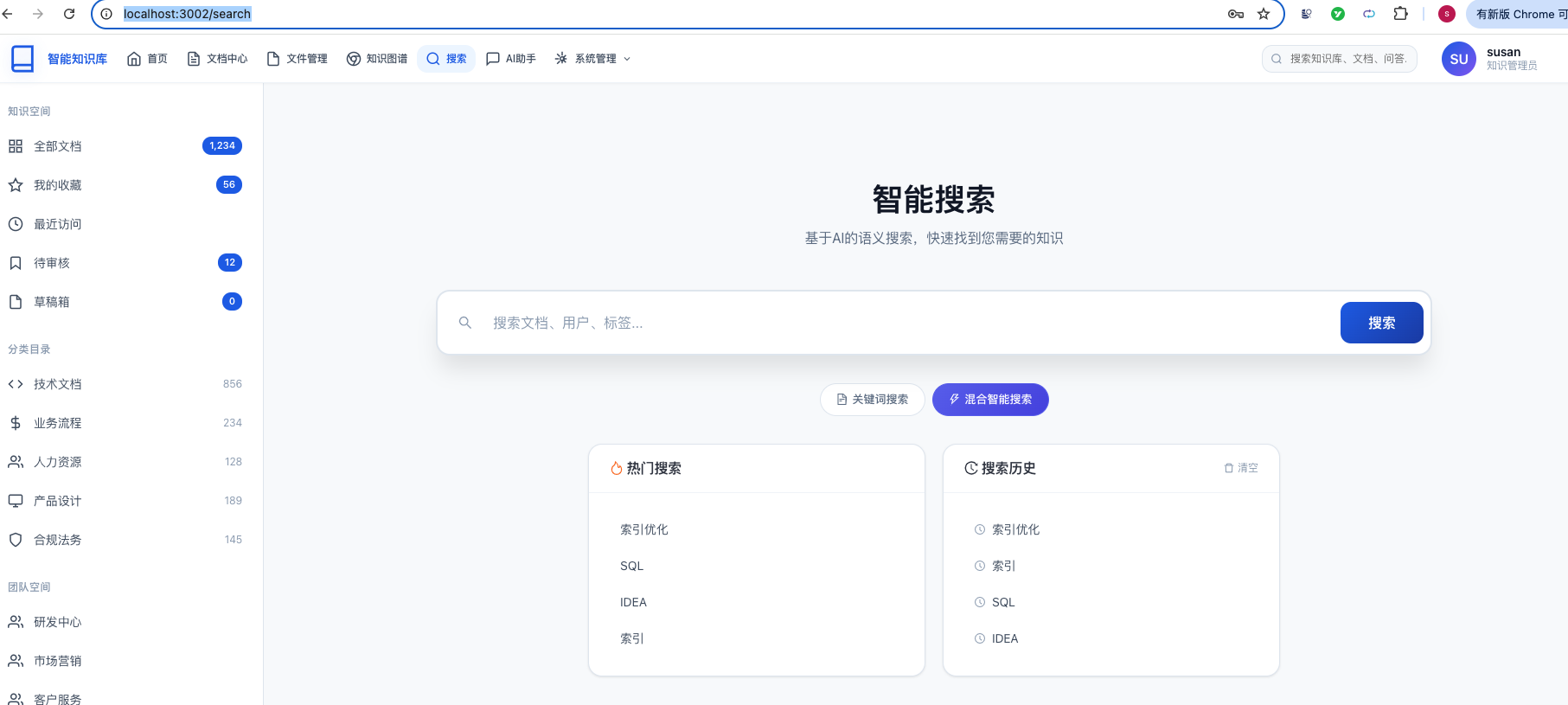
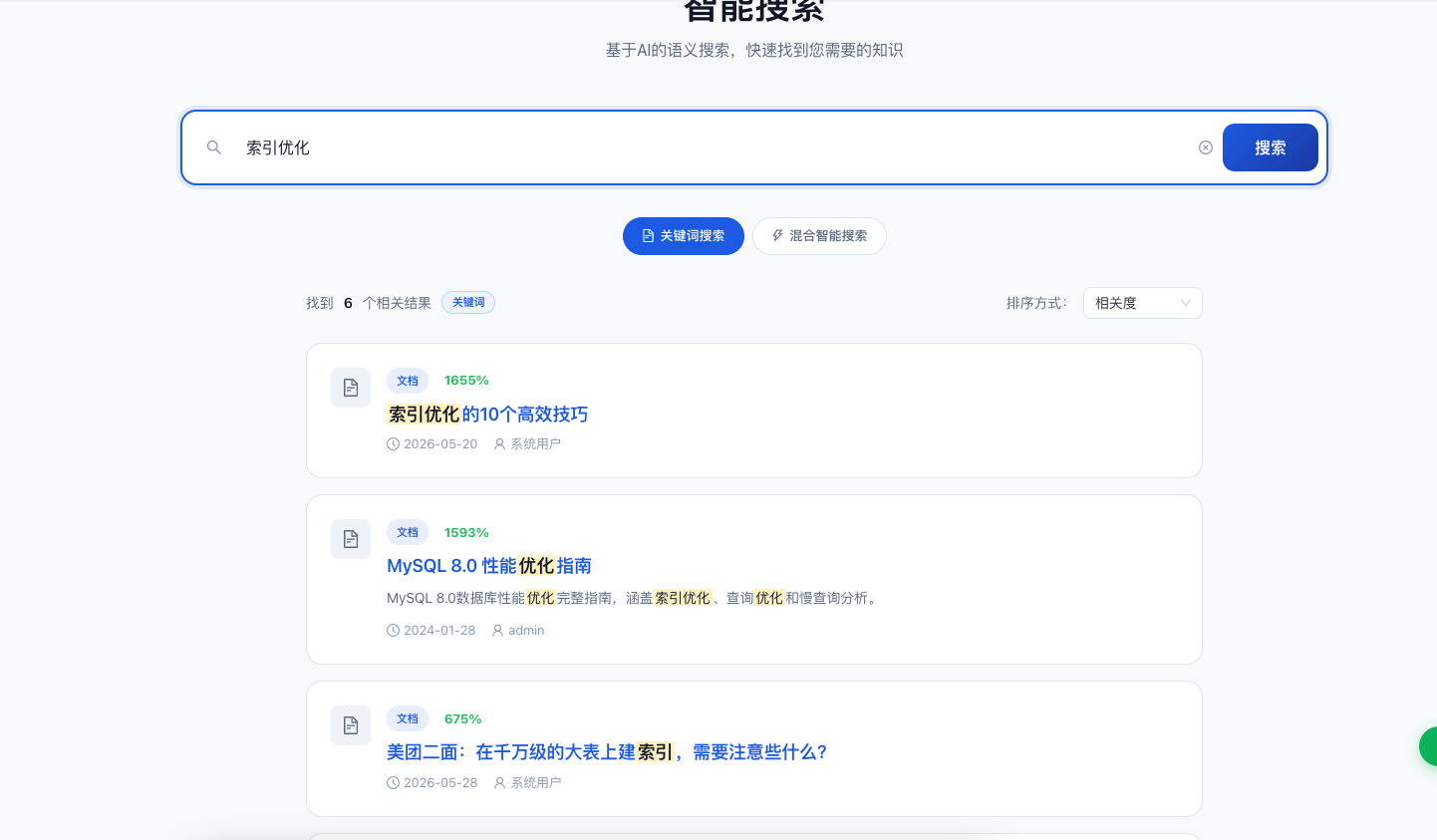
关键字搜索:
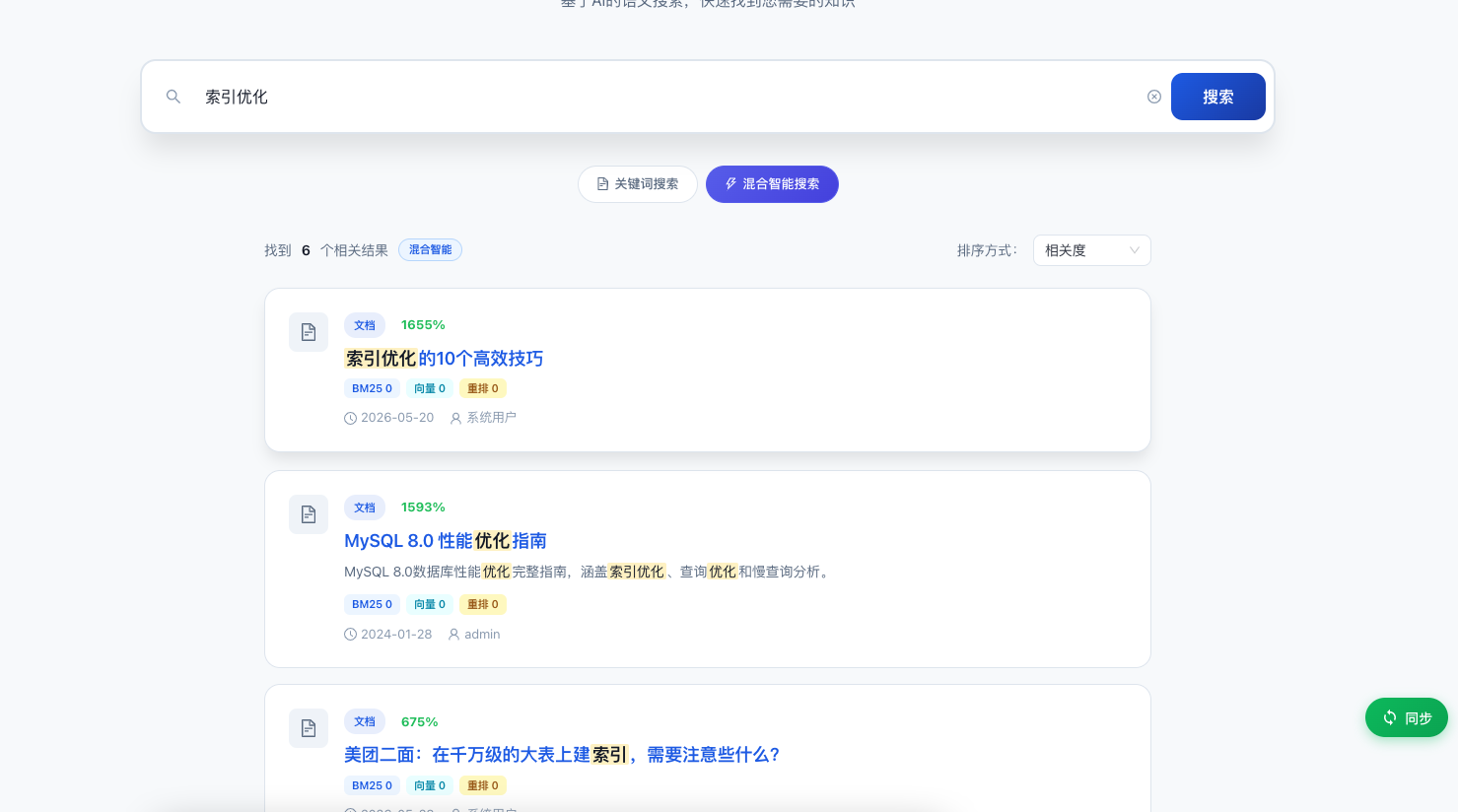
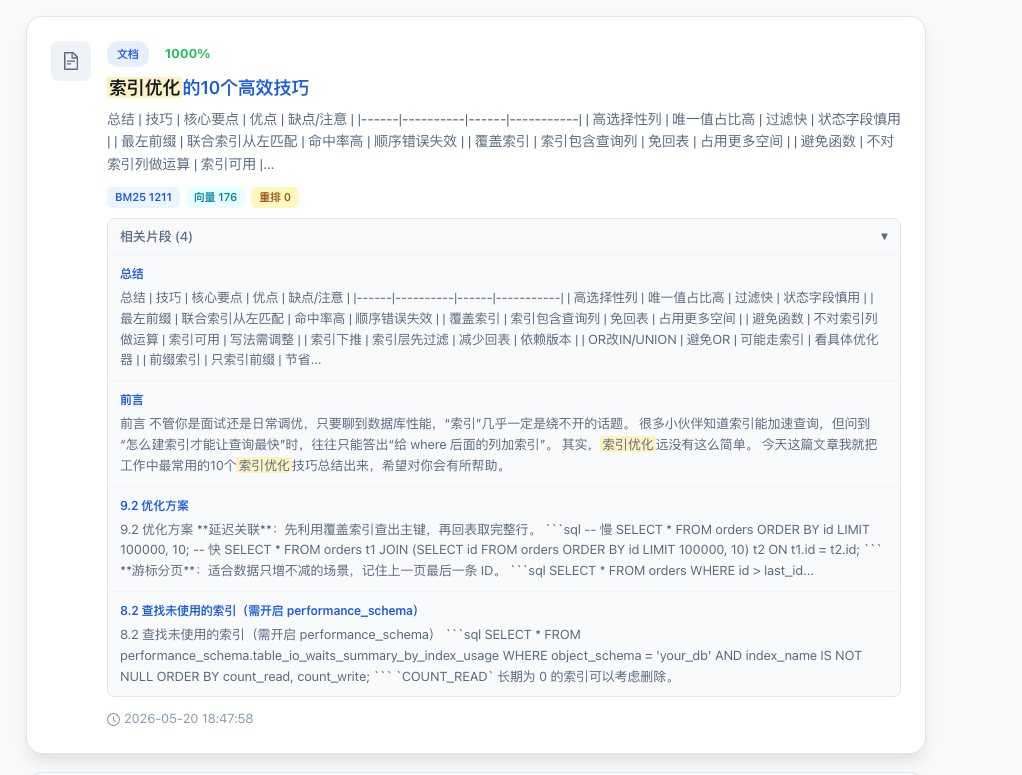
混合智能搜索:
总结
15.1 已完成功能
| 功能 | 实现方式 | 说明 |
|---|---|---|
| 关键词搜索 | ES multi\_match BM25 | 多字段加权匹配 (title2, summary1.5, content) |
| 混合智能搜索 | Feign → kb-ai | BM25 + kNN向量 + RRF融合 + LLM重排序 |
| 搜索高亮 | ES原生highlight | 标题/摘要完整字段,内容3片段 |
| 高亮碎片修复 | mergeAdjacentEmTags() | 合并IK分词器产生的相邻em标签 |
| 搜索建议 | ES prefix query | title.keyword前缀匹配 |
| 搜索历史 | MySQL + MyBatis Plus | UPSERT逻辑,异步保存 |
| 热门搜索 | MySQL聚合查询 | 最近7天,按搜索次数降序 |
| 索引同步 | REST调用kb-document | 创建/更新/删除文档后自动更新ES索引 |
| 索引重建 | 分页拉取 + 批量写入 | 删除旧索引→创建新索引→全量同步 |
| 异常回退 | try-catch + fallback | 混合搜索失败自动回退到关键词搜索 |
| 元数据补充 | ES terms批量查询 | 混合搜索结果补充分类、作者、统计信息 |
通过本文的学习,你应该能够掌握:
- Elasticsearch的全文检索(multi\_match、highlight、prefix)实现
- Spring Data Elasticsearch和ES原生客户端的配合使用
- BM25 + kNN向量 + RRF混合检索的整体架构
- OpenFeign微服务间调用的声明式实现
- React前端搜索页面的完整实现(防抖建议、高亮渲染、chunk展开)
- 搜索历史UPSERT和异步保存的设计模式
- 各种边界情况(IK分词语高亮碎片、时间字段反序列化、请求对象回收)的处理方案
