一、概述
系统设置是企业管理后台的重要功能模块,允许管理员通过可视化页面配置系统的各项参数,包括基本设置、安全策略、存储参数、通知配置和AI集成等。
本文将详细介绍如何以"key-value 配置表 + 分组读写服务 + 前后端联动"的架构,实现一个完整的、可运行的系统设置功能。
1.1 功能定位
系统设置作为企业知识库的配置中心,提供以下核心能力:
| 功能模块 | 说明 | 使用场景 |
|---|---|---|
| 基本设置 | 系统名称、描述、版本、语言、时区及功能开关 | 品牌定制与功能启用/停用 |
| 安全设置 | 密码策略、会话超时、2FA、IP限制、登录重试次数 | 安全合规管理 |
| 存储设置 | 文件上传大小限制、允许的文件类型、存储后端 | 存储资源管控 |
| 通知设置 | 邮件与WebSocket开关及连接参数 | 通知通道管理 |
| AI设置 | AI模型、Embedding模型、Milvus向量数据库参数 | AI功能配置 |
| 系统状态 | 运行状态、数据库状态、存储使用率、备份信息 | 运维监控概览 |
1.2 技术架构
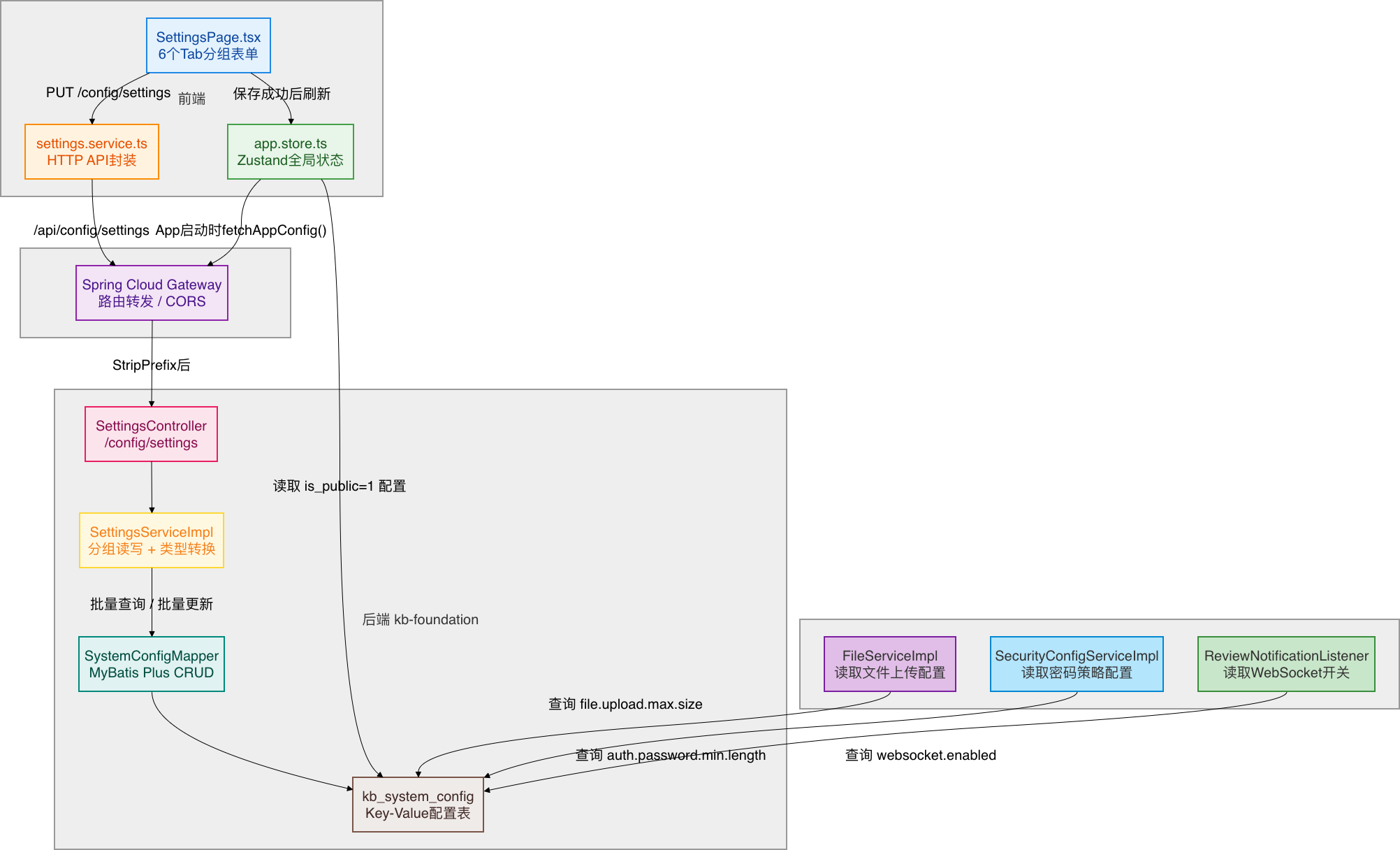
1.3 设计特点
- Key-Value 存储:所有配置项存储在
kb_system_config表中,通过config_key唯一标识 - 分组读写:前端按"基本/安全/存储/通知/AI"五个分组操作,后端自动映射到具体的
config_key - 类型安全:数据库中以字符串存储,读写时通过
config_type字段自动转换为boolean/number/string - Upsert 语义:保存设置时自动创建不存在的配置项,无需手动初始化
- 公开/私有两种模式:通过
is_public字段区分公开配置和私有配置,公开配置无需认证即可读取 - 消费者解耦:其他微服务通过
JdbcTemplate直接查询kb_system_config表,不依赖 SettingsService
二、数据库设计
2.1 系统配置表结构
CREATE TABLE `kb_system_config` (
  `id`          BIGINT NOT NULL COMMENT '配置ID(雪花算法生成)',
  `config_key`  VARCHAR(100) NOT NULL COMMENT '配置键(唯一标识,如 system.name)',
  `config_value` TEXT DEFAULT NULL COMMENT '配置值',
  `config_type` VARCHAR(20) NOT NULL DEFAULT 'string' COMMENT '值类型:string/number/boolean/json',
  `category`    VARCHAR(50) DEFAULT NULL COMMENT '配置分类:AI/STORAGE/NOTIFICATION/SECURITY/SYSTEM',
  `description` VARCHAR(500) DEFAULT NULL COMMENT '配置描述',
  `is_public`   TINYINT NOT NULL DEFAULT 0 COMMENT '是否公开:0-私有,1-公开',
  `created_at`  DATETIME NOT NULL DEFAULT CURRENT_TIMESTAMP COMMENT '创建时间',
  `updated_at`  DATETIME NOT NULL DEFAULT CURRENT_TIMESTAMP ON UPDATE CURRENT_TIMESTAMP COMMENT '更新时间',
  `create_by`   BIGINT DEFAULT NULL COMMENT '创建人',
  `update_by`   BIGINT DEFAULT NULL COMMENT '更新人',
  `deleted`     TINYINT NOT NULL DEFAULT 0 COMMENT '逻辑删除标记',
  PRIMARY KEY (`id`),
  UNIQUE KEY `uk_config_key` (`config_key`),
  KEY `idx_category` (`category`)
) ENGINE=InnoDB DEFAULT CHARSET=utf8mb4 COLLATE=utf8mb4_unicode_ci COMMENT='系统配置表';
2.2 字段说明
| 字段 | 类型 | 说明 | 必填 | 默认值 |
|---|---|---|---|---|
| id | BIGINT | 雪花算法生成的全局唯一ID | 是 | 自动生成 |
| config\_key | VARCHAR(100) | 配置唯一键,如 system.name | 是 | - |
| config\_value | TEXT | 配置值,所有类型均以字符串存储 | 否 | - |
| config\_type | VARCHAR(20) | 值类型:string/number/boolean/json | 是 | string |
| category | VARCHAR(50) | 分类:SYSTEM/SECURITY/STORAGE/NOTIFICATION/AI | 否 | - |
| description | VARCHAR(500) | 配置项说明 | 否 | - |
| is\_public | TINYINT | 是否公开:0-私有,1-公开 | 是 | 0 |
| deleted | TINYINT | 逻辑删除标记 | 是 | 0 |
2.3 索引设计
- 主键索引:
id- 雪花算法ID,全局唯一 - 唯一索引:
uk_config_key- 保证配置键唯一,支持按 Key 精确查询 - 普通索引:
idx_category- 加速按分类查询配置项
2.4 初始化数据
-- 基本设置(SYSTEM)
INSERT INTO kb_system_config (id, config_key, config_value, config_type, category, description, is_public) VALUES
(1000000000000004001, 'system.name',                '智能知识库',             'string',  'SYSTEM',       '系统名称', 1),
(1000000000000004002, 'system.description',          '企业级智能知识管理平台',   'string',  'SYSTEM',       '系统描述', 1),
(1000000000000004003, 'system.version',              'v2.4.1',                'string',  'SYSTEM',       '系统版本', 0),
(1000000000000004004, 'system.language',             'zh-CN',                 'string',  'SYSTEM',       '默认语言', 1),
(1000000000000004005, 'system.timezone',             'Asia/Shanghai',         'string',  'SYSTEM',       '时区',     1),
(1000000000000004006, 'user.registration.enabled',   'true',                  'boolean', 'SYSTEM',       '允许注册', 1);

-- 安全设置(SECURITY)
INSERT INTO kb_system_config (id, config_key, config_value, config_type, category, description, is_public) VALUES
(1000000000000004010, 'system.passwordPolicy',       'medium',                'string',  'SECURITY',     '密码策略',  1),
(1000000000000004011, 'auth.session.timeout',        '3600',                  'number',  'SECURITY',     '会话超时',  1),
(1000000000000004012, 'system.enable2FA',            'false',                 'boolean', 'SECURITY',     '双因素认证', 1);

-- 存储设置(STORAGE)
INSERT INTO kb_system_config (id, config_key, config_value, config_type, category, description, is_public) VALUES
(1000000000000004020, 'file.upload.max.size',        '104857600',             'number',  'STORAGE',      '最大文件大小', 1),
(1000000000000004021, 'file.upload.allowed.types',   'pdf,doc,docx,xlsx,pptx,txt,md,jpg,png,gif', 'string', 'STORAGE', '允许的文件类型', 1);

-- 通知设置(NOTIFICATION)
INSERT INTO kb_system_config (id, config_key, config_value, config_type, category, description, is_public) VALUES
(1000000000000004030, 'email.enabled',               'true',                  'boolean', 'NOTIFICATION', '邮件通知开关', 1),
(1000000000000004031, 'websocket.enabled',            'true',                  'boolean', 'NOTIFICATION', 'WebSocket通知开关', 1);

-- AI设置(AI)
INSERT INTO kb_system_config (id, config_key, config_value, config_type, category, description, is_public) VALUES
(1000000000000004040, 'qwen.model.name',             'qwen-max',              'string',  'AI',           'AI模型名称', 1),
(1000000000000004041, 'qwen.embedding.model',        'text-embedding-v3',     'string',  'AI',           'Embedding模型', 1);
三、实体类设计
3.1 创建 SystemConfig 实体类
创建 kb-foundation/src/main/java/com/knowledge/base/foundation/entity/SystemConfig.java:
package com.knowledge.base.foundation.entity;

import com.baomidou.mybatisplus.annotation.TableName;
import com.knowledge.base.common.config.BaseEntity;
import lombok.Data;
import lombok.EqualsAndHashCode;

/**
 * 系统配置实体类
 *
 * <p>使用 Key-Value 模式存储系统配置项,支持多种值类型。</p>
 *
 * @author 苏三
 * @since 1.0.0
 */
@Data
@EqualsAndHashCode(callSuper = true)
@TableName("kb_system_config")
public class SystemConfig extends BaseEntity {

    /**
     * 配置键(唯一标识)
     */
    private String configKey;

    /**
     * 配置值(所有类型均以字符串存储)
     */
    private String configValue;

    /**
     * 值类型:string / number / boolean / json
     */
    private String configType;

    /**
     * 分类:AI / STORAGE / NOTIFICATION / SECURITY / SYSTEM
     */
    private String category;

    /**
     * 配置描述
     */
    private String description;

    /**
     * 是否公开:0-私有,1-公开
     */
    private Integer isPublic;
}
3.2 设计思路
- 继承 BaseEntity:复用基础字段(id、createdAt、updatedAt、createBy、updateBy、deleted)
- Key-Value 模式:
config_key做唯一标识,config_value存文本值,结构灵活可扩展 - 类型标记:
config_type字段标注值的真实类型,供读写时自动转换 - 分类管理:
category字段将配置项分组,方便按模块查询 - 公开标记:
is_public控制配置是否可被未认证请求读取
四、DTO 和 VO 设计
4.1 创建 SettingsDTO(更新请求)
创建 kb-foundation/src/main/java/com/knowledge/base/foundation/dto/SettingsDTO.java:
package com.knowledge.base.foundation.dto;

import io.swagger.v3.oas.annotations.media.Schema;
import jakarta.validation.constraints.NotBlank;
import lombok.Data;

import java.util.Map;

/**
 * 设置更新DTO
 *
 * @author 苏三
 * @since 1.0.0
 */
@Data
@Schema(description = "设置更新请求参数")
public class SettingsDTO {

    @NotBlank(message = "设置分组不能为空")
    @Schema(description = "设置分组:basic/security/storage/notification/ai")
    private String section;

    @Schema(description = "设置键值对,key为字段名,value为字段值")
    private Map<String, Object> settings;
}
4.2 创建 SettingsVO(读取响应)
创建 kb-foundation/src/main/java/com/knowledge/base/foundation/vo/SettingsVO.java:
package com.knowledge.base.foundation.vo;

import io.swagger.v3.oas.annotations.media.Schema;
import lombok.AllArgsConstructor;
import lombok.Builder;
import lombok.Data;
import lombok.NoArgsConstructor;

import java.util.Map;

/**
 * 系统设置VO
 *
 * @author 苏三
 * @since 1.0.0
 */
@Data
@Builder
@NoArgsConstructor
@AllArgsConstructor
@Schema(description = "系统设置完整信息")
public class SettingsVO {

    @Schema(description = "基本设置")
    private Map<String, Object> basic;

    @Schema(description = "安全设置")
    private Map<String, Object> security;

    @Schema(description = "存储设置")
    private Map<String, Object> storage;

    @Schema(description = "通知设置")
    private Map<String, Object> notification;

    @Schema(description = "AI设置")
    private Map<String, Object> ai;

    @Schema(description = "系统运行状态")
    private SystemStatusVO status;
}
4.3 创建 SystemStatusVO
创建 kb-foundation/src/main/java/com/knowledge/base/foundation/vo/SystemStatusVO.java:
package com.knowledge.base.foundation.vo;

import io.swagger.v3.oas.annotations.media.Schema;
import lombok.AllArgsConstructor;
import lombok.Builder;
import lombok.Data;
import lombok.NoArgsConstructor;

/**
 * 系统状态VO
 *
 * @author 苏三
 * @since 1.0.0
 */
@Data
@Builder
@NoArgsConstructor
@AllArgsConstructor
@Schema(description = "系统运行状态")
public class SystemStatusVO {

    @Schema(description = "系统版本号")
    private String version;

    @Schema(description = "运行状态:running/stopped/maintenance")
    private String runStatus;

    @Schema(description = "数据库连接状态:connected/disconnected")
    private String dbStatus;

    @Schema(description = "最近备份时间")
    private String lastBackupTime;

    @Schema(description = "总存储容量(字节)")
    private Long totalStorage;

    @Schema(description = "已用存储(字节)")
    private Long usedStorage;

    @Schema(description = "文档总数")
    private Long documentCount;

    @Schema(description = "用户总数")
    private Long userCount;

    @Schema(description = "系统启动时间")
    private String startTime;
}
4.4 设计说明
DTO vs VO 的区别:
| 类型 | 用途 | 特点 |
|---|---|---|
| SettingsDTO | 接收客户端更新请求 | 包含 section 标识分组 + settings 键值对 |
| SettingsVO | 返回完整设置数据 | 五个分组 Map + 一个 SystemStatusVO |
| SystemStatusVO | 系统运行指标 | 各类统计数据和状态信息 |
使用 Map 而非强类型的原因:
- 配置项可能动态增加,Map 结构避免了频繁修改 VO 类
- 前端通过字段名动态绑定表单,不需要后端定义每个字段的 Java 属性
- 类型转换在 Service 层统一处理
五、数据访问层
5.1 创建 Mapper 接口
创建 kb-foundation/src/main/java/com/knowledge/base/foundation/mapper/SystemConfigMapper.java:
package com.knowledge.base.foundation.mapper;

import com.baomidou.mybatisplus.core.mapper.BaseMapper;
import com.knowledge.base.foundation.entity.SystemConfig;
import org.apache.ibatis.annotations.Mapper;
import org.apache.ibatis.annotations.Param;
import org.apache.ibatis.annotations.Select;

import java.util.List;

/**
 * 系统配置Mapper接口
 *
 * @author 苏三
 * @since 1.0.0
 */
@Mapper
public interface SystemConfigMapper extends BaseMapper<SystemConfig> {

    /**
     * 根据配置键查询单条配置
     */
    @Select("SELECT * FROM kb_system_config WHERE config_key = #{configKey} AND deleted = 0")
    SystemConfig selectByConfigKey(@Param("configKey") String configKey);

    /**
     * 根据分类查询配置列表
     */
    @Select("SELECT * FROM kb_system_config WHERE category = #{category} AND deleted = 0 ORDER BY config_key")
    List<SystemConfig> selectByCategory(@Param("category") String category);

    /**
     * 查询所有公开配置
     */
    @Select("SELECT * FROM kb_system_config WHERE is_public = 1 AND deleted = 0 ORDER BY category, config_key")
    List<SystemConfig> selectPublicConfigs();
}
5.2 MyBatis Plus 集成
继承了 BaseMapper<SystemConfig> 后,自动获得以下 CRUD 方法:
// 基础 CRUD,无需编写 SQL
systemConfigMapper.selectById(id);
systemConfigMapper.selectList(wrapper);
systemConfigMapper.insert(config);
systemConfigMapper.updateById(config);
systemConfigMapper.deleteById(id);

// 条件查询
LambdaQueryWrapper<SystemConfig> wrapper = new LambdaQueryWrapper<>();
wrapper.eq(SystemConfig::getCategory, "SYSTEM")
       .eq(SystemConfig::getDeleted, 0);
List<SystemConfig> list = systemConfigMapper.selectList(wrapper);
六、业务逻辑层
6.1 创建 SettingsService 接口
创建 kb-foundation/src/main/java/com/knowledge/base/foundation/service/SettingsService.java:
package com.knowledge.base.foundation.service;

import com.knowledge.base.foundation.dto.SettingsDTO;
import com.knowledge.base.foundation.vo.SettingsVO;
import com.knowledge.base.foundation.vo.SystemStatusVO;

/**
 * 系统设置Service接口
 *
 * @author 苏三
 * @since 1.0.0
 */
public interface SettingsService {

    /**
     * 获取系统所有设置(包含五个分组和系统状态)
     */
    SettingsVO getSettings();

    /**
     * 按分组批量更新设置
     *
     * @param settingsDTO 分组名和设置键值对
     * @return 是否更新成功
     */
    Boolean updateSettings(SettingsDTO settingsDTO);

    /**
     * 获取系统运行状态
     */
    SystemStatusVO getSystemStatus();

    /**
     * 清理系统缓存
     */
    String clearCache();

    /**
     * 创建数据备份
     */
    String createBackup();
}
6.2 创建 SettingsServiceImpl 实现类
这是整个系统设置功能的核心实现,负责字段映射、类型转换和批量读写。
创建 kb-foundation/src/main/java/com/knowledge/base/foundation/service/impl/SettingsServiceImpl.java:
package com.knowledge.base.foundation.service.impl;

import com.baomidou.mybatisplus.core.conditions.query.LambdaQueryWrapper;
import com.knowledge.base.common.exception.BusinessException;
import com.knowledge.base.common.utils.SnowflakeIdGenerator;
import com.knowledge.base.foundation.dto.SettingsDTO;
import com.knowledge.base.foundation.entity.SystemConfig;
import com.knowledge.base.foundation.mapper.SystemConfigMapper;
import com.knowledge.base.foundation.service.SettingsService;
import com.knowledge.base.foundation.vo.SettingsVO;
import com.knowledge.base.foundation.vo.SystemStatusVO;
import jakarta.annotation.Resource;
import lombok.extern.slf4j.Slf4j;
import org.springframework.cache.annotation.CacheEvict;
import org.springframework.stereotype.Service;
import org.springframework.transaction.annotation.Transactional;

import java.time.LocalDateTime;
import java.time.format.DateTimeFormatter;
import java.util.*;

/**
 * 系统设置Service实现
 *
 * <p>设计要点:
 * <ul>
 *   <li>使用内存映射表桥接 "config_key" 与 "settings字段" 的双向转换</li>
 *   <li>写操作时自动创建缺失的配置项(upsert语义)</li>
 *   <li>读操作时对缺失配置返回预设默认值</li>
 *   <li>boolean/number类型的值在DB中以字符串存储,读写时自动转换</li>
 * </ul>
 *
 * @author 苏三
 * @since 1.0.0
 */
@Slf4j
@Service
public class SettingsServiceImpl implements SettingsService {

    @Resource
    private SystemConfigMapper systemConfigMapper;

    // ==================== 字段映射表 ====================

    /**
     * 设置字段 → 数据库配置键 的映射
     * key: 前端settings字段名
     * value: [config_key, config_type, default_value, category]
     */
    private static final Map<String, String[]> FIELD_TO_CONFIG = new LinkedHashMap<>();
    static {
        // ===== 基本设置 =====
        FIELD_TO_CONFIG.put("systemName",           new String[]{"system.name",                    "string",  "智能知识库",                          "SYSTEM"});
        FIELD_TO_CONFIG.put("systemDescription",    new String[]{"system.description",             "string",  "企业级智能知识管理平台",                "SYSTEM"});
        FIELD_TO_CONFIG.put("systemVersion",        new String[]{"system.version",                 "string",  "v2.4.1",                             "SYSTEM"});
        FIELD_TO_CONFIG.put("defaultLanguage",      new String[]{"system.language",                "string",  "zh-CN",                              "SYSTEM"});
        FIELD_TO_CONFIG.put("timezone",             new String[]{"system.timezone",                "string",  "Asia/Shanghai",                      "SYSTEM"});
        FIELD_TO_CONFIG.put("allowRegistration",    new String[]{"user.registration.enabled",      "boolean", "true",                               "SYSTEM"});
        FIELD_TO_CONFIG.put("requireApproval",      new String[]{"system.requireApproval",         "boolean", "true",                               "SYSTEM"});
        FIELD_TO_CONFIG.put("enableComments",       new String[]{"system.enableComments",          "boolean", "true",                               "SYSTEM"});
        FIELD_TO_CONFIG.put("enableAI",             new String[]{"system.enableAI",                "boolean", "true",                               "SYSTEM"});
        FIELD_TO_CONFIG.put("enableAIWriting",      new String[]{"system.enableAIWriting",         "boolean", "true",                               "SYSTEM"});
        FIELD_TO_CONFIG.put("enableFullTextSearch", new String[]{"system.enableFullTextSearch",    "boolean", "true",                               "SYSTEM"});

        // ===== 安全设置 =====
        FIELD_TO_CONFIG.put("passwordPolicy",       new String[]{"system.passwordPolicy",          "string",  "medium",                             "SECURITY"});
        FIELD_TO_CONFIG.put("sessionTimeout",       new String[]{"auth.session.timeout",           "number",  "3600",                               "SECURITY"});
        FIELD_TO_CONFIG.put("enable2FA",            new String[]{"system.enable2FA",               "boolean", "false",                              "SECURITY"});
        FIELD_TO_CONFIG.put("ipRestriction",        new String[]{"system.ipRestriction",           "boolean", "false",                              "SECURITY"});
        FIELD_TO_CONFIG.put("passwordMinLength",    new String[]{"auth.password.min.length",       "number",  "8",                                  "SECURITY"});
        FIELD_TO_CONFIG.put("requireSpecialChar",   new String[]{"auth.password.require.special",  "boolean", "true",                               "SECURITY"});
        FIELD_TO_CONFIG.put("loginMaxRetry",        new String[]{"auth.login.max.retry",           "number",  "5",                                  "SECURITY"});

        // ===== 存储设置 =====
        FIELD_TO_CONFIG.put("maxFileSize",          new String[]{"file.upload.max.size",           "number",  "104857600",                          "STORAGE"});
        FIELD_TO_CONFIG.put("allowedFileTypes",     new String[]{"file.upload.allowed.types",      "string",  "pdf,doc,docx,xlsx,pptx,txt,md,jpg,png,gif", "STORAGE"});
        FIELD_TO_CONFIG.put("storageEndpoints",     new String[]{"rustfs.endpoints",               "string",  "http://localhost:8200",              "STORAGE"});
        FIELD_TO_CONFIG.put("storageBucket",        new String[]{"rustfs.bucket",                  "string",  "knowledge-docs",                     "STORAGE"});

        // ===== 通知设置 =====
        FIELD_TO_CONFIG.put("emailEnabled",         new String[]{"email.enabled",                  "boolean", "true",                               "NOTIFICATION"});
        FIELD_TO_CONFIG.put("emailHost",            new String[]{"email.host",                     "string",  "smtp.example.com",                   "NOTIFICATION"});
        FIELD_TO_CONFIG.put("emailPort",            new String[]{"email.port",                     "number",  "587",                                "NOTIFICATION"});
        FIELD_TO_CONFIG.put("websocketEnabled",     new String[]{"websocket.enabled",              "boolean", "true",                               "NOTIFICATION"});
        FIELD_TO_CONFIG.put("notificationRetentionDays", new String[]{"notification.retention.days", "number", "90",                            "NOTIFICATION"});

        // ===== AI设置 =====
        FIELD_TO_CONFIG.put("aiModelName",          new String[]{"qwen.model.name",                "string",  "qwen-max",                           "AI"});
        FIELD_TO_CONFIG.put("embeddingModel",       new String[]{"qwen.embedding.model",           "string",  "text-embedding-v3",                  "AI"});
        FIELD_TO_CONFIG.put("milvusHost",           new String[]{"milvus.host",                    "string",  "localhost",                          "AI"});
        FIELD_TO_CONFIG.put("milvusPort",           new String[]{"milvus.port",                    "number",  "19530",                              "AI"});
    }

    // 各分组的字段列表
    private static final List<String> SETTINGS_BASIC_FIELDS = List.of(
            "systemName", "systemDescription", "systemVersion", "defaultLanguage", "timezone",
            "allowRegistration", "requireApproval", "enableComments", "enableAI", "enableAIWriting", "enableFullTextSearch"
    );
    private static final List<String> SETTINGS_SECURITY_FIELDS = List.of(
            "passwordPolicy", "sessionTimeout", "enable2FA", "ipRestriction",
            "passwordMinLength", "requireSpecialChar", "loginMaxRetry"
    );
    private static final List<String> SETTINGS_STORAGE_FIELDS = List.of(
            "maxFileSize", "allowedFileTypes", "storageEndpoints", "storageBucket"
    );
    private static final List<String> SETTINGS_NOTIFICATION_FIELDS = List.of(
            "emailEnabled", "emailHost", "emailPort", "websocketEnabled", "notificationRetentionDays"
    );
    private static final List<String> SETTINGS_AI_FIELDS = List.of(
            "aiModelName", "embeddingModel", "milvusHost", "milvusPort"
    );

    // ==================== 读取设置 ====================

    @Override
    public SettingsVO getSettings() {
        log.info("获取系统设置");

        // 一次性查询所有配置,避免N+1
        List<SystemConfig> allConfigs = systemConfigMapper.selectList(
                new LambdaQueryWrapper<SystemConfig>()
                        .eq(SystemConfig::getDeleted, 0)
        );

        // 构建 configKey → configValue 映射
        Map<String, String> configMap = new HashMap<>();
        for (SystemConfig config : allConfigs) {
            configMap.put(config.getConfigKey(), config.getConfigValue());
        }

        // 分别组装五个分组
        Map<String, Object> basic        = buildSection(SETTINGS_BASIC_FIELDS, configMap);
        Map<String, Object> security     = buildSection(SETTINGS_SECURITY_FIELDS, configMap);
        Map<String, Object> storage      = buildSection(SETTINGS_STORAGE_FIELDS, configMap);
        Map<String, Object> notification = buildSection(SETTINGS_NOTIFICATION_FIELDS, configMap);
        Map<String, Object> ai           = buildSection(SETTINGS_AI_FIELDS, configMap);

        return SettingsVO.builder()
                .basic(basic)
                .security(security)
                .storage(storage)
                .notification(notification)
                .ai(ai)
                .status(getSystemStatus())
                .build();
    }

    /**
     * 按字段列表构建一个分组配置 Map
     */
    private Map<String, Object> buildSection(List<String> fieldNames,
                                              Map<String, String> configMap) {
        Map<String, Object> section = new LinkedHashMap<>();
        for (String fieldName : fieldNames) {
            String[] meta = FIELD_TO_CONFIG.get(fieldName);
            if (meta == null) {
                log.warn("未知的设置字段: {}", fieldName);
                continue;
            }
            String configKey  = meta[0];
            String configType = meta[1];
            String rawValue   = configMap.getOrDefault(configKey, meta[2]);

            section.put(fieldName, convertValue(rawValue, configType));
        }
        return section;
    }

    /**
     * 将字符串值按类型转换为Java对象
     */
    private Object convertValue(String raw, String type) {
        if (raw == null) return null;
        return switch (type) {
            case "boolean" -> "true".equalsIgnoreCase(raw) || "1".equals(raw);
            case "number"  -> {
                try {
                    yield Long.parseLong(raw.trim());
                } catch (NumberFormatException e) {
                    yield raw;
                }
            }
            default -> raw;
        };
    }

    // ==================== 更新设置 ====================

    @Override
    @Transactional(rollbackFor = Exception.class)
    @CacheEvict(value = {"configCache", "settingsCache"}, allEntries = true)
    public Boolean updateSettings(SettingsDTO settingsDTO) {
        String section = settingsDTO.getSection();
        Map<String, Object> settings = settingsDTO.getSettings();
        log.info("批量更新设置:section={}, 字段数={}", section, settings.size());

        if (settings == null || settings.isEmpty()) {
            throw new BusinessException("设置内容不能为空");
        }

        for (Map.Entry<String, Object> entry : settings.entrySet()) {
            String fieldName = entry.getKey();
            Object value = entry.getValue();

            String[] meta = FIELD_TO_CONFIG.get(fieldName);
            if (meta == null) {
                log.warn("跳过未知设置字段: {}", fieldName);
                continue;
            }
            String configKey  = meta[0];
            String configType = meta[1];
            String category   = meta[3];

            upsertConfig(configKey, configType, category, value);
        }

        return true;
    }

    /**
     * 创建或更新单个配置项(Upsert语义)
     */
    private void upsertConfig(String configKey, String configType, String category, Object value) {
        String stringValue = (value instanceof Boolean)
                ? String.valueOf(value)
                : Objects.toString(value, "");

        SystemConfig existConfig = systemConfigMapper.selectByConfigKey(configKey);

        if (existConfig != null) {
            // 更新已有配置
            existConfig.setConfigValue(stringValue);
            existConfig.setConfigType(configType);
            existConfig.setCategory(category);
            existConfig.setUpdatedAt(LocalDateTime.now());
            systemConfigMapper.updateById(existConfig);
        } else {
            // 创建新配置项
            SystemConfig newConfig = new SystemConfig();
            newConfig.setId(SnowflakeIdGenerator.getInstance().nextId());
            newConfig.setConfigKey(configKey);
            newConfig.setConfigValue(stringValue);
            newConfig.setConfigType(configType);
            newConfig.setCategory(category);
            newConfig.setDescription("由设置页面自动创建");
            newConfig.setIsPublic(1);
            newConfig.setCreatedAt(LocalDateTime.now());
            newConfig.setUpdatedAt(LocalDateTime.now());
            systemConfigMapper.insert(newConfig);
        }
    }

    // ==================== 系统状态 ====================

    @Override
    public SystemStatusVO getSystemStatus() {
        List<SystemConfig> allConfigs = systemConfigMapper.selectList(
                new LambdaQueryWrapper<SystemConfig>()
                        .eq(SystemConfig::getDeleted, 0)
        );
        Map<String, String> configMap = new HashMap<>();
        for (SystemConfig config : allConfigs) {
            configMap.put(config.getConfigKey(), config.getConfigValue());
        }

        return SystemStatusVO.builder()
                .version(configMap.getOrDefault("system.version", "v2.4.1"))
                .runStatus("running")
                .dbStatus("connected")
                .lastBackupTime(LocalDateTime.now().minusDays(1)
                        .format(DateTimeFormatter.ofPattern("yyyy-MM-dd HH:mm")))
                .totalStorage(107374182400L)   // 100GB 占位
                .usedStorage(72796356608L)     // 67.8GB 占位
                .documentCount(2847L)
                .userCount(128L)
                .startTime(getJvmStartTime())
                .build();
    }

    private String getJvmStartTime() {
        long startTimeMs = java.lang.management.ManagementFactory.getRuntimeMXBean().getStartTime();
        return new java.text.SimpleDateFormat("yyyy-MM-dd HH:mm:ss").format(new java.util.Date(startTimeMs));
    }

    // ==================== 运维操作 ====================

    @Override
    public String clearCache() {
        log.info("清理系统缓存");
        return "缓存已清理";
    }

    @Override
    public String createBackup() {
        log.info("创建系统备份");
        return "备份已创建于 " + LocalDateTime.now().format(DateTimeFormatter.ofPattern("yyyy-MM-dd HH:mm:ss"));
    }
}
6.3 核心设计说明
6.3.1 字段映射表(FIELD\_TO\_CONFIG)
private static final Map<String, String[]> FIELD_TO_CONFIG = new LinkedHashMap<>();这是整个设置系统的"翻译中枢",每个条目定义了:
| 元素 | 说明 | 示例 |
|---|---|---|
| Map Key | 前端字段名 | maxFileSize |
| meta[0] | 数据库 config\_key | file.upload.max.size |
| meta[1] | 值类型 | number |
| meta[2] | 默认值 | 104857600 |
| meta[3] | 分类 | STORAGE |
使用 LinkedHashMap 的原因:保持字段在 Map 中的插入顺序,确保前端渲染时字段顺序一致。
6.3.2 类型转换(convertValue)
private Object convertValue(String raw, String type) {
    return switch (type) {
        case "boolean" -> "true".equalsIgnoreCase(raw) || "1".equals(raw);
        case "number"  -> Long.parseLong(raw.trim());
        default -> raw; // string 类型直接返回
    };
}
数据库中所有值都以字符串形式存储,读写时根据 config_type 自动转换:
boolean:将"true"/"false"/"1"/"0"转换为 Java booleannumber:将字符串解析为Long类型string:原样返回
6.3.3 Upsert 语义
private void upsertConfig(String configKey, String configType, String category, Object value) {
    SystemConfig existConfig = systemConfigMapper.selectByConfigKey(configKey);
    if (existConfig != null) {
        // 更新已有配置
    } else {
        // 创建新配置项
    }
}
保存设置时自动检测配置项是否存在:
- 存在:更新
config_value - 不存在:自动创建新记录,使用雪花算法生成ID
这样管理员无需手动初始化配置项,直接在页面上修改即可。
七、控制器层
7.1 创建 SettingsController
创建 kb-foundation/src/main/java/com/knowledge/base/foundation/controller/SettingsController.java:
package com.knowledge.base.foundation.controller;

import com.knowledge.base.common.result.Result;
import com.knowledge.base.foundation.dto.SettingsDTO;
import com.knowledge.base.foundation.service.SettingsService;
import com.knowledge.base.foundation.vo.SettingsVO;
import com.knowledge.base.foundation.vo.SystemStatusVO;
import io.swagger.v3.oas.annotations.Operation;
import io.swagger.v3.oas.annotations.tags.Tag;
import jakarta.annotation.Resource;
import jakarta.validation.Valid;
import lombok.extern.slf4j.Slf4j;
import org.springframework.web.bind.annotation.*;

/**
 * 系统设置Controller
 *
 * <p>提供按分组读写系统设置的统一入口。</p>
 *
 * @author 苏三
 * @since 1.0.0
 */
@Slf4j
@RestController
@RequestMapping("/config/settings")
@Tag(name = "系统设置", description = "系统设置分组管理接口")
public class SettingsController {

    @Resource
    private SettingsService settingsService;

    /**
     * 获取全部系统设置
     */
    @GetMapping
    @Operation(summary = "获取全部设置", description = "返回按分组组织的设置项和系统状态")
    public Result<SettingsVO> getSettings() {
        SettingsVO settings = settingsService.getSettings();
        return Result.success(settings);
    }

    /**
     * 按分组更新设置
     */
    @PutMapping
    @Operation(summary = "批量更新设置", description = "更新指定分组下的设置项")
    public Result<Boolean> updateSettings(@Valid @RequestBody SettingsDTO settingsDTO) {
        Boolean result = settingsService.updateSettings(settingsDTO);
        return Result.success("设置已保存", result);
    }

    /**
     * 获取系统运行状态
     */
    @GetMapping("/status")
    @Operation(summary = "获取系统状态", description = "返回系统运行指标")
    public Result<SystemStatusVO> getSystemStatus() {
        SystemStatusVO status = settingsService.getSystemStatus();
        return Result.success(status);
    }

    /**
     * 清理系统缓存
     */
    @PostMapping("/cache/clear")
    @Operation(summary = "清理缓存", description = "清理系统缓存以释放空间")
    public Result<String> clearCache() {
        String result = settingsService.clearCache();
        return Result.success("缓存清理完成", result);
    }

    /**
     * 创建数据备份
     */
    @PostMapping("/backup")
    @Operation(summary = "创建备份", description = "创建系统数据完整备份")
    public Result<String> createBackup() {
        String result = settingsService.createBackup();
        return Result.success("备份创建成功", result);
    }
}
7.2 RESTful API 设计
| 方法 | 路径 | 说明 | 入参 |
|---|---|---|---|
| GET | /config/settings | 获取全部分组设置和系统状态 | - |
| PUT | /config/settings | 按分组更新设置 | SettingsDTO |
| GET | /config/settings/status | 仅获取系统状态 | - |
| POST | /config/settings/cache/clear | 清理缓存 | - |
| POST | /config/settings/backup | 创建备份 | - |
7.3 网关路由配置
在 kb-gateway 的 application.yml 中添加路由:
# 基础服务路由(通知、配置、日志、字典)
- id: kb-foundation
  uri: lb://kb-foundation
  predicates:
    - Path=/api/notifications/**, /api/config/**, /api/logs/**, /api/dicts/**
  filters:
    - StripPrefix=1
由于 SettingsController 的 @RequestMapping 是 /config/settings,经过网关 StripPrefix=1(去掉 /api)后,实际路径为 /config/settings,与控制器映射一致。
八、前端实现
8.1 类型定义
在 src/types/index.ts 中添加系统设置相关类型:
// ==================== 系统设置类型 ====================

export interface SystemSettings {
  basic: Record<string, unknown>;
  security: Record<string, unknown>;
  storage: Record<string, unknown>;
  notification: Record<string, unknown>;
  ai: Record<string, unknown>;
  status: SystemStatus;
}

export interface SystemStatus {
  version: string;
  runStatus: 'running' | 'stopped' | 'maintenance';
  dbStatus: 'connected' | 'disconnected';
  lastBackupTime: string;
  totalStorage: number;
  usedStorage: number;
  documentCount: number;
  userCount: number;
  startTime: string;
}
8.2 API 服务
创建 src/services/settings.service.ts:
import { http } from './request';
import type { SystemSettings, SystemStatus } from '@/types';

const BASE_URL = '/config/settings';

export const settingsService = {
  /** 获取全部设置 */
  getSettings: (): Promise<SystemSettings> => http.get(BASE_URL),

  /** 按分组更新设置 */
  updateSettings: (section: string, settings: Record<string, unknown>): Promise<boolean> =>
    http.put(BASE_URL, { section, settings }),

  /** 获取系统状态 */
  getSystemStatus: (): Promise<SystemStatus> => http.get(`${BASE_URL}/status`),

  /** 清理缓存 */
  clearCache: (): Promise<string> => http.post(`${BASE_URL}/cache/clear`),

  /** 创建备份 */
  createBackup: (): Promise<string> => http.post(`${BASE_URL}/backup`),
};
8.3 全局应用状态 Store
在 src/stores/app.store.ts 中,Zustand Store 在应用启动时自动从 /config/public 加载公开配置:
import { create } from 'zustand';
import { foundationService } from '@/services';

interface AppState {
  systemName: string;
  systemDescription: string;
  requireApproval: boolean;
  enableComments: boolean;
  enableAI: boolean;
  enableAIWriting: boolean;
  enableFullTextSearch: boolean;
  enableEmail: boolean;
  enableWebSocket: boolean;
  maxFileSize: number;
  allowedFileTypes: string;
  loaded: boolean;

  fetchAppConfig: () => Promise<void>;
}

/** 布尔类型配置映射:configKey → [storeKey, defaultValue] */
const BOOLEAN_CONFIG_MAP: Record<string, [keyof AppState, boolean]> = {
  'system.requireApproval':     ['requireApproval', true],
  'system.enableComments':      ['enableComments', true],
  'system.enableAI':            ['enableAI', true],
  'system.enableAIWriting':     ['enableAIWriting', true],
  'system.enableFullTextSearch': ['enableFullTextSearch', true],
  'email.enabled':              ['enableEmail', true],
  'websocket.enabled':          ['enableWebSocket', true],
};

export const useAppStore = create<AppState>((set, get) => ({
  systemName: '企业知识库',
  systemDescription: '智能企业知识管理平台',
  requireApproval: true,
  enableComments: true,
  enableAI: true,
  enableAIWriting: true,
  enableFullTextSearch: true,
  enableEmail: true,
  enableWebSocket: true,
  maxFileSize: 104857600,  // 100MB
  allowedFileTypes: 'pdf,doc,docx,xlsx,pptx,txt,md,jpg,png,gif',
  loaded: false,

  fetchAppConfig: async () => {
    if (get().loaded) return;
    try {
      const configs: Record<string, string> = await foundationService.config.getPublic();

      // 读取字符串类型配置
      const systemName = configs['system.name'] || '企业知识库';
      const systemDescription = configs['system.description'] || '智能企业知识管理平台';

      // 读取布尔类型配置
      const booleanUpdates: Record<string, boolean> = {};
      for (const [configKey, [storeKey, defaultVal]] of Object.entries(BOOLEAN_CONFIG_MAP)) {
        const raw = configs[configKey];
        booleanUpdates[storeKey] = raw !== undefined ? raw === 'true' : defaultVal;
      }

      // 读取文件上传配置
      const maxFileSizeRaw = configs['file.upload.max.size'];
      const allowedFileTypesRaw = configs['file.upload.allowed.types'];

      set({
        systemName,
        systemDescription,
        ...booleanUpdates,
        maxFileSize: maxFileSizeRaw ? parseInt(maxFileSizeRaw, 10) || 104857600 : 104857600,
        allowedFileTypes: allowedFileTypesRaw || 'pdf,doc,docx,xlsx,pptx,txt,md,jpg,png,gif',
        loaded: true,
      });

      document.title = systemName + ' | Enterprise Knowledge Base';
    } catch {
      set({ loaded: true });
    }
  },
}));关键设计:
loaded标记防止重复加载- 布尔配置通过
=== 'true'转换 - 数值配置通过
parseInt转换 - 每次加载成功后同步更新浏览器标题
8.4 设置页面 UI
创建 src/pages/admin/SettingsPage.tsx。页面使用 Ant Design 的 Tabs 组件组织六个分组,每个分组使用独立的 Form 实例管理其字段。
8.4.1 页面结构
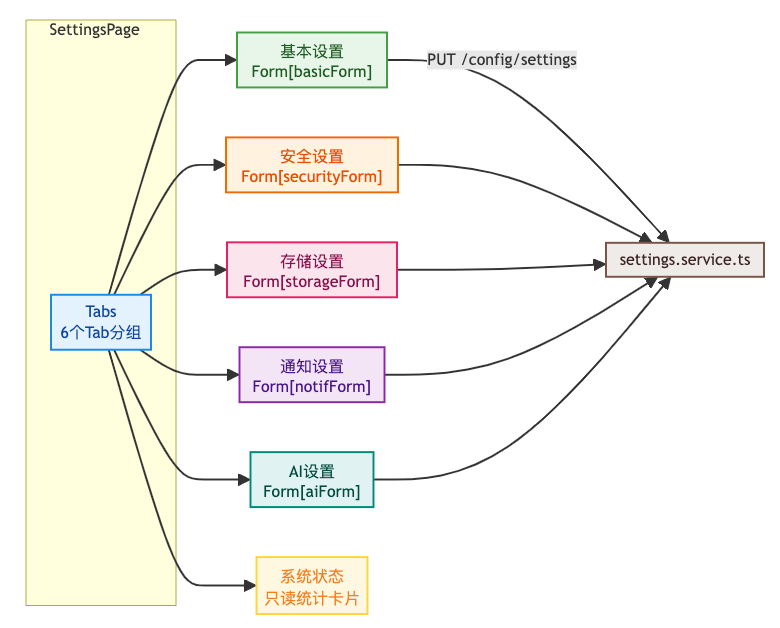
8.4.2 核心代码实现
以下是 SettingsPage 的核心部分:
import React, { useState, useEffect, useCallback } from 'react';
import {
  Card, Form, Input, Switch, Button, Space, Select, Row, Col,
  Typography, Tag, Progress, Tabs, InputNumber, Spin, Divider, Statistic, Tooltip,
} from 'antd';
import { App } from 'antd';
import {
  SaveOutlined, SettingOutlined, SecurityScanOutlined,
  CloudServerOutlined, BellOutlined, RobotOutlined, DatabaseOutlined,
} from '@ant-design/icons';
import { settingsService } from '@/services';
import { useAppStore } from '@/stores';
import type { SystemSettings } from '@/types';

const { Title, Text } = Typography;

type SettingsTab = 'basic' | 'security' | 'storage' | 'notification' | 'ai' | 'status';

const TABS = [
  { key: 'basic' as const,      label: '基本设置', icon: <SettingOutlined /> },
  { key: 'security' as const,   label: '安全设置', icon: <SecurityScanOutlined /> },
  { key: 'storage' as const,    label: '存储设置', icon: <CloudServerOutlined /> },
  { key: 'notification' as const, label: '通知设置', icon: <BellOutlined /> },
  { key: 'ai' as const,         label: 'AI设置',    icon: <RobotOutlined /> },
  { key: 'status' as const,     label: '系统状态',  icon: <DatabaseOutlined /> },
];

export const SettingsPage: React.FC = () => {
  const { message } = App.useApp();
  const [loading, setLoading] = useState(true);
  const [saving, setSaving] = useState(false);
  const [settings, setSettings] = useState<SystemSettings | null>(null);
  const [activeTab, setActiveTab] = useState<SettingsTab>('basic');

  const [basicForm]    = Form.useForm();
  const [securityForm] = Form.useForm();
  const [storageForm]  = Form.useForm();
  const [notifForm]    = Form.useForm();
  const [aiForm]       = Form.useForm();

  // 根据当前Tab获取对应的Form实例
  const getForm = (tab: SettingsTab) => {
    const forms: Record<SettingsTab, typeof basicForm> = {
      basic: basicForm, security: securityForm, storage: storageForm,
      notification: notifForm, ai: aiForm, status: basicForm,
    };
    return forms[tab];
  };

  // --- 加载设置 ---
  const fetchSettings = useCallback(async () => {
    setLoading(true);
    try {
      const data = await settingsService.getSettings();
      setSettings(data);
      // 将数据填充到各表单
      basicForm.setFieldsValue(data.basic);
      securityForm.setFieldsValue(data.security);
      storageForm.setFieldsValue(data.storage);
      notifForm.setFieldsValue(data.notification);
      aiForm.setFieldsValue(data.ai);
    } catch (err: any) {
      message.error('加载设置失败:' + (err.message || '未知错误'));
    } finally {
      setLoading(false);
    }
  }, []);

  useEffect(() => { fetchSettings(); }, [fetchSettings]);

  // --- 保存设置 ---
  const handleSave = async (section: SettingsTab) => {
    if (section === 'status') return;
    const form = getForm(section);
    try {
      const values = await form.validateFields();
      setSaving(true);
      await settingsService.updateSettings(section, values);
      message.success(`${TABS.find(t => t.key === section)?.label}已保存`);
      await fetchSettings(); // 保存后重新加载
    } catch (err: any) {
      if (err?.errorFields) return; // 表单校验失败
      message.error('保存失败:' + (err.message || '未知错误'));
    } finally {
      setSaving(false);
    }
  };

  if (loading) {
    return <div style={{ textAlign: 'center', padding: 80 }}><Spin size="large" tip="加载设置中..." /></div>;
  }

  return (
    <div>
      <Title level={2} style={{ marginBottom: 24 }}>
        <SettingOutlined style={{ marginRight: 12 }} />
        系统设置
      </Title>
      <Card>
        <Tabs activeKey={activeTab} onChange={(k) => setActiveTab(k as SettingsTab)} items={TABS.map(tab => ({
          key: tab.key,
          label: <span>{tab.icon} {tab.label}</span>,
          children: (
            <div style={{ maxWidth: 800 }}>
              {/* 基本设置 Tab */}
              {tab.key === 'basic' && (
                <Form form={basicForm} layout="vertical">
                  <Form.Item label="系统名称" name="systemName"
                    rules={[{ required: true, message: '请输入系统名称' }]}>
                    <Input placeholder="请输入系统名称" />
                  </Form.Item>
                  <Form.Item label="系统描述" name="systemDescription">
                    <Input.TextArea rows={2} placeholder="请输入系统描述" />
                  </Form.Item>
                  <Form.Item label="默认语言" name="defaultLanguage">
                    <Select>
                      <Select.Option value="zh-CN">简体中文</Select.Option>
                      <Select.Option value="en-US">English</Select.Option>
                    </Select>
                  </Form.Item>
                  <Form.Item label="允许注册" name="allowRegistration" valuePropName="checked">
                    <Switch />
                  </Form.Item>
                  <Form.Item label="启用AI" name="enableAI" valuePropName="checked">
                    <Switch />
                  </Form.Item>
                  <Form.Item label="启用全文搜索" name="enableFullTextSearch" valuePropName="checked">
                    <Switch />
                  </Form.Item>
                  <Button type="primary" icon={<SaveOutlined />}
                    loading={saving} onClick={() => handleSave('basic')}>
                    保存基本设置
                  </Button>
                </Form>
              )}

              {/* 安全设置 Tab */}
              {tab.key === 'security' && (
                <Form form={securityForm} layout="vertical">
                  <Form.Item label="密码策略" name="passwordPolicy">
                    <Select>
                      <Select.Option value="low">低(仅要求最小长度)</Select.Option>
                      <Select.Option value="medium">中(字母+数字)</Select.Option>
                      <Select.Option value="high">高(大小写+数字+特殊字符)</Select.Option>
                    </Select>
                  </Form.Item>
                  <Form.Item label="会话超时(秒)" name="sessionTimeout">
                    <InputNumber min={300} max={86400} style={{ width: '100%' }} />
                  </Form.Item>
                  <Form.Item label="密码最小长度" name="passwordMinLength">
                    <InputNumber min={4} max={32} style={{ width: '100%' }} />
                  </Form.Item>
                  <Form.Item label="最大登录尝试次数" name="loginMaxRetry">
                    <InputNumber min={1} max={20} style={{ width: '100%' }} />
                  </Form.Item>
                  <Form.Item label="要求特殊字符" name="requireSpecialChar" valuePropName="checked">
                    <Switch />
                  </Form.Item>
                  <Button type="primary" icon={<SaveOutlined />}
                    loading={saving} onClick={() => handleSave('security')}>
                    保存安全设置
                  </Button>
                </Form>
              )}

              {/* 存储设置 Tab */}
              {tab.key === 'storage' && (
                <Form form={storageForm} layout="vertical">
                  <Form.Item label="最大文件大小(MB)" name="maxFileSize"
                    getValueFromEvent={(val: number) => val * 1048576}
                    getValueProps={(val: number) => ({ value: Math.round(val / 1048576) })}>
                    <InputNumber min={1} max={2048} style={{ width: '100%' }}
                      addonAfter="MB" />
                  </Form.Item>
                  <Form.Item label="允许的文件类型" name="allowedFileTypes">
                    <Select mode="tags" placeholder="输入文件扩展名后按回车添加"
                      tokenSeparators={[',']} />
                  </Form.Item>
                  <Button type="primary" icon={<SaveOutlined />}
                    loading={saving} onClick={() => handleSave('storage')}>
                    保存存储设置
                  </Button>
                </Form>
              )}

              {/* 通知设置 Tab */}
              {tab.key === 'notification' && (
                <Form form={notifForm} layout="vertical">
                  <Form.Item label="启用邮件通知" name="emailEnabled" valuePropName="checked">
                    <Switch />
                  </Form.Item>
                  <Form.Item label="启用WebSocket通知" name="websocketEnabled" valuePropName="checked">
                    <Switch />
                  </Form.Item>
                  <Form.Item label="通知保留天数" name="notificationRetentionDays">
                    <InputNumber min={1} max={365} style={{ width: '100%' }} />
                  </Form.Item>
                  <Button type="primary" icon={<SaveOutlined />}
                    loading={saving} onClick={() => handleSave('notification')}>
                    保存通知设置
                  </Button>
                </Form>
              )}

              {/* AI设置 Tab */}
              {tab.key === 'ai' && (
                <Form form={aiForm} layout="vertical">
                  <Form.Item label="AI模型名称" name="aiModelName">
                    <Input placeholder="如 qwen-max" />
                  </Form.Item>
                  <Form.Item label="Embedding模型" name="embeddingModel">
                    <Input placeholder="如 text-embedding-v3" />
                  </Form.Item>
                  <Form.Item label="Milvus地址" name="milvusHost">
                    <Input placeholder="如 localhost" />
                  </Form.Item>
                  <Form.Item label="Milvus端口" name="milvusPort">
                    <InputNumber min={1} max={65535} style={{ width: '100%' }} />
                  </Form.Item>
                  <Button type="primary" icon={<SaveOutlined />}
                    loading={saving} onClick={() => handleSave('ai')}>
                    保存AI设置
                  </Button>
                </Form>
              )}

              {/* 系统状态 Tab */}
              {tab.key === 'status' && settings?.status && (
                <>
                  <Row gutter={[16, 16]}>
                    <Col span={12}>
                      <Card size="small"><Statistic title="系统版本" value={settings.status.version} /></Card>
                    </Col>
                    <Col span={12}>
                      <Card size="small"><Statistic title="文档总数" value={settings.status.documentCount} /></Card>
                    </Col>
                    <Col span={12}>
                      <Card size="small"><Statistic title="用户总数" value={settings.status.userCount} /></Card>
                    </Col>
                    <Col span={12}>
                      <Card size="small"><Statistic title="启动时间" value={settings.status.startTime} /></Card>
                    </Col>
                  </Row>
                  <Divider />
                  <Text>存储使用情况</Text>
                  <Progress
                    percent={Math.round(
                      ((settings.status.usedStorage || 0) / (settings.status.totalStorage || 1)) * 100
                    )}
                    format={() => `${Math.round((settings.status.usedStorage || 0) / 1073741824)}GB / ${Math.round((settings.status.totalStorage || 0) / 1073741824)}GB`}
                  />
                </>
              )}
            </div>
          ),
        }))} />
      </Card>
    </div>
  );
};

export default SettingsPage;
8.4.3 存储设置的 MB 转换技巧
存储 Tab 中 maxFileSize 字段在数据库中存储**字节数**,但在页面上以 **MB** 显示:
<Form.Item label="最大文件大小(MB)" name="maxFileSize"
  getValueFromEvent={(val: number) => val * 1048576}
  getValueProps={(val: number) => ({ value: Math.round(val / 1048576) })}>
  <InputNumber min={1} max={2048} addonAfter="MB" />
</Form.Item>getValueProps:将数据库中的字节数除以 1048576,转换为 MB 显示getValueFromEvent:将用户输入的 MB 数乘以 1048576,转换回字节数提交
8.5 路由配置
在 src/router/index.tsx 中注册设置页面路由:
{
  path: 'settings',
  element: (
    <ProtectedRoute permissions={[PERMISSIONS.systemSettings]}>
      <SettingsPage />
    </ProtectedRoute>
  ),
}
九、设置被其他服务消费
系统设置的核心价值在于被其他微服务读取和消费。以下展示三个典型消费场景。
9.1 文件上传服务读取存储配置
在 kb-file 模块的 FileServiceImpl.java 中,通过 JdbcTemplate 直接查询配置表:
@Service
public class FileServiceImpl implements FileService {

    @Resource
    private JdbcTemplate jdbcTemplate;

    /**
     * 从 kb_system_config 表读取最大文件大小配置
     */
    private long getMaxFileSizeFromConfig() {
        try {
            String value = jdbcTemplate.queryForObject(
                "SELECT config_value FROM kb_system_config WHERE config_key = 'file.upload.max.size'",
                String.class
            );
            if (value != null) return Long.parseLong(value.trim());
        } catch (EmptyResultDataAccessException ignored) {
        } catch (Exception e) {
            log.warn("读取文件上传大小配置失败: {}", e.getMessage());
        }
        return 104857600L; // 默认 100MB
    }

    /**
     * 从 kb_system_config 表读取允许的文件类型配置
     */
    private List<String> getAllowedFileTypesFromConfig() {
        try {
            String value = jdbcTemplate.queryForObject(
                "SELECT config_value FROM kb_system_config WHERE config_key = 'file.upload.allowed.types'",
                String.class
            );
            if (value != null && !value.isBlank()) {
                return List.of(value.toLowerCase().split(","));
            }
        } catch (EmptyResultDataAccessException ignored) {
        } catch (Exception e) {
            log.warn("读取允许文件类型配置失败: {}", e.getMessage());
        }
        return List.of("pdf", "doc", "docx", "xlsx", "pptx", "txt", "md", "jpg", "png", "gif");
    }

    /**
     * 文件校验:从配置表动态读取限制
     */
    private void validateFile(MultipartFile file) {
        long maxSize = getMaxFileSizeFromConfig();
        if (file.getSize() > maxSize) {
            throw new BusinessException("文件大小超过限制:" + (maxSize / 1048576) + "MB");
        }

        List<String> allowedTypes = getAllowedFileTypesFromConfig();
        String ext = FilenameUtils.getExtension(file.getOriginalFilename()).toLowerCase();
        if (!allowedTypes.contains(ext)) {
            throw new BusinessException("不支持的文件类型:" + ext);
        }
    }
}
9.2 安全配置服务读取密码策略
在 kb-user-auth 模块的 SecurityConfigServiceImpl.java 中:
@Service
public class SecurityConfigServiceImpl implements SecurityConfigService {

    @Resource
    private JdbcTemplate jdbcTemplate;

    @Override
    public int getPasswordMinLength() {
        try {
            String value = jdbcTemplate.queryForObject(
                "SELECT config_value FROM kb_system_config WHERE config_key = 'auth.password.min.length'",
                String.class
            );
            return value != null ? Integer.parseInt(value.trim()) : 8;
        } catch (Exception e) {
            return 8; // 默认 8 位
        }
    }

    @Override
    public boolean isRequireSpecialChar() {
        try {
            String value = jdbcTemplate.queryForObject(
                "SELECT config_value FROM kb_system_config WHERE config_key = 'auth.password.require.special'",
                String.class
            );
            return "true".equalsIgnoreCase(value);
        } catch (Exception e) {
            return true; // 默认要求特殊字符
        }
    }
}
9.3 通知监听器读取 WebSocket 开关
在 kb-foundation 模块的 ReviewNotificationListener.java 中:
@Component
public class ReviewNotificationListener {

    @Resource
    private JdbcTemplate jdbcTemplate;

    private boolean isWebSocketEnabled() {
        try {
            String value = jdbcTemplate.queryForObject(
                "SELECT config_value FROM kb_system_config WHERE config_key = 'websocket.enabled'",
                String.class
            );
            return value == null || "true".equalsIgnoreCase(value);
        } catch (Exception e) {
            return true; // 默认开启
        }
    }

    @RabbitListener(queues = "review.notification.queue")
    public void handleReviewNotification(ReviewEvent event) {
        // 持久化通知(总是执行)
        persistNotification(event);

        // 仅当 WebSocket 开启时才推送实时通知
        if (isWebSocketEnabled()) {
            messagingTemplate.convertAndSendToUser(
                String.valueOf(event.getUserId()),
                "/queue/notifications",
                event
            );
        }
    }
}
十、前后端完整数据流
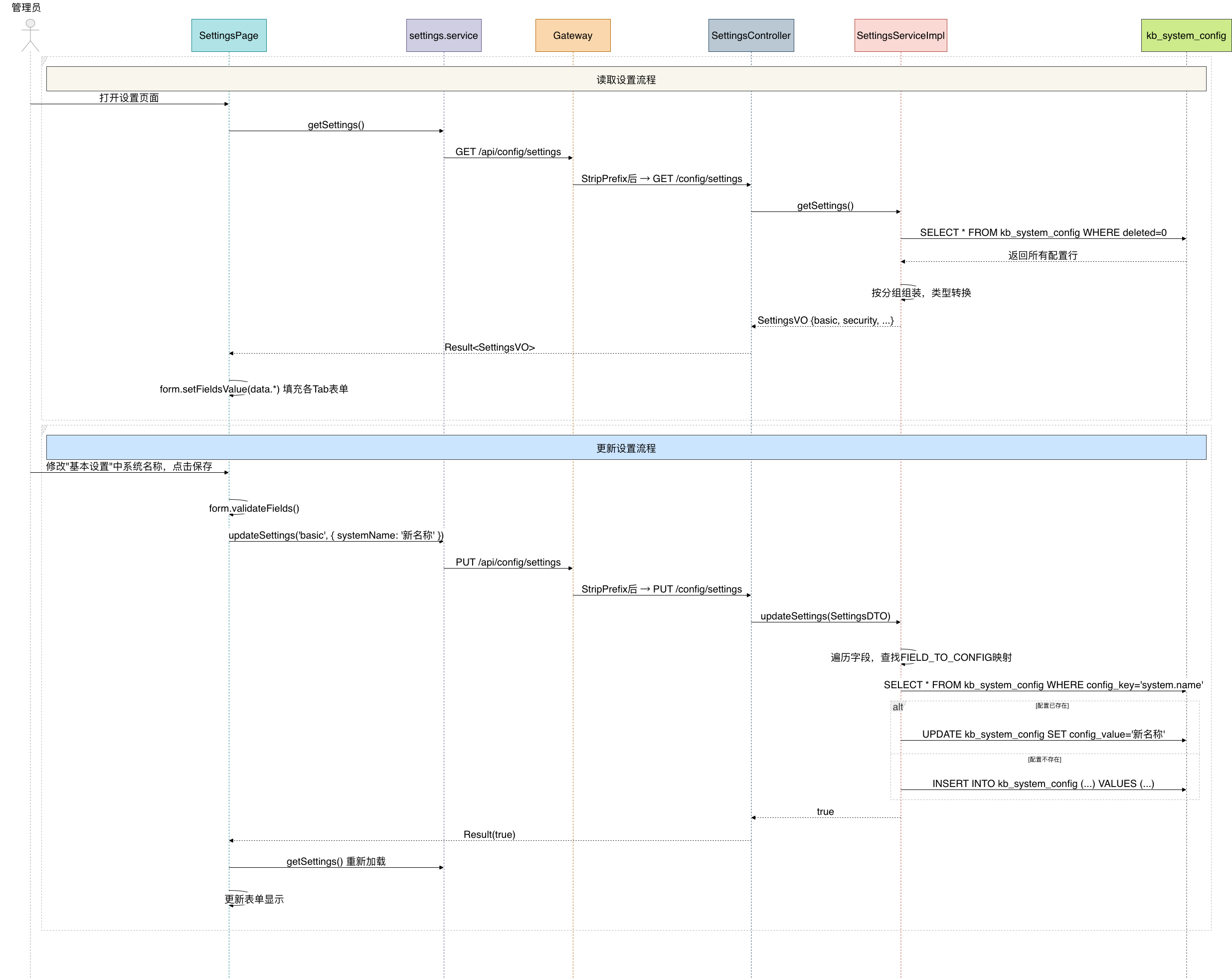
十一、测试
按顺序启动下面这些微服务:
kb-foundation
kb-auth-user
kb-document
kb-gateway
启动前端
cd knowledge-base-frontend
npm run dev
浏览器访问系统设置页面:
http://localhost:3002/admin/settings
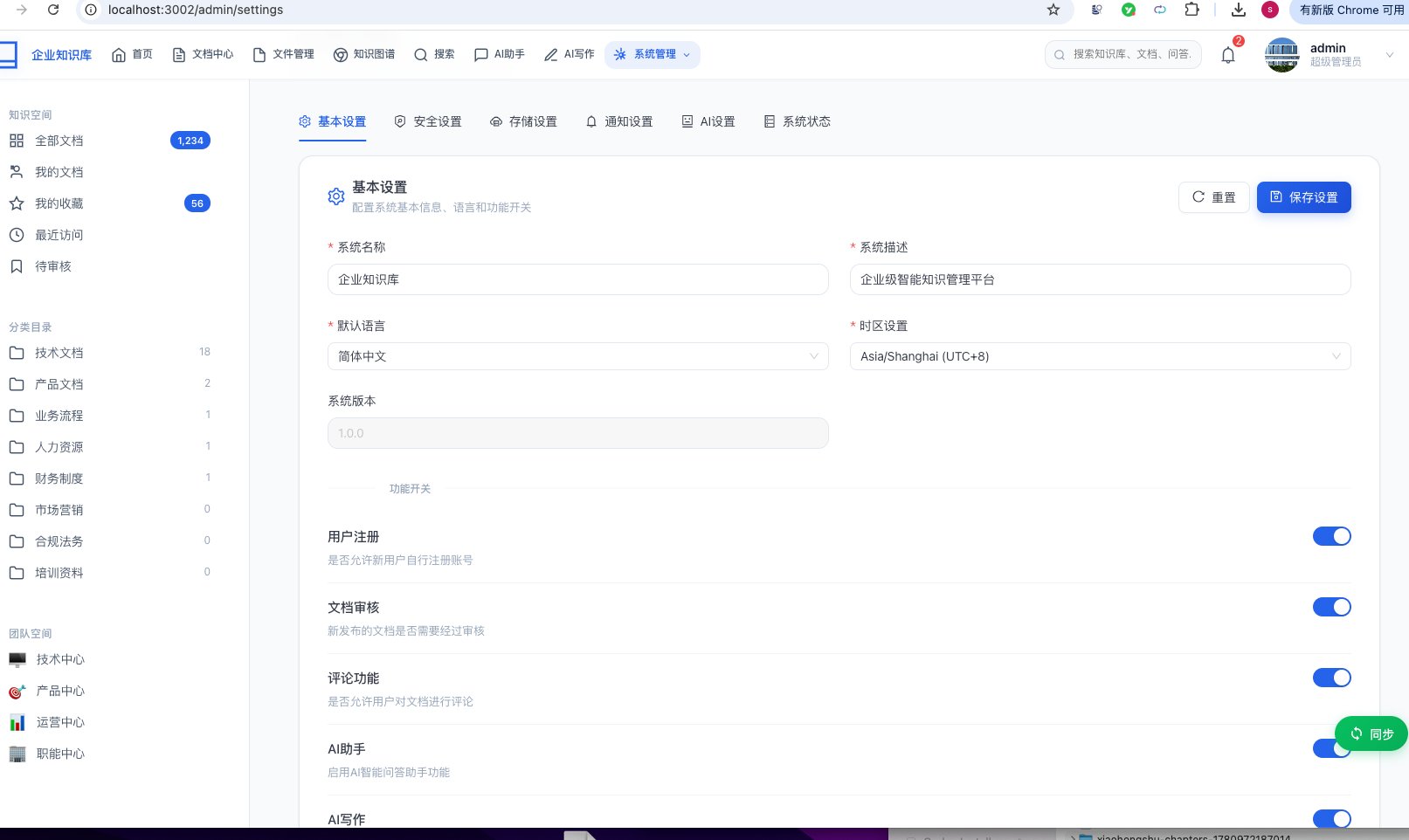
在基本设置中能够修改系统名称、描述。
控制是否开启用户注册、文档审核、评论功能、AI助手、AI写作等功能。
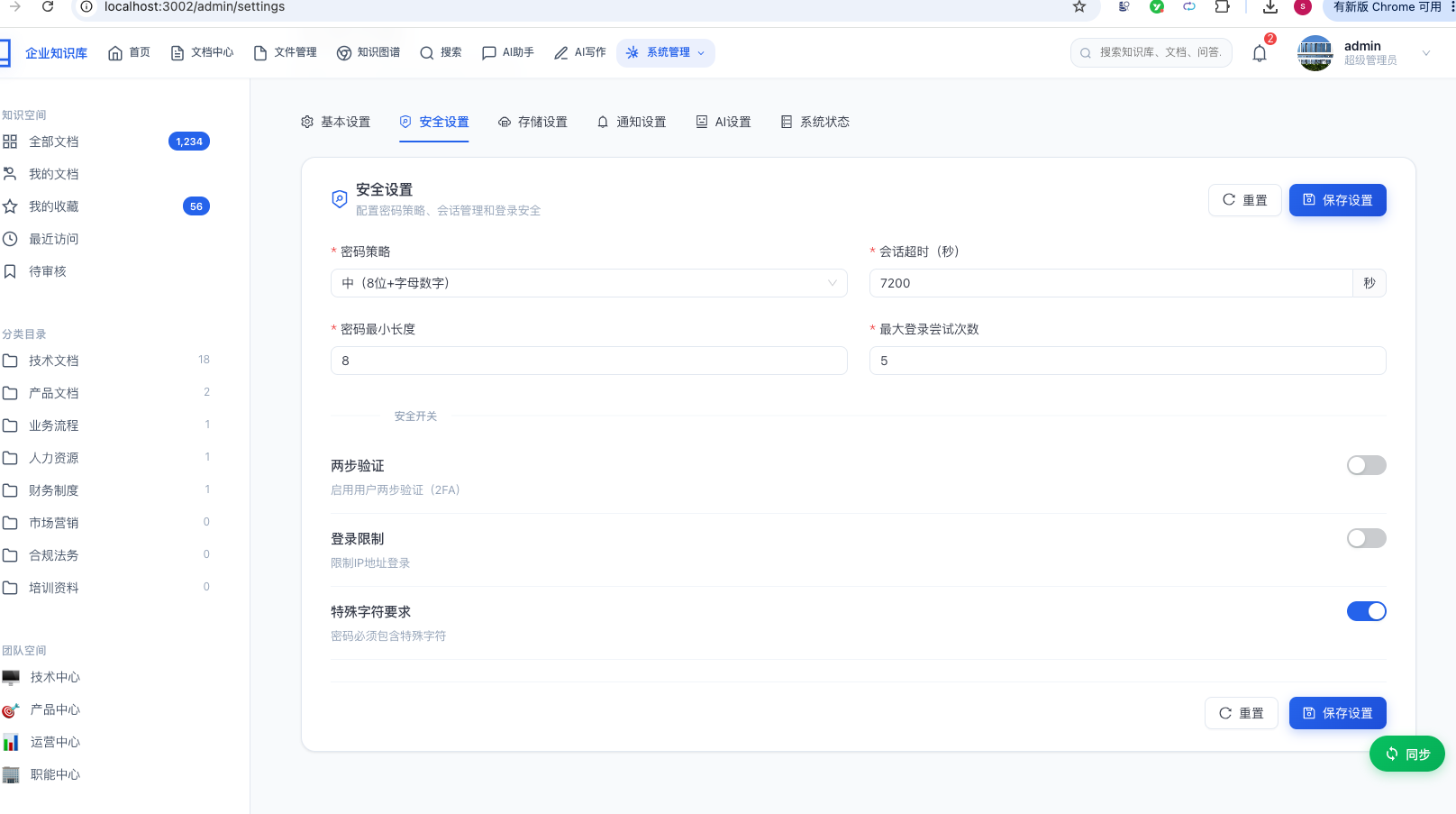
在安全设置中能控制密码策略、会话超时时间、密码最小长度、最大登录尝试次数、特殊字符要求等。
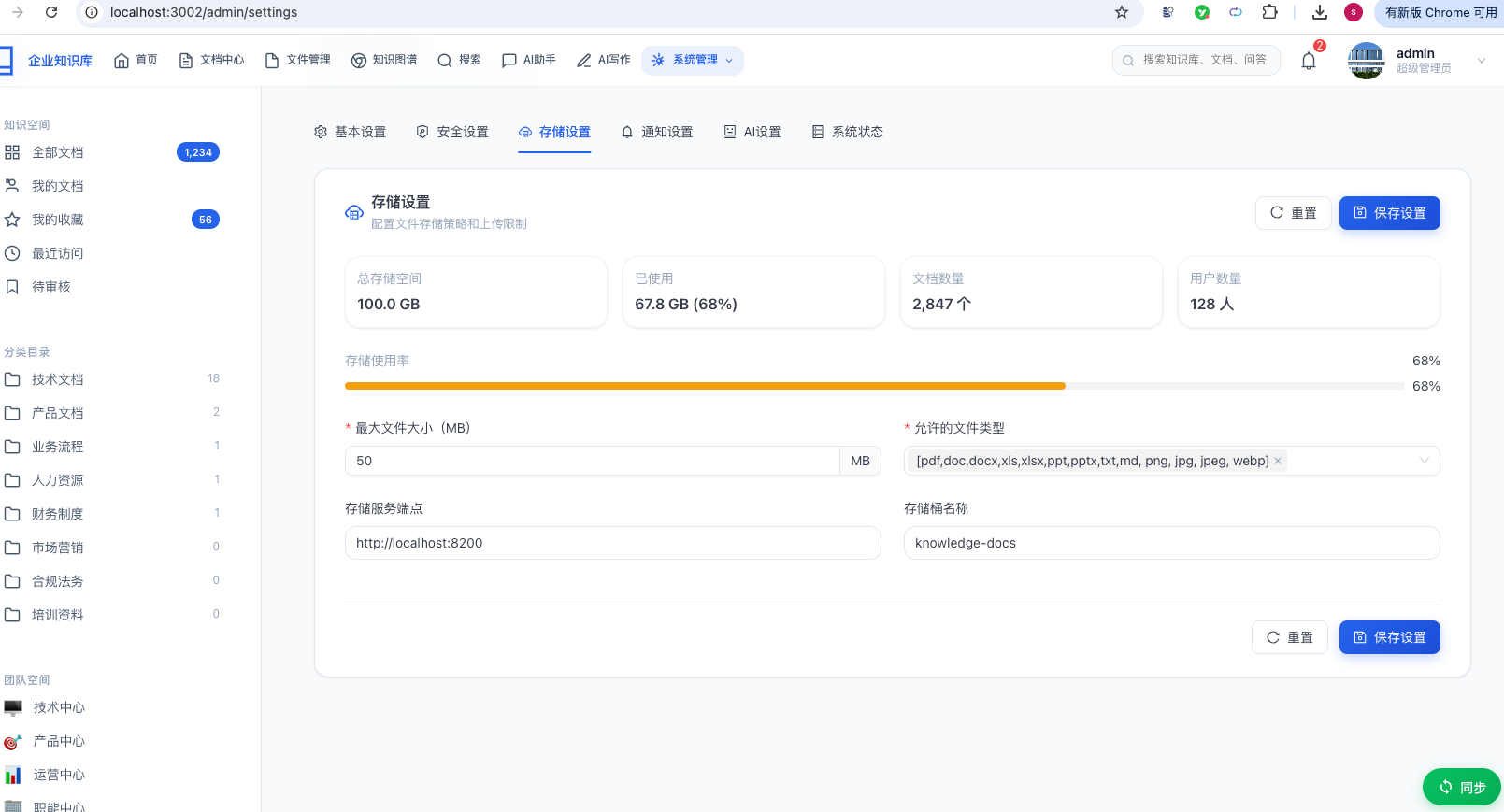
在存储设置中,能够控制上传的最大文件大小,允许文件类型等。
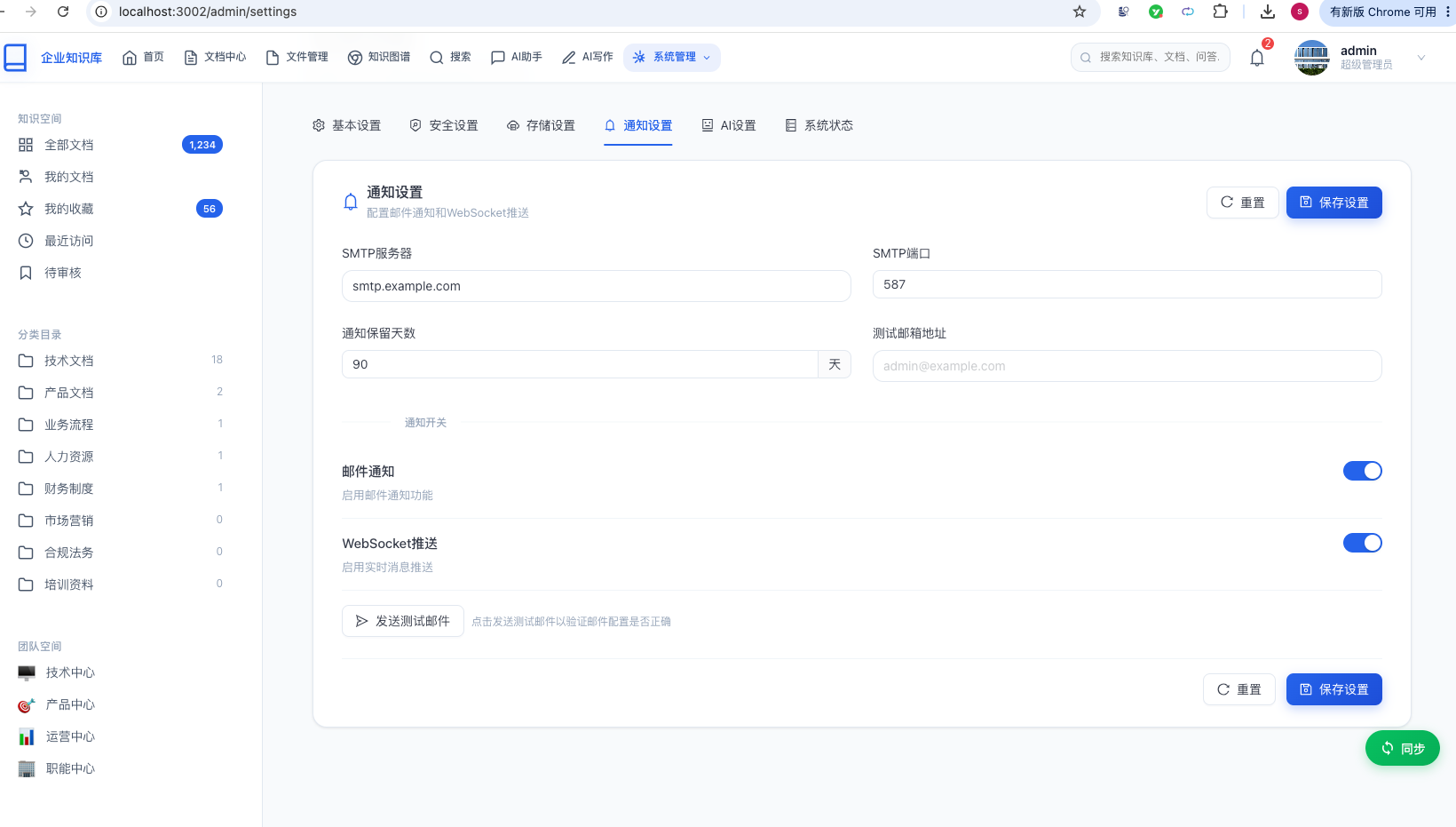
在通知设置中,可以控制是否开启邮件通知和WebSocket通知。
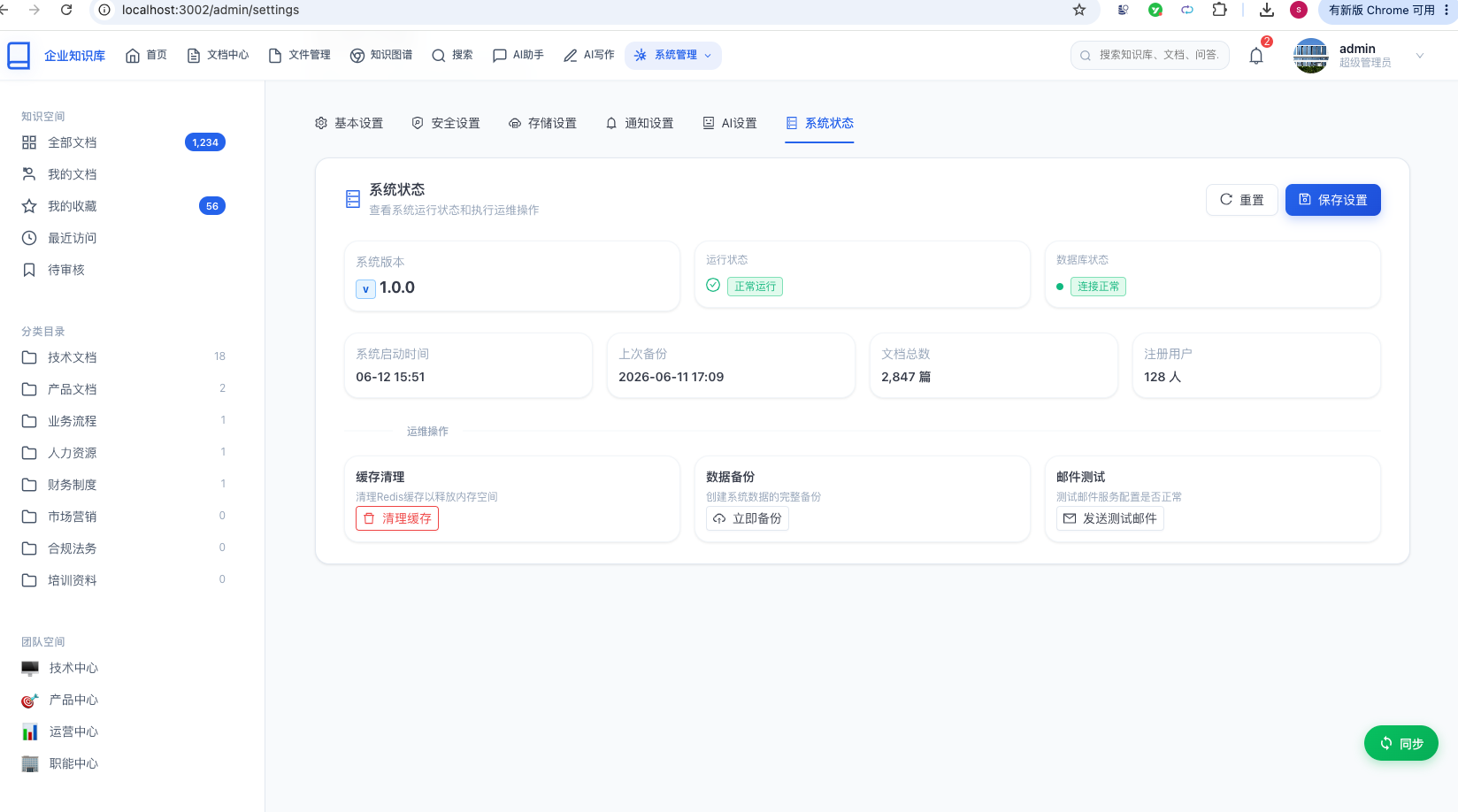
在系统状态中,能够查看系统的运行情况。
总结
本文详细介绍了系统设置功能的完整实现,涵盖了以下核心内容:
已完成功能
| 功能 | 实现方式 | 说明 |
|---|---|---|
| 配置存储 | Key-Value + 类型标记 | kb_system_config 表 |
| 分组读写 | SettingsService + FIELD\_TO\_CONFIG | 前端字段到数据库键的映射 |
| 类型转换 | convertValue() | 自动转换 boolean/number/string |
| Upsert 保存 | upsertConfig() | 自动创建或更新配置 |
| 六个分组 | 5个可编辑Tab + 1个只读状态Tab | 基本/安全/存储/通知/AI/状态 |
| 消费者集成 | JdbcTemplate 直接查询 | 文件上传/安全策略/通知推送 |
| 前端表单 | Ant Design Tabs + Form | 每个Tab独立Form实例 |
| 存储MB换算 | getValueFromEvent + getValueProps | 字节 ↔ MB 互转 |
技术要点
- Key-Value 存储模式:灵活可扩展,新增配置项无需改表结构
- FIELD\_TO\_CONFIG 映射表:桥梁作用,连接前端字段名与数据库配置键
- 类型安全转换:数据库字符串存储 + 读写时自动类型转换
- Upsert 语义:保存时自动创建不存在的配置项
- 消费者解耦:各服务通过 JdbcTemplate 独立读取配置,不形成服务间依赖
- 前后端联动:Zustand Store 在应用启动时加载公开配置,各组件响应式消费
通过本文的学习,你应该能够掌握:
- Key-Value 配置表的数据库设计与实现
- 分组读写服务的设计模式
- 前端的设置页面表单设计
- 微服务间配置共享与消费
- MyBatis Plus 和 Ant Design 的实战应用
- JdbcTemplate 在跨数据库消费场景中的使用
祝你开发顺利!
