一、概述
文档自动保存是知识库编辑器的核心体验功能。
用户在编辑器中撰写文档时,系统每隔一定时间(默认30秒)自动将内容保存到后端,防止因浏览器崩溃、误关闭页面等原因导致内容丢失。
同时,系统会保存每次自动保存的历史快照,支持用户查看和恢复历史版本。
1.1 功能定位
自动保存功能涉及前后端协作,提供以下核心能力:
| 功能模块 | 说明 | 使用场景 |
|---|---|---|
| 定时自动保存 | 每隔30秒自动将编辑器内容保存到后端 | 编辑中防止内容丢失 |
| 变化检测 | 通过序列化对比判断内容是否变化 | 避免无效保存请求 |
| 草稿恢复 | 检测未保存的草稿,弹窗提示用户恢复 | 意外关闭页面后重新进入 |
| 历史快照 | 每次自动保存生成不可变快照存入MongoDB | 回溯历史版本 |
| 去重复用 | 5分钟内检测已有草稿,复用而非新建 | 防止重复创建草稿 |
| 放弃草稿 | 调用后端标记所有草稿为已确认 | 不再弹出恢复提示 |
| 保存状态指示 | 实时显示保存中/已保存/保存失败等状态 | 用户感知保存进度 |
| 无缝提交 | 恢复草稿后提交直接更新已有记录 | 防止文档重复 |
1.2 整体架构
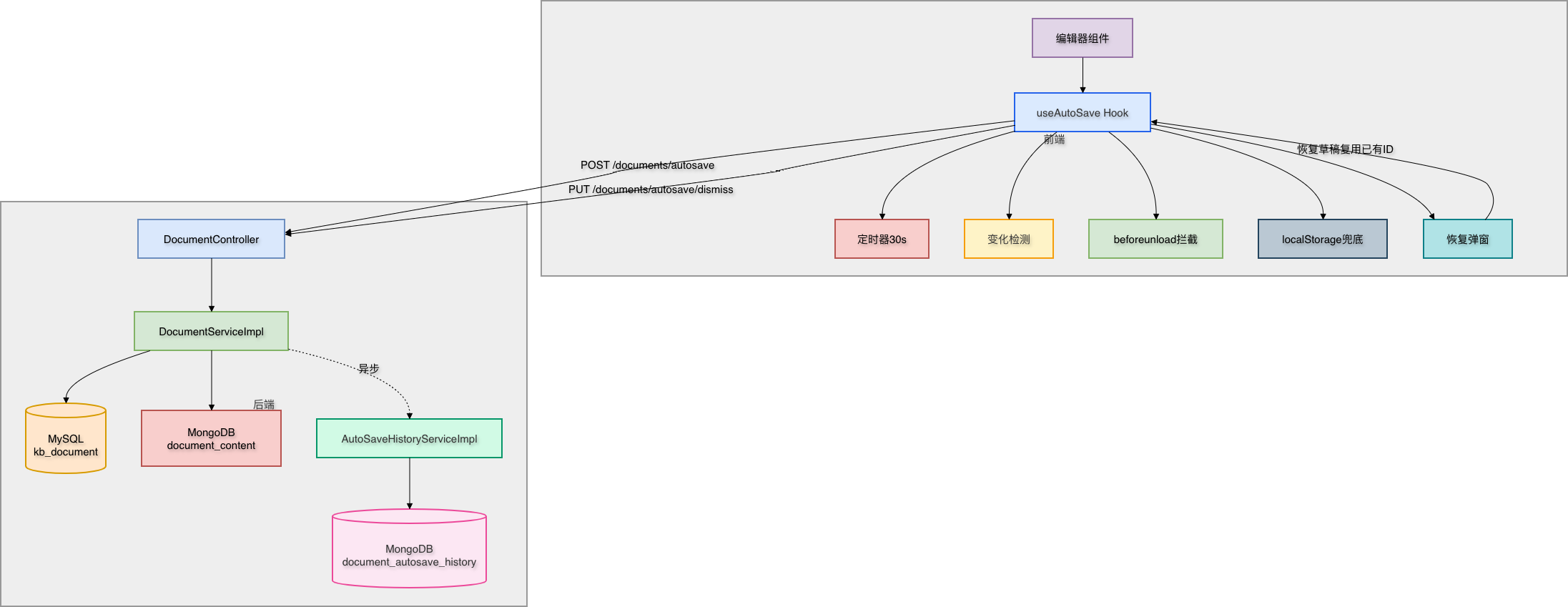
1.3 技术选型
| 技术 | 用途 | 说明 |
|---|---|---|
| React Hooks | 前端状态管理 | useRef避免闭包陷阱,useCallback稳定引用 |
| localStorage | 浏览器兜底存储 | 后端保存失败时仍保留内容 |
| CompletableFuture | 异步任务 | 快照保存不阻塞主流程 |
| Spring Data MongoDB | 快照存储 | 不可变历史记录,独立于MySQL |
| MyBatis-Plus | MySQL ORM | LambdaUpdateWrapper精准更新 |
| Caffeine | 本地缓存 | 提升高频读取(如分类树)场景性能 |
二、数据库设计
2.1 MySQL表变更
在已有的 kb_document 表上新增字段,用于标记用户是否已放弃恢复自动保存的草稿:
-- 添加自动保存草稿确认标记字段
-- 用于标记用户是否已放弃恢复自动保存的草稿
ALTER TABLE kb_document
ADD COLUMN auto_save_dismissed tinyint(1) DEFAULT 0
COMMENT '自动保存草稿已确认(0-未确认,1-用户已放弃恢复)';
2.2 MongoDB集合设计
新建 document_autosave_history 集合,存储每次自动保存的不可变快照:
{
  "_id": "ObjectId",
  "documentId": 327366085009608704,
  "title": "未命名文档",
  "content": "# 这是完整的Markdown内容...",
  "contentPreview": "# 这是完整的Markdown内容...(前200字)",
  "contentLength": 1523,
  "authorId": 1001,
  "savedAt": "2025-01-15T10:30:00.000Z",
  "deleted": false
}
2.3 字段说明
| 字段 | 类型 | 说明 | 必填 |
|---|---|---|---|
| \_id | ObjectId | MongoDB自动生成的主键 | 是 |
| documentId | Long | 关联的MySQL文档ID,已建索引 | 是 |
| title | String | 保存时的文档标题 | 是 |
| content | String | 完整Markdown内容 | 是 |
| contentPreview | String | 内容前200个字符,供列表展示 | 是 |
| contentLength | Integer | 字符数统计 | 是 |
| authorId | Long | 作者ID | 是 |
| savedAt | Date | 保存时间戳 | 是 |
| deleted | Boolean | 软删除标记,默认false | 是 |
2.4 索引设计
// documentId 升序索引,加速按文档查询历史
db.document_autosave_history.createIndex({ "documentId": 1, "deleted": 1 });

// savedAt 降序索引,加速按时间排序
db.document_autosave_history.createIndex({ "savedAt": -1 });
三、实体类设计
3.1 MongoDB实体 - AutoSaveHistory
创建 kb-document/src/main/java/com/knowledge/base/document/entity/mongodb/AutoSaveHistory.java:
package com.knowledge.base.document.entity.mongodb;

import lombok.Builder;
import lombok.Data;
import org.springframework.data.annotation.Id;
import org.springframework.data.mongodb.core.index.Indexed;
import org.springframework.data.mongodb.core.mapping.Document;
import org.springframework.data.mongodb.core.mapping.Field;

import java.time.LocalDateTime;

/**
 * 自动保存历史快照(MongoDB)
 *
 * <p>每次自动保存生成一条不可变快照,存储完整Markdown内容。
 * 用于编辑器的版本回溯功能。</p>
 *
 * @author 苏三
 * @since 1.0.0
 */
@Data
@Builder
@Document(collection = "document_autosave_history")
public class AutoSaveHistory {

    @Id
    private String id;

    /**
     * 关联的MySQL文档ID
     */
    @Indexed
    private Long documentId;

    /**
     * 保存时的文档标题
     */
    private String title;

    /**
     * 完整Markdown内容
     */
    private String content;

    /**
     * 内容预览(前200字符)
     */
    private String contentPreview;

    /**
     * 内容长度(字符数)
     */
    private Integer contentLength;

    /**
     * 作者ID
     */
    private Long authorId;

    /**
     * 保存时间
     */
    private LocalDateTime savedAt;

    /**
     * 软删除标记
     */
    @Builder.Default
    private Boolean deleted = false;
}
3.2 MySQL实体 - Document新增字段
在已有的 Document.java 中新增字段:
/**
 * 自动保存草稿已确认(0-未确认,1-用户已放弃恢复)
 */
private Integer autoSaveDismissed;
3.3 设计思路
- MongoDB存快照:不可变的历史快照适合文档型数据库,避免MySQL表膨胀
- MySQL存标记:
autoSaveDismissed字段在已有表中,零额外维护成本 - @Builder模式:AutoSaveHistory使用Lombok Builder,构建代码简洁清晰
- 软删除:快照通过
deleted字段软删除,支持数据恢复
四、DTO和VO设计
4.1 AutoSaveDTO
创建 kb-document/src/main/java/com/knowledge/base/document/dto/AutoSaveDTO.java:
package com.knowledge.base.document.dto;

import io.swagger.v3.oas.annotations.media.Schema;
import jakarta.validation.constraints.Size;
import lombok.Data;

/**
 * 自动保存DTO
 *
 * <p>与DocumentDTO的差异:
 * <ul>
 *   <li>title非必填,空值自动填充"未命名文档"</li>
 *   <li>无status字段,强制草稿状态</li>
 *   <li>只包含自动保存需要的核心字段</li>
 * </ul></p>
 *
 * @author 苏三
 * @since 1.0.0
 */
@Data
@Schema(description = "自动保存请求")
public class AutoSaveDTO {

    @Schema(description = "文档ID(更新时传入,新建时为空)")
    private Long id;

    @Size(max = 200, message = "标题最多200个字符")
    @Schema(description = "文档标题(可为空)")
    private String title;

    @Schema(description = "Markdown内容")
    private String content;

    @Size(max = 500, message = "摘要最多500个字符")
    @Schema(description = "摘要")
    private String summary;

    @Schema(description = "分类ID")
    private Long categoryId;

    @Schema(description = "团队空间ID")
    private Long teamId;

    @Schema(description = "标签(逗号分隔)")
    private String tags;
}
4.2 AutoSaveHistoryQueryDTO
创建 kb-document/src/main/java/com/knowledge/base/document/dto/AutoSaveHistoryQueryDTO.java:
package com.knowledge.base.document.dto;

import io.swagger.v3.oas.annotations.media.Schema;
import jakarta.validation.constraints.NotNull;
import lombok.Data;

/**
 * 自动保存历史查询DTO
 *
 * @author 苏三
 * @since 1.0.0
 */
@Data
@Schema(description = "自动保存历史查询请求")
public class AutoSaveHistoryQueryDTO {

    @NotNull(message = "文档ID不能为空")
    @Schema(description = "文档ID", required = true)
    private Long documentId;

    @Schema(description = "当前页码", example = "1")
    private Long current = 1L;

    @Schema(description = "每页大小", example = "20")
    private Long size = 20L;
}
4.3 AutoSaveHistoryVO
创建 kb-document/src/main/java/com/knowledge/base/document/vo/AutoSaveHistoryVO.java:
package com.knowledge.base.document.vo;

import io.swagger.v3.oas.annotations.media.Schema;
import lombok.AllArgsConstructor;
import lombok.Builder;
import lombok.Data;
import lombok.NoArgsConstructor;

import java.time.LocalDateTime;

/**
 * 自动保存历史VO
 *
 * <p>列表查询时不返回content完整内容(只返回preview),
 * 详情查询时才返回完整content。</p>
 *
 * @author 苏三
 * @since 1.0.0
 */
@Data
@Builder
@NoArgsConstructor
@AllArgsConstructor
@Schema(description = "自动保存历史快照")
public class AutoSaveHistoryVO {

    @Schema(description = "快照ID(MongoDB _id)")
    private String id;

    @Schema(description = "文档ID")
    private Long documentId;

    @Schema(description = "文档标题")
    private String title;

    @Schema(description = "内容预览(前200字符)")
    private String contentPreview;

    @Schema(description = "完整Markdown内容(仅详情查询返回)")
    private String content;

    @Schema(description = "内容长度(字符数)")
    private Integer contentLength;

    @Schema(description = "保存时间")
    private LocalDateTime savedAt;
}
4.4 数据流转说明
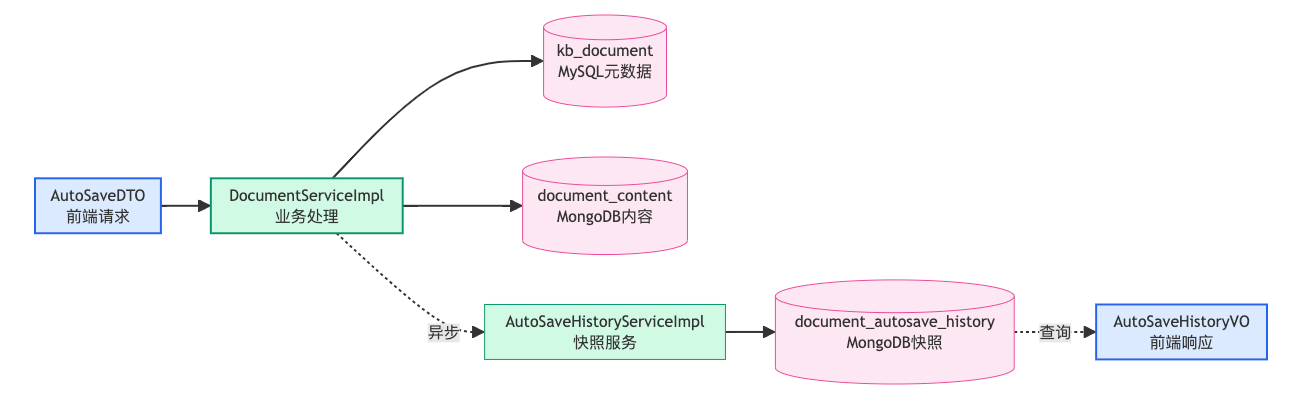
五、数据访问层
5.1 MongoDB Repository
创建 kb-document/src/main/java/com/knowledge/base/document/repository/mongodb/AutoSaveHistoryRepository.java:
package com.knowledge.base.document.repository.mongodb;

import com.knowledge.base.document.entity.mongodb.AutoSaveHistory;
import org.springframework.data.domain.Page;
import org.springframework.data.domain.Pageable;
import org.springframework.data.mongodb.repository.MongoRepository;
import org.springframework.stereotype.Repository;

/**
 * 自动保存历史MongoDB Repository
 *
 * @author 苏三
 * @since 1.0.0
 */
@Repository
public interface AutoSaveHistoryRepository extends MongoRepository<AutoSaveHistory, String> {

    /**
     * 按文档ID分页查询未被删除的快照,按保存时间倒序
     */
    Page<AutoSaveHistory> findByDocumentIdAndDeletedFalseOrderBySavedAtDesc(
            Long documentId, Pageable pageable);

    /**
     * 统计文档的未被删除的快照数量
     */
    long countByDocumentIdAndDeletedFalse(Long documentId);
}
5.2 MyBatis-Plus Mapper
自动保存功能复用已有的 DocumentMapper,通过 LambdaUpdateWrapper 实现精准字段更新:
// 示例:更新草稿并标记为已确认
documentMapper.update(null,
    new LambdaUpdateWrapper<Document>()
        .eq(Document::getAuthorId, userId)
        .eq(Document::getStatus, 0)       // 只影响草稿
        .set(Document::getAutoSaveDismissed, 1)
);
5.3 关键设计
- Spring Data MongoDB:查询方法命名自动解析,零XML配置
- MyBatis-Plus LambdaUpdateWrapper:类型安全,避免字段名硬编码
- 区分MySQL和MongoDB职责:MySQL管元数据和状态,MongoDB管大文本内容和不可变历史
六、业务逻辑层
6.1 AutoSaveHistoryService接口
创建 kb-document/src/main/java/com/knowledge/base/document/service/AutoSaveHistoryService.java:
package com.knowledge.base.document.service;

import com.baomidou.mybatisplus.core.metadata.IPage;
import com.knowledge.base.document.dto.AutoSaveHistoryQueryDTO;
import com.knowledge.base.document.vo.AutoSaveHistoryVO;

/**
 * 自动保存历史Service接口
 *
 * @author 苏三
 * @since 1.0.0
 */
public interface AutoSaveHistoryService {

    /**
     * 保存自动保存历史快照
     *
     * @param documentId 文档ID
     * @param title      文档标题
     * @param content    Markdown内容
     * @param authorId   作者ID
     */
    void saveSnapshot(Long documentId, String title, String content, Long authorId);

    /**
     * 分页查询自动保存历史
     *
     * @param query 查询条件
     * @return 分页快照列表
     */
    IPage<AutoSaveHistoryVO> pageHistory(AutoSaveHistoryQueryDTO query);

    /**
     * 获取单个快照详情(含完整内容)
     *
     * @param snapshotId  快照ID(MongoDB _id)
     * @param documentId  文档ID(用于权限校验)
     * @return 快照详情
     */
    AutoSaveHistoryVO getSnapshot(String snapshotId, Long documentId);

    /**
     * 批量删除指定文档的所有快照
     *
     * @param documentId 文档ID
     */
    void deleteByDocumentId(Long documentId);
}
6.2 AutoSaveHistoryServiceImpl实现
创建 kb-document/src/main/java/com/knowledge/base/document/service/impl/AutoSaveHistoryServiceImpl.java:
package com.knowledge.base.document.service.impl;

import com.baomidou.mybatisplus.core.metadata.IPage;
import com.baomidou.mybatisplus.extension.plugins.pagination.Page;
import com.knowledge.base.common.exception.BusinessException;
import com.knowledge.base.document.dto.AutoSaveHistoryQueryDTO;
import com.knowledge.base.document.entity.mongodb.AutoSaveHistory;
import com.knowledge.base.document.repository.mongodb.AutoSaveHistoryRepository;
import com.knowledge.base.document.service.AutoSaveHistoryService;
import com.knowledge.base.document.vo.AutoSaveHistoryVO;
import jakarta.annotation.Resource;
import lombok.extern.slf4j.Slf4j;
import org.springframework.data.domain.PageRequest;
import org.springframework.stereotype.Service;

import java.time.LocalDateTime;
import java.util.List;
import java.util.stream.Collectors;

/**
 * 自动保存历史Service实现
 *
 * @author 苏三
 * @since 1.0.0
 */
@Slf4j
@Service
public class AutoSaveHistoryServiceImpl implements AutoSaveHistoryService {

    @Resource
    private AutoSaveHistoryRepository autoSaveHistoryRepository;

    @Override
    public void saveSnapshot(Long documentId, String title, String content, Long authorId) {
        try {
            if (content == null || content.isEmpty()) {
                return;
            }

            AutoSaveHistory snapshot = AutoSaveHistory.builder()
                    .documentId(documentId)
                    .title(title)
                    .content(content)
                    .contentPreview(content.length() > 200
                            ? content.substring(0, 200) : content)
                    .contentLength(content.length())
                    .authorId(authorId)
                    .savedAt(LocalDateTime.now())
                    .deleted(false)
                    .build();

            autoSaveHistoryRepository.save(snapshot);
        } catch (Exception e) {
            // 快照保存失败不影响主流程
            log.warn("保存自动保存快照失败:documentId={}", documentId, e);
        }
    }

    @Override
    public IPage<AutoSaveHistoryVO> pageHistory(AutoSaveHistoryQueryDTO query) {
        // 转换分页参数(MyBatis-Plus从1开始,MongoDB从0开始)
        int page = Math.toIntExact(query.getCurrent() - 1);
        int size = Math.toIntExact(query.getSize());
        PageRequest pageRequest = PageRequest.of(page, size);

        org.springframework.data.domain.Page<AutoSaveHistory> result =
                autoSaveHistoryRepository
                        .findByDocumentIdAndDeletedFalseOrderBySavedAtDesc(
                                query.getDocumentId(), pageRequest);

        // 转换为VO
        List<AutoSaveHistoryVO> records = result.getContent().stream()
                .map(this::toVO)
                .collect(Collectors.toList());

        // 构建MyBatis-Plus Page
        Page<AutoSaveHistoryVO> mpPage = new Page<>(query.getCurrent(), query.getSize());
        mpPage.setRecords(records);
        mpPage.setTotal(result.getTotalElements());
        return mpPage;
    }

    @Override
    public AutoSaveHistoryVO getSnapshot(String snapshotId, Long documentId) {
        AutoSaveHistory snapshot = autoSaveHistoryRepository.findById(snapshotId)
                .orElseThrow(() -> new BusinessException("快照不存在"));

        if (!snapshot.getDocumentId().equals(documentId)) {
            throw new BusinessException("快照不属于该文档");
        }

        if (Boolean.TRUE.equals(snapshot.getDeleted())) {
            throw new BusinessException("快照已被删除");
        }

        AutoSaveHistoryVO vo = toVO(snapshot);
        vo.setContent(snapshot.getContent()); // 完整内容
        return vo;
    }

    @Override
    public void deleteByDocumentId(Long documentId) {
        try {
            int batchSize = 1000;
            PageRequest pageRequest = PageRequest.of(0, batchSize);
            org.springframework.data.domain.Page<AutoSaveHistory> page;

            do {
                page = autoSaveHistoryRepository
                        .findByDocumentIdAndDeletedFalseOrderBySavedAtDesc(
                                documentId, pageRequest);
                List<AutoSaveHistory> list = page.getContent();
                for (AutoSaveHistory s : list) {
                    s.setDeleted(true);
                }
                if (!list.isEmpty()) {
                    autoSaveHistoryRepository.saveAll(list);
                }
            } while (page.hasNext());
        } catch (Exception e) {
            log.warn("删除自动保存快照失败:documentId={}", documentId, e);
        }
    }

    /**
     * 实体转VO(不含完整内容)
     */
    private AutoSaveHistoryVO toVO(AutoSaveHistory entity) {
        return AutoSaveHistoryVO.builder()
                .id(entity.getId())
                .documentId(entity.getDocumentId())
                .title(entity.getTitle())
                .contentPreview(entity.getContentPreview())
                .contentLength(entity.getContentLength())
                .savedAt(entity.getSavedAt())
                .build();
    }
}
6.3 DocumentService接口新增方法
在 DocumentService.java 中新增:
/**
 * 自动保存文档(创建新草稿或更新已有草稿)
 *
 * <p>与 createDocument/updateDocument 的关键区别:
 * <ul>
 *   <li>标题非必填,空标题自动填充"未命名文档"</li>
 *   <li>强制状态为草稿(0),不触发RAG/KAG/ES索引</li>
 *   <li>仅更新非空字段,避免覆盖已有数据</li>
 * </ul></p>
 *
 * @param autoSaveDTO 自动保存数据
 * @return 文档ID(创建时返回新ID,更新时返回已有ID)
 */
Long autoSaveDocument(AutoSaveDTO autoSaveDTO);

/**
 * 放弃自动保存草稿:将当前用户所有草稿(status=0)标记为已确认,
 * 后续不再弹出恢复提示。
 */
void dismissAutoSaveDrafts();
6.4 DocumentServiceImpl核心实现
在 DocumentServiceImpl.java 中实现 autoSaveDocument() 方法:
@Override
@Transactional(rollbackFor = Exception.class)
public Long autoSaveDocument(AutoSaveDTO autoSaveDTO) {
    // ⚠️ 必须在异步操作前获取userId(ThreadLocal在异步线程中不可用)
    Long currentUserId = UserContext.getCurrentUserId();
    String currentUserName = UserContext.getCurrentUserName();

    // ========== 情况A:更新已有文档 ==========
    if (autoSaveDTO.getId() != null) {
        Document existDoc = documentMapper.selectById(autoSaveDTO.getId());
        if (existDoc == null) {
            throw new BusinessException("文档不存在");
        }

        // 更新MongoDB内容
        if (autoSaveDTO.getContent() != null) {
            try {
                documentContentService.saveOrUpdateContent(
                        existDoc.getContentId(),
                        autoSaveDTO.getContent()
                );
                // 同步更新MySQL中的contentLength
                Document updateContentLength = new Document();
                updateContentLength.setId(existDoc.getId());
                updateContentLength.setContentLength(autoSaveDTO.getContent().length());
                documentMapper.updateById(updateContentLength);
            } catch (Exception e) {
                log.warn("自动保存MongoDB内容失败:docId={}", existDoc.getId(), e);
            }
        }

        // 更新MySQL字段(仅更新非空字段)
        Document update = new Document();
        update.setId(existDoc.getId());
        update.setTitle(autoSaveDTO.getTitle() != null
                ? autoSaveDTO.getTitle() : "未命名文档");
        update.setStatus(0); // 强制草稿
        if (autoSaveDTO.getSummary() != null) {
            update.setSummary(autoSaveDTO.getSummary());
        }
        if (autoSaveDTO.getCategoryId() != null) {
            update.setCategoryId(autoSaveDTO.getCategoryId());
        }
        if (autoSaveDTO.getTeamId() != null) {
            update.setTeamId(autoSaveDTO.getTeamId());
        }
        if (autoSaveDTO.getTags() != null) {
            update.setTags(autoSaveDTO.getTags());
        }
        documentMapper.updateById(update);

        // 异步保存历史快照
        saveAutoSaveSnapshot(
                existDoc.getId(), update.getTitle(),
                autoSaveDTO.getContent(), currentUserId);

        return existDoc.getId();
    }

    // ========== 情况B:新建-去重检测 ==========
    // 查询5分钟内该用户的草稿,复用而非新建
    Document recentDraft = documentMapper.selectOne(
            new LambdaQueryWrapper<Document>()
                    .eq(Document::getAuthorId, currentUserId)
                    .eq(Document::getStatus, 0)
                    .ge(Document::getCreatedAt,
                            LocalDateTime.now().minusMinutes(5))
                    .orderByDesc(Document::getCreatedAt)
                    .last("LIMIT 1")
    );

    if (recentDraft != null) {
        // 复用已有草稿
        Document update = new Document();
        update.setId(recentDraft.getId());
        update.setTitle(autoSaveDTO.getTitle() != null
                ? autoSaveDTO.getTitle() : "未命名文档");
        update.setStatus(0);
        if (autoSaveDTO.getSummary() != null) {
            update.setSummary(autoSaveDTO.getSummary());
        }
        if (autoSaveDTO.getCategoryId() != null) {
            update.setCategoryId(autoSaveDTO.getCategoryId());
        }
        if (autoSaveDTO.getTeamId() != null) {
            update.setTeamId(autoSaveDTO.getTeamId());
        }
        if (autoSaveDTO.getTags() != null) {
            update.setTags(autoSaveDTO.getTags());
        }
        documentMapper.updateById(update);

        // 更新MongoDB内容
        if (autoSaveDTO.getContent() != null) {
            try {
                documentContentService.saveOrUpdateContent(
                        recentDraft.getContentId(),
                        autoSaveDTO.getContent()
                );
                Document updateLen = new Document();
                updateLen.setId(recentDraft.getId());
                updateLen.setContentLength(
                        autoSaveDTO.getContent().length());
                documentMapper.updateById(updateLen);
            } catch (Exception e) {
                log.warn("自动保存MongoDB内容失败", e);
            }
        }

        saveAutoSaveSnapshot(
                recentDraft.getId(), update.getTitle(),
                autoSaveDTO.getContent(), currentUserId);

        return recentDraft.getId();
    }

    // ========== 情况C:新建全新草稿 ==========
    Long newId = SnowflakeIdGenerator.getInstance().nextId();
    Document doc = new Document();
    doc.setId(newId);
    doc.setTitle(autoSaveDTO.getTitle() != null
            ? autoSaveDTO.getTitle() : "未命名文档");
    doc.setStatus(0); // 草稿
    doc.setDocumentType(1); // 文章
    doc.setAuthorId(currentUserId);
    doc.setAuthorName(currentUserName);
    doc.setCategoryId(autoSaveDTO.getCategoryId());
    doc.setTeamId(autoSaveDTO.getTeamId());
    doc.setTags(autoSaveDTO.getTags());
    doc.setSummary(autoSaveDTO.getSummary());
    doc.setViewCount(0L);
    doc.setLikeCount(0L);
    doc.setFavoriteCount(0L);
    doc.setCommentCount(0L);
    doc.setSource(1);
    doc.setAllowComment(1);
    doc.setIsPublic(0);
    doc.setIsTop(0);
    doc.setIsRecommend(0);
    doc.setAutoSaveDismissed(0);
    doc.setSort(0);

    int count = documentMapper.insert(doc);
    if (count <= 0) {
        throw new BusinessException("自动保存创建文档失败");
    }

    // 更新分类文档计数
    if (autoSaveDTO.getCategoryId() != null) {
        try {
            categoryMapper.incrementDocumentCount(
                    autoSaveDTO.getCategoryId());
        } catch (Exception e) {
            log.warn("更新分类文档计数失败", e);
        }
    }

    // 保存MongoDB内容
    if (autoSaveDTO.getContent() != null) {
        try {
            String contentId = documentContentService.saveContent(
                    newId, autoSaveDTO.getContent());
            Document updateContent = new Document();
            updateContent.setId(newId);
            updateContent.setContentId(contentId);
            updateContent.setContentLength(
                    autoSaveDTO.getContent().length());
            documentMapper.updateById(updateContent);
        } catch (Exception e) {
            log.warn("保存MongoDB内容失败", e);
        }
    }

    saveAutoSaveSnapshot(newId, doc.getTitle(),
            autoSaveDTO.getContent(), currentUserId);

    return newId;
}
6.5 异步快照保存
/**
 * 异步保存自动保存历史快照,不阻塞主流程
 */
private void saveAutoSaveSnapshot(Long documentId, String title,
                                   String content, Long authorId) {
    CompletableFuture.runAsync(() -> {
        autoSaveHistoryService.saveSnapshot(
                documentId, title, content, authorId);
    }, asyncTaskExecutor).exceptionally(ex -> {
        log.warn("异步保存自动保存快照失败:documentId={}", documentId, ex);
        return null;
    });
}
6.6 dismissAutoSaveDrafts实现
@Override
public void dismissAutoSaveDrafts() {
    Long userId = UserContext.getCurrentUserId();
    if (userId == null) {
        log.warn("用户未登录,无法确认自动保存草稿");
        return;
    }

    int updated = documentMapper.update(null,
            new LambdaUpdateWrapper<Document>()
                    .eq(Document::getAuthorId, userId)
                    .eq(Document::getStatus, 0)           // 只影响草稿
                    .set(Document::getAutoSaveDismissed, 1)
    );

    log.info("用户 {} 确认放弃自动保存草稿,更新了 {} 条记录",
            userId, updated);
}
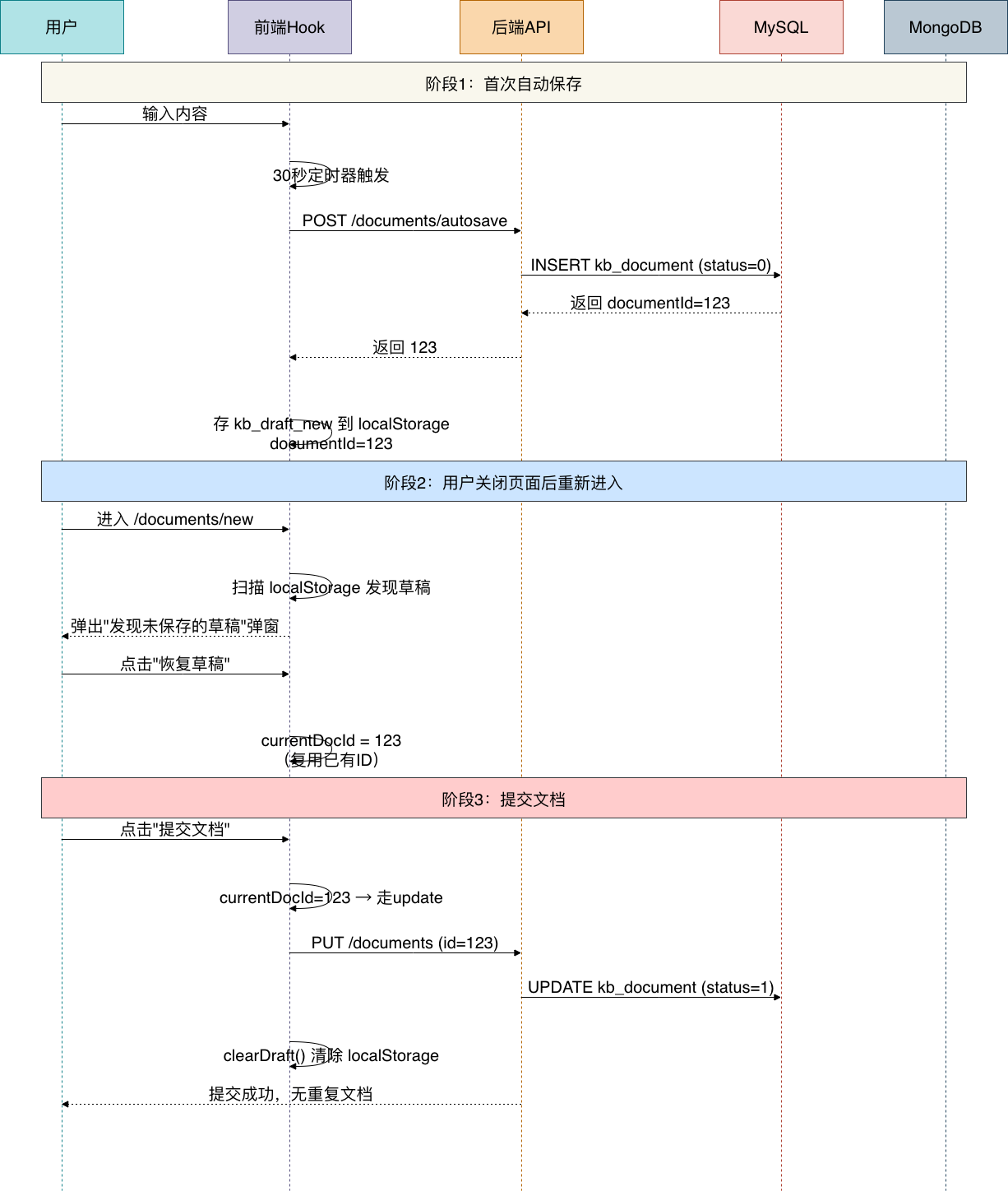
6.7 草稿恢复与提交流程
当用户恢复草稿并提交时,系统需要保证复用已有文档ID而非创建新记录:
七、控制器层
7.1 新增端点
在 DocumentController.java 中新增以下四个端点:
/**
 * 自动保存文档(创建或更新草稿)
 *
 * <p>允许空标题,强制状态为草稿,不触发RAG/KAG/ES索引。
 * 用于前端编辑器自动保存场景,防止用户数据丢失。</p>
 */
@PostMapping("/autosave")
@Operation(summary = "自动保存文档", description = "自动保存草稿,允许空标题,不触发索引")
@PreAuthorize("hasAnyAuthority(..., ...)")
public Result<Long> autoSaveDocument(
        @Valid @RequestBody AutoSaveDTO autoSaveDTO) {
    log.info("自动保存请求:id={}, title={}",
            autoSaveDTO.getId(), autoSaveDTO.getTitle());
    Long documentId = documentService.autoSaveDocument(autoSaveDTO);
    return Result.success("自动保存成功", documentId);
}

/**
 * 放弃自动保存草稿
 */
@PutMapping("/autosave/dismiss")
@Operation(summary = "放弃自动保存草稿",
        description = "将当前用户所有草稿标记为已确认,不再弹出恢复提示")
@PreAuthorize("hasAnyAuthority(..., ...)")
public Result<Boolean> dismissAutoSaveDrafts() {
    log.info("放弃自动保存草稿请求");
    documentService.dismissAutoSaveDrafts();
    return Result.success("已确认放弃草稿", true);
}

/**
 * 获取文档的自动保存历史
 */
@GetMapping("/{documentId}/autosave-history")
@Operation(summary = "获取自动保存历史",
        description = "分页查询指定文档的自动保存快照历史")
@PreAuthorize("hasAuthority(...)")
public Result<IPage<AutoSaveHistoryVO>> getAutoSaveHistory(
        @PathVariable Long documentId,
        @RequestParam(defaultValue = "1") Long current,
        @RequestParam(defaultValue = "20") Long size) {
    AutoSaveHistoryQueryDTO query = new AutoSaveHistoryQueryDTO();
    query.setDocumentId(documentId);
    query.setCurrent(current);
    query.setSize(size);
    IPage<AutoSaveHistoryVO> result =
            autoSaveHistoryService.pageHistory(query);
    return Result.success(result);
}

/**
 * 获取单个自动保存快照详情(含完整Markdown内容)
 */
@GetMapping("/{documentId}/autosave-history/{snapshotId}")
@Operation(summary = "获取自动保存快照详情",
        description = "根据快照ID获取完整Markdown内容")
@PreAuthorize("hasAuthority(...)")
public Result<AutoSaveHistoryVO> getAutoSaveSnapshot(
        @PathVariable Long documentId,
        @PathVariable String snapshotId) {
    AutoSaveHistoryVO vo = autoSaveHistoryService
            .getSnapshot(snapshotId, documentId);
    return Result.success(vo);
}
7.2 RESTful API汇总
| 方法 | 路径 | 说明 | 参数 |
|---|---|---|---|
| POST | /documents/autosave | 自动保存文档 | AutoSaveDTO |
| PUT | /documents/autosave/dismiss | 放弃自动保存草稿 | - |
| GET | /documents/{id}/autosave-history | 查询历史快照列表 | current, size |
| GET | /documents/{id}/autosave-history/{snapshotId} | 获取快照详情 | snapshotId |
八、前端实现
8.1 localStorage工具类
创建 src/utils/draft-storage.ts:
const DRAFT_PREFIX = 'kb_draft_';

export interface DraftData {
  title: string;
  content: string;
  summary: string;
  categoryId: string;
  teamId: string;
  tags: string[];
  visibility: string;
  allowComments: boolean;
  allowEdit: boolean;
  aiIndex: boolean;
  saveOption: 'submit_review' | 'draft';
  documentId?: string;      // 关联的后端文档ID
  savedAt: number;           // Date.now()
}

export const draftStorage = {
  getKey(docId?: string): string {
    return docId ? `${DRAFT_PREFIX}${docId}` : `${DRAFT_PREFIX}new`;
  },

  save(docId: string | undefined, data: Omit<DraftData, 'savedAt'>): void {
    try {
      const full: DraftData = { ...data, savedAt: Date.now() };
      localStorage.setItem(this.getKey(docId), JSON.stringify(full));
    } catch (e) {
      console.warn('[DraftStorage] localStorage save failed:', e);
    }
  },

  load(docId: string | undefined): DraftData | null {
    try {
      const raw = localStorage.getItem(this.getKey(docId));
      return raw ? (JSON.parse(raw) as DraftData) : null;
    } catch (e) {
      console.warn('[DraftStorage] localStorage load failed:', e);
      return null;
    }
  },

  remove(docId: string | undefined): void {
    try {
      localStorage.removeItem(this.getKey(docId));
    } catch (e) {
      console.warn('[DraftStorage] localStorage remove failed:', e);
    }
  },

  removeAll(): void {
    try {
      for (let i = localStorage.length - 1; i >= 0; i--) {
        const key = localStorage.key(i);
        if (key && key.startsWith(DRAFT_PREFIX)) {
          localStorage.removeItem(key);
        }
      }
    } catch (e) {
      console.warn('[DraftStorage] removeAll failed:', e);
    }
  },

  /** 扫描所有 kb_draft_* 条目,返回最新的一条 */
  findLatest(): DraftData | null {
    try {
      let latest: DraftData | null = null;
      for (let i = 0; i < localStorage.length; i++) {
        const key = localStorage.key(i);
        if (key && key.startsWith(DRAFT_PREFIX)) {
          const raw = localStorage.getItem(key);
          if (raw) {
            try {
              const draft = JSON.parse(raw) as DraftData;
              if (draft.savedAt
                  && (!latest || draft.savedAt > latest.savedAt)) {
                latest = draft;
              }
            } catch { /* 跳过损坏条目 */ }
          }
        }
      }
      return latest;
    } catch (e) {
      console.warn('[DraftStorage] findLatest failed:', e);
      return null;
    }
  },

  exists(docId: string | undefined): boolean {
    return this.load(docId) !== null;
  },
};
关键设计点:
| 设计 | 说明 |
|---|---|
| 双key策略 | kb_draft_new 供新建页恢复,kb_draft_{docId} 供编辑页恢复 |
| findLatest() | 全量扫描兜底,处理跨会话迁移的草稿 |
| removeAll() | 用户放弃草稿时一次性清除 |
| try-catch | localStorage操作可能因隐私模式/配额满而失败 |
8.2 前端API服务
在 src/services/document.service.ts 中新增:
// 自动保存文档
autoSaveDocument: (data: {
  id?: number | string;
  title?: string;
  content?: string;
  summary?: string;
  categoryId?: number | string;
  teamId?: number | string;
  tags?: string;
}) => {
  return http.post<{ id: string }>(
      '/document/documents/autosave', data);
},

// 获取自动保存历史快照
getAutoSaveHistory: (documentId: string, page = 1, pageSize = 20) => {
  return http.get<any>(
      `/document/documents/${documentId}/autosave-history`, {
    params: { current: page, size: pageSize },
  }).then((data: any) => ({
    list: data.records || [],
    total: data.total || 0,
    page: data.current || 1,
    pageSize: data.size || 20,
  }));
},

// 获取单个快照详情
getAutoSaveSnapshot: (documentId: string, snapshotId: string) => {
  return http.get<any>(
      `/document/documents/${documentId}/autosave-history/${snapshotId}`);
},

// 放弃自动保存草稿
dismissAutoSaveDrafts: () => {
  return http.put<boolean>('/document/documents/autosave/dismiss');
},
8.3 useAutoSave Hook(核心)
创建 src/hooks/useAutoSave.ts:
import { useRef, useState, useEffect, useCallback } from 'react';
import { draftStorage, type DraftData } from '@/utils/draft-storage';
import { documentService } from '@/services';
import { EDITOR_CONFIG } from '@/config';
import { AUTO_SAVE } from '@/constants';
import { message } from 'antd';

export type SaveStatus = 'idle' | 'saving' | 'saved' | 'error' | 'unsaved';

export interface AutoSaveFormData {
  title: string;
  content: string;
  summary: string;
  categoryId: string;
  teamId: string;
  tags: string[];
  visibility: string;
  allowComments: boolean;
  allowEdit: boolean;
  aiIndex: boolean;
  saveOption: 'submit_review' | 'draft';
}

interface UseAutoSaveOptions {
  documentId?: string;
  formData: AutoSaveFormData;
  enabled?: boolean;
  interval?: number;
  onDocumentCreated?: (id: string) => void;
}

interface UseAutoSaveReturn {
  saveStatus: SaveStatus;
  lastSavedAt: Date | null;
  currentDocId: string | undefined;
  hasRecoveryDraft: boolean;
  recoveryDraft: DraftData | null;
  isRecoveryDialogOpen: boolean;
  acceptRecovery: () => DraftData | null;
  dismissRecovery: () => void;
  clearDraft: () => void;
  performSave: () => Promise<void>;
}

export const useAutoSave = ({
  documentId: initialDocId,
  formData,
  enabled = EDITOR_CONFIG.enableAutoSave,
  interval = AUTO_SAVE.INTERVAL,  // 默认30秒
  onDocumentCreated,
}: UseAutoSaveOptions): UseAutoSaveReturn => {
  const [currentDocId, setCurrentDocId] = useState<string | undefined>(
      initialDocId);
  const [saveStatus, setSaveStatus] = useState<SaveStatus>('idle');
  const [lastSavedAt, setLastSavedAt] = useState<Date | null>(null);
  const [recoveryDraft, setRecoveryDraft] = useState<DraftData | null>(null);
  const [isRecoveryDialogOpen, setIsRecoveryDialogOpen] = useState(false);

  // Refs 避免定时器中的闭包陷阱
  const formDataRef = useRef(formData);
  const currentDocIdRef = useRef(currentDocId);
  const isSavingRef = useRef(false);
  const hasChangesRef = useRef(false);
  const saveToBackendRef = useRef<() => Promise<void>>(async () => {});

  // ==== 草稿恢复检测(挂载时执行一次)====
  useEffect(() => {
    if (!enabled) return;
    // 1) 按 documentId 精确匹配
    let draft = draftStorage.load(initialDocId);
    // 2) 如果是新建文档,扫描所有 kb_draft_* 兜底查找
    if (!draft && !initialDocId) {
      draft = draftStorage.findLatest();
    }
    if (draft) {
      setRecoveryDraft(draft);
      setIsRecoveryDialogOpen(true);
    }
  }, []);

  // ==== 保存到后端 ====
  const saveToBackend = useCallback(async (): Promise<void> => {
    if (isSavingRef.current) return;
    isSavingRef.current = true;
    setSaveStatus('saving');

    try {
      const data = formDataRef.current;
      const payload = {
        id: currentDocIdRef.current || undefined,
        title: data.title || undefined,
        content: data.content,
        summary: data.summary,
        categoryId: data.categoryId || undefined,
        teamId: data.teamId || undefined,
        tags: data.tags.length > 0 ? data.tags.join(',') : undefined,
      };

      // 过滤 undefined 和字符串 "undefined"
      const cleanPayload = Object.fromEntries(
        Object.entries(payload).filter(
            ([_, v]) => v !== undefined && v !== 'undefined'),
      );

      const result = await documentService
          .autoSaveDocument(cleanPayload);

      // 后端可能返回字符串ID或 { id: "..." }
      const docId: string | undefined =
          typeof result === 'string'
            ? result
            : (result?.id ? String(result.id) : undefined);

      if (!docId) {
        console.error(
            '[AutoSave] Backend did not return a valid document ID');
        setSaveStatus('error');
        return;
      }

      // 首次自动保存:缓存ID,持久化到localStorage
      if (!currentDocIdRef.current) {
        setCurrentDocId(docId);
        currentDocIdRef.current = docId;
        draftStorage.save(docId, { ...data, documentId: docId });
        onDocumentCreated?.(docId);
      }

      // 始终保留 kb_draft_new 供重新进入 /documents/new 恢复
      draftStorage.save(undefined, { ...data, documentId: docId });

      setLastSavedAt(new Date());
      setSaveStatus('saved');
      hasChangesRef.current = false;

      // 3秒后淡出为 idle
      setTimeout(() => {
        setSaveStatus((prev) =>
            (prev === 'saved' ? 'idle' : prev));
      }, 3000);
    } catch (error) {
      console.error('[AutoSave] Backend save failed:', error);
      // 兜底:保存到 localStorage
      const data = formDataRef.current;
      draftStorage.save(currentDocIdRef.current, {
        ...data,
        documentId: currentDocIdRef.current,
      });
      setSaveStatus('error');
    } finally {
      isSavingRef.current = false;
    }
  }, [onDocumentCreated]);

  // ==== 变化检测 ====
  const serialized = JSON.stringify(formData);
  const prevSerialized = useRef(serialized);
  useEffect(() => {
    if (serialized !== prevSerialized.current) {
      prevSerialized.current = serialized;
      hasChangesRef.current = true;
      setSaveStatus('unsaved');
    }
  }, [serialized]);

  // ==== 定时自动保存 ====
  saveToBackendRef.current = saveToBackend;
  useEffect(() => {
    if (!enabled) return;

    const timer = setInterval(() => {
      if (hasChangesRef.current && !isSavingRef.current) {
        saveToBackendRef.current();
      }
    }, interval);

    return () => clearInterval(timer);
  }, [enabled, interval]);

  // ==== beforeunload 拦截 ====
  useEffect(() => {
    const handler = (e: BeforeUnloadEvent) => {
      if (hasChangesRef.current) {
        const data = formDataRef.current;
        const docId = currentDocIdRef.current;
        draftStorage.save(docId, { ...data, documentId: docId });
        if (docId) {
          draftStorage.save(undefined, {
            ...data, documentId: docId });
        }
        e.preventDefault();
        e.returnValue = '';
      }
    };

    window.addEventListener('beforeunload', handler);
    return () => window.removeEventListener('beforeunload', handler);
  }, []);

  // ==== 恢复/放弃操作 ====
  const acceptRecovery = useCallback((): DraftData | null => {
    setIsRecoveryDialogOpen(false);
    const draft = recoveryDraft;
    // 恢复已有文档ID,后续提交流程走update而非create
    if (draft?.documentId) {
      setCurrentDocId(draft.documentId);
      currentDocIdRef.current = draft.documentId;
    }
    return draft;
  }, [recoveryDraft]);

  const dismissRecovery = useCallback(() => {
    setIsRecoveryDialogOpen(false);
    setRecoveryDraft(null);
    // 调用后端标记所有草稿为已确认
    documentService.dismissAutoSaveDrafts().catch(err => {
      console.warn('[AutoSave] dismissAutoSaveDrafts failed:', err);
    });
    draftStorage.removeAll();
  }, []);

  const clearDraft = useCallback(() => {
    draftStorage.remove(currentDocIdRef.current);
    draftStorage.remove(undefined);  // 同时清除 kb_draft_new
    hasChangesRef.current = false;
    setSaveStatus('idle');
  }, []);

  const performSave = useCallback(async () => {
    await saveToBackend();
    message.success('已保存');
  }, [saveToBackend]);

  return {
    saveStatus,
    lastSavedAt,
    currentDocId,
    hasRecoveryDraft: recoveryDraft !== null,
    recoveryDraft,
    isRecoveryDialogOpen,
    acceptRecovery,
    dismissRecovery,
    clearDraft,
    performSave,
  };
};
Hook设计要点:
| 技术 | 解决的问题 |
|---|---|
| useRef 存储最新值 | 定时器回调不依赖闭包中的旧状态 |
| saveToBackendRef | 避免因回调变化频繁重建定时器 |
| JSON.stringify 对比 | 变化检测精确,避免无效保存 |
| 双key存储 | kb\_draft\_new保证新建页恢复,kb\_draft\_{id}保证编辑页恢复 |
| beforeunload | 页面关闭前紧急保存到localStorage |
8.4 恢复弹窗组件
创建 src/components/DraftRecoveryDialog/index.tsx:
import React from 'react';
import { Modal, Button } from 'antd';
import { ExclamationCircleOutlined } from '@ant-design/icons';
import type { DraftData } from '@/utils/draft-storage';

interface DraftRecoveryDialogProps {
  open: boolean;
  draft: DraftData | null;
  onAccept: () => void;
  onDismiss: () => void;
}

export const DraftRecoveryDialog: React.FC<DraftRecoveryDialogProps> = ({
  open, draft, onAccept, onDismiss,
}) => {
  if (!draft) return null;

  const savedAt = new Date(draft.savedAt).toLocaleString('zh-CN');
  const preview = draft.content
    ? draft.content.substring(0, 100)
        + (draft.content.length > 100 ? '...' : '')
    : '(无内容)';

  return (
    <Modal
      open={open}
      title={
        <span style={{ display: 'flex', alignItems: 'center', gap: 8 }}>
          <ExclamationCircleOutlined
              style={{ color: '#f59e0b', fontSize: 18 }} />
          发现未保存的草稿
        </span>
      }
      onCancel={onDismiss}
      footer={[
        <Button key="discard" danger onClick={onDismiss}>
          放弃草稿
        </Button>,
        <Button key="recover" type="primary" onClick={onAccept}>
          恢复草稿
        </Button>,
      ]}
      centered
      width={480}
      destroyOnClose
    >
      <div style={{ marginBottom: 16 }}>
        <p style={{ color: '#64748b', marginBottom: 12 }}>
          检测到您有未保存的编辑内容,保存时间:{savedAt}
        </p>
        <div style={{
          background: '#f8fafc', borderRadius: 8,
          padding: '12px 16px', lineHeight: 1.8,
        }}>
          <div><strong>标题:</strong>{draft.title || '(未命名)'}</div>
          <div><strong>内容预览:</strong>{preview}</div>
        </div>
      </div>
      <p style={{ color: '#94a3b8', fontSize: 12, margin: 0 }}>
        选择"恢复草稿"将继续编辑,选择"放弃草稿"将清除暂存内容。
      </p>
    </Modal>
  );
};
8.5 保存状态指示器
创建 src/components/SaveStatusIndicator/index.tsx:
import React from 'react';
import {
  LoadingOutlined, CheckCircleOutlined,
  ExclamationCircleOutlined,
} from '@ant-design/icons';
import type { SaveStatus } from '@/hooks/useAutoSave';

const statusConfig: Record<SaveStatus, { label: string; color: string }> = {
  idle:    { label: '',                color: 'transparent' },
  saved:   { label: '已保存',          color: '#10b981' },
  saving:  { label: '保存中...',        color: '#f59e0b' },
  unsaved: { label: '未保存的更改',     color: '#94a3b8' },
  error:   { label: '保存失败',        color: '#ef4444' },
};

export const SaveStatusIndicator: React.FC<{
  status: SaveStatus;
  lastSavedAt: Date | null;
}> = ({ status, lastSavedAt }) => {
  if (status === 'idle') return null;

  const config = statusConfig[status];

  return (
    <div style={{
      display: 'inline-flex', alignItems: 'center',
      gap: 4, fontSize: 12, color: config.color,
      whiteSpace: 'nowrap', lineHeight: '32px',
    }}>
      {status === 'saving' && <LoadingOutlined style={{ fontSize: 12 }} />}
      {status === 'saved' && <CheckCircleOutlined style={{ fontSize: 12 }} />}
      {status === 'error' && <ExclamationCircleOutlined style={{ fontSize: 12 }} />}
      <span>{config.label}</span>
    </div>
  );
};
8.6 在编辑器中集成
在编辑页面(如 CreateDocumentPage.tsx)中使用以上组件:
// 1. 引入 Hook 和组件
import { useAutoSave } from '@/hooks/useAutoSave';
import { DraftRecoveryDialog } from '@/components/DraftRecoveryDialog';
import { SaveStatusIndicator } from '@/components/SaveStatusIndicator';

// 2. 在组件中调用 Hook
const {
  saveStatus,
  lastSavedAt,
  currentDocId,
  recoveryDraft,
  isRecoveryDialogOpen,
  acceptRecovery,
  dismissRecovery,
  clearDraft,
} = useAutoSave({
  documentId: undefined, // 新文档
  formData: { title, content, summary, categoryId, teamId,
              tags, visibility, allowComments, allowEdit,
              aiIndex, saveOption },
  onDocumentCreated: (id) => console.log('自动保存创建:', id),
});

// 3. 恢复草稿:将localStorage数据填充到表单
const handleAcceptRecovery = () => {
  const draft = acceptRecovery();
  if (draft) {
    setTitle(draft.title || '');
    setContent(draft.content || '');
    setSummary(draft.summary || '');
    if (draft.categoryId) setCategoryId(String(draft.categoryId));
    if (draft.teamId) setTeamId(String(draft.teamId));
    if (draft.tags?.length > 0) setTags(draft.tags);
    if (draft.visibility) setVisibility(draft.visibility);
    setAllowComments(draft.allowComments);
    setAllowEdit(draft.allowEdit);
    setAiIndex(draft.aiIndex);
    if (draft.saveOption) setSaveOption(draft.saveOption);
  }
};

// 4. 提交时复用currentDocId
const handleDirectPublish = async () => {
  const documentData = { title, content, summary,
      categoryId, teamId, tags: tags.join(','),
      status: 0, documentType: 1, allowComment: 1, source: 1 };

  let docId: string;
  if (currentDocId) {
    // 自动保存过 → 更新已有记录
    await documentService.updateDocument(
        currentDocId, documentData as any);
    docId = currentDocId;
  } else {
    // 未自动保存 → 创建新记录
    const result = await createDocument(documentData);
    docId = String(result.id);
  }

  await documentService.publishDocument(docId);
  clearDraft();
  message.success('文档已发布!');
  navigate('/documents');
};

// 5. 在JSX中渲染
return (
  <>
    {/* 编辑器内容... */}
    <SaveStatusIndicator
        status={saveStatus} lastSavedAt={lastSavedAt} />
    <button onClick={handleDirectPublish}>提交文档</button>
    <DraftRecoveryDialog
      open={isRecoveryDialogOpen}
      draft={recoveryDraft}
      onAccept={handleAcceptRecovery}
      onDismiss={dismissRecovery}
    />
  </>
);
8.7 自动保存历史页面
创建 src/pages/AutoSaveHistoryPage.tsx,支持:
- 左侧快照列表(分页展示时间线和标题)
- 右侧Markdown内容预览(react-markdown渲染)
- 点击左侧快照条目查看完整内容
- 返回按钮导航到草稿箱或编辑页
页面结构为左右分栏布局,左侧340px宽快照列表,右侧弹性宽度Markdown渲染区域。
九、配置常量
在 src/constants/index.ts 中定义自动保存相关常量:
export const AUTO_SAVE = {
  // 自动保存间隔(毫秒)
  INTERVAL: 30000,
  // 保存状态淡出时间(毫秒)
  STATUS_FADE_TIME: 3000,
  // 草稿存储localStorage前缀
  DRAFT_PREFIX: 'kb_draft_',
};
在 src/config/index.ts 中定义开关:
export const EDITOR_CONFIG = {
  enableAutoSave: true,   // 是否启用自动保存
};
十、路由配置
在 src/router/index.tsx 中注册自动保存历史页面路由:
{
  path: 'documents/:id/autosave-history',
  element: <AutoSaveHistoryPage />,
}
在草稿箱页面添加历史按钮,导航到自动保存历史:
<Tooltip title="查看本地历史">
  <Button
    type="text"
    icon={<HistoryOutlined />}
    onClick={() => navigate(
        `/documents/${record.id}/autosave-history`)}
  />
</Tooltip>
十一、测试验证
按顺序启动下面这些微服务:
kb-auth-user
kb-document
kb-gateway
启动前端
cd knowledge-base-frontend
npm run dev
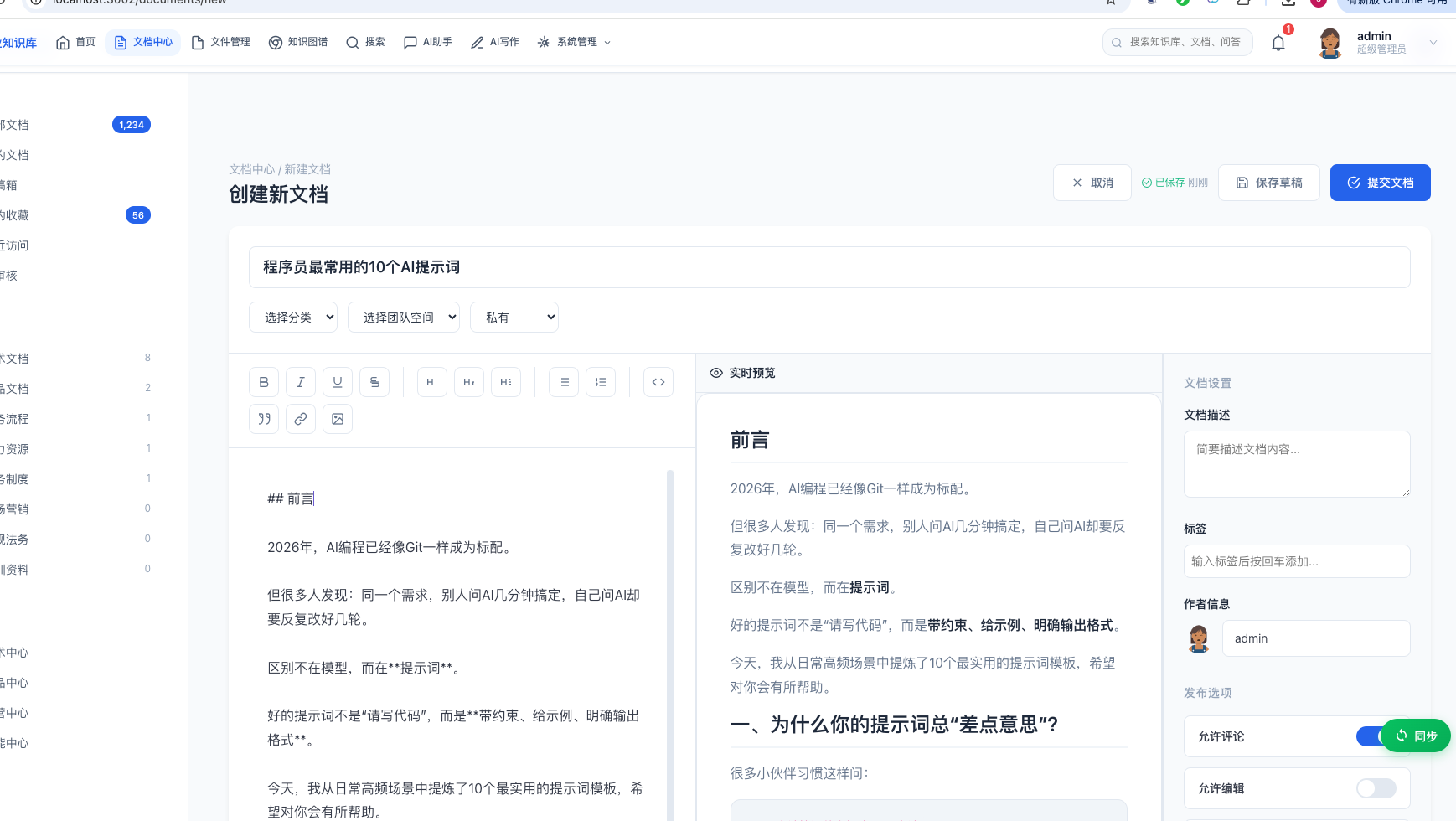
浏览器访问创建新文档页面:
http://localhost:3002/documents/new
在里面写一篇文档,我们没有点击保存草稿按钮,它会自动保存,显示已保存成功:
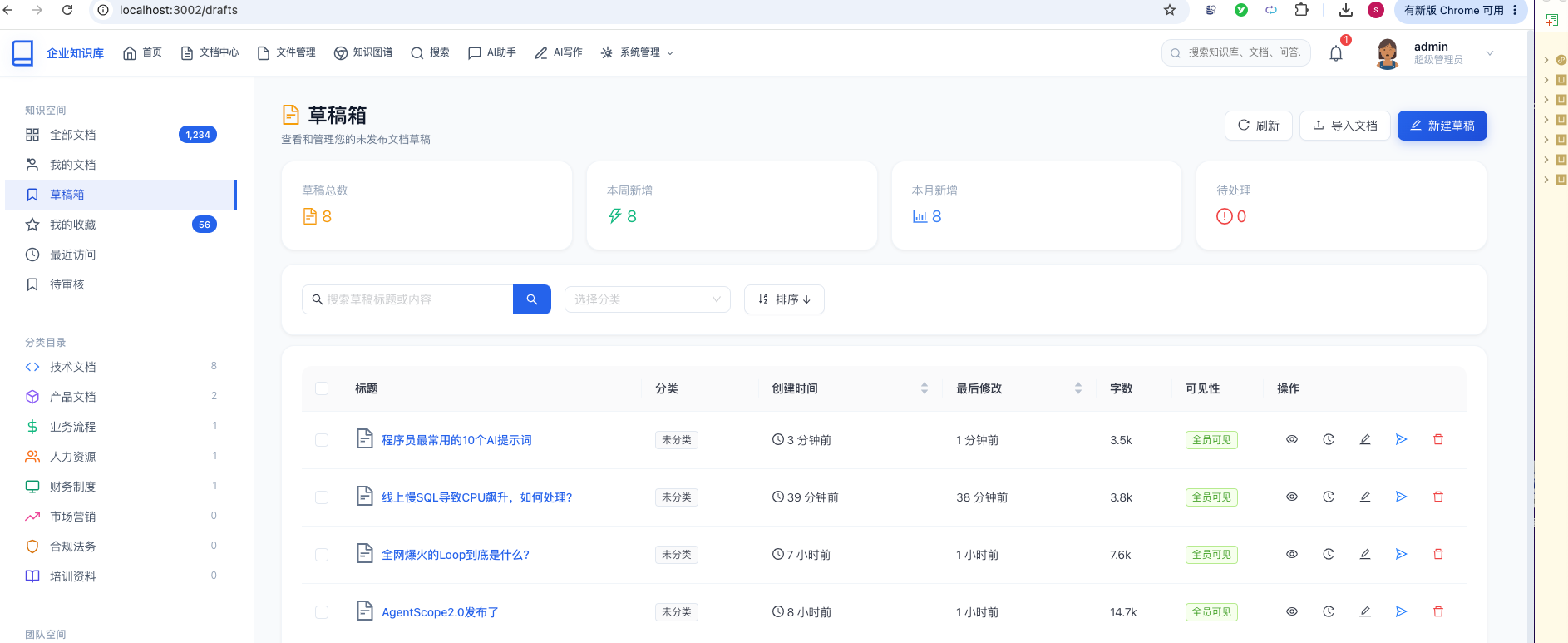
到草稿箱页面,能看到系统自动保存的这个文档记录:
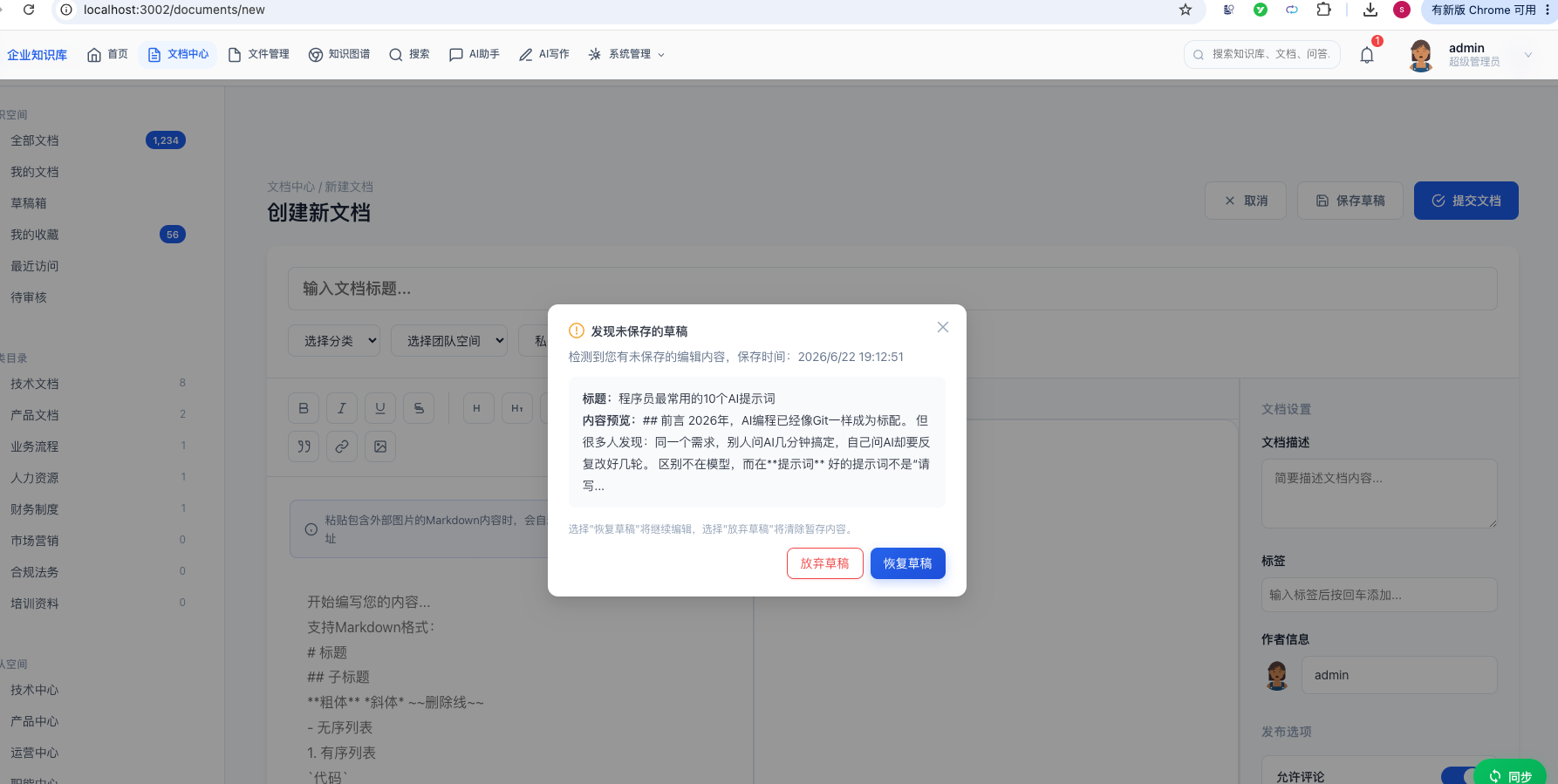
如果我们现在重新新建一个文档,此时,会自动弹出一个窗口,提示我们可以恢复草稿或者放弃草稿:
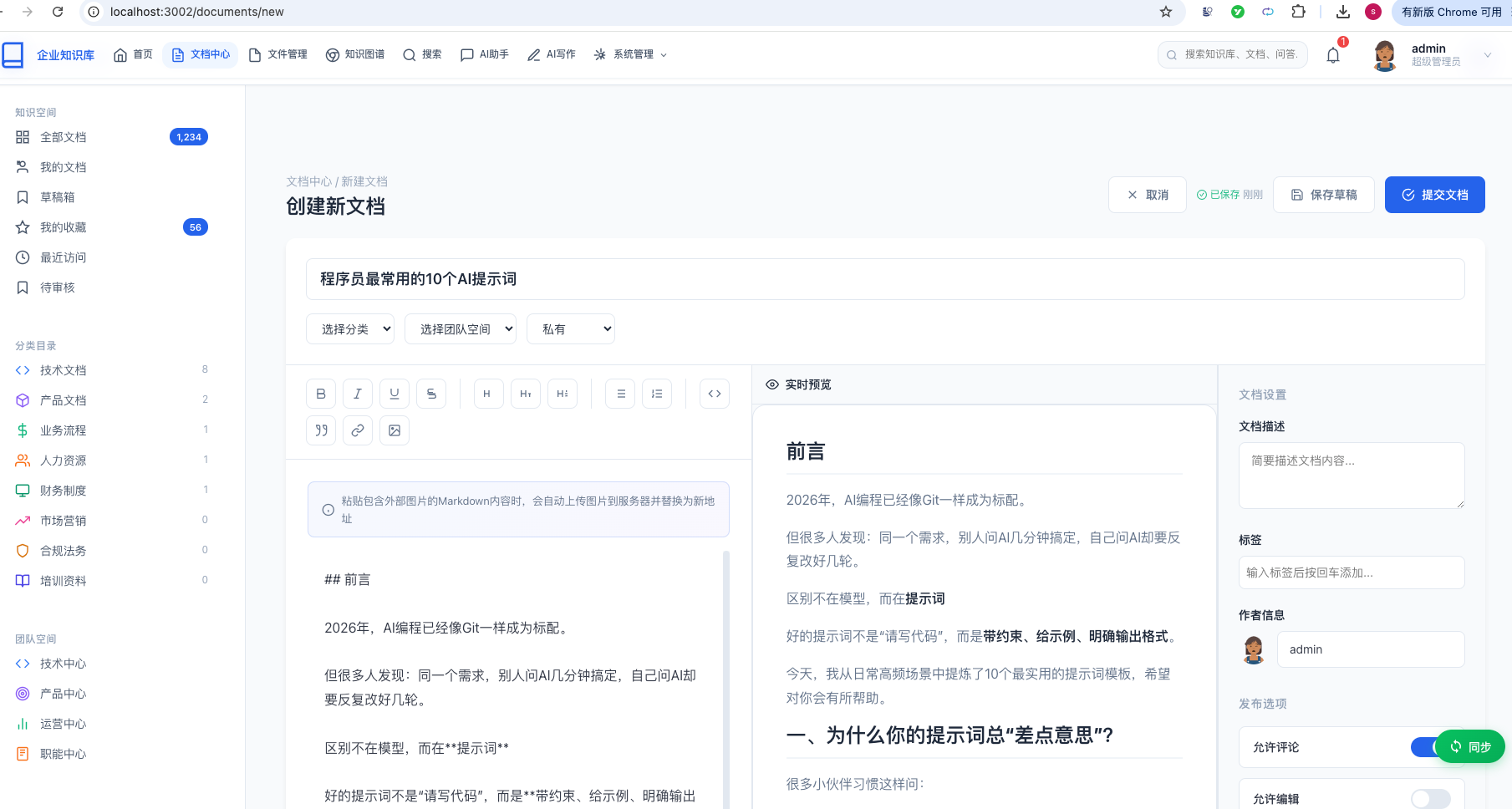
如果我们点击恢复草稿按钮,可以将刚刚还未保存的文档内容自动填充到新文档中,继续接着写:
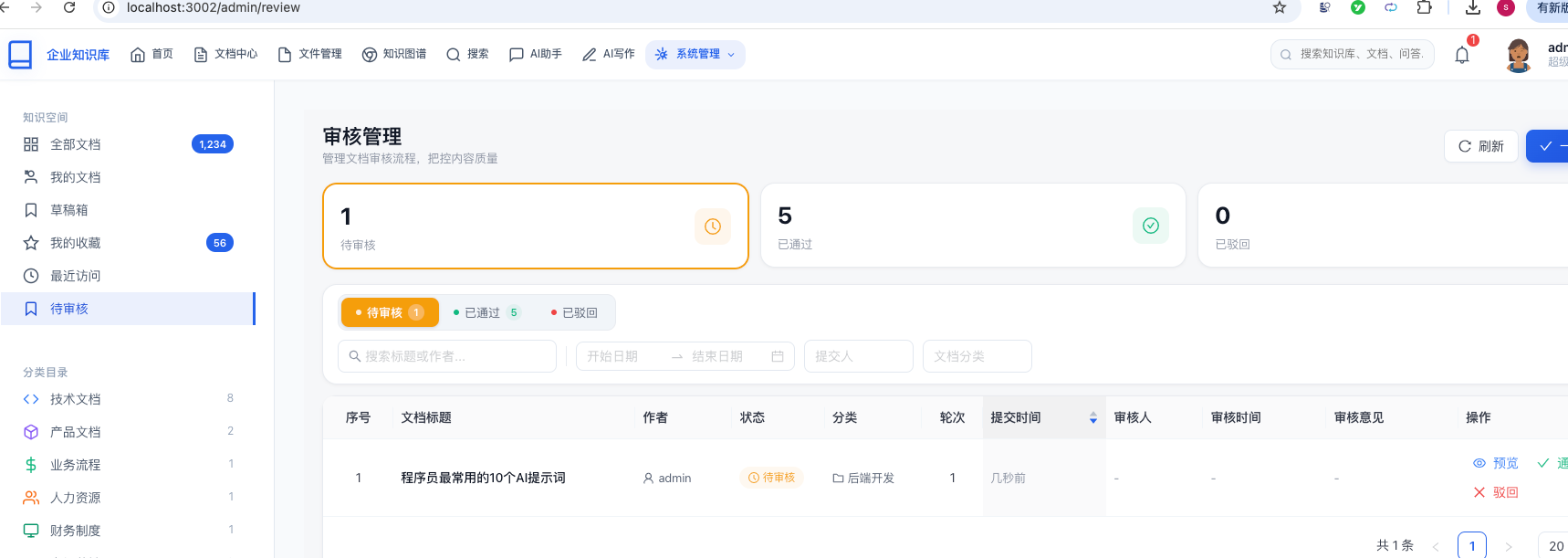
点击提交文案按钮,在待审核列表中就能看到这条记录:
总结
本文详细介绍了文档自动保存功能的完整实现,涵盖以下核心内容:
已完成功能
| 功能 | 实现方式 | 说明 |
|---|---|---|
| 定时自动保存 | React定时器 + 后端接口 | 30秒间隔,变化检测 |
| 草稿恢复 | localStorage + useAutoSave Hook | 双key策略,弹窗提示 |
| 历史快照 | MongoDB document\_autosave\_history | 不可变快照,异步保存 |
| 去重复用 | 5分钟窗口检测 | 防止重复创建草稿 |
| 放弃草稿 | 后端标记 + 前端清理 | autoSaveDismissed字段 |
| 状态指示 | SaveStatusIndicator组件 | 实时反馈保存状态 |
| 无缝提交 | currentDocId复用 | 恢复后提交更新而非新建 |
| 历史查看 | AutoSaveHistoryPage | 左右分栏,react-markdown渲染 |
技术要点
- useRef避免闭包陷阱:定时器回调中始终读取最新formData
- 双key存储策略:kb\_draft\_new + kb\_draft\_{docId} 覆盖所有恢复场景
- 去重复用:5分钟窗口防止刷新后重复创建
- 异步快照:CompletableFuture不阻塞主流程
- 局部更新:LambdaUpdateWrapper只更新非空字段
- 兜底机制:后端保存失败时localStorage作为安全网
- ThreadLocal陷阱:进入异步线程前必须捕获userId
通过本文的学习,你应该能够掌握:
- React Hooks中定时器与闭包的常见陷阱及解决方案
- localStorage在Web应用中的高级用法
- Spring异步任务处理与ThreadLocal注意事项
- MongoDB与MySQL混合存储的设计模式
- 前后端协作实现防丢失、防重复的整体方案
祝你开发顺利!
