前言
企业智能知识库系统是一个多人协作的知识管理平台,文档从创建到发布需要经历编辑、提交、审核、发布等多个环节。
在这个协作链路中,通知推送系统扮演了关键角色:
- 实时感知:文档提交审核后,审核员应立即收到通知,而不是依赖轮询
- 离线可达:审核员不在线时仍能收到通知(持久化到数据库,下次登录可见)
- 精准投递:通知定向推送给特定的接收人(审核员、文档作者),而非全局广播
- 多端兼容:WebSocket 在浏览器环境可能有网络限制,需要降级机制(SockJS)
本系统的通知推送架构采用 RabbitMQ 异步解耦 + STOMP over WebSocket 实时推送 + 数据库持久化兜底 的三层设计。
通知生产者在 kb-document 服务中通过 RabbitMQ 发出审核事件,kb-foundation 服务的 ReviewNotificationListener 消费事件后同时完成数据库持久化和 WebSocket 点对点推送。
1. 一次审核驳回通知走了什么链路
以审核员驳回文档为例,完整的通知推送链路如下:
审核员在审核页面点击"驳回",填写驳回原因,提交
  → DocumentReviewController.rejectReview(dto)
       └── DocumentReviewServiceImpl.rejectReview(dto)
             ├── 校验审核记录状态(未被审核)
             ├── 更新审核记录:reviewResult=REJECTED, reviewComment
             ├── 更新文档状态:status → REJECTED
             ├── 构建 ReviewEventDTO
             │     → eventType=REJECTED, documentId, documentTitle
             │     → authorId, reviewComment="格式不规范,请修改"
             └── rabbitTemplate.convertAndSend(
                       exchange: "kb.notification.exchange",
                       routingKey: "notification.review.{instanceId}.rejected",
                       body: reviewEventDTO
                   )
  → RabbitMQ 路由到队列 kb.notification.review.queue.{instanceId}
  → ReviewNotificationListener(kb-foundation 服务)消费消息
       ├── 匹配 eventType "REJECTED" → handleRejected(event)
       ├── 构建通知内容:"您的文档《xxx》未通过审核,驳回原因:格式不规范"
       └── persistAndPush(authorId, type, title, content, link, documentId)
             ├── ① 持久化到 MySQL kb_notification 表
             └── ② messagingTemplate.convertAndSendToUser(
                       "{authorId}", "/queue/notifications", payload
                   )
  → Spring STOMP Broker 将消息路由到目标用户的 /user/queue/notifications
  → 前端 WebSocketService 收到 STOMP 帧
       ├── JSON.parse(message.body) → WsNotificationPayload
       ├── notificationStore.addNotification(notification)
       │     → 通知列表头部插入 + 未读计数 +1
       └── MainLayout 触发 Ant Design notification.open()
             → 浏览器桌面 Toast:"文档审核驳回 — 您的文档《xxx》未通过审核"
  → 用户下次打开通知中心页面时
       └── GET /notifications?isRead=0 → 展示所有未读通知(含刚收到的驳回通知)
完成这条链路的关键组件有 6 个:RabbitMQ 发布者、ReviewEventDTO事件体、ReviewNotificationListener消费者、NotificationService持久化、SimpMessagingTemplate推送、前端WebSocketService接收。以下逐层展开。
2. 数据库设计:通知与模板两张表
2.1 ER 关系

kb_notification:每一条通知都是写给特定用户的,记录已读/未读状态kb_notification_template:模板表独立于通知表,用于统一管理内容格式,支持变量替换
2.2 通知表
CREATE TABLE `kb_notification` (
  `id` BIGINT NOT NULL COMMENT '通知ID(雪花算法)',
  `user_id` BIGINT NOT NULL COMMENT '接收用户ID',
  `user_name` VARCHAR(50) DEFAULT NULL COMMENT '用户姓名(冗余)',
  `notification_type` VARCHAR(20) NOT NULL COMMENT 'system/comment/mention/review/like',
  `title` VARCHAR(200) NOT NULL COMMENT '通知标题',
  `content` TEXT NOT NULL COMMENT '通知内容',
  `link` VARCHAR(500) DEFAULT NULL COMMENT '点击跳转链接',
  `related_type` VARCHAR(50) DEFAULT NULL COMMENT '关联类型',
  `related_id` BIGINT DEFAULT NULL COMMENT '关联ID',
  `is_read` TINYINT NOT NULL DEFAULT 0 COMMENT '0=未读, 1=已读',
  `read_time` DATETIME DEFAULT NULL COMMENT '阅读时间',
  `created_at` DATETIME NOT NULL DEFAULT CURRENT_TIMESTAMP,
  `updated_at` DATETIME NOT NULL DEFAULT CURRENT_TIMESTAMP ON UPDATE CURRENT_TIMESTAMP,
  `created_by` BIGINT DEFAULT NULL,
  `updated_by` BIGINT DEFAULT NULL,
  `deleted` TINYINT NOT NULL DEFAULT 0,
  PRIMARY KEY (`id`),
  KEY `idx_user_id` (`user_id`),
  KEY `idx_is_read` (`is_read`),
  KEY `idx_notification_type` (`notification_type`),
  KEY `idx_create_time` (`created_at`)
) ENGINE=InnoDB DEFAULT CHARSET=utf8mb4;字段设计要点:
| 字段 | 说明 |
|---|---|
user_name | 冗余存储用户名,避免查询通知列表时需要 JOIN 用户表 |
notification_type | 5 种类型:system、comment、mention、review、like |
link | 前端跳转路径,如 /review/documents/12345 |
related_type + related_id | 多态关联,可以关联 document、review 等多种资源 |
is_read + read_time | 追踪阅读状态,支持"全部标为已读" |
2.3 通知模板表
CREATE TABLE `kb_notification_template` (
  `id` BIGINT AUTO_INCREMENT PRIMARY KEY,
  `template_code` VARCHAR(100) NOT NULL COMMENT '模板编码',
  `template_name` VARCHAR(200) NOT NULL COMMENT '模板名称',
  `notification_type` VARCHAR(50) NOT NULL COMMENT 'EMAIL/SMS/WECHAT/SYSTEM/BROWSER',
  `title` VARCHAR(500) NOT NULL COMMENT '模板标题(支持变量:{{variable}})',
  `content` TEXT NOT NULL COMMENT '模板内容(支持变量:{{variable}})',
  `variables` VARCHAR(1000) DEFAULT '[]' COMMENT '模板变量(JSON数组)',
  `description` VARCHAR(500) DEFAULT NULL,
  `is_active` TINYINT DEFAULT 1 COMMENT '0=停用, 1=启用',
  `created_at` DATETIME DEFAULT CURRENT_TIMESTAMP,
  `updated_at` DATETIME DEFAULT CURRENT_TIMESTAMP ON UPDATE CURRENT_TIMESTAMP,
  UNIQUE KEY `uk_template_code` (`template_code`)
) ENGINE=InnoDB DEFAULT CHARSET=utf8mb4;
种子数据——6 个默认模板:
| 模板编码 | 类型 | 标题模板 |
|---|---|---|
EMAIL_VERIFY_CODE | 验证码 - {{systemName}} | |
DOCUMENT_APPROVED | SYSTEM | 您的文档《{{documentTitle}}》已通过审核 |
DOCUMENT_REJECTED | SYSTEM | 您的文档《{{documentTitle}}》需要修改 |
NEW_COMMENT | SYSTEM | 您的文档收到新评论 |
DOCUMENT_LIKED | SYSTEM | 您的文档收到新的点赞 |
WELCOME_MESSAGE | SYSTEM | 欢迎加入{{systemName}} |
模板使用 {{variableName}} 占位符,variables 字段以 JSON 数组声明可用变量名。notification_type 字段扩展至 EMAIL/SMS/WECHAT/SYSTEM/BROWSER,预留了多渠道推送的扩展能力(当前仅 SYSTEM 类型通过 WebSocket 推送)。
2.4 实体映射
// kb-foundation/.../entity/Notification.java
@Data
@EqualsAndHashCode(callSuper = true)
@TableName("kb_notification")
public class Notification extends BaseEntity {
    @TableField("user_id")
    private Long userId;
    @TableField("user_name")
    private String userName;
    @TableField("notification_type")
    private String notificationType;    // system/comment/mention/review/like
    @TableField("title")
    private String title;
    @TableField("content")
    private String content;
    @TableField("link")
    private String link;
    @TableField("related_type")
    private String relatedType;
    @TableField("related_id")
    private Long relatedId;
    @TableField("is_read")
    private Integer isRead;            // 0=未读, 1=已读
    @TableField("read_time")
    private LocalDateTime readTime;
}
// kb-foundation/.../entity/NotificationTemplate.java
@Data
@EqualsAndHashCode(callSuper = true)
@TableName("kb_notification_template")
public class NotificationTemplate extends BaseEntity {
@TableField("template_code")
private String templateCode;
@TableField("template_name")
private String templateName;
@TableField("notification_type")
private String notificationType; // EMAIL/SMS/WECHAT/SYSTEM/BROWSER
@TableField("title")
private String title;
@TableField("content")
private String content;
@TableField("variables")
private String variables; // JSON 数组
@TableField("description")
private String description;
@TableField("is_active")
private Integer isActive; // 0=停用, 1=启用
}3. WebSocket 连接:STOMP + SockJS 双层认证
3.1 端点注册
// kb-foundation/.../websocket/WebSocketConfig.java
@Configuration
@EnableWebSocketMessageBroker
public class WebSocketConfig implements WebSocketMessageBrokerConfigurer {

    @Override
    public void configureMessageBroker(MessageBrokerRegistry registry) {
        // 简单消息代理(内存级),支持 /topic(广播)和 /queue(点对点)
        registry.enableSimpleBroker("/topic", "/queue");
        // 客户端发送消息的前缀(本系统未使用客户端→服务端消息)
        registry.setApplicationDestinationPrefixes("/app");
        // 用户目标前缀,用于 convertAndSendToUser 自动路由
        registry.setUserDestinationPrefix("/user/");
    }

    @Override
    public void registerStompEndpoints(StompEndpointRegistry registry) {
        registry.addEndpoint("/ws/notification")
                .setAllowedOriginPatterns("*")      // 允许跨域
                .setHandshakeHandler(new CustomHandshakeHandler())
                .addInterceptors(webSocketHandshakeInterceptor)
                .withSockJS();                       // SockJS 降级支持
    }
}
STOMP Broker 的三个目标前缀:
| 前缀 | 方向 | 用途 |
|---|---|---|
/topic/* | 服务端 → 客户端(广播) | 审核员频道广播 |
/queue/* | 服务端 → 客户端(点对点) | 个人通知 convertAndSendToUser |
/user/ | (内部路由前缀) | Spring 将 convertAndSendToUser(userId, "/queue/...") 转换为 /user/{userId}/queue/... |
3.2 双层认证:握手阶段 + STOMP CONNECT 阶段
WebSocket 连接有两层认证,互为兜底:
第一层:HTTP 握手阶段(URL 参数传 token)
// kb-foundation/.../websocket/WebSocketHandshakeInterceptor.java
@Component
public class WebSocketHandshakeInterceptor implements HandshakeInterceptor {

    @Override
    public boolean beforeHandshake(ServerHttpRequest request,
                                    ServerHttpResponse response,
                                    WebSocketHandler wsHandler,
                                    Map<String, Object> attributes) {
        // 从 URL 查询参数 ?token=xxx 中提取 JWT
        String token = extractTokenFromQuery(request.getURI().getQuery());
        if (token != null && jwtUtil.validateToken(token)) {
            Long userId = jwtUtil.getUserId(token);
            if (userId != null) {
                // 将 userId 作为 Principal 设置到 WebSocket 会话
                attributes.put("principal", new Principal() {
                    @Override
                    public String getName() {
                        return String.valueOf(userId);
                    }
                });
            }
        }
        // 即使没有 token 也允许连接(匿名用户可接收广播消息)
        return true;
    }
}
第二层:STOMP CONNECT 阶段(Authorization 头传 token)
// kb-foundation/.../websocket/WebSocketAuthInterceptor.java
@Component
public class WebSocketAuthInterceptor implements ChannelInterceptor {

    @Override
    public Message<?> preSend(Message<?> message, MessageChannel channel) {
        StompHeaderAccessor accessor = StompHeaderAccessor.wrap(message);

        if (StompCommand.CONNECT.equals(accessor.getCommand())) {
            // 从 STOMP CONNECT 帧的 Authorization 头提取 JWT
            String authHeader = accessor.getFirstNativeHeader("Authorization");
            if (authHeader != null && authHeader.startsWith("Bearer ")) {
                String token = authHeader.substring(7);
                if (jwtUtil.validateToken(token)) {
                    Long userId = jwtUtil.getUserId(token);
                    if (userId != null) {
                        accessor.setUser(new Principal() {
                            @Override
                            public String getName() {
                                return String.valueOf(userId);
                            }
                        });
                    }
                }
            }
        }
        return message;
    }
}
为什么需要双层认证?
STOMP CONNECT 帧在 HTTP 握手完成后才发送,此时 Principal 已经固定。如果在 HandshakeInterceptor 中未设置 Principal,convertAndSendToUser 将无法正确路由点对点消息。WebSocketAuthInterceptor 作为第二道保险确保 STOMP 层也完成身份设置。
CustomHandshakeHandler:
// 确保 HandshakeInterceptor 设置的 Principal 被应用到会话
public class CustomHandshakeHandler extends DefaultHandshakeHandler {
    @Override
    protected Principal determineUser(
            ServerHttpRequest request, WebSocketHandler wsHandler,
            Map<String, Object> attributes) {
        // 返回 HandshakeInterceptor 中存入 attributes 的 Principal
        return (Principal) attributes.get("principal");
    }
}
4. 通知生产:审核事件通过 MQ 发布
4.1 ReviewEventDTO 事件体
// kb-common/.../event/ReviewEventDTO.java
@Data
@Builder
public class ReviewEventDTO implements Serializable {
    private String eventType;           // SUBMITTED / APPROVED / REJECTED
    private Long documentId;
    private String documentTitle;
    private Long authorId;
    private String authorName;
    private Long reviewerId;
    private String reviewerName;
    private Integer reviewRound;
    private Integer reviewLevel;
    private String reviewComment;       // 驳回时必填
    private LocalDateTime timestamp;
}
4.2 三个事件发布点
三个事件均在 DocumentReviewServiceImpl 中,于业务操作成功后通过 RabbitMQ 发布,发布失败不影响审核主流程:
// kb-document/.../service/impl/DocumentReviewServiceImpl.java

private static final String REVIEW_EXCHANGE = "kb.notification.exchange";

private String reviewRoutingKey(String eventType) {
    return "notification.review." + instanceIdentifier.getId() + "." + eventType;
}

// ① 提交审核 → SUBMITTED
public Boolean submitForReview(Long documentId) {
    // ... 更新文档状态 ...
    try {
        ReviewEventDTO event = ReviewEventDTO.builder()
            .eventType("SUBMITTED")
            .documentId(documentId)
            .documentTitle(document.getTitle())
            .authorId(document.getAuthorId())
            .authorName(document.getAuthorName())
            .timestamp(LocalDateTime.now())
            .build();
        String rk = reviewRoutingKey("submitted");
        rabbitTemplate.convertAndSend(REVIEW_EXCHANGE, rk, event, correlationData);
    } catch (Exception e) {
        log.warn("发布审核提交事件失败(不影响审核流程):documentId={}", documentId, e.getMessage());
    }
    return true;
}

// ② 审核通过 → APPROVED
// 路由键:notification.review.{instanceId}.approved

// ③ 审核驳回 → REJECTED
// 路由键:notification.review.{instanceId}.rejected三段路由键:
| 事件 | 路由键模式 | 示例 |
|---|---|---|
| 提交审核 | notification.review.{instanceId}.submitted | notification.review.mac-local.rejected |
| 审核通过 | notification.review.{instanceId}.approved | notification.review.mac-local.approved |
| 审核驳回 | notification.review.{instanceId}.rejected | notification.review.mac-local.rejected |
关键设计:MQ 发布失败不影响主流程。发布操作包裹在 try/catch 中,即使 RabbitMQ 不可达,审核操作仍正常完成,只是通知未产生。这保证了业务操作的可用性不依赖消息队列。
5. 通知消费:持久化 + WebSocket 双写
5.1 RabbitMQ 队列配置
// kb-foundation/.../config/RabbitMQConfig.java

/** 通知交换机 */
public static final String NOTIFICATION_EXCHANGE = "kb.notification.exchange";

// 通用通知队列
public String notificationQueueName() {
    return "kb.notification.queue." + instanceIdentifier.getId();
}

// 审核通知队列
public String reviewNotificationQueueName() {
    return "kb.notification.review.queue." + instanceIdentifier.getId();
}

// 绑定:review 路由键 → review 队列
@Bean
public Binding reviewNotificationBinding() {
    return BindingBuilder.bind(reviewNotificationQueue())
            .to(notificationExchange())
            .with(reviewNotificationRoutingKey());
    // reviewNotificationRoutingKey = "notification.review." + instanceId + ".*"
}审核专用的独立队列:kb.notification.review.queue.{instanceId} 独立于通用通知队列,避免审核类高频消息影响其他通知的消费速度。
5.2 ReviewNotificationListener:核心消费者
// kb-foundation/.../mq/ReviewNotificationListener.java
@Slf4j
@Component
public class ReviewNotificationListener {

    @Resource
    private NotificationService notificationService;
    @Resource
    private SimpMessagingTemplate messagingTemplate;
    @Resource
    private UserAuthFeignClient userAuthFeignClient;
    @Resource
    private SystemConfigCache systemConfigCache;

    @RabbitListener(queues = "#{@reviewNotificationQueue.name}")
    public void handleReviewEvent(ReviewEventDTO event) {
        if (event == null || event.getEventType() == null) {
            log.warn("收到空的审核事件,忽略");
            return;
        }

        String type = "review";
        String link = "/review/documents/" + event.getDocumentId();

        try {
            switch (event.getEventType()) {
                case "SUBMITTED" -> handleSubmitted(event, type, link);
                case "APPROVED"  -> handleApproved(event, type, link);
                case "REJECTED"  -> handleRejected(event, type, link);
            }
        } catch (Exception e) {
            log.error("处理审核事件失败:eventType={}, documentId={}, error={}",
                    event.getEventType(), event.getDocumentId(), e.getMessage(), e);
        }
    }
}
5.3 三种事件的处理逻辑
SUBMITTED — 通知审核员(三级降级查找):
private void handleSubmitted(ReviewEventDTO event, String type, String link) {
    // 1. 按优先级查询审核通知接收人
    List<Long> reviewerIds = findReviewerUserIds();
    //    ① ROLE_REVIEWER(审核员)
    //    ② ROLE_ADMIN(管理员)—— 降级
    //    ③ ROLE_SUPER_ADMIN(超级管理员)—— 最终降级

    if (reviewerIds.isEmpty()) {
        // 兜底:没有审核员时通知作者
        String content = "您的文档《" + event.getDocumentTitle() + "》已提交审核,请等待审核员处理。";
        persistAndPush(event.getAuthorId(), type, "文档已提交审核", content, link, event.getDocumentId());
        return;
    }

    // 2. 为每个审核员持久化 + 推送
    String content = String.format("用户「%s」提交了文档《%s》,请及时审核。",
            event.getAuthorName(), event.getDocumentTitle());
    for (Long reviewerId : reviewerIds) {
        persistAndPush(reviewerId, type, "新文档待审核", content, link, event.getDocumentId());
    }
}
APPROVED — 通知作者:
private void handleApproved(ReviewEventDTO event, String type, String link) {
    String content = String.format("您的文档《%s》已通过审核,正式发布。",
            event.getDocumentTitle());
    persistAndPush(event.getAuthorId(), type, "文档审核通过", content, link, event.getDocumentId());
}
REJECTED — 通知作者(含驳回原因):
private void handleRejected(ReviewEventDTO event, String type, String link) {
    String reason = event.getReviewComment() != null && !event.getReviewComment().isBlank()
            ? event.getReviewComment() : "未填写原因";
    String content = String.format("您的文档《%s》未通过审核,驳回原因:%s",
            event.getDocumentTitle(), reason);
    persistAndPush(event.getAuthorId(), type, "文档审核驳回", content, link, event.getDocumentId());
}
5.4 persistAndPush:双写核心
private void persistAndPush(Long userId, String type, String title,
                             String content, String link, Long documentId) {
    // ① 持久化到数据库(始终执行,确保离线用户也能看到通知)
    NotificationDTO dto = new NotificationDTO();
    dto.setUserId(userId);
    dto.setNotificationType(type);
    dto.setTitle(title);
    dto.setContent(content);
    dto.setLink(link);
    dto.setRelatedType("document");
    dto.setRelatedId(documentId);
    dto.setIsRead(0);
    try {
        notificationService.sendNotification(dto);
    } catch (Exception e) {
        log.error("通知持久化失败:userId={}, error={}", userId, e.getMessage(), e);
        // 持久化失败不影响 WebSocket 推送
    }

    // ② WebSocket 点对点推送(仅当 websocket.enabled = true 时)
    if (!isWebSocketEnabled()) {
        return;
    }
    Map<String, Object> payload = new LinkedHashMap<>();
    payload.put("notificationType", type);
    payload.put("title", title);
    payload.put("content", content);
    payload.put("link", link);
    payload.put("documentId", documentId);
    messagingTemplate.convertAndSendToUser(
            String.valueOf(userId), "/queue/notifications", payload);
}双写的容错设计:
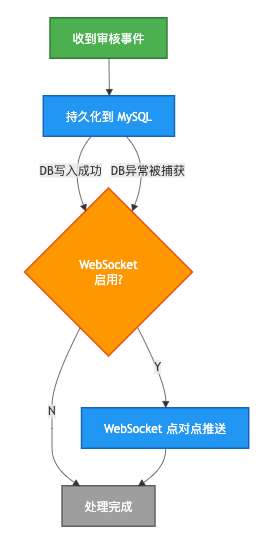
两条写路径互不阻塞:数据库持久化失败不会阻止 WebSocket 推送(用户此时在线,仍可实时收到通知),WebSocket 未启用不会影响数据库写入(用户下次登录可查看离线通知)。
5.5 审核员查找的三级降级
private List<Long> findReviewerUserIds() {
    try {
        // 1. 优先查询审核员
        Result<List<Long>> result = userAuthFeignClient.getUserIdsByRole("ROLE_REVIEWER");
        if (result != null && result.getData() != null && !result.getData().isEmpty()) {
            return result.getData();
        }

        // 2. 降级:查询管理员
        log.warn("未找到审核员,降级使用管理员角色");
        List<Long> adminIds = userAuthFeignClient.getUserIdsByRole("ROLE_ADMIN").getData();
        if (adminIds != null && !adminIds.isEmpty()) {
            return adminIds;
        }

        // 3. 最终降级:查询超级管理员
        log.warn("未找到审核员和管理员,降级使用超级管理员角色");
        List<Long> superAdminIds = userAuthFeignClient.getUserIdsByRole("ROLE_SUPER_ADMIN").getData();
        if (superAdminIds != null && !superAdminIds.isEmpty()) {
            return superAdminIds;
        }

        log.warn("未找到任何审核通知接收人");
        return List.of();
    } catch (Exception e) {
        log.error("Feign 查询审核员失败:{}", e.getMessage());
        return List.of();
    }
}降级链:ROLE_REVIEWER → ROLE_ADMIN → ROLE_SUPER_ADMIN → 通知作者兜底。确保通知总能到达某个角色,不会因角色缺失而丢失。
6. 通知管理 REST API
6.1 NotificationController 接口一览
kb-foundation 服务在 /notifications 路径下提供 7 个 REST 接口:
| 方法 | 路径 | 功能 | 说明 |
|---|---|---|---|
GET | /notifications | 分页查询通知 | 支持 isRead 筛选(0/1/null=全部) |
GET | /notifications/{id} | 查询通知详情 | 返回完整 Notification 对象 |
POST | /notifications | 创建通知 | 手动发送通知(管理后台使用) |
PUT | /notifications/{id}/read | 标记已读 | 设置 is_read=1 + read_time=NOW() |
PUT | /notifications/read-all | 全部标为已读 | 当前用户的所有未读通知 |
DELETE | /notifications/{id} | 删除通知 | 逻辑删除(deleted=1) |
GET | /notifications/unread-count | 未读数量 | 当前用户的未读通知计数 |
6.2 分页查询实现
// NotificationController.java
@GetMapping
public Result<IPage<Notification>> pageNotifications(
        @RequestParam(defaultValue = "1") Long current,
        @RequestParam(defaultValue = "10") Long size,
        @RequestParam(required = false) Integer isRead) {
    Long userId = UserContextUtil.getUserId();  // 从 ThreadLocal 获取当前用户
    IPage<Notification> page = notificationService.pageNotifications(current, size, userId, isRead);
    return Result.success(page);
}
// NotificationServiceImpl.java
public IPage<Notification> pageNotifications(Long current, Long size, Long userId, Integer isRead) {
LambdaQueryWrapper<Notification> wrapper = new LambdaQueryWrapper<>();
wrapper.eq(Notification::getUserId, userId); // 仅查自己的通知
wrapper.eq(Notification::getDeleted, 0); // 排除逻辑删除
if (isRead != null) {
wrapper.eq(Notification::getIsRead, isRead);
}
wrapper.orderByDesc(Notification::getCreatedAt); // 最新在前
Page<Notification> page = new Page<>(current, size);
return notificationMapper.selectPage(page, wrapper);
}6.3 未读计数查询
// NotificationMapper.java
@Select("SELECT COUNT(*) FROM kb_notification WHERE user_id = #{userId} AND is_read = 0 AND deleted = 0")
Long countUnreadByUserId(@Param("userId") Long userId);
未读计数使用 @Select 注解直接写 SQL,避免 MyBatis-Plus 组装查询的额外开销——这个接口在登录后、WebSocket 连接建立后、每次收到新通知后都会调用,需要保持轻量。
7. 通知模板系统
7.1 模板配置
NotificationTemplateController 在 /notifications/templates 路径下提供完整的模板 CRUD:
| 方法 | 路径 | 功能 |
|---|---|---|
GET | /notifications/templates | 分页查询模板(支持类型筛选) |
GET | /notifications/templates/{id} | 查询模板详情 |
POST | /notifications/templates | 创建模板 |
PUT | /notifications/templates/{id} | 更新模板 |
DELETE | /notifications/templates/{id} | 删除模板 |
POST | /notifications/templates/{id}/test | 测试发送(使用模板发送一条测试通知) |
7.2 模板变量替换
模板内容使用 {{variableName}} 占位符:
模板: 您的文档《{{documentTitle}}》已通过审核,感谢您的贡献!
变量: { "documentTitle": "2024年度技术规划" }
结果: 您的文档《2024年度技术规划》已通过审核,感谢您的贡献!
variables 字段存储 JSON 数组:["userName", "verifyCode", "systemName"],前端管理页面可据此渲染变量输入表单。
7.3 多通道设计预留
notification_type 字段包含 EMAIL、SMS、WECHAT、SYSTEM、BROWSER 五种通道。当前仅 SYSTEM 类型通过 WebSocket 实时推送,其他通道的模板已定义但未接入发送通道(如邮件服务、短信网关)。这是一个明确的扩展点。
8. 前端实时通知:连接、推送、Toast、列表
8.1 WebSocketService:单例连接管理
// src/services/websocket.service.ts
class WebSocketService {
  private client: Client | null = null;
  private notificationCallbacks: Set<NotificationCallback> = new Set();
  private reconnectAttempts = 0;
  private maxReconnect = 5;

  connect(authToken: string, isReviewer: boolean): void {
    // 防止重复连接
    if (this.client?.active) return;

    const tokenParam = authToken.replace(/^Bearer\s+/i, '');
    const sockJsUrl = `${WS_BASE_URL}/notification?token=${encodeURIComponent(tokenParam)}`;

    this.client = new Client({
      webSocketFactory: () => new SockJS(sockJsUrl),  // SockJS 降级
      connectHeaders: { Authorization: authToken },    // STOMP CONNECT 认证头
      heartbeatIncoming: 30000,                         // 30s 心跳
      heartbeatOutgoing: 30000,
      reconnectDelay: 0,                                // 手动控制重连

      onConnect: () => {
        // ① 订阅个人通知频道(点对点)
        this.client?.subscribe('/user/queue/notifications', (message) => {
          const payload: WsNotificationPayload = JSON.parse(message.body);
          this.notificationCallbacks.forEach(cb => cb(payload));
        });

        // ② 审核员额外订阅广播频道
        if (isReviewer) {
          this.client?.subscribe('/topic/reviewers', (message) => {
            const payload: WsNotificationPayload = JSON.parse(message.body);
            this.reviewerCallbacks.forEach(cb => cb(payload));
          });
        }

        this.reconnectAttempts = 0;
      },

      onDisconnect: () => this.attemptReconnect(authToken, isReviewer),
      onStompError: (frame) => this.attemptReconnect(authToken, isReviewer),
    });

    this.client.activate();
  }

  // 自动重连:最多 5 次,间隔 5 秒
  private attemptReconnect(authToken: string, isReviewer: boolean): void {
    if (this.reconnectAttempts >= this.maxReconnect) return;
    this.reconnectAttempts++;
    setTimeout(() => {
      if (!this.connected) this.connect(authToken, isReviewer);
    }, 5000);
  }
}

export const webSocketService = new WebSocketService();两个订阅频道:
| 频道 | 目标前缀 | 接收人 | 触发场景 |
|---|---|---|---|
/user/queue/notifications | /user/{userId}/queue/notifications | 指定用户 | 审核通过/驳回通知作者,提交审核通知审核员 |
/topic/reviewers | /topic/reviewers | 所有审核员 | 广播新提交审核事件(备用,当前主要以点对点方式推送) |
8.2 MainLayout 集成:连接 + Toast
// src/components/layout/MainLayout.tsx
useEffect(() => {
  if (!user || !enableWebSocket) return;

  // ① 获取初始未读计数
  fetchUnreadCount();

  // ② 注册 WebSocket 通知回调
  const unsubNotification = webSocketService.onNotification((payload) => {
    notificationStore.addNotification(toSystemNotification(payload));
  });

  // ③ 建立连接
  const isReviewer = user.roles?.includes('REVIEWER');
  webSocketService.connect(authToken, isReviewer);

  return () => {
    unsubNotification();
    webSocketService.disconnect();
  };
}, [user, enableWebSocket]);

// 在 notifyStore.addNotification 中同步弹出 Toast:
// notification.open({ message: title, description: content, icon, onClick })导航栏通知铃铛:
// Badge 在右上角显示未读计数
<Badge count={unreadCount} size="small">
  <BellOutlined onClick={() => navigate('/notifications')} />
</Badge>
8.3 NotificationCenterPage:通知列表页
前端通知中心是一个完整的管理页面:
- 4 个统计卡片:全部通知、未读、已读、类型数
- 侧边栏筛选:按状态(全部/未读/已读)和类型(system/comment/mention/review/like)筛选
- 通知列表:每条通知含类型图标 + 标题 + 内容预览(截断) + 时间戳 + "标记已读"/"删除"操作按钮
- 详情抽屉:点击通知展开抽屉,显示完整内容和"查看详情"按钮(跳转到关联文档/审核页)
- 空状态和骨架屏加载态
8.4 WebSocket 推送数据格式
export interface WsNotificationPayload {
  eventType?: string;          // SUBMITTED / APPROVED / REJECTED
  notificationType: string;    // review
  title: string;               // "文档审核驳回"
  content: string;             // "您的文档《xxx》未通过审核,驳回原因:..."
  link?: string;               // "/review/documents/12345"
  documentId?: EntityId;
  documentTitle?: string;
  timestamp?: string;
}
8.5 前端通知存储(Zustand Store)
// src/stores/notification.store.ts
interface NotificationState {
  notifications: SystemNotification[];
  unreadCount: number;
  isLoading: boolean;

  fetchNotifications(params): Promise<void>;
  fetchUnreadCount(): Promise<void>;
  markAsRead(id: string): Promise<void>;
  markAllAsRead(): Promise<void>;
  deleteNotification(id: string): Promise<void>;

  // WebSocket 回调专用方法
  addNotification(notification: SystemNotification): void; // 插入头部 + 递增未读数
  incrementUnreadCount(delta?: number): void;
}
addNotification() 将 WebSocket 推送的通知插入列表头部(unshift),并直接递增 unreadCount,不需要再次请求后端。这种乐观更新保持了 UI 的即时响应性。
9. 实例隔离:多开发者环境 MQ 隔离
9.1 问题
多个开发者同时本地开发时,kb-document 服务发布的审核事件会被所有人的 kb-foundation 消费者接收,导致:
- 开发者 A 提交审核 → 开发者 B 也收到通知
- 通知被多个消费者抢占,可能造成部分消费者丢失消息
9.2 解决方案:InstanceIdentifier + 实例级队列名
// 队列名包含实例标识
public String reviewNotificationQueueName() {
    return "kb.notification.review.queue." + instanceIdentifier.getId();
}

// 路由键包含实例标识
public String reviewNotificationRoutingKey() {
    return "notification.review." + instanceIdentifier.getId() + ".*";
}
InstanceIdentifier 的三级取值策略:
// ① 从环境变量 COMPUTER_ID / USER 读取(开发者自定义)
// ② 从操作系统 hostname 读取
// ③ 生成随机 UUID(兜底)
实际运行效果:
开发者 A (mac-local):
  队列:kb.notification.review.queue.mac-local
  路由键:notification.review.mac-local.*

开发者 B (ubuntu-dev):
  队列:kb.notification.review.queue.ubuntu-dev
  路由键:notification.review.ubuntu-dev.*

→ 两人的消费者各自监听独立队列,消息不会串扰
@RabbitListener 注解通过 Spring SpEL 动态引用队列 Bean:
@RabbitListener(queues = "#{@reviewNotificationQueue.name}")
public void handleReviewEvent(ReviewEventDTO event) { ... }
总结
| 维度 | 评价 |
|---|---|
| 异步解耦 | 审核业务操作与通知推送完全解耦,通过 RabbitMQ 异步传递,审核操作不因通知服务的故障而阻塞 |
| 双写容错 | 数据库持久化 + WebSocket 推送为独立路径,一侧失败不影响另一侧,确保在线用户实时感知 + 离线用户历史可见 |
| 点对点推送 | 使用 convertAndSendToUser 基于 userId 的精确路由,每个通知只发送给目标用户,不造成消息泄露 |
| 三级降级查找 | 审核员 → 管理员 → 超级管理员,找不到任何角色时通知作者兜底,确保通知不落空 |
| 双层认证 | HandshakeInterceptor(URL 参数) + ChannelInterceptor(STOMP 头),确保 Principal 正确设置 |
| SockJS 降级 | 浏览器不支持原生 WebSocket 时自动降级为 HTTP 长轮询,提升兼容性 |
| 自动重连 | 前端 WebSocketService 支持最多 5 次自动重连,间隔 5 秒,网络波动后自动恢复 |
| 实例隔离 | 通过 InstanceIdentifier 在队列名和路由键中嵌入实例标识,多开发者环境互不干扰 |
| 模板系统 | 通知模板独立管理,支持变量替换和多通道扩展(EMAIL/SMS/WECHAT),与通知实例分离 |
| 前端响应 | Zustand Store 乐观更新 + Ant Design Toast 即时提醒 + 完整通知中心页面,交互体验流畅 |
技术栈总结
传输协议:STOMP over WebSocket (SockJS fallback)
消息代理:Spring SimpleBroker(内存级,/topic + /queue)
异步队列:RabbitMQ 3.x(Jackson2JsonMessageConverter 序列化)
服务解耦:ReviewEventDTO 事件驱动(SUBMITTED / APPROVED / REJECTED)
数据持久化:MySQL (kb_notification + kb_notification_template)
认证集成:JWT(URL 参数 + STOMP Authorization 头双层认证)
前端连接:@stomp/stompjs 7.x + sockjs-client
前端状态:Zustand Store(乐观更新)
前端 UI:Ant Design(Badge / notification / Drawer / Table)
多环境隔离:InstanceIdentifier(队列名 + 路由键实例隔离)